A vibe-coded checkout can charge cards correctly and still leak money six ways, from a webhook nobody verifies to a refund that never revokes access. These failures can leave Stripe’s payment records looking healthy while the app grants the wrong product, grants it too early, or never removes it.
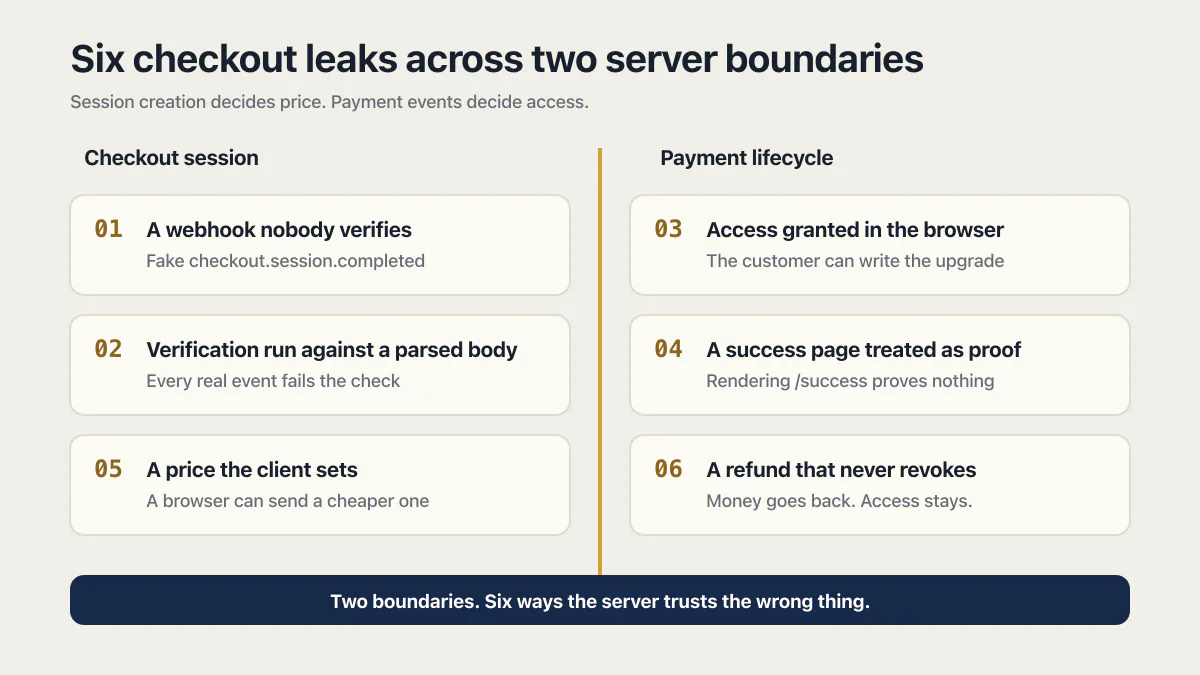
The six leaks, in one screen:
- A webhook nobody verifies. The endpoint is public, so anyone can POST a fake
checkout.session.completedand get a free upgrade. - Verification run against a parsed body. Your framework parses the JSON before the signature check runs, so what you verify no longer matches what Stripe signed and every real event fails the check.
- Access granted in the browser. The upgrade is written by client code, so the customer can write it too.
- A success page treated as proof. Rendering
/successproves nothing. People who paid can miss it, and people who did not pay can open it. - A price the client sets. The browser sends
unit_amountor aprice_ID, so a stranger’s browser can send a cheaper one. - A refund that never revokes. Nothing listens for
charge.refunded,customer.subscription.deletedorinvoice.payment_failed, so the money goes back and the access stays.
A seventh failure sits underneath all six: test mode keys, or a webhook endpoint registered only in test mode, running in production. The checkout looks like it works and no money ever moves. How to check your own is in “Check your own checkout in 10 minutes” below.
On 15 March 2026, a personal Medium post relayed a founder’s account of a Stripe key shipped in frontend code. The post says roughly 175 customers were affected and $2,500 was lost to processing fees. AxonBuild has not independently verified those figures. That one made a story because the mistake was visible to anyone who viewed source. The six leaks below never make a story. They live in checkouts that charge real cards and pass every test the founder runs, while the product walks out the door unpaid.
The six leaks concentrate at two server boundaries. Your checkout-session endpoint decides what the customer is buying and what it costs. Your payment-event handling decides when access begins, changes, or ends. In 10 of the 21 third-party apps AxonBuild audited in June and July 2026, the server trusted the browser’s word on something only it should decide, prices and plans included. Each finding was verified against the code rather than pattern-matched.
The half of the checkout AI tools skip
A checkout is two jobs wearing one button. The first job is taking the card: the Stripe session, the redirect, the confirmation screen. That half is the one you watched work, and shipping it is genuinely further than most side projects ever get. The second job is deciding who is allowed in once money moves, and hearing about it when the money moves back. Sit through a Lovable, Bolt, Base44, Replit, Cursor or Claude Code session that wires up a Stripe checkout and you’ll reliably watch the first job get finished and the second get sketched, because the demo only needs the first.
The tool barely changes the outcome. All of them optimise for the moment the payment succeeds on screen, because that is the moment you asked for and the moment you can see.
The second half is where checkout bugs turn into revenue leaks. A bug in the card half is loud: the charge fails, the customer emails you, Stripe’s dashboard shows red. A leak in the who-gets-in half makes no sound at all, because every request succeeds and the only thing wrong is who received the product. It’s the same misplaced trust boundary that runs through the security holes AI tools ship; a checkout is just the version with a price tag on it.
The six leaks
Each leak below is one place where the server accepted something it should have decided for itself. They cover the whole money path, from the event that unlocks access, through checkout-session creation and the success page, to the day the money goes back.
1 · The webhook nobody verifies, and how anyone can forge one
Stripe POSTs Checkout events to your webhook URL. A generated handler can trust the JSON solely because its type says checkout.session.completed, then grant access without checking that Stripe sent it. A webhook URL is public. Anyone who finds it can POST a hand-written event claiming whatever they like, and the server upgrades an account no card ever paid for. Stripe signs every event so you can refuse forgeries, and its webhook docs walk through the check. In code, the difference between the two worlds is one line:
// Reject the request before reading a single field of it:
const event = stripe.webhooks.constructEvent(rawBody, sig, endpointSecret);
Stripe recommends a second layer alongside the signature check: only accept webhook requests from Stripe’s published IP addresses. Signature verification is the one that cannot be skipped.
2 · The raw-body trap: why signature verification fails on every real event
Signature verification needs the exact bytes Stripe sent. Most frameworks helpfully parse the request into JSON before your handler runs, so what you verify no longer matches what was signed, and constructEvent throws on every legitimate event. A depressing number of tutorials fix that error by deleting the verification, which converts leak #2 straight back into leak #1. The fix that keeps the check is one route-level line:
app.post('/webhook', express.raw({ type: 'application/json' }), handleWebhook);When this breaks, the error is specific enough to search:
Webhook signature verification failed. Err: No signatures found matching the expected signature for payload.Your endpoint returns a 400 and the delivery shows up as failed in the Stripe Dashboard. Most founders read that message as “my signing secret is wrong” and go re-copy the whsec_ value. Sometimes it is the secret. Just as often the secret is fine and something added whitespace, reordered keys, converted the body to JSON or changed its encoding before verification ran. Stripe’s signature troubleshooting guide lists both causes and is explicit that any manipulation of the raw body makes verification fail.
The raw-body fix on Supabase, Next.js and Express
Three platforms, three different fixes.
Supabase Edge Functions. A Supabase function verifies a Supabase JWT on incoming requests by default, and Stripe does not send one, so the POST is rejected before your code ever runs. Supabase’s own docs make the point directly: external providers like Stripe or GitHub don’t send Supabase credentials, they sign the request body with their own shared secret. Turn JWT verification off for that one function in supabase/config.toml:
[functions.stripe-webhook]
verify_jwt = false
Then read the body as text and verify the Stripe signature yourself. On Deno you need the async form, because the Web Crypto API is async:
const body = await req.text();
const cryptoProvider = Stripe.createSubtleCryptoProvider();
const event = await stripe.webhooks.constructEventAsync(
  body,
  req.headers.get('Stripe-Signature'),
  Deno.env.get('STRIPE_WEBHOOK_SIGNING_SECRET'),
  undefined,
  cryptoProvider,
);
Supabase is blunt about the trade: with verify_jwt = false, your handler is fully responsible for authenticating the caller. With verify_jwt off, the signature check is the only door.
Next.js route handlers. Read await request.text() first and verify that string. Nothing else may touch the body before it. On the older Pages Router you also have to disable the built-in body parser for that one API route and buffer the request yourself. Stripe ships working examples for both routers in the stripe-node repo.
Express. express.raw({ type: 'application/json' }) on the webhook route, and then the part people miss: middleware order matters. If app.use(express.json()) appears above your webhook route, it parses the body before verification and the route-level raw parser never gets a chance. Register the webhook route first, then the global JSON parser.
app.post('/webhook', express.raw({ type: 'application/json' }), handleWebhook);
app.use(express.json()); // everything below this line, not above
3 · Access granted in the browser, where anyone can grant it
Here the unlock itself lives in client code. A component watches the redirect land, or reads a success flag, and writes the upgrade on the spot:
// This line runs entirely in the browser:
if (paymentSuccess) setUser({ plan: 'pro' })
Anything the browser can write, the browser’s owner can write. paymentSuccess is a variable sitting in a stranger’s dev tools, and flipping it costs nothing. The browser may ask whether an account has paid. A trusted server-side fulfillment function must write the answer after retrieving a Checkout Session and checking its payment_status, or after processing a verified payment event through that same function.
A related symptom points at the same layer from the other side: the webhook lands, the database is correct, and the user still sees the old plan or the old credit balance. That is a timing bug rather than a payment bug. Stripe’s redirect can reach the browser before your handler has finished writing, and a client that cached its entitlement before checkout keeps rendering the stale number. Refetch entitlement from the server after the redirect rather than trusting the cached client value, and let the page retry briefly if the transition has not landed yet.
4 · Treating the success page as proof of payment
After Checkout, Stripe can redirect the customer to your /success URL, and the generated page treats being rendered as proof of payment. This breaks in both directions at once. A paying customer whose connection drops before the redirect can receive nothing, while someone who never paid can open the URL directly. Stripe’s fulfillment guide requires webhooks for reliable fulfillment and also recommends calling the same fulfillment function from the landing page for a faster customer experience. That landing-page call must retrieve the Checkout Session server-side, check payment_status, and be safe to run more than once, including concurrently. Rendering the URL itself proves nothing.
Until your server hears it from Stripe, a payment that unlocked in the browser is only a suggestion.
5 · The client sets the price, so the customer picks what to pay
The checkout session gets created from numbers the browser sent: unit_amount: body.amount, or a price_ ID the client picked. In your own testing the client sends the right number every time, so the flow looks perfect. A stranger’s client can send any number, and client-side price manipulation needs nothing beyond dev tools: pay one dollar for the hundred-dollar plan, or pass a cheaper tier’s price ID and receive the expensive one.
I stopped filing this leak under theoretical when I audited a food-delivery app whose order total, line-item prices included, was copied straight from the browser’s cart and written to the database with no server-side recompute. A customer could record a one-cent total for a full cart of groceries. I still don’t know how long that path had been live, because the app kept no logs that could say. A B2B SaaS starter in the same corpus made the subtler version of the mistake: it passed the browser-chosen Stripe price ID through with no allow-list against its own plan catalog. Both checkouts demoed flawlessly, because a demo’s cart always sends the right numbers.
The fix is a standing rule: price lives on the server, in a fixed catalog keyed by plan. The browser names the plan it wants; the server decides what that plan costs.
If you monetize with a Stripe Payment Link, or through a merchant of record like Polar, Lemon Squeezy or Paddle, there is no server-side session creation to get wrong, so leak #5 cannot happen on that path. Leaks #1, #4 and #6 all still can, because you are still granting access from an event you have to verify and still revoking it on a refund you have to hear about.
6 · Cancel and refund that never revoke access
Granting access is half of the wiring. The generated handler listens for the paid event and nothing else: no subscription deletion, refund, dispute, or failed-renewal path appropriate to the product. Money can flow backwards while access stays put. The same B2B starter from leak #5 had nothing listening for charge.refunded, so a customer could buy a token pack, refund the charge, and keep spending the credits.
Which events and which statuses actually revoke access
charge.refunded is one line of a longer list. For a subscription product, the events that change entitlement are customer.subscription.created, customer.subscription.updated, customer.subscription.deleted, invoice.paid and invoice.payment_failed. A generated handler usually has none of them. What your app should do when a Stripe payment fails is the renewal half of the same list.
The decision itself hangs off the subscription status field rather than the event name. Here is Stripe’s status vocabulary and what each one means for access:
| Status | What it means | Access |
|---|---|---|
trialing | In a trial period. Moves to active on first payment. | Grant |
active | In good standing. | Grant |
incomplete | The first payment has not succeeded yet. The customer has 23 hours to pay. | Hold |
incomplete_expired | No successful first payment within 23 hours. Never bills. | Deny |
past_due | Latest finalized invoice failed or was not attempted. Retries are still running. | Warn the customer |
unpaid | Retries are finished and the invoice is still unpaid. | Revoke |
canceled | Terminal. Cannot be updated. | Revoke |
paused | Trial ended with no payment method. No invoices are created. | Revoke |
Stripe states the rule outright: when a subscription changes to canceled or unpaid, revoke access to your product. Why a canceled Stripe subscription can still show as active is the cancellation page’s half; leak 6 here keeps the refund framing. customer.subscription.trial_will_end fires 3 days before a trial ends, which is your window to check there is a payment method on file before the free users become paying ones.
One event has a direct cost for ignoring it. If Stripe does not receive a successful response to invoice.created, it delays finalizing every invoice on automatic collection for up to 72 hours. A broken endpoint leaves your database stale and can stall your own billing.
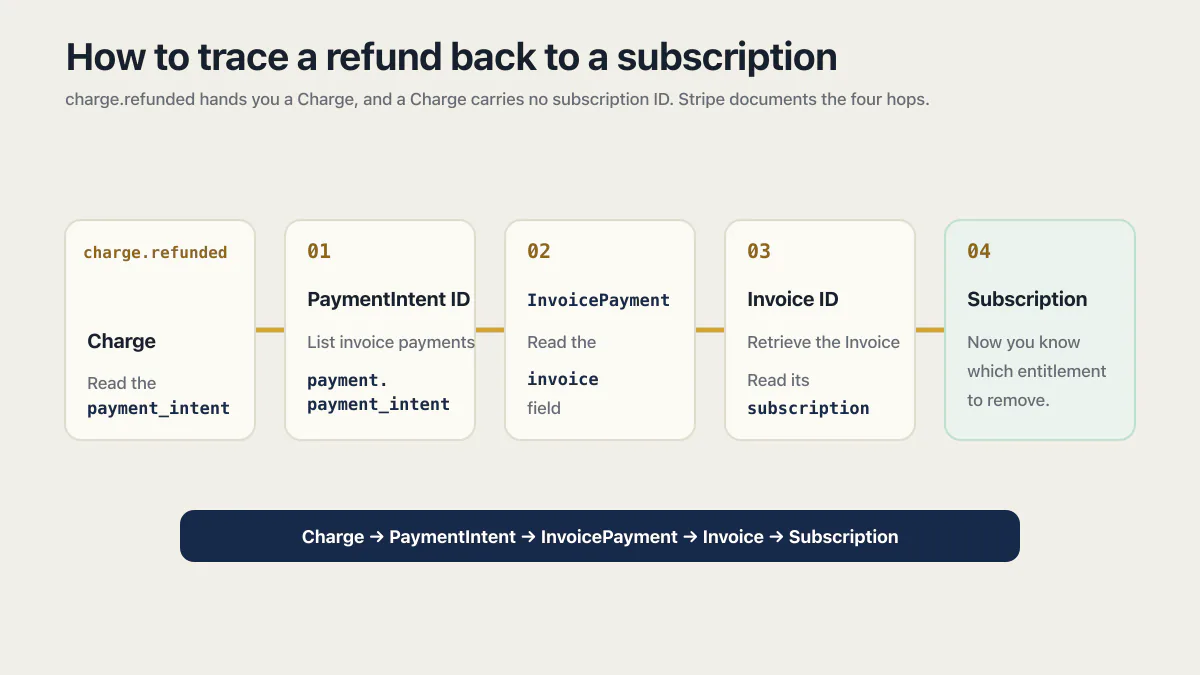
How to trace a refund back to a subscription
charge.refunded hands you a Charge, and a Charge carries no subscription ID, which is where most implementations quietly stop. Stripe documents the four hops:
- Read the
payment_intentfield off the Charge. - Call the list invoice payments endpoint with
payment.payment_intentset to that PaymentIntent ID. - The returned
InvoicePaymenthas aninvoicefield with the Invoice ID. - Retrieve the Invoice and read its
subscriptionfield.
Only after that do you know which entitlement to remove.
Retries and duplicates
Retries create a second problem. Stripe’s webhook guidance says endpoints can receive the same event more than once and does not guarantee event order. In live mode Stripe retries a failed delivery for up to 3 days with exponential backoff; in a sandbox it retries three times over a few hours. You can also resend an event by hand from the Dashboard for up to 15 days after it was created, or with the Stripe CLI for up to 30 days. For background jobs your own app retries, an idempotency key for safe retries makes a repeated job a no-op, and a dead letter queue keeps what still fails.
Record processed event IDs, and account for separate events about the same object by using the object ID together with the event type where needed. Make the entitlement transition idempotent in your own database and retrieve the current Stripe object when the transition depends on current state. If the handler makes a Stripe API request, use an idempotency key for that request as well; it does not automatically deduplicate your database writes. How to make a webhook handler idempotent covers the processed-events table, the single transaction and the test that delivers one event several times at once.
The seventh leak: test mode keys in production
The six above are wiring mistakes. This one is a configuration mistake, and it is the cheapest way to run a checkout that collects nothing at all.
Stripe has two separate worlds. Sandbox (test mode) keys start with pk_test_ and sk_test_. Live mode keys start with pk_live_ and sk_live_. Objects in one mode are invisible to the other, so a price_ ID created in a sandbox cannot be part of a live payment, and in a sandbox the card networks do not process anything. Moving a Stripe integration from test mode to live is the full sequence, checklist included.
Three versions of this go wrong in AI-built apps:
- Test keys shipped to production. The checkout runs, the form accepts
4242 4242 4242 4242, the success page renders, and no money moves. Everything you can see says it works. - A webhook endpoint registered only in test mode. Live events go to an endpoint that does not exist in live mode, so production never hears about a single real payment.
- The wrong
whsec_for the mode. Webhook signing secrets are per endpoint, and the test and live secrets for the same URL are different. The secret printed bystripe listenverifies CLI-forwarded events only, never events delivered by a Dashboard endpoint, and mixing them lands you back in leak #2.
Check the prefix of the key your production server is actually using, not the one in your .env.example. The payment go-live checklist covers the same switch for Adyen, Chargebee and RevenueCat as well as Stripe.
What each leak looks like from the outside
| Leak | Stripe’s dashboard shows | Your database shows | The fix |
|---|---|---|---|
| 1. Unverified webhook | Normal deliveries, 200 OK | Accounts upgraded with no matching payment | Verify the signature before reading a single field |
| 2. Parsed body | Failed deliveries, 400s, on every real event | Nothing changes after a real payment | Read the raw bytes before any parser touches them |
| 3. Browser-side grant | A correct payment, or nothing at all | Plans changed with no payment behind them | Write entitlement only from the server |
| 4. Success page as proof | A payment with no matching fulfillment, or the reverse | Access missing for payers, present for non-payers | Retrieve the Session server-side and check payment_status |
| 5. Client-set price | A successful charge for the wrong amount | Expensive plan, cheap payment | Price catalog on the server, keyed by plan |
| 6. No revoke path | charge.refunded and customer.subscription.deleted delivered fine | Access still active after the money went back | Handle the full lifecycle, revoke on canceled and unpaid |
| 7. Test mode in production | Nothing at all in live mode | Paid users with no live payments behind them | Confirm sk_live_ and a live mode endpoint |
Read the middle column. Only leak #2 is loud.
All six leaks assume the checkout is already switched on. What has to be true before you take the first card is the decision one step earlier, and it is ordered by how much money can move before anyone notices.
Check your own checkout in 10 minutes
Six checks, in order. The first four are read-only and need nothing but the Stripe Dashboard.
- Check the key prefix your production server is using. Read it from your hosting platform’s environment settings, not from a local file.
sk_live_means live mode.sk_test_means your checkout has never taken a real payment. - Check that the webhook endpoint exists in live mode. Open the Webhooks tab and switch out of sandbox. An endpoint that only exists in test mode has never received a production event.
- Read the event list on that endpoint. If
checkout.session.completedis the only entry, you have leak #6 by definition: refunds, cancellations and failed renewals are not being heard. - Open the endpoint’s Event deliveries tab and read the status codes. Each attempt shows
Delivered,PendingorFailedwith its HTTP status. A wall of 400s is leak #2. A wall of 500s is your handler throwing. Timeouts mean you are doing the work before returning a 2xx. - Replay events against your local machine.
stripe listen --forward-to localhost:4242/webhookforwards sandbox events to your handler and prints thewhsec_signing secret to verify them with. Use that secret, not the Dashboard one. - Fire the events you never test, and check the database both times.
stripe listen --forward-to localhost:4242/webhook
stripe trigger checkout.session.completed
stripe trigger charge.refunded
Then send the same event again: copy the evt_ ID the CLI printed for checkout.session.completed and run stripe events resend <evt_id>. Running stripe trigger a second time creates a new session and a new event, so a second grant there is correct behavior. If the resent event grants a second month, or a second batch of credits, your handler is not idempotent. If charge.refunded changes nothing in your database, leak #6 is live in your app right now.
Test cards cover the paths a real card will not let you rehearse. 4242 4242 4242 4242 is the successful Visa, 4000 0000 0000 0002 is a generic decline, and 4000 0025 0000 3155 requires 3D Secure authentication. They work with test keys only, never in live mode.
Why one happy-path test misses these leaks
Every leak above can survive the test you’re most likely to run, which is buying your own product once. When you test your checkout, you really pay. You follow the redirect. You send the honest price, you never POST forged events at your own webhook, and you rarely refund yourself to see whether the credits survive. A useful checkout test suite also covers forged signatures, duplicate and out-of-order deliveries, delayed payment methods, interrupted redirects, refunds, disputes, cancellations, and failed renewals.
This is one of the seven evidence gates that decide whether your app is actually ready to launch, and it’s the one that converts directly into money, because the person best positioned to find these six is the one person with a reason to keep quiet about them.
Fix the two server boundaries
The price leak is prevented before payment, when your server creates the Checkout Session from a trusted product catalog. The other five are controlled by one idempotent fulfillment and entitlement layer that receives verified events and may also be invoked from a server-rendered landing page after it retrieves the Session. Both paths must converge on the same database transition rather than granting access independently. If you accept delayed payment methods, checkout.session.completed can arrive before payment succeeds, so the function must check payment_status and handle checkout.session.async_payment_succeeded as well. How to integrate Stripe sets out what a correct integration contains, end to end.
- 01 Create the Checkout Session server-side from a trusted product and price catalog
- 02 Verify webhook signatures against the unmodified raw request body
- 03 Route verified events into one idempotent fulfillment and entitlement function
- 04 Let the landing page call that same server-side function only after retrieving and checking the Checkout Session
- 05 Record processed event IDs and make database transitions safe under duplicate, concurrent, and out-of-order delivery
- 06 Handle immediate and delayed payment success plus every refund, dispute, cancellation, and failed-renewal state that can change this product’s access
Everything on that list is payment-lifecycle wiring. What an account is entitled to can also drift long after a clean purchase, when renewals fail or subscriptions cancel and nothing downgrades; that entitlement-drift lane is a separate set of five checks, while this post focuses on the trust boundaries that create the leak. Trial access has a separate boundary before payment: free-trial abuse begins when eligibility can be reset or replayed without a server-owned identity and clock.
Common questions
Why is my Stripe webhook not updating my database?
Start from the endpoint’s Event deliveries tab in the Stripe Dashboard: the HTTP status on the last few attempts separates delivery problems from handler problems. The full trace, cause by cause, is a Stripe webhook not updating the database.
Why does signature verification fail on every real event?
Almost always because something parsed the request body before the check ran, so the bytes you verify no longer match the bytes Stripe signed. The other causes, and the fix for each, are on Stripe webhook signature verification.
Why is my Stripe subscription not updating after a payment?
The subscription inside Stripe is usually correct and your copy of it is stale: the events carrying the change are not reaching your database. The trace is the same as the previous answer’s; once the events arrive, drive entitlement off the subscription status field rather than the event name, and revoke access when the status becomes canceled or unpaid.
How do I test a Stripe webhook without making a real purchase?
Use the Stripe CLI. stripe listen --forward-to localhost:4242/webhook forwards sandbox events to your local handler and prints the whsec_ signing secret to verify them with, and stripe trigger checkout.session.completed sends a real signed event with no card involved. Resend that same event with stripe events resend <evt_id> and confirm the second delivery changes nothing, which is the cheapest idempotency test available. Triggering twice creates two different events, so it tests something else.
What happens if Stripe sends the same event twice?
Nothing, if your handler is idempotent, and a duplicate grant if it is not. Stripe documents that endpoints can receive the same event more than once and does not guarantee delivery order, so log the event IDs you have processed and skip anything already logged. Where two separate events describe the same object, key on the object ID in data.object together with event.type.
Is the success page proof of payment?
No. It fails as proof in both directions: a customer can pay and never reach the page, and someone who never paid can navigate to the URL directly. A landing page may call your server-side fulfillment function, but the server must retrieve the Checkout Session, check its payment_status, and make the operation idempotent. The URL visit alone cannot grant access.
Can someone get paid access without paying?
Yes, if the app treats an unverified webhook, a browser-side flag, or a success-page visit as authority. A client-controlled price can also let someone underpay, while an unhandled refund leaves access active after the money returns. None of those paths has to create a failed charge, which is why the Stripe dashboard alone cannot prove that your entitlement logic is correct.
Why does my app still show the old credits after the webhook lands?
That is a timing bug rather than a payment bug. Stripe’s redirect can reach the browser before your handler has finished processing the event, so a client that cached its entitlement before checkout renders the old number. Refetch entitlement from the server after the redirect instead of trusting the cached value, and have the page retry briefly if the transition has not landed yet.
Do I need to worry about PCI compliance with a vibe-coded checkout?
Yes, but a hosted checkout keeps the burden small. Stripe is certified annually by an independent assessor as a PCI Level 1 service provider, and a hosted integration collects card details and sends them straight to Stripe without them passing through your servers, which reduces your own obligations. You take on the heavy version, hundreds of security controls plus external auditors, only if you handle raw card numbers on your own pages.
You still have to attest to compliance annually. Stripe lists the documentation your business needs in the compliance settings of your Dashboard.
If you have a working app built with these tools and need it ready for real customers, this is what we do.
Built it with AI. Now it has to hold up for real customers.
The Production Hardening Sprint takes the app you already have and builds the production foundation underneath it. Authentication and access rules, payments that stay consistent, error handling, monitoring, backups, automated tests and a documented handover. Our engineers work inside your existing codebase for ten working days. All 123 deliverables are included, and you get the evidence for each one.
See the Production Hardening Sprint →  $2,500 fixed price · 10 working days · One codebase