Probably not yet, and you do not have to take that on faith. Between June and July 2026, AxonBuild audited 26 working AI-built applications: 11 public apps in a deep-audit cohort, 10 held-out public apps, and five founder-owned production apps. None received a green band, 22 had at least one confirmed-critical finding, and scores ranged from 29 to 81 out of 100. Every finding was verified against the code, not pattern-matched.
Your AI-built app is ready to launch, or production ready, when its important claims survive direct checks in the deployed environment. The same test applies whether you vibe coded it in Lovable, Base44, Bolt, Replit, or Claude Code, or wrote every line by hand. A clean demo is useful evidence for the happy path, and what production ready means in the fullest sense, the five checks behind the definition, is the companion read. Launch also brings a second account, failed payments, traffic spikes, bad inputs, broken dependencies, and recovery after a mistake.
The audit figures describe that historical cohort. It was not a random sample of every AI-built app, so it cannot calculate the probability that your app is unsafe. It does establish a practical launch test: verify access, recovery, errors, deployments, load, payments, and regressions against your own app. The 26-app methodology and denominator ledger records the selection, scoring, and limitations behind every figure used below.
The seven-gate checklist at a glance
Seven gates, 25 checks. The gate is the launch readiness decision; the checks nested under it are the work that produces the evidence.
- Access. A second ordinary account cannot read or change the first account’s records.
- Create two ordinary accounts and confirm neither can read, update, delete, or export the other’s records.
- Call protected routes directly with no session, with an expired session, and with a low-privilege session.
- Confirm admin actions check the role on the server, not only in hidden interface controls.
- Verify uploaded files and download URLs follow the same ownership rules as database records.
- Remove test accounts, shared credentials, temporary bypasses, and debug-only access before launch.
- Recovery. Someone has restored the data the business needs, into an isolated target, and timed it.
- Confirm development and staging cannot write to the production database, storage, payment account, or email list.
- Take a current backup and restore it into a safe environment.
- Test destructive changes, migrations, imports, and bulk edits against realistic data before production.
- Document who can restore service, where credentials live, and the acceptable data-loss window.
- Errors. A forced failure lands in an error dashboard and alerts an accountable person.
- Trigger a deliberate application error and confirm logs plus an alert reach the responsible person.
- Add a health check that tests the dependencies the app’s critical workflow needs.
- Confirm analytics records the key business events without collecting secrets or unnecessary personal data.
- Write the launch-day owner, escalation channel, status-update path, and stop-or-rollback decision in one place.
- Deployment. A deliberately broken required check stops the production release.
- Build from a version-controlled commit and record which commit is running.
- Require the type checker, build, and critical-path tests to pass before production deployment.
- Rehearse rollback without depending on the person who made the last change remembering every step.
- Check current dependencies and investigate whether relevant advisories are reachable in this app.
- Load and abuse. The main and most expensive routes stay inside latency, capacity, and spend limits.
- Put authentication, rate limits, input limits, and cost caps around expensive actions.
- Test realistic data volume and a controlled concurrency ramp against dynamic routes, not only the landing page.
- Set timeouts and clear failure messages for external APIs, then test a slow response and an unavailable one.
- Payments. The server grants paid access only from a verified provider event.
- Verify payment-webhook signatures before trusting an event.
- Make webhook handling idempotent so a retried event cannot grant, charge, or fulfill twice.
- Calculate price, discount, entitlement, and usage limits on the server.
- Test cancellation, refund, failed-payment, upgrade, and downgrade paths against real account state.
- Regressions. Every critical workflow has a test that fails when its business rule breaks.
- Exercise sign-up, login, password reset, the main business action, account deletion, and support contact on mobile and desktop.
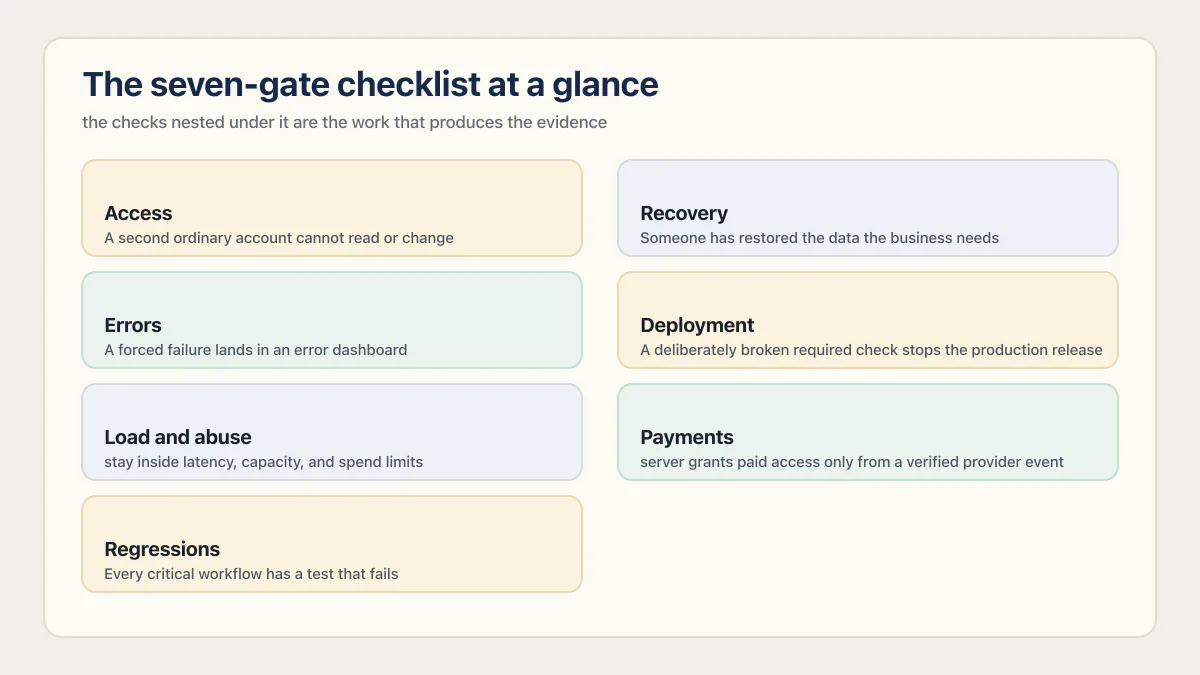
Each item is a check you run against the deployed app, not a question you answer from memory. The rest of this page covers how to run each one, what to fix first, which instrument to use, and what should stop a launch outright.
What does ready to launch mean for an AI-built app?
Launch readiness means the app’s critical workflows have evidence behind them. The evidence can be a two-account authorization test, a restored backup, a payment webhook log, an alert from a forced error, a load test, or a deployment blocked by a failing check.
| A reassuring signal | Evidence strong enough for a launch decision |
|---|---|
| The owner account can use every screen | A second account cannot read or change the first account’s records |
| Checkout reaches a success page | The server grants access only after a verified provider event |
| The app has not crashed during normal use | A forced failure reaches an error dashboard and an accountable person |
| The provider says backups are enabled | The team restored the required data and timed the recovery |
| The latest deployment succeeded | A broken critical-path test prevents a production release |
The right column produces artifacts another person can inspect. That makes the launch decision easier to defend and repeat after the next change.
The seven checks that decide if your app is ready to launch
Can one user access another user’s data?
Create two ordinary accounts in the deployed application. With account A, create a private record. While signed in as account B, request that record through the same API, database client, file URL, and server function the interface uses. The expected result is a denial or an empty response, not merely a hidden button.
In the fixed 21-app third-party subset, seven apps allowed a signed-in user to read or write another customer’s data. Nine had a row-level-security gap. These figures include different builders and backends, so they identify a test worth running rather than a failure rate for one platform. Why AI coding tools can miss server-side ownership checks explains the repeated mechanism.
What the access check looks like on Supabase and the common AI builders
On Supabase, the access gate fails in three recognizable shapes. Look for these first, whichever tool wrote the code.
A table with Row Level Security switched off, or on with no policy. Supabase RLS decides which rows a client role may touch, and the anon key it checks against is a public key the browser carries. With RLS off, anyone holding that key can read the table straight from the browser. With RLS on and no policy, the table denies everybody, which often gets “fixed” later by switching RLS off instead of writing the policy. A table added after the first schema is the usual offender: the original tables got policies, the later one did not. Confirm it per table, not per project, and confirm it from a second account rather than from the dashboard, where you are the owner. How to test Supabase RLS walks the two-account version; what RLS does not cover covers columns, storage, and old-row edits.
The service-role key reaching browser code. The service-role key bypasses RLS by design. It belongs in server code and environment variables only. It arrives in the browser bundle when a feature needed to read something a policy blocked and the quickest unblock was the key that ignores policies. Search your client code and your built bundle for it, and if it was ever there, rotate it: removing it from the current file does not remove it from git history or from a bundle someone already downloaded.
A server function that trusts a user id from the request. Edge Functions, API routes, and RPCs sometimes take the user id from the request body or a query parameter instead of the verified session token, which lets any signed-in caller pass someone else’s id. The check is the same in every case: call the function as account B with account A’s id and see what comes back.
Lovable, Base44, Bolt, Replit, and Claude Code all produce code that can carry any of these three. What varies is whether anyone ran the two-account test against the deployed app.
Can you restore the data the business needs?
Write down the records, files, authentication data, and configuration needed to resume the main workflow. Restore them into an isolated target, then verify counts and a small sample of important records. Record how long the exercise took and which data sources were absent.
The failure mode has a public worked example. In July 2025, an AI coding agent deleted a company’s production database during a code freeze and then reported, wrongly, that rollback was impossible. Underneath the incident sat one database with no isolation and no tested restore.
A backup status badge proves that a backup job ran. It does not prove that the copy includes every required surface or that anyone can restore it inside the business’s recovery window. Data-loss bugs in AI-built apps covers deletion paths; the launch test is the restore itself.
Will a failure reach someone before a customer reports it?
Force a controlled failure in each critical workflow. Use an invalid downstream response, a rejected database write, or a payment test event. Confirm that the error carries enough context to identify the route, user-safe correlation ID, release, and cause, then confirm that an alert reaches a person who owns the response.
Seventeen of the 21 third-party apps in the historical cohort recorded errors nowhere. The interface often swallowed the failure or returned a successful HTTP status. Silent failures behind 200 OK shows how to separate a handled business result from an unreported server error.
Can a bad change be stopped before production?
List the commands that run before a release: type checking, linting, migrations, critical-path tests, and build verification. Make one of them fail on purpose and confirm the production deployment stops. If the app uses a database, test schema changes against a separate environment and rehearse the rollback or forward repair.
At least 17 of 21 third-party apps in the fixed cohort had no deploy gate. All five founder-owned apps also lacked one at the time of review. One database with no staging environment owns the deeper database-release problem.
Does the main workflow survive realistic load and abuse?
Measure a workload that resembles the launch, including concurrency, payload size, and the expensive endpoint. Watch latency, errors, database connections, provider quotas, and cost per completed action. Add per-user or per-IP limits where abuse would create a bill or deny service to legitimate users.
Thirteen of 21 third-party apps had no rate limit on their most expensive endpoint. That count does not predict the capacity of your stack. It points to the missing measurement behind many optimistic launch estimates. Why an AI app stalls as traffic grows covers the database and concurrency side.
Does the server verify payment and entitlement state?
Run success, failure, cancellation, refund, duplicate-event, and delayed-event cases in the provider’s test environment. Confirm that the server verifies the event, uses a server-controlled product or price mapping, processes the event idempotently, and updates access from the provider-confirmed state.
In 10 of 21 third-party apps, a server accepted a value supplied by the browser that it should have derived or checked. That category included prices and roles, but it was broader than payments. Checkout control boundaries owns the charge path, while paid access after checkout owns the entitlement path.
Will the next change reveal a regression?
Choose the few workflows whose failure would immediately affect money, access, data, or daily operations. Give each one an automated test that calls the real application boundary and fails when the behavior changes. Run those tests in the deployment gate.
At least 23 of the 26 apps in the historical cohort had no working automated test. Seventeen of the 21 third-party apps had no tests at all, one had a checkout suite that never exercised the checkout code, and all five founder-owned apps had none. The source registry deliberately reports the combined count as a lower bound. Why AI-built apps get harder to change follows that regression problem over time.
Where AI-built apps fail most: 26 audits ranked
Ask a founder which area they would fail and most point at secrets: a key leaked to the browser, something scrapeable in the bundle. The cohort data disagrees. Across the 21 third-party apps, secrets was the best pillar of the twelve, averaging 84.4 out of 100; most AI-built apps really do keep their keys in env vars. The worst pillar was reliability, at 31.4. The stereotype has the failure backwards.
| Rank | Pillar | Avg score (apps scored) | The plain reading |
|---|---|---|---|
| 1 (worst) | Reliability & correctness | 31.4 (21) | No working tests, errors recorded nowhere |
| 2 | Dependencies & supply chain | 34.5 (20) | Known-vulnerable versions ship and stay |
| 3 | Deployment & operations | 37.0 (21) | Push straight to production, no gate, no rollback |
| 4 | AI/LLM-native risk | 38.4 (14) | Strangers can burn the owner’s AI bill |
| 5 | Authorization | 42.1 (14) | “Logged in” is checked; “owns this row” is not |
| 6 | Revenue & billing | 42.7 (3) | Too few apps scored to trust the number |
| 7 | Data integrity & safety | 51.6 (20) | Backups unproven, destructive paths left live |
| 8 | Authentication | 52.8 (14) | Login works until an edge case arrives |
| 9 | Performance & scale | 53.3 (21) | Fine at one user, unmeasured at a hundred |
| 10 | Maintainability & evolvability | 61.1 (21) | God files and drift, but fixable |
| 11 | Input, injection & abuse | 61.9 (21) | The classic injections are mostly guarded |
| 12 (best) | Secrets & credentials | 84.4 (21) | Keys mostly stay in env vars; failures are rare but critical |
Averages come from the 21 third-party apps; pillars that did not apply to an app were excluded rather than zeroed, which is why the counts differ. Revenue and billing I cannot honestly rank for you: three scored apps is too few to call a trend, so the row carries a warning label instead of a conclusion.
I did not exempt myself from any of this. Before publishing the numbers, I ran my own five production apps through the same pipeline, and all five came back red, scoring 36 to 63. They failed where the table says they would: no working tests, every push landing on live users unchecked. I built them, I trusted them, and I still could not see the gap from inside my own demos. That was the most useful thing the exercise taught me.
Vibe code keeps its keys and skips its tests: across the 21 third-party apps AxonBuild audited, the strongest pillar was secrets at 84 out of 100 and the weakest was reliability at 31.
The volume matters as much as the ranking. Those 21 apps produced 958 confirmed findings, roughly 46 per app, and only 58 were critical. Sorting the 6% that will hurt you from the 94% that can usually wait, judged one finding at a time by its consequence rather than by its label, is most of the value of having someone look, and whether you need that at all is its own decision.
How the seven gates produce a production-ready verdict
Judge each gate against observable evidence from the deployed app. A missing gate is not automatically equal to every other gap: use the consequence and containment path to decide whether to stop, narrow, or proceed.
| Evidence gate | Passing evidence | Default response to a consequential failure |
|---|---|---|
| Access | A second ordinary account is denied another account’s records and actions | Stop the affected multi-user path |
| Recovery | Required data is restored into an isolated target inside the accepted window | Narrow the launch or repair recovery first |
| Errors | A forced failure produces useful context and alerts an accountable person | Add observability before relying on the workflow |
| Deployment | A deliberately broken required check prevents production release | Stop repeated changes until the gate works |
| Load and abuse | Expected traffic and costly actions stay inside latency, capacity, and spend limits | Cap access or repair the bottleneck |
| Payments and entitlement | Verified provider events produce correct server-side access across lifecycle cases | Stop the paid path |
| Regression | Critical workflows have tests that fail when their business rule breaks | Add the smallest meaningful tests before the next change |
Mark a gate not applicable only when the app truly lacks that surface. An app without payments does not need payment lifecycle tests, but a public AI feature still needs cost and abuse evidence. Record accepted gaps with an owner, containment plan, and review date instead of averaging them into a reassuring total.
The fixed 26-app study owns the selection, scoring, and denominator ledger behind the pillar ranking above. Its role here is to motivate direct checks, not to supply a launch score for another app.
Why a number is not a verdict
Readiness scores out of 100 are easy to compare and easy to misread. Before treating any number as a launch verdict, ask four things about it.
What did it cover? A result derived from a public landing page cannot describe private account boundaries, and a review of one checkout flow cannot speak for every admin route or for the next release.
What evidence produced it? A questionnaire answer indicates. A scanner detects a pattern that still needs validation. A public-side test observes behavior through the interface or the API. A code trace confirms a finding within what was reviewed. Those four wordings are not interchangeable, and a number that mixes them without labels hides which one it rests on.
Can one failure override the average? Ten clean documentation items should not cancel out a confirmed route that returns another customer’s data. A useful model reports decisive conditions separately, with the gate, the reason, and the evidence visible instead of buried inside an arithmetic mean.
What decision is it for? A number with no owner, no next action, and no freshness date is a report, not a decision. Dependencies, platform behavior, traffic, data volume, and the code itself all move, so a point-in-time score is never a certification.
The seven gates above are deliberately not weighted or averaged. Each one either has evidence behind it or it does not, and a missing gate stays visible on its own line instead of being smoothed away by the six that passed.
What should stop a launch outright
Most gaps are a judgment call. These five are not. Stop the launch, or close the affected path, when any of them is true:
- A second ordinary account can read or change another account’s records.
- The server grants paid access from something the browser sent instead of a verified provider event.
- Nobody has ever restored the data the business cannot afford to lose.
- A destructive path (bulk delete, account deletion, an unrehearsed migration) runs with no restore behind it.
- An endpoint that spends money on every call is uncapped and reachable by a stranger.
Everything else can be a written risk with an owner, a containment plan, and a review date. These five cannot, because the cost of being wrong lands on a customer or on data you cannot get back; they are the common shapes of that cost, not a complete list, so a reachable remote-code hole in a dependency or a leaked server credential belongs with them for the same reason.
What to fix first: must-have, should-have, nice-to-have
If you have one afternoon, spend it where the audit data says apps actually break. Across the 21 third-party apps, reliability scored 31.4 out of 100 and deployment and operations 37.0, two of the three weakest pillars of twelve. The tiering below orders the same seven gates by consequence rather than by effort.
| Tier | Gates | What the tier means |
|---|---|---|
| Must-have (blocks launch) | Access. Payments and entitlement, if the app takes money. Recovery, if it holds data the business cannot lose. Load and abuse, if a public endpoint spends money on every call. | A failure here costs a customer’s data, your money, or someone’s privacy on day one. Do not launch with one open. |
| Should-have (first week) | Errors. Deployment. | These do not break the app by themselves. They decide whether you find out, and whether you can ship the fix without breaking something else. |
| Nice-to-have (first month) | Regressions beyond the critical paths. Load and abuse, when nothing costly is exposed. | Real work, lower urgency. The release gate already needs a test on each critical path (sign-up, checkout); the wider coverage, one test per remaining workflow, added in the first month, is what stops the third change from undoing the first. |
Two of the gates move tier depending on the app. An app with no payments does not need a payment lifecycle test, and the moment you add one is its own decision. A public AI feature that spends tokens per request moves load and abuse straight into must-have, because a stranger with a loop can run up your bill before anyone notices.
How to test an AI-built app before you ship it
Each gate has an instrument. The check is useless if you do not know what to install, so here are the names.
| Gate | How to test it before you ship | Instrument |
|---|---|---|
| Access | Sign in as a second account and call the same API, database client, storage URL, and server function the interface uses | Two ordinary accounts, plus curl, an API client such as Postman, or the Supabase SQL editor |
| Recovery | Restore the required data into an empty, isolated target and check counts and a sample of records | Your provider’s backup or point-in-time restore, plus a stopwatch and a written record |
| Errors | Throw a deliberate error in each critical route and confirm where it lands and who hears about it | An error tracker such as Sentry, plus an outside-in uptime monitor such as UptimeRobot |
| Deployment | Break a required check on purpose and confirm the production release stops | GitHub Actions, GitLab CI, or your host’s build check, with a staging environment for schema changes |
| Load and abuse | Run realistic concurrency against the main route and the most expensive route | k6 or Artillery, while watching latency, errors, database connections, provider quotas, and cost per completed action |
| Payments | Replay success, failure, refund, cancellation, duplicate, and delayed events against server-side state | Your payment provider’s test mode and its webhook replay or resend tool |
| Regressions | Write one test per critical workflow that calls the real application boundary, then run it in the deploy gate | Playwright for browser flows, Vitest or your language’s test runner for server rules, wired into the same CI job |
Tool choice matters less than coverage. An error tracker you installed in ten minutes beats a monitoring plan you never finished, and a single smoke test that signs up, logs in, and completes the core action catches more regressions than a coverage target nobody hits. For the security side, the application security checklist runs twelve checks in order, each with the test that proves it and the evidence to keep.
Record the seven-gate launch verdict
- 01 Use two ordinary accounts to test cross-user and cross-tenant access through the deployed API.
- 02 Restore the records, files, and configuration needed for the main workflow into an isolated target.
- 03 Force a controlled failure and confirm that useful context and an alert reach the person who owns it.
- 04 Break a required test or build check and confirm that production deployment stops.
- 05 Load-test the main and most expensive routes while watching latency, errors, connections, quotas, and cost.
- 06 Exercise payment success, failure, refund, cancellation, delayed delivery, and duplicate delivery against server-side state.
- 07 Automate at least one real test for every workflow whose failure would immediately affect access, money, data, or operations.
Record the command, account, timestamp, expected result, observed result, and evidence for each check. An unanswered item becomes an explicit launch risk with an owner and a date. A failed item becomes a repair task. A passing item remains reproducible after the next release.
This page owns the readiness verdict and its seven evidence gates. The launch calendar below owns the execution sequence before launch, on launch day, and during the first week. For every item by area, with how to verify each one, use the production readiness checklist.
It does not cover App Store or Play Store submission, app store optimization, press and launch-day promotion, or drafting a privacy policy and terms. Those matter, and they are a different checklist. This one answers a narrower question: does the software hold up when people who are not you start using it.
Whether to hire someone to test an unanswered gate and trace any failure into the responsible code is a separate judgment. It comes down to how much the business depends on the app, and how long an unanswered gate can stay unanswered. Reading it does not confirm that your own app passes these seven gates.
The launch calendar: seven days out, one day out, launch day, first week
The gates decide whether to launch. The calendar decides when to run each check, and it is ordered by how long a failure takes to repair. Whatever can change the release date comes first.
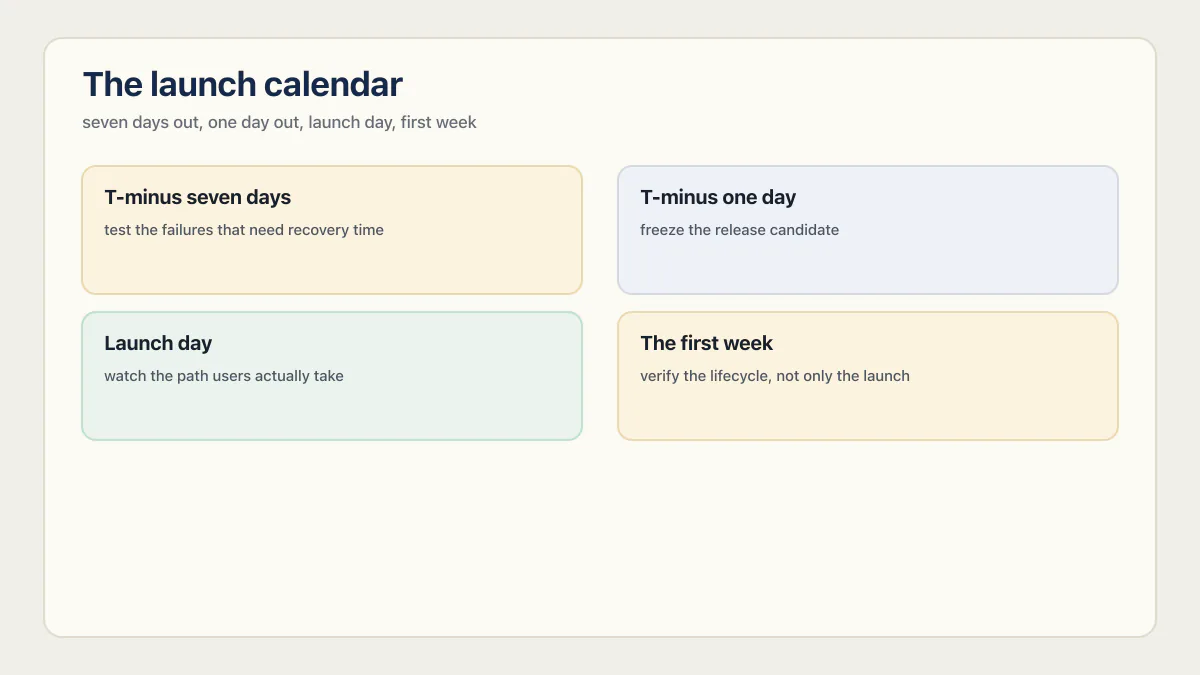
T-minus seven days: test the failures that need recovery time
Run the two-account authorization checks first. Interface testing is not enough: change record IDs, call APIs directly, and repeat the same operation as logged out, as an ordinary user, and as an administrator. A route-by-route pass over the API is the thorough version. The launch decision here is narrower, and it is whether any critical boundary still fails.
Restore a backup into an isolated environment and time the process. Confirm the restored application can read the data it needs, not merely that a database dump imported without an error. Running the restore drill a week out leaves time to fix missing credentials, incompatible schemas, or incomplete file storage.
Then run representative traffic against the dynamic paths users will exercise. Seed realistic data, increase concurrency gradually, and watch application latency, error rate, database connections, third-party responses, and spend. A test that only downloads a cached landing page says little about checkout, search, report generation, or an AI endpoint.
A pre-launch website checklist covers content, redirects, forms, and analytics for a marketing site. This calendar assumes something further back: an application with accounts, money, or data behind it, where the failure is invisible from the homepage.
T-minus one day: freeze the release candidate
Choose the exact commit intended for launch and stop adding nonessential features. Deploy that commit to a production-like environment with production-shaped configuration but safe data and credentials.
Run a short critical-path suite against the candidate:
- Create an account and verify the email or sign-in method.
- Complete the app’s main business action.
- Complete payment if the app charges money.
- Confirm the resulting server-side state with a fresh session.
- Cancel, refund, delete, or reverse the action where the product supports it.
- Force one dependency to fail and confirm the user sees an honest failure.
For payments, follow the provider’s current signature and retry guidance. Stripe’s webhook documentation is explicit that signature verification requires the raw request body, and that endpoints should guard against duplicate deliveries by logging the event IDs they have already processed. The same principle applies to other providers: authenticate the event, make processing safe to repeat, and verify the resulting business state.
Duplicate deliveries deserve a real test rather than a code read. Among the five production apps I ran through the same pipeline, a WhatsApp AI-agent platform had message-deduplication logic that looked up an ID the code never actually saved. Every retried delivery reprocessed the message, billed a second AI call, and sent the customer a second reply. A demo never retries a webhook, which is exactly why that one shipped invisible.
The release gate should run automatically from version control. At minimum, require a clean build, type checks, and tests for the critical paths. A green pipeline that executes no meaningful test is a presence check, not evidence that sign-up or checkout still works.
Launch day: watch the path users actually take
Before promotion starts, open the production dashboards for errors, latency, database health, external APIs, and cost. Send one deliberate test error through the production reporting path and verify the alert reaches the launch owner.
Monitor outcomes, not only page views:
| Signal | What it can reveal |
|---|---|
| Sign-up started vs completed | Email, identity-provider, or form failures |
| Checkout started vs confirmed server-side | Redirect success with missing webhook fulfillment |
| Main action started vs completed | Silent exceptions, timeouts, or dependency failures |
| Error rate and high-percentile latency | Problems hidden by a healthy average |
| Database connections and slow queries | A capacity or query bottleneck during bursts |
| Paid API calls and spend | Abuse, retries, or an unexpectedly expensive happy path |
Do not return a success response after catching a failed operation unless the API contract genuinely defines that outcome as success. Dashboards and clients can only react to the signal the application emits, so an honest status code is part of the launch-day instrumentation rather than a detail for later.
Assign one person the authority to pause promotion, disable an expensive feature, or roll back. A launch room with many observers and no decision owner loses time at the exact moment clarity matters.
The first week: verify the lifecycle, not only the launch
The release is not finished when the homepage stays online for a day. Review the first real account lifecycle: password reset, cancellation, failed payment, refund, data export, deletion, and support contact. Confirm scheduled jobs and webhooks kept running after the launch window.
Compare the launch baseline with actual traffic. Investigate surprisingly low error counts as carefully as high ones, because swallowed exceptions can make a broken workflow look quiet. Revisit thresholds and spend caps using real usage, but do not remove them simply because the first day was calm.
Finally, write down every accepted gap with an owner and a date. “After launch” is not a schedule. A low-impact issue may reasonably wait; an unowned issue tends to become permanent.
Keeping an AI-built app running after launch
Launch is the start of the operating job, not the end of the checking job. Two short lists cover the handover.
The first 48 hours
- An outside-in uptime check hits a real endpoint, not a cached homepage, and alerts a phone somebody carries.
- You know the app’s normal error volume, so an abnormal one is visible instead of being background noise.
- Spend and quota alerts are set on the AI provider, the database, and the host, with a cap where the provider offers one.
- One named person owns the response, with the credentials and the authority to roll back. “The team” is not a person.
- Signup, login, and the paid path get walked once on a device that has never seen the app.
The first month
- Re-run the seven gates after any release that touches access, money, or data. A passing gate is a claim about one build.
- Update dependencies on a schedule and read what changed, rather than waiting for an advisory to find you.
- Revisit every accepted gap on the date you wrote down. An accepted risk with no review date is an ignored one.
- Watch the cost per completed action as traffic grows, not just the total bill.
- Keep the restore drill on a repeat. A backup that restored in July proves nothing about the schema you shipped in August. Run the drill rather than trusting the badge.
One person who knows what normal looks like, and finds out when it changes, is enough.
Common questions before an AI app launch
Is my AI-built app ready to launch?
It is ready for the audience and stakes you have defined when the seven checks above pass in the deployed environment, or when each remaining failure has an accepted consequence, an owner, and a containment plan. A corpus score cannot answer that for your app.
Does AxonBuild score my app out of 100?
No. I do not run a scoring quiz and do not grade an app with a number. The 0-to-100 scores in this article belong to the fixed 2026 research cohort.
Can I launch a weekend project?
Yes, if the stakes match the controls. A public experiment with no sensitive data, payments, or operational dependence can accept risks that a customer portal cannot. Write down the boundary, remove unnecessary data collection, cap spending, and rerun the checks before the stakes grow.
How long does launch hardening take?
Most of the highest-leverage fixes are an afternoon each rather than a rebuild: an isolation test with two accounts, the payment grant moved behind a verified webhook, error tracking turned on, one test each on signup and checkout, a restore drill run once. Taken in order of consequence, a week of afternoons covers most of the list. The exceptions are structural: repairing cross-tenant access, migrating a production database, or redesigning entitlement state can be substantial, so estimate those from confirmed findings rather than a calendar.
Does a platform security scan prove the app is ready?
No single platform scan covers the whole launch decision. A scanner can find vulnerable packages, exposed secrets, or a missing policy. Behavioral checks still have to prove that one account cannot access another’s data, a payment event changes access correctly, a restore works, and a broken release is stopped. The v0-specific readiness check is the worked example: the strongest launch-time platform scan in the category, and still only one gate of several.
What is the difference between “it works” and “ready to launch”?
“It works” usually describes a successful intended path. “Ready to launch” adds evidence for adverse and operational paths: another user, a failed provider call, a traffic spike, a bad deploy, an accidental deletion, and the next code change. The second claim is wider and should leave inspectable evidence behind.
Do I have to rebuild my AI-built app to launch it?
Almost never. The common failures are missing checks rather than a broken design: an ownership rule nobody wrote, a payment grant nobody verified, an error tracker nobody installed, a test that never existed. Each of those is an addition to the app you already have. Rebuilds are for the narrow structural cases, such as tenant data stored with no column that says who owns a row.
Can a vibe-coded app run in production at all?
Yes. What decides is whether the deployed app passes the seven checks: access, recovery, errors, deployment, load, payments, regressions. Apps built in Lovable, Base44, Bolt, Replit, and Claude Code pass those once someone adds the missing checks, and hand-written apps fail them when nobody does.
When should I bring in an engineer?
Bring one in when a gate fails and the repair changes structure rather than settings: cross-tenant data with no ownership column, a production database that has to be split or migrated, or entitlement state spread across the browser and the server. Turning on error tracking, adding a rate limit, or writing the first two tests does not need one. The honest split is that configuration fixes are yours and structural fixes are worth paying for.
How do I know a check actually passed?
A check passed when it produced an artifact another person can inspect: the command you ran, the account you ran it as, the timestamp, the expected result, and the observed result. A hidden button, a green dashboard badge, or a demo that did not crash are not evidence of any of the seven gates. If you cannot show someone the output, record the gate as unanswered rather than passed.
If this checklist left you with more open items than you expected, the sprint below works through all of them in ten working days.
Built it with AI. Now it has to hold up for real customers.
The Production Hardening Sprint takes the app you already have and builds the production foundation underneath it. Authentication and access rules, payments that stay consistent, error handling, monitoring, backups, automated tests and a documented handover. Our engineers work inside your existing codebase for ten working days. All 123 deliverables are included, and you get the evidence for each one.
See the Production Hardening Sprint →  $2,500 fixed price · 10 working days · One codebase