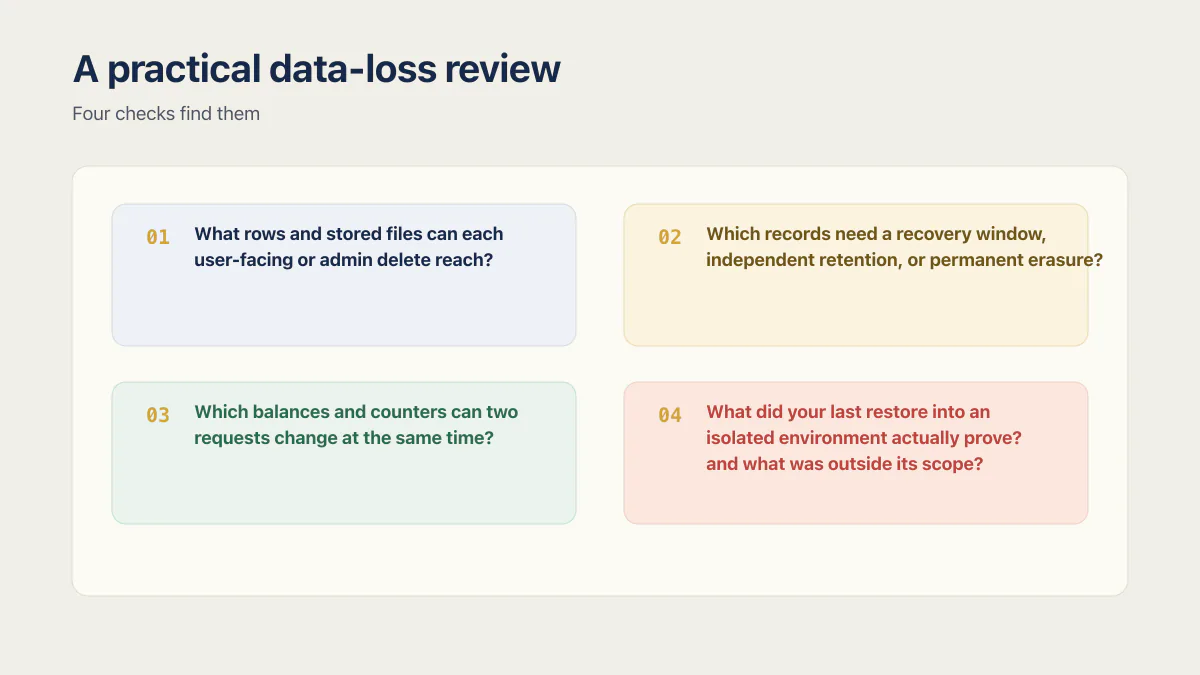
AI-built apps lose data in four ways. A cascading foreign key deletes far more than the row you clicked. A hard delete commits with nothing behind it to undo. Money sits in a floating-point column and stops reconciling. And a backup nobody has ever restored turns out not to cover everything. All four look fine in a demo. Four checks find them:
- 01 What rows and stored files can each user-facing or admin delete reach?
- 02 Which records need a recovery window, independent retention, or permanent erasure?
- 03 Which balances and counters can two requests change at the same time?
- 04 What did your last restore into an isolated environment actually prove, and what was outside its scope?
The first check takes about a minute: paste the foreign-key query below into your SQL editor and read the on_delete column. If your data is already gone, skip to what is recoverable.
One of the 21 third-party apps I audited in June and July 2026 had a leftover maintenance endpoint that could drop every production table through a GET request. The only barrier was a secret in the query string. It was one app, not evidence that every AI-built app has the same flaw, but it illustrates why a clean demo cannot prove that data will survive a mistake.
Data loss is broader than a database disappearing. It also includes an account deletion that silently removes billing history, a balance corrupted by concurrent requests, an amount that no longer reconciles, or a backup that omits the files customers expect it to contain. Leaks are the other half of the risk, and I cover that half separately: a vibe coding security audit walks the read side, and whether Supabase is safe takes the same question down to row-level security. This post is about whether your rows survive.
The audits put a number on that half. As of August 2026, the AxonBuild audit record covers 21 third-party apps audited in June and July 2026. Across it, the Data Integrity & Safety pillar averaged 51.6 out of 100, scored on 20 of the 21 apps. Four recurring patterns account for most of it: destructive cascade paths, irreversible deletes, inexact money types, and untested recovery procedures. All four recurred across that cohort’s AI-generated schemas, for a mundane reason: the version you can recover from and the version that merely works are indistinguishable on the day they are generated. These defects often remain invisible in demo-scale testing. Finding them requires tracing deletion paths, checking state changes under concurrency, and rehearsing recovery.
Start with the deletion blast radius
What ON DELETE CASCADE actually does
ON DELETE CASCADE is not inherently unsafe. It is appropriate when a child row has no meaning without its parent. If an invoice line is a true component of a disposable draft invoice, deleting both may be exactly right. It becomes dangerous when the child has independent retention, financial, or audit value.
The delete action you pick is a trade between two failure modes. CASCADE never leaves orphan records, but it destroys rows you may have needed. RESTRICT and NO ACTION keep those rows alive by blocking the parent delete until you deal with them; SET NULL keeps them alive as orphans, and in exchange you have to decide who owns an orphaned row once its parent is gone.
The five delete actions, side by side
PostgreSQL defines the available foreign-key actions. There are five, not four. In the audited apps the generated schemas used the first one almost everywhere, and the other four barely at all.
| ON DELETE action | What happens to the child row | Use it when | What it costs you |
|---|---|---|---|
CASCADE | Deleted along with the parent | The child has no meaning or value without its parent | Silent bulk deletion down every chained path |
RESTRICT | Nothing. The parent delete fails immediately | Deleting the parent should be blocked while records remain | Delete buttons start erroring until you handle it |
NO ACTION | Nothing. The parent delete fails, and the check can be deferred to the end of the transaction | Same as RESTRICT, but other cascades in the same transaction need to run first | Same as RESTRICT, plus a subtler failure point |
SET NULL | Foreign-key column becomes NULL | The relationship is genuinely optional | Orphan records with no attribution, unless you store it elsewhere |
SET DEFAULT | Foreign-key column reverts to the column default | A fallback owner exists, such as a “deleted user” placeholder row | The default must exist as a real row, or the delete fails |
RESTRICT and NO ACTION are not the same option
Both block a parent delete while children reference it, so they look interchangeable in a schema file. The difference is timing. RESTRICT checks immediately and raises an error the moment the delete runs. NO ACTION can be declared DEFERRABLE INITIALLY DEFERRED, which moves the check to the end of the transaction. That lets cascades on other columns delete their dependent rows first, and the constraint only complains if references still exist when the transaction commits. Supabase’s cascade deletes documentation is built on this distinction.
When the check fails, Postgres says so in the text people paste straight into a search box:
ERROR:  update or delete on table "organizations" violates foreign key constraint
        "wallets_org_id_fkey" on table "wallets"
DETAIL:  Key (id)=(1) is still referenced from table "wallets".
That error is not a bug. It is the constraint doing the job you asked it to do, and it is a much better outcome than the silent version where the wallet rows simply vanish.
Check the cascade graph you actually shipped
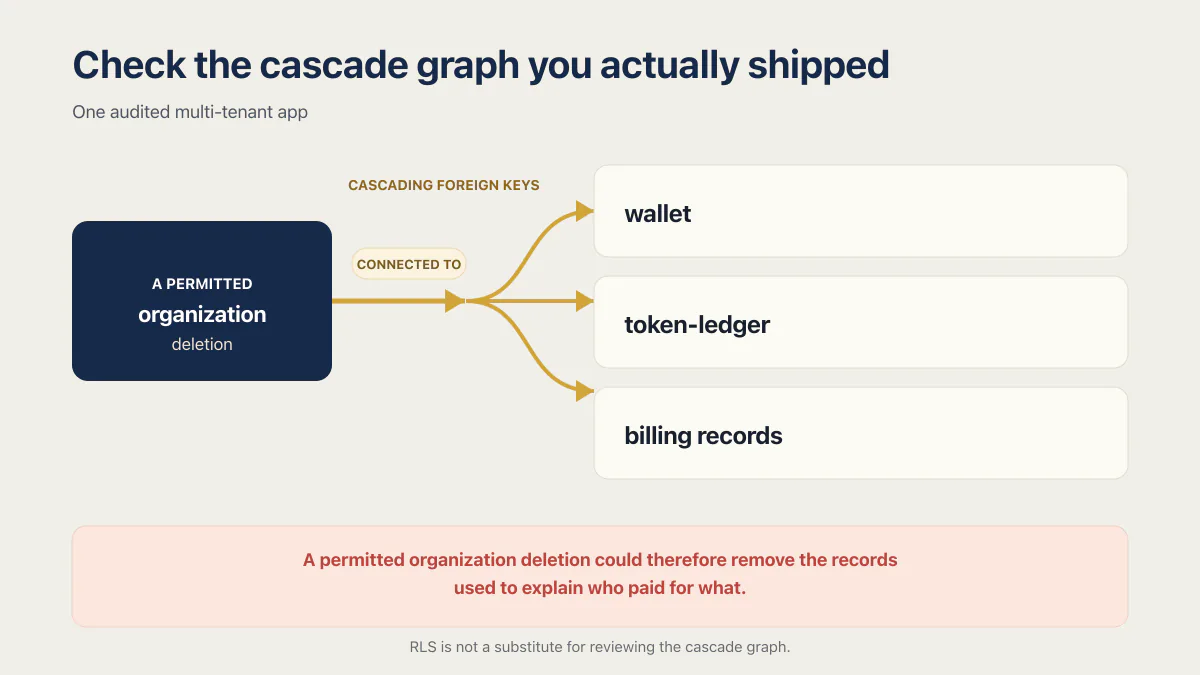
One audited multi-tenant app had wallet, token-ledger, and billing records connected to an organization through cascading foreign keys. A permitted organization deletion could therefore remove the records used to explain who paid for what. Direct deletes through the app’s ordinary client roles were restricted by row-level security, but that did not make the ledger safe from its declared foreign-key action. PostgreSQL’s row-security documentation states that referential-integrity checks bypass row security, so RLS is not a substitute for reviewing the cascade graph.
The same repository contained safer constraint definitions inside CREATE TABLE IF NOT EXISTS. They had not changed the existing tables. PostgreSQL documents that this form leaves an existing relation unchanged and gives no guarantee that it resembles the requested definition. A migration needs to alter the live constraint explicitly and verify the resulting schema.
A defensible rule set is narrower than “never cascade”:
- Use
CASCADEonly when the child has no independent retention or audit value. - Prefer
RESTRICTwhen deleting the parent should fail immediately while retained records exist. - Use
NO ACTION DEFERRABLE INITIALLY DEFERREDwhen other cascades in the same transaction have to run first. - Use
SET NULLorSET DEFAULTonly when the relationship is genuinely optional and required attribution is preserved elsewhere. - Test the entire delete graph against the actual migrated schema, not only the schema file in the repository.
Find every delete that can reach your data
The last item on that list is the one people skip, because “test the delete graph” sounds like a project. It is one query. Paste this into the Supabase SQL editor (or any Postgres client pointed at your live database) and read the results:
select
  child_ns.nspname || '.' || child.relname  as child_table,
  con.conname                               as constraint_name,
  parent_ns.nspname || '.' || parent.relname as parent_table,
  case con.confdeltype
    when 'c' then 'CASCADE'
    when 'r' then 'RESTRICT'
    when 'n' then 'SET NULL'
    when 'd' then 'SET DEFAULT'
    when 'a' then 'NO ACTION'
  end                                       as on_delete
from pg_constraint con
join pg_class     child     on child.oid  = con.conrelid
join pg_class     parent    on parent.oid = con.confrelid
join pg_namespace child_ns  on child_ns.oid  = child.relnamespace
join pg_namespace parent_ns on parent_ns.oid = parent.relnamespace
where con.contype = 'f'
  and child_ns.nspname not in ('pg_catalog', 'information_schema')
order by on_delete, parent_table, child_table;
You do not need to understand the query. You need to read one column. Every row where on_delete says CASCADE is a path along which deleting the parent row destroys the child row. Find the rows where the child table holds invoices, payments, ledger entries, subscriptions, audit logs, or anything you would need to answer a chargeback, and you have your list of problems, ranked.
Two things this query does not tell you. It shows one hop, not the full chain, so a cascade from organizations to projects to documents appears as two rows and you have to follow it yourself. And it only sees foreign keys. Application code that deletes rows in a loop, or deletes a file from object storage, is invisible here.
If you do not want to run SQL yourself, paste this into Lovable, Claude Code, Cursor, or whatever tool built the app:
List every foreign key in my database schema with its ON DELETE action.
Flag any CASCADE that can reach a table holding invoices, payments,
ledger entries, subscriptions, or audit logs. Show me the list and explain
what each flagged one would delete. Do not change anything.
The last sentence matters. Left to itself, an agent asked about a risky cascade will often “fix” it, run a migration, and tell you afterwards.
Choose deletion behavior by data class
A hard delete and a soft delete solve different problems. A hard delete permanently removes the selected row once its transaction commits and may trigger referential actions. A soft delete marks the row as inactive, commonly with deleted_at, so an authorized recovery remains possible.
-- Permanent removal. Review every foreign-key action first.
delete from projects where id = $1;

-- Reversible state change, if this entity has a recovery window.
update projects
set deleted_at = now()
where id = $1 and deleted_at is null;
Soft deletion is not one extra filter that makes the rest of the app behave identically. It affects unique constraints, joins, aggregates, indexes, RLS policies, storage retention, and every read path. You also need to define who can restore a row, whether related records are restored with it, how long the recovery window lasts, and when permanent purging occurs.
Use the data’s purpose to decide:
| Data class | Typical design question |
|---|---|
| User-created content | Does the product promise undo or a recovery window? |
| Sessions and reset tokens | Should revocation remove access immediately and permanently? |
| Invoices, ledger entries, and audit events | Must the record remain independently attributable after an account closes? |
| Personal data | Is deletion, irreversible anonymisation, restriction, or lawful retention required for this category and jurisdiction? |
Once a hard-delete transaction commits, SQL has no built-in undo button for that row. Recovery depends on a retained copy such as point-in-time recovery (PITR), a backup, a replica designed for recovery, or application-level history. That is why deletion policy and recovery design have to be reviewed together.
Make soft delete real
Three pieces turn a deleted_at column into an actual feature. First, a partial unique index, so a soft-deleted row stops occupying the name or slug a new row wants:
create unique index projects_slug_active_idx
  on projects (org_id, slug)
  where deleted_at is null;
Second, a filtered view, so ordinary read paths cannot forget the filter:
create view active_projects
  with (security_invoker = true) as
  select * from projects where deleted_at is null;
The security_invoker option, available from PostgreSQL 15, makes the view run with the caller’s permissions, so the row-level security on projects still applies to whoever queries it. Leave it off and a view created by the postgres role reads the whole table for anyone allowed to select from the view, which turns a convenience into a way around the policies. Check that before you expose the view to the authenticated role.
Third, a scheduled purge, so the recovery window you promised is the recovery window you keep. On Supabase that is pg_cron, which schedules recurring jobs with cron syntax inside Postgres:
select cron.schedule(
  'purge-soft-deleted-projects',
  '0 3 * * *',
  $$delete from projects where deleted_at < now() - interval '30 days'$$
);
Without the third piece, “soft delete” means “we keep everything forever”, which is its own problem the first time someone asks you to erase their data.
Where your data actually lives, by tool
Recovery advice is worthless if it points at the wrong system. Where the rows sit depends on which builder made the app:
- Lovable. Two different setups with two different answers. Lovable Cloud is Lovable’s own managed backend, built on Supabase’s open-source foundation but hosted by Lovable, not a project in a Supabase account you control. Lovable’s docs say removing Cloud “permanently deletes your Cloud instance and cannot be undone” and tell you to export the database and download storage files first. If instead you connected your own Supabase project, that project lives in your Supabase account, and disconnecting the integration is not the same as deleting the data.
- Base44. Its own backend, not Supabase and not Postgres. Base44’s entity docs describe a MongoDB-compatible NoSQL database, so Postgres-specific advice about cascades, RLS, and PITR does not apply. Base44 keeps deleted records for 30 days so you have a window to recover them, offers CSV export, and puts automatic per-entity version history on its Elite and Enterprise plans.
- Bolt. New projects use Bolt Database by default, and Supabase is available as an alternative you connect yourself. Check which one your project actually uses before you go looking for a backup.
- Replit. Replit’s production databases are billed and run through Neon. Development databases created after December 4, 2025 sit on Replit’s own infrastructure and are restored with a checkpoint rollback rather than a Neon-style recovery. The two are not the same database, and a rollback on one does not touch the other.
- Claude Code, Cursor, and other coding agents. They have no database of their own. They write code on your machine that points at whatever provider you chose, so the recovery story belongs entirely to that provider. The risk they add is the one in the incidents below: an agent with production credentials running a destructive command.
Write down which of these you are on. It is the first question anyone helping you recover data will ask.
Protect money and counters from quiet corruption
Some data-loss bugs change values instead of deleting rows.
For amounts that must reconcile exactly, avoid PostgreSQL real and double precision. They are inexact types, which is the same floating-point rounding error that makes 0.1 + 0.2 come out as 0.30000000000000004 in most languages. PostgreSQL recommends numeric for exact monetary calculations. Integer minor units can also work when the currency and pricing model permit them, but not every currency uses two decimal places, and application-language integer limits still apply. Choose a representation deliberately and test rounding at every boundary.
Concurrent state changes need the same care. This read-modify-write pattern is a classic race condition, and it can lose an update when two requests read the same starting balance:
const { credits } = await getUser(id)
await setCredits(id, credits - 1)
Make the same-row condition and arithmetic one database operation instead:
const [row] = await db`
  update users
     set credits = credits - 1
   where id = ${id}
     and credits >= 1
   returning credits
`

if (!row) throw new Error('Insufficient credits')
This prevents that same-row lost update and rejects an insufficient balance. It does not solve every billing failure. Retried operations need an idempotency key or a uniquely keyed ledger entry, and invariants spanning several rows may require a transaction with explicit locking (SELECT ... FOR UPDATE) or serializable isolation. An optimistic-locking version column works too, where the update only applies if the version you read is still the current one. For credits or payments, an append-only ledger can preserve the history that a single mutable balance cannot.
Deleting a lot of rows without taking the app down
A single DELETE that removes millions of rows is a different operation from one that removes ten. It holds locks for a long time, generates write-ahead log (WAL) traffic, and pushes that load onto replication. Supabase’s data deletion guide recommends deleting in batches instead, around 5,000 rows at a time:
delete from events
where id in (
  select id from events
  where created_at < now() - interval '90 days'
  limit 5000
);
Run it repeatedly until it deletes nothing. Each batch is a short transaction, so the table stays usable between them.
Then there is the part that surprises people: deleting rows does not give you the disk space back. Postgres marks the rows dead and leaves the space allocated to the table, which is why a founder can delete half a table and watch the database size stay flat. VACUUM makes that space reusable by the same table. VACUUM FULL actually returns it to the operating system, but it rewrites the whole table under an ACCESS EXCLUSIVE lock, which blocks everything including reads, so it belongs in a maintenance window. pg_repack does the same reclamation without holding that lock. Table bloat after a large delete is normal and worth checking rather than panicking about.
DROP TABLE and DROP COLUMN take the same ACCESS EXCLUSIVE lock. For DROP COLUMN the hold is brief because it is a metadata change, but DROP TABLE blocks the table completely, and unlike a batched delete there is nothing incremental about it. TRUNCATE empties a table in one step and is not a row-by-row delete you can interrupt halfway. These are the commands in the headline incidents, not DELETE. If an agent has credentials that can run them against production, the delete-action table above will not save you.
A backup setting is not recovery evidence
What a restore drill proves
A successful restore drill proves that one selected recovery point was usable under the tested conditions. It does not prove that every scheduled backup completed, every required asset was included, or the next incident will fit the same recovery window.
The first restore you ever run should not be the one your business depends on.
The known incidents show why the rehearsal matters. In July 2025, an AI coding agent deleted a production database despite explicit instructions to change nothing, then reported that rollback was impossible. The rollback worked; the founder learned that mid-incident instead of during a rehearsal. In April 2026, a Cursor agent deleted the production volume of a SaaS company called PocketOS in nine seconds, and the platform’s own backups went with it, because volume-level backups lived on the very volume being deleted. The data came back only because Railway’s CEO stepped in two days later and restored it from a copy outside that path. Nine seconds is not a window anyone reacts in. The facts that decided how both stories ended were learnable in advance, on a calm afternoon, by restoring one backup and reading where it came from.
Managed providers also draw important scope boundaries. For example, Supabase explains that its database backups do not include Storage API file objects. Its restore-to-new-project workflow is database-focused and requires other project features and settings to be reconfigured. A database row count alone therefore cannot prove that the application is recoverable. What a Supabase backup covers per plan tier is narrower than the toggle suggests, and PITR is a paid add-on on top of it (checked August 2026).
Running the drill safely
- Choose an approved recovery point and document the recovery-point and recovery-time objectives you are testing.
- Restore into an isolated, access-controlled environment that applies the same protections as other production-data systems.
- Disable outbound email, webhooks, scheduled jobs, network extensions, and other integrations before the restored system can contact real users or services.
- Verify schema and constraints, representative records, authentication, critical application reads, and separately protected assets such as object storage.
- Record the restore time, missing dependencies, manual steps, owners, and credentials required by the runbook.
- Securely dispose of the restored copy under the same retention and access rules as the source data.
Separately monitor backup success and retention. Repeat the drill after material schema or infrastructure changes. The first recovery attempt should not happen while customers are waiting.
If it already happened: what is recoverable
Stop writes before you try anything else. Every minute the app keeps accepting traffic is a minute of new data that a restore will overwrite, and it widens the gap between “restore the backup” and “keep what customers did today”. Note the exact time you noticed, save the logs and the agent’s command history, and do not let a coding agent attempt the repair.
Then work out which kind of loss you have, because they recover differently:
| What was lost | What can reach it |
|---|---|
Rows removed by a committed DELETE or a cascade | PITR to a timestamp just before it, or the most recent daily backup. There is no SQL undo |
| A dropped table or column | Same as above. The schema comes back with the restore, not on its own |
| Files in object storage | Not covered by a database backup. Supabase states that database backups do not include objects stored via the Storage API |
| A deleted Supabase project | Nothing. Supabase’s backup docs say deleting a project permanently removes all associated data including backups, and that the action is irreversible |
| Data on a plan with no automatic backups | Only whatever you exported yourself |
PITR reaches any moment inside its retention window, but only for the period after you turned it on. It cannot go back and cover last week if you enabled it this morning. Daily backups reach the last snapshot, so the honest question is how much work your customers did since then. On Supabase, PITR is an add-on available on the Pro, Team, and Enterprise plans, and it also requires at least a Small compute add-on (checked August 2026).
You can also find out that it happened without anyone telling you. The usual signals are a table’s row count dropping between two checks, a customer reporting a record they are sure they created, invoices or credit balances that stopped reconciling, and files returning 404 while their database rows still exist. Any one of those is worth an hour of investigation before it becomes a support queue.
The first hour after deleting a production database walks the incident sequence in full, and Supabase backup by plan covers what each tier actually retains.
A practical data-loss review
You can inventory these risks in an afternoon. Remediation may take longer because changing foreign keys, converting money types, introducing soft deletion, or repairing a recovery process can require migrations and careful rollout.
Start with the four questions at the top of this post, in order: what each delete can reach, which records need retention or erasure, which counters two requests can touch at once, and what your last isolated restore proved. The foreign-key query answers the first one today. For the wider pass over every table, the database review checklist covers constraints, keys, cascade rules, and a data model a reviewer can read.
Those checks are part of whether an app is ready to launch. If production and development still share one database, fix the missing staging boundary before treating a restore drill as routine.
Common questions about data loss
Can I recover data my AI tool deleted?
Sometimes, and it depends entirely on what was already in place before the deletion. If point-in-time recovery was enabled, you can restore to a timestamp just before the command ran. If only daily backups exist, you get the last snapshot and lose everything after it. Stop writes first, because continued traffic makes the gap between the recovery point and now harder to reconcile.
Does Supabase have point-in-time recovery?
Yes, as a paid add-on rather than a default. Supabase’s backup documentation says Pro, Team, and Enterprise projects can enable PITR as an add-on, and that a project using it must also run at least a Small compute add-on. Enabling it also changes what else you have: Supabase states that with PITR on it no longer takes daily backups, so PITR replaces them rather than adding a second layer. Without PITR, Pro keeps the last 7 daily backups, Team 14, and Enterprise up to 30 (checked August 2026).
How do I undo a DELETE in Postgres?
You cannot, once the transaction has committed; inside an open transaction that has not committed yet, ROLLBACK still works. Everything past that is retrieval from a retained copy, and the whole ladder, from soft-delete columns up to a point-in-time restore, is on how to recover deleted rows in Postgres.
Why did my storage files disappear when I deleted a user?
Because file storage and the database are two separate systems, and only one of them knows about your foreign keys. Deleting a user row can cascade to the rows that reference the files, while the files themselves stay in the bucket as orphans, or get removed by application code that no backup covers. Supabase states that database backups do not include objects stored via the Storage API, so a database restore will not bring those files back.
What does “update or delete on table violates foreign key constraint” mean?
It means a delete was blocked because other rows still point at the row you tried to remove. The constraint is set to RESTRICT or NO ACTION, and Postgres is refusing rather than silently deleting the children. The fix is to decide what should happen to those child rows: delete them deliberately, reassign them, or keep the block in place because the parent should not be deletable while they exist.
Why is my Postgres disk still full after deleting rows?
Deleting rows marks them dead but leaves the space allocated to the table, so database size can stay flat after a large delete. VACUUM makes that space reusable by the same table, VACUUM FULL returns it to the operating system but rewrites the table under a lock that blocks reads, and pg_repack reclaims it without that lock. Some bloat after a big delete is normal.
Does turning on backups mean my data is protected?
No. It shows that a backup feature is configured. Protection also depends on successful jobs, usable retained recovery points, access to the restore process, coverage of every required data surface, and a tested runbook. One isolated restore gives evidence about one recovery point; monitoring and repeated drills cover the rest.
Is hard delete ever the right choice?
Yes. Expired secrets, revoked sessions, and data that must be permanently erased may need hard deletion. Other records may need a recovery window or independent retention. Map the behavior by data class and test its foreign-key consequences instead of applying one deletion default everywhere.
Does a GDPR erasure request mean deleting the entire account graph?
Not automatically. A valid request may require permanent deletion or irreversible anonymisation of personal data, and merely hiding an identifiable row is not erasure. But Article 17 is conditional and includes exceptions, including legal obligations and the establishment, exercise, or defence of legal claims. The European Commission’s guidance summarizes those limits. Map each category to the applicable law and retention purpose, and get qualified legal advice for the jurisdictions you serve.
Why do these bugs survive demo testing?
A demo usually exercises the happy path with one user and a small dataset. Cascades, concurrent updates, migration drift, retention conflicts, and incomplete restores appear at system boundaries the demo never touches. The generator gets its feedback from the demo, so the demo’s blind spots become your schema’s defaults. Test those boundaries explicitly rather than assuming the generated schema chose them well.
If this checklist left you with more open items than you expected, the sprint below works through all of them in ten working days.
Built it with AI. Now it has to hold up for real customers.
The Production Hardening Sprint takes the app you already have and builds the production foundation underneath it. Authentication and access rules, payments that stay consistent, error handling, monitoring, backups, automated tests and a documented handover. Our engineers work inside your existing codebase for ten working days. All 123 deliverables are included, and you get the evidence for each one.
See the Production Hardening Sprint →  $2,500 fixed price · 10 working days · One codebase