A change that took an afternoon in your first month takes two days now. You open the file, you can’t tell what depends on what, and you’ve started avoiding whole areas of your own codebase because you don’t know what an edit will knock over. That avoidance is the real symptom, and it has a mechanism.
An AI-built app gets harder to change when code is added faster than anyone builds a reliable model of how its parts depend on one another. Maintainability is just how easily code can be read, changed, tested and debugged over the life of the app, and that is the thing dropping here. Local generations accumulate, duplicated logic drifts, and missing tests leave the next edit without a regression signal. In AxonBuild’s fixed June-July 2026 research cohort, at least 23 of 26 apps had zero working automated tests. The corpus methodology and denominator are historical; new audits do not silently enlarge this claim.
A practical maintenance loop can start small: give the coding agent a short repository instruction file, pin tests to the few flows whose failure costs money or exposes data, and use the next real change to split one unstable boundary. The loop creates feedback before the next change adds more; accumulated debt still needs separate work.
The god file: one component doing everything
A common sign is a file that only grows. When an assistant is asked to extend the component already in context, adding another branch there can be the locally plausible choice even when a separate module would create a clearer boundary.
Developers call the result a god file or god component: one file fetches data, applies business rules, holds state, and renders the interface. A large file becomes costly when a change in one responsibility alters another distant responsibility and no focused test identifies the regression.
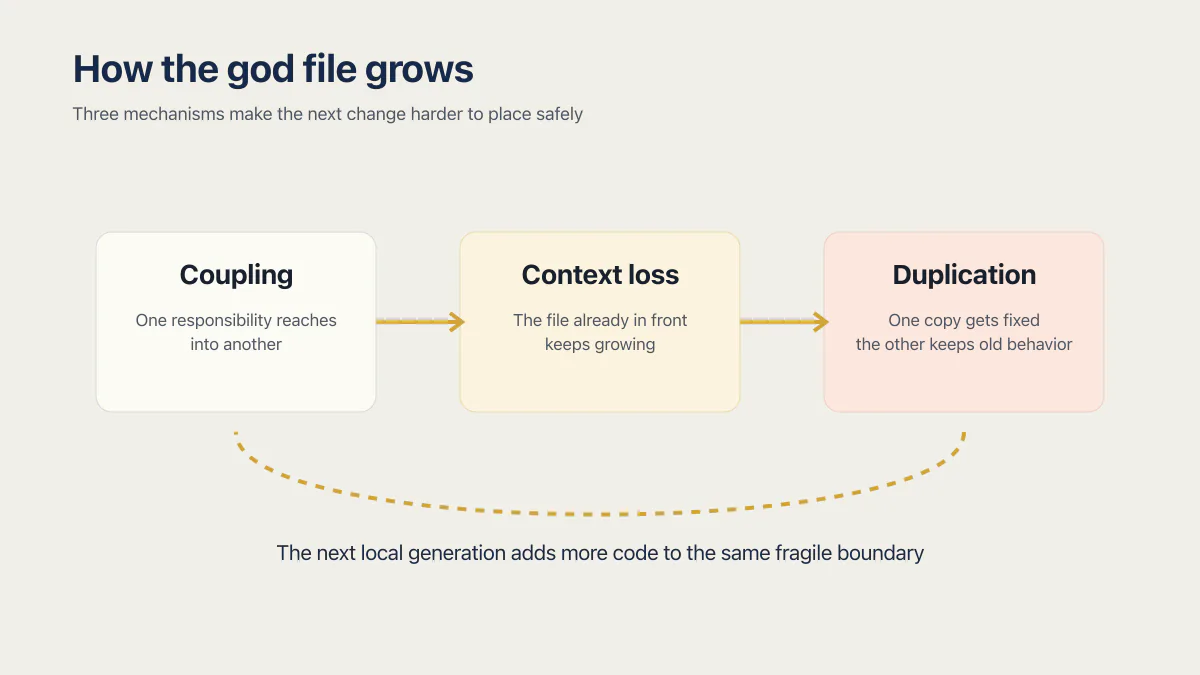
Three mechanisms produce that file, and each one has a normal name:
- Coupling. One responsibility reaches into another inside the same file. Change the fetch logic and you change what renders, with nothing in between to warn you. Tight coupling is why an edit in one corner breaks something you were not looking at.
- Context loss. The assistant only sees what is in its context window. Extending the file already in front of it is cheap; finding the right module somewhere else in the repository is not. So the file in front of it grows, session after session.
- Duplication instead of reuse. Generating a second copy of a rule costs less than locating the shared one. Later, one copy gets fixed and the other keeps the old behavior. That is code duplication, and it is the failure the DRY principle (do not repeat yourself) exists to prevent.
Regular code is understood, then it decays. A lot of AI-built code was never understood by anyone, so it gets harder to change instead of easier.
The doom loop, measured: code churn in AI-built repos
The second sign lives in your git history: fix, revert, try again, revert, all in the same file in the same afternoon. The name for the pattern is code churn: lines revised or reverted soon after they were first committed.
GitClear’s 2025 report analyzed 211 million changed lines from anonymized private repositories and 25 large open-source projects between 2020 and 2024:
| What GitClear measured | 2020 to 2024 |
|---|---|
| Code churn: lines revised within two weeks of being committed | Rose from 3.1% to 5.7% |
| Copy-pasted lines | Rose from 8.3% to 12.3% |
| Moved (reorganized) lines | Fell from 24.1% to 9.5% |
| Duplicated code blocks of five or more lines | Rose about 8-fold during 2024 |
| Overall prevalence of code duplication | About 10x the 2022 level |
The report observed more short-term rework, more copied lines, and fewer moved lines over the period. Moved lines are the fingerprint of code reorganization: someone pulling shared logic into one place. Fewer of them, alongside more duplication, is a codebase being added to rather than reorganized. The report does not isolate AI assistance as the only cause of those changes, so the figures are trend evidence rather than a defect rate for a particular tool. A separate 2026 study of 304,362 verified AI-authored commits found that 24.2% of tracked AI-introduced issues remained in the latest repository version, which supports the narrower point that some AI-introduced issues persist.
What this costs is the part founders skip. Maintenance, rather than the first build, is where most of a system’s money goes: published estimates put the maintenance share of total lifetime software cost anywhere from 60 percent to roughly 90 percent, depending on the system and the study you read. The spread is wide because “maintenance” is defined differently each time. The direction is not in dispute. So a rising churn rate is the largest line item in the app’s life getting more expensive while you watch, whatever the code looks like on the page.
You can read your own gauge in one line:
git log --follow --oneline -- src/components/Dashboard.tsxRun it on the file you avoid changing. Several fixes and reverts in a short window make it a review candidate, although active feature work can also create healthy churn. Read the diffs before treating commit count as debt.
Is AI code actually less maintainable? The studies disagree
Here is the honest state of the evidence, because the headlines only quote whichever half suits them. Three serious sources point in different directions.
| Study | What it looked at | What it found |
|---|---|---|
| GitClear, 2025 | 211 million changed lines, 2020 to 2024, private repos plus 25 large open-source projects | More churn, more copy-paste, sharply less code reorganization |
| Cotroneo, Improta and Liguori, ISSRE 2025 | Over 500,000 Python and Java samples from ChatGPT, DeepSeek-Coder and Qwen-Coder | AI code is simpler and more repetitive, with more unused constructs and hardcoded debugging statements. Human code carries greater structural complexity and a higher concentration of maintainability issues |
| Eltabakh et al., IEEE 2024 | 5,312 samples: 2,700 human-written, 2,612 AI-generated | AI code scored a higher maintainability index and lower cyclomatic complexity, with more comments. Human code adapted better to complex problem statements |
A fourth claim gets passed around social feeds with no paper attached: that there is no significant difference in maintenance cost between AI-assisted and hand-written code. Treat it as a hypothesis rather than a finding.
The contradiction resolves once you notice what each study measures. Per line and per function, AI code is often the tidier artifact: shorter, flatter, better commented, which is exactly what a maintainability index scores. The cost lands on the map of the whole system rather than on any line, which is the one thing nobody generated, and no per-file metric can see it.
That is why your experience and the maintainability index can both be right. Your app is hard to change because forty tidy functions were written by something that never held all forty in mind at once, and neither did you.
Which AI builders make this worse, and why
Not every tool fails the same way. The shape of the mess follows the shape of the generator, and knowing which one you are holding tells you where to look first. These patterns follow from how each generator works rather than from any per-tool measurement: the audit corpus does not record which tool wrote which app, and none of them is a vendor defect.
| Tool | The failure mode it tends to produce |
|---|---|
| Lovable, Bolt, v0 | Screen-at-a-time generation. The whole page (fetching, state, rules, markup) arrives as one file, so the god file is the default output shape rather than a mistake anyone made |
| Base44 | App-level generation where the data model is inferred from prompts. A later prompt can define the same entity a second, slightly different way |
| Replit | Chat-driven regeneration alongside a real editor. Edits made by hand can be overwritten when a later prompt regenerates the same file |
| Cursor, Claude Code | These edit an existing repo instead of regenerating it, so the god file is less automatic. The failure flips to context loss between sessions unless a repository instruction file carries the map forward |
| Any of them plus Supabase | Row Level Security policies written per prompt rather than per data model, so each new table gets its own improvised rule and no two agree |
The common factor is that none of them keep a durable, shared description of what the app is supposed to be. That description is your job, and it is cheap: see the rules file below.
How to measure it in ten minutes
Three commands tell you whether this is a real problem or a bad week. Run all three in the repository root.
1. Find the god file. Sort your source files by length:
find src -type f \( -name '*.ts' -o -name '*.tsx' -o -name '*.js' -o -name '*.jsx' \) -exec wc -l {} \; | sort -rn | head -10What deserves review: a UI component over 500 lines, especially one that also changes often. A file over 1,000 lines is a strong signal rather than proof of a god file. Read it for mixed responsibilities, coupling, and duplicated rules before classifying it.
2. Find the churn. The git log --follow line above reads one file. This reads the whole repo and ranks files by how often they were touched:
git log --since='3 months ago' --name-only --pretty=format: | sed '/^$/d' | sort | uniq -c | sort -rn | head -10What deserves review: a file that appears near the top of both lists, big and constantly edited. Read its recent diffs to distinguish repeated fixes and reverts from healthy feature work. Protect the riskiest confirmed behavior with a test first.
3. Spot-check duplication. Pick one business rule that has changed at least once (the trial length, the discount rule, the tax calculation) and count how many places know about it:
grep -rn "trial" src --include='*.ts' --include='*.tsx'Review the matches and identify independent implementations of the rule. Several matching lines in one implementation are not duplication. If the same business decision is implemented separately in several places, changing it means finding and checking every copy.
Static analysis tools score this more precisely (SonarQube and similar compute duplication and complexity metrics for you), but a founder deciding whether to act does not need a score. Two lists and one grep answer the question.
Why team-sized technical debt advice does not fit a solo builder
Much of the available advice assumes a pull-request process, a merge gate, and another reviewer. Those are sound controls for a team. A solo builder cannot create a second reviewer through a repository setting, so the first useful controls need to work with one person: executable tests, version-control history, and concise instructions that the coding agent reads.
This article focuses on that one-person maintenance loop. Technical debt in AI-generated code owns the broader measurement and pay-down process; the sections below concentrate on keeping the next change observable.
The rules file that maps the fragile areas (AGENTS.md, CLAUDE.md, .cursor/rules)
The smallest durable briefing is a repository instruction file the assistant reads before editing: AGENTS.md for tools that support the shared format, .cursor/rules for Cursor-specific rules, or CLAUDE.md for Claude Code. How AGENTS.md support differs by tool matters because a file the active tool never reads protects nothing.
# Fragile areas -- do not change without a passing test
Auth + sessions:      src/lib/auth/*
Payments + webhooks:  src/lib/payments/*
Tenant isolation:     supabase/migrations/*  (RLS policies)

Rule: never edit the files above without adding or updating
a test that proves the old behavior still holds.
What earns a place in that file:
- The two or three areas where a wrong-but-plausible change costs money or leaks data: auth, payments, data isolation.
- One falsifiable instruction per area (“don’t change this RLS policy without a two-account test”), never “be careful.”
- A pointer to the test that has to stay green when that area is touched.
For this maintenance pass, fragile paths and executable checks deserve priority over style preferences and general be-careful language. A rule earns its keep by being checkable. Ten falsifiable lines are easier to maintain than two hundred aspirational ones.
Two or three tests as behavior pins
A rules file tells the assistant what to avoid; a test makes the avoidance enforceable. Without one, “don’t break auth” is a hope. With one, breaking auth turns a green run red before anything ships.
You do not need a coverage target before writing the first useful regression test. Start with behaviors whose failure changes access, money, or irreplaceable data: signup to a working account, checkout to unlocked access, and one user’s inability to read another user’s rows. The next edit either keeps those behaviors passing or produces a failure you can inspect. Runtime monitoring handles the other half of the problem when an app fails silently behind a 200 OK.
The pins have to run the real flow, though. A retail POS app I audited is why I open every green suite with suspicion: its 818-line test suite passed, but it never executed the sale-creation path (the silent-failures post tells that story in full). Green checkmarks over an untested checkout are worse than no tests at all, because they end the conversation that would have caught the bug.
Rewrite or repair?
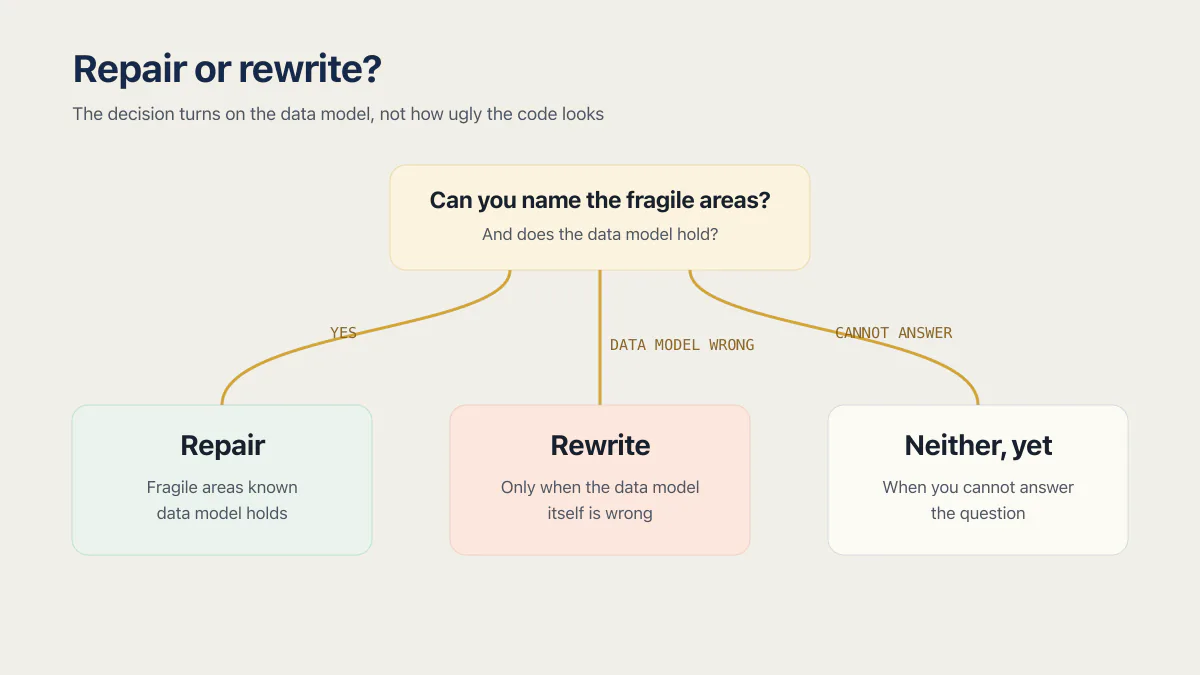
Repair, almost always. The decision comes down to the data model and what it would cost to repair it, rather than how ugly the code is.
- Repair when you can name the fragile areas and the data model holds. Messy code over a sound schema is a repair job you can do one boundary at a time, while the app keeps running.
- Rewrite when the data model itself is wrong and cannot be migrated in place: the same fact stored in three tables, no tenant column, money as a float, or a schema that cannot express what the business now does. Many schema defects can be repaired by a migration while the app keeps running, so weigh what that migration would cost and risk, how much working behavior you would keep, and what a replacement would cost before choosing the rewrite. A wrong schema left in place poisons every rewrite of the code sitting on top of it.
- Neither, yet when you cannot answer the question. A rewrite decided in that state is a coin flip. Spend the ten minutes on the three checks above first.
Rewrites also fail the same way the first build did. The same tools, the same missing map, the same absent tests, and a second codebase to keep alive during the switch. Assume the rewrite carries every habit that produced the first one unless something changed about how you work. The repair-or-rebuild arithmetic is its own decision page.
The takeover test: could a new developer or a different AI pick this up
One question exposes the gap: could a new developer or a different AI assistant open the repository and identify the fragile paths, the relevant tests, and the command that runs them? A short rules file and focused tests make that answer reproducible. A map stored only in one person’s memory does not survive a week away or a change of owner. Handing the whole mess to someone who cleans up vibe-coded apps for a living is the other route, priced separately.
The loop is three steps, in that order. Write the small instruction file, add the first behavior test, and split a large file when a real change gives you a boundary to extract. That discipline helps keep a one-database, no-staging deploy from turning a small edit into an outage. It also addresses one part of whether the app is ready to launch without pretending maintainability settles the rest.
The useful target is modest: make the next risky change report which protected behavior it broke.
Key takeaways
- The mechanism is a missing map rather than bad code. Code arrives faster than anyone builds a model of how the parts depend on each other, through coupling, context loss between sessions, and duplication instead of reuse.
- The number that fits it: GitClear’s 211-million-line dataset shows code reorganization (moved lines) falling from 24.1% to 9.5% while copy-paste rose from 8.3% to 12.3%, trend evidence the report does not attribute to AI assistance alone.
- The loop is three steps: write a short repository instruction file, pin two or three tests to the behaviors whose failure costs money or leaks data, then split one boundary on the next real change.
- The takeover test is the scoreboard. If a new developer or a different AI assistant could open the repo and find the fragile paths, the tests and the command that runs them, you are out of the doom loop.
Common questions about AI code maintainability
Why does my AI generated code break when I change it?
This often happens when locally plausible generations accumulate without a shared map or regression tests. Duplicated logic lets one copy change while another keeps the old behavior. A large component lets distant responsibilities share state. Missing tests leave the first break visible only in the running app.
Do I need full test coverage before adding features?
No. Start with a focused test for each behavior whose failure changes access, money, or irreplaceable data. Add another test when a real change reaches an unprotected fragile area. Coverage can help reveal gaps, but the percentage alone does not prove that the important workflow was exercised.
What is code maintainability in software?
Code maintainability is how easily code can be read, changed, tested and debugged over the life of the app. It is about how confidently someone can make the next change rather than whether the code looks tidy, and how quickly they find out when that change breaks something.
Tools score it with a maintainability index built from things like file length, complexity and comment density. Those scores measure one file at a time, which is why an app can score well on code maintainability per file and still be miserable to change as a whole.
Is AI generated code harder to maintain than human code?
The research does not say yes cleanly. Cotroneo, Improta and Liguori (ISSRE 2025, over 500,000 Python and Java samples) found AI code simpler and more repetitive, while human code carried greater structural complexity and more maintainability issues. An IEEE study by Eltabakh et al. found AI code scored a higher maintainability index than human code.
What rises over the years of AI assistance is duplication and rework across the codebase rather than ugliness within a file. GitClear’s 211-million-line dataset shows copy-paste up and code reorganization (moved lines) down over 2020 to 2024, a trend the report does not attribute to AI alone. The difficulty is system-level, so per-file metrics miss it.
What is the problem with AI-generated code?
The problem is usually the missing map rather than the code on the page: each generated file can be tidy on its own while nobody, human or model, holds a reliable picture of how the parts depend on one another. That is why the trouble shows up at system level rather than in any one function. An edit here breaks something over there, one copy of a duplicated rule gets fixed while the others keep the old behavior, and the first sign of a regression is a customer rather than a failing test.
It also explains why per-file quality scores look fine on apps that are miserable to work in. The cost sits between the files, in the dependencies nobody wrote down, and no per-file metric can see it.
Why does the AI keep breaking things it already fixed?
Two reasons, and neither is the model being careless. The assistant only sees what fits in its context window, so a fix made last week is invisible this week unless it is written down where the tool reads it. And when the same rule was duplicated into several files, fixing one copy leaves the others on the old behavior, which looks exactly like a regression.
A repository instruction file (AGENTS.md, CLAUDE.md, or .cursor/rules) plus a test on the behavior turns both problems into something the tool can check instead of remember.
What should you do if AI generated code does not work as expected?
Stop prompting and get a signal before you change anything else. A second prompt aimed at code that already failed is a guess made without evidence, and it leaves you with two changes to understand instead of one. Reproduce the failure once so you know exactly what stopped working, look at which recent commits touched that file, and return to the last version that behaved correctly rather than deleting the broken one, because the broken version is where the evidence lives.
Then close the loop before the next generation, or you will be here again next week. Write the behavior down as a test, so the same break turns something red next time instead of arriving as a surprise. A falsifiable line in the repository instruction file the assistant reads helps it steer clear of the area, but only the test detects the break.
How do I check the quality of AI generated code?
Run three checks in the repository root. List your largest source files, rank files by how often they changed in the last three months, and search for one business rule. File length and churn identify candidates. Read the file’s responsibilities and recent diffs before calling it debt, and review search matches to count independent implementations rather than matching lines.
A file that is both large and constantly edited deserves an early review. Static analysis tools can add duplication and complexity measures, but the commands only tell you where to inspect. They do not predict the next outage.
How do I know if my AI-built app is too far gone to fix?
Look at the database, not the code. If the schema is sound (one place per fact, tenant IDs where you need them, money stored as integers), then messy code is a repair job you can do one boundary at a time while the app stays live. If the data model itself is wrong, code cleanup alone does not fix it; the next question is whether a migration can repair the schema while the app runs, and what that costs and risks against a rewrite.
Volume of bad code is a weaker signal than people think. A 5,000-line god file over a correct schema is far more recoverable than a clean codebase over a schema that cannot express what the business does.
Should I rewrite my AI-built app from scratch?
Usually not. A rewrite carries every habit that produced the first version, the same tools, the same missing map, the same absent tests, plus the cost of keeping two codebases alive during the switch. Rewrite when the data model is wrong and a migration cannot repair it at a cost and risk you can carry; a wrong schema is the one thing code cleanup alone does not fix.
Does AI generated code create technical debt?
It accelerates a particular kind: duplicated logic and unreviewed code that nobody ever built a mental model of. GitClear’s data shows code reorganization (moved lines) falling from 24.1% to 9.5% between 2020 and 2024 while copy-paste rose, which is a codebase being added to instead of reorganized, though the report does not isolate AI assistance as the cause. The debt is that no one holds the map, whatever the code looks like.
How long does it take to get an AI-built app under control?
Start by writing the short instruction file, adding one executable test on the flow whose failure costs money, and running the three measurement checks. The time depends on repository size, access, testability, developer familiarity, and what those checks expose. The first pass is complete when the instruction file is in use, the named test exercises the real flow, and the measurements have been reviewed. Its value becomes visible when a risky edit is blocked or explained by that evidence; split the large file gradually as real feature work reaches each boundary rather than promising a fixed number of weeks.
Owning an app means being able to run it, change it and recover it without guessing. The sprint below leaves you with the runbooks and documentation to do that.
Built it with AI. Now it has to hold up for real customers.
The Production Hardening Sprint takes the app you already have and builds the production foundation underneath it. Authentication and access rules, payments that stay consistent, error handling, monitoring, backups, automated tests and a documented handover. Our engineers work inside your existing codebase for ten working days. All 123 deliverables are included, and you get the evidence for each one.
See the Production Hardening Sprint →  $2,500 fixed price · 10 working days · One codebase