An AI app security audit becomes worth considering when an unverified failure could expose user data, spend money, or interrupt a workflow people rely on. A prototype with no sensitive data, users, payments, or costly endpoints may be adequately covered by basic scanning and manual checks for now.
- Defer it while the app is a prototype with no users, no money moving, and nothing sensitive in the database. A free scanner plus your platform’s advisor is a fair posture at that stage.
- Buy it once real users, live payments, a metered AI endpoint, or a customer’s security questionnaire is involved and you cannot reproduce the relevant failure tests yourself.
- The evidence: 22 of the 26 AI-built apps in the fixed AxonBuild cohort had at least one confirmed-critical finding. The sample was selected, not random, so read it as a map of the failure classes, not as odds for your app.
The fixed AxonBuild research cohort adds evidence without supplying population odds. Between June and July 2026, AxonBuild reviewed 26 selected apps built with AI tools. “AI tools” here means the builders founders actually ship on: Lovable, Base44, Bolt, Replit, Cursor, Claude Code, and v0, with Supabase behind a large share of them. Twenty-two had at least one confirmed-critical finding, and none reached the historical study’s green band. The sample was not random, so it cannot tell you that 22 of every 26 AI-built apps will have a critical issue.
The same research cohort includes a useful counter-result. In 3 of 21 third-party apps, scanners flagged 33 to 44 known vulnerabilities and verification found none reachable from the application. A good review can reduce a scary report as well as escalate a real path.
Do you need a security audit for your AI-built app?
Outside review is reasonable when something real is at stake and you cannot verify the app’s guarantees yourself: live payments, other people’s data, an AI endpoint that bills per call, or a customer asking security questions you cannot answer. You can usually defer it when the app is an isolated prototype and the consequences of a mistake are contained.
The practical question is whether the checks you can run now cover the consequences your app creates. A dependency scan can find a vulnerable package. It cannot establish that customer A cannot read customer B’s rows, or that a browser cannot claim a payment succeeded. The decision turns on the boundary you need to prove.
A review should cut both ways. It should escalate confirmed, consequential paths and downgrade scanner findings that are not reachable in the application.
What “AI app security audit” means here, and what it means everywhere else
The phrase covers two different jobs. One is governance and security review of an AI system itself: model risks, agent permissions, red-teaming, and frameworks such as the NIST AI Risk Management Framework. The other is application-security review of software that happened to be built with AI assistance.
That first job owns prompt injection, excessive agency, shadow AI, insecure MCP integrations, the OWASP LLM Top 10, MITRE ATLAS, and EU AI Act obligations. Those are real problems with real buyers. None of them are what this page covers.
This post is about the other thing: a security review of an app that AI tools helped build. The enterprise guides won’t tell you whether a stranger can read your users’ rows, and this post won’t help you write an AI governance policy. If the question underneath yours is how to secure a vibe-coded app in the first place, the twelve-pillar ranking is the map this decision sits on top of. If you’ve been bouncing off compliance-flavored search results wondering why none of them mention Supabase, this is why.
What the research changes about the decision
The fixed study supports one buyer-relevant conclusion: a candidate count is not the same as an application-specific verdict. Some consequential paths required connected authorization, payment, or abuse checks, while scanner advisories in other apps became non-issues after reachability tracing.
The cohort’s failure profile is worth one line, because the stereotype predicts a different one. Leaked API keys, the thing every scanner leads with, turned out to be the strongest area: the secrets pillar averaged 84/100 across the 21 third-party apps, the best of twelve, while the worst was reliability at 31/100. And the method has no mercy setting: I ran the same audit on my own 5 production apps, and all five came out red, with scores from 36 to 63. That is exactly what makes its “you’re fine here” worth something.
The security-statistics owner page carries the complete score distribution, denominator ledger, recurring-pattern counts, and study limits. This page uses that research only to decide whether another layer of verification is justified. Why AI coding tools miss these boundaries owns the causal question.
What a scanner proves about your AI-built app, and what it cannot
Scanners are genuinely good at presence-class questions: is a known-vulnerable dependency version in your tree, is a key sitting in your client bundle, is row-level security enabled on this table. If your app is pre-launch, holds nothing sensitive, and nobody’s money moves through it, a free scanner plus your platform’s built-in advisor is a reasonable posture. That’s a real answer, and it’s free.
The free options are worth naming, because “run a scanner” is useless advice without them. npm audit or pnpm audit covers your dependency tree. Semgrep and Snyk both have free tiers for code scanning, Dependabot opens pull requests for vulnerable packages on GitHub, and GitGuardian watches for committed secrets. If you are on Supabase, the Security Advisor in the dashboard flags tables with row-level security switched off, policies written as USING (true), and functions callable without authentication. If you are on Lovable, its Supabase integration runs automated checks on row-level security coverage after a schema change. Run all of that before you pay anyone for anything.
A dependency scanner cannot decide whether every flagged advisory is reachable in your app. That question has an industry name, reachability analysis, and it is the 33-to-44 result from the top of this post: tracing each flagged CVE through the code found zero reachable paths in three apps. In eight other apps, at least one known vulnerability was reachable. The same advisory list can lead to opposite decisions after application-specific verification.
The corpus also contains a music-theory tool with no login, database, or user data. Its pinned framework version exposed a reachable server path covered by a critical advisory. The case page owns the full trace; here it shows why a small data footprint does not settle dependency reachability.
| What a scanner report tells you | What a verified audit tells you |
|---|---|
| 44 known CVEs in your dependency tree | Which of the 44 are reachable from your code (in 3 of the 21 apps I audited, the answer was none) |
| Row-level security is enabled on the table | Whether a second logged-in account can actually read the first one’s rows |
| A severity score per finding (CVSS 9.8) | file:line evidence, plus what this specific finding costs you if someone uses it |
This is the presence-versus-correctness gap applied to the report itself. A scanner matches detectable conditions. Verification asks whether the affected behavior is reachable in this app and what the consequence would be. Raw scanner output is an input to risk assessment.
Can I just have AI audit its own code?
Partly, and it is worth doing because it costs nothing. Ask an AI to review the code and it will surface candidate issues: missing middleware, a key in the client bundle, a vulnerable dependency, a table with no policy behind it. What it cannot do is confirm how the app behaves, because it is reading code rather than running the app. Presence of a policy is not proof of enforcement. For the reading half done properly, the secure code review checklist covers what to look for in an AI-built codebase, in what order, and when reading has to stop.
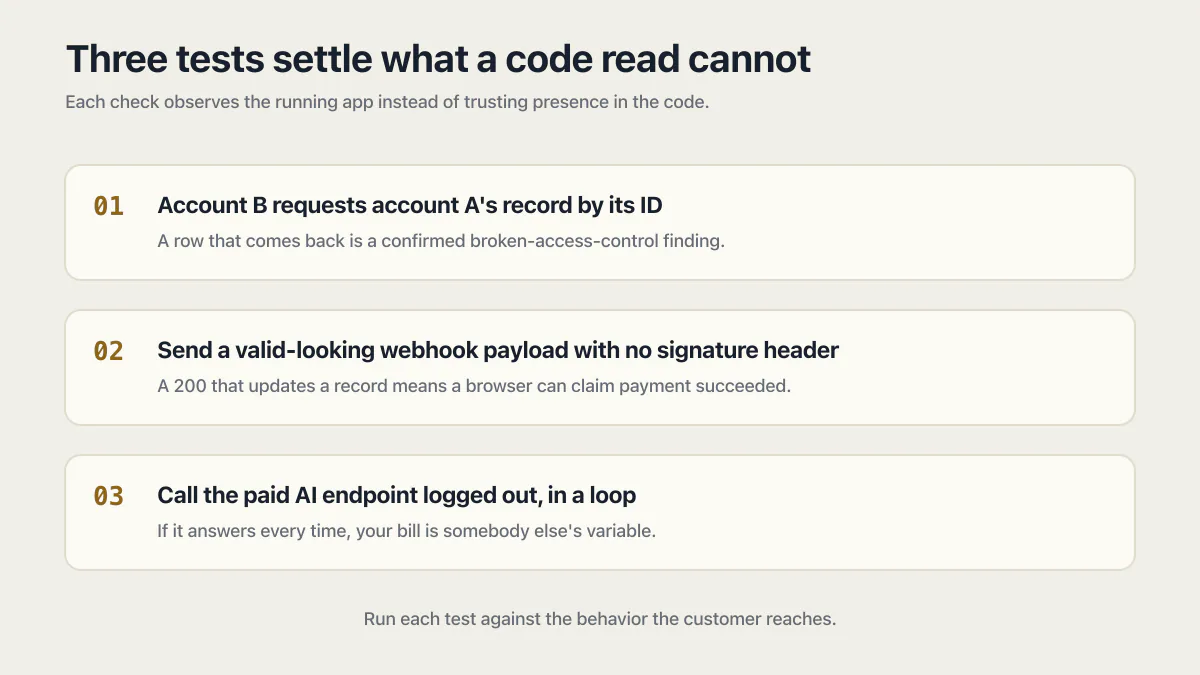
Three tests settle what a read cannot. You can run all three yourself in under an hour.
- 01 Log in as account B and request account A's record by its ID, through the URL and through the API. A row that comes back is a confirmed broken-access-control finding, not a candidate
- 02 Send your webhook endpoint a valid-looking payload with the signature header removed. If it returns 200 and updates a record, a browser can claim a payment succeeded
- 03 Call your paid AI endpoint logged out, in a loop, from a fresh browser. If it answers every time, your bill is somebody else's variable
Use a separate review context from the one that wrote the code, and check each claim against running behavior rather than against the model’s own summary. An assistant grading its own homework tends to agree with itself.
What your builder tool audits for you, and what it leaves to you
Every builder gives you some access control and some visibility. None of them gives you the verdict.
| Tool | What it gives you | What it still leaves to you |
|---|---|---|
| Supabase | Row Level Security, hosted auth, and a Security Advisor that flags tables with RLS off, permissive USING (true) policies, and functions callable without authentication | Writing a correct policy per table, and proving account B cannot read account A’s row |
| Lovable | The Supabase stack underneath, plus automated checks on RLS coverage after a schema change | The same proof, plus whatever the generated code does outside the database |
| Base44 | Built-in auth and SSO, app-level access control, and row-level plus field-level security rules on entities | Confirming the rules match the roles you actually shipped, and that no entity was left open |
| Bolt, Replit, v0 | Generation, preview, and hosting; the guarantees come from the backend you connect or the database the platform provisions | Reading that backend’s rules yourself. A working preview says nothing about who can read a row in production |
| Cursor, Claude Code | Code, in your repository. No runtime and no database of their own | All of it. Whatever your host and database enforce is the whole of your access control |
Auditability is the thinner surface across all of them. Before you promise a customer you can show who accessed a given record and when, check whether your stack records that at all, where those logs live, and how long they are kept. That is usually a table you write and a retention decision you make, not a switch you flip. The page on how you can prevent insufficient logging and monitoring covers which security events to log, where those logs must live, and the alerts that turn them into detection.
Where AI-built apps land on the OWASP Top 10
Most security questionnaires and most auditors index against the OWASP Top 10, so it is worth knowing where these apps actually fail. The current edition is the OWASP Top 10:2025, and the renumbering matters: broken access control is still A01, and software supply chain failures moved up to A03.
| OWASP Top 10:2025 category | What it looks like in an AI-built app | What the cohort showed |
|---|---|---|
| A01 Broken Access Control | A logged-in user opening another customer’s record by changing an ID (IDOR), or a table whose only policy is using (true) | 7 of 21 third-party apps had confirmed cross-customer access |
| A02 Security Misconfiguration | Keys shipped into the client bundle under VITE_ or NEXT_PUBLIC_ prefixes, policies written as USING (true), debug routes left live | The stereotype that turned out least true. The secrets pillar averaged 84/100, the best of the twelve |
| A03 Software Supply Chain Failures | A pinned framework or package version covered by a known advisory | Scanners flagged 33 to 44 advisories in 3 apps with none reachable; 8 other apps had at least one reachable |
| A07 Authentication Failures | A login endpoint with no rate limit, sessions that never expire, tokens parked in localStorage | Not broken out as its own cohort statistic. Check it yourself with test 6 below |
| A08 Software or Data Integrity Failures | A webhook endpoint that accepts an unsigned request and marks an order paid | Not broken out as its own cohort statistic. Check it yourself with test 5 below |
| A09 Security Logging and Alerting Failures | Nothing recorded that would let you reconstruct who read what, or notice that anyone did | The reliability pillar averaged 31/100, the worst of the twelve |
One of the most expensive findings in the cohort has no clean home on that list. Denial of wallet, where a stranger runs up your metered AI bill, is not broken access control and not a misconfiguration in the usual sense. Map only to the Top 10 and you will never go looking for it.
When outside review becomes reasonable
Five signals raise the value of independent review. They describe what is at stake, not proof that the app is unsafe:
- 01 Real users trust the app with their data. In the fixed cohort, 7 of 21 third-party apps had confirmed cross-customer access
- 02 The app has a paid AI endpoint. In that cohort, 12 of 14 eligible third-party apps had a confirmed denial-of-wallet path
- 03 Money moves through the app, including subscriptions, refunds, or usage-based billing
- 04 A customer, investor, insurer, or procurement team needs evidence about the controls
- 05 You are about to launch with one of these consequences and cannot reproduce the relevant failure tests yourself
The number of signals is less important than their consequence. One payment boundary can deserve more scrutiny than five low-risk prototype features. The list helps decide what to verify; it does not diagnose a finding.
A security audit for an AI-built app earns its price when it is bought against one of those consequences, not against a general worry that the code was generated. Name the boundary and the cost of it failing first, then decide who has to prove it.
Denial of wallet: 12 of 14 apps with a paid AI endpoint had a confirmed path
Denial of wallet is the failure where somebody else can make your app spend money. An AI feature that answers without a login, without a rate limit, and without a per-user cap is a metered endpoint a stranger can hold down. In the fixed cohort, 12 of the 14 third-party apps with a paid AI feature had a confirmed route for a non-owner to fire the metered call. It is the cheapest of these failures to test and the easiest to miss, because nothing about it looks like a security bug until the invoice arrives.
Seven checks to run before you pay anyone
Every check below is free, and each one either produces a finding or removes a worry. Run them first, because they change what a paid review is for.
- 01 The two-account test (IDOR). Create two accounts, log in as B, and request A's record by its ID through both the URL and the API. A row that comes back is a confirmed finding
- 02 Row-level security, table by table. RLS enabled on the project is not RLS enforced on a table. In Supabase, open the Security Advisor and confirm every table the browser is meant to read has a policy that names the caller, and that no policy is written as USING (true); a table with RLS on and no policy is closed to the client, which is the right state for a server-only table
- 03 Grep the built bundle for keys. Run your production build and search the output for VITE_ and NEXT_PUBLIC_ values. Those prefixes are public by design, so a service key or provider secret there is already leaked
- 04 Call the paid endpoint logged out, in a loop (denial of wallet). If an anonymous request gets an answer every time, your AI bill has no owner
- 05 Replay a webhook with the signature header removed. A payment or subscription webhook that accepts unsigned requests lets anyone claim a payment succeeded
- 06 Try twenty wrong passwords in a row against one account. No lockout, no delay, and no challenge means credential stuffing runs unmetered
- 07 Run npm audit or pnpm audit plus a free Semgrep or Snyk scan, then mark each finding reachable or not. The list is the input; the reachability call is the work
Write the results down as you go, two lines per check: what you did and what happened. That log is the difference between “I think it’s fine” and evidence you can hand to a customer, an insurer, or whoever you hire next. It also stops you paying someone to rediscover the three things you already fixed.
What an app security audit covers, item by item
Ask any seller to name the areas in writing before you compare prices. Eight of them cover the failure classes this page has been describing, and each one has a form of proof that a finding count cannot fake.
| Area | What the review checks | What counts as proof |
|---|---|---|
| Access between accounts | Every route and table that returns a record, tried from a second logged-in account and from no account at all | The request, the two accounts used, and the row that came back or did not |
| Authentication and sessions | Lockout after repeated failures, session expiry, where tokens are stored, password reset and email change flows | The request sequence that kept a dead session alive, or the reset link that changed the wrong person’s password |
| Secrets and configuration | The production bundle, VITE_ and NEXT_PUBLIC_ values, service keys, debug routes, permissive CORS, default accounts | The file and line where the value ships, plus what that key unlocks |
| Payment and webhook integrity | Whether price, quantity and entitlement are decided on the server, and whether webhooks verify their signature | A replayed request with the signature header removed, and what the record did afterwards |
| Metered and AI endpoints | Authentication, rate limits and per-user caps on anything that bills per call | An anonymous loop against the endpoint and the answers it returned |
| Data exposure and storage | What the API returns beyond what the screen shows, storage bucket rules, backups, and what deletion actually deletes | The response body with the extra fields still in it, or the file fetched with no session |
| Dependencies and reachability | Known advisories in the tree, then whether each one is reachable from your code | The path from your code to the affected function, or a written not-reachable call with the reasoning |
| Logging and auditability | Whether you can reconstruct who read or changed what, where those records live, and how long they are kept | The log line produced by a test action, or the documented absence of one |
Published prices split along that list rather than along quality, and the tool prices below were checked on 17 August 2026. Snyk and Aikido both publish a free tier. Snyk’s Team plan starts at $25 per month per contributing developer. Aikido’s Basic plan is $300 per month for ten users. Pentest-Tools.com sells a free edition with paid plans from $95 per month for five assets on yearly billing. Those tools cover the dependency, secrets and configuration rows automatically. They do not run the account-to-account, payment, or auditability checks. Prices for a human review, a penetration test, or a SOC 2 audit depend on the system, the checks, and the report required.
Two rows are usually missing from cheap work and always present in good work: access between accounts, and logging. Both need somebody to run the app rather than read it, which is why they survive as the honest test of what you bought.
How much does an AI app security audit cost?
There is no single price, because the label covers five different jobs. What you can compare is the band, the turnaround, and what each one actually proves.
| What you buy | What it proves | Typical cost | Typical turnaround |
|---|---|---|---|
| Free scanner plus your platform’s advisor | Presence: known-vulnerable packages, keys in the bundle, tables with row-level security switched off | $0 | Minutes |
| Human application security review | The agreed checks, plus any fixes and retests included in the work | Depends on the app, checks and written output | Depends on the app and the work included |
| Web application penetration test | What a tester can actually do against a running target, in a report a customer will accept | Depends on the target, identities, workflows and allowed actions | Depends on tester availability and the system being tested |
| SOC 2 Type II audit | That your controls operated over a period of time, attested by a CPA firm | Depends on the auditor, organization and report | Depends on the observation period and audit process |
Tool prices were checked 17 August 2026. Ask a tester or auditor for a written price based on your app and the report you need.
Two things follow from the table. A scanner subscription and a penetration test are not competing offers. They answer different questions for different audiences. The tool row is still useful, which is why the seven checks come before any of this.
When compliance, not risk, forces the audit
Sometimes the risk judgment this page teaches is beside the point, because somebody with leverage wants a document. Four common triggers:
- A customer questionnaire or a SOC 2 request. SOC 2 Type II is an attestation from a CPA firm covering how your controls operated over a period. No code review substitutes for it, and no security tool sells you one.
- Personal data of people in the EU. The EU GDPR requires security appropriate to the risk under Article 32, including a process for regularly testing and evaluating the effectiveness of your measures. A dated report of what was tested is exactly that kind of evidence. If personal data has already leaked, the page on a GDPR breach covers what you have to report, to whom, and within how long.
- Health data in scope of HIPAA. If you are a covered entity or a business associate, the Security Rule expects a risk analysis, and your BAA will say who is responsible for what. AxonBuild’s Base44 compliance guide walks that boundary.
- Card data touching your servers. PCI DSS scope expands fast once payment details pass through your code rather than the processor’s hosted page. Stripe’s hosted Checkout keeps most of that scope out of your app.
Say the limit plainly: a code review is not a certification. Having me check the code can give you honest answers about where a specific boundary in the app stands before an auditor arrives. It cannot be the attestation, and anyone selling you a “SOC 2 audit” for a few hundred dollars is selling something else.
What to compare before you buy
The written report is where a real AI code security audit separates from a scan with an invoice, and you can check for everything below before paying anyone. The vibe coding security audit process guide owns the step-by-step verification method and evidence fields; this page owns the decision to seek that work.
Look for evidence tied to the exact behavior: a file and line where applicable, the request that reproduces it, the two accounts used to test isolation, or the package path that makes an advisory reachable. A candidate finding should also carry the check that could disprove it. The final report should separate confirmed consequences, lower-confidence concerns, and scanner noise, then order the confirmed work by business consequence.
Ask for the AI app audit process in writing as well, at the level of which areas get named, how each one is tested, and how a confirmed finding gets ranked against the others. A seller who cannot answer that in a paragraph is selling tool output.
Check the commercial boundary too. A review should state whether implementation is included, who owns the findings, and whether you can take them to another developer. When I check your code after a call, nothing live is changed until you agree a quote, and anything I tell you about the code is yours to take to anyone.
An audit that can’t tell you what you don’t need to fix is a sales letter.
Scan, code audit, penetration test, or certification: which one you are actually being asked for
When someone says “we need a security audit”, they mean one of five things. Naming the right one saves more money than anything else on this page.
| What it is | What it proves | Who accepts it as evidence | Typical cost |
|---|---|---|---|
| Vulnerability scan | A tool matched known conditions: package versions, exposed keys, missing headers | Nobody on its own. It is an input to a decision | $0 to a few hundred |
| Code review or application security audit | A person traced named boundaries in your code and confirmed or disproved each one, with evidence | A technical buyer, an investor’s diligence, your own repair plan | Varies by app, checks and written output |
| Penetration test | What a tester could actually do against a running system under agreed testing boundaries | Enterprise customers, some insurers, some contracts | Varies by target and test conditions |
| Compliance audit or certification (SOC 2, ISO 27001) | That an accredited third party assessed your controls against a published standard | Procurement teams, regulated customers | Varies by organization, standard and report |
| Bug bounty | Ongoing findings from many testers at variable depth and no fixed scope | Nobody, as a point-in-time document | Per finding, ongoing |
Send a scanner PDF to a customer who asked for an audit and you will be asked again. Send a code review to a customer who asked for SOC 2 and you get the same result. Ask which of the five they mean before you price anything, because the rows buy different evidence. If what raised the question is being asked for a penetration test by a customer or auditor, that decision has its own page.
The names are not standardised, so match the words to the rows rather than to the seller. An application security audit, a web application security audit, an app security assessment, a web app security assessment and a mobile app security assessment normally describe row two: a person reads the application and tests named boundaries. A vulnerability assessment, whether it is sold as a web app vulnerability assessment or a mobile app vulnerability assessment, is usually row one with a human write-up on top, so the tool finds candidates and somebody sorts them. An app risk assessment is a different exercise again, closer to naming what a failure would cost the business, and it can be produced without anyone touching the code. A cloud app security audit adds the hosting account and its permissions to whichever of those you bought, and an ai application security audit or an ai apps audit is a marketing phrasing for whichever row applies underneath. The guide to web application security testing services sorts the four kinds of seller behind that label, who reads the code in each, and who fixes what they find.
Two more phrasings are worth pinning down. What a security audit is, in the plain information-security sense, is a comparison of a system against a written standard, which is why the certification row exists and why nothing in rows one to three substitutes for it. And a security audit checklist for a web application is what the seven checks above are, in founder form; the item-by-item list is what a paid one should cover. Job titles drift the same way: an application security auditor or a lead application security auditor at a large firm is usually a compliance role indexed to a standard, while the person tracing a broken-access-control path in an AI-built app is doing engineering under the same words. Ask which one you are hiring. App auditing on its own is not a security phrase at all, and most of what search returns under it is inspection-checklist software for field teams.
How I price this, and what price cannot prove
Audit prices are hard to compare until the included checks, environments, identities, workflows, and written output match. A vulnerability scan, a code review, an application-security assessment, a penetration test, and a regulated certification can all appear under similar labels while buying different work. The code audit service guide compares those labels by included checks, evidence, written output, remediation, and what the price does not prove. That is a change to your code, not a penetration test or a regulated certification.
Judge the written report, not the number. A finding count with no evidence is a tool output, and a severity score with no reachability call can misstate the app’s real priority. Treat an unrequested rebuild pitch as a separate piece of paid work, and require evidence for why repair would be the worse choice.
Common questions before you decide
What does an AI app security audit cost, and what does AxonBuild charge?
There is no useful universal price because the label can cover different work. The named scanners on this page publish free tiers, while a human review, a penetration test and a SOC 2 Type II attestation are priced around the system and report required.
The named tools above publish free and paid plans. Their current plan pages show what each tier includes. Ask which of the eight areas above a human actually tested before you compare a tool report with a human review.
Compare the application count, environments, workflow depth, code access, testing method, the written report, remediation, and whether a penetration test or certification is actually required. The cost table above sets each band against what it proves.
How long does a security audit of an AI-built app take?
It depends on the type. A scanner run takes minutes. A penetration test depends on tester availability, the system and the allowed actions. A SOC 2 Type II takes longer because it observes your controls over a period rather than at one point in time.
What is the difference between a penetration test and a code audit?
A penetration test attacks a running system from the outside and reports what a tester could actually do. A code audit reads the code and traces specific boundaries, so it can prove a whole class of problem is absent or present, including paths no tester happened to try. The practical difference for a founder is who accepts it: enterprise customers and some insurers ask for a penetration test by name, while a code audit is what tells you and your developer what to fix.
Is an AI review of its own code enough?
AI review can surface candidate issues such as missing middleware, exposed credentials, and vulnerable dependencies, and it is worth running because it is free. Contextual boundaries still need reproducible tests: account B attempting to read account A’s row, an unsigned webhook request, or an anonymous loop against a paid endpoint. Use a separate review context from the one that wrote the code and verify each result against running behavior. The section above lists the three tests in full.
Can the same team that audits my app also fix it?
Yes, and it is often the fastest route, but keep the two as separate agreements so the incentive stays visible. A reviewer who is paid per fix has a reason to find more fixes, so ask for the evidence per finding and confirm you can take the findings to another developer. AxonBuild is paid for the change to the app rather than for a report.
Do I need a security audit to raise funding or pass due diligence?
Rarely at pre-seed and seed, where investors ask about data handling rather than asking for a report. It becomes real when you sell to companies: a security questionnaire, a SOC 2 request, or an insurer’s application will ask what you have tested and when. A dated report with evidence per finding answers most of those questions honestly, and a SOC 2 Type II attestation is a separate, longer, more expensive project.
Do Lovable, Base44, Bolt, Replit, Cursor and Claude Code apps have the same problems?
Broadly yes, because the failures live in the backend, not the builder. Access control, metered endpoints, webhook signatures, and dependency reachability behave the same whether the code came from Lovable, Base44, Bolt, Replit, Cursor, Claude Code, or v0. What differs is what the platform hands you: Supabase-backed tools give you row-level security and an advisor to check it, while Cursor and Claude Code have no runtime at all, so every guarantee comes from the stack you chose.
Can an AI-built app pass a SOC 2 audit?
Yes. SOC 2 assesses your controls and how they operated over a period, not who or what wrote the code. What usually blocks a first attempt is the absence of evidence: no access logs, no documented change process, no record of who can reach production data. Fix those before booking the audit, and treat a code review as preparation for it rather than a substitute.
Should I get the audit before or after launch?
Before launch gives you time to repair a confirmed issue before users depend on the affected path. After launch, review the highest-consequence live boundaries first and use normal incident handling if you already have evidence of compromise. A scheduled review should not delay containment.
Should I get a code review before I scale the app?
Yes, if scaling means more users, more money, or more data crossing a boundary nobody has verified. Growth does not create these failures, it changes what each one costs: cross-customer access with 20 users is an apology, and the same finding with 2,000 is a disclosure. Run the seven checks first because they answer the cheap version of the question for free, then bring someone in for whichever boundary you still cannot prove yourself. The other common outcome is that the boundaries hold and the load path is the real problem, which is a different piece of work with a different test.
What if the audit finds nothing serious?
Then the review still did its job if the tested boundaries and limitations are documented. Four apps in the fixed cohort had no confirmed critical. That historical result does not guarantee the same outcome for another app, but it shows the method could return a non-critical verdict.
Where to start
Start by naming the boundary you cannot verify and the consequence if it fails. If the seven checks above can answer it, run those first and write down what happened. If the app now carries user data, money, costly endpoints, or a workflow the business relies on and those boundaries remain unverified after you have run them, outside review has a clear job.
Fixing the bug in this guide gets you past today. If you would rather have the whole foundation checked and built in one go, that is what the sprint below is for.
Built it with AI. Now it has to hold up for real customers.
The Production Hardening Sprint takes the app you already have and builds the production foundation underneath it. Authentication and access rules, payments that stay consistent, error handling, monitoring, backups, automated tests and a documented handover. Our engineers work inside your existing codebase for ten working days. All 123 deliverables are included, and you get the evidence for each one.
See the Production Hardening Sprint →  $2,500 fixed price · 10 working days · One codebase