Kiro Pro and Cursor Pro both cost $20 a month, and most of what ranks for this comparison stops at that number and calls it even. The two ladders count different things. Kiro’s $20 buys 1,000 credits, and a credit is a floating unit of agent work whose size moves with the model and with the job. Cursor’s $20 buys an allowance stated in dollars, the same currency as the invoice. The second question underneath is what a session leaves on disk for the next person, and they answer that differently too.
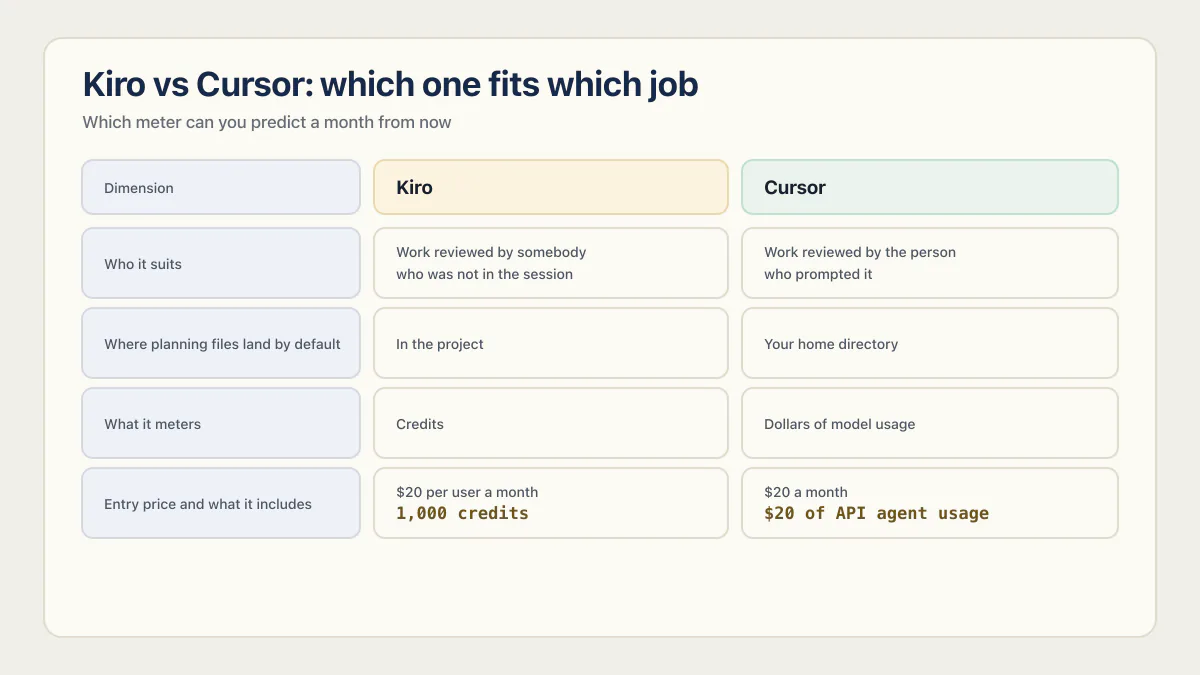
Kiro fits work that somebody else has to read later, and Cursor fits work you review yourself as a diff in the file you already had open. Both entry plans cost $20 a month, checked 17 August 2026, but Kiro meters credits whose size floats and Cursor meters a dollar allowance.
Nothing here comes from a paid seat on either product. Prices, file paths and quoted sentences below were taken from Kiro’s and Cursor’s own pages and Anthropic’s Claude Code documentation on 17 August 2026, with no timed run or token count behind any of it.
Kiro vs Cursor: which one fits which job
Kiro suits a team where a plan has to survive the person who wrote it, because its requirements, design and tasks files are ordinary repository objects. Cursor suits a developer who reviews by reading a diff. Both start at $20 a month, checked 17 August 2026, and the meters underneath are not comparable.
| Dimension | Kiro | Cursor |
|---|---|---|
| What it meters | Credits, defined on Kiro’s pricing page as a unit of work in response to a prompt, with the size of that unit varying | Dollars of model usage, stated per plan on Cursor’s usage and limits page |
| Entry price and what it includes | $20 per user a month for 1,000 credits, extra credits $0.04 each | $20 a month for “$20 of API agent usage + generous First-party models pool usage” |
| Where planning files land by default | In the project: requirements.md (or bugfix.md), design.md and tasks.md, per Kiro’s spec docs | Your home directory, per Cursor’s planning docs; “Save to workspace” is the button that files a plan into the project instead |
| Standing-rules file | Steering files in .kiro/steering/, or ~/.kiro/steering/ for every project, per the steering docs | .cursor/rules as version-controlled .mdc files, or AGENTS.md, per Cursor’s rules docs |
| Model lineup | Auto plus models from OpenAI, Anthropic, MiniMax, Zhipu AI, DeepSeek, and Qwen, with availability varying by plan and region, per Kiro’s model docs re-read 17 August 2026 | OpenAI, Anthropic, Google and others, per Cursor’s model docs |
| Who it suits | Work reviewed by somebody who was not in the session | Work reviewed by the person who prompted it |
Prices checked 17 August 2026. Neither vendor stamps an effective date on its pricing page, so that date is ours.
The tradeoff is how much writing you are willing to pay for before any code exists. Kiro asks you to approve a requirements document, then a design, then a task list, and every one of those rounds is billable agent work. On a one-line fix that is money spent on paperwork nobody will read. On a feature three people have to review next month, it is the only part of the session that outlives it. Cursor forces none of it, so nothing gets written unless you ask.
Two disqualifiers. Do not pick Kiro if most of your work is small edits to code you already understand, because you will pay credits to generate documents you delete. Do not pick Cursor if you are shopping because nobody can reconstruct why a change was made, since Cursor will let you keep working the way that produced it.
What each one actually bills you
Kiro Pro is $20 for 1,000 credits and sells extra credits at $0.04 each, which puts a $40 list value on the included allowance. Cursor Pro is $20 for an allowance the vendor states as “$20 of API agent usage”. Kiro’s looks like the better deal until you notice that the size of a credit is not fixed.
Kiro publishes the definition on the same page as the prices:
“A credit is a unit of work in response to user prompts. Simple prompts can consume less than 1 credit. More complex prompts, such as executing a spec task, typically cost more than 1 credit.”
Two sentences in, the unit has stopped being a unit. It moves with the model too: the same page gives the example of a task consuming X credits in Auto costing 1.3X credits through Sonnet 4.6, so a 30 percent swing in the bill comes from a dropdown. And the workflow Kiro is sold on draws on the same balance:
“Any prompt you ask Kiro to execute, whether in vibe mode or spec mode, as well as spec refinement, task execution, and agent hook execution, will consume credits.”
The structure Kiro is sold on is the part of Kiro you are metered on.
Cursor keeps one unit all the way up its ladder: $20 a month carries “$20 of API agent usage”, $60 a month carries $70 of it, and $200 a month carries $400. Once the included amount is gone, its usage and limits page says a notification appears in the editor and you can switch on pay-as-you-go billing or move up a plan. Team pricing is a separate ladder starting at “$40 / user / mo.” on Cursor’s pricing.
So the conversion runs like this. On Cursor Pro, $20 buys $20 of metered work, and one month of watching tells you how far that goes. On Kiro Pro, the number that decides your cost is what a credit buys, and that floats. The same doubling holds at the top, where $200 buys 10,000 credits, so the uncertainty scales with the plan instead of washing out.
Nobody ranking for this query does that conversion. The comparisons in the top ten print two ladders side by side, never reconcile the units, and close on workflow preference. Currency is patchy too: New Math Data’s page at newmathdata.com/blog/kiro-vs-cursor-ai-ide-comparison-pros-cons/ is dated 16 August 2025 and prints no prices at all, and Augment Code’s at augmentcode.com/tools/kiro-vs-cursor, published 14 March 2026 and updated 24 July 2026, claims testing on production repositories yet covers no data handling, retention, training or export. Neither is linked here: New Math Data sells build services, Augment Code sells a competing tool.
Build This Now says the quiet part out loud. Its Claude Code vs Kiro comparison, published 21 June 2026 and updated 30 June 2026, puts it this way: “…the real choice is workflow shape, not price.” Half right. Workflow shape is the choice, and on Kiro the workflow shape is what the meter counts, so the two are one decision wearing different clothes.
The honest limit: these are published rates, not measured costs. No task was run on either tool here, so nothing on this page says how many credits your next feature takes. Cursor’s meter answers that in dollars after a month of normal use. Kiro’s answers in credits over the same month, and the published overage rate turns the credits into dollars; the extra step is the conversion, and on both tools the number depends on the model and the task.
What each one leaves behind for the next person
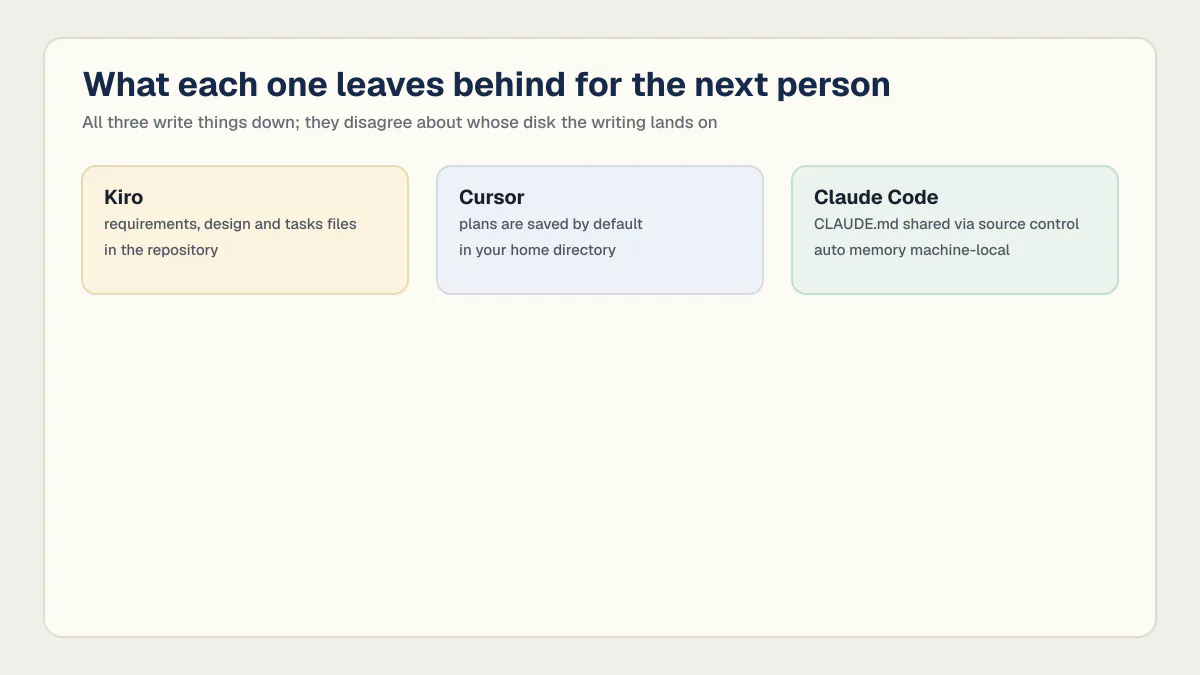
Kiro writes its planning files into the project. Cursor saves plans to your home directory by default and its standing rules to a version-controlled directory. Claude Code splits the difference, sharing its instructions file and keeping its own notes local. All three vendors’ documentation was checked on 17 August 2026.
| What it is | Kiro | Cursor | Claude Code |
|---|---|---|---|
| Planning files | requirements.md (or bugfix.md), design.md and tasks.md, from a three-phase workflow. The docs name the files, not a containing directory | Plans “saved by default in your home directory”, and a button labelled “Save to workspace” is what relocates one into the project | None documented on the memory page |
| Standing instructions | Steering files in .kiro/steering/ or ~/.kiro/steering/ | .cursor/rules as version-controlled .mdc files, or AGENTS.md | ./CLAUDE.md or ./.claude/CLAUDE.md, shared with team members via source control |
| Machine-only notes | None documented | None documented | Auto memory at ~/.claude/projects/<project>/memory/ |
| Reaches a teammate through git | Yes, by default | Rules yes, plans only if you move them | CLAUDE.md yes, auto memory no |
| Source, read 17 August 2026 | Kiro spec and steering docs | Cursor planning and rules docs | Anthropic’s memory docs |
The stock sentence on this SERP, that Kiro writes the plan down while Cursor keeps it in the chat window, no longer matches Cursor’s documentation. Cursor writes plans too; it files them where nobody else can see them, and the “Save to workspace” button is the whole distance between a private note and a repository object. Anthropic documents both halves of the same split: project instructions reach team members through source control, while of auto memory the docs say “Auto memory is machine-local.” All three write things down; they disagree about whose disk the writing lands on. The contents of Kiro’s three files, what its hooks and steering files do with them, and the whole credit ladder are worked through at length in the full Kiro IDE review. Where a file lands says nothing about what a useful spec actually contains, which comes down to writing the behaviours, the fragile areas and what has to be true when the work is finished.
Kiro vs Claude Code
Kiro and Claude Code are metered on different clocks, so comparing their subscription prices produces a number that means nothing. Kiro counts credits per unit of agent work, and Claude Code counts usage against session windows. On the file side, Kiro puts the plan in the repository and Claude Code puts the instructions there while keeping its own notes local.
That is also the answer to kiro vs claude code pricing, or claude code pricing vs kiro: people type those wanting the two subscription figures lined up, and lining them up settles nothing. You would have to know how many credits your work consumes and how often you hit a window, and neither number is on either vendor’s price page. The Claude Code plan names, window figures and per-token rates stay off this page deliberately. How Claude Code and Cursor compare on price and limits is its own two-way comparison with its own dated ladder.
The file difference is easier to act on. Kiro’s requirements, design and tasks files arrive in the project by default, so a reviewer who was not in the session can read the reasoning by checking out the branch. Claude Code’s CLAUDE.md reaches teammates the same way, but the notes Claude writes for itself live under your home directory and, in Anthropic’s own words, are machine-local. One tool leaves a shared record of what was decided; the other leaves a shared record of the rules and a private one of what it learned.
Pick Kiro if what you keep losing is the reasoning behind a change. Pick Claude Code if what you keep losing is time.
Kiro vs GitHub Copilot
For teams that already have a GitHub Copilot plan, the useful question is whether Kiro’s structure is worth a second subscription. The exception is narrow enough to name.
Copilot can suggest code inside an IDE. It can also review a pull request on GitHub. Those are separate surfaces, so not every output arrives as a pull-request review. Kiro is a separate editor with a separate meter that writes planning files into the repository before implementation starts. If changes keep arriving with no written statement of what they were meant to do, Kiro addresses that and Copilot does not. If the problem is throughput, a second editor and a second bill will not help. One note on the name: the other products carrying the Copilot brand are unrelated to the coding assistant, and results for the bare word mix them together.
What neither one decides
Neither tool decides whether the app works. Across the 21 third-party AI-built apps in AxonBuild’s audit corpus, reviewed in June and July 2026 with automated analysis and human-verified findings, a 29.7-point spread separates the pillar Kiro and Cursor compete on from the pillar that scored worst: Maintainability and Evolvability at an average of 61.1 out of 100, Reliability and Correctness at 31.4, last of the twelve areas scored.
Read those two numbers next to the comparison above. Maintainability is the area a readable plan, a tidy rules file and a clear task list genuinely improve, and it was already the third strongest of the twelve. Reliability, which asks whether the app catches its own mistakes and whether anything notices when it does not, was the weakest of the twelve. Kiro and Cursor compete hard over the part that was mostly fine, and neither vendor claims to fix the part that was not. A design document is not a test that runs, and a task list marked complete is not an error recorded where a human will see it.
Data handling gets one dated row here rather than a section. Kiro’s data protection documentation, read 17 August 2026, states that content from Kiro Free Tier users and Kiro individual subscribers may be used for service improvement, that content from enterprise users is not, and that Free Tier users can turn the collection off in the telemetry settings. Cursor’s data use page, read the same day, presents Privacy Mode as a setting rather than a plan tier: with it on, customer data is not used for training and Cursor says it holds zero data retention agreements with its providers; with it off, code and prompts may be stored and used to train its models. Cursor’s Privacy Mode and what it covers runs further than one row, into retention terms and a published record of past vulnerabilities.
So the decision comes down to two checkable questions. Which meter can you predict a month from now, and which set of files will the next person on your team be able to open.
Common questions about Kiro and Cursor
Is Kiro AI better than Cursor?
Neither is better in general. Kiro wins when the plan behind a change has to be readable by somebody who was not in the session, since its requirements, design and tasks files go into the repository. Cursor wins when you are the reviewer, since it puts the diff in the file you already had open and charges no credits for skipping the paperwork.
Is Kiro better than Copilot?
GitHub Copilot is better for most teams that already have it, because it is already paid for and already inside the pull request. Kiro is better when changes keep arriving with no written statement of intent, since it writes requirements, design and task files into the project before implementation. Adding Kiro means a second subscription and a second editor, so the structure has to earn that.
Is Kiro more expensive than Cursor?
At the entry tier both are $20 a month, checked 17 August 2026, so the list prices match. Kiro Pro includes 1,000 credits and sells extra at $0.04, but a credit is a variable unit and Kiro’s pricing page says a complex prompt such as executing a spec task typically consumes more than one. Cursor Pro includes “$20 of API agent usage”, in the currency of the bill, which makes it the easier of the two to predict.
Can you use Kiro and Cursor on the same project?
Yes. Nothing in either vendor’s documentation stands in the way, since both work on an ordinary checkout of your repository. The cost is two meters and two sets of standing instructions, Kiro’s steering files and Cursor’s .cursor/rules, which drift apart the first week nobody updates both.
Does Kiro use the same models as Cursor?
Not exactly. Both products offer models from OpenAI and Anthropic. Kiro’s model documentation, re-read 17 August 2026, also lists MiniMax, Zhipu AI, DeepSeek, and Qwen, with access varying by plan and region. Cursor documents Google and other choices too, so compare the models available on your plan instead of treating either picker as single-vendor.
Which one is better for a team where one person is not a developer?
Kiro, for one narrow reason: its requirements and design files are plain markdown a non-developer can read and comment on before any code exists, and they land in the repository rather than in a chat history. The catch is that reading a design document says nothing about whether the finished app works.
Does Cursor have a spec workflow like Kiro’s?
No. Cursor has plan mode, which produces an implementation plan you can edit, and its planning documentation states that plans are saved by default in your home directory, and that “Save to workspace” is the action that puts a plan in the repository. A plan describes how the work will be done. Kiro’s three-phase workflow separately asks what must be true once it is finished, and that second half is what plan mode does not cover.
Does either tool make the app production ready?
No, and neither vendor claims it. Across the 21 third-party AI-built apps in AxonBuild’s audit corpus, reviewed in June and July 2026, Reliability and Correctness averaged 31.4 out of 100 and ranked last of twelve areas, while Maintainability and Evolvability averaged 61.1. Both tools compete on the second number. Readiness comes from tests that run, errors that get recorded, and access rules that hold when a signed-in stranger goes looking.
If you have a working app built with these tools and need it ready for real customers, this is what we do.
Built it with AI. Now it has to hold up for real customers.
The Production Hardening Sprint takes the app you already have and builds the production foundation underneath it. Authentication and access rules, payments that stay consistent, error handling, monitoring, backups, automated tests and a documented handover. Our engineers work inside your existing codebase for ten working days. All 123 deliverables are included, and you get the evidence for each one.
See the Production Hardening Sprint →  $2,500 fixed price · 10 working days · One codebase