A .env file is a plain text list of KEY=value lines in your project root, which loaders like dotenv, Vite and Next.js read into your app. A local .env reaches no host: builds and servers read the hosting dashboard. A value set in only one place is the usual reason an app works locally and fails in production.
An environment variable is a named string supplied to a process or build outside the application source. A .env file is one way local tooling can supply that value. A hosting dashboard is another. Neither location automatically synchronizes with the other, and neither makes a value secret after a framework bundles it into browser code.
The practical answer to “where should I set this variable?” depends on four facts: which framework reads it, whether browser or server code uses it, whether it is evaluated during the build or while the app runs, and which deployment scope needs the value.
What an environment variable actually is
At the operating-system level, a process receives key-value strings such as DATABASE_URL or NODE_ENV, two everyday examples of environment variables (env vars, for short). In Node.js, server code commonly reads them through process.env. Node’s environment-variable documentation also defines a .env text format, but a file sitting in a project does not populate every runtime by itself. Node needs its --env-file option or programmatic API; frameworks and packages can load files under their own rules.
Values arrive as strings. FEATURE_ENABLED=false is the string "false", which is truthy in JavaScript unless the application parses it. The same applies to numbers, JSON, URLs, and comma-separated lists.
const raw = process.env.FEATURE_ENABLED;
const featureEnabled = raw === 'true';
An unset name normally reads as undefined. A present but empty value reads as an empty string. Validation should distinguish those states when an empty string is invalid.
dotenv and the other loaders
A .env file does nothing on its own. Something has to read it and push the values into the process. That something is a loader, and which one you have depends on your stack.
- dotenv is the historical default in Node. You call
require('dotenv').config()orimport 'dotenv/config'near the top of your entry file, and it loads variables from a.envfile intoprocess.env. - dotenv-expand adds
${VAR}expansion on top of dotenv, soDATABASE_URL="postgres://${USERNAME}@localhost/my_database"resolves. Plain dotenv leaves that text alone. - cross-env sets a variable inline in an npm script on any platform. It exists because most Windows command prompts choke on the
NODE_ENV=production npm run buildform. Its repository was archived on November 19, 2025, and is now read-only. - Node itself has
--env-filebuilt in since v20.6.0, and--env-file-if-existssince v22.9.0. No package needed. - Bun reads
.env, then.env.productionor.env.developmentor.env.test, then.env.localwith no configuration. Deno does not: it needs--env-fileor the standard library’s dotenv module. - python-dotenv makes
.envfiles work the same way in Python: runpip install python-dotenv, then callload_dotenv()fromfrom dotenv import load_dotenvnear the top of the entry file, and Python code reads the environment variables throughos.environoros.getenv. By defaultload_dotenv()looks in the script’s own folder and then higher up the directory tree, so a Python script in a subfolder can load a.envfrom a parent directory, and it leaves variables that are already set alone unless you passoverride=True. Those two lines are the load_dotenv example in the python-dotenv documentation. - Docker Compose reads
.envfiles for containers: anenv_file:entry passes a file’s lines into a container’s environment, a.envbesidecompose.yamlfills${VAR}references in the Compose file itself, anddocker compose --env-file ./config/.env.dev uppoints Compose at a different file. Docker’s docs on environment variables in Compose cover which source wins when several set the same name. - Vite, Next.js, and Astro load
.envfiles themselves during dev and build. Do not stack dotenv on top of them.
The point that saves you an afternoon: a loader only runs where you call it. A .env file that stays on your machine changes nothing inside a browser bundle and nothing on a host, because neither one runs your loader against it. A hosted build does run its loader, so a .env file you commit or upload to the host is read there like any other input, which is why only browser-safe values belong in one.
What a .env file is and what goes in it
A .env file is a plain text file in your project root, one KEY=value pair per line. The name is only an extension, with nothing before the dot, which is why it is hidden by default on macOS and Linux. env is short for environment. The operating system knows nothing about this file: it is a convention that loaders agree to look for.
Here is a real one.
# Server-side only. Never give these a public prefix.
DATABASE_URL=postgres://user:pass@localhost:5432/app
SUPABASE_SERVICE_ROLE_KEY=eyJhbGciOiJIUzI1NiIsInR5cCI6...

# Safe in the browser. The VITE_ prefix says so out loud.
VITE_API_URL=https://api.example.com
VITE_SUPABASE_ANON_KEY=eyJhbGciOiJIUzI1NiIsInR5cCI6...

APP_NAME="Acme Launch Console"
SENTRY_DSN=
That is what a .env file means in practice, and what most .env files look like: a short list like this example, where most lines are API keys and connection strings. Each key line holds an API key, a string that lets whoever holds it call a service as you. Which of those values are secrets, and where each belongs once the app is live, is the subject of secrets management best practices.
.env file format and syntax rules
A .env file’s format is one KEY=value pair per line, and 8 rules decide how a loader reads each line: spacing around the equals sign, comments, quotes, ${VAR} expansion, empty values, a leading export, multiline values and a repeated key. Loaders differ on several of them, so check the one your app uses.
KEY=valueis the portable convention. Node ignores spaces around the equals sign, but other loaders can behave differently, so check the loader your app uses.#starts a comment. A#inside an unquoted value can be read as the start of one, so quote values that contain it.- Quote a value that holds spaces or a line break.
APP_NAME="Acme Launch Console"gets quotes. A URL does not need them. ${VAR}expansion is loader-specific, not universal. Plain dotenv does not expand it, dotenv-expand does, and hosts generally do not.SENTRY_DSN=is not the same as leaving the line out. It sets an empty string, which is why validation should reject empty values and not only missing ones.- A leading
exportis not needed by most loaders, although several tolerate it. - Multiline values work inside quotes in dotenv and in Node’s
--env-file: a quoted value can span several lines, and dotenv also turns\ninside double quotes into a line break; Node’s docs show\nas a line break in one quoted example but state no rule for it. - A repeated key is best avoided, because neither dotenv’s README nor Node’s docs say which line wins inside one file. Across files the two differ: dotenv keeps the first value unless
overrideis set, while Node lets a later--env-fileoverride an earlier one.
The usual env file name is .env, or a name that starts with it such as .env.production, and Node’s docs call that naming a recommendation, not a requirement. The env file extension and the env file type do not change between Python, Java, JavaScript and TypeScript projects: the whole name is .env, with no name before the dot and no extension after it, and the type is plain text. A .env file is not a .txt file, though any text editor opens it, and some tools call it an environment file. Node’s docs say the dotenv file format has no formal specification, so Node defines its own, and python-dotenv’s README says its files should mostly look like Bash files. The example above follows that env file format, so it works as an env file example for Python too: python-dotenv reads the same KEY=value lines, comments and quotes.
.env.example and naming rules
Commit a .env.example that lists every key with no values. It is the onboarding contract: a new machine, a new teammate, or a coding agent copies it to .env and fills it in, and a missing key becomes obvious at setup instead of a crash three screens into the app.
That is the working difference between .env and .env.example when someone joins: never send the .env file or its values in chat or email; the teammate gets .env.example from the repository and the values through a password manager or the host’s own variable store.
- Use
UPPER_SNAKE_CASEas a portable convention. It is not a universal loader requirement. - Avoid leading digits and dashes. Some loaders reject those names and some shells cannot export them.
- Treat
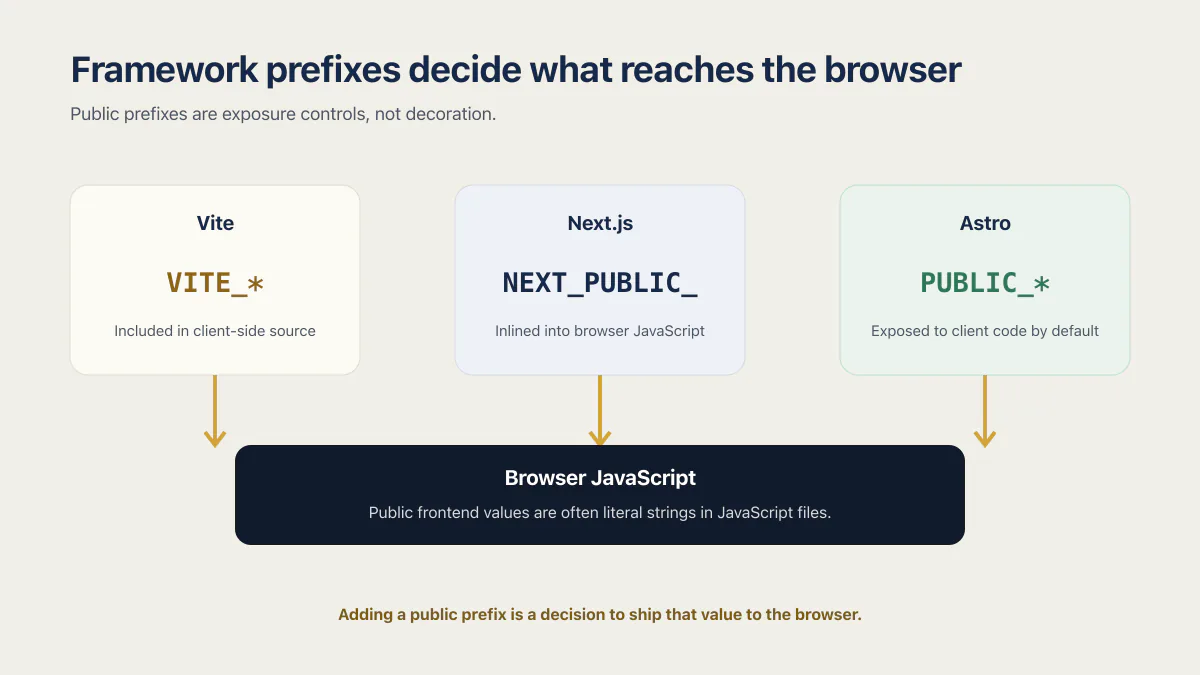
VITE_,NEXT_PUBLIC_, andPUBLIC_as public markers, not naming style. Adding one is a decision to ship that value to the browser. - Keep the same names in local, preview, and production. Renaming per environment is how a preview deployment ends up reading nothing.
.env.local, .env.development and the other .env files
.env.local is the local-only override: Next.js checks it before .env except in test runs, and Vite and Next.js both keep files ending in .local out of git. Mode files such as .env.development and .env.production load only in their own mode.
| File | Loaded when | Beats | Commit it? |
|---|---|---|---|
.env | Every mode, in Vite and in Next.js | Nothing in Next.js, which checks it last; in Vite the mode files rank above it | Only if it holds no secret. Next.js’s create-next-app template ignores every .env file; Lovable projects are the documented exception and must commit it for VITE_* values |
.env.local | Every mode in Vite; every mode except test in Next.js | .env in Next.js; its rank against .env is not stated in Vite’s docs | No: Vite marks it ignored by git, and Next.js expects .env*.local files in .gitignore |
.env.development, .env.production | Their mode only. Vite runs the dev server in development and vite build in production unless --mode names another; Next.js follows NODE_ENV, and if it is unassigned uses development for next dev and production for every other command | .env in both, and .env.local in Vite; in Next.js, .env.local beats them | Not stated in Vite’s docs; Next.js’s template ignores them with every other .env file |
.env.development.local, .env.production.local | Their mode only, on your machine | Every other file in Next.js; in Vite they beat the generic files, and their rank against .env.[mode] is not stated in Vite’s docs | No, in both |
A variable already set in the shell or by the host beats every one of these files: that is the precedence rule in the section on setting one by hand, below.
Where the .env file lives, and how to open it
The .env file lives in your project root, next to package.json in a JavaScript project, because that is where dotenv, Vite and Next.js look by default when the app starts there. Its name starts with a dot, so macOS and Linux hide it: ls -a lists it, and any code editor opens it as plain text.
Put the .env file in the folder where the process that reads it starts, and store it only on the machines that run the app, with .gitignore keeping it out of commits.
| Setup | Where the file goes |
|---|---|
| A single JavaScript app | The project root, next to package.json. Vite reads the folder its envDir option names, the project root by default, and Next.js says .env* files should stay in the root even when the code sits in /src. |
A monorepo, or an app with a separate server/ folder | The folder where that process starts, which is why a server/.env exists. dotenv reads .env from the current working directory and Node’s --env-file path is relative to it, so a process started from another folder finds the file only when you pass its path. |
| A Python script | Beside the script or in a folder above it: load_dotenv() looks in the script’s folder, then higher up the directory tree. |
| Docker Compose | Beside compose.yaml for ${VAR} interpolation; an env_file: path is relative to compose.yaml, and --env-file points at a file somewhere else. |
| A hosted app | No file at all: the host’s dashboard holds the values, as the scopes sections below describe. |
To open or view an env file in a terminal, ls -a lists it on macOS and Linux and cat .env prints it. A .env file on Windows is the same plain text file; in PowerShell, Get-ChildItem -Force lists a folder with its hidden items. To edit a .env file, use the same editor you write the code in. If you still cannot find your .env file, the project may ship only .env.example, which you copy to .env first. Printing the file puts every value on screen, so never do it during a screen share, a recording or a support chat.
Set one by hand on macOS, Linux, and Windows
You do not need a file. Every shell can set an env variable directly, and this is what the host is doing for you under the dashboard.
| Shell | Set it | Read it back |
|---|---|---|
| bash or zsh (macOS, Linux) | export API_KEY=value | echo $API_KEY |
| Windows Command Prompt | set API_KEY=value | echo %API_KEY% |
| Windows Command Prompt, persistent | setx API_KEY value | echo %API_KEY% in a new window |
| PowerShell | $Env:API_KEY = "value" | $Env:API_KEY |
And how long each one lasts:
| Shell | How long it lasts |
|---|---|
| bash or zsh (macOS, Linux) | The current shell and anything it starts. Add the line to ~/.zshrc or ~/.bashrc to get it in every new shell. |
| Windows Command Prompt | The current console window only. |
| Windows Command Prompt, persistent | Written to the registry. Microsoft is explicit that variables set with setx are available in future command windows only, not the current one. |
| PowerShell | The current session. Put the line in your PowerShell profile ($PROFILE) to get it every time. |
To see or check the env variables already set before you blame the code, list them:
| Shell | List every variable | Show one |
|---|---|---|
| bash or zsh (macOS, Linux) | printenv or env | printenv API_KEY |
| Windows Command Prompt | set | set API_KEY, which also lists any name that starts with API_KEY |
| PowerShell | Get-ChildItem Env: | $Env:API_KEY |
A full listing prints every secret that shell holds, so run it where nobody else can see the output. To create or set a persistent environment variable in Windows 11 or on a Windows Server machine, Microsoft’s PowerShell documentation gives three methods for Windows, and the one with a dialog is the System Control Panel: open the System Control Panel, select System, then Advanced System Settings, the Advanced tab and Environment Variables. That dialog is also where you find environment variables that persist across sessions, because Windows writes them to the registry, and setx writes to the registry too.
Two rules cover all four shells.
First, precedence: a value already in the shell environment beats the same name in a .env file. Node’s own docs put it plainly, saying that if the same variable is defined in the environment and in the file, the value from the environment takes precedence. Vite behaves the same way. So does every host, because a host injects its variables into the process environment before your loader ever runs. If a .env edit appears to do nothing, check whether the name is already exported in your shell.
Second, case: Windows treats variable names as case-insensitive, and macOS and Linux do not. Microsoft’s PowerShell documentation calls this out directly, and it is why Api_Key can work on a laptop and resolve to nothing on a Linux build server.
.env and the hosting dashboard solve different scopes
A local .env, .env.local, or mode-specific file supplies values to local commands according to the framework’s loading order. A host stores values for remote builds and running services. Most hosts also split them by environment: development, preview or branch deployments, staging, and production can each receive a different value for the same name.
| Location | What it affects |
|---|---|
| Local .env files | Local development, tests, or local builds when the selected framework or command loads that file |
| Host build variables | The remote build step; public framework prefixes can be compiled into the browser bundle |
| Host runtime variables | Server processes, functions, or edge runtimes while they handle requests |
| Preview or branch scope | Non-production deployments; it must be configured separately from production when the host separates scopes |
| Production scope | New production builds or running services, subject to the host’s apply and restart rules |
This is why identical source can behave differently. The production build may have received a different public API URL. A preview function may be missing a server key, one of the usual preview vs production differences. A long-running service may still hold the old value in memory because nobody restarted it.
Many hosts keep Preview and Production values apart, so a preview can lack a value production has. Add a non-production value to Preview, deploy again, and check that the preview cannot reach production data unless that access is intentional; a staging environment, if you run one, needs the value a third time. The guide to DevOps for startups covers the 13 controls behind a safe release path for one app.
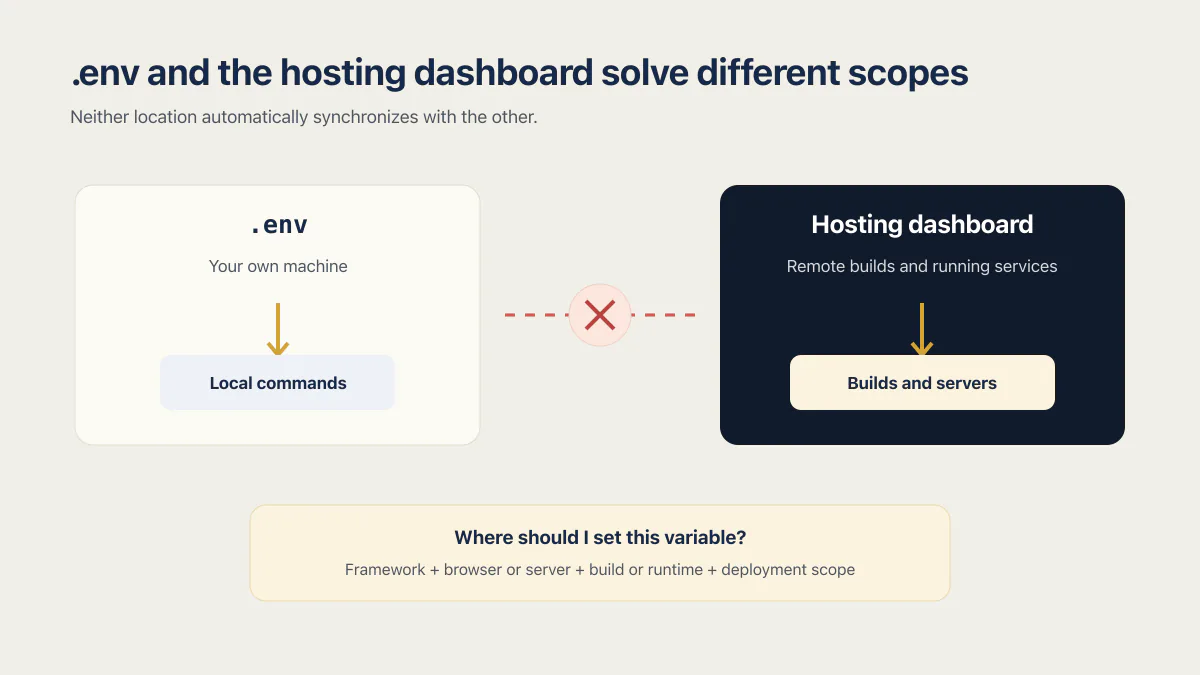
The code is identical in both places. The config is what changes, and the variable you set once, on your laptop, is the one production never got.
Framework prefixes decide what reaches the browser
A variable’s name can trigger framework behavior. Public prefixes are exposure controls, not decoration.
Vite and older Lovable projects
Vite exposes VITE_* variables through import.meta.env and replaces them at build time. Their values are included in client-side source after bundling, so VITE_STRIPE_SECRET_KEY is a leaked secret even if the host masks it in the dashboard.
Vite loads .env, .env.local, .env.[mode], and .env.[mode].local with documented precedence. Existing process variables take priority. It reads the files when Vite starts, so restart the development server after changing them. A deployed static build needs a new build to receive a changed VITE_* value.
Lovable adds an important exception to blanket .env advice. Lovable’s Secrets documentation says a Lovable project keeps browser-safe VITE_* values in its committed .env file so previews and published builds can use them. Private backend values belong in Lovable Secrets, whose values are write-only and injected only into server-side code. Do not put private credentials into that committed .env file.
In Lovable projects on either stack, older React and Vite or TanStack Start, VITE_ prefix inlining decides what is safe to commit for Lovable environment variables: a prefixed value is written into the browser bundle at build time, so only browser-safe values get the prefix.
Next.js
Next.js loads .env* files into process.env for server use. Names beginning with NEXT_PUBLIC_ are inlined into browser JavaScript during next build and remain frozen in that build. Changing the dashboard value does not rewrite an existing deployment.
Unprefixed variables stay server-side when read from server code. In the App Router, dynamically rendered server code can read runtime values. Static generation and build-time code still capture what existed during the build. Decide from the code path, not from the variable name alone.
Astro
Astro supports Vite’s import.meta.env behavior and exposes only PUBLIC_* names to client code by default. Its astro:env API can declare a schema with client/server context, public/secret access, type conversion, required fields, and defaults. Runtime access depends on the SSR adapter: a Node adapter can use Node environment behavior, while Deno and Cloudflare have their own runtime APIs.
For a static Astro site, values used to render pages are build inputs. For an SSR route, a server-only value can be read at request time when the adapter supports it. The Astro environment guide documents both paths and its validation schema.
Newer Lovable projects
Lovable’s current FAQ says projects created from May 13, 2026 (June 22, 2026 in Enterprise workspaces) use TanStack Start with server-side rendering, while older projects use React and Vite. Do not apply a Vite-only migration recipe to a newer project. Inspect package.json, the server routes, and the generated environment lookups, then follow the current Lovable deployment guide for that stack.
Base44, Bolt, v0, Replit, and Claude Code projects
Lovable is not the only generator, and each tool puts the same two ideas (a public prefix and a private store) in a different place.
| Tool | Public prefix | Private store |
|---|---|---|
| Bolt | VITE_* when the frontend is Vite. Bolt’s database guide uses VITE_SUPABASE_URL and VITE_SUPABASE_ANON_KEY. | Server side only. That same guide lists SUPABASE_SERVICE_ROLE_KEY with no prefix, and it has to stay that way: a VITE_ name on that key would ship a key that bypasses Row Level Security to the browser. |
| v0 | Not stated in v0’s docs; a Next.js app uses NEXT_PUBLIC_*, Next.js’s own rule. | Project environment variables. v0’s docs say they are project-scoped, so every chat in the project sees them. |
| Base44 | Not a documented prefix. Assume anything the frontend can read is public. | Base44 secrets, set with base44 secrets set KEY=value or --env-file, read inside backend functions through secrets.get(). A new or changed value reaches deployed backend functions right away, though an app published from the editor may keep the old value until you publish again. |
| Replit | Whatever your framework uses. Replit adds no prefix of its own. | The Secrets tool, which encrypts the value and hands it to the app as an environment variable. |
| Claude Code and other agent-written projects | Whatever the framework you asked for uses. | Nothing is configured for you. The agent writes the lookup and leaves both .env and the host dashboard to you, so check both before the first deploy. |
Environment variables in plain HTML and JavaScript
A plain HTML page has no environment variables: the browser has no process object and never reads .env. A value reaches the page when a build tool such as Vite writes it into the HTML or the JavaScript bundle, when the server renders it in, or when the page fetches it, and every visitor can then read it.
That is why process.env in browser code throws the first error in the table further down.
You cannot set a variable in HTML itself, so there are three ways to get an environment variable into HTML or JavaScript without Node in the browser. A build tool replaces it at build time: Vite statically replaces import.meta.env.VITE_* references in JavaScript and, per its docs, fills %VITE_NAME% placeholders in index.html. The server renders the value into the page before sending it. Or the page fetches a small config file or endpoint when it loads.
In a React app built with Vite, an environment variable such as VITE_API_URL can appear in index.html as %VITE_API_URL% and in JavaScript as import.meta.env.VITE_API_URL, both filled from the same .env file. All three routes hand the value to every visitor, so only publishable keys and public URLs travel this way.
Vercel: “Remove the public framework prefix to keep this value private”
Vercel’s “remove the public framework prefix” warning means a variable saved as the Secret type has a public name such as NEXT_PUBLIC_ or VITE_, which the build copies into browser code. Fix it by dropping the prefix and reading the value on the server, or by setting the type to Config if the value is public.
The whole message, as people paste it into search from the dashboard, reads: “Remove the public framework prefix to keep this value private. Public prefixes expose values to the browser. If that’s safe, change the variable to config.” Vercel’s changelog and docs pages do not print it, so read it as the dashboard’s wording, not a documented rule.
Since August 24, 2026, per Vercel’s changelog entry on config and secret types, you choose the Config type or the Secret type when you add or edit a variable, and existing variables marked Sensitive are treated as Secrets. A Config value “remains readable after saving for members with access”, and the changelog suggests Config for “variables with a public framework prefix”. A Secret “remains available to your deployments and can be replaced, but members cannot view or retrieve it after saving”, which makes it a write-only value.
| What the value is | Name | Type | Where the code reads it |
|---|---|---|---|
| A private key: payment, AI provider, database | No public prefix | Secret | Server code only; Next.js keeps names without NEXT_PUBLIC_ out of the browser, and Vite leaves names without VITE_ out of client code |
| A publishable key or a public URL | Keeps NEXT_PUBLIC_ or VITE_ | Config | Anywhere; the build writes it into the JavaScript the browser downloads |
| A value that already shipped in a public build | Renamed without the prefix | Secret, with a new value | Nowhere until it is replaced: treat it as exposed, rotate it (see the rotation section below), then read the new value on the server |
Picture the path that leads to this warning. A server-only key comes back undefined in a browser component, and the quick fix is to rename it with NEXT_PUBLIC_ or VITE_ so browser code can read it. The error goes away, and the key now sits in the built JavaScript every visitor downloads, whatever the dashboard calls it. If the browser needs a value, it was never a secret: move the call to the server instead.
From the command line, vercel env add and vercel env update take --visibility config or --visibility secret, and the --sensitive and --no-sensitive flags remain available and map to Secret and Config. Per the vercel env CLI reference, a variable added with neither flag defaults to Secret in Production, Preview and custom environments and to Config in Development.
Build log redaction follows the type too: Vercel’s page on sensitive environment variables says that during builds, a Secret value 32 characters or longer that appears in build logs is replaced with [REDACTED]. The same page now files Sensitive under a legacy heading, and the Enforce Sensitive Environment Variables team policy is deprecated; for what the Sensitive setting protected, read whether Vercel keeps your environment variables safe.
A dashboard can protect how a value is stored, but a framework can still inline a public-prefixed variable into browser JavaScript. The storage label, whether Secret, Config or the older Sensitive, does not tell you how the code reads the value. To confirm nothing private got through, check a built bundle for exposed keys.
In the Production Hardening Sprint, frontend secret removal is deliverable 2.1, and deliverable 2.1 is verified this way: scan source and built assets and inspect browser traffic for private credentials. It sits on the sprint’s published list of deliverables .
Build-time and runtime variables behave differently
Build-time values become inputs to generated output. Public frontend values are often literal strings in JavaScript files delivered to the browser. Static pages can also be generated from an unprefixed server value during a trusted build without exposing the raw value, although its effect appears in the output.
Runtime values are read by a server process or function after deployment. A long-running Node service usually needs a restart or new deployment to receive a changed process environment. Serverless hosts typically attach a snapshot of variables to each deployment, so old deployments keep old values.
| Build-time value | Runtime value |
|---|---|
| Read during npm run build or an equivalent command | Read at process start or while a server request runs |
| Requires a rebuild and redeploy after a dashboard change | Requires the host’s restart, redeploy, or staged apply action |
| Can enter the browser bundle through a public prefix or client path | Stays server-side unless application code returns, logs, or otherwise discloses it |
| Public inlined values stay frozen in the built artifact | A server artifact can read a different value in each runtime environment |
- 01 For a browser-public value, set it in the build environment and create a new build.
- 02 For a server runtime value, set it in the exact service or function scope and follow that host’s restart or deployment rule.
- 03 For a preview, add the preview value separately unless the host explicitly inherits it.
- 04 For production, verify the new deployment rather than checking only that the dashboard saved the value.
Host scopes and apply rules
The dashboard label “environment variable” hides meaningful host differences.
| Host | Current apply behavior |
|---|---|
| Vercel | Development, Preview, Production, and custom environments can each hold a different value, and a Preview value can target one Preview branch. Each variable is typed Config or Secret. Changes apply to new deployments; previous deployment URLs keep their old values. |
| Netlify | Variables can take a different value per deploy context, and on Pro and Enterprise plans they can be limited to scopes such as builds and functions. Changes need a new build and deploy to take effect. |
| Railway | Variables are available to builds and running services. Adding, changing, or removing one creates staged changes that must be reviewed and deployed. |
| Render | Values can sit on one service or in a shared environment group, and a service-level value beats a linked group value of the same name. Saving offers Save, rebuild, and deploy; Save and deploy; or Save only, and with Save only the service keeps the old values until its next deploy. |
| Heroku | Called config vars. Setting or removing one restarts the app and creates a new release, so no separate deploy step is needed. |
| Supabase | Edge Function secrets are set in the dashboard or with the CLI, and are available to functions immediately without a redeploy. SUPABASE_ANON_KEY is safe in a browser when Row Level Security is on; SUPABASE_SERVICE_ROLE_KEY must never reach one. |
| Cloudflare Pages and Workers | Plaintext vars and secrets are separate things: secret values are not visible in Wrangler or the dashboard once you define them. Pages variables are set in the dashboard for the production and preview environments, for runtime and build time. |
| Replit | The Secrets tool encrypts each value and exposes it to the app as an environment variable. Whether a running process sees a new secret without a restart is not stated in Replit’s docs. |
| A VPS or container | The process receives values when it starts. Replace or restart the process; a static image with public build values must be rebuilt. |
Host behavior above verified 2026-09-28. Recheck before a production change: these rules are product-specific and they move.
Vercel’s environment-variable documentation, Netlify’s environment overview, Railway’s variables guide, Render’s environment guide, Heroku’s config vars article, Supabase’s Edge Function secrets page, Cloudflare’s Workers secrets page, and Cloudflare’s Pages environment variables and bindings page are the source of truth for those apply rules.
Render’s docs describe setting environment variables per service in the Render Dashboard; whether a static site reads them only at build time is not stated in those docs. Some platform settings are unsafe as shipped, which is its own topic: what are insecure defaults.
Supabase environment variables are the case where the defaults matter most. As of September 2026 its secrets page lists SUPABASE_URL, SUPABASE_DB_URL, SUPABASE_PUBLISHABLE_KEYS, SUPABASE_SECRET_KEYS, and SUPABASE_JWKS as already available inside every Edge Function, with the older SUPABASE_ANON_KEY and SUPABASE_SERVICE_ROLE_KEY names still listed, so anything you set yourself sits alongside those rather than replacing them.
What the error message is actually telling you
You search the string on your screen, not the concept behind it. Here is what each one usually means when a variable is the cause.
| What you see | What it usually means |
|---|---|
ReferenceError: process is not defined | Browser code is reading process.env in a Vite build (Lovable and Bolt projects included). process only exists in Node. Decide first whether the value is private: a private key stays on the server behind a route, and only browser-safe configuration moves to a VITE_-prefixed name read through import.meta.env. |
Cannot read properties of undefined (reading 'env') | The same problem one step earlier: the object you are reading env from resolved to undefined in that runtime. Work out which runtime the file actually executes in before changing anything. |
Error: supabaseUrl is required | createClient() received undefined. The name in your code and the name in your .env or dashboard do not match, or the variable was never added to the scope that produced this deployment. |
Invalid API key from a provider | The variable is set, just to the wrong value. A test key in production, a production key in preview, or a key from a different project all land here. |
ENOTFOUND undefined, or a request to undefined/api | A public base-URL variable was missing at build time, so the literal string undefined got baked into the bundle. Set it and rebuild; restarting will not help. |
Missing required environment variable: DATABASE_URL | Your own startup guard, working exactly as designed. Set the name it printed, in the scope it printed from, then redeploy. |
The first two are the same lesson twice: a browser has no process object, so any variable your frontend reads has to arrive through the framework’s public channel and is therefore public. The Invalid API key row is the one that can come from five different services at once, and the fix for an invalid API key error starts from the exact words rather than from the variable.
Sometimes there is no error text to search at all, and what you end up typing is .env file not working. The same table still applies, because the file only has an effect when a loader reads it in that runtime, the name matches exactly, and the value reached the scope that produced the build you are looking at.
Validate configuration before serving traffic
Required server configuration should fail during build or startup with the missing variable’s name, never its value. Optional integrations can disable themselves deliberately, but their disabled state should be visible in logs or a health check.
function requiredEnv(name) {
  const value = process.env[name];

  if (typeof value !== 'string' || value.trim() === '') {
    throw new Error(`Missing required environment variable: ${name}`);
  }

  return value;
}

const databaseUrl = new URL(requiredEnv('DATABASE_URL'));
const port = Number(requiredEnv('PORT'));

if (!Number.isInteger(port) || port < 1 || port > 65535) {
  throw new Error('PORT must be an integer between 1 and 65535');
}
A larger app can declare these checks once as an env schema, a single list of every variable with its type and whether it is required; Astro’s astro:env, described above, is one built into a framework.
Validate URLs, numbers, booleans, enums, and JSON after reading them. Avoid a production fallback for signing keys, database URLs, encryption keys, payment credentials, or authorization configuration. A default such as SESSION_SECRET=development keeps the app running under a predictable secret and hides the deployment error.
I have watched that exact failure in the field. In one health-records API I audited, the code signing a user’s login cookie was supposed to read a session secret from the environment. That variable was unset in every deploy configuration I found, and the app did not fail to start over it: it fell back to a fixed phrase printed directly in the source and kept issuing cookies anyway. Nothing crashed, no startup guard refused to boot, and “configured” looked identical to “not configured” from every place you would normally check. A generic feature flag defaulting to false is a reasonable fallback. A signing secret defaulting to a string anyone can read in your own source leaves the app pretending it is still configured.
Do not print all of process.env during debugging. Logs, build output, exception trackers, and support exports can become a second disclosure path. Report the missing name and scope, never the value.
If you committed .env to GitHub
Rotate first. Everything else comes second.
What happens if you push a .env file with a live key in it is not hypothetical: I audited 21 third-party apps in June and July 2026, and 3 of them had a real secret permanently in git history, namely a webhook signing secret, a live AI-provider key, and a Stripe test key with its webhook secret. Those 21 were my own pick, so 3 of 21 is not a rate for AI-built apps in general.
Deleting the file in a new commit does not remove the value. It stays in the commit history, in every clone, in every fork, and in the index of anything that already scraped the repository. Until the credential is revoked at the provider that issued it, the leak is live, no matter how clean the current tree looks.
- 01 Revoke or rotate every credential in that file, at the provider that issued each one. Do this before you touch Git.
- 02 Check whether the repository was ever public, and for how long. Treat any value that was ever in a public commit as copied, however briefly it was there.
- 03 Delete the file from the working tree, add it to .gitignore, and commit that.
- 04 Rewrite history only if you have a reason to, and know it does not fix the leak on its own: forks and existing clones keep the old commits either way.
- 05 Roll the replacement credential out everywhere using the checklist below, then prove the old one is dead by making a real request with it.
For the first hour after a leak, read what to do when an API key leaked; to find every key the history still holds, start with secret scanning for a small app.
The rollout in step five is the section directly below. Do not stop at step three: a deleted file with a live key is the version of this that gets someone breached.
Rotate a credential without breaking every environment
Rotation touches the credential issuer, every deployment scope, and every process or build that consumes it.
- 01 Identify all consumers by code search, host/project inventory, and provider access logs where available.
- 02 Create a second credential at the provider when overlapping keys are supported.
- 03 Set the new value in development, preview, staging, production, workers, scheduled jobs, and any separate project that uses it.
- 04 Rebuild public build-time consumers and redeploy or restart server runtime consumers.
- 05 Exercise the real integration in every required environment and inspect provider-side success or failure logs.
- 06 Revoke the old credential, then confirm old deployment URLs and forgotten workers cannot still use it.
If the provider allows only one live credential, plan a maintenance window or its documented no-overlap procedure. Copying the same old value to a new dashboard is configuration migration, not rotation.
This section stays with the rollout across environments; the full runbook, with the overlap window per provider and a rehearsal, is how to rotate API keys safely.
In the sprint, the secret rotation runbook is deliverable 2.6, and deliverable 2.6 is verified this way: rehearse rotation with a test credential and record the affected services and checks.
Diagnose “works locally, fails in production”
Use a narrow sequence that preserves the secret:
- 01 Find the exact framework lookup in code and classify it as client, server, build-time, or runtime.
- 02 Confirm the name and case match exactly; Linux hosts are case-sensitive even when a local Windows environment is not.
- 03 Check the target scope: preview and production may have separate values.
- 04 Confirm a new build, deployment, staged change, or process restart happened after the dashboard update.
- 05 Validate type parsing and URL format rather than treating any non-empty string as valid.
- 06 Check whether the code runs in a different service, function, worker, or build job from the scope you edited.
- 07 Use a safe health indicator that reports configured or missing without returning the value.
The sibling guide on why an app works locally but not in production covers the broader deployment causes. Use that diagnostic tree when the variable checks above pass.
Common questions about environment variables
What is a .env file?
A .env file is a plain text file in your project root that lists KEY=value pairs, one per line, which a loader such as dotenv, Vite or Next.js reads into your app’s environment on your own machine. Left uncommitted, it feeds your local runs only: your host’s builds and servers read values from the hosting dashboard instead, so a value that exists only in your local .env never reaches the live app.
What does .env stand for?
env is short for environment. The file has no name before the dot, only the extension, which is why macOS and Linux hide it by default. Nothing about the name is special to the operating system: it is a convention that loaders such as dotenv, Vite, and Next.js agree to look for in your project root. So the full form of .env is simply environment, and that is the whole meaning of the name: env means environment.
How do I create a .env file?
Make a plain text file named .env in your project root. In an editor, create a new file and type .env as the whole name; from a terminal, touch .env does it on macOS and Linux, and New-Item .env -ItemType File does it in PowerShell. Then add one KEY=value per line, add .env to .gitignore, and restart your dev server so the loader reads the new file.
Whenever I write a .env file for a new project, I copy .env.example first and fill in the values, so no key is forgotten.
One follow-up catches people out. Sourcing the file: source .env in bash or zsh sets those names in your current shell but does not pass them to programs you run afterwards, because the lines carry no export. Running set -a first fixes that, since bash then gives every variable it creates or modifies the export attribute.
In what file are the environment variables usually stored?
None, strictly speaking. Environment variables live in the memory of a running process, and a file is only one way to get them there. Locally that file is usually .env in the project root. On a host there is often no file at all, because the platform injects the values into the process when it starts.
What is $env in PowerShell?
$Env: is PowerShell’s environment provider. $Env:API_KEY reads a variable and $Env:API_KEY = "value" creates or changes one. Microsoft’s documentation notes that the change affects only the current session, so put the line in your PowerShell profile if you want it in every window.
Should you commit a .env file?
No, not one that holds a secret. Next.js templates and Vite’s *.local convention follow that rule. Lovable projects are a documented exception for a committed .env containing browser-safe VITE_* build values. Never place a private key in that public file. Commit .env.example instead.
Do I need to restart my computer after changing environment variables?
No. Restart the program that reads the value. Vite local development needs a restart after .env changes. Static or public-prefixed values need a rebuild. Vercel and Netlify changes apply to new deployments. Railway creates staged changes that must be deployed. A long-running server process needs the host’s restart or redeploy action. On Windows, a value set with setx appears in a new terminal window, with no reboot.
Are env files safe?
Yes on your own machine, when .gitignore keeps the file out of commits; no in a public repository, a container image, a chat message or a browser bundle. A .env file is plain, unencrypted text, so it is exactly as safe as the laptop and the repository it sits in. Every other way the values leak is covered under environment variables security risk.
Works on your laptop but not once it is live?
Settings that exist in one place and not the other cause many failures after a deploy, and some quietly expose keys to the browser. On the audit, we look over where your app keeps its settings and secrets with you, and point out which gaps to close first.
Book a free audit → Free · 30 minutes · No code access needed