You push one line, a copy change on the pricing page, and by the time you refresh the production URL the signup form throws a blank error and the dashboard will not get past its loading spinner. Back on your machine, on the exact branch you just merged, none of that happens. The source may be identical, but the configuration, database state, build artifact, runtime, and installed dependencies may differ.
For an AI-built web app with that split, start with five environment gaps. Here they are, before the walk-through.
The five-gap answer, before the details
- 01 An environment variable that’s set on your machine and nowhere else
- 02 A URL, path, or port hardcoded to localhost
- 03 A migration that ran in dev and never ran against the production database
- 04 A production build that behaves differently than the dev server you tested on
- 05 A dependency that resolved to a different version, or refused to install at all, on the server
These five gaps are a useful first pass for a web app that works on localhost but fails on its server. Start with the production logs because two gaps often appear together. The sections below cover the rest of the usual list: CORS, login and cookies, mixed content, database connectivity, ports and proxies, disappearing uploads, and platform timeouts.
Localhost vs production, in plain English
Localhost is your app running on your own computer. The name localhost (and the address 127.0.0.1) always means “this device”, so when you open localhost:3000 the browser and the server are the same machine, using your files, your .env, your database, and your dev server.
Production is the copy running on a server your users reach over the internet at a real domain. It has its own configuration, its own database, its own filesystem, a built artifact instead of a dev server, and nobody sitting next to it. Every failure below is one of those differences showing up in public.
What the symptom usually means
Start from what you can see. The symptom narrows the cause faster than rereading code does.
| Symptom | Usual cause | First check |
|---|---|---|
| Blank white page after deploy | The bundle threw before it rendered, often a public config value that was empty at build time | The browser console on the live URL, first error only |
| 500 Internal Server Error | Server code crashed on that request, usually a missing variable or an unreachable database | The host’s runtime log for that request, not the browser |
404 on every /api route | The API never deployed, or the rewrite that routes /api exists only in the dev server | curl -i one API path on the live domain and read the status line |
| Blocked by CORS policy | The production domain is not in the API’s allowed-origin list | The response headers on the failing request |
ECONNREFUSED 127.0.0.1:3001 | Something in the deployed code still points at localhost | Grep the deployed source and build output for localhost and 127.0.0.1 |
relation "orders" does not exist | The migration ran in dev and never against the production database | Migration history on production, and which database URL production actually uses |
undefined is not a valid URL | A config variable is missing, so a client received undefined where a URL belonged | Whether that variable is set in the production scope of the host |
| 502 Bad Gateway | The app process crashed at boot, or never bound to the port the platform expects | Startup logs, plus the listen port and bind address |
| Login succeeds, next page says logged out | The session cookie was rejected, or the session lives in memory on one instance | Set-Cookie attributes (Secure, SameSite) and where sessions are stored |
| Uploaded file is gone a few minutes later | The upload was written to a filesystem that gets discarded | Where the upload handler writes, and whether that path survives a restart |
| Request hangs, then times out or returns 504 | A platform timeout, a memory cap, or a query waiting on a connection that never frees | Function duration and memory in the platform log |
| Console says the request was blocked as mixed content | An https page is calling an http API | The scheme in the API base URL the deployed bundle uses |
Why it works on localhost but not on the server
None of these five gaps means the feature logic itself is wrong. They appear when the development loop validates only the local environment: its populated .env, familiar database state, open ports, warm dependency tree, and dev server. In AxonBuild’s dated June-July 2026 third-party audit cohort, at least 17 of 21 apps had no deploy gate between a push and production. That sample does not estimate the prevalence across all AI-built apps, but it shows how often environment parity went untested in the reviewed set. One database with no staging environment covers the larger release risk; this article stays with diagnosis.
The environment variable that only exists on your laptop
One app in the corpus signs its login cookies with a secret pulled from the environment, correct design on paper. I checked what happens when that variable is unset, expecting a crash. It doesn’t crash, and that’s the part that sat with me: the code falls back to a public phrase hardcoded into the source and signs cookies with that instead, so the app looks exactly as secure as it did a minute before. On a laptop the fallback never fires, because the real secret has sat in the local .env file since setup. Deploy the same code to a host where nobody copied that one variable over, and the fallback is what actually signs every session, readable by anyone who can see the code.
That’s the general shape: a new variable gets added once, locally, into a .env file that already has a dozen others. Adding it to the hosting dashboard is a separate, easy-to-forget step with no compiler to catch the miss. What a .env file is, against production environment settings, explains why the value never travels with the code. The fix is a startup check that reads every required variable and refuses to boot if one is missing, instead of silently substituting something worse. Some of the gap belongs to the host and some of it never did, which is what your host does and does not cover.
Where the value lives depends on the host, and so does what it takes for a new value to reach the running app:
- Vercel stores each variable per environment (Production, Preview, Development, and custom environments). Its environment variables documentation states that changes “are not applied to previous deployments, they only apply to new deployments”, so a variable you add after the last deploy changes nothing until you redeploy.
- Netlify stores values per deploy context (production, deploy previews, branch deploys, preview server, local development) and, on its paid plans, lets you scope a variable to builds, functions, runtime, or post processing. Its environment variables overview lists both.
- Render gives you three save options, and only one of them is quiet: “Save only” stores the variable “without triggering a deploy”, so the service keeps running on the old values until its next deploy. The other two rebuild or redeploy, per Render’s environment variable docs.
- Railway turns a variable edit into staged changes that you have to review and deploy before they apply, per Railway’s variables guide.
- Supabase Edge Functions read secrets set in the dashboard or with
supabase secrets set, which are separate from your frontend.env. Supabase’s function secrets guide says you do not need to redeploy after setting one, because they are available immediately. - Lovable, Base44 and Replit publish a snapshot, so the editor preview and the live app are two different versions. Lovable’s publishing docs say “changes are not automatically published and pushed live”, Replit describes a published app as “separate from the version in the Project Editor” in its deployments docs, and Base44’s code editing docs also require a Publish before a code change reaches the live app. If the preview works and the published app does not, the question is what was live at the last publish, not what is in the editor now.
A fetch call still pointed at localhost
The most literal version of this gap is exactly what it sounds like: a request to your own API, or a redirect URL after login, hardcoded to the address it happened to run at while you were building.
// Works from your machine, where the API happens to run on :3001.
// In a visitor's browser, localhost points to that visitor's device.
const res = await fetch('http://localhost:3001/api/checkout', {
  method: 'POST',
  body: JSON.stringify(cart),
});
Locally it works because localhost resolves to the device running the browser, where you happen to have port 3001 open. For a visitor, the same URL points to that visitor’s own device. If the frontend and API share an origin, use a relative path such as fetch('/api/checkout'). If they are separate, use the framework’s documented public client configuration and validate the production value during the build or startup phase where that framework reads it. Public build-time variables and server-only runtime variables do not behave interchangeably.
The request that only gets blocked once your frontend has a real domain
This one names itself in the browser console:
Access to fetch at 'https://api.example.com/orders' from origin
'https://app.example.com' has been blocked by CORS policy:
No 'Access-Control-Allow-Origin' header is present on the requested resource.
CORS never fires locally because both halves usually share one origin: the frontend and the API run on the same localhost port, or the dev server proxies /api to the backend so the browser only ever sees one address. Deploy them and they become two origins, https://app.example.com and https://api.example.com, and the browser starts enforcing the rules it had nothing to enforce before. A simple request can reach the server while the browser hides its response. When a required preflight fails, only the OPTIONS request reaches the server and the real request is never sent.
Three things to check, in order. First, the allowed-origin list on the API has to contain the exact production origin, scheme and subdomain included: https://app.example.com is not https://www.app.example.com and not http://app.example.com. Second, anything beyond a simple request triggers a preflight. Per MDN’s CORS guide, methods other than GET, HEAD and POST, and requests carrying a custom header such as Authorization, make the browser send an OPTIONS request first, and if your framework or proxy never answers OPTIONS, the real request is never sent at all. That is why the server log can look completely clean while the browser reports a failure.
Third, the credentials trap, which is where cookie-based login breaks. If the request sends credentials and the response comes back with Access-Control-Allow-Origin: *, MDN’s guide is explicit that “the browser will block access to the response, and report a CORS error in the devtools console”. A credentialed request needs an explicit origin echoed back plus Access-Control-Allow-Credentials: true. The wildcard that got you through local testing is the thing failing in production.
The login that works locally and fails on the deployed URL
The symptom is specific: the login call succeeds, and then the very next page acts like it never happened. Four causes account for most of it. When it is your customers rather than you who cannot get in, customers locked out of your live app starts from what they can see.
An OAuth redirect URI still set to localhost. Every provider keeps an allowlist of authorized redirect URIs, and the one you registered while building says http://localhost:3000/auth/callback. The provider will not redirect to an address that is not on the list, so the user gets an error page from the provider rather than from your app. Add the production callback URL, keep the local one, and check the provider’s own error message for the exact URI it rejected.
Supabase Site URL and redirect allowlist never updated. Supabase Auth uses a Site URL as the default redirect target when your code passes no redirectTo, and it defaults to http://localhost:3000. Its redirect URLs documentation says the value you pass has to match the configured allowlist. Leave both at the local defaults and your live users get emailed a confirmation link that sends them to localhost, their own device, where nothing is listening.
Cookies that need Secure and SameSite once the site is https and cross-site. If the frontend and the API sit on different sites, the session cookie is a third-party cookie and needs SameSite=None. MDN’s Set-Cookie reference states that “the Secure attribute must also be set when using this value”, and that some browsers apply Lax as the default when SameSite is unspecified. Locally, one origin over http, none of that applies, so the cookie was always accepted.
An in-memory session store. The default session store in most frameworks keeps sessions in the process’s memory, which is fine for one long-running local process. In production the process restarts on every deploy and may run as several instances behind a load balancer, so a session created on one instance is unknown to the next request. Move sessions into a database, a cache, or a signed cookie.
The https page that will not load your http API
An https production page cannot call an http API. MDN’s mixed content reference puts fetch() and XMLHttpRequest in the blockable category, so those requests are blocked outright, while images, audio and video are upgraded to https automatically. Locally the whole site is http, so nothing is mixed and nothing is blocked.
The tell is a console message about the request being blocked as mixed content, with no matching entry in the API’s log. The fix is the API base URL, not the page: serve the API over https and use the https address, and if the API sits on a domain without a certificate, that is the thing to fix first.
The migration that ran in dev and never ran in production
A database change can reach development before it reaches production. The new column exists where the feature was tested, while the live app still runs the older schema. Applying migrations is tool-specific, and adding a migration command to deployment is only safe when the change is compatible with the old and new application versions. For a risky change, expand the schema first, deploy compatible code, move the data, and remove the old shape in a later release. How to run database migrations on deploy covers where the migration step goes in a release and which schema changes are safe in one deploy.
A forgotten migration may not fail at boot. The app can start and answer unrelated requests, then throw only when a query touches the missing table or column.
The database the app cannot reach
A missing migration is a schema problem. This is the blunter version: production cannot open a connection at all, so every request that touches data fails while static pages keep serving.
The connection string is the first suspect. A value copied from a local setup points at localhost:5432 and a database that exists only on your laptop, which produces a connection-refused error rather than a query error. Managed hosts also expect SSL on the connection, so a client configured for a plain local Postgres can be rejected before it authenticates.
The port matters more than it looks on Supabase. Its connection docs list a direct connection on port 5432, a transaction pooler on 6543, and a session pooler on 5432, each with a different connection string. Serverless functions that open a connection per invocation belong on the pooler; a long-running server can hold a direct connection. Point a serverless app at the direct port and it works fine at your test volume, then exhausts the connection limit under real traffic. IP allowlists produce the same shape of failure: your home address was added once, the production server’s was not.
Read the error text before changing anything. Connection refused, no pg_hba entry, SSL required, too many clients, and password authentication failed are five different problems that all look like “the database is down” from the outside. Connection limits in particular are a pool exhaustion problem rather than a configuration one, and they get worse with traffic instead of failing consistently.
Production build, dev assumptions
Most local testing happens against a dev server rather than the artifact a deployment runs. A production build may bundle modules, replace public environment values at build time, remove development-only branches, or fail type and import checks the dev server did not exercise. The Twelve-Factor App’s build-release-run principle separates the build artifact from the release’s configuration and the running process. Run the actual production build locally or in CI, then start that artifact with production-shaped configuration before release.
Two build-time differences catch people repeatedly. The first is filename case. macOS and Windows default to case-insensitive filesystems, so import Button from './button' happily resolves a file named Button.tsx. Linux, which is what almost every production build runs on, does not, and the build fails with a module-not-found error naming a file you can see sitting right there in your editor. AI-generated code produces these mismatches often, because the file and the import get written at different moments.
The second is how the process listens. Hosts hand your app a port through the environment and expect it to bind on that port and on 0.0.0.0, the address that accepts connections from outside the machine. Code that hardcodes 3000, or binds to 127.0.0.1 because that was enough locally, starts cleanly and then answers nothing: the platform health check fails and you get a 502. The related failure is a reverse proxy in front of the app that routes / but never routes /api, which shows up as a 404 on every API call while the pages themselves load.
The dependency that installed differently on the server
The server usually performs a clean install while a laptop may keep an older node_modules tree. Without a committed lockfile and a frozen install command, the two environments can resolve different dependency versions. Platform-specific native modules can also behave differently across operating systems, CPU architectures, Node versions, and system libraries. For npm projects, npm ci requires an existing lockfile, removes the current node_modules, exits when package.json and the lockfile disagree, and does not rewrite either file. It makes the install reproducible within the recorded dependency and platform constraints; it does not make different runtimes identical.
The file your app saved and then lost
Your upload handler writes to a folder next to the code, the file appears, and locally it is still there next week. On serverless platforms and most container hosts, that folder belongs to an instance that gets thrown away: the write succeeds, the response says success, and the file is gone after the next deploy, the next restart, or the next request that happens to land on a different instance. Nothing errors, which is why this one usually gets discovered by a customer.
Anything a user uploads or your app generates and needs later belongs in object storage or in the database, with the URL or key stored in your own tables. The local disk is fine for a temporary file inside a single request and for nothing that has to still exist afterwards.
It does not error, it just never finishes
Not every production-only failure is an error message. Sometimes the request hangs, the spinner keeps spinning, and after some seconds the platform returns a 504 or the browser gives up. Serverless platforms cap how long one invocation may run and how much memory it may use, and those caps do not exist on your laptop, where a slow query just takes as long as it takes.
Four limits produce this shape: the function duration limit, the memory ceiling (which usually shows up as the process being killed mid-request rather than as a graceful error), the maximum request body size for uploads, and cold starts, where the first request after an idle period pays the startup cost. Check the platform’s log for the invocation, not just your own application log, because the duration, the memory used, and the reason it ended are recorded there and nowhere else. Then check whether the same work is slow locally against production-sized data, since a query that takes 40 milliseconds against 50 test rows can take 40 seconds against 500,000 real ones.
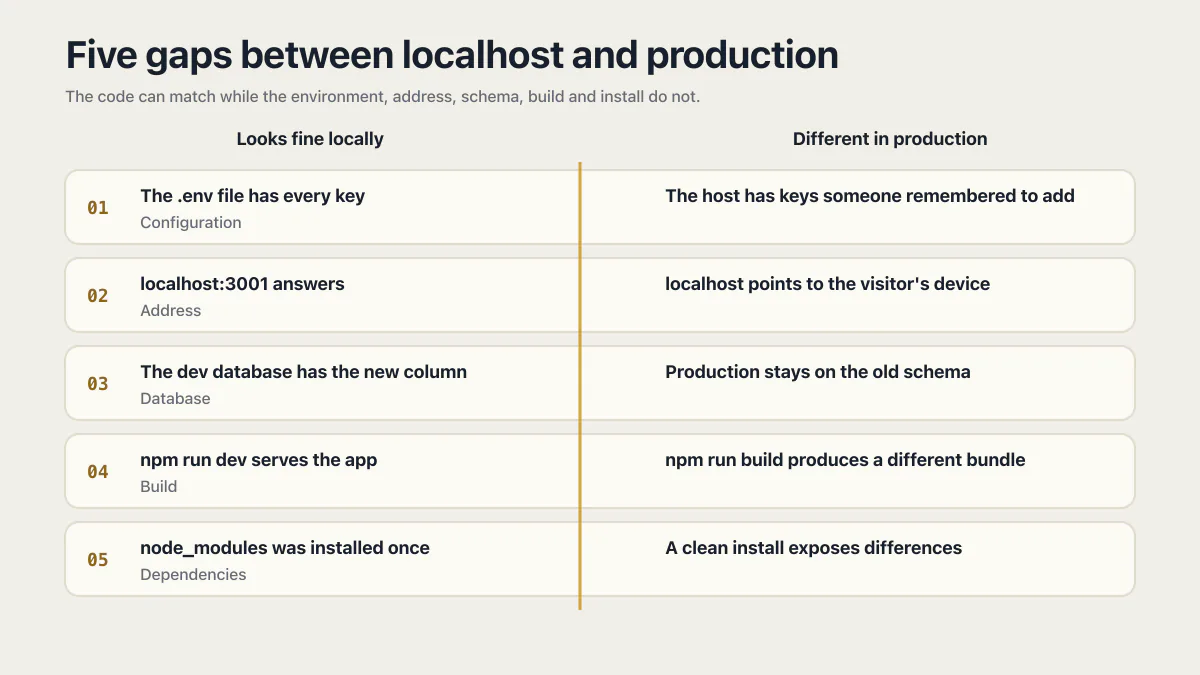
The five core gaps, side by side:
| Looks fine locally | Different in production |
|---|---|
| The .env file has every key filled in | The hosting dashboard has whichever keys someone remembered to add |
| localhost:3001 answers every API call | localhost points to the visitor’s device, not your API server |
| The dev database already has the new column | The production database stays on the old schema until someone runs the migration there |
| npm run dev serves the app you keep testing | npm run build produces a different bundle you may never have run |
| node_modules was installed once and left alone | A clean install exposes lockfile, runtime, and native-module differences |
Locally, your app has never once run without you standing next to it. Production is the first time it runs alone.
Read the logs before you read the code
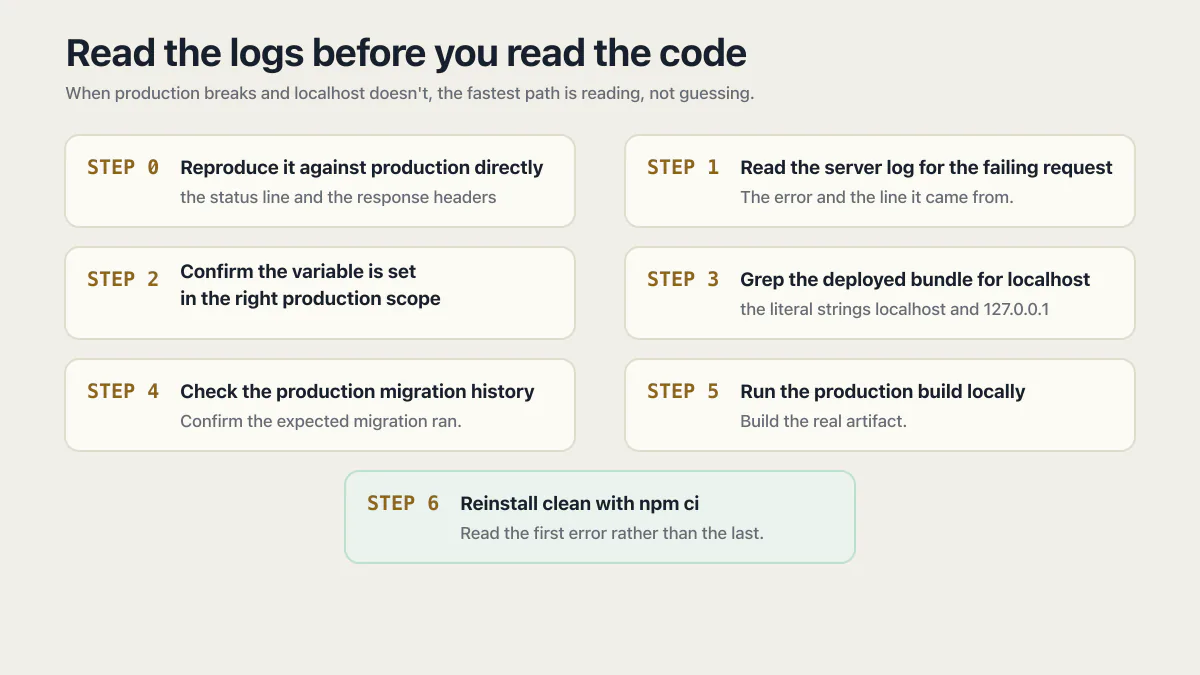
When production breaks and localhost doesn’t, the fastest path is reading, not guessing. Seven steps, in this order.
Step 0: Reproduce it against production directly
Before any code, hit the deployed thing yourself. curl -i https://yourdomain.com/api/orders prints the status line and the response headers, which tells you whether you are looking at a 404 (nothing deployed at that path), a 500 (your code ran and threw), a 502 (the process is not answering), or a normal 200 that the browser is refusing for its own reasons. Then open DevTools on the live URL, go to the network tab, and reproduce the failure in the browser: whether the request appears at all, what status it got, and what headers came back separates a server problem from a CORS, cookie, or mixed-content problem in about ten seconds.
Step 1: Read the server log for the failing request
Not just the browser console. The error and the line it came from provide the first falsifiable lead: undefined is not an object, ECONNREFUSED 127.0.0.1:3001, relation "orders" does not exist. Check the deployment log too, since a build that half-failed can still publish something.
Step 2: Confirm the variable is set in the right production scope
Production, preview and development are separate scopes on most hosts, and a variable added after the last deploy may not be live yet. Log only its presence and validated shape, never the secret value.
Step 3: Grep the deployed bundle for localhost
Search the deployed source and the built output for the literal strings localhost and 127.0.0.1. Public values are baked in at build time, so the bundle is the honest copy, not your source tree.
Step 4: Check the production migration history
Confirm the expected migration ran before changing anything, then choose a forward-compatible repair or a rollback based on the tool and the change. Confirm which database the production app is actually pointed at while you are in there.
Step 5: Run the production build locally
Build the real artifact and start it with production-shaped configuration, rather than trusting the dev server you have been testing on. This is where missing build-time values surface without a customer involved. The case-sensitive import errors only show on a case-sensitive filesystem, so run this build where the host does (Linux, or a container), or check the import paths against the filenames by hand.
Step 6: Reinstall clean with npm ci
Delete node_modules, run npm ci, and read the first error rather than the last. Resolve platform and engine warnings here instead of discovering them in the deploy log.
If the app doesn’t error at all and just does the wrong thing silently, that’s a related but different failure: when your app fails silently and says 200 OK covers what to do when nothing in the log says anything happened.
Common questions about apps that work locally but not in production
Why does my app break in production but not on localhost?
Start with five common differences: production configuration, a hardcoded localhost address, database migration state, the production build, and the installed dependency or runtime environment. The server log and the host’s deployment log usually narrow the list faster than editing code locally.
Is every difference between dev and production a bug?
No. A production build hiding stack traces from end users is intentional and correct. The problem is the accidental kind: a value nobody set, a command nobody ran, an install nobody repeated. The check is whether the difference was a decision or an oversight.
How do I debug an app that’s broken in production but works in dev?
Start with the server log for the failing request and the deployment log for its build. ECONNREFUSED 127.0.0.1 often points to a localhost dependency, relation does not exist often points to the wrong database or schema state, and an undefined configuration value points toward environment loading or validation. Treat those messages as leads, then confirm the deployed artifact, environment scope, and database target.
Why does my API work in localhost but not in production?
The three usual causes are the API base URL, CORS, and configuration. Locally the frontend and the API share an origin or a dev-server proxy, so a relative path works and no CORS rules apply; in production they are two origins and the production domain has to be on the API’s allowed-origin list. Run curl -i against the deployed API path first: a 404 means it never deployed there, a 500 means your code ran and threw, and a clean 200 that the browser still rejects means the problem is CORS or cookies.
Why does my app work in preview but not after I publish it?
Publishing deploys a snapshot, so the published app is a different version from the one in the editor, with its own configuration. Lovable, Base44 and Replit all work this way, and Vercel and Netlify keep separate variable values for preview and production. Check what was live at the last publish rather than what the editor shows, then compare the production variables against the preview ones.
Why does login work locally and fail on the live site?
Usually the redirect URL, the cookie, or the session store. An OAuth authorized redirect URI or a Supabase Site URL still set to http://localhost:3000 sends users to their own machine, a cross-site session cookie needs SameSite=None with Secure once the site is https, and an in-memory session store is emptied by every restart and is invisible to a second instance. The browser’s network tab on the live URL shows which of the three it is: look at whether the Set-Cookie header arrives and whether the cookie is sent back on the next request.
Why do I get a CORS error in production but not on localhost?
Because on localhost there was usually only one origin. The frontend and API share a port, or the dev server proxies /api to the backend, so the browser has no cross-origin rules to enforce. In production they become two real domains, and the API must return your exact production origin in Access-Control-Allow-Origin, answer preflight OPTIONS requests, and avoid the * wildcard entirely if the request carries cookies.
Why can nobody else see my app running on localhost:3000?
Because localhost means “the device I am on” for everyone, including the person you sent the link to. Their browser resolves localhost:3000 to their own machine, finds nothing listening, and shows a connection error. To let other people use it, deploy it to a host so it gets a public domain, or use a tunnel tool for a temporary demo.
Why does my deployed app return a 500 Internal Server Error?
A 500 means your server code ran and threw an exception, so the answer is in the runtime log rather than the browser. The common production-only causes are a missing environment variable, a database the app cannot reach or authenticate against, and a query hitting a table or column that the production schema does not have yet. Open the host’s log for that exact request and read the stack trace, which is hidden from the browser in production on purpose.
Why does file upload work locally but not in production?
The write usually succeeds, and then the file disappears. Serverless functions and most container hosts give the app a filesystem that is discarded on restart, redeploy, or a request landing on another instance, so anything saved next to the code is temporary. Store uploads in object storage or the database and keep only the key or URL in your own tables. A separate cause is the platform’s maximum request body size, which rejects large files outright.
The pre-deploy check you can run yourself
Same five gaps, run before you push instead of after a customer finds one:
- 01 Every env var the app reads is set on the actual host, not just your local .env.
- 02 No literal "localhost" left in the codebase or the built bundle.
- 03 The production migration history matches the release plan, with compatibility and recovery checked before any pending migration runs.
- 04 The real production build ran locally at least once, not just npm run dev.
- 05 One clean npm ci, with install errors and platform or engine warnings resolved before deployment.
Keep the commands and expected output in the deployment runbook. The next person should be able to reproduce the production build without inheriting your laptop.
Fine on your laptop, broken once it is live?
When the same code fails only on the server, the cause usually sits in settings, addresses or a database step the live app never got. In an audit, we walk through how your app moves from your machine to production and point out the gaps. You leave knowing where to look first.
Book a free audit → Free · 30 minutes · No code access needed