Lovable is the app builder at lovable.dev, and the pane on the right side of its editor is what most people mean when they say the preview stopped working. It goes white, or spins forever, or stops picking up the change you just asked for. The question underneath the search is rarely about the pane, though. It is whether the app you already published went down with it, and whether anyone outside your project can see the difference.
A dead Lovable preview pane is usually the editor, not your published app. Lovable calls four different things a preview, and only one of them is the copy your customers use. Your published site keeps serving the snapshot from your last publish. Refresh the pane, then hold Shift and click Refresh.
Three checks, in this order, before you type another prompt.
- 01 Open your published lovable.app address in a private browser window. If it loads and works, your customers are fine and this is an editor problem.
- 02 Look at the Lovable status page and read its incident list, not just the green light at the top.
- 03 Work the preview controls in the order the documentation gives them, starting with Refresh.
The first check is the one that changes how worried you should be. Use a private window for it, because your own browser may hold a cached copy or a signed-in session no visitor has.
Which Lovable preview is broken: the editor pane, a shared link, or the published app?
Four separate surfaces in Lovable get called the preview, and they fail independently. Sorting yours into one of the four rows below decides everything else, including whether anyone outside your project is affected.
| Surface | What it shows you | First thing to do | Can customers see it |
|---|---|---|---|
| The live preview pane in the editor | Your latest work, running in a temporary cloud environment Lovable starts for your project while you work | Click Refresh, then hold Shift and click Refresh | No. Nobody outside the project ever sees this pane |
The same development preview in its own browser tab, opened with Open in new tab | The same development preview, full screen. The docs say this URL requires signing in to Lovable with access to your project | Confirm you are signed in as an account with project access, then treat it like the pane | No |
| A shared preview link you sent to a client or a friend | A view-only copy of the latest in-progress version of the app, openable with no Lovable account | Check the link’s age and its row under Your active links before you touch the app | Only the people holding that link |
The published app at your lovable.app address | The snapshot from the last time you pressed publish | Open it in a private window | Yes. This is the only one your customers use |
One more thing gets called a preview and belongs to a different question. On hosts like Vercel and Netlify, a preview is a whole deployed environment with its own configuration, which is the deployment sense of the word preview rather than anything in the Lovable editor. If that was your search, that page owns it. What preview deployments are, a temporary copy of the app for each pull request, is covered on its own page.
Lovable’s preview documentation defines the pane plainly: the preview “is the live, interactive version of your app that runs on the right side of the editor”. A running copy, started for you, that nobody else has a URL for.
Is the preview pane dead, or is the published app dead?
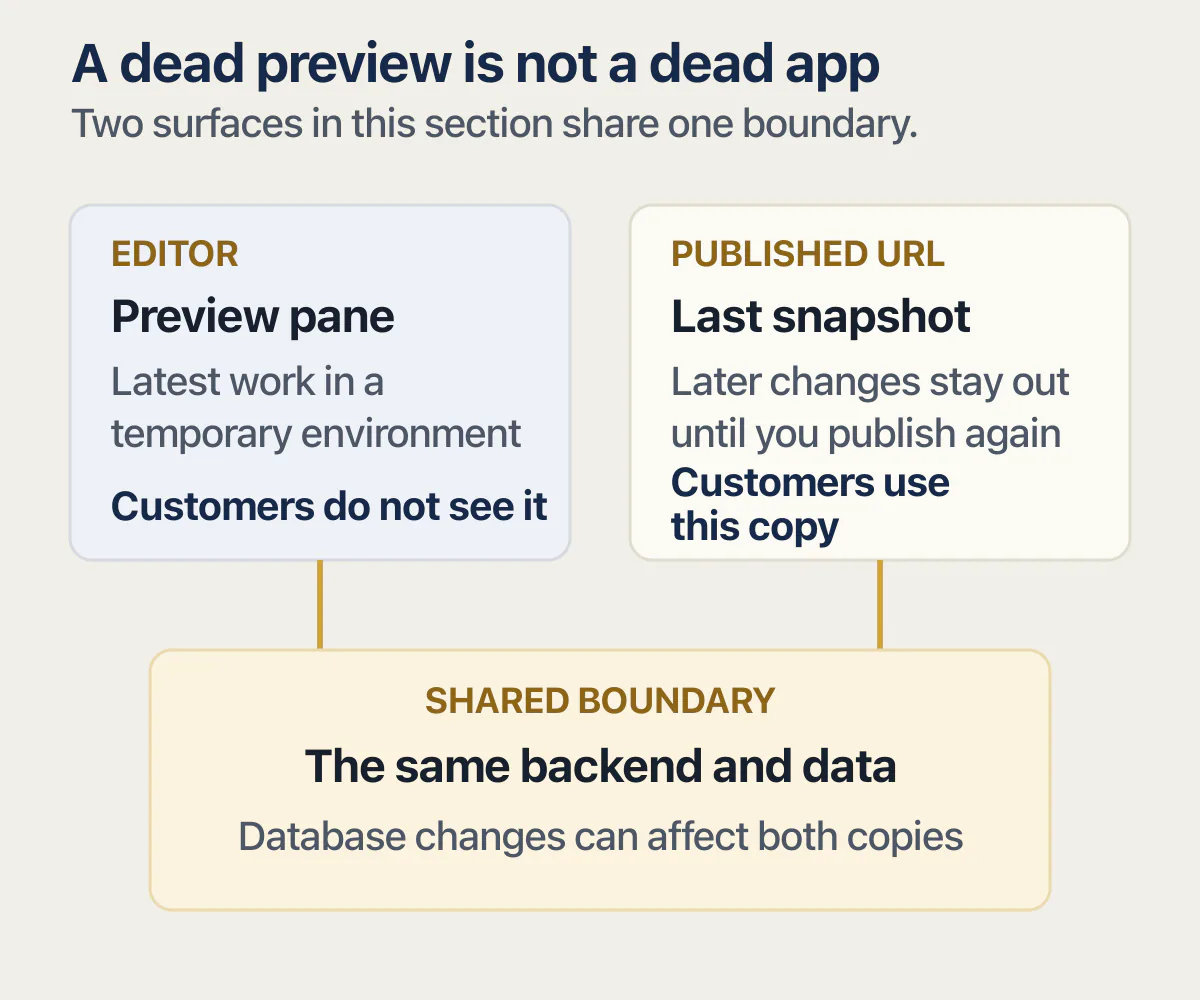
The published app and the preview pane are two different copies by design. Lovable’s preview documentation puts the split in one line: “Your visitors see the published version instead, a snapshot that only changes when you publish.” A dead pane says nothing about that snapshot.
Its publish page adds the rest of the rule: only the current version is deployed, and later changes do not reach the live app on their own. So the app your customers are using is a frozen older copy of the one in your editor, and it keeps serving whether or not the editor is having a bad afternoon. That is why a quiet pane is such a poor signal about customer impact: it reports on a temporary cloud environment while the snapshot carries on untouched.
Your customers are looking at the copy you published last, and your editor is looking at a different one.
Lovable says the same thing about its own pause behaviour. When you have been away for a while, the preview environment stops to save resources, and the documentation is explicit about what that does not touch: “Your published site is never affected, and visitors can still access your live app while the preview is paused.”
One honest limit on that reassurance: the same page notes that “the preview and your published app share the same backend and data, so changes to your database affect both”. A broken pane is an editor problem. A broken table, a deleted column, or an authentication rule you changed an hour ago reaches both copies, and the private-window check is what tells the two cases apart.
Three cases sit next to this one and get different answers. If the pane went white immediately after one prompt, the useful question is which files that edit actually changed. If the pane is fine and trouble only starts once the app is deployed, code that behaves differently once it is deployed is the closer match. And if your published address is failing while real customers are inside the app, that is the published app broken while real customers are using it, which is more urgent than anything on this page. What the Publish button actually does, step by step, is its own subject.
Lovable stuck on loading the live preview? Work these controls in order
Lovable documents three controls for a preview that will not load, in a fixed order, and most people never find the second one. It restarts the preview environment rather than reloading the page, and the documentation says that resolves most loading issues.
- Click
Refreshabove the preview. - Hold
Shiftwhile clickingRefresh. The docs say this will “also restart the preview environment, which resolves most loading issues”. - Do a hard browser refresh:
Cmd+Shift+Ron Mac,Ctrl+Shift+Ron Windows and Linux.
Two states get mistaken for a broken preview. The first is the pause: after you have been away, the pane shows a Still building? message saying Lovable paused the environment, and Keep building starts it again where you left off. Pausing is described as normal and as changing nothing about your project. The second is a setting. At Project settings → General → Preview there is a Live preview toggle, and with it off the pane only shows the most recent completed version instead of updating while Lovable works. A preview that stopped following your changes may be doing what it was told.
Two lines in Lovable’s own notes on the pane are worth reading first. On a white pane, it says a blank preview “usually comes from an error in the app itself”, which points at your code rather than the platform. On the state people search for by name, it says a preview showing “Not found” or stuck spinning up is “often temporary” and suggests trying again in a moment.
Two community threads ranking for this problem are titled If your Lovable preview breaks after a prompt, don’t panic … and Stuck with “Starting Live Preview”, which is roughly how the search strings arrive. One commenter in the first thread, read from its Google result on 25 August 2026, puts the broken-preview state at 12 to 24 hours before it sorts itself out. No Lovable page states a recovery time, so that is one person’s account rather than a duration to plan around. The threads are cited as reddit.com/r/lovable without a link because their bodies do not render from this side.
When all three controls fail, the next check is the status page rather than another prompt. If the chat or the build is what hangs and the pane is only the symptom you noticed, that is the chat or the build hanging instead of the preview, and it needs a different set of evidence.
When Lovable is the reason the preview pane is stuck
Lovable’s status page will not answer this question with a single light. As of 25 August 2026, none of its top-level rows is named preview, and the useful detail sits one level down: Hosting is a group of two components, Published customer sites and Preview links, the second described on the page as customer previews on lovable.app subdomains starting with preview--.
Neither of those is the pane in your editor. The pane has no component of its own. The build and preview incidents below were filed against Editor. So the way to read this page for a stuck preview is to open the incident history and check which components each incident names, because that is what separates an editor problem from a customer problem.
Six incidents from Lovable’s own incident history, read on 25 August 2026, show the split cleanly. The history page rolls, so this window is May to August 2026 plus one older permalink.
| Date | Incident title, as written | Severity | Components listed | Published apps affected |
|---|---|---|---|---|
| 18 Jun 2026 | Builds failing | Degraded performance | Editor | Not listed |
| 25 Jun 2026 | Elevated rates of build errors | Degraded performance | Editor | Not listed. The resolution says “The build errors affecting the preview and chat have been corrected” |
| 31 Jul 2026 | Some project builds are currently failing | Partial outage | Editor | Not listed |
| 4 Aug 2026 | Previews for TanStack applications are currently unavailable | Full outage | Editor, Hosting | Yes. Resolved with “The issue affecting TanStack application previews and published apps has been resolved” |
| 10 Aug 2026 | Project previews and publishing not working. | Partial outage | Editor, Hosting | Not established by the quoted text, which names previews and publishing, not already published apps. Resolved with “The issue has been resolved and both previews and publishing is now working as expected” |
| 14 Jul 2025 | Some projects have issues with loading the live preview | Partial outage | Website | Not listed |
Read down the components column and the pattern is the vendor’s, not mine. The incidents naming Editor alone were build and preview failures that left published apps out of the description entirely. Of the two that also named Hosting, the 4 August resolution names published apps outright; the 10 August one names publishing, which is a different thing from apps already published, so its effect on live sites is not established by the text. A failed build takes the pane with it, which is what the 25 June resolution says in Lovable’s own words. It still does not follow that your live site moved.
The oldest row is there because it matches a search string exactly. Its update on 14 July 2025 said “We are aware of issues with spinning up the live preview for some projects and pushing a fix”. If you searched for a preview stuck spinning up, that is Lovable’s own phrase.
Two neighbouring questions have their own answers. Whether Lovable itself is down, across Lovable, Base44, Replit, Bolt and v0, is the wider triage question and needs each platform’s own status page. And if the whole workspace stopped, that is projects paused because the workspace ran out of credits, which is a billing event rather than a preview fault: Lovable’s publish page notes that apps using the built-in backend or AI features need available credits to serve requests, and what Lovable’s credits actually cost covers the price side.
A shared preview link that stopped working is usually an expired link
If a client tells you the link you sent is dead, check its age before you look at the app. Lovable’s sharing documentation, read 25 August 2026, describes a shared preview link as “a view-only URL for the latest in-progress version of your app” that anyone can open without a Lovable account. On Free and Pro plans, those links expire after 7 days. On Business and Enterprise plans you can also require a password and set Link expiration to 24 hours, 7 days, 30 days or Never, with 7 days as the default and no way to change it after the link is created.
You create one at Share, then Share preview, then Create new preview link, with an optional Link name and an Allow comments choice. The documentation notes that named links, comment controls, passwords and expiry options are rolling out gradually and may not be in your workspace yet, so a missing option is not a broken account.
Expiry is also what makes this failure confusing. The docs say “Expired links stop working and disappear from the list automatically”, so the link vanishes from Your active links at the same moment your client’s tab stops working, leaving nothing in the interface to inspect. Deleting a link by hand is described as irreversible.
None of this touches your published address. Lovable’s publish page is explicit that a published site stays live indefinitely with no expiry and no automatic unpublishing for inactivity, and that “Only share preview links expire, after 7 days by default”. Publishing that fails outright, or a custom domain pointing nowhere, is a separate failure at the publish step.
Will you lose the work while the preview pane is down?
Your work is not at risk here. Lovable records every change it makes as a version on its own, with no save button anywhere in the editor, so a pane that will not render is not unsaved work sitting in a buffer.
The version history documentation is where that is stated, and it adds a detail that helps when the pane is dark: the version your visitors currently see carries a Published badge in the history list, which is the fastest way to find what is actually live.
Going back to the last version that worked in the builder is its own job, with one limitation worth knowing before you try it. A revert moves code, not rows: anything written after the version you pick stays written. That trade is the whole subject of getting back to the last version that worked, and it deserves more room than a paragraph here.
When the pane is fine and the published app really is broken
Sometimes the private-window check comes back bad: the published address fails for a second account, or a customer describes something you cannot reproduce. The preview question is finished.
Three routes from here. If Lovable keeps reporting the bug as fixed and the screen keeps doing the same thing, the fix loop that keeps saying it is fixed covers what its tools reach and where they stop; a build error puts a Try to fix button on the activity card, per Lovable’s chat documentation, and that button is the first rung of that ladder rather than the last. If you only found out because someone told you, an outside check that tells you before a customer does is the piece that is missing. And if paying users are inside the app while it is failing, the published app broken while real customers are using it is a sequence that starts with containment rather than diagnosis.
Every control, label, path and quotation on this page was read off Lovable’s own preview, publish, sharing and version-history documentation and its public status history on 25 August 2026. None of those documentation pages shows a last-updated date, so treat all of it as a snapshot of that day. I did not run a Lovable project to produce any of it, and nothing here is a reproduced test.
Common questions about a Lovable preview that will not load
Why is my Lovable preview not loading?
Click Refresh above the preview, then hold Shift and click Refresh to restart the preview environment, then do a hard browser refresh with Cmd+Shift+R or Ctrl+Shift+R. Lovable’s documentation says a blank preview usually comes from an error in the app itself, so if the controls do not help, ask Lovable what is failing rather than repeating the prompt that broke it.
Does a broken Lovable preview mean my published app is down?
Usually not. Your published address keeps serving the snapshot from your last publish, because later changes do not go live on their own. Open it in a private window to confirm. The exception is anything shared between the two copies, because the preview and the published app use the same backend and data.
How do I restart the Lovable preview environment?
Hold Shift while clicking Refresh above the preview. Lovable’s documentation describes this as restarting the preview environment rather than reloading the page, and says it resolves most loading issues. A plain Refresh only reloads the pane. If the environment paused while you were away, the pane shows Still building? instead, and Keep building starts it again.
Why is my Lovable preview stuck on “Starting Live Preview”?
That message describes the temporary cloud environment Lovable starts for your project. Lovable’s documentation says a preview showing “Not found” or stuck spinning up is often temporary and suggests trying again shortly. If it stays stuck, restart the environment with Shift and Refresh, then look for an Editor incident on the status page.
Why did my shared preview link stop working?
Most often it expired. Shared preview links expire after 7 days on Free and Pro, and Business and Enterprise can set 24 hours, 7 days, 30 days or never, defaulting to 7 days. Lovable’s documentation says expired links stop working and disappear from the list automatically, so check the age before assuming the app broke.
Is Lovable’s preview down right now?
Check status.lovable.dev and read the incident list rather than the summary at the top. As of 25 August 2026 no top-level component there is named preview: the editor’s pane falls under Editor, and shared preview links sit inside Hosting as Preview links. A stuck pane usually surfaces as an Editor incident, if it surfaces at all.
I can’t log in to Lovable. What should I do?
Being locked out of Lovable itself starts with the Login component on the status page rather than with any preview control. Not being able to get into Lovable at all has its own path, and the steps here assume you are already inside a project.
Preview blank and worried the live app went with it?
A stuck editor pane is annoying, but a broken published app costs you users, and the two can look alike at first. On the audit, we look at the live app with you and point out what could fail for real people. You leave knowing which problem needs your time today.
Book a free audit → Free · 30 minutes · No code access needed