A connection that stopped is a different problem from an app that never worked. The card goes through and the subscription never activates. The tables you asked for are missing from your Supabase dashboard. The emails stopped arriving on Tuesday and nobody changed anything.
Lovable calls these connections connectors, publishes a catalog of them, and names a specific failure for most of them. That failure is written down on a different page from the one you are reading when it happens, and for most joins the thing that has to change is not inside Lovable at all.
Most Lovable integration failures are cleared on the other service, not in Lovable. Eleven joins, and each one has a different owner: a Supabase permission, a DNS record, a deleted webhook endpoint, a Shopify claim window, a Google Analytics data stream. Work out which join broke first, then who holds that side.
Every failure named on this page is one Lovable publishes about itself. It comes from the connector index, the Supabase, Stripe, Shopify, Resend, Contentful and Google Analytics connector pages, the built-in payments, project analytics and custom-email feature pages, and the integration security page, all read on 25 August 2026, plus the one page Supabase wrote about telling a Lovable backend from your own. No connection was made or broken in an AxonBuild account to write it.
What Lovable connects to, and where each join breaks
Lovable sorts connections into three kinds and leaves a fourth path for anything the catalog misses. The catalog listed 92 live connectors on 25 August 2026, and the same page says new ones ship every week. The table below is eleven joins, with the failure Lovable documents for each and who can clear it.
The three kinds matter because they decide who the connection belongs to. Lovable describes an app and chat connector this way: “Runs on one shared account, and Lovable can use it in the chat while you build too.” A chat connector is an MCP server that is “Personal to you” and “Not part of the published app”, so nothing your customers touch depends on it. An app user connector is the third kind: “Each end user of your published app connects their own account, and the app acts with their permissions.” The fourth path is for services the catalog does not carry, where a workspace admin can build a custom connector for a REST API or you can wire the API into the app directly.
The count is a number with a date on it. Lovable’s connector page split those 92 into eight named categories on 25 August 2026, the largest being personal productivity at 26 and commerce and payments at 13, and promised new ones every week. Treat any count you read anywhere, including this one, as the state on the day it was read. That page also says Lovable watches your connections and “flags anything that needs fixing, straight to your inbox”, which is the vendor describing its own monitoring and worth knowing about rather than relying on.
| The join | How it is made | What breaks, as Lovable documents it | Which side holds the fix |
|---|---|---|---|
| Supabase, your own project | A workspace admin links a Supabase organization once, then a project editor connects a single project | Four states: Lovable cannot find the connected project, the Connect link will not click because the project is paused or still provisioning, the Add Organization button is disabled, or the link is off while Lovable is still working | The Supabase dashboard, plus whoever holds workspace admin |
| The built-in backend (Cloud) | On by default. There is no external account to connect | Shows up as confusion rather than an error. The project is never listed in your own Supabase dashboard, and no service role key or direct database URL is handed to you | Lovable’s Cloud view. Nothing is missing |
| Payments, Stripe or Paddle, built in | The Payments tab under More, and only on the built-in backend | Deleting the app’s registered webhook endpoint at the provider stops payment events silently: purchases still succeed and nothing unlocks. Live checkout stays off until the go-live steps are finished | The provider’s dashboard, then the Payments tab |
| GitHub or GitLab sync | A workspace-level connection plus a repository link on the project | The two ends stop agreeing, and the code you are reading stops being the code that is running | Depends which of the two layers failed |
| Email from your own domain | DNS records verified under Cloud → Emails, on the built-in backend | Domain stuck in Verifying, domain Offline because records “were changed, removed, or expired after verification”, domain removed while a project still used it, or mail that simply does not send. Sending is capped at 100 emails per hour per workspace | Your DNS host first, then Cloud → Emails |
| Email through a provider connector (Resend and the other sending connectors) | One workspace-level connection shared by every project that uses it | ”Deleting is permanent. It removes the credentials from all linked projects”, and the app features built on it stop until a new connection exists | The connector, then the provider’s own sending logs |
| Shopify | A sandbox store created from Lovable, or your own store connected to the project | ”Shopify removes development stores that stay unclaimed for 30 days.” A project with a live Shopify connection cannot be remixed until the store is disconnected | Shopify |
| Analytics | Two separate things: built-in visitor analytics under More → Analytics, and the Google Analytics connector | Built-in analytics “only collects data while your project is published” and does not read UTM tags. The Google Analytics connector is send-only, and “Lovable does not verify the measurement ID when you save the connection” | Publish state and project settings, or the Google Analytics data stream |
| CMS content (Contentful) | A connection holding a space ID and a content delivery token | ”The Contentful connector is read only. It does not support creating, updating, or deleting content.” Content that will not save from your app was never going to save | The CMS itself |
| Any other API, no connector | You ask for it. If the API needs authentication, Lovable “prompts you to enable the built-in backend (Cloud) and add a secret, and automatically creates an Edge Function to protect sensitive credentials” | No connector exists here, so nothing in the catalog can fail. What breaks is the secret or the function behind it | Cloud → Secrets, and the key page at the other service |
| Next.js | Not a connection at all | Nothing to break. As of 25 August 2026, Lovable’s own documentation index lists no Next.js page, and the two templates it names are React plus Vite and TanStack Start | No Lovable-side fix exists. The question underneath it is usually about search visibility |
Eight of those eleven rows put at least part of the fix somewhere that is not Lovable. That is the reason prompting the builder again usually changes nothing: a chat message cannot add a DNS record, restore a deleted webhook endpoint or grant workspace admin at Supabase. The builder can only rewrite the code that calls the service, and the code calling the service is rarely the part that stopped.
Two rows fail on a clock rather than on a credential. Lovable’s custom-email documentation puts the usual DNS wait at a few hours and the outside case at two days, so a domain still verifying an hour after you added the records is not evidence of anything yet. The Shopify connector page carries Shopify’s own 30-day rule for unclaimed development stores, which runs whether or not anyone is looking. Lovable’s 100-per-hour ceiling on sending is also a different number from the other rate limit that stops your app’s emails, the one Supabase applies to mail it sends for you.
One person asking for help with the Shopify join put the shape of it in two sentences: “My developer is having issues with Shopify Collabs. Affiliate Unique links are not registering sessions for the affiliates…” Their storefront was built in Lovable and the checkout runs in Shopify. Both products were working, and the affiliate sessions were being lost at the join between them.
Three of the things people call integrations are not connections at all. Lovable’s own connector index says it plainly: “Hosting, a backend, and AI are built into Lovable, so there is no external account to connect.” When hosting, the database or the model behaves badly, there is no connector to inspect, no credential to rotate, and no third-party dashboard to open.
Lovable Supabase not working, and the dashboard you are looking in
The most common version of this is not a broken connection. Your project runs on Lovable’s built-in backend, which is a Supabase instance Lovable owns, so it will never appear in your own Supabase account no matter how long you look. Check which backend the project is on before you debug anything else.
Supabase publishes the only page either company writes about telling the two apart, and its answer is about ownership. On the built-in backend the Supabase instance belongs to Lovable rather than to your account, so the project is never listed in your own dashboard and no service role key or direct database URL is handed to you. If the Lovable project shows the Supabase icon, your project name and a link through to the Supabase dashboard, you are on your own project. If it does not, you are on Cloud and the tables are exactly where they should be. That troubleshooting page carries no date of its own, which is worth knowing when you compare it against anything newer.
Demand for this answer is easy to see and hard to satisfy. On 25 August 2026 the search results for lovable supabase not working included a Reddit thread titled “Why can’t I connect my Supabase project to Lovable?”, a Facebook group post about Supabase connection problems, and a GitHub discussion in the Supabase organization on the same subject. A search alert from r/Supabase carried the thread title “Conectar a supabase na Lovable”, which is the same question in Portuguese. Every one of them is somebody looking for a diagnosis rather than publishing one.
When the connection genuinely is broken, Lovable documents four states and each one has a different owner:
The Cloud view showing a Supabase connection issue means “Lovable can’t find the connected Supabase project”, usually because the project was deleted in Supabase or your workspace lost access to the organization. A Connect link that will not click is a status problem at the other end: “Projects that aren’t ready in Supabase (for example, paused or still provisioning) can’t be connected”, and Lovable shows a prompt to check the project status instead. A disabled Add Organization button is not a bug at all: “Linking a Supabase organization requires workspace admin permissions”, so the person clicking is the wrong person, and an admin has to link the organization once before anyone else can connect a project. A connect link that is off while Lovable says it is still working means exactly that, and waiting is the whole fix.
Disconnecting frightens people more than it should. Lovable’s Supabase connector page says “Disconnecting stops Lovable from deploying edge functions and reading your database schema, but it does not change your code and does not delete anything in your Supabase project.” Clearing a broken link and reconnecting is a reversible thing to try.
Bringing your own Supabase project changes two things people are rarely warned about. Authentication moves out of the builder: “Authentication settings themselves live in your Supabase project, not in Lovable”, so the redirect URL or the provider setting you are hunting for in Lovable is in the Supabase dashboard. And a set of Lovable features stops applying, including the two that cost the most when they vanish quietly. Built-in payments need Cloud “for webhooks and subscription data”, and “sending your app’s emails from your own domain requires the built-in backend”. An app that moved to its own Supabase project and stopped sending emails left that feature behind on the way.
There is also no way back. Lovable documents that neither backend turns into the other on its own, in either direction, so a project that starts on Cloud stays there unless somebody moves the data by hand. Deciding which backend to run, rather than working out which one you are already on, comes down to who holds the account and who gets the bill, and that decision is much cheaper to make before there is customer data sitting in one of them. What the backend actually does for your app, rather than what a broken join to it looks like, is the ground covered by what it takes for a Lovable app to hold up in front of paying users.
Two different things are called the Lovable API
Searching lovable api returns two unrelated products. The Lovable API is a way to create Lovable apps programmatically. Calling somebody else’s API from your app is the other direction, and it is a connector if the catalog has one and a written integration if it does not. Most people typing the phrase want the second.
Lovable’s own wording for the first is unambiguous. “The Lovable API makes it possible to create and share Lovable apps programmatically…” and its first release, Build with URL, generates apps from a shareable link. The newest piece is a Model Context Protocol server at mcp.lovable.dev, in research preview, which lets an AI client manage Lovable projects in conversation. That is a tool for people building on top of Lovable, not for an app that needs to read your CRM. The Lovable API documentation is the page for that job.
The other direction has its own page. If the catalog carries the service, you connect it and the credential lives at workspace level. If it does not, Lovable’s guide to integrating any API describes what happens when the API needs authentication: Lovable “prompts you to enable the built-in backend (Cloud) and add a secret, and automatically creates an Edge Function to protect sensitive credentials”, and the secret lives in the backend “never in your app’s frontend code”. So the question “does Lovable have an API” has two right answers depending on which way round you meant it, and the two answers live on two different documentation pages.
The search results say the same thing from the other side. The Reddit thread ranking on this query is titled “How to integrate any API correctly?”, which is the second question, while the page Lovable ranks at the top of it answers the first. Automation tools land in the second group too: Lovable’s Supabase FAQ answers external-service wiring by telling you to ask it to “create an edge function that acts as a custom API endpoint or webhook for the external service”, which is how a Zapier or Make webhook gets an address to call.
The connector worked yesterday and stopped today
Nothing in your app changed and the connector stopped anyway. Five things Lovable’s integration security page documents can cause it, and none of them is a bug in your code. They are an account, a deletion, a domain, a rate limit and a rotated key, in the order that is quickest to check; Lovable publishes no figures on how often each one happens.
- The account that made the connection lost access at the other service. Lovable puts it plainly: “A connector can only see what the account used to create the connection is permitted to see at the third-party service.” When the person who set it up changes role or leaves, the connector’s view shrinks with them and nothing in Lovable records why.
- Somebody deleted the connection. “When you delete a connection, its secrets are removed and apps using it stop working.” That applies to every project sharing that workspace-level connection, not only the one the deletion happened in. The Resend connector page puts it bluntly for sending: “Deleting is permanent. It removes the credentials from all linked projects”.
- The app moved to a custom domain and a browser key was restricted to the old ones. Lovable’s documented patterns are
*.lovable.app/*,*.lovable.dev/*and*.lovableproject.com/*, plus your production domain, and a key that never learned about the production domain fails only in production. - Traffic crossed the ceiling. “Gateway connectors allow up to 1,000 requests per minute per connector per project”, so a burst of real users looks the same as a broken credential from inside the app.
- A key was rotated and the old one is still being accepted. “After rotation, the previous key may still be valid for up to an hour depending on caching”, which is why the failure can arrive an hour after the change that caused it, long after anyone connects the two events.
Nothing is tidied up for you either. Lovable’s integration security page states that “Expired or unused connections are never deleted automatically. Remove a connection yourself when you no longer need it”, so a connection made by somebody who has since left is live until a human removes it. And a call that returns nothing is not always a credential problem: an AI feature that hangs and then dies is a different failure with a different answer, and the exact words an invalid key puts on your screen, and which of your keys the message is actually about, are read off the message itself.
When the money side of the app is what stopped
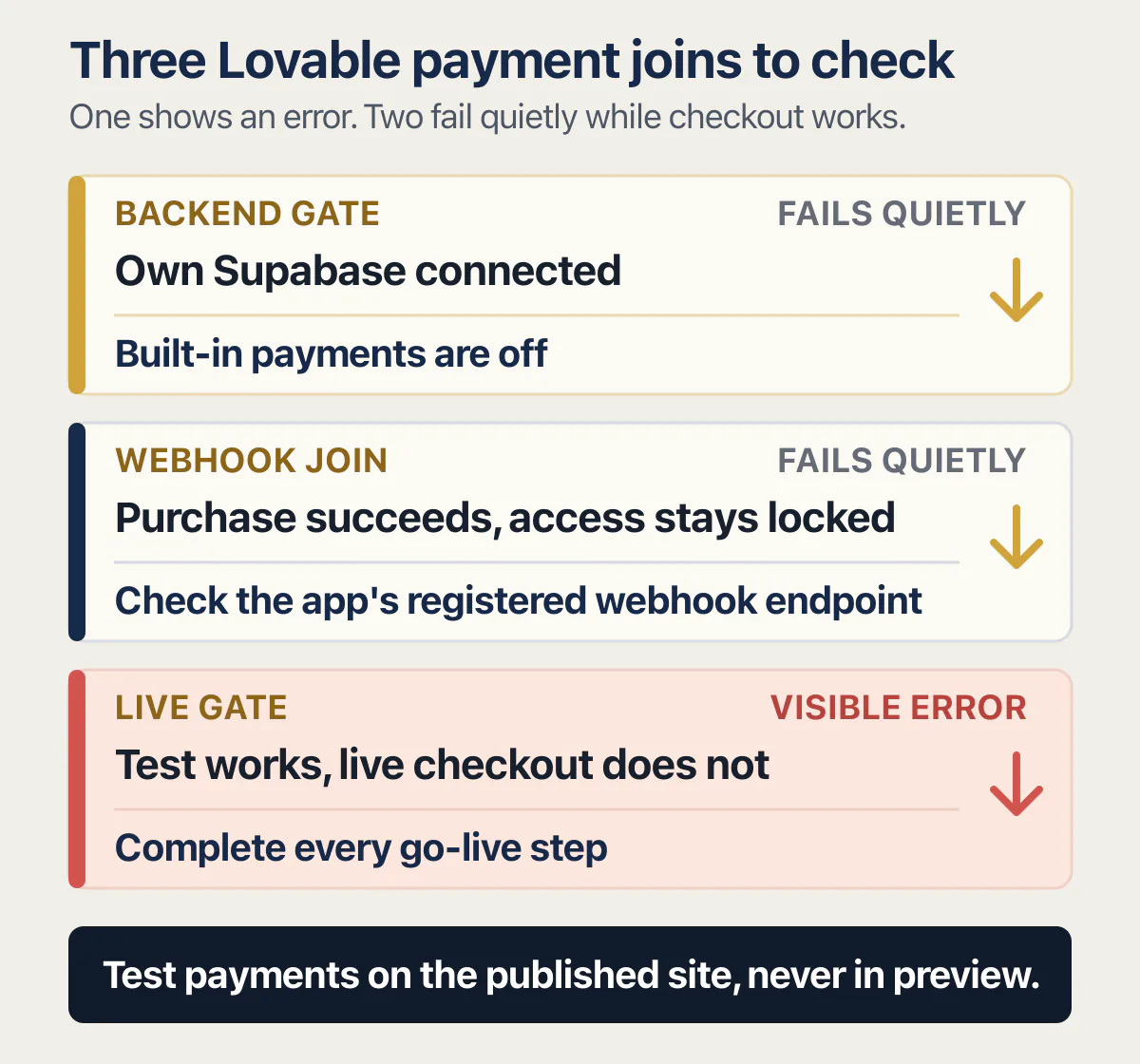
Payments that stopped working divide into three joins: the backend the payment feature needs, the webhook endpoint the provider calls, and whether the account is live yet. Only one of them produces an error anybody sees. The other two fail quietly while checkout keeps working.
The surprise comes first. Connecting your own Supabase project turns built-in payments off. Lovable’s payments page says they “aren’t available for projects connected to your own Supabase project”, because the feature uses the built-in backend for webhooks and subscription data. When an app switches backends and nobody’s plan upgrades any more, the missing piece is the payments feature itself.
The second join is the one worth reading twice. Lovable registers two webhook endpoints per environment, one for your app and one of its own for monitoring, and the payments documentation is explicit about what happens if the wrong one goes.
Deleting your app’s endpoint silently stops payment events from reaching your app: purchases still succeed, but subscriptions never activate and features never unlock.
You can tell the two endpoints apart by their shape without reading the whole string. Your app’s endpoint is on the backend’s own domain and ends in a payments webhook path with an environment marker like ?env=live; the monitoring endpoint sits under api.lovable.dev with the project ID in the path. In the provider’s dashboard they look like two rows of the same kind, and deleting the tidy-looking duplicate is the mistake the monitoring endpoint cannot cover for. Once you know the endpoint is the problem, telling a webhook that arrives and changes nothing from a subscription row that was never written runs in a fixed order of checks.
Two more documented limits catch people during testing. The provider’s customer portal “will not function inside the Lovable preview panel”, so a portal that looks broken in the preview may be fine on the deployed site. And Lovable’s older Stripe guide, which on 25 August 2026 is marked “This article is deprecated. Most projects should use the built-in Payments feature instead.”, still carries the warning that “Stripe integration doesn’t work in preview. To test the integration, make sure to deploy.” Both statements point at the same practical rule: test the money path on the published site, never in the pane.
Live checkout is gated as well. Lovable states that “Until all go-live steps are completed, live checkout will not work”, so an account that takes test cards and refuses real ones is behaving as documented. Sweeping test keys and webhook secrets before you take real money is a job with its own list of things to change.
Which side of the join to check first
Five checks, in order, before you type another prompt. All of them are readable by a non-developer.
- 01 Is the connection still listed under Project connectors, and does it still appear under App connections? A connection that has been deleted is not a misbehaving connection, and the app features built on it stop the moment it goes.
- 02 Did anything change at the other service in the last week? A plan change, a paused project, a rotated or deleted key, or a person who left. The connector sees exactly what the account that created it can see, so a change in their permissions is a change in yours.
- 03 Did the app move to a new domain? A browser key restricted to the builder domains fails only on the new one, which means it fails only for customers.
- 04 Is the thing that broke gated on something other than the connection? Built-in analytics needs the project to be published, built-in payments need the built-in backend, and [a publish that will not finish](/blog/lovable-publish-not-working/) leaves every one of those gates shut.
- 05 Write down what you found before you prompt the builder again. A prompt cannot add a DNS record, restore a deleted webhook endpoint or grant a Supabase permission, and asking it to try produces code changes you did not need.
Two of those answers change what you do next rather than what you fix. If a person left the company, the repair is an account question first. If nothing changed at the other service and the app has not moved, the live question is whether Lovable itself is down.
The last check is the one people skip. A repository and a project that have stopped agreeing is a two-layer diagnosis and which layer failed decides who can clear it, in the same way a missing table is a permissions question and a silent subscription is a webhook question. Getting a copy of the code out of Lovable and moving the app off Lovable altogether are two different routes with two different contents, and neither of them repairs a join that is broken on the other side.
When it is worth having somebody read it
Three signals say the problem is bigger than the connector in front of you. The same join breaks every time anyone touches it, which usually means two systems disagree about who owns a piece of the data. Money is moving and nobody’s plan unlocks, the failure with no error message anywhere. Or nobody in the company can say which account created the connection in the first place, which makes every fix temporary.
The pages that rank for this subject will not help with any of the three. A directory site advertising 276+ Guides of Lovable integration walkthroughs, read at rapidevelopers.com on 25 August 2026, carries how-to-connect instructions and no diagnosis. A sync vendor at stacksync.com sells a paid two-way layer between an app and a CRM, which is a product to buy rather than a way to find out what stopped. Both are answering the question somebody asks before the app exists.
Common questions about Lovable integrations
What integrations does Lovable support?
Lovable publishes a connector catalog that showed 92 live connectors on 25 August 2026, grouped into eight categories including personal productivity, business and CRM, commerce and payments, and data and analytics. Beyond the catalog, a workspace admin can create a custom connector for any REST API, and any API can be wired into the app directly. Connections come in three kinds: app and chat connectors that run on one shared account, chat connectors that are personal to you and never part of the published app, and app user connectors where each of your customers connects their own account.
Does Lovable have an API?
Yes, and it is probably not the one you mean. The Lovable API creates Lovable apps programmatically, with a first release called Build with URL that generates an app from a shareable link. Calling an outside service from an app you built is a different job, handled by a connector when the catalog has one and by a written integration when it does not. The two questions have two different documentation pages behind them.
Why can’t I connect my Supabase project to Lovable?
Usually because the project is not ready on the Supabase side. Lovable documents that “Projects that aren’t ready in Supabase (for example, paused or still provisioning) can’t be connected”, and shows a prompt to check the project status instead. The other common reason is permissions: linking a Supabase organization needs workspace admin rights, so the Add Organization button stays disabled for everyone else until an admin links it once.
Where are my API keys stored in a Lovable app?
It depends on which key. A secret for an authenticated API lives in the project’s secrets, in the built-in backend rather than in your app’s frontend code, and is read by an Edge Function so it never reaches a visitor’s browser; Lovable sets that up itself when an API you are integrating requires authentication. A key made for the browser, such as a maps or analytics key, does ship to the visitor and relies on the domain restrictions described above. Workspace connector credentials sit in the workspace connection, not in the app at all. When a key works in the builder and the published app behaves as though it has none, start with where a key lives once the app is published, and why the live app cannot see it.
Can I use Lovable with Shopify?
Yes. You can connect an existing store or create a sandbox development store from Lovable, and the storefront you build calls into it. One clock matters: “Shopify removes development stores that stay unclaimed for 30 days”, so an unclaimed store built for a demo disappears on Shopify’s schedule, not yours.
Can a Lovable app use a CMS?
Yes, for reading content. Contentful is the CMS connector whose limits Lovable documents, and that page says the connector “is read only. It does not support creating, updating, or deleting content”, with all content management happening in the Contentful web app or through its own management API. An editing screen your app generated against that connector will therefore never save, which is a limit rather than a fault. Writing to Contentful is possible only through its management API, which would be a separate integration of your own, outside the connector.
Does Lovable work with Next.js?
As of 25 August 2026, Lovable’s published documentation index at docs.lovable.dev/llms.txt, which is a plain-text listing rather than a page to read, contains no Next.js entry. The two templates it names are React plus Vite and the newer TanStack Start, described on Lovable’s upgrade page as the template whose pages render on the server. People usually ask this question because they were told Next.js is better for search, and why a Lovable site can be live and still not show up in Google is a question about how the pages are built rather than which services they call.
Why is my Lovable analytics empty?
Two different products can be empty for two different reasons. Built-in project analytics “only collects data while your project is published”, so an unpublished project records nothing, and it does not read UTM tags, so campaign traffic counts toward the site it came from. The Google Analytics connector is send-only and does not check the ID: Lovable states that a “correctly formatted but wrong ID saves without an error”, so compare the measurement ID against your data stream in Google Analytics before assuming the connector is broken.
Can I connect my Lovable app to Zapier or Make?
Yes, through a function rather than a connector. Lovable’s Supabase FAQ answers external-service wiring by telling you to ask it to “create an edge function that acts as a custom API endpoint or webhook for the external service”, which gives the automation tool a URL to call and your app a place to receive what it sends. The credential for the outside service still belongs in the project’s secrets.
A connected service stopped and nobody changed a thing?
When payments, email or the database stop talking to your app, the fault can sit on either side of the join. In an audit, we go over how your app connects to outside services with you, then name the likely causes. By the end, you know which link to look at first.
Book a free audit → Free · 30 minutes · No code access needed