Lovable projects come out through three documented routes: Git sync into a GitHub repository, a codebase download on paid plans, and the separate Cloud database export. The first two hand you application code. The database export hands you database structure and data. No single route hands you the running backend, the files in storage, or a secret value.
Whether you can export at all was never really the question. Lovable’s own FAQ answers the ownership half with “You as the creator do!”, and its hosting documentation says you can clone the repository, modify it outside Lovable, and self-host without restriction. What people actually want to know is which route to use to download the code, and what they are holding once the files are on disk. This page settles both, against Lovable’s current documentation, checked on 15 August 2026.
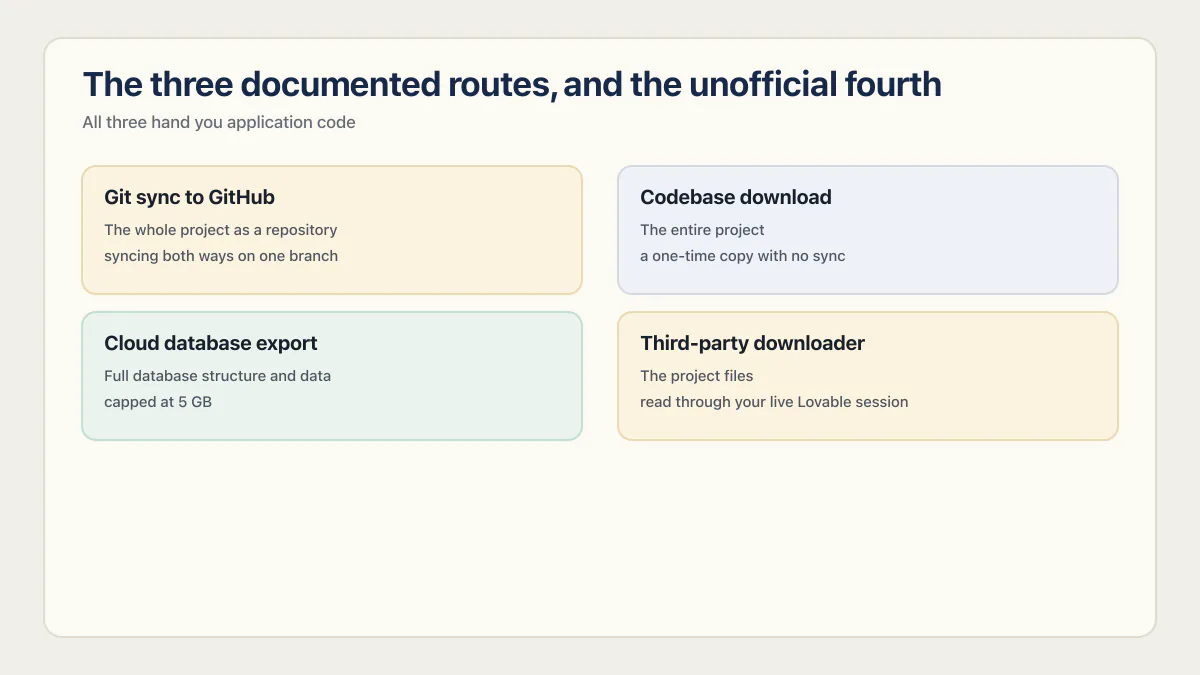
The three documented routes, and the unofficial fourth
| Route | What lands | What does not | What it costs | What it needs |
|---|---|---|---|---|
| Git sync to GitHub | The whole project as a repository, private by default, syncing both ways on one branch | Cloud database contents, storage files, secret values | Included on all plans for github.com; GitHub Enterprise is Enterprise-plan only | A GitHub account and a workspace connection |
| Codebase download | The entire project as a .zip from the code editor, as a one-time copy with no sync | The same three, and any later change you make in Lovable | Paid plans; Free is read only | Edit access, and on Enterprise workspaces an admin who has not restricted downloads |
| Cloud database export | Full database structure and data, capped at 5 GB | Storage files, edge function code, project secrets, and passwords users can keep signing in with | Included with Cloud, one request per 24 hours | The Cloud tab and Advanced settings |
| Third-party downloader | The project files, read through your live Lovable session | Everything the first three miss, plus any file over the API’s size limit | Free to install | A bearer token for your Lovable account, or an extension sitting on lovable.dev pages |
Read the third row as a pointer rather than an instruction. Its 5 GB cap, its once-per-24-hours limit and its four exclusions come from Lovable’s Advanced settings documentation, checked 15 August 2026, and the database is a separate job with its own restore problem and its own failure modes. That whole job is covered in exporting a Lovable Cloud database. Exporting code gives you no data. Exporting the database gives you no code. Do both if you are leaving.
How to connect Lovable to GitHub
Lovable’s GitHub connection lives under Project settings, then Git, then GitHub. Click Connect next to your workspace connection and Lovable creates a new private repository and starts two-way sync on one branch. It works on every plan for github.com. The closed direction is the start: GitHub cannot seed a Lovable project, so nothing comes into Lovable that way.
These are the steps Lovable’s GitHub documentation publishes, as read on 15 August 2026, rather than a sequence reproduced in a paid account:
- 01 Open Project settings, then Git, then GitHub. The plus menu in the chat opens the same screen.
- 02 Find your workspace connection and click Connect next to it.
- 03 Lovable creates a new GitHub repository, private by default, and starts two-way sync automatically.
- 04 Confirm which branch is syncing. Lovable syncs one branch at a time, normally the repository default.
- 05 Clone the repository so you hold a copy that survives the connection being broken.
Three warnings in that documentation matter more than the click path, because each one costs you the connection rather than a minute. Renaming your GitHub account or organization breaks the connection and the project stops syncing. Transferring the repository to another account breaks sync. And if you reconnect after any of that, Lovable creates a new repository holding the current version of the project; the original stays on GitHub, unchanged and no longer linked to Lovable. That last behavior is the one that surprises people, because the old repository still looks alive.
A local clone is the only copy that does not depend on Lovable or GitHub staying connected to each other:
git clone https://github.com/<your-account>/<your-repo>.git
cd <your-repo>
npm install
If the install completes and the project’s build command runs, the export is intact as source. Whether it runs as an application is a different test, further down.
Getting the code without GitHub: the codebase download
There is a second route that skips GitHub entirely. Lovable’s code-mode documentation states that on paid plans, everyone with edit access to the project can click Download codebase at the bottom of the file tree sidebar to save the entire project as a .zip file. On the Free plan the code editor is read only, with a Read only label and an Upgrade option in place of editing, so Lovable does allow code editing and downloading, but not on Free. One narrower option survives on any plan: the Download button in the file toolbar saves a single open file.
Enterprise workspaces add a gate above the plan gate. Admins can restrict codebase downloads so only workspace admins and owners can use them, and everyone else sees the Download codebase option disabled. If the button is grayed out on a paid plan, that setting is the first thing to check.
This is worth stating plainly because the guidance in circulation disagrees. Encited’s Lovable export guide, published 20 February 2026 and still ranking for this query, says the ZIP download “requires a Business plan”. Lovable’s own code-mode page names no tier at all: it says paid plans. Checked 15 August 2026, the documentation is the safer source, and the practical answer is to open the code editor on your own plan and look at whether the button is live.
The download is a snapshot, and it does not keep up. Edit in Lovable tomorrow and the zip on your disk is yesterday’s project, which is the whole argument for the synced repository over a saved file.
The Lovable project downloaders, and what they need from you
Third-party Lovable downloaders work by borrowing your login. The open-source command-line one documents this itself: log into lovable.dev, open DevTools, and copy the authorization header off any request to api.lovable.dev. A browser extension running on lovable.dev pages never has to ask, because it is already inside that session. Lovable Downloader and Lovable.dev Project Downloader reported 10,000 and 2,000 users.
The README for the lovable-downloader command-line tool documents the mechanism itself: it instructs the user to open lovable.dev and log in, open the DevTools Network tab, open or reload a project, find any API request to api.lovable.dev, and copy the authorization header value. That value is then supplied as a BEARER_TOKEN environment variable, in a .env file, or at an interactive prompt. It is a bearer token for your Lovable account, handed to a program you did not write. The same README is honest about the limits: no watch or sync mode, no parallel downloads, and files over the API size limit are skipped with no workaround.
A browser extension does the same job with the friction removed, and the removed friction is the whole difference. It runs on the page while you are already signed in, so it never has to ask you for a token, and it holds that position for as long as it stays installed and auto-updating. Here is what the two Chrome Web Store listings reported when they were read for this page on 15 August 2026, with one caveat: neither could be re-read against the live store page afterwards, and a later search reading of the first listing came back with a different listing title, a 4.13 rating and 30 reviews. Treat every figure below as reported at the listing rather than a current count. Lovable Downloader, listed as an export-projects-as-ZIP tool: 10,000 users, 4.3 out of 5 from 35 ratings, version 3.0.0, last updated 28 April 2026, a developer reachable at a gmail address, a privacy policy hosted on a personal GitHub gist, and a declaration that it does not collect or use your data. Lovable.dev Project Downloader: 2,000 users, 1.9 out of 5 from 9 ratings, version 1.0.0, last updated 11 May 2026, developer listed as “Project Download zip” at a gmail address, with the same no-collection declaration.
None of that says either extension misuses anything, and neither one has been installed or inspected here. The point is the access model rather than the developer. Treat this class of tool as software to review before running rather than a button to click, and remember that two routes get you the same files without handing anyone your session: clone the synced repository and archive it yourself, or use the paid-plan codebase download.
One naming trap while you are searching. lovable.dev/download is Lovable’s own desktop and mobile app, and it ranks high for downloader queries. It is not a project downloader and it will not get your code out.
Does the exported code run anywhere else?
The exported Lovable frontend runs anywhere. The backend mostly does not. Lovable’s own documentation names four Supabase-specific services you lose on the way out: authentication, storage, realtime, and edge functions.
Lovable’s ownership and hosting documentation says you can clone the repository, modify it outside Lovable, deploy it on your own infrastructure, or fully self-host without restriction, and it names those four services on the same page. It goes further than most vendors would. Moving to plain PostgreSQL or another database provider, it says, would require implementing equivalent authentication, storage, and edge services, and is not supported out of the box. Lovable Cloud bundles the database, storage, authentication, realtime, and functions behind one backend, and there is no one-click migration from it to your own Supabase project. Cloud’s Secrets tool holds your Stripe or Resend keys in a form only your app can use, which means they do not travel in any export. Storage files are their own download, and Lovable tells you to take them before you remove Cloud, because removal is permanent.
Project age changes the answer too. Lovable’s FAQ says projects created from 13 May 2026 use TanStack Start with server-side rendering, while older ones use React with Vite. Those are different local commands, different build output, and different hosting requirements, so check package.json before you decide where the export is going.
Two destinations people ask about specifically. WordPress is not one: a Lovable export is a React or TanStack Start application and WordPress serves PHP themes, so there is no path short of rebuilding the thing. A normal host is straightforward, and deploying a Lovable frontend to Vercel covers why a synced repository beats a hand-uploaded copy there. If the backend is moving as well, that is a bigger job than an export and moving off Lovable Cloud is the one that plans it. The database half stays with the Cloud database export, including the 5 GB cap and what the file leaves out.
What to open in the export before you trust it
Four checks answer most of what you need to know, and none of them takes longer than a minute:
package.json: tells you which stack you have. TanStack Start with a server entry point, or React and Vite with adistbuild. Everything else about hosting follows from this line.supabase/functions, or the server routes: where backend code lives, if any came with the export. An empty folder here on an app that clearly does server work means the logic is running somewhere the export did not reach..envand.env.example: the list of values the app expects to be configured, which is the closest thing you have to an inventory of its integrations. Which of those values are safe in browser code depends on the prefix, and getting it wrong is how a server key ends up shipped to users.- The build command, actually run: a repository that clones cleanly and fails to build is a common and recoverable state, but it is better discovered now than during a cutover.
A clean build proves only that the exported source and configuration available in that tested environment can build. It does not prove that server routes, runtime configuration, secrets, storage, data, or externally hosted logic are present, or that the app still has a backend to talk to. If the export is part of taking over the project from someone else, owning an app someone else built covers the takeover checklist for the repository, accounts, domain, keys and hosting.
Common questions
How do I export a project from Lovable?
Connect the project to GitHub from Project settings, then Git, then GitHub, and Lovable (often typed loveable) creates a private repository with two-way sync you can clone. On paid plans you can skip GitHub and click Download codebase at the bottom of the file tree sidebar in the code editor. Neither route includes your database, storage files, or secret values, which export separately or not at all.
Does Lovable allow code export?
Yes, on documented routes, and Lovable’s FAQ states that you own the projects and code you create. Git sync to GitHub or GitLab provides an ongoing repository. On paid plans, editors can use the native Download codebase control for a one-time .zip snapshot. Enterprise admins can restrict that download to workspace admins and owners.
Can I import code into Lovable?
No. Lovable’s FAQ says there is currently no way to start a Lovable project from already existing code on, for example, GitHub, and its GitHub documentation says you can only export from Lovable to GitHub, not the other way around. The sync is two-way once a Lovable-created repository exists, so commits pushed to the active branch come back into Lovable, but that is not the same as uploading a project you built elsewhere.
Does the exported code run without Lovable?
The frontend does. Clone it, install, build, and deploy it on any host you like. Anything that talked to Lovable Cloud keeps talking to Lovable Cloud until you rebuild those services somewhere else, because authentication, storage, realtime, and edge functions are Supabase-specific and, in Lovable’s own words, not supported out of the box on plain PostgreSQL.
Moving platforms is the moment the missing production pieces show up. The sprint below builds them into the codebase you land on.
Built it with AI. Now it has to hold up for real customers.
The Production Hardening Sprint takes the app you already have and builds the production foundation underneath it. Authentication and access rules, payments that stay consistent, error handling, monitoring, backups, automated tests and a documented handover. Our engineers work inside your existing codebase for ten working days. All 123 deliverables are included, and you get the evidence for each one.
See the Production Hardening Sprint →  $2,500 fixed price · 10 working days · One codebase