Every AI app builder answers this question with a yes on its own website, and every one of them is telling the truth. That is why the yes is not worth much. The closest thing to a cross-tool answer currently on this search, a June 2026 roundup on ssojet.com, publishes a yes/no export column for eight builders and then explains the mechanics for exactly one of them. It never says whether the database, the environment values or the running backend come out with the files.
Code export works on all six builders checked here: Lovable, Base44, Replit, Bolt.new, v0 by Vercel and Cursor. The backend is the real test. Four of the six can run one for you, and all four document a way to get the data out, although none puts the live database inside the code download.
So the useful version of the question is three questions, and the table below answers all three for each tool against the vendor’s own documentation.
Which AI builders let you export code
All six builders let you export the application code. Lovable, Base44, Replit and Bolt.new give you a download or a Git sync; v0 puts the repository in your own GitHub account; Cursor never held the code. What separates them is the backend, not the export button.
Four columns, six tools, and a source under every cell. Read your own row first, then the section under it, which explains why most rows look the same in column one and completely different in column two.
| Tool | Does the code come out | Does the backend and its data come out | What stays behind | Does it run without the vendor |
|---|---|---|---|---|
| Lovable | Yes. Two-way GitHub sync, plus a direct Download codebase button at the bottom of the file tree sidebar in the Code editor. Plan gate: the direct download is paid plans only (Lovable GitHub docs) | Partly. With Cloud on, Advanced settings exports “your full database, both structure and data”, one export per day up to 5 GB. But: “There is no one-click migration from the built-in backend (Cloud) to your own Supabase project” (Lovable Cloud, Advanced settings) | Files in storage buckets, edge function code, and project secrets are all excluded from that export, and passwords are “not exported in a usable form”. The region is locked once Cloud is on (Advanced settings) | The frontend, yes. The docs say you can “work locally in your IDE, test features on branches, and deploy outside Lovable”. The Cloud backend does not travel with it (Lovable GitHub docs) |
| Base44 | Yes, two routes. GitHub sync runs both ways and pushes for you: your changes are “synced to the connected repository automatically”, and “There’s no option to manually push updates from your Base44 app to GitHub” because you never have to. Plan gate: “GitHub 2 way sync requires the Builder plan or higher”, and an older one-way Export to GitHub connection has to be disconnected first. It does not reverse, either: “GitHub sync is permanent. You can’t disconnect or transfer the project back to Base44.” The CLI’s base44 eject “downloads the frontend code and backend resources from a selected app”, with no plan gate stated (GitHub sync, eject) | Schemas yes, rows separately. “The ejected project has an empty database. Your entity schemas are copied, but not your data.” Row data comes out one table at a time: Dashboard, then Data, then the table, then More Actions and Export, as CSV (eject, managing app data) | The runtime the backend functions need. Their source comes out with eject (“backend resources” includes the functions), but they “run on Deno, a modern TypeScript runtime” inside Base44, read secrets at runtime through secrets.get(), and the docs describe no way to run them elsewhere (backend functions) | Frontend yes, backend no. An ejected project gets “its own app ID”, the SDK client is created with createClient({ appId }), and deploying sends “your backend resources and any frontend files” to “Base44’s infrastructure”. No self-hosting path is documented (backend basics, SDK client) |
| Replit | Yes, no plan gate stated. “Select the three-dot menu at the top of the file tree and choose Download as zip”, and if that fails, “open a Shell and run zip -r project.zip .”. Git works too, via git remote add origin <url-to-repository> and a personal access token. Plan gate: self-hosted Git providers need Enterprise (projects and files, Git interface) | Yes, by connection string. “You can connect to your production database from any PostgreSQL-compatible SQL client using the connection string from the production database’s Settings tab”, which is what makes an ordinary Postgres dump possible (connection details) | App Storage objects. It is “powered by Google Cloud Storage (GCS)”, and the documented way out is one file at a time: “Select the download icon to the right of the file to download it.” No bulk export is documented (App Storage) | The docs do not state it. Replit’s publishing documentation covers deployment types on Replit and nothing else, and no page I could find on 2026-08-15 says whether a downloaded Replit app builds and runs off the platform (publishing) |
| Bolt.new | Yes. “Click the project title in the top left of your screen, then click Export > Download.” GitHub is two-way and automatic: Bolt commits working changes for you and “checks GitHub every 30 seconds for any updates made outside Bolt”. No plan gate stated (projects and files, Git) | Depends which backend. On your own Supabase, Bolt never held the data. On Bolt Database, the documented routes are to claim the database in Supabase, which requires a Supabase organization owner, or to select rows in each table and export them as CSV or JSON (Supabase integration, database tables) | The project download does not include its Bolt Database. Claiming the database is a separate Supabase flow, and manual row export operates one table at a time. The docs do not describe the code zip as a complete backend export (Supabase integration, database tables) | The frontend, yes. Unzip it, then npm install && npm run dev, for which “you’ll need Node.js installed first”. You can also run the build, click Download, and upload the build folder to Netlify yourself (projects and files, Netlify integration) |
| v0 by Vercel | Yes, and the repository is yours from the start. v0 creates a private repo in the GitHub account or organization you choose, “v0 does not store a separate copy of your code”, and GitHub is “the source of truth for your project”. Plan gate: on Plus plans, team members need repo access unless the team turns on “Allow v0 to Act on Behalf of Members” (v0 GitHub, Git import) | v0 never held it. Databases come from connected providers, listed as Upstash, Neon, Supabase and Vercel Blob, plus Snowflake, and “adding an integration provisions a new user account on that service” (v0 databases) | Nothing on the code side, since the repository already is the record. Provider accounts created through v0 stay at the provider, which is where the data was all along (v0 databases) | The docs only cover Vercel: “Deploy your v0 chats to Vercel with just a few clicks.” They do not discuss other hosts. Because the code sits in your own GitHub repo, changing hosts is an ordinary repository move rather than an export (v0 deployments) |
| Cursor | There is nothing to export. Cursor is “a coding agent for building ambitious software” working on a codebase already on your machine, and the docs describe integrations with GitHub, GitLab and Azure DevOps rather than a store of your code (Cursor docs) | Cursor never provisioned one. The docs describe an editor and a coding agent, with no database, auth or storage service of its own (Cursor docs) | Nothing. Cloud Agents run tasks against the repositories you already own (Cursor docs) | It already does. The files are local and the hosting was always your decision (Cursor docs) |
Checked 2026-08-15 against the vendor documentation linked in each cell. Plan gates are as written on those pages on that date, and they move: treat every cell as perishable and reread your own row before you act on it.
Why “yes, you can export the code” is the wrong question
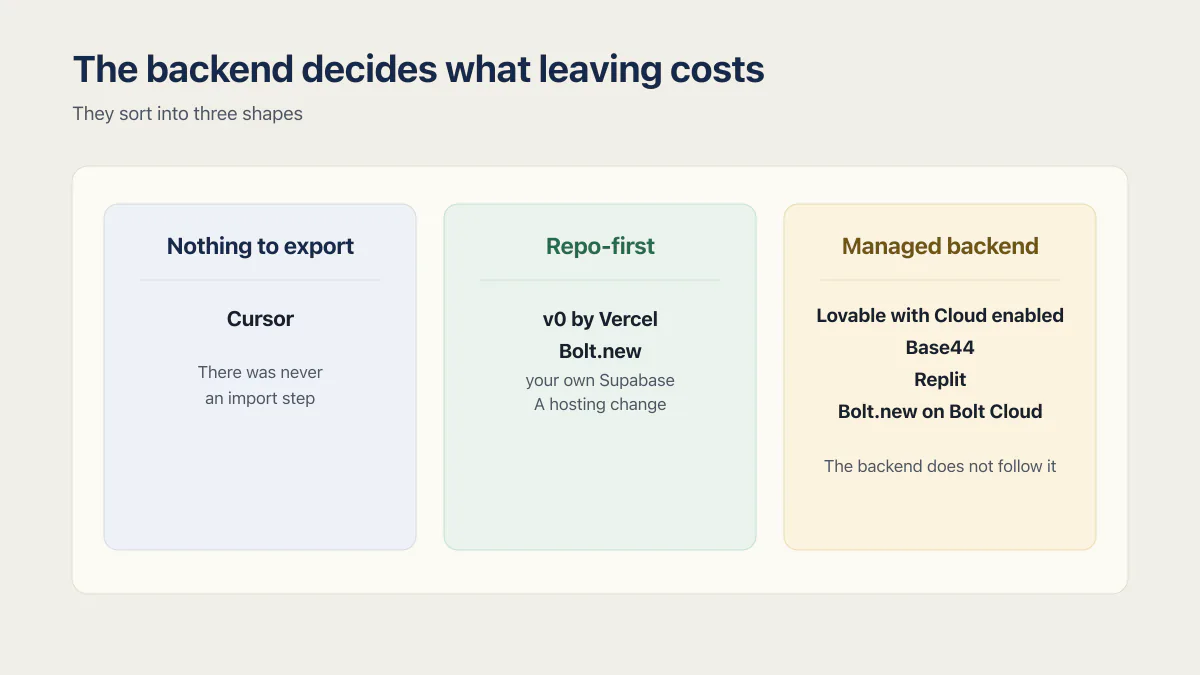
The code column is the wrong place to look, because it says yes six times and separates nothing. What separates the six tools is who has been running the backend, and on that question they sort into three shapes: nothing to export, repo-first, and managed backend.
The tool that ran your backend decides what leaving costs. The export button decides almost nothing.
Nothing to export. Cursor never took custody. There is no export step because there was never an import step, and whatever database the app talks to was set up in an account with your name on it.
Repo-first. v0 by Vercel is the clean case: the repository lives in your GitHub account and v0 keeps no separate copy, so the code was out before you asked. Bolt.new lands here too whenever the project was wired to your own Supabase, because then the database sat in your Supabase organization from day one. For this shape the move is a hosting change rather than a data recovery job.
Managed backend. Lovable with Cloud enabled, Base44, Replit, and Bolt.new on Bolt Cloud all run a database, auth, file storage and server-side functions for you. The code comes out and the backend does not follow it. Everything hard about leaving lives in this shape, and the four tools inside it are not equal: Replit hands you an ordinary Postgres connection string, Lovable gives you a full database dump with no one-click path into your own Supabase, so the restore and reconfiguration into your own project is manual work, Base44 gives you schemas plus per-table CSV, and Bolt Database can be claimed in Supabase or exported one table at a time as CSV or JSON.
Bolt Database still does not travel inside the project download. Its full migration route requires a connected Supabase account and a Supabase organization owner, while the manual export route requires selecting rows in each table. Which backend you picked at project creation decides which departure steps you have.
What an AI app builder code export leaves behind
An export copies the files. The running system is a bigger thing than its files, and five parts of it fall through that gap on the managed-backend tools in the table. On the repo-first tools (v0, Bolt.new on your own Supabase) and on Cursor, these parts were never in the builder’s custody, so the check is that they exist in accounts you hold rather than that they move.
- Secrets and environment values. API keys, database URLs, webhook signing secrets. Lovable’s export explicitly excludes “your project’s secrets”; Base44 functions read theirs at runtime from the platform. You will be reissuing keys rather than copying them, and what a .env file is and where its values live covers why they behave that way.
- Uploaded files. Everything users put into platform storage. Lovable excludes storage bucket files from the database export. Replit’s App Storage documents a per-file download icon and no bulk route.
- Auth users and their passwords. Lovable states passwords are “not exported in a usable form”, which is what you want from a security point of view and a problem the morning you switch. Every user signs in again somehow.
- Server-side functions and scheduled work. Base44 backend functions run on Deno inside Base44. Cron jobs, queues and webhooks are configuration on the platform, not files in the zip.
- The rows themselves, when only the schema exports.
base44 ejectis explicit: empty database, schemas copied, data not.
None of that is a scandal. It is the normal shape of a managed platform, and the vendors document it honestly. It is only a problem when you find out about it after the export, with the old project already cancelled.
What “runs without the vendor” actually means
Opening the folder in VS Code proves nothing. Four things have to be true, in order: the project installs and builds, the server starts, it finds a database it is allowed to talk to, and a real user can log in and see their own data. Most exports clear the first two on the first afternoon and stall on the third. Getting the app into a repository and hosting account you own, with a fresh-clone test that proves no step still needs the builder, is covered in how to self host an exported app.
The reason the data column matters more than it looks is that the export is often the first complete copy of the data anyone has made. Two apps in the audit corpus behind this blog show what that means in practice: in one, every change was tested directly against the production database because no staging environment existed at all; in another, leftover migrate and purge endpoints meant a single web request could drop the entire production database. In both cases the running database was the only copy of the business. An export attempt is a bad time to discover that.
Replit’s empty cell in column four deserves the same treatment rather than a guess dressed up as an answer. The zip download is documented and the Postgres connection string is documented; whether the result stands up on another host is not addressed anywhere I could find. How much the app leaned on App Storage and Replit-specific configuration probably decides it, and today you find that out by trying, because the docs do not say.
Which tool should I check first if I am planning to leave
Your shape answers this before the tool does. Cursor users have nothing to check. Repo-first users confirm the repository sits in their own GitHub account and treat the rest as a hosting change. On a managed backend, the first action is a verified copy of the data, followed by a written list of every secret, storage bucket, function and scheduled job the app depends on.
The code download comes after that list, because the download is the part that will still be there tomorrow. The data and the platform configuration are the parts tied to an account that can lapse.
The per-tool detail belongs to its own page. Getting a Lovable Cloud database out is a job with its own failure modes, covered in how to export a Lovable Cloud database. The Base44 side is set out in what a Base44 export actually contains, and what the Replit workspace is really holding is in is Replit production ready. Dedicated pages on what a Lovable export contains, every route out of Base44, and the four parts of a Replit export each cover one tool’s export in full.
One thing this page deliberately does not answer: whether you should move at all. Export mechanics tell you the cost of leaving, not whether leaving is the right call, and a builder you can exit cheaply is often a builder worth staying on. If the question underneath yours is which tool to build in next, that is a different comparison, and the Lovable alternatives roundup is the one to read instead.
Common questions about exporting code from an AI app builder
Can you export your code from Lovable?
Yes, two ways. Lovable offers two-way GitHub sync on all plans, and a direct Download codebase button at the bottom of the file tree sidebar in the Code editor, which the docs put behind a paid plan. The code is the easy part; the Cloud backend behind it does not move with the download.
Can you export code from Base44?
Yes. Base44 syncs code to GitHub in both directions and pushes your changes automatically, on the Builder plan or higher, and that sync is permanent: you cannot disconnect it or bring the project back to Base44. The other route is the CLI command base44 eject, which downloads the frontend code and backend resources into a new project with its own app ID. The ejected project starts with an empty database, so the data is a separate job.
Can you export code from Bolt.new?
Yes. Click the project title in the top left, then Export, then Download, and you get a zip you can run locally with Node.js installed. Bolt also connects to GitHub with automatic two-way sync. The question that matters is whether the project used your own Supabase or Bolt’s own Cloud database.
Does the database come out with the code?
Usually not in the same step. Lovable exports the full database separately through Advanced settings. Replit gives you a Postgres connection string you can dump from. Base44 exports schemas with the code and row data as per-table CSV. Bolt Database can be claimed in Supabase or exported as CSV or JSON one table at a time. v0 and Cursor never held your data in the first place.
Does exporting the code mean I own the app?
Exporting gives you the files. A working system also needs the data, the secrets, the storage files, the user accounts and somewhere to run it, and on a managed-backend builder those come out through four different doors. Owning the repository is step one of about six. When a person rather than a builder made the app, owning an app someone else built walks through the takeover of the repository, accounts, domain, keys and hosting.
Which AI app builder lets you export the full source code?
All six in the table give you the application code. v0 by Vercel comes closest to “the full thing” because the repository is in your own GitHub account and the databases were always at third-party providers, so there is nothing held back. On Lovable, Base44, Replit and Bolt Cloud, “full source” still excludes the platform-side backend.
Can you export the code from Framer, Adalo or Emergent?
Those three sit outside the six tools checked here, and the same three questions apply to each of them: what the export contains, whether the database and uploaded files come with it, and whether the result runs on a host the vendor does not control.
Do you need a paid plan to export your code?
Only in specific places. Lovable’s direct Download codebase button is documented as paid plans only, though GitHub sync is not. Replit gates self-hosted Git providers to Enterprise while ordinary GitHub connections carry no stated restriction. v0 adds a repo-access rule for team members on Plus plans. Bolt.new states no plan gate on its export routes, and Base44 states none on base44 eject, while its GitHub sync needs the Builder plan or higher.
What is the difference between exporting the code and migrating the app?
Exporting is one download. Moving the app is the whole sequence: data out and verified, secrets reissued, storage files copied, auth users re-established, functions and scheduled jobs rebuilt, then the app deployed somewhere and tested with a real login. What breaks during that move is its own subject, and so is the question of whether to hand the job to someone else.
Moving platforms is the moment the missing production pieces show up. The sprint below builds them into the codebase you land on.
Built it with AI. Now it has to hold up for real customers.
The Production Hardening Sprint takes the app you already have and builds the production foundation underneath it. Authentication and access rules, payments that stay consistent, error handling, monitoring, backups, automated tests and a documented handover. Our engineers work inside your existing codebase for ten working days. All 123 deliverables are included, and you get the evidence for each one.
See the Production Hardening Sprint →  $2,500 fixed price · 10 working days · One codebase