A Replit app you want somewhere else is four things sitting in four places: the code, the database, whatever your users uploaded, and the keys that make it run. Replit hands over the first one in a click. The other three each have their own door, and one of them does not exist at all until you have published the app.
Exporting a Replit app is four separate jobs, not one. The three-dot menu in the file tree downloads the code as a zip. The database, App Storage files, and Secrets each come out a different way, and Replit’s own documentation says a copy of a project does not include the secrets, the database, or the deployment configuration.
Everything below is read from Replit’s current documentation, checked on 15 August 2026, rather than from a run through the product. Where the documentation is thin or has drifted, I say so instead of filling the gap with a plausible click path.
What does exporting an app from Replit actually include?
A Replit export covers four things that live in four places: the project files, the Postgres database, anything in App Storage, and the values in Secrets. Only the first is a download. Replit’s documentation is explicit that copying a project leaves out the secrets, the database, and the deployment configuration.
Replit’s projects-and-files page says that after copying a project you have to set up secrets, the database, and deployment configuration in the new project, because those are not included in the copy. That line sits directly below the zip instructions, and the zip instructions are the part that gets repeated everywhere else.
| Part | Where it lives on Replit | The documented way out | What that path does not cover |
|---|---|---|---|
| Code and project files | The file tree in the workspace | Three-dot menu at the top of the file tree, then Download as zip. zip -r project.zip . in the Shell when the project is too big for the menu | Secrets, the database, and the deployment configuration |
| Database | A development Postgres per app, plus a production Postgres created when you publish | Production only: connect any PostgreSQL client using the connection string from the production database’s Settings tab | The development database is never reachable from outside the app, so an app you have never published has nothing external to dump |
| Uploaded files | App Storage, formerly Object Storage, backed by Google Cloud Storage | A download icon beside each file in the Objects view in the App Storage tab | No documented bulk download in the interface. A whole bucket needs the App Storage SDK or a Google Cloud Storage client |
| Secrets | The Secrets pane, App Secrets tab | Edit as JSON or Edit as .env, which shows the entire list at once | Nothing about reissuing the keys that point back at Replit-managed services |
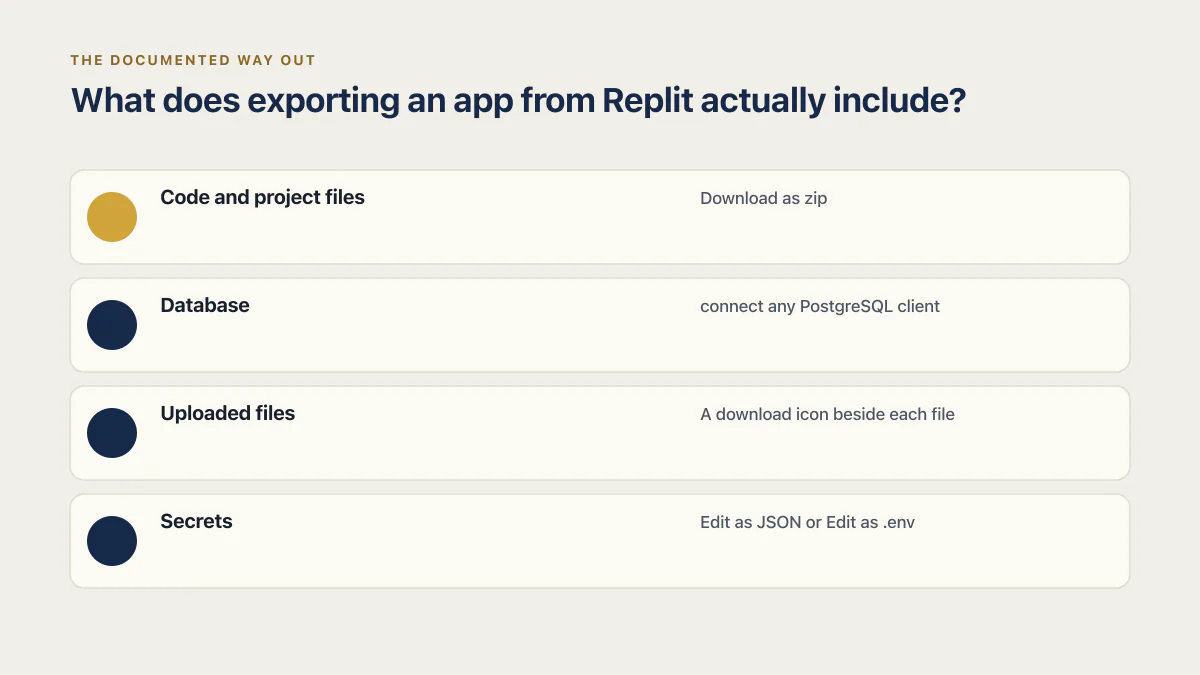
Three of those four rows need the app to still be running when you get to them, which makes the order you work in matter more than it looks.
How do I download an app from Replit?
Downloading a Replit app means downloading its code. Replit documents one click path: the three-dot menu at the top of the file tree, then Download as zip. If the project is large enough that the menu download fails, the documented fallback is to open a Shell and build the archive yourself.
zip -r project.zip .That packs the current directory into project.zip, which appears in the file tree to download like any other file. It is Replit’s own fallback for the large-project case, not a workaround someone invented.
“How can I download a project from Replit” gets the same answer, because a project and an app are the same object under two names. The zip carries the files in the tree and nothing from the three rows below it in the table above. It is the quarter of the job that carries the least risk, since you can take the zip again any time the app still exists.
How to connect Replit to GitHub
A GitHub connection beats a one-off zip for a boring reason: it keeps working. A zip is a photograph of the code on the afternoon you took it, and a remote repository stays current every time you push, which matters when the move takes three weeks.
Replit’s Git interface documentation describes the flow in stages rather than as a fixed sequence of button labels:
- 01 Open Tools, select the + sign, and add Git. That puts a Git pane in the workspace.
- 02 Initialize the repository and connect your provider from that pane.
- 03 Edit files as normal, then review the changed files in the Git pane.
- 04 Stage the files you want in the commit and write a commit message.
- 05 Push to the remote repository.
Treat those as the shape of the flow, not a script. Replit’s page describes the stages without naming every control, workspace layouts move, and I have not clicked through it to confirm the current labels. If a button is not where the sequence says it should be, the pane’s own wording wins.
Two details on that page matter more than the click path. For a GitHub.com repository, Replit says to use a personal access token instead of your password and to store it in Secrets as a GIT_URL in the form https://<username>:<token>@<git-host>/<owner>/<repository>. The same page warns that when you use credential secrets, anyone with access to your Replit App can potentially access your Git credentials. A collaborator on the Replit app is therefore a collaborator on every repository that token can reach. Use a token that can only touch the one repository, and retire it once the move is done.
Can you connect to a Replit database from outside the app?
A Replit app has two Postgres databases and only one of them is reachable from your machine. Replit documents the development database as accessible only from within your app and never exposed publicly. The production database is different: any PostgreSQL-compatible client can connect to it using the connection string from its Settings tab.
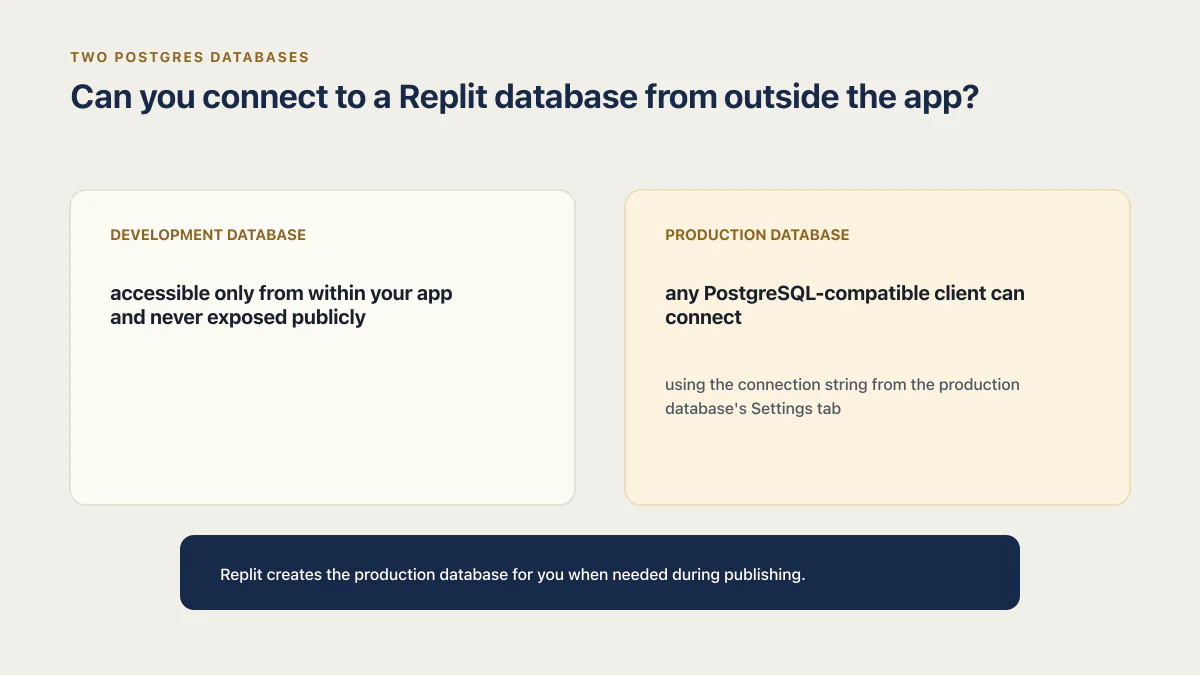
The second half is where people trip. Replit’s development and production database documentation says Replit creates the production database for you when needed during publishing. An app you built, tested, and never published has no externally reachable database at all, and no amount of hunting through settings will produce a connection string. If a pg_dump from your laptop goes nowhere, check that before anything else. The same split, read as a launch question rather than an export question, decides where your users’ data actually sits.
Once that database exists, Replit’s connection details page says any PostgreSQL-compatible SQL client can connect using the connection string from the production database’s Settings tab. From there the tooling is ordinary Postgres, not a Replit feature:
pg_dump "<connection string from the production database Settings tab>" \
  --no-owner --no-privileges -Fc -f replit-production.dump
-Fc writes the custom format that pg_restore reads, and --no-owner --no-privileges drops the role grants that will not exist at the destination anyway. Use the connection string exactly as Replit gives it, SSL parameters included.
Then restore it somewhere before you believe it. A dump you have never restored is an assumption, not a backup, and loading it into an empty database and counting rows is the fastest way to find a missing schema.
Replit’s recovery features matter here precisely because they are not an export. The data recovery page documents rollback to Agent checkpoints for the development database and point-in-time restore for production, with up to 7 days of history on Core and up to 28 days on Pro and Teams. Neither produces a file you can carry away, and the same page is blunt about the other trap: restoring your database does not restore your app’s code, and rolling back your app does not restore your database. That is a route back to an earlier Replit, not a route out.
How do you download files from Replit App Storage?
App Storage, which Replit used to call Object Storage, hands over files one at a time. The documentation’s only interface instruction is to select the download icon to the right of the file, in the Objects view in the App Storage tab. As of 15 August 2026 there is no documented download-everything button, so a bucket holding a few thousand user uploads is not something you empty by hand.
The App Storage page says App Storage is powered by Google Cloud Storage, and points bulk work at its programmatic access section: the App Storage SDK for JavaScript and Python, or the Google Cloud Storage client library. That is the path for anything past a handful of files, and this page only identifies it: neither Replit page documents a bulk download procedure, so a bucket with thousands of uploads needs a listing and download written against one of those clients, plus a count and total-bytes check against the bucket before the workspace is closed.
The rename is still half-finished, so the documentation URL reads object-storage while the tool reads App Storage, and guides written before the change describe a feature you cannot find by name. Whichever programmatic path you pick, run it while the app is still up: the code that copies the bucket lives inside the app you are leaving.
How do you export your Replit Secrets?
Secrets are the one part of a Replit export that comes out whole. The Secrets pane has two tabs, App Secrets and Account Secrets, and Replit’s documentation says you can modify the entire list of App Secrets by selecting Edit as JSON or Edit as .env at the bottom of the tab. That view is the export.
Check both tabs before you close the pane. Replit’s secrets documentation describes App Secrets as belonging to the app and Account Secrets as account-level values that need a linking step before an app can use them, so a key your app depends on may not appear in the app’s own JSON at all.
Copying the list is the easy half. Every value you paste into a file now lives in a second place, on a laptop, probably in a directory that syncs somewhere. Anything tied to a Replit-managed service needs reissuing at the destination rather than copying, and anything that touched your downloads folder is worth rotating once the move settles. What Replit secures at the platform layer, and what your app is still responsible for, covers where that line sits.
What still will not run when all four parts are on your machine
You now have files, a dump, a bucket, and a list of keys. None of that starts the app.
Replit’s documentation names deployment configuration alongside secrets and the database as things a copy does not include. The .replit file in the tree describes how Replit runs the app, which is a set of instructions for a platform you are leaving. Anything the app gets from a Replit service rather than from its own code, Replit Auth being the obvious case, has no equivalent in the zip. And the connection string in your secrets list still points at Replit.
Getting the four parts onto your machine is a different project from getting the app running somewhere else, with its own decisions about where it lands and what breaks on the way. This page stops at the boundary: what Replit will and will not hand you.
Replit documents code, database, App Storage, and Secrets as separate export paths. Only the code has one download button.
The same shape turns up on other builders with different limits attached. What a Lovable Cloud database export moves, and what it leaves behind is the sister version of this question.
Click paths, plan retention windows, and the App Storage naming here were checked against Replit’s documentation on 15 August 2026. Replit is mid-rename on App Storage and its workspace layout changes often, so confirm any control against the product before you rely on it.
Common questions about exporting a Replit app
How do I export a Replit file?
Through the file tree. Replit’s documented control is the three-dot menu at the top of the tree, and Download as zip takes the whole project, so a single file means taking the archive and pulling that file out of it. When the project is too large for the menu download, the documented fallback is zip -r project.zip . in the Shell.
How do I export a Replit database?
Only the production database can be exported from outside the app, and it only exists once you publish. Replit documents the development database as accessible only from within your app and never exposed publicly, while the production database can be reached by any PostgreSQL-compatible client using the connection string from its Settings tab. With that string, pg_dump behaves as it does against any Postgres.
How do I export a Replit app to GitHub?
Through the Git pane rather than the zip. Replit’s Git interface documentation describes adding Git from Tools, initializing the repository, connecting your provider, then staging, committing, and pushing from that pane. Use a personal access token rather than a password for a GitHub.com repository, and remember that a token stored in Secrets is reachable by anyone with access to the Replit App.
How to move apps from Replit to GitHub?
One at a time, through each app’s own Git pane. Replit’s documentation covers connecting a single app to a provider, and I found nothing in it describing a way to push many apps to GitHub in one action. For a handful of apps that is tedious but predictable. For dozens, budget the time rather than assuming a bulk path exists.
Does Replit have a bulk export for all my apps?
I could not confirm one in Replit’s own documentation on 15 August 2026. The claim does circulate: the archived replit-exporter tool, still surfacing in search results, says in its README that you can start a bulk export from your account settings. That repository was archived on 22 March 2025 and says no support will be provided, and an archived third-party README is not evidence a feature exists today. Check your own account settings, and treat per-app export as the documented path until you see it there.
Is there a way to import Replit into GitHub?
Yes, through the same Git pane. Replit documents both directions: connecting an existing app to a provider so you can push, and importing a repository from a provider into Replit. If the goal is a backup rather than a move, pushing to a private repository on a schedule you actually keep beats a zip in a downloads folder.
Can I export a Replit app and self host it?
You can export every part, and self hosting is still a separate build. Deployment configuration is explicitly not included in a copy, and the .replit file that tells Replit how to run the app means nothing to another host. Expect to write the run command, the environment file, and the database connection yourself at the destination. How to self host an exported app covers that build: your own repository, your own hosting, and a fresh-clone test that proves it.
What does the Replit zip not include?
Secrets, the database, and the deployment configuration. Replit’s projects-and-files documentation states that those three are not included when you copy a project, and the zip has the same boundary. Uploaded files in App Storage sit outside the archive too, since they live in Google Cloud Storage rather than in the file tree.
Moving platforms is the moment the missing production pieces show up. The sprint below builds them into the codebase you land on.
Built it with AI. Now it has to hold up for real customers.
The Production Hardening Sprint takes the app you already have and builds the production foundation underneath it. Authentication and access rules, payments that stay consistent, error handling, monitoring, backups, automated tests and a documented handover. Our engineers work inside your existing codebase for ten working days. All 123 deliverables are included, and you get the evidence for each one.
See the Production Hardening Sprint →  $2,500 fixed price · 10 working days · One codebase