“If I switch, do you know how I can transfer what I’ve built in replit across? I’m naive to how this all works.” That is how one founder asked it, with a working app and a bill that had started to hurt. Every guide ranking for that question answers a different one, which host to pick and how to push code to it, and leaves the word doing all the work unexamined. “Transfer” is covering four things besides the code.
A Replit app can use code, Replit-managed data and files, Secrets, Replit Auth or Clerk Auth, plus custom or external services. Start by identifying which of those your app actually uses. The code is only one part of that inventory.
What is actually in your Replit workspace?
Do not assume every Replit app has the same architecture. List each managed, dedicated, custom, and external service before assigning migration work. A Replit-managed service needs an export or replacement. An external service may only need new connection settings on the destination.
| Piece | Travels with the code? | What it needs on the other side |
|---|---|---|
| Application code | Yes, once it is in a repository you control | A host that runs your stack, with the same environment variable names set |
| Database | It depends | Replit Postgres needs an export and tested import. An external database may stay where it is |
| File storage | It depends | Replit App Storage needs an export and replacement. An external object store may stay where it is |
| Secrets | Names only, never values | Each name re-entered by hand, with its value found again at the source |
| Login system | It depends | Inventory Replit Auth, Clerk Auth, custom auth, or no auth before changing identities or sessions |
The limits for Replit-managed pieces are visible in Replit’s own documentation. Remix an app inside Replit and you get all the files, the configuration and the source’s checkpoint history. Replit’s remix documentation, checked 15 August 2026, says deployments, domains and connector configurations are not copied, that the copy starts on a fresh database which never connects to the original’s data, and that secrets arrive as names with empty values. Data is the one exception, and only sometimes: the same page documents a “Copy data from original App” option that does copy the data across when the source app offers it. An app connected to an external database, storage service, or identity provider follows that provider’s rules instead.
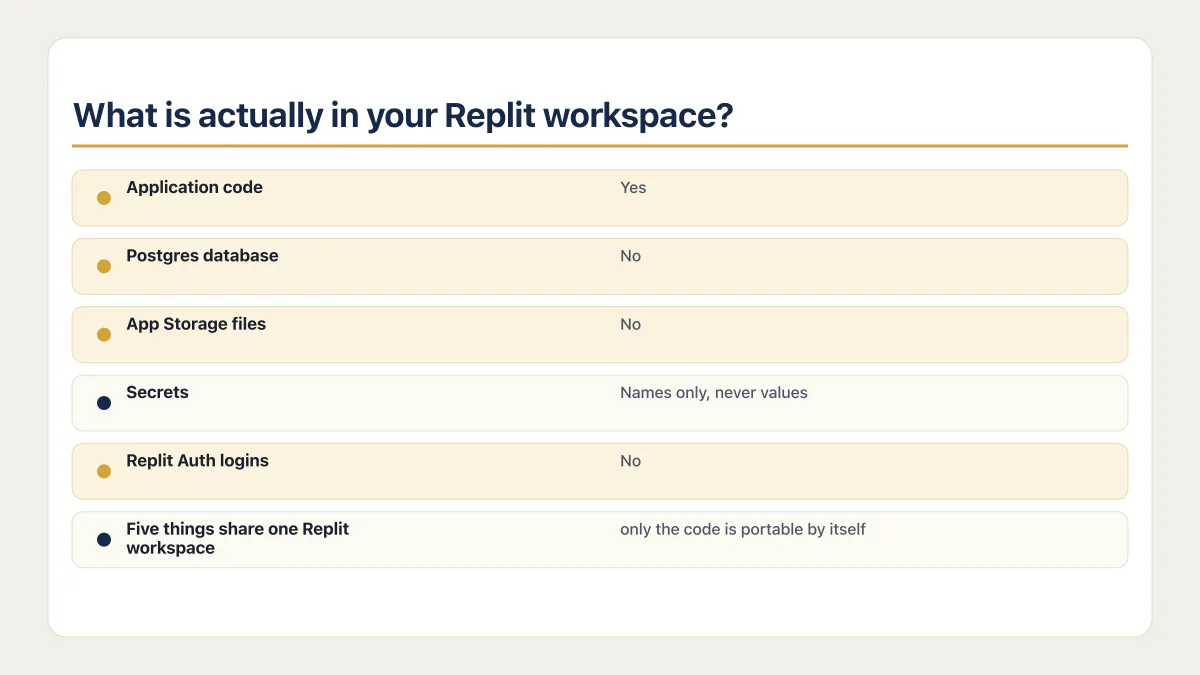
Copying a workspace inside Replit never carries the deployments, the domains, the connectors or the secret values. Copying it out of Replit does not carry them either.
App Storage is the piece people forget, because nothing about it shows up in the file tree. Replit’s documentation says App Storage is powered by Google Cloud Storage and describes two ways to get a file back out: a download icon next to a single file in the Objects view in the App Storage tab, or code written against the JavaScript or Python App Storage SDK or Google’s own Cloud Storage client library. As of 15 August 2026, Replit’s docs do not document a bulk export, a command-line tool, or an S3-compatible endpoint. For an app with a handful of images that is a slow afternoon. For an app where users upload things, it is the piece that turns a weekend into a project.
The database is friendlier than it looks. Replit’s SQL database documentation puts the production database’s connection string in that database’s own Settings tab, next to the credentials for external tools, so ordinary Postgres tooling can read the production data from outside Replit. Current apps have separate development and production databases, production is the one your users have been writing to, and the development one is documented as “Only accessible from within your app; never exposed publicly”, so it is not something you connect to from your laptop at all. On the receiving side any managed Postgres will do, and the trade-offs between the managed options are the same whether or not you arrived from Replit.
Secrets are the quiet one. Replit’s Secrets documentation says values are encrypted at rest with AES-256, handed to the app as environment variables, and kept out of your file tree entirely. That is the right design and a bad surprise on moving day, because there is no file to copy. You have to find every value again where it originally came from, one dashboard at a time. If that sentence was new, what a .env file is and why the value is not in your code is five minutes well spent.
What happens to your logins when you leave Replit?
First identify the login system. An app with no login has no user migration. An app already using an external identity provider may keep it and change only its approved domains, callback URLs, and secrets.
Replit’s current authentication overview documents two built-in choices. Replit Auth uses Replit accounts. Clerk Auth gives the app a dedicated Clerk tenant. Replit also documents an eligible Replit Auth to Clerk migration that preserves user data and existing table relationships. That supported path is different from replacing Replit Auth with an unrelated provider.
A provider change can create new user IDs and new sessions. One practitioner wrote up a four-part move in Replit’s own community forum on 12 September 2025, swapping Replit Auth for Auth0, the database for Neon, App Storage for Google Cloud Storage and hosting for Fly.io, and flagged the consequence in a line worth reading twice: “users will get different userId when logging in trough Auth0 so it might cause problems for your existing data”. That is one person’s account rather than a specification, and the same write-up says data exporting and migration are outside its guide.
Separate three questions before the switch. Decide whether current sessions must be renewed. Confirm whether account records keep their identity. Then test whether orders, saved settings, uploaded files, and message history still point to the right user. Replit’s supported Clerk path says those existing relationships stay intact. A custom provider change needs an explicit mapping when its IDs differ.
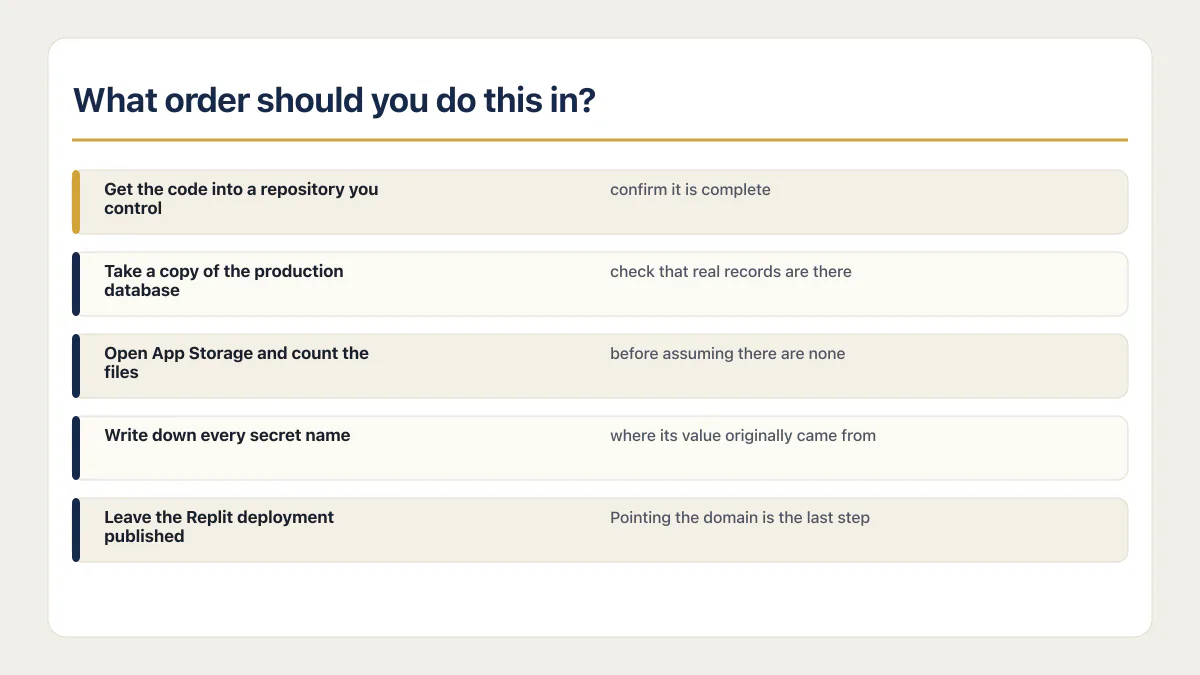
What order should you do this in?
Order matters more than tooling here, and one rule covers it: nothing on the Replit side changes until the replacement serves real traffic. Take the copies first, prove you can read them elsewhere, then point the domain. Replit documents point-in-time recovery windows of up to 7 days on Core and up to 28 days on Pro and Teams. Its recovery page does not state what happens after cancellation, so export and test the data before changing the plan.
- 01 Get the code into a repository you control, then read it back from somewhere other than Replit to confirm it is complete.
- 02 Take a copy of the production database, load it into a Postgres you own, and check that real records are there. A copy nobody has read is not a copy.
- 03 Open App Storage and count the files before assuming there are none. Uploads accumulate without ever appearing in the file tree.
- 04 Write down every secret name and where its value originally came from. The values are not in the code, and nobody remembers the third one.
- 05 Leave the Replit deployment published and serving until the new host has handled real traffic. Then pause writes on Replit, take one final database copy, load it into the new host, and point the domain. Replit stays the only place that accepts writes until that moment.
Step five works because of how Replit publishes. A published app is a running instance separate from the version in the Project Editor, so nothing you do in the workspace reaches your users until you publish again. The live app keeps serving while you build its replacement, which is why there is no cutover weekend here unless you create one. The one window you do need is the final copy: anything written to the Replit database after step two is missing from the copy you tested, so put the Replit app into a read-only or maintenance state, take the last copy, restore it on the new host, check the row counts match, and only then point the domain. If the new host fails in the first hours, point the domain back at Replit, which is still published, and carry across whatever the new host wrote in between before you try again.
Step two is the one people skip, and a restore drill is the difference between owning a backup file and owning your data. It also tells you what safety net you are stepping off. Replit documents up to 7 days of point-in-time recovery on Core and up to 28 days on Pro and Teams, with database restore and code rollback as separate operations. On the new host that net is whatever you set up, which is often nothing for the first month. What Replit already covers for a production app is worth reading before you decide the destination is an upgrade.
How much work is this really?
Effort splits unevenly across the five pieces, and not in the order most people expect. The code is the easy part, which is where the published advice stops. The database is routine for anyone who has used a Postgres client. App Storage and the logins are what consume the actual time, and neither of them has a button.
One thing is worth checking before you push anything to GitHub. Every guide on this topic opens by telling a beginner to get their code into a repository, and Replit keeps secret values out of the file tree, so the push feels clean by default. AxonBuild audited 26 apps in June and July 2026, and 21 of them were built for third parties. Of those 21, 6 had shipped a real secret, and 3 of the 6 had one sitting permanently in git history: a webhook signing secret, a live AI-provider key, and a Stripe test key with its webhook secret. Those got into files during debugging sessions, and git history does not forget. If you have ever pasted a key into a file to make something work at two in the morning, find it before the first push.
That corpus did not record which tool built each app, so it establishes nothing about Replit specifically. What it records is a habit no builder causes and none prevents: a key pasted into a file to unblock something, then forgotten. The same corpus found at least 23 of the 26 apps had no working automated tests, which is why “does it still work now that it has moved” is a question almost nobody’s app can answer on its own.
If App Storage or the logins are further than you want to go, paying someone to move those two parts is a reasonable answer, and a much smaller job than paying for the whole move.
When not to move off Replit yet
Three things send people to this query, and only one of them is really about Replit. A bill that jumped is the common trigger: Replit Core is $20 a month and Pro is $100, or $17 and $95 billed annually, each with a monthly credit balance, prices checked 3 September 2026. Read where the spend actually went before treating the platform as the cause, because usage follows the app to any host that charges for it.
One bad week with the agent is the second, and it is a reason to look at the app rather than the platform. Whether Replit itself is safe is a different question from whether the app it generated holds up. The third is a scale worry that has not happened yet, and apps that stumble at a few hundred users usually stumble on the things that break at 100 users, every one of which follows the code to the new host.
Nobody publishing on this query says that out loud. As of 15 August 2026, the results are Render’s step-by-step guide, CodeConductor’s eight-step funnel, Arsturn’s host-shopping article and Replit’s own two blog posts, one of which is about migrating into Replit from somewhere else. Each of them sells the destination. Whether it is time to leave at all is a larger question than this page, and it deserves a page of its own.
Moving to another builder is not moving off
Replit to Bolt, Replit to Lovable, Replit to Base44: a different box with a different logo, and the same five pieces waiting to be unpicked again next year. Looking for Replit alternatives for non developers is a fair thing to do when the tool genuinely does not fit how you work, and it is a different job from this one. Picking a builder is a product decision. What this page describes is what your workspace is made of, and that question comes back every time you switch. If the destination is another builder, read what it lets you take out before you put anything in. Moving off Bolt has the same five-piece shape.
Common questions
Does Replit own your app?
No. Replit’s Terms of Service, last updated 3 August 2026, state in section 3.a that “Except as provided in these Terms, you retain any and all of your rights to any content you submit, post, or display on or through the Service.” The same section grants Replit the right to “copy, display, distribute, perform, reformat, and modify your content as necessary”, which is the operating licence any host needs to run and back up your app, not a transfer of ownership. Section 3.b reserves the right to access the content of private apps for troubleshooting, service improvement, and safety and security. Separately, Replit’s Commercial Agreement says Replit will not use Customer Content to develop or improve its products, train machine learning models, or create derivative works, except as expressly permitted there. Owning your app and being able to take it are two different questions, and the rest of this page is about the second one.
Does a Replit remix copy my database?
Not by default. Replit’s remix documentation says a remix starts on a fresh database that never connects to the original’s data source, and that deployments, domains and connector configurations are not copied either. The exception is a “Copy data from original App” option, which the same page documents for source apps that offer it. Secrets always come across as names with empty values. It is the clearest available signal of what “the app” means on Replit: files and configuration, with the stateful pieces attached to the account instead.
What happens to my users when I leave Replit?
It depends on the login system and migration path. An app with no auth has no user-account move. An external provider may stay in place. Replit documents a Replit Auth to Clerk migration for eligible apps that preserves user data and existing relationships. A move to another provider may require users to sign in again and may require an explicit mapping from old user IDs to new ones. Test sessions, account records, and historical ownership separately before the switch.
Can I keep my custom domain if I move off Replit?
Yes. The domain is registered in your name with your registrar, so you keep it and repoint its DNS records at the new host when you are ready. The domain carries nothing else with it. Replit’s remix documentation treats domains as configuration you set up per deployment, and a custom domain pointing at Replit is still a Replit deployment, which is why Replit Auth keeps working right up until the moment it does not.
Do I lose my database if I cancel Replit?
Take a copy before you find out. Replit’s recovery features are plan features rather than permanent guarantees: point-in-time recovery runs up to 7 days on Core and up to 28 days on Pro and Teams, and downgrading from Pro to Core shortens the window to 7 days. Copy the production database out, load it somewhere you control, confirm the records are readable, and only then change anything about the plan.
Can you move a Replit app without a developer?
Partly. Getting the code out is genuinely a click: Replit’s version control documentation describes adding the Git pane from Tools with the plus button and using one-click GitHub sync to push code between Replit and GitHub. A Replit database needs someone comfortable with a Postgres client. Replit App Storage may need code against the SDK for a bulk move. Auth work depends on whether the app uses Replit Auth, Clerk, a custom provider, or no auth.
What is the hardest part of moving off Replit?
The hardest part is the stateful service with the weakest export path. That may be an auth-provider change because sessions, account identities, and historical records must still line up. It may be App Storage for an upload-heavy app, since Replit’s docs describe single-file download in the UI or code against the SDK and document no bulk path as of 15 August 2026. The inventory tells you which problem you actually have.
Moving platforms is the moment the missing production pieces show up. The sprint below builds them into the codebase you land on.
Built it with AI. Now it has to hold up for real customers.
The Production Hardening Sprint takes the app you already have and builds the production foundation underneath it. Authentication and access rules, payments that stay consistent, error handling, monitoring, backups, automated tests and a documented handover. Our engineers work inside your existing codebase for ten working days. All 123 deliverables are included, and you get the evidence for each one.
See the Production Hardening Sprint →  $2,500 fixed price · 10 working days · One codebase