The chat pane still says working. It said working eleven minutes ago, and before that it said considering next step, and nothing has appeared since. There is no error, no timer, no cancel button that promises anything. So you sit there deciding whether to send another message, and two questions arrive that no page on this search answers: is this costing me money while it sits there, and did the work I already had survive it.
A stuck Replit Agent is four different states, and only one of them is a genuine hang. Replit documents a step for three of them, and its checkpoint page lists four moments Agent saves your work, none of which is a run that stopped partway.
Everything below is read off Replit’s own documentation and help pages on 25 August 2026, with the sentences quoted so you can check them against the page yourself. Nobody here ran a build to test it, and no account was used.
The four things people mean by “Replit Agent stuck”
The phrase covers four states that look similar from the chair and behave nothing alike. Telling them apart takes about a minute, and it decides whether you wait, restart, redeploy, or stop.
| What you are looking at | How you can tell | What Replit documents you do | What it leaves behind |
|---|---|---|---|
| A frozen run | The chat sits on working or considering next step, no new output, no error, no partial file change | Stop sending messages, restart the development environment from the command palette, open a new chat and describe the task again | The checkpoint from before the run started, and a billing question the docs do not answer |
| A looping run | Agent keeps answering, keeps reporting success, and the app stays broken | Select Stop in the Agent panel, then a stopping rule of your own | A charge per completed request when the run was confirmed as a paid action, allowance consumption in Free Mode, and a checkpoint for each one |
| A publish that never finishes | The build or the migration sits there, and the app in the Project Editor is fine | A documented four-step sequence that ends at Replit Support with your build logs | Build logs, which Replit keeps for seven days |
| Replit having a bad hour | Everything is slow or unreachable at once, and other people are posting about it in the same hour | Read the status page and wait | Nothing of yours to fix |
Only the first row is a hang. The second row carries a bill the first one may not, because every attempt in a loop finished and, if you had confirmed a paid action, got charged (in Free Mode it draws down the allowance instead), so an Agent that keeps answering and keeps being wrong is a fix loop with a spending decision inside it, and what it needs is a stopping rule instead of a restart.
The fourth row is worth ruling out before you touch anything, and it stops being a Replit question fast. When people building on Lovable, Base44, Bolt and v0 are all posting within the same hour, working out whether Replit is down or your own app is broken is the whole job, and your Agent is not the subject. Replit publishes its own status page, which is where that check starts. The same hang on Lovable, where the chat pane sits on thinking, works the same way and has its own recovery path.
When the Agent is frozen and the chat will not move
Replit’s help centre for Agent and AI treats a frozen Agent as a known state, and its first instruction is about what not to do:
While Agent looks frozen, stop sending messages…
The reason it gives is that the extra messages end up as instructions that contradict each other. That is the part people get wrong while they wait. A second and third prompt into a pane that has not moved does not queue politely behind the first one.
The documented recovery is three steps, in this order:
- “Open the command palette with
Cmd+K(Mac) orCtrl+K(Windows).” - “Search for Restart compute and select it to restart the development environment.”
- “Open a new Agent chat and describe your task again to continue.”
Step three is the one that stings, and it is worth reading slowly. The documented path forward is a new chat and the task described again, which is why a hang feels like starting over even when your files are all still there. Whether that feeling is accurate is what the next two sections settle.
The same page gives one line of prevention, and it is the only thing on it that reduces the odds of a second hang: “If Agent keeps freezing on the same task, break the work into smaller, focused prompts.” A task that freezes twice in the same place is telling you something about its size.
Does a hang cost me credits?
Replit does not document what a hung request costs. Its billing page ties a charge to a checkpoint, which it says happens when Agent completes work on your request, and Free Mode work runs against an allowance that resets every five hours. The useful test is whether you confirmed a paid action before the pane froze.
Start with which path the run was on. Replit’s Agent overview lists three modes, Free Mode, Power and Max, and names Free Mode as the no-charge path for Core and Pro subscribers, bounded by an allowance. Of that allowance it says one thing worth writing down: “Its allowance resets every five hours and has a weekly limit.” So a hang on the free path costs you an allowance window rather than a balance, and the window comes back on its own.
The paid path is where the question gets sharper, and Replit’s AI billing page documents one thing that settles most of it without opening a usage screen at all. A paid action does not begin until you confirm it. So if nothing asked you to confirm before the pane stopped moving, no paid action had started, and that is a check you can run from memory.
What gets billed on that path is tied to a completed unit of work. The same page states it plainly: “A checkpoint occurs when Agent completes work on your request and implements the requested functionality in your code.” Price scales with the size of the request, and it says “Simple requests (like bug fixes or small changes) typically cost less than complex builds”. Thinking counts as work there too. Replit documents that a paid Plan Mode request can be billed for the reasoning it did even when nothing in your code moved.
Here is the gap. As of 25 August 2026 that page carries no sentence about a request that never completes, is cancelled, or is killed by a restart. It attaches the charge to completion, it puts a confirmation step in front of paid work, and it stops there. Nobody can tell you from the documentation whether a run you interrupted at minute twelve produced a charge, and any page that tells you confidently either way is guessing.
The cumulative version of this question belongs to the loop rather than the hang, because a loop finishes each attempt and each one is billed. And there is a worse version of running low that has nothing to do with a stuck run. When an app goes down because the credits ran out, the whole published thing goes with it instead of one chat window, and getting it back is a billing job with its own sequence.
Did the hang cost me my checkpoint?
The checkpoint you can return to after a hang is normally the one from before the hung run started, though a long run can pass one of the documented milestones and then hang, so check the checkpoint timestamps in the history before assuming. Replit’s checkpoints page lists four moments Agent creates one, and as of 25 August 2026 every one of the four is a completion or a progress moment; an interruption itself has no checkpoint of its own.
Replit’s checkpoints and rollbacks documentation describes a checkpoint as a full snapshot of your app’s state, taken by Agent on its own at development milestones rather than by anything you click. The page names the four milestones:
- Feature completion, after a requested feature or piece of functionality has been implemented successfully.
- Major milestones, when significant progress is made on complex tasks.
- Stable states, after testing and validation of implemented changes.
- Error recovery, before Agent attempts a fix on something critical.
Read that list against a run you just killed. All four are moments where something either finished or measurably advanced. There is no entry for a run that was interrupted, stopped, cancelled or restarted out from under itself, which means the newest snapshot you can return to is normally the one that existed before you sent the prompt that hung.
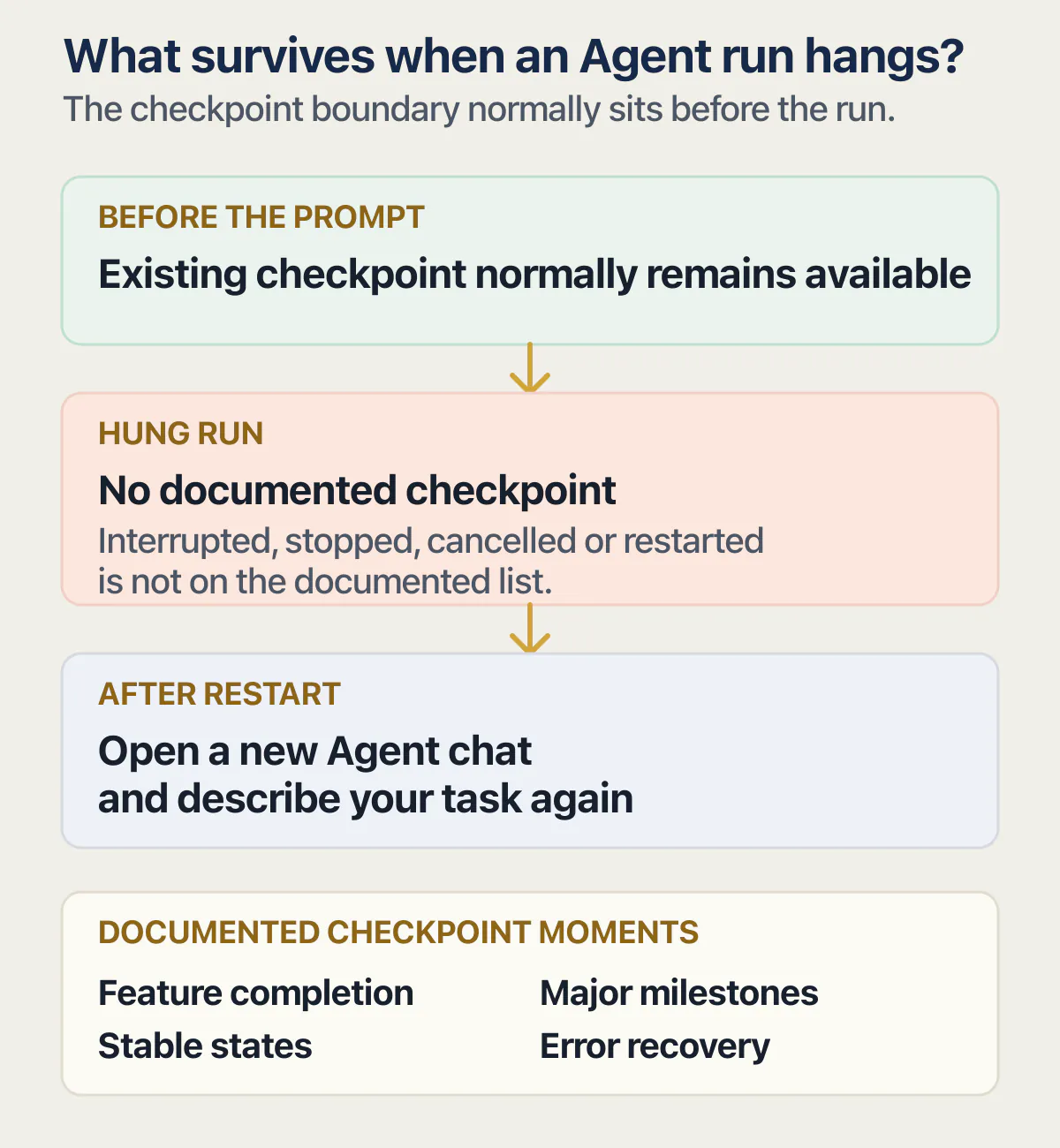
Every documented moment Agent saves your work is a milestone it reached. A run that stopped partway is not on the list, so the interruption itself saves nothing.
In practice that is less brutal than it sounds, because a frozen run usually produced nothing anyway. The cost is the prompt and the wait, not the files that were already working. Worth knowing before you start hunting: your database follows a separate rule, and Replit’s default is that a rollback leaves it alone unless you choose to restore it too.
Getting back is a different task from knowing whether you can, and the mechanics have their own warnings. How to roll back to a checkpoint and what it takes with it covers the three places checkpoints appear, the control that restores one, and what leaves with it.
When the deployment is the thing that is stuck
A publish that fails at the last step looks exactly like a publish that hangs, and Replit documents one rule that produces exactly that appearance. Replit’s publishing troubleshooting guide states it: “If your homepage takes more than five seconds to respond, the health check can time out and publishing can fail at the final step.” A slow homepage and a broken build produce the same waiting.
Before you retry anything, copy the build log. Replit’s deployment monitoring page says “Replit retains logs for 7 days”, so the evidence has a shelf life and the retry is what tends to bury it.
Then Replit’s help centre for deployment and publishing documents the sequence for a deployment stuck during build or migration, in this order:
- Open the command palette with
Cmd+Kon Mac orCtrl+Kon Windows, search for Restart compute, and select it. - Open Publishing and select Publish to trigger a new deployment.
- If it fails again, open the failed deployment’s logs from the three-dot menu, copy the build log, and paste it into a new Agent chat for diagnosis.
- “If the deployment stays stuck, contact Replit Support with your full build logs.”
Step four is the honest end of the documented path, and it is not a formality. On r/replit there is a thread titled “Deployment stuck in limbo for 4 days”, which is a useful correction to the word stuck: people use it for four minutes and for four days, and the documented sequence is the same either way.
Somebody else in the same subreddit, running an app with over a hundred daily users, put the smaller version of the problem well:
This is my first time getting stuck. Why it’s taking so long now? Usually its just 5 minutes or less. Now it’s more than 15 minutes, and it’s still bundling…
That is the real difficulty with a stuck build. There is no published number for how long a bundle step should take, so the only baseline you have is your own history with the same app, and the first time you exceed it you have nothing to compare against. Fifteen minutes against a normal five is worth one restart and one republish. Four days is a support ticket that should already be open.
A build that sits in a queue on a different host has its own causes and its own controls. Whether a Vercel build that never leaves the queue is a concurrency limit, a stale cache or a failing install is a question about that host’s build pipeline, and none of the Replit steps above touch it.
The kill 1 advice you will find, and what Replit documents instead
Search this problem and kill 1 shows up fast, usually with no explanation of where it came from. It came from Replit’s own community forum rather than from Replit. In a thread titled “Agent lost get stuck at considering”, opened on 25 July 2025 by somebody whose app “won’t do anything. Just says it’s considering next step”, a reply two days later suggested opening the Shell and running a command that restarts the container, adding: “Often times this will kick it into gear.” That reply came from a community member, not a member of Replit staff, and the thread has no staff answer in it at all.
As of 25 August 2026, Replit’s own Agent troubleshooting page documents Restart compute from the command palette for a frozen Agent, and does not mention the Shell command anywhere.
Both are ways of restarting the machine your app runs on. The difference that matters if this goes badly is which one the people answering your support ticket wrote down. A restart performed the documented way is a step they can follow; a Shell command you found on a forum is a thing you now have to explain. That is the whole argument for using the palette, and it has nothing to do with either one being technically superior.
When to stop waiting and get somebody to read it
Three signals say the documented path has run out. The same task freezes every time you send it, which the docs answer with smaller prompts and nothing else. The deployment has stayed stuck through the restart, the republish and the log paste, which means the ticket is the next step and the ticket is not yours to resolve. Or the run keeps starting over and finishing and starting over, and the balance keeps moving while the app stays where it was.
Two pages selling Replit repair work rank on this search, so plenty of people reach that point. sidetool.co published a stuck-Agent guide dated 3 October 2025 with no author credited: session refresh, status page, error messages, network checks, rollback to a checkpoint, timeout tuning. It carries two separate claims that over 60% of something happens, neither with a source attached, it does not separate a frozen run from a looping one, and it says nothing at all about credits. appstuck.com/platforms/replit sells the work directly at “$70 /hour” with a five prepaid hour minimum, promises simple fixes in two to five days, and cites no Replit documentation on the page. Both read 25 August 2026. Neither answers the two questions you actually had when the pane stopped moving.
One bug that will not die however you prompt it is a different problem from a run that stopped answering, and it usually needs somebody to read the code rather than another attempt. And moving is not a fix for a hang. Moving off Replit is its own job, and getting a copy of the code out of Replit is the first part of it. Doing either while a run is stuck changes two things at once, which leaves you unable to say which one helped.
A stuck deployment that turns out to need something resolved on Replit’s side is not work anybody outside Replit can promise to finish. Be suspicious of anyone who says otherwise while your build log is still sitting there unread.
Common questions about a stuck Replit Agent
How do I restart my Replit agent?
Open the command palette with Cmd+K on Mac or Ctrl+K on Windows, search for Restart compute, select it, then open a new Agent chat and describe your task again. That is the sequence Replit documents for a frozen Agent, checked 25 August 2026. A browser refresh is not the documented step and does not restart the development environment. Before any of it, stop sending messages into the frozen chat, because Replit’s own instruction is that extra messages produce instructions that conflict with each other.
Why is my Replit not running?
Four different things produce that sentence, and the fastest way to separate them is to ask what is still responding. A stuck chat pane over an app that still runs is a frozen Agent run, and a restart is the documented answer. When the Project Editor works and the published version does not, the publish is what failed. If nothing loads at all and other people are complaining in the same hour, check Replit’s status page before you change anything. An Agent that keeps replying while the app stays broken is a loop rather than a stop.
Does a Replit Agent run that never finished still cost me?
Replit’s billing page does not say, as of 25 August 2026. What it does say is that a checkpoint happens when Agent completes work on your request, and that a paid action begins only after you confirm it. So the practical test is whether anything asked you to confirm before the pane froze. This is a narrower question than whether a failed fix gets billed: an attempt that finished and did not work is completed, charged work, which is a separate matter from a request that never completed at all.
Did I lose my work while the Agent hung?
Almost certainly not the work you already had. Replit’s checkpoints documentation lists four moments Agent creates a snapshot, and every one of them is a completion, a milestone, a validation, or the moment before it attempts a fix on something critical. None of them is an interrupted run, so the newest checkpoint available to you is normally the one from before the hung prompt; a complex run can reach a progress milestone before it hangs, so read the checkpoint timestamps rather than assume. What you lose is the prompt and the waiting, not the state the app was in when you sent it.
What is Replit Agent?
Replit Agent is the part of Replit you describe your app to in chat, and it writes and changes the code for you. Replit’s own overview calls it a creative partner that takes your ideas, helps you refine them and then makes them real, and it names three modes: Free Mode, Power and Max. For the purposes of a hang, the useful thing to know is that Agent works in units of a request, saves a checkpoint when a request completes, and has documented recovery steps of its own when it stops responding.
How does Replit work?
Replit is a browser-based place to build and run an app, where the editor, the running app, the database and the published version all live on Replit’s own infrastructure rather than your machine. You describe changes to Agent, Agent edits the code, and publishing pushes a separate running copy live for your users. The consequence people run into is that the copy you are looking at and the copy your customers use are not the same thing. What Replit runs for you and what it leaves to you covers where that line falls.
Does Replit have a daily limit on Agent runs?
Not a daily one, on the free path. Replit documents a Free Mode allowance that resets every five hours and also has a weekly limit, checked 25 August 2026, so the shape is a rolling window rather than a midnight reset. Paid work is billed per completed request instead of rationed. The version of this question that hurts is when an app goes down because the credits ran out, which is a billing outage rather than a limit you are bumping into.
Is Replit Agent 4 good?
There is no verdict on this page, because nothing here involved using it. Replit’s documentation describes Agent’s modes, its billing and its failure states rather than rating versions of it, and a quality judgment needs somebody actually building with it and reporting what came out. A closer look at what Agent actually produces is a different kind of page from this one, and treating a troubleshooting guide as a product review would be the wrong way round.
Replit Agent stuck and you are afraid to touch it?
A stalled Agent leaves two worries: whether it keeps spending credits and whether your last good version survived. During the audit, we go over where your Replit app stands with you and what a restart could cost. Afterward, you know whether to roll back, wait or get help on the code.
Book a free audit → Free · 30 minutes · No code access needed