Lovable publishes seven status components rather than one on-or-off signal, so the first check is the component you are using rather than the brand. If that component is green and no incident entry is open, the fault is almost certainly inside your own project.
Every builder in this class publishes its own status surface, and every one of them reports on parts rather than on the whole product. Lovable’s own incident record makes the point better than any argument: in the fifteen days to 21 August 2026 it logged five separate incidents, and each one names a component or a feature. This page covers where to look on five builders, what each component name means for the thing you are staring at, three checks that separate an outage from a bug in your own app, and where to take it once you know which one you have.
One note on method before any of that. Every component name, uptime figure and incident title below was read on the vendor’s own page on 25 August 2026 and is printed as that vendor prints it. Nothing here was tested against an account. And nothing here tells you whether any platform is up right now, deliberately: a sentence saying a service is operational is wrong the minute an incident starts, which is the whole reason the component matters more than the dot.
Is Lovable down, or is it your app?
The answer lives on the builder’s own status page, and specifically in its component list rather than its summary line. Lovable publishes seven components. Bolt publishes its own plus a group of eight upstream providers. A red component next to what you are doing settles the question in seconds.
The Lovable status page sits at status.lovable.dev, and the Lovable Dev status page people search for is the same page under a name they type instead. Behind it is a separate incident history, which is the more useful of the two once you know how to read it. Here is where each of the five builders publishes, and what each page covers.
| Builder | Where its status is published | What that page reports on | What it will not answer |
|---|---|---|---|
| Lovable | status.lovable.dev, with a separate incident history | seven named components, plus a dated record of past incidents | whether your published project is reaching your own customers |
| Replit | status.replit.com | its own named components, which is why what settles it when a Replit app keeps breaking starts there | whether the code the Agent wrote an hour ago actually works |
| Base44 | status.base44.com | named components with rolling uptime history, listed in full on what Base44’s status page reports on | whether your own data or a connected service is the failure |
| Bolt (bolt.new) | status.bolt.new | bolt.new itself and, separately, a group of eight upstream providers | which of the services your app rents has stopped answering |
| v0 by Vercel | v0-status.com, with Vercel’s status page for the hosting underneath | three named components, each with an uptime figure for the window shown | whether the deployment serving your published app is healthy |
That last column is a monitoring question rather than a status question, and finding out before your customers do is where it belongs.
There is a reason this question gets answered by third parties instead of by the vendor. Lovable’s documentation FAQ, read 25 August 2026, covers prompts, publishing, exporting, refunds and account transfers among much else, with no entry at all about a published site being down or users unable to reach an app. The URL that used to answer exactly that, lovable.dev/faq/deployment/troubleshooting/published-site-down, now returns a 301 to the FAQ index. It is printed here without a link on purpose: sending somebody mid-incident to a page that does not answer their question helps nobody.
What each status page component actually means
A component name is a translation of a symptom, and nobody publishes the translation. Lovable’s seven names map onto things a founder can see: the chat, the site they log into, the site their customers land on, a sign-in, the data layer, and two programmatic surfaces. A green component answers the platform question, not whether your own run is progressing.
Read 25 August 2026, Lovable’s status page publishes seven of these names, one of which, Hosting, is itself a group of two components. No uptime percentages appear on its front page. The names in the middle column below are the vendor’s own, and the two columns either side of them are the part nobody publishes.
| What you are looking at | The component that would be red | What green there tells you |
|---|---|---|
| The chat will not answer, or answers and nothing changes | Editor | the editor is not the subject of an open incident, so look next at your project, your session, or the message you sent |
| lovable.dev will not load at all | Website | the site is up for everyone else, so start with your browser, your network, or a signed-out tab |
| A sign-in fails | Login | Lovable’s own sign-in is answering, so the failure sits in your account or in your app’s own auth |
| Your published site is dead for customers | Hosting | published apps are being served, so the fault is inside your project’s code or data |
| The site loads and nothing that needs data works | Cloud | the backend service is running, so look at your own tables, rules and functions |
| An outside AI assistant stopped reaching the project | Lovable MCP | the connector is up, so check that assistant’s own configuration |
| Something that calls Lovable programmatically stopped | API | the interface is answering, so check your key, your quota and your request |
Two names are missing from that list on purpose. Replit and Base44 publish the same kind of component list, and both status pages returned an HTTP 403 to an automated fetch on 25 August 2026, so no component name of theirs is printed here. The two pages linked in the table above carry those lists, read on the dates they record.
Now read the record the other way round. In the fifteen days to 21 August 2026, Lovable’s public incident history carried five entries, and every one of them names a component or a feature:
- 21 August 2026: remixing a project and switching on Cloud, both failing on some projects
- 18 August 2026: “We are currently experiencing issues with our Shopify integration.”
- 14 August 2026: “Degraded Lovable Cloud project creation”
- 10 August 2026: project previews and publishing, failing together
- 7 August 2026: “ChatGPT Connector Authorization Failures”
A builder rarely goes down all at once. One component goes, and five out of five entries in that August window named a component rather than the platform.
That is also why a brand-level red or green dot cannot answer your question. IsDown and StatusGator read the same vendor pages this page reads, and Downdetector counts user reports; all three compress seven components into one signal. On 25 August 2026 three of the eight organic results for lovable not working were aggregators of that kind. They can tell you whether other people are complaining. They cannot tell you whether the part you are using is the part that broke.
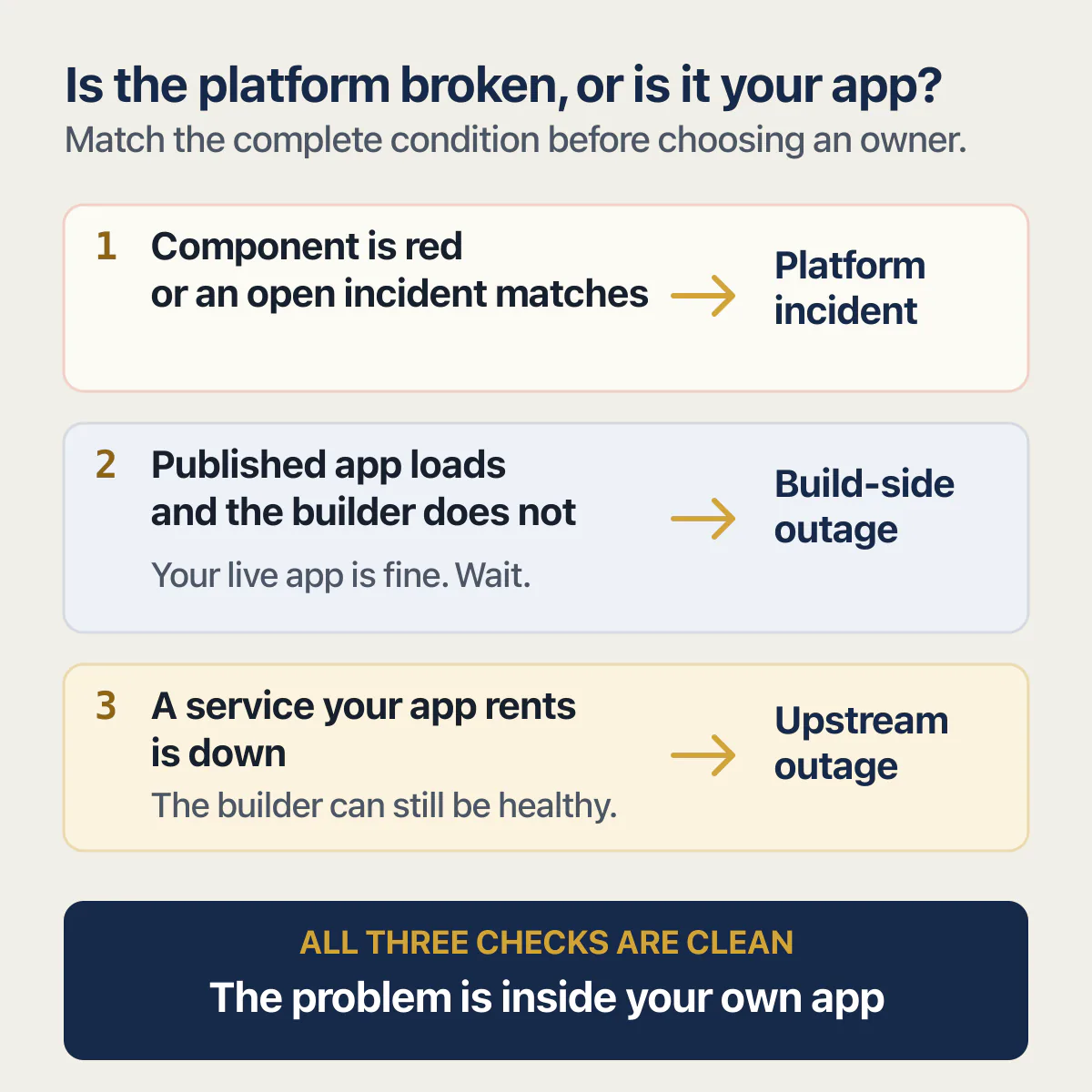
Three checks that tell a platform outage from a break in your own app
These take about a minute between them, in this order, and none of them needs a terminal.
1. Read the component, not the dot
Open the vendor’s own status page, find the component that matches what you are doing, and read only that one. On Lovable that means Editor if the chat is the problem, Hosting if your customers are the problem, Cloud if the data is the problem. Then check the incident history for an open entry, because a component can be listed as operational while an incident is still being investigated on a feature underneath it. Publishing is a good example of that gap: it has no front-page component of its own, and it appears in the incident record under its own titles instead.
What this check rules out is the whole class of half-answer where somebody else is having a bad day on a part of the product you never touch. If the component you need is green and nothing open matches your symptom, you have eliminated the platform in under a minute.
2. Separate the thing you build in from the thing your customers use
These are two different components on the same status page. Editor is where you work; Hosting is where your customers land. One can be perfectly healthy while the other is not, and knowing which is which changes what you do next.
Open your published URL on a device or network that has never signed in: a phone on mobile data, a private window, somebody else’s laptop. If the published app loads there while the builder will not load for you, the outage is on the build side and your live app’s public face is fine; sign in with a test account and run the workflow that matters before deciding nothing needs doing except waiting. If the builder loads and the published app does not, that is the urgent direction, and it is usually yours. This check also settles the commonest false alarm on any builder, which is that the copy you are looking at is not the copy your customers get. A preview that will not load is its own question with its own answer.
3. Check what your app rents
Almost nothing an AI builder produces runs entirely on the builder. There is a database, an auth provider, a payment processor, a mail sender, often an AI API, and each of those has its own status page and its own bad days.
Bolt (bolt.new) makes the case visible in a way no aggregator can. On its status page, read 25 August 2026, the components include bolt.new itself and, separately, a group of eight upstream providers, and the incident list carried entries titled [Dependency Check] Cloudflare and [Dependency Check] Supabase, both reading “Upstream Provider has reported an outage”. A builder can be working exactly as designed while the database or the CDN it rents is not, and a brand-level dot has nowhere to put that.
So a green builder does not mean a green stack. If you do not know what your app rents, that list is worth writing down now rather than during the next incident.
If all three checks come back clean, the problem is in your own app, and the routing below says where to take it.
Lovable Cloud down, or your app down?
Lovable Cloud is reported as its own status component, which is exactly why a Cloud incident and a broken app look identical from outside: the site loads, and then everything that needs data fails. Two of the five August incidents named Cloud. The component is the only cheap way to tell them apart.
Both are worth reading closely, because they are narrower than they look. The 21 August entry covers remixing and switching Cloud on, and the 14 August one, titled “Degraded Lovable Cloud project creation”, covers making a new Cloud project. Both are about setting a backend up rather than about one that was already running and serving an app. An incident on the setup path does not mean your live data layer is affected, and that distinction is invisible on any page that publishes one dot per brand.
The honest part is what nobody publishes. Lovable’s Cloud documentation, read 25 August 2026, runs through enabling the backend, permissions, region selection, usage costs and its own FAQ, and says nothing about what happens to a published app while its Cloud backend is paused or unavailable. So the check has to come from outside the docs, and check 2 above is the one that does it: load the published URL from a signed-out device and watch which parts of the page fail. If the shell renders and only the data-driven parts are dead, the backend is the first suspect, and the failing request in the browser’s network tab (a connection error against a query error) tells you whether it is the platform or your own auth, config or query code.
One neighbouring case is worth naming so you do not chase it here. If the reason nothing works is that the workspace ran out of credits, that is a different failure with a different recovery, and projects paused because the workspace ran out of credits is the page that covers it.
Is v0 by Vercel down?
v0 by Vercel publishes its own status page with three named components, and Vercel’s platform status is a separate page from it. A published v0 app runs as a Vercel deployment, so the two pages answer two different questions and you will often need both.
Read 25 August 2026, v0-status.com listed Website, Platform API and iOS App, with uptime of 99.69%, 99.97% and 99.92% respectively over the May 2026 to August 2026 window shown on the page. iOS App there is v0’s own mobile app, not anything you built and put in a store. An uptime figure for a past window is a record of the past rather than a statement about now, which is worth remembering when a figure like 99.69% is the only number on screen: the missing 0.31% works out at roughly nine hours across a four-month window, and none of it tells you anything about the last ten minutes.
The part that catches people is the split. Once a v0 project is published, its production behaviour is a Vercel deployment’s behaviour, so a hosting incident shows up on Vercel’s status page rather than on v0’s. If the chat and the project list work and your live URL does not, check the Vercel side. The wider question of whether a v0 app is ready for real users is separate from whether it is up today.
Lovable works on my laptop and is dead on my phone
Usually nothing is down here. Lovable’s own mobile documentation says so directly, and the reason is a feature gap rather than an outage.
Read 25 August 2026, Lovable’s mobile app documentation says: “Most of Lovable works the same on mobile as on desktop. The following flows aren’t supported in the app yet. Open lovable.dev in your browser to use them.” Named examples on that page include exporting workspace members and offline editing. The layout differs too: on mobile you “swipe left or right to switch between the chat and the live preview”. The same page adds: “On desktop they sit side by side.” So a founder who expects both at once on a small screen reads a missing panel as a broken app. The same page gives the minimum versions as iOS 15 or later and Android 9 or later, which is the one cause on this whole page that a non-developer can check and fix in a minute.
Then there is the split that almost nothing written on this subject makes. The builder on a phone and your published app on a phone are two separate questions. If the builder misbehaves on mobile, the documentation above is the place to check first. If your own published app looks wrong on a phone while it looks fine on a laptop, no status page anywhere is involved: that is your app’s layout, on your own code, and it will still be there when every component is green.
The status page is green and it is still not working
If all three checks came back green, this is the section you came for, and it is the better outcome: a problem in your own project is one you can start on today.
Four of the commonest cases belong to the builder rather than to your app, and each has its own answer. The chat that sits on thinking and never finishes is one. A preview that will not load is another. On Replit it is the Replit Agent that hangs mid-task. And when a GitHub repo and a Lovable project have stopped agreeing, the code you are reading in one place is not the code running in the other, which explains a whole category of fixes that appear to do nothing.
The publish path has its own set: a publish that will not finish, a build stuck in the queue, an integration that stopped working, an invalid API key error after a key was rotated or a free tier ran out. A 500 from Claude Code is the same class of question on a different tool.
Two more cases get mistaken for outages. Users who cannot log in is nearly always your own auth configuration once the Login component is green, and it is worth checking whether it fails for everyone or only for accounts created after your last change. A bug the AI cannot fix, however you word the prompt, is a code problem, and another prompt is the least likely thing to end it.
When the break started immediately after a prompt, the page on what to do when it broke right after an AI edit covers getting back to the version before it, and undoing what the AI changed in the builder’s own history is the fastest version of that move. An app that keeps breaking no matter what you change is a different problem with a different cause, and getting a vibe-coded app fixed by somebody else is the route some founders take instead. For a Lovable project specifically, when Lovable is up and the app is still broken is the ladder to walk, and the Replit and Base44 pages linked further up do the same job for those builders.
What to do while you wait
If the platform really is having an incident, two things are worth doing and one big thing is worth not doing.
Stop prompting. Changes made against a half-working platform are the ones you cannot untangle afterwards, because you end up unable to tell which edit broke what. Write down what you saw and when: the exact time, the URL, what failed, what the status page said. That record takes two minutes and it is the difference between a support ticket that gets answered and one that gets a template. And tell your users something true before they ask, even if all you can say is that a service you depend on is having problems and you are watching it.
What comes after that is a bigger job than this page. What to do first when the app is down has its own sequence for the first hour, and being broken while paying customers are watching adds decisions about refunds, messaging and who to tell first that have nothing to do with status pages. Waiting on support that has not replied is its own problem again, with its own escalation path.
The one thing worth repeating is the cheapest: during somebody else’s incident, the correct action on your own code is usually none at all.
Common questions about a Lovable app that is not working
Is Lovable down?
Lovable publishes the answer itself, at status.lovable.dev, and the useful part is the component list rather than the summary sentence at the top. Read the component closest to what you are doing: Editor for the chat, Hosting for a published site, Cloud for anything that needs data. Then check the incident history behind the same page for an open entry, because some features, publishing among them, have no front-page component of their own.
Why is Lovable Dev not working?
Lovable Dev and lovable.dev are the same product, and its status page splits that product into seven separately reported parts, so there is rarely one answer to the whole question. Read 25 August 2026, one of those parts covered the editor, one covered hosting for published apps, and one covered the backend that holds your data. Whichever one matches your symptom is the one to read, and if it is green the answer is in your own project.
Component lists change, so the names on the page when you read this may differ from the ones in the table further up. The method survives the change: match your symptom to a component, then read that component.
Is the Lovable site down?
Two different sites hide inside that question. lovable.dev, the builder you log into, is reported as the Website component. Your own published app is reported under Hosting, which the status page describes as a group of two components. One can be broken while the other is fine, and when it is the published one, the cause is far more often your own code than the platform.
How do I check Lovable’s status?
Open status.lovable.dev for the current component list, then open the incident history linked from it for the dated record of what has actually been breaking. The history is the more informative of the two, because it shows which parts of the product fail and how often. In the fifteen days to 21 August 2026 it recorded five separate incidents, none of which took the whole platform down.
Why is Lovable not working today?
No page can honestly answer “today” in advance, because a sentence saying a platform is fine is wrong the moment it stops being fine. What holds on any day is the method: read the component you depend on, check the incident history for an open entry that matches your symptom, then run the three checks above. Two minutes of that beats any third-party dot.
What does it mean when Lovable says a project is locked?
Lovable does not document a project state called locked. The changelog, the Cloud documentation and the documentation FAQ, all read 25 August 2026, name no user-facing project state called locked, and those are the three pages that would have it. The nearest documented states are a Cloud backend somebody paused on purpose and a workspace that has run out of credits, and the wording you are seeing is worth reading carefully to tell which one you have.
The pause is documented plainly. Lovable’s changelog entry dated Jul 8, 2026, “Pause a Lovable Cloud project”, says: “You can now manually pause a project’s Lovable Cloud backend so it stops using compute credits while you are not working on it.” So a Cloud backend can be off because somebody in your workspace switched it off, which from outside looks exactly like a platform problem. A workspace that has run out of credits is a third situation again, with a different fix.
What are the most common Lovable issues?
The pages ranking for this phrase on 25 August 2026 are mostly error-string indexes, one of them advertising fixes for more than 98 common bugs and errors, and an index cannot tell you whether any of its entries applies to you. The vendor’s own incident record is the better answer, because the entries name one feature at a time: remixing and enabling Cloud, a Shopify integration, Cloud project creation, project previews and publishing, a ChatGPT connector authorisation failure. Start from the component that matches your symptom rather than from a list of errors.
Is Lovable not working for everyone, or just me?
The community threads on Reddit are where most people go to check that, and they answer a slightly different question: whether other people are also complaining right now. The component list answers yours. If the component you depend on is green, no incident entry is open, and your published app loads for a device that has never signed in, then the problem is in your own project, and that is the version of this you can actually finish today.
Is it the platform, or is it your own app?
Waiting on a status page wastes time if the fault is inside your project, and a change in the wrong place makes things worse. Bring the problem to an audit: we talk through what your users see and help you tell whose side the fault is on. Then we tell you what to deal with first.
Book a free audit → Free · 30 minutes · No code access needed