If your app broke immediately after an AI edit, stop making new changes and preserve the broken revision. Record the failed behavior, find the last revision where that exact path worked, and compare the two. Before a routine restore, check whether the rollback is compatible with current configuration and data; active harm may still require an immediate known-good traffic rollback or disabling the affected action.
Do not start with another broad prompt. A second edit can erase the useful evidence in the first diff or create a second failure. The recovery goal is simple: return the app to a known-good state without losing newer user data, then add one test that would have caught the regression.
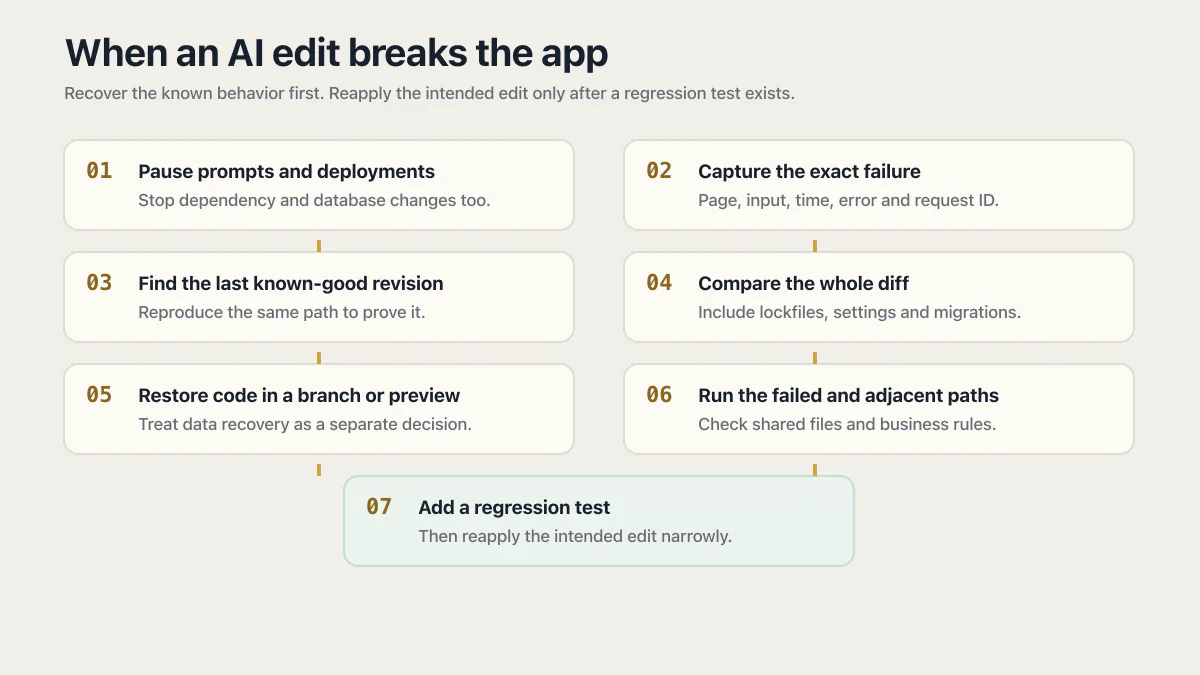
What to do when an AI edit breaks your app
- 01 Pause new prompts, deployments, dependency updates, and database changes.
- 02 Capture the exact failure: page, account, input, time, error message, request ID, and whether every user is affected.
- 03 Identify the last known-good revision by reproducing the same path, not by choosing the last commit that deployed successfully.
- 04 Compare the working and broken revisions, including code, lockfiles, environment settings, generated configuration, and migrations.
- 05 Restore the code in a branch or preview first; treat database and irreversible data changes as a separate recovery decision.
- 06 Run the failed path from start to finish, then check adjacent paths that share the changed files or business rule.
- 07 Add a regression test for the behavior before reapplying the intended edit in a narrower change.
If users are actively losing data, being charged incorrectly, or seeing another account’s records, contain that consequence first. Disable the affected action or roll traffic back through your deployment platform if a known-good release is available. Preserve logs and the broken revision so the cause can still be investigated.
Restore the last known-good behavior, not merely the last successful deployment.
Step 1: capture the failure before changing anything else
Write one sentence that another person could reproduce: “A signed-in customer clicks Cancel plan, sees success, and still has paid access after the page reloads.” Save the visible error, relevant logs, request or event ID, affected account, and approximate time.
Then decide how wide the failure is. Try a test account, a private browser session, and the same action in a non-production environment if one exists. Do not repeat destructive actions against live customer data merely to prove the bug.
These checks narrow the cause among a code regression, local browser state, expired session, provider outage, missing environment variable, or stale deployment. They also give you a fixed behavior to verify after recovery.
Step 2: find the last known-good revision
A deployment can succeed while the feature inside it is broken. “Last known good” therefore means the most recent revision where the failed business path passes the same reproduction steps.
Start with the smallest interval you can prove:
- the current broken revision;
- the most recent revision where the path definitely worked;
- every deployment, commit, or AI checkpoint between them.
If the AI tool creates checkpoints but does not expose a normal Git history, export or duplicate the current project before restoring one. Keep both the broken and restored versions until the cause is understood. Undoing a change through the builder’s own history is a separate procedure from restoring a commit, with its own failure modes when the checkpoint list and the deployed code disagree.
Step 3: inspect the whole diff, not only the requested file
List every changed file and group the changes by type. The failure may be in the feature code, but it may also come from a regenerated lockfile, renamed environment variable, route configuration, schema migration, authorization policy, or shared component.
| Diff contains | Check before restoring |
|---|---|
| Application code only | Which routes, imports, shared helpers, and callers use the changed code? |
| Package or lockfile changes | Did a dependency version, runtime requirement, or build output change? |
| Environment or deployment settings | Is the required value present in the affected environment, and does it require a new build? |
| Schema or data migration | Did production data change in a way that reverting code alone cannot understand? |
Do not assume the assistant touched only what the prompt named. Generated edits often include supporting types, imports, configuration, or cleanup. Those adjacent changes may be necessary, unrelated, or the actual regression.
Step 4: separate a code rollback from a database recovery
Code and data do not travel backward safely in the same way. Reverting application code can be low risk when the old code still understands the current database. Reverting a migration, restoring an old database snapshot, or deleting newly written rows can destroy valid data created after that snapshot.
Before rolling code back across a schema change, answer three questions:
- Can the old code read and write the current schema?
- Did the migration transform or delete existing data?
- Have users created new data since the change?
If any answer is uncertain, preserve a current backup and use a preview, branch database, or isolated recovery copy to test the plan. A forward fix may be safer than reversing a destructive migration. Restoring a production backup is a recovery operation, not an ordinary code rollback.
Step 5: verify the restored behavior and its neighbors
Run the original reproduction steps against the restored version. “The page loads” is not enough. The business result must be correct: the record is created once, the payment grants the right entitlement, cancellation revokes it, or account B cannot read account A’s data.
Then test paths that share the changed code. If the diff touched a shared form, check sign-up and password reset. A change to subscription state means testing purchase, renewal, cancellation, refund, and expired access. If the app returned success while nothing happened, use the silent-failure diagnostic to check the side effect rather than the status message alone.
Step 6: turn the incident into a regression test
The smallest useful test reproduces the failure, asserts the correct business result, and fails on the broken revision. It does not need to cover the whole app.
For the cancellation example, the test record could be:
| Test input | Expected result |
|---|---|
| Active subscriber receives a valid cancellation event | Paid access ends at the time the product rule says (immediately, or at the end of the paid period), exactly once, and the event ID is recorded |
| The same event is delivered again | No second destructive action occurs |
| Event signature is invalid | No entitlement changes |
Run that test before every future change touching the same path. At least 23 of the fixed cohort of 26 apps reviewed in June and July 2026 had no working automated tests. That historical result does not prove why a particular edit failed, but it explains why regressions in these apps can reach users without an automatic warning. The corpus report documents the counts, method, and limits.
Why AI edits break code outside the requested feature
Three mechanisms recur, and each leaves different evidence in the diff.
Shared code changed
A helper, type, layout, data model, or authorization rule serves more than one feature. The requested edit works, but another caller no longer matches the new behavior. Tests around the dependent paths are the early warning.
Duplicated logic drifted apart
The same business rule exists in two components, routes, migrations, or configuration files. The edit corrects one copy while the other remains live. Search for the old and new rule across the repository instead of assuming the first match is authoritative.
I audited an AI coding tool built on exactly this shape: a chat-saving feature whose save path assumed a uniqueness constraint that, in the schema copy actually live, didn’t exist. Two conflicting copies of that schema had drifted apart, so depending on which one was live for a given request, messages either silently duplicated or every save failed outright. An assistant told to fix the duplicate messages would patch the copy in front of it and never learn the other one existed.
Configuration or generated files moved with the edit
An apparently small code change can also alter a lockfile, environment name, build target, route manifest, or generated type. The deployment succeeds, but production runs with a different dependency or missing value. That is why the recovery diff includes configuration and build inputs, not just source files. When package or lockfile changes started the failure, the dependency-update recovery guide traces the resolved version, runtime path, and safe rollback separately.
Model-backed features add another source of variation. In 8 of the 14 AI apps in the June and July 2026 audit cohort, ordinary user text could reach the model directly and change what the feature did, the way the feature had been wired since the day it shipped, with no attacker required. A feature built that way may vary between runs on ordinary input too, so model variation is a second hypothesis to test alongside the last edit rather than a verdict on it; that 8-of-14 count measures injection exposure, not everyday reliability. For regression recovery, first determine whether the code path or configuration changed; then test model behavior across a defined set of inputs instead of attributing every inconsistent result to the last edit.
How to prevent the next AI edit from breaking the app
- Make one independently testable change at a time.
- Save a checkpoint before the edit and keep the broken revision afterward.
- Ask the assistant to list every changed file and the callers affected by each one.
- Require critical-path tests to pass before deployment.
- Review migrations, dependency changes, and environment changes separately from feature code.
- Use a preview environment for the intended edit, then test the exact business path before production.
These controls do not require you to stop using AI coding tools. They make each change observable and reversible. The chronic version of this problem is an app whose undocumented rules and duplicated logic make every future edit wider; this runbook is for recovering from the acute break first. For the wider reliability side, hardening SaaS applications resilience covers ten checks for an AI-built app, from timeouts to a staging outage drill.
How do I find which AI change broke the app?
Reproduce the failed path on the current revision and successively earlier revisions until you have a working and broken boundary. Compare every change inside that interval, including dependencies, settings, generated files, and migrations. The culprit is the change that explains the reproduced behavior, not necessarily the largest diff. If every revision fails the same way and the assistant has already failed the same repair several times over, the problem has moved from finding the change to getting a straight answer out of the agent.
Common questions about AI edits breaking an app
Should I revert the AI edit immediately?
Contain active harm immediately, but preserve the broken revision and capture the failure first when it is safe to do so. Test the rollback in a preview or branch. If the edit included a database migration or changed live data, do not assume reverting the code also restores the data safely.
Why does the AI keep breaking unrelated features?
The features may share code, data rules, configuration, or duplicated logic that the prompt did not mention. Missing regression tests let those dependencies remain invisible until a user exercises them. If the AI keeps breaking your app edit after edit, that repeating loop is a different problem from one bad edit, and it is answered by changing how edits are made and tested rather than by another recovery.
Is an AI regression the same as a security vulnerability?
No. A regression is a behavior that stopped working as intended. It becomes a security issue only when the changed behavior creates a security consequence, such as bypassed authorization, exposed data, or unverified payment events. Recover the known-good behavior, then assess any security impact separately.
If you have a working app built with these tools and need it ready for real customers, this is what we do.
Built it with AI. Now it has to hold up for real customers.
The Production Hardening Sprint takes the app you already have and builds the production foundation underneath it. Authentication and access rules, payments that stay consistent, error handling, monitoring, backups, automated tests and a documented handover. Our engineers work inside your existing codebase for ten working days. All 123 deliverables are included, and you get the evidence for each one.
See the Production Hardening Sprint →  $2,500 fixed price · 10 working days · One codebase