Your app is down, customers are finding out, and you cannot read the code well enough to say why. The order that helps is the same every time: establish whether the failure belongs to you or to the platform you built on, capture the evidence that is already expiring, get back to the last version that worked, and only then start looking for a cause.
This page is for an app that is unreachable or erroring for everyone who tries it. An app that loads fine and quietly does the wrong thing for the customers who pay you is a different failure with a different first hour, one that starts by switching off whatever keeps making things worse and counting who it reached. A store build that crashes on real devices after you publish it starts somewhere different again, in the build you shipped rather than the app you tested. None of this is about an app you downloaded on your phone.
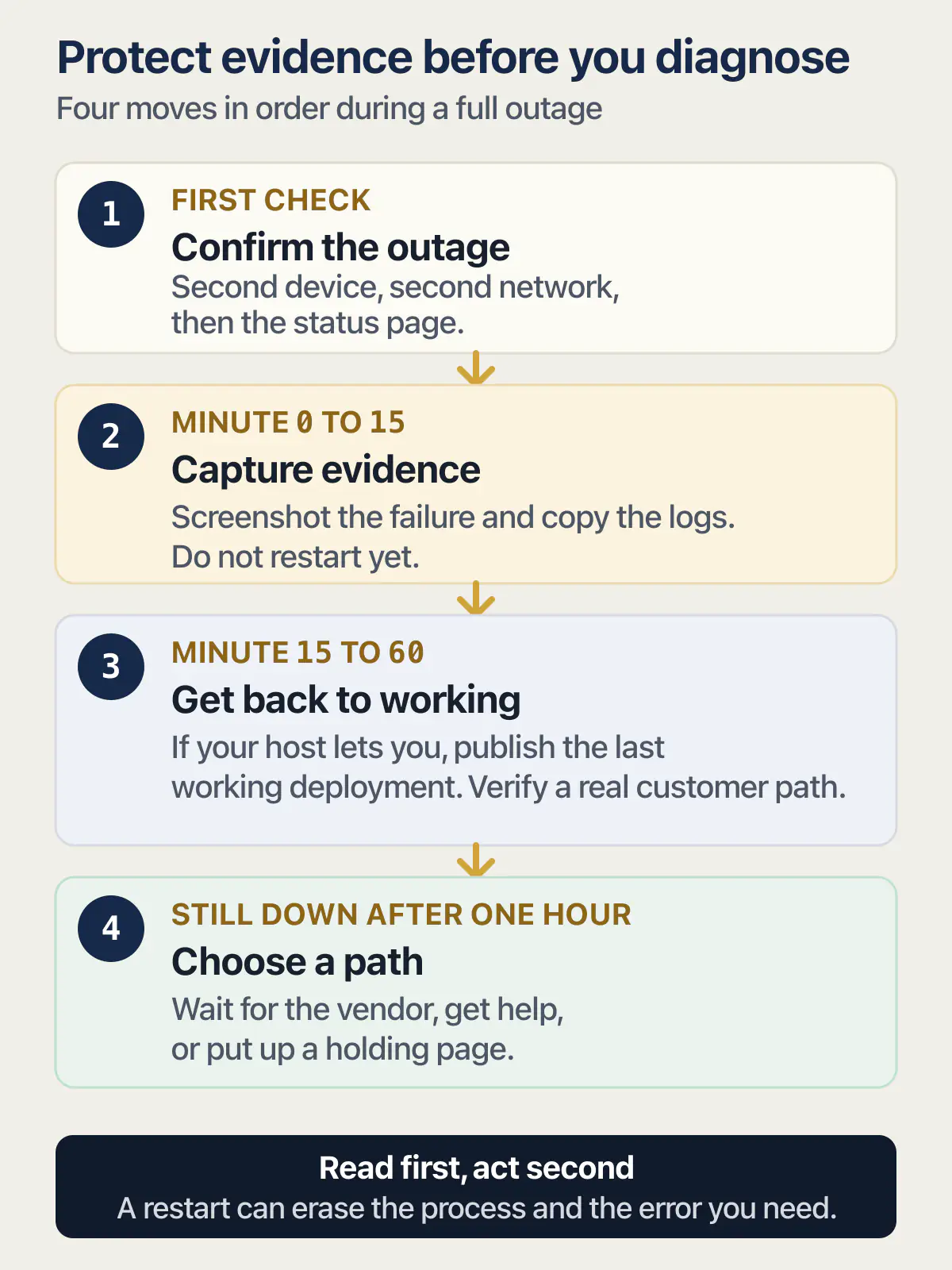
An app that is down needs four moves in order: prove the failure is yours and not the platform’s, screenshot and copy the logs before they expire, publish the last deployment that worked, and only then hunt the cause. Vercel’s Hobby plan keeps one hour of runtime logs, so the capture comes before the fix.
Every platform step below was read from the vendor’s own status page or documentation on 25 August 2026 and linked where it is used. Nothing here came from taking a live app offline to watch what happened.
Is it down for everyone, or only for you?
An outage that is real fails on a second device and a second network. Load the live URL on a phone over mobile data, then read the vendor’s status page for the component your customers touch. A failure that happens only on your own machine is a browser, DNS or network problem, and no deploy will fix it.
Do the phone check first, because it is the cheapest and it fails more often than owners expect. A stale service worker, a cached DNS answer, a browser extension, or an office network can all produce a dead app for exactly one person. A second device on a different network either confirms the outage or hands you back an hour.
The top of Google will offer you a crowd-report outage checker instead. On 25 August 2026, downdetector.com ranked first for my app is down what do i do, and isitdownrightnow.com ranked first for my website is down what do i do. They work by counting reports from other users, which means they can tell you that a payment processor with millions of customers is having a bad morning, and they can tell you nothing whatsoever about a small app nobody outside your own customer list has heard of. Nobody is filing reports about your app. A green result there is not evidence.
The status page is different, because the vendor writes it. What matters is reading the right line on it. A builder that hosts your app usually reports the editor and the hosting separately, so the tool being broken and your live app being broken are two different rows, and only one of them explains what your customers see. If the builder itself is what has stopped responding rather than the app it published, that is its own question and it is answered separately from this page.
| Platform | What its status page reports, in its own component names | What it cannot tell you |
|---|---|---|
| Lovable | status.lovable.dev reports seven separately named components, Editor and Hosting among them, with an incident history view and a subscribe option | Whether your published app is serving. Editor and Hosting are separate rows, so the builder can be down while your live app is fine, and the reverse |
| Vercel | vercel-status.com reports Build & Deploy (with Builds, CI/CD, Deploy Hooks and Git Integrations under it), CDN with a row per region node, Functions, DNS, Firewall, Logs and Observability, and offers email, SMS, Slack, webhook, RSS and Atom subscriptions | Whether your own build failed or your own function is throwing. A regional CDN row going amber matters only if your traffic is in that region |
| Netlify | netlifystatus.com reports Build Pipeline, Origin Servers, Standard Edge Network, High-Performance Edge Network, API, Hosted DNS, Netlify Functions and Edge Functions, and lists resolved incidents by date, such as “Elevated HTTP 500 errors serving sites and the Netlify UI” on 18 August 2026 | Whether your site’s own build is the thing that broke, and whether a third-party row like GitHub Webhooks is why nothing has deployed |
| Supabase | status.supabase.com reports Database, Auth, API Gateway, Connection Pooler, Realtime, Storage, Edge Functions, Analytics, Dashboard and Management API, plus compute capacity by region | Anything about your project. The page is platform-wide, so an all-green Supabase is entirely compatible with your own database being paused, out of connections, or out of disk |
| Replit and Base44 | Both publish component-level status pages at status.replit.com and status.base44.com | Component names are not printed here: both pages refused an automated read on 25 August 2026 with HTTP 403. Open them in a browser during an incident, where they render normally |
Two adjacent cases this check separates out. A preview or editor URL that still loads proves almost nothing about production, because the preview URL can stay up while the live one is dead. And if the app loads for everyone but customers are stuck at the login screen while the rest of it works, the failure is in one system rather than all of them, which is a narrower search than this one.
Minute 0 to 15: confirm it, capture it, tell them
Every step in this block is read-only, and there is a reason for that beyond caution. The logs that explain the outage are on a timer, and the fastest way to lose them is to start restarting things.
- 01 Write down two times in UTC: when you first saw the failure, and now.
- 02 Open the live URL yourself and screenshot exactly what a customer sees, including the address bar and any error text.
- 03 Copy the logs out of the host before the retention window closes on the hour you need.
- 04 Check whether anything shipped in the last hour, and note who shipped it and what was in it.
- 05 Open the database or backend provider dashboard and look for a paused project, a full disk, or a connection limit.
- 06 Send customers one short message saying you know and when you will update them next.
- 07 Leave the AI agent out of it until the cause is known, and do not restart anything on a loop.
The third step is the only one with a deadline on it, and the one people most often skip. Vercel’s runtime-log documentation, last updated 3 August 2026, publishes the retention windows by plan: Hobby keeps one hour of logs, Pro one day, Pro with Observability Plus 30 days, Enterprise three days, and Enterprise with Observability Plus 30 days. On a Hobby project, an outage you spend ninety minutes reading about on your phone is an outage with no logs. The same page says runtime logs live under Logs in the project sidebar, that they can be filtered by level for Warning, Error and Fatal, and that requests returning 4xx are marked Warning while 5xx are marked Error. That filter is where a first-time reader should start.
Supabase publishes log sources rather than windows. Its logging guide documents API, Postgres, Auth, Storage, Realtime and Edge Function logs, and states that retention is based on your project’s pricing plan without printing the per-plan windows on that page as of 25 August 2026. Treat that as a reason to export rather than a reason to relax.
An automated restart is the other way evidence disappears. It clears the process that holds the error, and if the real problem is a bad migration or a dependency that will not load, the restart simply happens again, this time with the original logs rolled off the end. Read first, act second.
The message to customers is short and it is not an explanation. Acknowledge it, give a time you will speak again, and keep that time. If you want the wording and somewhere to put it, what to publish while it is still down covers both.
One branch splits off here. If the app is up but records, rows, or files are missing, this sequence is the wrong one, and the first hour after data goes missing is the right one. Recovery order matters far more in that case than uptime does.
Minute 15 to 60: get back to the last version that worked
If a deploy is anywhere near the start of this, the fastest route out is backwards. You are not fixing the bug in this window. You are removing the version that has the bug in it, and each host does that differently.
On Vercel, Instant Rollback points your production domains at an eligible earlier deployment without rebuilding it. Vercel’s documentation says Hobby can roll back to the immediately previous deployment, while Pro and Enterprise can select any deployment previously aliased to a production domain, and that deployments never aliased to production are not eligible. It also documents the part that saves the next hour: after a rollback, Vercel turns off auto-assignment of production domains, so a later push to your production branch will not quietly replace the version you just restored.
Netlify has the same idea with different labels. Its deploy-management documentation says Publish Deploy on the detail page of any successful deploy publishes that earlier atomic deploy without triggering a new build, and that rollbacks are instantaneous. The companion control is Lock to stop auto publishing, in the site’s Deploys list, which stops a later build from replacing what you just published. Unlock to start auto publishing puts things back. Almost none of the outage advice that ranks for this search mentions the lock, and it is the difference between a rollback that holds for an hour and one that gets overwritten by a teammate’s commit while you are still on the phone.
Lovable’s deploy documentation documents Publish and Publish changes, and states that only the current version is deployed and later changes are not pushed live automatically. As of 25 August 2026 that page documents no rollback and no published-version history. So the route back on Lovable is getting the code to a good state and publishing again, which assumes the publish itself works. When publish reports success and the domain still shows nothing, that is a failure in the publishing step rather than in the code, and it is worth separating from an app that published fine and then died. Reversing the change that caused it runs off the builder’s own edit history rather than the deploy list, whether that is one AI edit that took the app with it, getting back to the version before the AI edit, or the longer loop where every fix breaks something else.
Replit works on snapshots. Its deployments documentation describes publishing as saving a snapshot of the app to the cloud, separate from the version in the Project Editor, and says you publish again to create a fresh snapshot when you want the live app updated. Nothing on that page documents restoring an earlier snapshot, which is worth knowing before you start editing the code the live app came from.
- 01 Identify the last deployment that was live and working, and write down its time.
- 02 Publish that deployment rather than building a fix, if your host lets you.
- 03 Stop the next automatic deploy from replacing it until the repair is verified.
- 04 Load a real customer path end to end, not the homepage, and confirm it completes.
- 05 Tell customers it is back, and say what you are still watching.
Going back a version restores code and build output. It does not restore a database, a storage bucket, a third-party account, or anything a customer changed in the meantime, so a rollback across a migration can leave old code talking to a new schema. What each host’s rollback actually restores is the page for that boundary, and it is worth reading before an incident rather than during one.
If nothing shipped and the rollback changes nothing, check the money. An app switched off for billing reasons rather than code reasons looks identical from outside, and no amount of redeploying brings it back until the account behind it is settled.
Still down after an hour: the three honest options
An hour in, you have either a cause or a confirmed absence of one. In late July 2026 an owner wrote publicly about work their customers had already paid for sitting behind an app they could not open. That is the situation this section is for, and there are only three real moves.
Wait, because it is genuinely not yours
If the status page has an open incident on a component you depend on, nothing you deploy will help, and every change you make during the incident is a change you will have to unpick afterwards. Open a ticket so your account is on the record, note the incident ID, and go work on the customer messaging instead. Getting to a human at the platform is its own problem, with its own tactics, and it is worth knowing them before you need them.
Get help, and make the first hour count
The expensive part of bringing someone in during an outage is the twenty minutes they spend asking where things live. Have the answers ready: what to hand the person who is going to look at it lists them. If the app was built on a specific tool, the repair route differs by tool, and the recurring failures on Lovable, Replit and Base44 each start in a different place.
Put a holding page in front of it
A page that says what is happening beats a spinner, a stack trace, or a half-loading app that takes payment details and drops them. It also stops new interactive attempts from generating broken records while you work; API routes, webhooks, scheduled jobs and clients that are already open keep writing unless you pause or block those paths separately. This is the least popular option and often the correct one.
The four things that actually take an AI-built app down
Four causes cover almost every outage in an AI-built app. Reading down it in order is faster than guessing, because the cheapest checks sit at the top.
| Cause | What it looks like from outside | Who owns it | What settles it |
|---|---|---|---|
| Something shipped | Worked an hour ago, failure started within minutes of a deploy, and the failure is total rather than partial | You | The deploy list. Publish the last good version and see whether the failure goes with it |
| The platform | Several unrelated features fail at once, the builder or dashboard is also unhappy, and other people are complaining in the same hour | The vendor | The status page row for the component you use, plus its incident history |
| Billing or credits | A clean error page or a placeholder, no code change anywhere, and an account that is unpaid, expired, or out of credits | You, in the billing screen | The plan and usage screen, not the code |
| The app took itself down | Nothing shipped, status is green, billing is current, and the app still refuses requests | You | The logs you copied in minute 0 to 15 |
The fourth row is the one owners rule out first and should not. Five of the 26 apps in the AxonBuild audit corpus are my own production apps, put through the same automated audit as the rest in June and July 2026, with every finding verified against the code. Two of those five carried a path where a single unauthenticated request could take the whole app down. One served every request through a framework version carrying documented high-severity denial-of-service and server-side request-forgery flaws, fixable with a version bump inside the same major release. The other accepted document uploads with no size cap and entity expansion left enabled, so a small crafted file exhausts the parse worker’s memory. Neither needed a login, a traffic spike, or a bad deploy. Both would read, from outside, as an app that fell over for no reason.
Four nearby failures get mistaken for this one. A surge you can actually name, where one founder went from a quiet evening to a national news mention overnight and a dead app by breakfast, belongs to the first 48 hours of a traffic spike you can name. Something slower, a stall that arrives with real users, is a capacity problem rather than an outage. An app that is up, answering 200, and giving customers nothing will never appear on any check that only asks whether the page loads. And a deploy that is still sitting in the build queue has not failed yet, which is a different wait with a different fix.
What to set up this week so the next one takes ten minutes
Most of the first hour above is spent gathering things that could have already existed. Four of them fit in one afternoon.
The first is a monitor outside the app that pages you before a customer emails, so the discovery arrives as an alert rather than an email from the person who was mid-checkout.
The second is somewhere your app’s errors actually land, which turns the retention windows above from a deadline into a non-issue, because the record has already left the host by the time you need it.
The third is a way to talk to customers that does not live on the app itself. If the outage takes your site with it, a status note hosted on that same site is down too, and you will be writing it into a form that will not submit.
The fourth is proof the backup can actually be restored, which is a different claim from having backups switched on. The gap between those two only ever shows up on the day you need the backup.
Common questions about an app that is down
Is my app down, or is it just me?
Load the live URL on a phone using mobile data rather than your own network. If it works there, the outage is local to your device or network, and the usual causes are a cached DNS answer, a stale service worker, or a browser extension. If it fails there too, the problem is wider than your device and the platform’s status page is the next stop; whether every account and region is affected is a separate check against the logs and the people reporting it.
How do I get my app working again right now?
Capture the logs first, then check whether the bad deploy shipped a database migration; if it did, the old code may not understand the current schema and rolling back needs the migration handled too. If no migration shipped, publish the last deployment that worked, if your host supports it, and stop the next automatic deploy from replacing it. On Vercel that is Instant Rollback; on Netlify it is Publish Deploy plus Lock to stop auto publishing. On builders that document neither, the route back is getting the code to its last good state and publishing again. Do this before diagnosing further.
Why did my app stop working today when nothing changed?
Because something outside your code changed. The common ones are a platform incident on a component you depend on, an expired card or exhausted credits, a free-plan project that paused for inactivity, a certificate or domain renewal, or a dependency that updated itself during a build. Supabase, for example, pauses free-plan projects that do not receive enough database activity over the previous week, and its documentation says the project returns to its previous state, data and configuration included, once it is restored.
Should I restart or redeploy my app?
Not as a first move. A restart clears the process holding the error and, on a short retention plan, can take the only record of the cause with it. If the failure is a bad deploy, redeploying the same build reproduces the failure. Copy the logs, check the deploy list, then either publish the last good version or wait out a confirmed platform incident.
Why is my Vercel app not working?
Check three things in order: the Vercel status page for Build & Deploy, Functions and your CDN region; the project’s own deployment list, since a failed or queued build leaves the previous version live and a successful build can still ship a broken app; and the runtime logs filtered to Error and Fatal. A deploy that never left the queue is a separate problem from a deploy that shipped and broke. If it works in the builder and not on the live URL, the difference between the two environments is usually configuration rather than code, and a live preview URL is not evidence that production is healthy.
Will rolling back lose customer data?
Rolling back the app does not touch the database, so no rows disappear because you published an earlier deployment. The risk runs the other way: old code meeting a newer schema. If the bad deploy included a migration, an earlier version of the app may not understand the tables it is now reading, and writes made in between can be shaped for the newer code. Check whether a migration shipped before you roll back across it.
What do I tell customers while it is down?
One short message that says you know, that you are working on it, and when you will speak next. Do not guess at a cause or a fix time you cannot hold. Post it somewhere that is not hosted on the app that is down, and post the follow-up even if the news is that there is no news yet. Silence is what turns an outage into a trust problem.
My app loads but is broken for some customers. Is that the same thing?
No, and the first hour is different. An app that is up and answering requests wrongly for the customers who pay you needs impact assessment before recovery, because you have to find out who was affected and what they saw. A page that returns 200 with nothing useful behind it is the clearest version of that failure, and no check that only asks whether the page loads will ever catch it.
Do I have to tell customers if nobody noticed?
If nobody could have been affected, a note in your own records is enough. If anyone’s data, payment, or submitted work touched the failure window, tell them, because they will find out from the gap later and the second version of the story is always worse. A three-minute outage at 4am on a business tool is different from three minutes during checkout.
Built it with AI. Can’t get the last part right?
That’s the normal state of an AI-built app, and it’s fixable. I trace what the app actually does, explain what needs changing, and build it if you want me to.
Talk about your app →  Free 20-minute video call with Bilal.