Your app loads. Customers can still sign in and their cards are still being charged. Something inside it is wrong: numbers that do not match, a button that does nothing, a charge that should never have happened, one account working while another does not. If instead the app does not load at all for anybody, the order of the first hour changes and the checklist is timed in minutes, because proving whether the failure is yours or the platform’s comes before everything else. This page is for the other case, the app that is up, taking money, and telling paying customers something untrue.
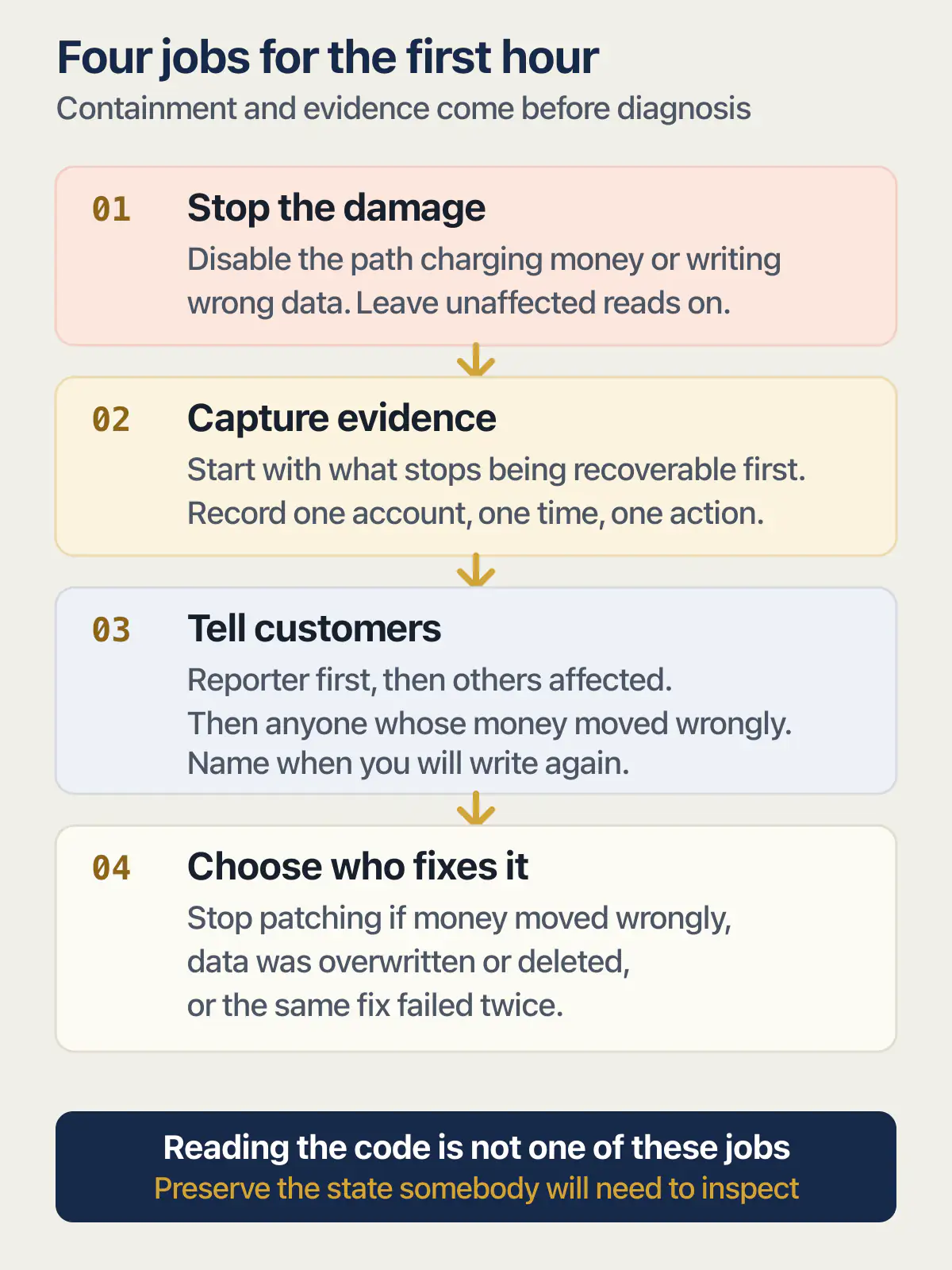
The first hour has four jobs, in this order: stop the damage from growing, write down what is about to disappear, tell the customers who were affected, and only then decide who fixes it. Reading the code is not one of them.
That order comes from what each piece of evidence needs in order to survive. Some of it sits on a customer’s phone, some in a payment provider’s records, some in a row that your next save overwrites. Nothing on this page was run against a live app for this article; where platform behaviour matters, it is read from the vendor’s own page and dated in the sentence that uses it.
One founder posting about a product with real revenue described the state plainly. Anonymously, in their own words: “I now have paying customers and people who love the product… It is buggy. States are broken. Literally users are so frustrated with some of the things in the product that is inconsistent.” That is the state this page is written for. The search that follows is usually some version of my app is buggy and users are frustrated, and searching does not help much yet: on 2026-08-25 the highest-ranking organic result for my app is broken and i have paying customers was a community thread titled “Customers paid for my broken product. Now I need a …”, and most of the rest of that first page was written for people who had bought an app and wanted it fixed or refunded.
Should you switch the broken part off?
Switching the broken part off is the right call when it keeps making things worse while you look at it. Money moving wrongly and data being written wrongly both qualify. Wrongness that only sits on a screen usually does not, and taking that away costs you more than it saves.
There are three states, and the middle column is the one that decides.
| What the customer can see | What keeps getting worse while you look | What to switch off |
|---|---|---|
| A wrong label, a stale total, a page that renders badly, a feature that does nothing | Nothing accumulates. The stored record is correct and one deploy corrects the display | Nothing. Keep serving it and tell the people who noticed |
| A charge, a renewal, a top-up, anything that debits a card | Every run adds a charge you will have to reverse and a customer you will have to write to | The charging path for that one product or plan, not the whole app |
| Wrong data being saved | Every save writes another row you will later have to find and correct by hand | The write path for that one feature. Leave reads on so people can still see their own work |
| One customer seeing another customer’s records | Every page view or export shows more of someone else’s data, and you cannot take a disclosure back | The read path for that feature, until you have checked that each account only gets its own rows. Reads you have proved are scoped to the signed-in account can stay on |
After you switch something off, you should be able to say in one sentence which of those three rows you were in and what exactly was growing. If you cannot name the thing that was growing, you have probably switched off something that was only embarrassing, and everybody who was fine a minute ago is now affected too.
How you switch it off matters less than how fast it stops. Hiding the entry point in the interface, disabling that plan or product at the payment provider, or removing the one scheduled job that runs it all count, and all three are reversible in a minute. Whatever you choose, write down what you turned off and where, because the thing nobody remembers a week later is which switch is still flipped.
Before you switch the path back on, correct one affected record end to end and check it from the front of the app, the way the customer will. A record that looks right in a database table and still shows wrong on the screen means the fault was never in the data, and re-enabling the path would have produced a second round of the same complaints.
None of this recovers anything. If rows are missing or overwritten instead of wrong, stop reading here and go to the first hour for when the data itself is gone rather than wrong, because the recovery window is the thing that runs out while you decide.
Stop touching these four things
The code-side pause has a page of its own. Freezing new prompts and deployments, capturing the exact failure, and getting back to the last version that worked all belong there, and so does the case where the builder’s own history holds the version you want put back. The four below are the ones nobody writes down, because they concern your customers and their money.
-
Do not tell the customer to reinstall, clear their data, or clear their browser. One of the apps AxonBuild reviewed in June and July 2026 was a CRM that kept its contacts, deals and call notes in the browser’s own storage. Seven unguarded reads of that storage ran on load, with no
try/catchanywhere in the repository and no error boundary, so a single malformed entry threw on load and white-screened the whole application. The only repair a user could find for themselves, clearing site data, erased everything they had. That app had no server behind it, so the only repair on offer took the business with it, and that is why “try clearing your cache” should stay unsent until you know where that customer’s data actually lives. -
Do not refund, void or cancel a charge before it is recorded somewhere you can read later. A reversed charge is much harder to count than a wrong one, and once the row drops out of the provider’s default view you have lost the cleanest list you will ever have of who was affected.
-
Do not switch a feature off under people who are mid-task without telling them. Somebody is halfway through the thing you are about to remove. A one-line notice inside the app costs a minute and saves the support thread where a customer describes their work vanishing.
-
Do not re-run the job that produced the wrong output across the whole customer list. Re-running is the most tempting move available, and it is the one that turns a problem affecting eleven people into a problem affecting everybody. Correct one record by hand first and look hard at what came out.
Capture what disappears first
Almost none of the evidence you need is in your code, and most of it is in somebody else’s hands. Order the capture by what stops being recoverable first, not by what is easiest to open.
| Evidence | Where it actually lives | What destroys it | Who can still get it |
|---|---|---|---|
| The customer’s message and the screenshot they sent | Their phone and your inbox thread | They delete the thread, replace the phone, or reword the story when you ask again a day later | Only them, and only for a while |
| The time it happened and the timezone they were in | Nowhere, unless somebody asks | Memory. Nobody recalls whether it was Tuesday morning or Wednesday | Only them |
| The money record for that charge or refund | Your payment provider, or the store that took the payment | Nothing destroys it, but the searchable window and the dispute clock both move | You, today, in the provider’s own dashboard |
| The notification or email your app sent them | Your email or messaging provider’s sending log | The retention limit on your plan, often measured in days | You, until that window closes |
| The affected rows exactly as they stand now | Your database | Your next save, and any fix you deploy over the top of them | You, but only before you change anything |
Copy the top three rows out of their homes and into one file with today’s date on it. A pasted screenshot and a customer’s own sentence, in a document you control, will still be there next week. The thread they came from may not be.
The same CRM is the reason a customer telling you it saved is not evidence that it saved. Every add and edit in that app serialised the whole collection back into the browser’s localStorage in one synchronous write, and past roughly 5MB the write threw QuotaExceededError and stopped. Silently. New records stopped persisting while the interface went on showing them as saved. Nothing was down, nothing errored, and the screen told the user the opposite of the truth. That was a browser-storage application with no database behind it, so the mechanism is specific to that shape, and the fuller story of the CRM whose only copy of the data was the browser tab sits on the page that owns it.
An app that reports success while writing nothing makes your customer the only witness and their memory the only log.
Once you have one account, one time and one action written down, you have something a person can look up. The next move is to turn one customer report into one request you can look up, which is where the three possible log outcomes get sorted out.
What to tell customers when your app is broken
Three groups, in this order, and each one gets something different. This is the one-to-one part: a named person, in your name, before anything is published anywhere.
The person who reported it
Reply the same day, even if all you can say is that you have switched off the charging path and do not yet know the cause. What they are testing is whether writing to you produced a human. Tell them what you did, what you have not worked out, and when you will write again, then write again at that time even if nothing has changed.
The people who were affected and have not noticed
They need to hear it from you before they find it themselves. Two plain sentences beat an explanation: this went wrong between these times, and here is exactly what happened to your account. Naming the window is what makes it credible, because it shows you counted instead of guessing.
Anyone whose money moved wrongly
Say what happens to the charge before they ask. “I have reversed the two duplicate charges from Tuesday, the refund shows on your statement within five working days, and I will write again once the cause is fixed” is a complete answer. “I will look into the billing” leaves them to chase you.
What not to promise: a fix time you cannot hold, that it is fixed when you have only switched it off, or that one person was affected before you have actually counted. A customer forgives a slow fix far more easily than a confident sentence that turns out to be untrue.
When more than a few customers are asking at once, one-to-one messages stop scaling and the question becomes what to publish once more than a few customers are asking, including whether a public page is worth its upkeep at your size.
How many customers were affected?
The count lives in four places outside the code: your payment provider’s records, the log of emails and notifications your app sent, the platform’s request log, and the list of accounts that used that feature in the window. Work through them in that order, because the first two have names attached to every row.
The payment provider is the best of the four. Charges, refunds and failed attempts are all timestamped, all attached to a customer, and all exportable, so a date filter usually produces the list in a couple of minutes. The sending log for your emails and notifications is second best for the same reason, and it has the added value of telling you who was sent something untrue by an automated message.
The platform’s request log is third. It will tell you how many requests hit the broken route in the window even when it cannot tell you who they were, which is enough to know whether you are writing four apologies or four hundred. The list of accounts that touched the feature is last because it usually needs somebody to run a query, and it is the one most likely to be wrong in an app where nobody has looked at the data model since it was generated.
Then the honest part. In an app built this way the count is frequently recorded nowhere at all: no event log, no audit column, no record of who saw which screen. When that is the answer, asking eight customers directly beats guessing from a number you invented, and the replies arrive the same day. Green tests beside a broken screen deserve the same caution, since a passing suite in an AI-built app can assert only that the code ran.
Assume the person who reported it was not the first. In another anonymous row from the same sweep of public founder posts, an owner with paying customers only learned that a core export had been broken for two days when the customer who had noticed it mentioned it. The problems an owner cannot see from using the app themselves are exactly the ones customers hit first, and the people who quietly work around a fault always outnumber the people who write in about it.
If nothing pointed at this before a customer did, that gap is a finding in its own right, and the signal that should have told you before a customer did is the cheapest thing on this page to fix afterwards. If the complaints are about the app being slow rather than wrong as more people arrived, the count matters less than the load curve, and the work starts with measuring load rather than counting customers.
Should you keep patching, or get help?
Three conditions end the patching. Money moved wrongly, data was overwritten or deleted, or the same fix has already failed twice. Any one of them means the next hour is worth somebody else’s time, because each of the three gets harder to unpick the longer it runs.
Money moved wrongly is first because it has a clock on it. Card disputes, app-store refunds and payout reversals all run on other people’s timetables, and a fix that arrives after the dispute window has closed costs you the money regardless of how good the fix was.
Data overwritten or deleted is second because prompting again actively makes it worse. Every new attempt runs more code over the same rows, and the version you wanted back moves further away with each deploy.
The same fix failing twice is the condition people ignore. Two failed attempts on one bug mean the explanation you are working from is wrong, and a third attempt built on that same explanation fails the same way. If every fix has also been breaking something else, that repeating loop is the real problem, bigger than any single bug inside it, and it is worth naming before you spend another evening on it. The assistant is weakest here, because what it cannot see about its own code is exactly the running behaviour that would prove its first explanation wrong.
If what you are waiting for sits on the platform’s side, a stalled support ticket does not have to stop everything, and there is a short list of things you can safely do while a ticket sits. Knowing that list is worth more than a day of waiting.
What to give a person so the first hour is not repeated, in three lines: the capture file with the customer’s message, the times and the money record; which of the three containment states you chose and what you switched off; and the list of affected accounts, or the note that no such list exists. That is enough for somebody to start on the problem instead of the archaeology, and it is roughly what somebody looks at first when they take over a broken AI-built app. If what you want is to hand the whole broken app to somebody, the starting point is the whole application and not this one hour.
Which symptom do you actually have?
Broken covers at least eight different failures, and each one has a different first move: wrong data on screen, slowness under load, a bad charge, a total outage, a workspace paused over billing, customers locked out, a break immediately after an AI edit, or the builder itself going down while your app is fine.
- Wrong data on screen, or a success message that was not true, is covered by when your app says 200 OK and saved nothing.
- Slow, timing out, or falling over as more people arrived: start with why an AI-built app stalls around a hundred users.
- Charges failing, doubling, or landing in the wrong environment belongs to when the charge itself is what went wrong. That same page is the nearest owner for customers who cannot pay at all, or who were charged twice.
- It broke immediately after an AI edit and you know which edit: the diff is the whole job, and the page on what actually changed walks it.
- Nothing loads for anybody. The timed checklist for an app that will not load at all runs in a different order from this one, starting with proving whether the failure is yours or the platform’s.
- Nothing in your app is broken and the platform paused the workspace over billing. When the platform paused the app over billing rather than code, none of the containment above applies and the fix is on the account side.
- Customers can reach the app but cannot get into their accounts. A live app with customers locked out of it feels like a full outage to the person affected, and authentication is the first place to look, ahead of whatever feature they were trying to reach.
- The builder or the hosting platform is down and your application is fine. Telling a platform outage apart from a break in your own app comes first, because it decides whether there is anything for you to fix at all.
Common questions about an app broken with paying customers
What to do if in-app purchases don’t work?
Failed in-app purchases usually point at wiring on the seller’s side, not the buyer’s device. Google Play’s buyer help page for in-app purchase problems, read on 2026-08-25, walks a customer through eight checks and then sends them to you, so most people who write in have already restarted the device and confirmed the payment went through.
Those eight buyer steps are connectivity, force stopping and reopening the app, checking that the payment completed, restarting the device, updating the Play Store app, correcting the date and time, checking the Google Play country, and checking age restrictions. Google Play’s page on problems with in-app purchases then says: “If you’re still having issues with an in-app purchase and want to give feedback or get help, you can contact the app’s developer.” Read on 2026-08-25 it states no timeframe at all for how quickly a developer should reply, so nothing on the store’s side stops the wait becoming days. Start on your own side with when the charge itself is what went wrong if the purchase is yours to configure. A store subscription that will not restore behaves differently from a purchase that never completed, and separating the two is worth doing before you refund anybody.
Should I tell customers before I know what is wrong?
Yes, and sooner than feels comfortable. A message that names what you switched off, what you are still working out, and when you will write again is complete on its own. Waiting for the cause means the customer writes twice and decides you are ignoring them.
Do I refund customers while the app is broken?
Refund the charges that were wrong, once the record is readable somewhere you control. Reversing a charge removes the clearest list you have of who was affected, so export or note those rows first. Charges that were correct, for work the customer actually received, do not need reversing to make an apology credible.
How do I know how many customers were affected?
Four places hold the answer: the payment provider’s records, your email and notification sending log, the platform’s request log, and the accounts that used the feature during the window; the first three need no code, and the account list usually needs somebody to run a query. In many AI-built apps the count is recorded nowhere, and asking eight customers directly beats a guess.
Should I take the app offline while I fix it?
Rarely. Taking the whole app offline breaks it for everybody, including the customers who were never affected, and it removes the read access people need to check their own records. Switch off the one path that keeps making things worse, leave reads working unless the fault is one customer seeing another customer’s records, and say what you switched off.
Is it safe to ask the AI builder to fix it while customers are using the app?
Not while the broken path is still writing or charging. A prompted fix deploys straight into what your customers are using, and a wrong attempt writes more bad rows on top of the ones you already have. Contain the damage, capture the evidence, then let the builder try.
How long is too long to leave something broken?
Money moving wrongly is measured in hours, because dispute and refund windows run without you. Wrong data being written is also hours, since every save adds work. Something wrong on a screen can wait days, provided the affected customers know it is wrong and when it will be fixed.
Silence is what turns a slow fix into a lost customer.
Built it with AI. Can’t get the last part right?
That’s the normal state of an AI-built app, and it’s fixable. I trace what the app actually does, explain what needs changing, and build it if you want me to.
Talk about your app →  Free 20-minute video call with Bilal.