Between June and July 2026, 26 AI-built applications went through the same automated review, with every finding then verified against the code by a person. Fourteen problems came back often enough to count as patterns rather than one-off bugs. Reading that list back, one question splits it more sharply than severity does: could the owner have found this by using their own app?
Nobody answering the biggest-problem question in public asks that. The public answers are about the developer, their skills, their debugging hours, their motivation. This page answers for the person who paid for the app and has to decide whether it is finished.
The biggest problem with vibe coding is invisibility. Of the 14 recurring problems found across those 26 apps, one was plausibly visible to an owner using the app normally. The other 13 need a second account, a stranger, real traffic, or a customer who finally says something.
What is the biggest problem with vibe coding?
Invisibility is the biggest problem, and it has a testable meaning. Visible here means an owner using their own app in the normal way, on one account, would see something wrong. By that rule, 1 of the 14 recurring problems in the 26-app cohort qualifies.
The cohort is 26 real applications reviewed at the code level between June and July 2026, in three groups: 11 third-party apps used to build the pattern library, 10 further third-party apps the engine had never seen, and 5 of my own production apps run through the same review. The engine produced candidate findings, and each one was verified against the code before it counted. No pattern here was counted from scanner output alone.
The one visible pattern is fabricated or demo data presented as real product output. A motorsport dashboard in the cohort shipped invented race-winner data alongside timezone-naive datetimes that displayed the wrong times. An owner clicking around would eventually notice that a number looked wrong. That is the whole visible category, and even it comes with a caveat worth stating: you only catch fabricated data if you already know what the right answer looks like. Someone browsing a dashboard for a sport they do not follow closely sees plausible numbers and moves on.
Everything else passes the only test the app was ever given. The demo works, on your machine, on your account, with your data, doing the thing you asked for. That is not a small achievement, and it is also the exact reason the rest stays hidden: the conditions that expose the other 13 patterns are conditions an owner never creates on purpose. You do not sign up as a second customer and try to read your own first customer’s rows. Nobody sends a thousand requests at their own AI endpoint. You do not open the page bundle and search it for keys. Normal use is a narrow path through the app, and the app was built to survive exactly that path.
An owner posting about their own app put the gap in two sentences:
By Monday, it was working beautifully. By Thursday, it was broken.
Nothing changed on Tuesday that they could see. What changed is that something outside the demo path finally ran.
What a working app cannot show you
Here is the sort. Every one of the 14 recurring patterns from the fixed 26-app cohort is listed with the condition it takes to surface. The classification is a judgment, made from the recorded mechanism of each pattern, not a measurement: I asked of each one whether an owner using their own app in the normal way, on one account, would see something wrong.
| Recurring problem | What it would take for the owner to see it |
|---|---|
| Fabricated or demo data presented as real product output | Normal use, on your own account |
| Unauthenticated endpoint doing privileged work | A stranger who never logs in |
| Cross-customer data access by a logged-in user | A second account |
| Server trusting a fact the browser sent | A second account, or someone editing a request |
| AI denial-of-wallet path | A stranger, or a free account, spending your model budget |
| No rate limit on the costliest endpoint | Real traffic, or one person deciding to repeat a request |
| Live prompt-injection path | A stranger putting text where the model will read it |
| Personal or health data reachable across customers | A second account, or a stranger |
| Destructive leftovers, such as purge or run-any-SQL endpoints | A stranger who finds the URL |
| No working automated tests | Nothing. A later change breaks something and nobody is told |
| No error tracking or alerting | Nothing. A customer tells you, days later |
| No gate before production | Nothing. The broken deploy is already live |
| Reachable, publicly known critical CVE | Nothing. A dependency scanner plus somebody who checks reachability |
| A real secret committed or shipped to the browser | Nothing. Somebody reads the repository or the page bundle |
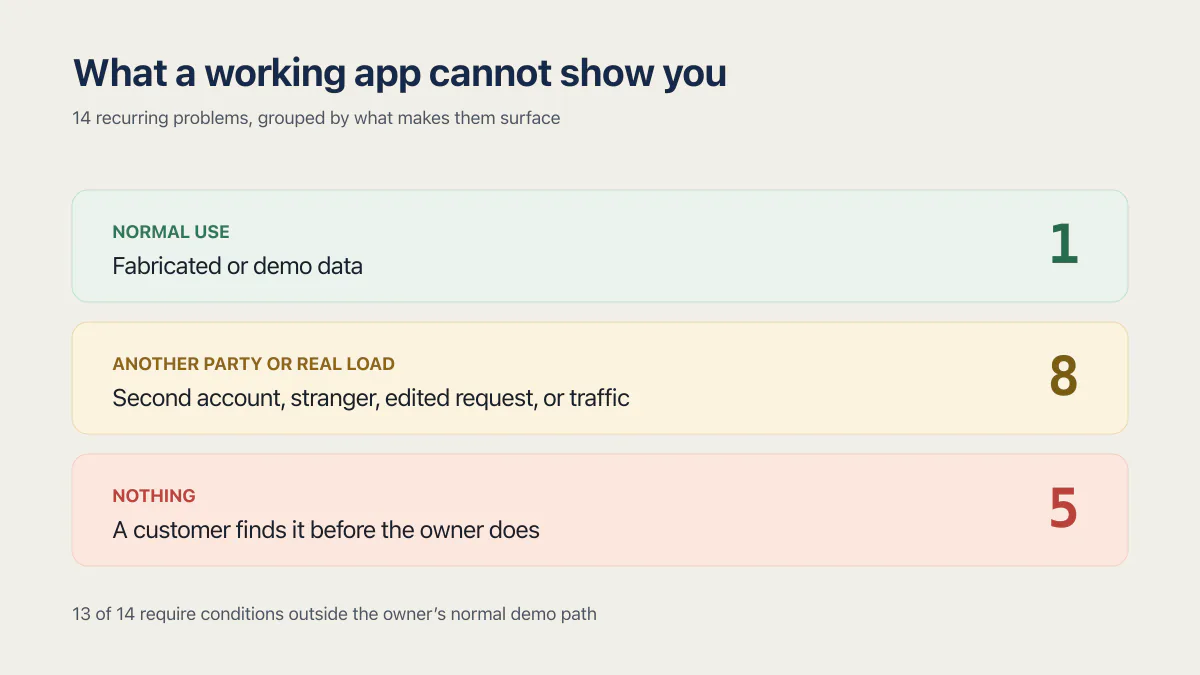
One row surfaces under normal use. Eight need another party or real load. Five surface through nothing at all, which is why they reach a customer before they reach you.
Thirteen of the fourteen recurring problems need something the owner never does: a second account, a stranger, real traffic, or a customer who finally says something.
Three counts give the bottom bucket its weight. At least 23 of the 26 apps had zero working automated tests. In 17 of the 21 third-party apps, an error a user hit was recorded nowhere a person would ever see it. And 12 of the 14 third-party apps with an AI feature had a confirmed path for a stranger or free account to burn the owner’s paid model bill.
Twelve of these fourteen patterns carry a rate; the other two, data-safety footguns and fabricated data, are told through named apps because their shapes vary too much to count honestly. If you want every denominator from the 26-app cohort, the rates, and how each maps to an OWASP or CWE class, that page owns the ledger and this one does not repeat it. The data-loss shapes specifically are their own category, because losing a row is worse than showing a wrong one.
A green test run does not move a problem out of the bottom bucket either. A suite can report green while never executing the code it claims to cover, and the distance between a passing run and a working app is its own subject.
Why the AI never built the missing half
The generator did not skip these parts out of carelessness. Five things about how the code got written explain almost the whole table above.
- The prompt names a result you can see. Every request is a description of a screen or a behavior the requester can picture, and a test, an alert, a quota, and a deploy gate have no pixels. Nobody asks for them, and nothing volunteers them, because the tools were tuned to give you what you asked for.
- The generator’s finish line is the screen looking right. That is a different finish line from the screen staying right after the next ten changes, and the second one takes work that never produces a visible improvement. Nothing in the loop rewards it.
- The reason a line exists is never written down. Red Hat’s Todd Wardzinski put it plainly in an argument about specifications: “When you vibe code, your instructions become obsolete the moment code is generated. The code itself becomes the only source of truth for what the software does…”
- Edit granularity depends on the tool and workflow. Some changes are localized, while others rewrite a large part of a file. The evidence is the before-and-after diff or version history. Cursor’s review interface, for example, can compare local changes against the main branch. A removed guard can appear as an ordinary deletion when the tool records it. The failure is letting a generated change through without reading that evidence, not the absence of a reviewable line.
- The failures that survive are the quiet ones. The Columbia DAPLab group looked at where coding agents break down and reported: “The most serious and common problems were error handling and business logic. These are dangerous because they are often silent, where the code appears to run without errors, but the app doesn’t actually do what the user asked.” Their write-up comparing Cline, Claude, Cursor, Replit and v0 states no sample size, so read it as a lab’s characterization of the failure shapes rather than a rate.
That last point is the mechanism behind the whole bottom bucket. A crash announces itself. A silent wrong answer waits for someone downstream to notice, and in a small product the someone downstream is a paying customer.
There is a separate argument about why the security-specific checks go missing, covering trust boundaries and what a model assumes about who is calling. Why AI coding tools ship security holes makes that case in full, and it is a different question from this one.
What owners actually notice first
Nobody discovers these patterns by reading code. They arrive as four symptoms, and each one has a specific gap underneath it.
A customer reports something that has been broken for days. The gap is error tracking. When nothing records a failure, the time between a bug appearing and you learning about it is however long it takes a person to get annoyed enough to write in. One founder described exactly that arrival:
my best customer emailed me a screenshot of a broken export with the message no rush, assumed you knew. I did not know. It had been broken for two days.
A change breaks two unrelated screens. The gap is that nothing pins the old behavior in place, so every edit is a guess about blast radius. That gets worse over time as files grow and the same logic ends up in three places, which is why each change gets harder rather than easier.
The bill jumps. The gap is metering. An endpoint that calls a paid model without a login check, a quota, or a rate limit is a bill anyone on the internet can raise, and 12 of the 14 AI-featured apps in the cohort had one. A jumped bill is one of the few failures on this list with an alarm attached, because the provider eventually sends an invoice, and the invoice arrives on the provider’s billing cycle rather than yours.
Something works on your account and not on theirs. The gap is authorization. The app checks that somebody is logged in, and never checks that this particular person owns this particular row. It can arrive as a support ticket that reads like a display problem: a customer mentions seeing another company’s project in a list. Fix that on the front end and the list looks right while the endpoint underneath keeps returning everything to everyone.
Two follow-on questions come up here almost every time. The first is whether the same AI that wrote the code can be asked to fix it, which turns on whether the model can see the failure it caused. The second is what changes when somebody else built the app for you with AI and has now moved on, because then you are also missing the person who remembers why anything is the way it is. If you want a read on how far the code has already drifted before deciding anything, measuring the drift gives you numbers instead of a feeling.
Why did vibe coding fail for so many people?
Vibe coding stopped early rather than failing. A working screen reads as a finished product to the person paying and to the person who built it, so the natural moment to stop arrives before the invisible half exists. In the 2025 Stack Overflow survey, 66% of developers named almost-right AI code as a top frustration.
That is also the answer to why vibe coders fail as individuals. The feedback loop pays out on the visible half and stays quiet about the rest. Somebody who has shipped software before carries an internal list of what is still missing at that point and feels the absence of it. Somebody who has not shipped before has no reason to suspect the list exists, and no tool in the chain mentions it. Both people ship. Only one of them knows they shipped early.
The numbers outside my cohort show the same review tension without one fixed delivery direction. In the 2025 Stack Overflow Developer Survey, the most-selected frustration with AI tools, chosen by 66% of the 31,476 developers who answered that question, was “AI solutions that are almost right, but not quite.” Almost right is precisely the failure that no screen displays.
DORA’s 2024 generative-AI model associated each 25% increase in AI adoption with a 1.5% decrease in delivery throughput and a 7.2% decrease in delivery stability. Those were modeled associations, not causal effects. DORA’s 2025 research found higher AI adoption associated with increased throughput and increased instability. The later evidence does not preserve the 2024 throughput direction. Together, the reports support the need for testing and review, not a universal claim that AI raises or lowers delivery speed.
The first-person version is worth reading if you want to see the shape without any statistics. Phoebe Sajor built an app with Bolt and had Stack Overflow engineers read the code. Their notes included “All the styling is inlined into the tsx components, which makes it much more cluttered/hard to read” and, flatly, “There are no unit tests.” The app worked. The review still found the same bottom bucket.
So are vibe coded apps any good?
Vibe coded apps are frequently good products and reliably incomplete engineering. The 26-app cohort included working, revenue-carrying software with real signed-up users. What none of them had was the layer that proves the product keeps working when the owner is not watching.
Two findings should retire the usual stereotype. Secrets and credentials was the strongest of the twelve areas the review scored, averaging 84.4 across the 21 third-party apps, so leaked keys sit low on the list of what actually goes wrong. Keys in environment variables is the default the generated starter templates hand you, and most AI-built apps stay there. When a secret does leak it is a serious finding, and git history never forgets one, but the stereotype of the vibe-coded app as a bucket of exposed API keys does not survive contact with the code.
The second finding cuts against alarm from the other direction. In 3 of those 21 apps, dependency scanners flagged between 33 and 44 known vulnerabilities each, and the review traced exactly zero of them as reachable in the running app. A scanner counts advisories against the versions you have installed; it does not check whether your application can actually execute the vulnerable path with input an attacker controls. Those two numbers get treated as one constantly. Acting on the advisory count first buys a week of version bumps that changed nothing about who can reach your data.
The honest summary is narrower than the headlines. Vibe coding built a working product and stopped one layer short of the evidence that the product stays working, which is a much duller thing to generate and a much more expensive thing to add afterwards. Eight of these apps read at the code level shows what that looks like app by app, and what the security risks actually are takes the risk question on its own terms.
What to do about it
Three reader states show up on this question, and they want different things.
If you do not yet know what is actually wrong, the useful first move is finding out rather than fixing. That means reproducing the four conditions the table above names, because each one exposes a different bucket: sign up as a second customer and try to reach the first one’s data, hit the app as somebody who never logged in, send an endpoint more traffic than one person would, and then check whether anything anywhere recorded what happened. Testing a vibe-coded app has its own sequence, and so does the question of what production ready actually means once you have a list in front of you.
If you already have a list and want to know whether the app is worth repairing, that is a comparison between the cost of finishing this code and the cost of rebuilding the parts that matter, and it deserves its own decision rather than a rule of thumb. The same goes for what a cleanup costs, which is priced from the verified findings and the changes connected to each; the bucket a finding sits in says how hard it was to see, not what it costs to fix.
Once you have decided to fix it, there are two routes and they need different things from you. The steps for cleaning it up yourself are a separate procedure that this page deliberately does not compress into a paragraph. Handing it over is the other route, and the person who does this for a living starts with the bottom bucket: a gate before production, error tracking, and a few tests pinning the flows that move money or data. Where the immediate question is only whether to launch at all, the practical launch decision is a shorter list than any of this suggests.
Common questions about what goes wrong with vibe coded apps
Is vibe coding a trap?
No, but the feedback loop is misleading. Vibe coding gives you a working screen quickly and gives you no signal at all about the parts that keep it working. Of the 14 recurring problems across 26 reviewed apps, 13 stay invisible during normal use, which is why the trap feeling shows up months later rather than on day one.
Is vibe coding risky?
The risk is real, and it concentrates somewhere most risk lists skip. In the 26-app cohort the common problems were unauthenticated endpoints, cross-customer data access, unmetered AI spending, and error tracking missing in 17 of the 21 third-party apps, while leaked API keys were among the rarer findings.
If you want the risks question answered as a security guide, with trust boundaries and the mitigation order, the security risks in full is the page for that.
Are vibe-coded apps any good?
As products they are often good, and as engineering they are consistently unfinished. Every app in the 26-app cohort ran and served its users, even where a finding showed a feature unfinished or a screen showing invented data, and none of them had a working proof that it would keep doing that job after the next change.
Judge the app on whether it works and judge the code on whether anything would tell you when it stops.
What is vibe coding and why is it bad?
Vibe coding is describing what you want in plain language and shipping whatever the model produces without reading it. It is good at making working software, which is the part people underestimate, and poor at making the invisible half: tests, alerts, deploy gates, quotas, and ownership checks.
None of them appear in a prompt because none of them appear on a screen.
Does vibe coding actually work?
Yes, for building a product, and that is exactly what makes the rest confusing. Every app in the 26-app cohort ran and served its users. The question that matters is a different one: does anything in the app tell you when it stops working?
In 17 of 21 third-party apps the answer was no, because an error a user hit was recorded nowhere.
Why is vibe coding dying?
Vibe coding is still growing; the stories about it have changed. The first wave of vibe-coded apps has now been running long enough to hit the failure modes that take months to appear, so the public conversation moved from launch stories to breakage stories.
The pattern behind those breakage stories is predictable and mostly operational: no tests, no alerting, no gate before production.
How do I stop vibe coding?
For an owner, the answer is usually to add one gate rather than to stop. Keep generating features, and put a check in front of production that runs your tests and refuses a broken deploy, so the next generated change cannot ship without something objecting.
The advice to learn programming properly is aimed at developers, and it does not help if what you have is an app with paying customers today. The steps for cleaning it up yourself are a separate procedure with a different starting point.
Is my vibe coded app safe?
Nothing on this page can answer that for your app, and any page that says yes without reading your code is guessing. What this cohort supports is a narrower statement: the problems that make an app unsafe are almost never visible from using it, so a working app is not evidence either way.
If this checklist left you with more open items than you expected, the sprint below works through all of them in ten working days.
Built it with AI. Now it has to hold up for real customers.
The Production Hardening Sprint takes the app you already have and builds the production foundation underneath it. Authentication and access rules, payments that stay consistent, error handling, monitoring, backups, automated tests and a documented handover. Our engineers work inside your existing codebase for ten working days. All 123 deliverables are included, and you get the evidence for each one.
See the Production Hardening Sprint →  $2,500 fixed price · 10 working days · One codebase