Vibe coded apps can be safe for business use. The build method is not the verdict. The evidence a vibe-coded app needs before you call it safe is four things tested, and passed, in the working app: can one account reach another account’s data, can the browser grant itself a paid role, are API keys exposed, and will anyone know when something breaks? Those four are the boundaries this page covers; passing them is required evidence, not a guarantee that nothing else is wrong.
That distinction cuts both ways. Building with Lovable, Base44, Bolt, Replit, Cursor or Claude Code does not make the app defective. A working screen also does not prove that one customer is blocked from another customer’s records. The category tells you where to look. The app supplies the verdict. Whether Lovable is safe applies that distinction to one platform.
Are vibe-coded apps safe by default?
Whether vibe coded apps are secure is not settled by the category alone. They inherit ordinary web-app risks, then add a development process where the person directing the work may not be able to inspect every generated change. This creates an evidence gap: the business owner can see that the app works, while important technical questions remain difficult to verify.
Here is what a fixed June-July 2026 set of AxonBuild audits found.
| What was counted | Result |
|---|---|
| AI-built apps reviewed in the cohort | 26 |
| Apps with at least one confirmed-critical finding | 22 of 26 |
| Apps that reached the historical green score band | 0 of 26 |
| Third-party apps with a reachable known-critical vulnerability | 8 of 21 |
This was a selected set of audited apps, not a random sample or a failure-rate estimate for every vibe-coded app. The security statistics from 26 AI-built app audits show which gaps appeared and explain the sample behind the numbers.
This article has a narrower job. Whether vibe coding is secure gets decided app by app, so what follows helps you decide what “safe enough for business use” should mean for your own. For an internal tool, the stakes may be staff access, client records, or the work that stops when the app is unavailable. For a customer-facing app, the stakes may include account separation, payments, and data another person trusted you to hold.
The security risks that show up most in vibe-coded apps
These are the six vibe coding security risks that keep appearing in AI-built business apps. Each one ends in a business consequence, because that is what decides whether it matters to you.
1. Exposed API keys and secrets
A key pasted into frontend code or left in a public build is readable by anyone who opens the browser’s network tab. A key committed to the repository is readable by anyone with access to that repository and stays in its history after you delete it, so the check there is the commit log rather than the network tab. AI tools generate working code fast, and the fastest working version often puts the key where the code can reach it rather than where the server can. Replit’s Secrets documentation warns that hard-coding secrets in your codebase can lead to accidental exposure through public sharing, version control, or screen sharing, and stores them encrypted instead, injected as environment variables. The consequence is someone else spending your model budget, or reading your whole database with a service key that was never meant to leave the server. Environment variables, explained covers where a key should actually live.
2. Missing row level security
Row level security (RLS) is the database rule that says a signed-in user can only see their own rows. Without it, any table your app exposes over its API can be read by any authenticated user who asks for it. Supabase’s own documentation says RLS is enabled by default on tables created with the dashboard’s Table Editor, but that if you create a table in raw SQL or the SQL editor you have to enable it yourself, and that RLS must always be enabled on any table in an exposed schema, which by default is public. Firebase Security Rules set the same trap from the other side: locked mode denies everyone, test mode allows anyone access, and the rules you deploy with are the ones that apply. The consequence is one customer downloading another customer’s records with no attack required.
3. Roles and permissions decided in the browser
If the app decides you are on the paid plan by reading a value in the browser, that value can be edited. The same applies to a role stored in a JSON web token (JWT) or in localStorage that the server never rechecks. The consequence is free accounts using paid features, or an ordinary user turning themselves into an admin, which is the failure known as broken access control.
4. Unvalidated inputs and file uploads
Anything a user can type or upload reaches your database, your storage bucket, and other people’s screens. Unchecked text is how SQL injection and cross-site scripting (XSS) get in. Unchecked uploads are how a 4 GB file or an executable disguised as an image gets in. The consequence ranges from a storage bill you did not plan for to a script running in another customer’s session.
5. Unpatched dependencies
Generated apps pull in dozens of packages, and the versions pinned on the day the code was written keep aging. A known-critical advisory only matters if the vulnerable code path is actually reachable from your app, which is the judgment a raw alert count cannot make for you. The consequence of ignoring the list entirely is shipping a known, published, already-weaponized hole.
6. No rate limit on paid calls
If one user can trigger a model call, an email send, or a file conversion in a loop, your bill is the attack surface. Rate limiting caps how often a single user or IP can hit an expensive path. The consequence is a five-figure invoice from an endpoint that worked exactly as written.
What your build tool covers and what is still yours
Most security advice stops at the list of risks and never says where the platform’s job ends and yours begins. Here is that split for the tools most founders are using, with one check you can run yourself for each.
| Build tool | What the platform usually handles | What is still yours | How to check it yourself |
|---|---|---|---|
| Lovable (with Lovable Cloud) | Lovable’s security page lists WAF controls, network isolation, encrypted storage, and adaptive rate limiting at the IP, user, and workspace level; secrets encrypted at rest and never shown in plaintext in logs or interfaces; a basic scan on every publish covering database configuration, RLS rules, and known misconfiguration patterns | The policy on each table, which storage buckets are public, whether a server-only key reached the browser bundle | Run the scan against the build you actually ship, then run the two-account test below. More detail in is Lovable safe |
| Base44 | Base44’s security settings docs say Base44 sets up data permissions automatically as you build, that you can adjust them by chat or manually, and that a security scan is worth running before you publish | Confirming the generated permissions match what you actually intended, and that roles behave the way the screens imply | Base44’s own advice: test in Preview signed in as different roles and confirm access. More in is Base44 safe |
| Bolt | Bolt’s Supabase integration connects a hosted SQL database and authentication services for user login and management | Every RLS policy on every table, plus the checks inside any edge function | Run the policy tests in how to test Supabase RLS against a local or disposable copy of your project with known test data; keep anything run against the live project to read-only checks with accounts you created |
| Replit | Secrets stored with AES-256 encryption at rest and TLS in transit, exposed to the app as environment variables, and hidden from visitors who open the app via Cover Page or Remix, per Replit’s Secrets docs | Server-side permission checks, rate limits, backups, and keeping keys out of frontend code | Open the deployed page, view source and the network tab, and search for anything that looks like a key. More in is Replit safe |
| Cursor or Claude Code with your own Supabase or Firebase project | Nothing is hosted for you. Anthropic describes Claude Code as a tool that reads your codebase, edits files, and runs commands, and Cursor works the same way | Hosting, secrets, access rules, dependency updates, backups, and monitoring, all of it | Every check on this page applies, starting with RLS: is Supabase RLS enough |
What should “safe for business use” mean for your app?
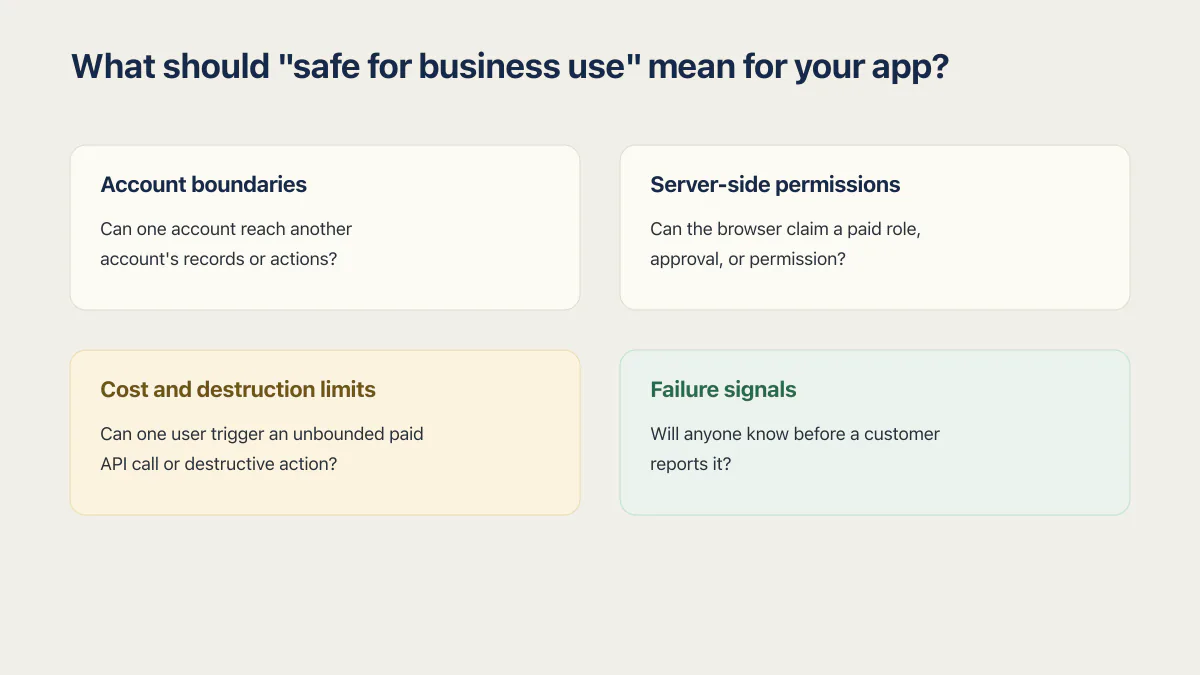
An app is safe enough for a specific use when the important boundaries for that use have been tested and the remaining risks are understood. A scheduling tool used by three staff members needs a different review depth from a public app holding payment details and customer documents.
Start with this four-question checklist:
- Account boundaries. Can one account reach another account’s records or actions?
- Server-side permissions. Can the browser claim a paid role, approval, or permission the server should decide?
- Cost and destruction limits. Can one user trigger an unbounded paid API call or destructive action?
- Failure signals. If an important path fails, will anyone know before a customer reports it?
The list is deliberately tied to consequence. A missing cosmetic loading state belongs lower than a customer boundary or a payment decision. How to secure a vibe-coded app turns those boundaries into a control-by-control fix order.
Which safety problems recur in AI-built business apps?
The recurring problems are familiar web-app failures: row level security written so broadly that it lets more through than intended, errors that never reach a human, deploys with no verification step, and paid API calls with no per-user limit. AI tools can generate the files for these controls while leaving the decisive connection incomplete.
One Q&A app in the AxonBuild corpus checked that a signed-in user owned the profile row they were editing. The policy looked sensible. The same update call also allowed the user to change the field that granted moderator access. Ownership was checked, but the server did not restrict which fields the owner could change. That app is one of eight vibe coding examples read at code level.
That example explains why a settings screen or policy file cannot settle the safety question alone. The boundary has to be tested through the path the working app actually uses. Scanner results need the same restraint: three of 21 third-party apps had 33 to 44 dependency alerts but no traced reachable finding, while eight other third-party apps had at least one known critical vulnerability that was reachable. A long alert list is not a safety verdict, and a short one does not clear the business paths a scanner never exercised. Why AI coding tools can ship security gaps covers the mechanism in more detail. What a vibe-coding security audit finds covers the evidence a deeper review produces.
How can you run a useful two-account test?
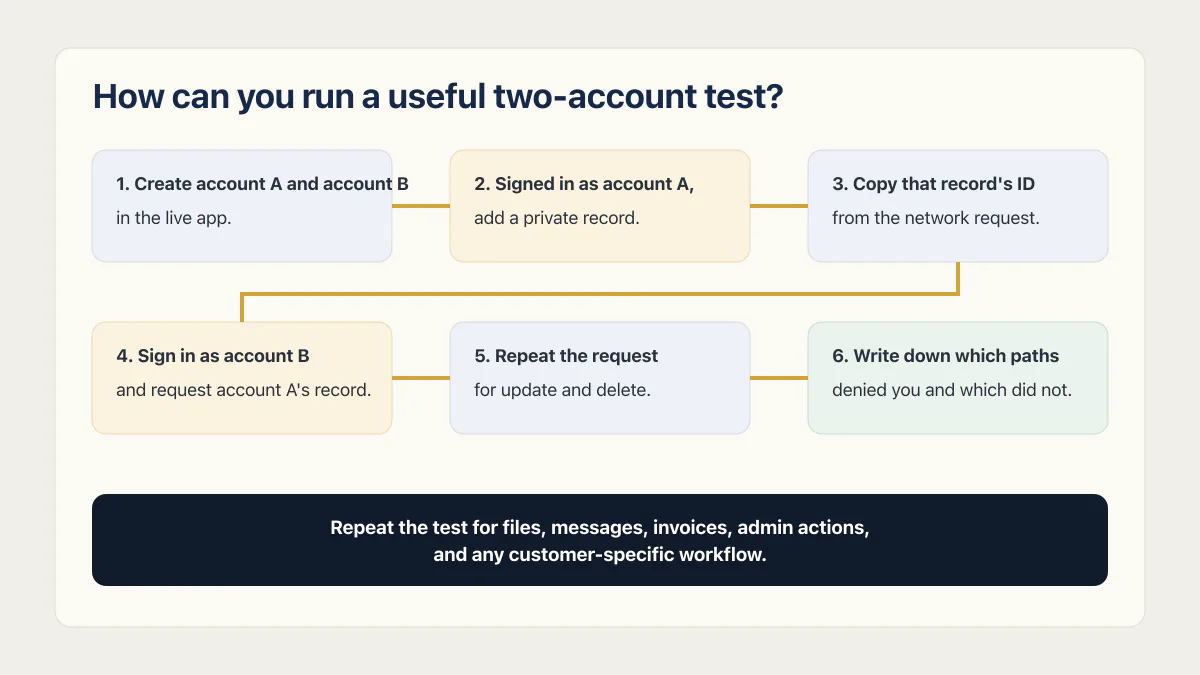
A two-account test checks whether one signed-in user can reach records or actions that belong to another. Run it on an app you own or have written permission to test. If it fails, the prompts that change what the builder writes are the repair side.
- Create account A and account B in the live app.
- Signed in as account A, add a private record: a document, an invoice, a message, a customer row.
- Copy that record’s ID from the address bar or from the network request the page made to load it.
- Sign in as account B, in a separate browser profile, and request account A’s record through the same path the app uses. Changing an ID in the address bar is only one version; many apps send the ID inside a network request, which the browser’s developer tools will show you.
- Repeat the request for update and delete, not just read. Ownership is often checked on one and not the others.
- Write down which paths denied you and which did not.
If account B receives account A’s record, stop and fix that boundary before adding more people. If access is denied, you have evidence for one path. Repeat the test for files, messages, invoices, admin actions, and any customer-specific workflow. A successful two-account test does not cover rate limits, backups, dependencies, or monitoring.
What the two-account test does not cover
The two-account test settles one boundary well and leaves the rest of the list open. It says nothing about a key still readable in the deployed page’s scripts, a dependency advisory with a path a request from the internet can actually reach, an upload far larger than any real user would send, or a paid call with no per-user limit. Those are the same six risks above, seen from the other side.
Working through them is a different job from the one this page does. Deciding whether an app is safe enough is a verdict; getting the keys out, enabling and testing row level security, moving permission decisions to the server, validating inputs, patching the reachable criticals and capping the paid calls is the fix order that follows the verdict, run in that sequence because each step changes what the next one can see. Production hardening covers that work for an app you already run, and which page to open first.
Is it safe to take payments or hold customer data in a vibe-coded app?
It can be, once four specific things are true; they are the minimum evidence rather than the whole answer. This is the part of “safe for business” that the security question usually hides.
- Card details should never reach your database. Use the payment provider’s hosted page. Stripe’s Checkout documentation describes customers entering payment details in a payment page that Stripe hosts or embeds, which keeps the card number out of your app entirely. If your own form is collecting card numbers, stop before you do anything else. Six ways a vibe-coded checkout leaks money covers the rest of the payment path.
- Know what personal data you actually store, and who can read it. List the tables holding names, emails, addresses, health or financial details, and uploaded documents. For each one, name the rule that stops another customer reading it. If you cannot name the rule, that is the answer.
- Be able to honor a deletion request. A customer asking you to delete their data should not require an engineer with database access. Know where their rows and their uploaded files live, and confirm deletion removes both.
- Be able to restore yesterday. Backups you have never restored are not backups. Prove you can recover a specific customer’s data from a specific day. Supabase backups covers what the platform gives you and what it does not.
When is the app ready for staff or customers to rely on?
The app is ready for a particular group to rely on when the paths that matter to that group have evidence behind them and a named person owns what happens next. Security is one part of that decision. Reliability, data recovery, payments, and ongoing changes may matter just as much.
The broader AI-built app readiness guide helps separate those concerns and identify which operational paths need evidence before people depend on them.
Common questions about vibe-coded app safety
Are vibe-coded apps safe?
Vibe-coded apps can be safe for real use, but the build method does not provide the verdict. Test the account boundaries, paid actions, important data paths, and failure signals that matter to the app’s actual use.
On the risk phrasing: vibe coding is a security risk in the same sense that any fast build process is one. The risks of vibe coding are ordinary web-app risks, reached by a route where nobody read the generated code. Vibe coding is safe to use once the boundaries that matter have evidence behind them. Review can find and reduce risk, but it cannot guarantee that no defect remains.
Does a failed check mean the app is unsafe to use?
Not on its own. One failed boundary means one boundary is open, and the verdict depends on what sits behind it: another customer’s records, a payment decision, or a cosmetic detail. Closing it is a separate, ordered job: keys out of the browser and the repository, row level security on every exposed table, permission decisions moved to the server, input and upload limits, reachable critical dependencies, and rate limits on paid calls.
Can a vibe-coded app be hacked?
A vibe-coded app can be attacked through the same unverified boundaries as any other web app. The practical question is whether the important paths in this app have been tested against a second account, an untrusted request, and a failed dependency. If compromise may already have happened, the hacked-app response guide starts with containment and evidence preservation.
Is vibe coding safe for production?
Vibe coding is safe for production when the app’s boundaries have evidence behind them, not when the screens look finished. Before real users arrive, confirm the two-account test passes, no keys are readable in the browser, the server decides every permission, and someone is alerted when an important path fails.
Are vibe-coded apps safe to store customer data?
A vibe-coded app can hold customer data safely if you know which tables hold personal data, can name the rule that stops one customer reading another’s, can delete a person’s records and files on request, and have restored a backup at least once. Card numbers are the exception: send those to a hosted checkout page instead of your own database.
Is a passing platform security check enough?
A passing platform check covers the patterns that tool knows how to inspect. It may be useful evidence, but it does not replace a behavioral test of the working app or a review of a business-critical path the scanner does not model.
Is a vibe-coded internal tool lower risk than a public app?
An internal tool usually has less public exposure, but its business impact can still be high if staff depend on it or it holds client data. Judge the risk by access, data, dependence, and recovery needs rather than by whether the app has a public signup page.
How long does it take to check whether my app is safe?
A small app takes a focused afternoon: an hour for the two-account test across your main record types, an hour for keys and dependencies, and an hour for uploads and inputs. A full review of payments, data recovery, and monitoring takes longer, because those need evidence from the running system rather than a single test.
The checks in this guide show you where the app is open. The sprint below closes those gaps, tests the result and writes the evidence down.
Built it with AI. Now it has to hold up for real customers.
The Production Hardening Sprint takes the app you already have and builds the production foundation underneath it. Authentication and access rules, payments that stay consistent, error handling, monitoring, backups, automated tests and a documented handover. Our engineers work inside your existing codebase for ten working days. All 123 deliverables are included, and you get the evidence for each one.
See the Production Hardening Sprint →  $2,500 fixed price · 10 working days · One codebase