Supabase Row Level Security can be enough to enforce which rows a client may read or change through a correctly configured data path. It is not enough to secure an entire production app, because several routes to the same data never ask a policy anything. Object grants decide whether a role reaches a table or function at all; views and privileged functions can run under a different security context; RLS does not hide selected columns; and one-row policies cannot express every quota, payment, approval, or multi-step workflow rule.
The useful question is therefore “does every route to this data use the authorization boundary I think it uses?” rather than “is RLS enough?” in isolation.
The basics live on Supabase RLS best practices: enabling RLS one table at a time, the default-deny state that follows, USING against the rows that already exist and WITH CHECK against the row being proposed, and a worked policy per command written to authenticated with (select auth.uid()). This page starts where that one stops. Two inputs still decide every result, the role the key authorizes and the expression in the policy, and every limit below is a route where one of those inputs is not the one you assumed.
| What RLS decides | What RLS cannot decide (its limits) |
|---|---|
| Whether this user may select a particular invoice row | Whether the role should be able to call an invoice-export function at all |
| Whether an inserted project_id belongs to an allowed tenant | Whether a refund followed the required approval and ledger sequence |
| Whether account B may update account A’s record | Whether an allowed row should expose every column it contains |
| Whether a normal query is filtered for the caller | Whether privileged server code applies the caller’s identity before returning data |
| Whether an updated row still belongs to the caller | Whether the caller quietly moved the row into another tenant |
RLS is a row-access boundary, not a complete application-security boundary.
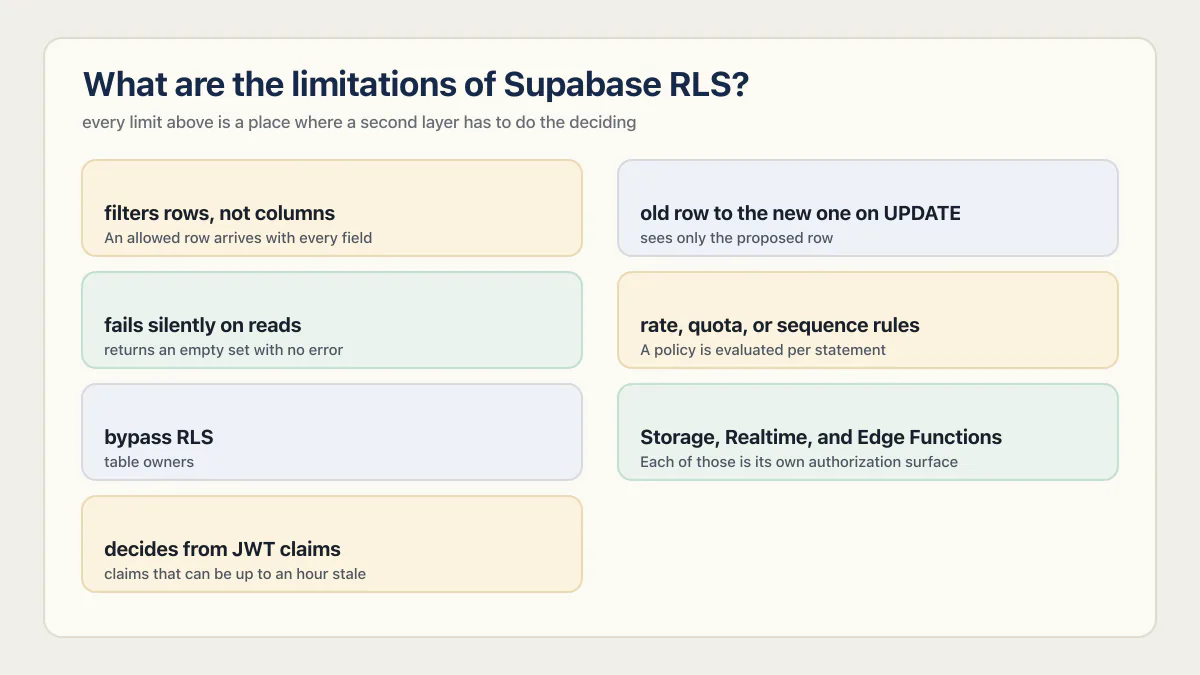
What are the limitations of Supabase RLS?
Seven limits account for almost every case where a correct-looking policy still leaves a hole. Each one is expanded further down the page.
- It filters rows, not columns. An allowed row arrives with every field it contains (columns).
- It cannot compare the old row to the new one on UPDATE.
USINGdecides which existing rows are eligible andWITH CHECKconstrains the values the new row may hold, but neither expression sees both versions at once, so a user can move their own record into another tenant (old row versus new row). - It fails silently on reads. A blocked
SELECTreturns an empty set with no error, so a green-looking app proves nothing (verification). - It cannot express rate, quota, or sequence rules. A policy is evaluated per statement, not across a workflow (business rules).
- It is bypassed by
service_role, table owners, andSECURITY DEFINERcode. Those routes never ask a policy anything (bypasses). - It does not cover Storage, Realtime, or Edge Function paths. Each of those is its own authorization surface (other surfaces).
- It decides from JWT claims that can be up to an hour stale, and from claims the user may be able to write (trust source).
Treat that list as the floor rather than the ceiling. RLS is the layer that keeps one signed-in user out of another’s rows, and every limit above is a place where a second layer has to do the deciding.
When is RLS enough to skip the backend entirely?
The pitch is real: skip the server, write policies, ship. For a simple client-side app that uses a publishable key, Supabase Auth, the Data API, and ordinary table operations, correct RLS can be the main authorization mechanism and no backend is required. “Correct” carries more weight than “enabled”: policies must bind each row to the signed-in user or tenant, cover each allowed command, and be tested with identities that should be refused.
That narrow claim has a primary source. On a 2023 Ask HN thread raising this exact question, the reply came from kiwicopple, the account Supabase’s own co-founder posts under everywhere else: “If you’re using pure react (client side) with the Supabase APIs, then RLS is all you need (just make sure you are using the anon key, not the service_role key).” Taken as written, that holds for the app it describes: no server route, no edge function, no security definer helper anywhere in the schema. Almost nothing stays that shape for long, and the moment a project adds one server action or one privileged RPC, the claim keeps being true only for the sliver that never grew one.
That still assumes least-privilege grants and a deliberately exposed schema. Supabase warns that existing projects may automatically grant new public tables and functions to Data API roles. Keeping internal objects in a private schema, or exposing a dedicated API schema, reduces the number of objects whose authorization must be reviewed.
The boundary stops being simple when the app adds an elevated key, a server route, a view, an RPC, a background job, or a rule that spans several actions. RLS may remain one part of the design; it is no longer the only proof required.
Can a SECURITY DEFINER function bypass Supabase RLS?
Yes, depending on who owns the function and the tables it accesses. A PostgreSQL SECURITY DEFINER function runs with its owner’s privileges rather than the caller’s. PostgreSQL’s row-security documentation says superusers and roles with BYPASSRLS always bypass RLS, while table owners normally bypass it unless the table uses FORCE ROW LEVEL SECURITY.
That makes the function a separate authorization boundary rather than unsafe by default. Its body must derive or verify the caller, constrain the rows and operation, use a safe search_path, and avoid dynamic SQL or caller-controlled identifiers that widen access. Its EXECUTE grant matters too.
The failing shape looks like this:
-- Runs with the privileges of the function's owner.
-- In this example, the function owner also owns `invoices`, and the table
-- does not use FORCE ROW LEVEL SECURITY. That effective role bypasses its policy.
create function get_team_invoices(p_team_id uuid, p_requested_by uuid)
returns setof invoices
language sql
security definer
as $$
  select * from invoices where team_id = p_team_id;
  -- p_requested_by is accepted as an argument and never compared
  -- to auth.uid(). The caller is trusted to say who they are.
$$;
I’ve read schemas where the table-level policy was genuinely correct and holding, then found a function two objects over doing exactly this: taking a team id or a user id as a plain argument, running as the table owner, and never once checking it against the session that called it. In Supabase, a function like this is usually reachable straight from the client as an auto-generated RPC endpoint. When its effective role can bypass that table’s RLS, no table policy can close that route, so the fix goes inside the function body:
-- Same argument list as the failing version, so this replaces it
-- instead of adding a second overload beside it.
create or replace function get_team_invoices(p_team_id uuid, p_requested_by uuid)
returns setof invoices
language sql
security definer
set search_path = ''
as $$
  select * from public.invoices
  where team_id = p_team_id
    and exists (
      select 1 from public.team_members
      where team_id = p_team_id and user_id = auth.uid()
    );
$$;
Same privilege, same shortcut around RLS, but now the function checks ownership itself instead of assuming the caller already did. PostgreSQL identifies a function by its name and argument types together, so a one-argument get_team_invoices(uuid) would sit next to the old two-argument route rather than replace it; keeping the signature and using create or replace closes the exposed route, p_requested_by is simply ignored, and the pinned search_path stops the table names from being redirected. Call the RPC as account B with both the old and the new argument shapes afterwards and confirm neither returns another team’s rows. A table-level RLS review reads the invoices policy, confirms it is correct, and moves on, with no reason to open get_team_invoices at all.
Supabase’s Security Advisor has checks for a security-definer view and for a security-definer function executable by anon or authenticated. Those checks identify a risky shape. They cannot establish that the function’s business-specific ownership test is correct, so the body and its reachable objects still need review.
Prefer invoker behavior where elevated privileges are unnecessary. When a security-definer helper is intentionally used inside an RLS policy, Supabase says it can live in an unexposed schema and be referenced with a qualified name; it does not need to become a public RPC.
Do Supabase views always obey the underlying table’s RLS policies?
No. Supabase documents that views normally run with their creator’s permissions. If a privileged creator owns the view, a caller may receive the creator’s access rather than the row filtering expected from the underlying tables.
On Postgres 15 and later, create the view with security_invoker = true when it should use the caller’s permissions and underlying RLS policies. On older versions, Supabase recommends revoking view access from anon and authenticated, or moving the view to an unexposed schema.
create view public.my_invoices
with (security_invoker = true)
as
select id, account_id, amount, status
from public.invoices;
Invoker behavior is not a replacement for policy testing. It ensures the caller’s security context is used; the policies in that context still have to be correct.
Can RLS hide sensitive columns in an allowed row?
No. RLS filters rows, not individual columns. If a user may select a profiles row, its RLS policy does not separately hide stripe_customer_id, internal notes, or another field included in that query.
Supabase’s column-level security guidance documents column privileges for advanced cases, while recommending a dedicated table for many designs. Separating public profile fields from billing or administrative fields usually creates a clearer boundary. A deliberately shaped invoker view can also avoid returning a sensitive field, provided its own grants and security behavior are correct.
Do not treat “the frontend never selects that column” as authorization. A caller can address the Data API directly unless the database permissions prevent it.
Can a user make themselves an admin by editing user_metadata?
Yes, if the policy reads the role out of user_metadata. The policy itself can be flawless and still hand over admin access, because it is trusting a claim the user is allowed to write.
-- Losing policy: the role comes from a claim the user controls.
create policy "Admins read every invoice"
on invoices for select to authenticated
using ( (select auth.jwt() -> 'user_metadata' ->> 'role') = 'admin' );
One client-side call defeats it:
// Writes into user_metadata, which is exactly what the policy reads.
await supabase.auth.updateUser({ data: { role: 'admin' } })
Supabase’s RLS guide is direct about this: raw_user_meta_data “can be updated by the authenticated user using the supabase.auth.update() function. It is not a good place to store authorization data,” while raw_app_meta_data “cannot be updated by the user, so it’s a good place to store authorization data.” The same guide warns that not everything in the JWT belongs in a policy.
The fix is to read the role from something the user cannot write: app_metadata set by trusted server code, or a roles table joined inside the policy.
create policy "Admins read every invoice"
on invoices for select to authenticated
using (
  exists (
    select 1 from user_roles
    where user_id = (select auth.uid()) and role = 'admin'
  )
);
Claims also go stale. Supabase’s default access token expiry is one hour, so a policy reading auth.jwt() is deciding from a token that may have been issued an hour ago; removing someone from a team in the database does not take effect on claim-based policies until their JWT refreshes. For the same reason a sensitive table can require a fully verified session with a restrictive policy on (select auth.jwt()->>'aal') = 'aal2', or RLS will treat a half-authenticated multi-factor session exactly like a complete one.
Why RLS cannot stop a user changing their own tenant_id or role
WITH CHECK evaluates the row being proposed and USING the row that exists, and neither sees both at once. A policy can still refuse values outright, a role of owner for instance, or a company_id outside the caller’s memberships. What it cannot do is hold a column to the value it had a second ago, so a policy that correctly scopes every read still allows a user to update their own company_id, role, or price column and land, legitimately as far as the policy is concerned, inside somebody else’s tenant.
Take the multi-tenant shape most Supabase apps end up with: users, companies, and a company_users join table carrying the membership and the role. This policy looks right:
create policy "Members maintain their own membership row"
on company_users for update to authenticated
using ( user_id = (select auth.uid()) )
with check ( user_id = (select auth.uid()) );
Both sides check the same thing: this row is mine. Neither side checks that company_id and role are the same values they were a second ago. The member updates their own row, sets company_id to another company and role to owner, and every condition passes.
Freeze the identity columns in a BEFORE UPDATE trigger, which is the only place that can see both versions of the row:
create function freeze_membership_identity()
returns trigger
language plpgsql
as $$
begin
  if new.company_id is distinct from old.company_id
     or new.role is distinct from old.role then
    raise exception 'company_id and role are not self-editable';
  end if;
  return new;
end;
$$;

create trigger company_users_freeze_identity
before update on company_users
for each row execute function freeze_membership_identity();
The alternative is column-level UPDATE grants: take the blanket update privilege away and hand back only the columns a member is allowed to change.
revoke update on public.company_users from authenticated;
grant update (display_name, notification_prefs) on public.company_users to authenticated;
Either works. What does not work is a policy alone, because the comparison it would need to make is not information a policy has.
Does RLS cover Supabase Storage, Realtime, and Edge Functions?
No. Each one is a separate authorization surface with its own policy story, and a perfect set of table policies says nothing about any of them.
Storage has its own policies, on its own table. Supabase’s storage access-control guide says you “selectively allow certain operations by creating RLS policies on the storage.objects table.” A policy can authorize from the object path with helpers such as (storage.foldername(name))[1], or compare the caller with owner_id when uploader ownership is the right boundary. The choice depends on how the app represents ownership and which operation it is authorizing.
Realtime authorizes at connect time, against a different table again. Supabase’s Realtime authorization guide says that “by creating RLS policies on the realtime.messages table you can control the access users have to a Channel topic,” and that the check happens when the user connects. Private channels need private: true on the client and public access disabled in the Realtime settings. Postgres Changes is the exception that does respect your table policies: records are only sent to clients allowed to read them.
Realtime also fails in a way that reads as slowness rather than as a refusal. Because the check runs at connect time, a channel that is slow to join and a channel that quietly refused the connection look much the same from the client, so separating slow Supabase Realtime from denied Supabase Realtime comes before rewriting any policy.
An Edge Function that holds the secret key asks no policy anything. Supabase’s function-secrets docs confirm the secret and legacy SUPABASE_SERVICE_ROLE_KEY values are injected into every function by default, and warn that the key “will bypass Row Level Security.” That is fine, and it is the point of a server function, but it means the function itself is the authorization boundary and must check the caller before it touches a row.
Supabase also notes that a Data API db_pre_request hook does not run for Realtime, Storage, or other Supabase products. A rate or quota check implemented there protects only the Data API route unless the equivalent condition is enforced on the other paths.
Which business rules need more than a row policy?
RLS is evaluated around database statements, while many product rules depend on history, rate, sequence, or an external system. Examples include:
- a user may export their own data, but not run unlimited exports per minute;
- a staff member may see an invoice, but cannot approve and pay the same refund;
- an account may have access to a paid row only after server-verified payment state;
- a subscription change must update an entitlement and ledger together;
- a deletion request must cover storage objects, authentication records, and third-party processors as well as one table.
These rules may live in a transactional database function, trusted server logic, a queue, or a combination. The requirement is to put each rule where the whole decision can be observed and enforced atomically where necessary, rather than to add a backend for its own sake.
How can you verify whether RLS is enough for your app?
Review the reachable data paths before reviewing policy text in isolation.
Start from the fact that RLS fails silently on reads. A blocked SELECT, UPDATE, or DELETE returns an empty result with no error at all; only a rejected INSERT or a failed WITH CHECK raises anything, and that is the “new row violates row-level security policy” message teams already know. So an app that looks correct in the browser proves nothing: a wide-open policy and a working policy both render a page full of the right rows for the account you are signed in as. The only thing that separates them is a second account that should be refused, which is why the two-account test below is not optional.
- 01 Inventory exposed schemas, tables, views, and functions, then record the grants held by anon and authenticated for each object.
- 02 Confirm RLS is enabled on exposed tables and map separate SELECT, INSERT, UPDATE, and DELETE behavior, including both USING and WITH CHECK conditions.
- 03 Test each path with two accounts in different ownership or tenant states. Account B must be refused when reading or changing account A’s disposable record.
- 04 List views and confirm whether each should use security_invoker. Revoke access to privileged or internal views that do not belong in the public API.
- 05 List SECURITY DEFINER functions, their owners, schemas, search paths, bodies, and EXECUTE grants. Verify the caller inside every function that intentionally elevates privilege.
- 06 Search server routes, edge functions, jobs, and scripts for secret or legacy service-role keys; verify that each route authorizes the user before using elevated access.
- 07 Write down rules that span rows, steps, time, payment state, quotas, or external systems, and test those workflows outside the table-policy happy path.
In AxonBuild’s June–July 2026 corpus, RLS gaps appeared in 9 of 21 third-party apps, while 7 of 21 had a confirmed cross-user or cross-tenant authorization failure. The categories overlap but are not interchangeable: a configuration smell is not automatically a proven leak, and a leak can also occur in application logic outside a table policy.
The full counted RLS-gap rate sits tallied once, in one place, across the whole audit program. This article uses only the authorization figures needed to answer its query rather than turning those findings into a product-specific Supabase failure rate.
So the honest answer to “is RLS enough” is: enough for rows, on the one path it governs, when the policy is correct and has been tested with an account that should be refused. Every other route on this page is a route that never asks it. Whether Supabase is safe for your app at all is the wider question this is one piece of.
Common questions about Supabase RLS
Is Supabase RLS enough for production?
Not for the whole application. Correct RLS can enforce row access for ordinary client queries, but production security also depends on object grants, exposed schemas, views, functions, privileged server code, column design, workflow rules, monitoring, and recovery. So is Supabase RLS enough? Yes for the rows on the one path it governs, and no for every route that reaches the same data without asking a policy.
Is Supabase RLS enough without a backend?
For a pure client-side app it can be. If the browser talks to the Data API with a publishable key, uses Supabase Auth, and only runs ordinary table reads and writes, correct RLS is the whole authorization layer and no server is needed. You need a backend the moment a rule spans several steps or a secret key touches data. Storage, Realtime, and Edge Functions are a different case: each has its own policy surface that your application-table policies do not cover automatically, so each one needs its own rules written and tested, whether or not a server exists.
What can Supabase RLS not do?
RLS filters rows and nothing else. It cannot hide columns in an allowed row, cannot compare the old row to the new one on UPDATE, cannot express rate, quota, or sequence rules, does not carry over from your tables to Storage or Realtime, which have their own policies, and does not apply to code holding a secret key. It also fails silently on reads, so an app that looks correct in the browser is not evidence that a policy works.
Does Supabase RLS apply to Storage and Realtime?
Not your table policies. Storage has its own RLS policies written on the storage.objects table, where the file path is the authorization key. Realtime authorizes channel access through policies on the realtime.messages table when the client connects, though Postgres Changes does still respect the RLS on the tables it streams.
Can RLS stop a user changing their own role?
No, not on its own. A WITH CHECK expression only sees the row being proposed, never the row it replaces, so a user updating their own record can change a role, tenant_id, or price column and still satisfy a correct-looking policy. Freeze those columns with a BEFORE UPDATE trigger that compares old and new with is distinct from, or revoke the blanket UPDATE grant and hand back only the columns the user may edit.
Do I need backend logic when I use Supabase RLS?
Not for every operation. A simple client-to-Data-API flow can authorize row ownership entirely through RLS. You need another enforcement point when a rule spans multiple steps, rows, services, time windows, payments, or privileged operations that a row policy cannot fully observe.
Does RLS enabled with no policy leave a table open?
No. PostgreSQL uses default-deny when RLS is enabled and no applicable policy exists. Normal callers see or modify no rows. A table is exposed when RLS is disabled and a Data API role has the matching grant, or when another privileged path bypasses the expected policy.
How do I disable RLS in Supabase, and when is that safe?
It is one statement, alter table public.invoices disable row level security;, and it is safe only when nothing on the Data API path can reach that table: an unexposed schema, or the anon and authenticated grants revoked. On a table those roles can still reach, disabling RLS removes the row filter for every caller holding the grant, which is the same as publishing the table.
Most people reach for it while debugging, which is the case it is least needed for. PostgreSQL already exempts table owners from row security unless the table is set to FORCE ROW LEVEL SECURITY, so a session connected as the owner, or any server code holding a secret key, already reads every row without the setting being touched. Turning RLS off to see your data is turning it off for the browser as well.
Supabase reports the disabled state as an error-level lint named rls_disabled_in_public, summarized as “Table publicly accessible”, for tables in the exposed public schema without RLS. The two documented resolutions are to enable RLS and write the policies, or to stop exposing that schema through the API at all. Neither of them is leaving it off.
Can RLS protect data accessed by a secret or service-role key?
Not when the request operates as service_role. Supabase secret keys and legacy service-role keys authorize that elevated role, which has BYPASSRLS, so trusted server code must perform its own authorization before accessing or returning data. Supabase documents one legacy-key nuance: a client initialized with a service key still follows a signed-in user’s RLS policies when the user’s Authorization header is explicitly supplied. Do not rely on that behavior as a substitute for authorizing privileged server routes.
Does Supabase RLS provide column-level security?
No. RLS controls rows. Use a separate table, deliberately shaped view, or column-level privileges when an allowed row contains fields the same role should not read or change.
Related reading
- Supabase RLS best practices: how to write and test the policies themselves.
- Can someone steal data from my Supabase app?: the read-only test for whether a public client reaches private rows when RLS is off entirely.
- New row violates row-level security policy: the opposite symptom, a policy denying a write rather than leaking a read.
- Why AI coding tools ship security holes: the recurring pattern behind missing ownership checks.
- Is your AI-built app ready to launch?: the broader decision beyond authorization.
Are row policies the only thing guarding your data?
Row policies guard some routes to your data, but functions, views, storage and server code can reach the same records without asking them. Bring it to an audit: we talk through the ways data leaves your app with you and your team, and name the routes that skip your rules. You get a clear answer on which to close first.
Book a free audit → Free · 30 minutes · No code access needed