Yes, someone can steal data from your Supabase app if a Data API role has permission to reach an object and the authorization around that object is missing or too broad. A second route is more serious: a legacy service_role key or a current Supabase secret key exposed outside trusted server code can be reused from a non-browser client to obtain elevated access that bypasses Row Level Security (RLS). Supabase returns HTTP 401 when a secret key arrives with a browser User-Agent, but it warns that this does not make a leaked key safe. Its own guidance is never to use a secret key in a browser, even on localhost, and never to pass a key in a URL or query parameter, because those get logged.
The public key is not the vulnerability. Supabase’s publishable key, and the older anon key it replaces, are designed to appear in browser and mobile apps. The real questions are what the anon or authenticated database role has been granted, which rows its RLS policies allow, and whether a privileged key or callable function opens another route.
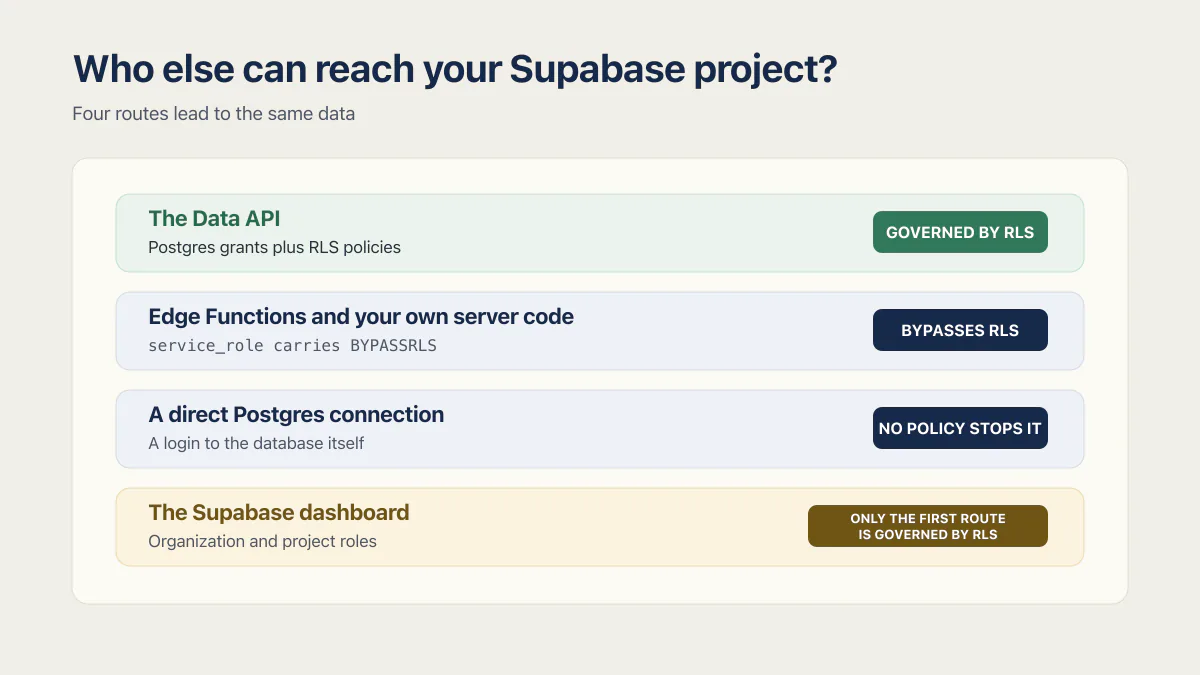
Who else can reach your Supabase project?
Four routes lead to the same data, and only the first one is what most RLS advice is about.
- The Data API, called from a browser or mobile app with the publishable key (or the older
anonkey). Guarded by Postgres grants plus RLS policies. This is the route the rest of this article tests. - Edge Functions and your own server code, which usually hold a secret key. A secret key runs as the
service_rolePostgres role, which carries theBYPASSRLSattribute, so RLS is not a control on this route at all. Whatever the function chooses to return is the boundary. - A direct Postgres connection, using the connection string and the database password. Direct connections and session-mode pooling use port 5432; transaction-mode pooling uses port 6543. This is a login to the database itself, with the broad privileges Supabase gives the
postgresrole. No policy stops it. - The Supabase dashboard, where any invited member signs in and reads data through the table editor and SQL editor. Guarded by organization and project roles, not by anything in your schema.
Only the first route is governed by RLS. The other three normally run on privileged credentials, the postgres role, a secret key or a dashboard login, that bypass your policies; what decides it is the role each credential carries, so a direct connection made as a restricted role is still bound by RLS. That is why “RLS is on” answers about a quarter of the question.
Can the Supabase publishable key expose an entire database?
Not by itself, and not necessarily the entire database. Supabase’s current API-key documentation says publishable keys are safe to expose because they identify a public client rather than confer secret authority. An unauthenticated request assumes the anon Postgres role; a signed-in user’s JWT normally makes the request run as authenticated.
Four key types are in circulation, and telling them apart by their first characters is the fastest check you can run:
| Key | Format | Privilege | Where it belongs | Postgres role |
|---|---|---|---|---|
| Publishable key | sb_publishable_... | Low | Browsers, mobile apps, CLI tools | anon, or authenticated once signed in |
| Secret key | sb_secret_... | Elevated, BYPASSRLS | Server code and Edge Functions only | service_role |
Legacy anon key | JWT, starts eyJ | Low | Client-side, deprecated by the end of 2026 | anon or authenticated |
Legacy service_role key | JWT, starts eyJ | Elevated, BYPASSRLS | Server only, deprecated by the end of 2026 | service_role |
BYPASSRLS is the Postgres attribute that makes the two elevated rows dangerous: the role skips every policy you wrote. Treat the browser 401 as a backstop rather than a control, because a leaked secret key still works from curl, from Postman, or from any script.
Two authorization layers then apply to an object exposed through the Data API:
- Postgres
GRANTs decide whether the role may select, insert, update, delete, or execute it. - RLS policies decide which rows the role may read or change.
Supabase documents that two-layer model in its Data API security guide. A table with RLS disabled is not automatically public to everyone: the request still needs a matching grant, and the table must sit in an exposed schema. But existing Supabase projects may automatically grant broad access on new public objects, so “RLS is off” plus “the role has a grant” is a dangerous and common combination.
A public Supabase key identifies the client; grants and RLS decide what that client can actually do.
One correction matters here: RLS enabled with no applicable policy is default-deny, not open access. PostgreSQL’s row-security documentation states that when RLS is enabled and no policy applies, rows are not visible or modifiable. That configuration can break an app, but it does not hand every row to the caller.
Key facts checked against Supabase documentation on 5 August 2026: the legacy anon and service_role JWT keys are deprecated by the end of 2026, and schema access through the Data API has required a secret key on every project since 8 April 2026.
Can anyone see your table and column names?
Not in bulk any more, unless you handed out a secret key. Individual table and column names can still surface in your client JavaScript, in the REST requests the browser makes (the path and the select and filter parameters), and in error messages, so treat the change below as closing the catalogue, not hiding the structure. Until 2026, the Data API root at https://YOUR_PROJECT.supabase.co/rest/v1/ returned the OpenAPI spec, which lists the tables, columns and types of every exposed schema, to anyone holding the anon key. Supabase announced the removal on 17 February 2026, blocked new projects on 11 March 2026, and blocked all existing projects on 8 April 2026. There is no opt-out.
A blocked request now returns Access to schema is forbidden, with a hint that accessing the schema via the Data API is only allowed using a secret API key. Secret and service_role keys are unaffected, so a leaked secret key still reads your whole structure along with everything else.
Before that change, the usual mitigations were to keep private tables out of the public schema and expose narrow views instead. Both are still worth doing, because a smaller exposed schema is a smaller thing to audit. But structure hiding is not access control. Knowing a table is called payments does not let anyone read it, and not knowing the name does not stop a grant plus a missing policy from handing over every row in it.
Which Supabase configurations can leak another user’s data?
The useful test is broader than “is RLS on?” because a project can pass that check and still expose data through an ownership-blind policy, a privileged view, or a callable function.
| Configuration | What it means |
|---|---|
| Exposed table, matching grant, RLS off | The role can reach every row allowed by its table privilege |
| RLS on, no applicable policy | Default-deny: the role sees or changes no rows |
| RLS on, policy checks only “logged in” | Every signed-in user may receive rows belonging to other users |
| View runs with its privileged creator’s permissions | The view can bypass the underlying table policies unless access or invoker behavior is constrained |
| Secret or service-role key exposed | The holder receives elevated access designed to bypass RLS |
The third case is the one a dashboard badge cannot settle. A policy such as using (auth.uid() is not null) proves the caller has a user identity; it does not prove that the row belongs to that identity. In the 21 third-party apps in AxonBuild’s June–July 2026 audit corpus, 9 had an RLS gap and 7 had a confirmed cross-user or cross-tenant authorization failure. Those are overlapping categories, not a claim that all nine leaked an entire database. At least 5 of the 21 exposed PII or PHI, some of it reachable without logging in at all.
Views and functions deserve their own inventory. Supabase notes that views normally use their creator’s permissions; on Postgres 15 and later, security_invoker = true can make a view obey the underlying caller’s RLS context. Functions are governed by EXECUTE grants, and a SECURITY DEFINER function runs with its owner’s privileges. Supabase’s RLS guidance recommends keeping security-definer functions out of exposed schemas.
Two more surfaces sit outside table policies entirely, and both are common in AI-built apps that added file uploads or live updates. Storage buckets marked public are readable by anyone holding the object URL: Supabase’s own bucket documentation says anyone in possession of the asset URL can access the file. Uploads, deletes and copies still go through policies, downloads do not. A private bucket plus a signed URL, which expires, is the fix for anything that is not a public logo or avatar. Realtime is the other one: channel authorization is opt-in, enforced by RLS policies on the realtime.messages table and a private: true channel, and it is separate from the policies on your data tables. For the bucket side, the object storage security checklist covers private buckets, presigned URLs that expire, and upload size and type limits.
After RLS, two more controls exist for the cases policies handle badly. Column Level Security restricts a role’s access to named columns inside a row it is otherwise allowed to read, and Vault stores secrets such as third-party API keys encrypted rather than sitting in a plain table. Both come after RLS, not instead of it.
What is the two-minute Supabase data-exposure test?
Start with a read-only request. Do not disable RLS as a diagnostic on a production table, and do not test writes or deletes against customer rows.
curl --get \
  'https://YOUR_PROJECT.supabase.co/rest/v1/orders' \
  -H "apikey: $SUPABASE_PUBLISHABLE_KEY" \
  --data-urlencode 'select=id' \
  --data-urlencode 'limit=1'
Run that request while signed out. Interpret the result carefully:
- Returned data proves the
anonrole can select at least those rows. It may be intentional for genuinely public data. - An empty array can mean RLS allowed zero rows, the table was empty, or the filter matched nothing.
401,403, or Postgres error42501can mean the key, schema exposure, or grant refused the request.
The curl result therefore identifies a question; it is not a complete vulnerability verdict. This is the quick first test promised in the title. For private user data, follow it with a two-account authorization test in staging or with disposable records you own.
The no-terminal version of the same test
If you have never opened a terminal, you can still find the worst version of this problem in a browser in about the same two minutes.
- Open your live app, open DevTools, and switch to the Network tab. Reload the page. The requests to your Supabase project show the project URL and the key the app is sending.
- Search the loaded JavaScript for
eyJand forsb_secret_. A current secret key starts withsb_secret_, and finding one is the emergency. A legacy JWT key starts witheyJwhether it isanonorservice_role, so compare anyeyJvalue you find against the two keys shown under Project Settings, API in your own dashboard; the one labelledservice_rolethere is the emergency, theanonone is normal. Do not paste the value into a third-party decoder. - Read your environment variable names. Anything prefixed
NEXT_PUBLIC_,VITE_orPUBLIC_is compiled into the browser bundle on purpose. A secret key parked behind one of those prefixes is the single most common way an AI-built app ships a server credential to every visitor. - Do the same for your hosting provider’s environment settings and any AI builder integration panel, not just the local
.envfile.
That finds a leaked key. It does not find a weak policy, which is what the two-account test below is for.
The six-step exposure audit
- 01 List every table, view, and RPC exposed through the Data API; do not limit the review to tables visible in the app’s main screen.
- 02 For each object, record the SELECT, INSERT, UPDATE, DELETE, or EXECUTE grants held by anon and authenticated. Remove privileges the client does not need.
- 03 Confirm RLS is enabled on every exposed table and inspect the policy expression itself. A policy must bind the requested row or tenant to the signed-in user, not merely check that auth.uid() exists.
- 04 Create two test accounts. While signed in as account B, attempt to read and update a disposable row owned by account A through the same client or API path the app uses.
- 05 Review exposed views and SECURITY DEFINER functions separately. Verify invoker behavior, EXECUTE grants, ownership checks, and a fixed search_path where appropriate.
- 06 Search built client assets, mobile packages, public repositories, logs, and deployment configuration for secret or legacy service-role keys.
Supabase’s Security Advisor helps find configurations such as RLS disabled in public, RLS enabled without a policy, security-definer views, permissive policies, and executable security-definer functions. It is a useful inventory, not proof that the business-specific ownership rule is correct. The decisive check is still account B attempting an action against account A’s data.
One audited app showed why the check has to run against the live project, not the repository. A sports-analytics app, exported as a single commit from an AI app builder, had RLS enabled and enforced correctly on every table I tested. None of that lived in the repo: every policy, every constraint, and every table definition sat only in the hosted Supabase dashboard, with nothing committed anywhere. A policy switched off from the dashboard tomorrow would leave no diff, no pull request, and nothing for a future reviewer to catch. Whether RLS is on is a fact about what is running right now, not about what is committed, and the two can drift apart with nothing recording the change.
What can someone actually do with each credential?
It depends entirely on which credential moved, not on how good your policies are.
| Credential | What the holder gets | What stops them |
|---|---|---|
Publishable or anon key | Whatever the anon and authenticated grants and RLS policies already allow, and nothing beyond that | Least-privilege grants plus ownership-bound policies |
Leaked secret or service_role key | Read and write on every object the Data API exposes, with RLS bypassed | Nothing, until the key is replaced and the old one deleted |
| Database password or connection string | A login to the whole Postgres instance, including the auth schema and tables the Data API never exposed | Nothing in your schema. Rotating the password and restricting network access |
| Dashboard login for a project member | All of the above through the table and SQL editors, plus project settings, logs and backups | Organization and project roles, plus MFA on the account |
Only the top row is governed by RLS. That is the honest answer to “what happens if my database gets hacked”, and it is why the audit above covers keys and dashboard members rather than tables alone. How to harden managed database settings covers the settings behind the lower rows: who can connect, which role the app uses, TLS, and manual access.
What should you do if the test returns private rows?
First preserve enough evidence to understand the exposed object, role, request, and affected fields. Then close the route before spending time polishing the policy.
What to do in the first hour
- 01 If a current secret key was exposed, remove it from the client, create a replacement, update trusted server environments, then delete the compromised key. Replace a leaked legacy service-role key with a current secret key and disable the legacy key after the migration.
- 02 Revoke unnecessary grants or remove private objects from the exposed schema so the Data API role cannot reach them while the policy is repaired.
- 03 Enable RLS and add command-specific ownership policies in a migration. Keep in mind that enabling RLS without an applicable policy denies access and may temporarily break the affected feature.
- 04 Retest signed out and with two distinct accounts, covering reads and each allowed write using disposable records.
- 05 Determine what data was reachable and review available API, database, application, and edge-function logs; do not assume that fixing the configuration proves nobody used it.
- 06 Rotate any reusable credentials or tokens stored in exposed rows and assess whether contractual or legal notification duties apply to the facts you find.
For future objects, pair grants, enable row level security, and policies in the same migration. Supabase is moving toward opt-in default grants, but its current documentation warns that existing projects may still grant new public tables and functions to Data API roles automatically. A dedicated exposed schema also makes the API surface much easier to audit.
This test covers one data-access boundary, not whether the whole app is safe. Why AI coding tools miss ownership checks explains the wider pattern, while data-loss bugs in AI-built apps covers destructive writes and recovery. Both remain separate from the launch question of whether the complete app is ready for people to rely on.
If an insert fails with “new row violates row-level security policy”, that is a different diagnosis: RLS is refusing the row rather than exposing it. The equivalent authorization model uses different syntax elsewhere, but the same read-anyone’s-data shape can show up in Firebase too when a project’s rules are configured too broadly.
Common questions about Supabase data exposure
Can someone steal data from my Supabase app?
Yes, in two situations. Either the Data API exposes an object the public role has a grant on and no policy binds those rows to their owner, or a secret key leaked into client code and bypasses RLS entirely. The publishable key being visible in the browser is not itself the flaw. Test both: one signed-out request, then a read attempt on account A’s row while signed in as account B.
What happens if someone hacks my Supabase database?
It depends which credential they got. A publishable or anon key gets them only what your grants and policies already allow. A leaked secret or service_role key gets read and write access to everything the Data API exposes, with RLS bypassed. The database password or a dashboard login is worse again: the whole Postgres instance, including the auth schema, plus settings, logs and backups.
Is it safe to expose the Supabase project URL as well as the key?
Yes. The project URL and the publishable key both have to travel with every request a browser makes, so hiding them is neither possible nor the control. What matters is that the anon and authenticated roles hold only the grants they need and that every exposed table has a policy binding rows to their owner. Treat a visible project URL as normal and a visible secret key as an incident.
My service_role key is in the git history, is rotating it enough?
Rotating is the necessary part, but the order matters: create a replacement secret key, update every server environment and Edge Function, then delete the compromised key so the old one stops working. Rewriting git history or making the repository private does not help on its own, because anyone who already cloned or forked it still holds the old key. After rotating, review your logs for use of the old key instead of assuming nobody found it.
Can other people on my Supabase project see all the data?
Yes. Anyone you invited to the organization or project can open the table editor and SQL editor and read data there directly, rather than through your app’s policies. Supabase’s roles are Owner, Administrator, Developer and Read-Only, and the Read-Only role and project-scoped roles are only available on the Team and Enterprise plans. Review the member list, remove collaborators you no longer work with, and require MFA on accounts that remain.
Does Supabase itself have access to my data?
Yes, in the way any hosted platform does: Supabase runs the machines your database sits on, so the route exists and nothing in your schema governs it. What governs it is contractual and operational instead. Supabase’s data processing addendum says it processes customer data only on behalf of and under the customer’s instructions, that access to infrastructure and internal resources is granted on the principle of least privilege, that personnel are bound by confidentiality duties, and that “Supabase retains audit logs of all interactions with its internal services and all interactions with Customer projects.” If a dataset cannot sit with a hosting provider at all, the answers are encrypting those values in your own code before they are stored, or running Postgres yourself.
Is the Supabase database encrypted at rest?
Yes, by default, with nothing to switch on. Supabase’s data processing addendum states that “All hard disks are encrypted-at-rest using the industry-standard AES-256 algorithm” and that the regularly scheduled backups are encrypted at rest with AES-256 too, and Supabase’s security page states that all customer data is encrypted at rest with AES-256 and in transit via TLS. Read carefully what that covers: the disks and the backup files, against someone who obtains the hardware or a copy of a backup. It does nothing about a request that arrives with a valid key and a grant, because that query is served decrypted exactly as your own app is served. Encryption at rest and the tests in this article answer different questions.
Is the Supabase anon key safe to expose?
Yes. The legacy anon key and its current replacement, the publishable key, are client-side identifiers rather than secrets. They are safe only when the anon and authenticated roles have least-privilege grants and every exposed data path has correct authorization.
Is RLS enabled by default in Supabase?
It depends on how the table was created. Supabase enables RLS by default for tables created in the Dashboard Table Editor. Tables created with raw SQL, the SQL Editor, migrations, or other tools require RLS to be enabled explicitly.
Does RLS enabled with no policy expose the table?
No. PostgreSQL applies default-deny when RLS is enabled and no applicable policy exists, so the affected role sees or modifies no rows. The configuration can cause empty results or permission failures, but it is the opposite of an open table.
What is the difference between publishable and secret Supabase keys?
A publishable key is meant for public clients and operates through the anon or signed-in authenticated role. A secret key is server-only and authorizes the elevated service_role, which bypasses RLS. Supabase is deprecating the legacy anon and service_role JWT keys in favor of these newer key types by the end of 2026.
Can a Supabase app leak data even when every table has RLS?
Yes. A policy may authorize every signed-in user instead of the row’s owner, a privileged view or function may use a different security context, or trusted server code may expose data after using a secret key. Test the actual request paths with two accounts rather than relying on the RLS switch alone.
Worried strangers can read your Supabase data?
Most Supabase leaks come from missing row rules or a secret key that ended up in the browser. On the audit, we go over who can reach your data with you and name the most likely openings. You leave knowing which one to close first.
Book a free audit → Free · 30 minutes · No code access needed