Yes, with one condition. The hosted platform is SOC 2 Type 2 compliant and ISO 27001 certified. Your project is only as safe as its RLS policies, grants, views, functions, storage buckets, and key handling, and that second half is where AI-built apps leak.
Supabase is a defensible production platform. Its Data API can be used safely from a browser when Row Level Security (RLS), grants, and keys are configured correctly. That platform answer cannot settle whether your project is safe. Your tables, policies, views, functions, server routes, and handling of elevated keys decide what one user can reach.
A fixed June–July 2026 AxonBuild study shows why authorization deserves a separate answer. Across the 14 of 21 third-party AI-built apps where authorization applied, the historical Authorization pillar averaged 42.1 out of 100. This was a mixed-stack cohort, not a Supabase-only sample, so it does not measure a Supabase failure rate. It measures how weak application authorization can become even when the underlying platform supplies the right controls.
Is Supabase safe? The platform and your project have separate boundaries
Supabase documents its SOC 2 boundary directly: the hosted backend and its management of customer data are covered by controls that are assessed annually. The same page says those controls do not transfer to environments outside Supabase’s product or control. HIPAA is a narrower story with a BAA, plan and add-on requirements, covered separately in is Supabase HIPAA compliant and on which plan.
A SOC 2 report covers Supabase’s controls. It does not certify the policy on the orders table someone added last month, the privileges on a callable function, or the authorization check inside your server route. That shared-responsibility boundary is where the app answer begins.
On the platform side, Supabase publishes what it actually operates: AES-256 encryption at rest and TLS in transit, ISO 27001 certification, GDPR-oriented deployments with a data processing agreement and in-region hosting for EU projects, daily backups on every paid plan with Point in Time Recovery available as a Pro add-on, and multi-factor authentication plus role-based access control on the dashboard. Those are real controls, and they are why the platform half of this question is the easy half. They also stop at the edge of your schema. How to harden managed database settings covers the settings those controls leave to you: who can connect, which role the app uses, TLS, ownership and manual access.
The two questions hiding in one search
“Is Supabase safe,” or how secure is Supabase, contains two questions. One asks whether the company can be trusted with hosted infrastructure: the same platform-or-your-code split that decides whether Supabase is slow or your queries are. The other asks whether your schema and application keep one customer’s data away from another. Supabase’s compliance material answers the first. Only a review of your project’s effective permissions can answer the second.
Supabase controls the hosted platform. Your grants, policies, views, functions, and keys control what each app user can reach.
What Supabase secures for you, and where the line sits
Under the hood, a Supabase project combines Postgres, Auth, Storage, Realtime, and a Data API. Why everyone uses Supabase and what the default costs later covers that convenience tradeoff. For client Data API requests, a publishable key uses the anon Postgres role before sign-in and the authenticated role when the request includes a user’s valid session. Supabase’s API-key documentation is explicit that RLS and grants decide what those roles can touch. Current publishable and secret keys are the successors to the legacy anon and service_role keys, but both generations can coexist until you disable the legacy keys. Secret and service_role keys are elevated server credentials that bypass RLS. The same ownership line runs through backups: what a Supabase backup covers on free versus Pro is fixed by the plan, while proving that a restore works is your job.
That arrangement is why a publishable key, or a legacy anon key, in the browser is expected. It identifies the project and leaves row access to Postgres roles, grants, and RLS. A table reachable through the Data API with RLS disabled or an overbroad policy changes the answer. A secret or legacy service_role key in client code is a separate failure because it grants elevated access outside the RLS boundary.
A correct policy is short, and the shape matters more than the syntax:
create policy "read own rows"
  on public.orders
  for select
  using (auth.uid() = user_id);
That single using clause is the difference between a policy that exists and one that enforces ownership. When an applicable SELECT policy reads using (true) and the requesting role has table access, it permits every row instead.
You will also see the same comparison written with the call wrapped in a subquery:
using ((select auth.uid()) = user_id)Both forms enforce the same rule. Supabase recommends the wrapped one for speed: the subquery lets the Postgres planner run an initPlan and cache the result once per statement instead of calling the function on every row.
What the audits found: authorization is where it breaks
In the mixed-stack historical cohort, Authorization ranked fifth from the bottom at 42.1, computed only across the 14 apps where the pillar applied. Across the full 21-app third-party set, 9 had an RLS gap and 7 had a confirmed cross-user or cross-tenant authorization failure. Those counts overlap, and the seven-app count includes non-RLS mechanisms, so neither number should be read as a Supabase incidence rate. They show that a platform feature being present is weak evidence until the effective access path has been tested.
A public incident makes the same point at a larger scale. CVE-2025-48757 covers Lovable-generated projects whose row-level security policies did not match the app’s logic. The NVD entry describes an insufficient database row-level security policy in Lovable through 2025-04-15 that let remote unauthenticated attackers read or write arbitrary database tables of generated sites, scored 9.3 critical by the assigning authority. The record is marked disputed, because the vendor’s position is that securing application data is the customer’s job. That disagreement is this post’s subject: both sides are describing the same shared-responsibility line from opposite ends, and the apps in the middle were the ones exposed.
I read a Supabase-backed app once where the profiles table’s own policy was written exactly right: a signed-in user could select their own row, nothing else. Then I found a second policy on the same table that read using (true). Postgres doesn’t ask which policy you meant. When more than one permissive policy applies to the same role, access is granted if any of them says yes, so the correct policy became decorative the moment the second one existed. One query, using nothing but the public key, returned every user’s email, phone number, and exact coordinates. Nobody had disabled row-level security. Nobody had written a bad policy on purpose. Two policies, each defensible on its own, combined into a leak neither author would have shipped alone.
A sharper version of the same failure does not need a second policy. A Postgres security definer function runs with the privileges of the role that created it. When that owner can bypass RLS, the function can do the same. In one app, a callable function trusted the user id supplied by its caller and never compared it with the authenticated identity, routing around otherwise-correct table policies. Supabase’s current API-security guidance warns that RLS does not apply to functions and that every security definer function needs careful review. Syntax alone cannot tell you whether its body authorizes the caller.
The three ways a “safe” Supabase app is actually open
A Supabase app that looks locked down can still be open in one of three shapes: a table with row-level security never enabled, a policy that checks only that the caller is logged in, or an elevated key shipped in client code. The fix for each is different enough that “turn on RLS” does not cover all three.
| Looks safe | Actually safe |
|---|---|
| RLS shows enabled in the dashboard for every table you remember building | RLS is enabled with a working policy on every table, including the one a feature shipped six weeks after launch |
| The policy on a table returns the right row when you test it logged in as yourself | The policy compares the row to the caller’s own id, not just whether a caller is logged in at all |
| Every key you found sits in an environment variable | Secret and legacy service_role keys never reach a client bundle, a NEXT_PUBLIC_ variable, or a mobile app’s compiled strings |
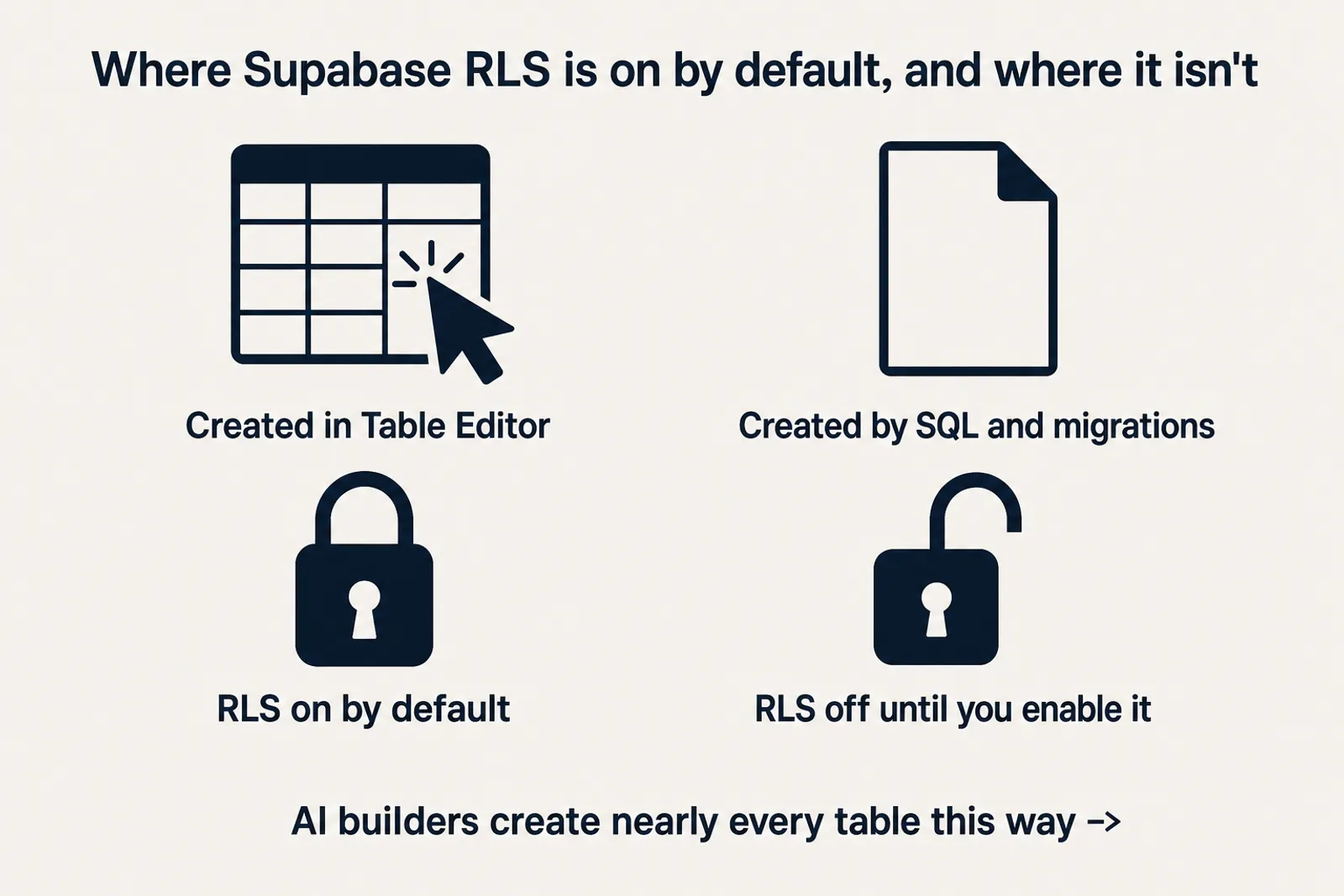
No RLS on a table your app reaches is the first shape. Supabase enables RLS by default for tables created in the Table Editor, while tables created in raw SQL or migrations require you to enable it. The second shape is an overbroad policy, view, or function: using (true), a login-only check with no ownership condition, a permissive policy that OR-combines with the intended one, or privileged code that trusts a caller-supplied id. Three mechanisms under that shape are worth naming instead of describing. A view created without security_invoker = true runs with its creator’s privileges, and Supabase’s own wording is blunt: views bypass RLS by default because they are usually created with the postgres user. The Data API’s exposed-schemas setting decides which schemas the API can reach at all, and only public is exposed by default, so adding a schema there widens the client surface in one click. Column-level grants decide which columns a role may select, which is how a table with a correct row policy still hands over a column nobody meant to publish.
The third shape bypasses RLS entirely: a current secret key or legacy service_role key shipped in public code. The resulting scope depends on grants and code, but each shape can expose substantially more data or authority than the UI suggests.
Closing the first two, the practices that actually hold row-level security together once you’ve turned it on, is its own subject. Turning it on isn’t the finish line either, and that’s worth a separate explanation. And if the answer you landed on is to leave, the six real Supabase alternatives and what you own after the switch change which four things you configure, not whether you configure them.
The surfaces RLS does not cover on its own
Table policies are not the whole boundary. Three other parts of a standard Supabase project carry their own authorization rules, and each has shipped wide open in apps whose tables were locked down correctly.
Storage buckets
A bucket’s public flag decides access before any policy does. Supabase’s storage docs put it plainly: with a public bucket, anyone who possesses the asset URL can readily access the file. Private buckets require a request carrying the user’s JWT or a time-limited signed URL created with createSignedUrl. The policies themselves live on the storage.objects table rather than on the bucket, and Storage allows no uploads to a bucket without them. A receipt or ID scan dropped into a public bucket is published the moment it lands, whatever the policies on your tables say. The object storage security checklist covers the rest of that surface: private buckets, presigned URLs that expire, upload limits and retention.
Edge Functions
An Edge Function is server code, so it can hold a secret or service_role key, and that key bypasses RLS. Two settings decide whether that matters. verify_jwt is on by default and makes the platform validate the caller’s JWT before your handler runs; switching it off makes the function callable by anyone who knows the URL. Inside the function, an admin client built from a secret key ignores row-level security completely, so the function body is the only thing checking that the caller owns what it is about to return. This is the surface most Lovable and Base44 projects actually use for server work, and it is the one people forget when they say the database is locked down.
Realtime
Realtime has two authorization paths. Postgres Changes sends records only to clients allowed to read them under the source table’s RLS, whether the channel is public or private. Broadcast and Presence use RLS policies on the realtime.messages table. Restricting those features requires private channels and public access disabled in Realtime settings.
How to check whether your Supabase project is safe
Start in the dashboard, not in the code. Supabase runs a Security Advisor under Database in the project dashboard; its checks run automatically and you can rerun them after a fix. The lint to read first is rls_disabled_in_public, which flags every table in the exposed public schema with row-level security switched off. Supabase’s description of that lint is the plainest statement of the risk anywhere on this page: anyone with your project URL can read, edit, and delete all data in this table because Row-Level Security is not enabled.
The same answer in SQL, pasteable into the SQL editor:
select schemaname, tablename, rowsecurity
from pg_tables
where schemaname = 'public'
  and rowsecurity = false;
Every row that comes back is a table the Data API can reach with no row filter at all. An empty result is the floor, not the finish line: it proves RLS is on, not that any policy compares a row to the caller.
Then run the rest as a procedure, against a disposable target rather than production data.
- 01 Spin up a disposable or staging project so write and delete tests never touch live data.
- 02 Create two ordinary accounts, A and B, each with rows of their own.
- 03 Run the pg_tables audit query above, then enable row-level security on every table it returns.
- 04 Signed in as B, using only the publishable key and no elevated credentials, call every table, view, and RPC the product uses and confirm none of A's rows come back.
- 05 Check the other three surfaces: which storage buckets are public, whether any Edge Function runs with verify_jwt off, and whether Realtime channels are created private.
A UI test is useful, but it does not cover a callable Data API object the UI never touches, which is why step four goes through requests rather than screens. Deeper versions of the steps live elsewhere: the exact anon-key request that turns step four into a two-minute test, plus the order to fix things in, the repeatable database and API suite, and what to do when one database with no staging environment is all you have. If you enabled row-level security and got an error back instead of a leak, that denial is a different problem with a safer starting state.
Authorization is one piece of whether your app is actually ready to launch, and the same trust-boundary gap explains why AI coding tools ship security holes by default on every stack, not just Supabase’s. This post covers the read side of that gap. The write and delete side of the same story is just as real and just as quiet, and when a delete does reach live data, the first hour after someone accidentally deletes the production database decides how much of it comes back.
Common questions about Supabase security
Is Supabase secure?
As a hosted platform, Supabase has a current SOC 2 Type 2 program with annual assessment. Whether a specific app is secure depends on its grants, RLS policies, views, functions, server authorization, and key handling. The same platform-versus-application boundary appears in whether a Base44 app is compliant.
Is Supabase Auth safe to use from the browser?
Yes, that is what it is designed for. The browser holds the publishable key, or its predecessor the anon key, which Supabase documents as safe to expose in a web page, a mobile app, or source code. That key identifies the project, not the person. Once a user signs in, the request carries their session and Postgres runs it under the authenticated role, so grants and RLS still decide every row that comes back.
Two things make it unsafe in practice, and neither is Auth’s doing. The first is a table the Data API can reach whose policy checks only that somebody is signed in, which turns any account into a key for everyone else’s rows. The second is a secret or service_role key shipped in the same bundle, which bypasses RLS whatever Auth decided. Sign-in tells you who is asking; the policy is what answers.
Is the Supabase anon key safe to expose?
The current publishable key and legacy anon key are designed for public clients. Supabase’s API-key guide says access still depends on the anon or authenticated Postgres role, table grants, RLS, and the user’s JWT. Current secret keys and legacy service_role keys are different: they are server-only credentials with elevated access and must not be exposed.
What is the difference between the anon, authenticated, and service_role roles?
They are three Postgres roles with three different trust levels. anon is the role a request gets before sign-in, authenticated is the role it gets when the request carries a valid user session, and both are still fully governed by table grants and RLS policies. service_role is the elevated Postgres role that bypasses RLS entirely; the legacy service_role API key and the current secret key are the two credentials that run as that role, so either belongs only in server code you control and never in a browser bundle, a NEXT_PUBLIC_ variable, or a mobile binary.
Is row-level security enabled by default in Supabase?
Only for tables created with the Table Editor in the dashboard; Supabase’s own guide states RLS “is enabled by default on tables created with the Table Editor.” A table created in raw SQL or through a migration ships with RLS off until someone enables it. Audit every migration-created table explicitly rather than inferring its state from dashboard-created neighbors.
Are Supabase Storage buckets covered by RLS?
Both public and private buckets use Storage RLS for uploads, deletes, moves, and copies. A public bucket bypasses access checks for retrieving and serving files, so anyone with an object URL can read it. Files in a private bucket require an authorized request or a time-limited signed URL.
Check the public flag on every bucket before you trust the policies attached to it. A single bucket flipped public during debugging is the most common way a locked-down project still publishes user uploads.
Can Supabase Edge Functions leak the service_role key?
Yes, in two ways, and only the first is a leak of the key itself. The key can be read out if it is returned, logged, or echoed into a response by the function’s own code; the evidence is the value in a response body or a log line. Separately, a function that runs with verify_jwt turned off is callable by anyone with the URL, so an admin client inside it acts on an unauthenticated caller’s behalf: the key never leaves the server, but its data and actions are exposed, and the evidence is a successful unauthenticated call that reads or changes rows. Keep verify_jwt on for anything a user triggers, and make the function body compare the caller’s identity to the rows it is about to touch.
Is Supabase more or less secure than Firebase?
Neither has one universal default; the creation mode decides the starting state. Supabase enables RLS on tables created with the Table Editor, and an enabled table with no allow policy denies access. Tables created through raw SQL or migrations need RLS enabled manually. Firebase Production or Locked mode denies mobile and web reads and writes, while Test mode allows them until its rules are tightened. Both platforms also ship a server escape hatch that ignores those rules: the Supabase service_role or secret key and the Firebase Admin SDK.
How do I get Supabase’s SOC 2 Type 2 report?
Team and Enterprise customers can download the report from Legal Documents in the organization dashboard. The security page also covers the ISO 27001 certificate. Remember what the report is scoped to: it attests to Supabase’s controls over the hosted platform, not to your schema, policies, or keys. SOC 2 certification in plain words, including why your host’s report is not yours, is covered separately.
Is Supabase safe for production?
Supabase provides production-oriented infrastructure and audited platform controls. A specific app is ready for production only when its effective permissions, failure handling, backups, and deployment path have been tested against the workflows real users will run. SOC 2 status supports the platform decision; it does not replace that application review.
Could one customer see another customer's records?
Supabase secures its platform, but your policies, functions and keys decide whether customer data stays private, and that is where apps built with AI tools tend to leak. An audit gives you a clear answer: we look at your app with you, point out the likely openings, and rank them by risk.
Book a free audit → Free · 30 minutes · No code access needed