Moving Stripe from a testing environment to live mode is not one toggle. Your application must switch to live API keys, live products and prices, a live webhook destination and signing secret, and production configuration that contains no test-only object IDs. A checkout can pass every non-live test and still fail at launch because one price_... value or whsec_... secret stayed behind.
Stripe documents two environments: live mode and sandboxes. Every Stripe account has a test mode sandbox, and you can create general sandboxes alongside it, so this guide says testing environment when a step applies to either one. The boundary that matters is simple: a sandbox is an isolated test environment, and the payments you create in one are not processed by card networks or payment providers.
Stripe test mode vs live mode
Test mode is itself a sandbox, but it is not the same as the general sandboxes you create. What every one of them shares is the line that matters here: each testing environment and live mode has its own keys and data; they are not interchangeable views of one object catalog.
| Testing environment | Live mode |
|---|---|
| Publishable and server keys use test prefixes | Publishable and server keys use live prefixes; server keys must stay secret |
| Customers, products, prices, subscriptions, and payments are isolated test data | Production code must use the corresponding live objects |
| Webhook destinations receive events from that testing environment and use their own signing secrets | Live destinations must be registered and use their own signing secrets |
| Test payment methods produce controlled outcomes | Actual issuers, payment methods, authentication, and fraud controls affect outcomes |
Switching the publishable and secret keys changes which environment the API request reaches. It does not translate a test price ID into a live one, copy a customer, create a production webhook, or update the environment variables deployed to your host.
Build an explicit test-to-live object map
Start with every Stripe object your application names or stores. For a typical Checkout subscription, that includes products, recurring prices, coupons or promotion codes, tax rates, payment links, portal configuration, webhook destinations, and any customer or subscription IDs in seed data.
Stripe lets you copy a product and its prices from a testing environment to live mode. You can copy the same product more than once. Each copy creates a separate live product, and later changes in the testing environment do not update an existing live copy. If you recreate objects another way, record the live IDs returned by Stripe. Do not assume a generated test object ID will resolve in live mode.
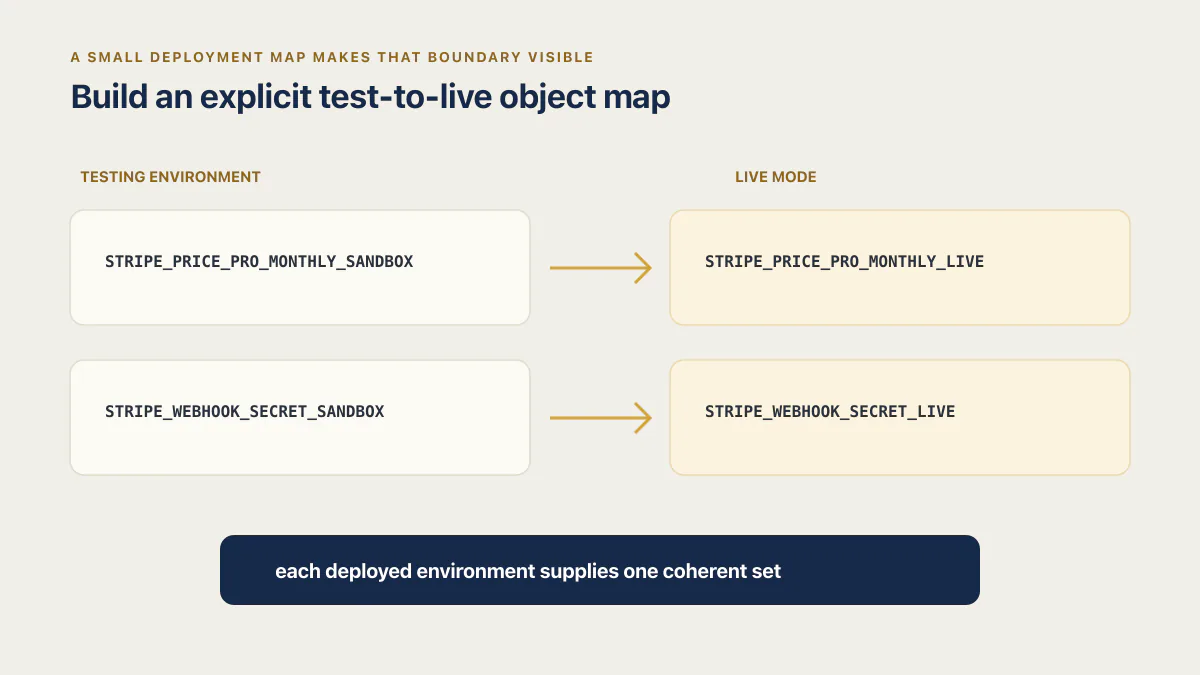
A small deployment map makes that boundary visible:
STRIPE_PRICE_PRO_MONTHLY_SANDBOX=<price ID from the Sandbox>
STRIPE_PRICE_PRO_MONTHLY_LIVE=<price ID from live mode>
STRIPE_WEBHOOK_SECRET_SANDBOX=<signing secret, Sandbox destination>
STRIPE_WEBHOOK_SECRET_LIVE=<signing secret, live destination>
Those names are illustrative. The important part is that each deployed environment supplies one coherent set. Avoid a fallback such as process.env.STRIPE_PRICE_ID || 'price_test_...': a missing production variable then creates a broken live request instead of a startup failure you can diagnose.
Find hardcoded Stripe artifacts before launch
An API key gets treated as a secret by every AI coding tool I’ve watched generate a Stripe integration: it lands in an environment variable on the first pass, because “secret” is a word the model recognizes and reacts to. A price ID carries no such flag. The same model that dutifully wrapped STRIPE_SECRET_KEY in process.env will happily write price_1AbC2dEfGhIjK straight into the line_items array of a checkout session call, because nothing marked that string as environment-specific too. The discipline that keeps real secrets out of source code doesn’t extend to the IDs that are just as tied to test versus live, and generated checkouts fail the go-live swap exactly where nobody was watching for a failure.
Search the whole repository, including deployment scripts and example environment files. You are hunting a short list of prefixes. Six of them are key prefixes documented in Stripe’s key reference: sk_test_ and sk_live_ for secret keys, pk_test_ and pk_live_ for publishable keys, rk_test_ and rk_live_ for restricted keys. Signing secrets (whsec_) and catalog IDs (price_) are not API keys, and that same page says so, but they are tied to one environment just as tightly and deserve the same grep. Use file-only output first so a terminal transcript or CI log does not print secret values:
rg -l --hidden --glob '!.git/**' --glob '!node_modules/**' \
  '(sk|rk|pk)_(test|live)_' .
rg -l --hidden --glob '!.git/**' --glob '!node_modules/**' \
  '(price|prod|sub|cus)_[A-Za-z0-9]+' .
rg -l --hidden --glob '!.git/**' --glob '!node_modules/**' 'whsec_' .
A match is a review prompt, not automatic proof of a bug. A publishable key may intentionally appear in client configuration, an example file may contain a harmless placeholder, and a migration might legitimately store an object ID. Inspect each matching file and classify it:
- Secret or restricted keys belong in the hosting platform’s secret store, never source control or client code.
- Publishable keys are safe in the browser, but the production build must receive the live value.
- Product and price IDs should come from environment-specific configuration or a server-side catalog mapping.
- Webhook signing secrets belong to the specific destination and environment that sends the event.
- Test customer, subscription, or payment IDs should not be required by production logic.
Across the 21 third-party apps AxonBuild audited in June and July 2026, Secrets & Credentials was the single best-scoring pillar, averaging 84 of 100; when it failed, a real key had shipped, not a whole category left unprotected. A price ID never earns that same scrutiny, because nothing ever sorted it into the protected bucket.
A price ID isn’t classified as a secret, so the discipline that keeps real secrets out of source code never learns to catch it, and the checkout fails at the one boundary nobody was told to guard.
If a real secret has been committed or exposed in logs, removing the text is not enough. Rotate the key or signing secret, update the deployed secret store, and verify that the old credential no longer works. Use restricted API keys for server workloads where their permissions cover the integration.
Register and verify the live webhook destination
A working testing-environment webhook does not become a live webhook when API keys change. Register the production HTTPS destination in Stripe, select only the events the application handles, and load that destination’s live signing secret into the production server. Stripe documents that signing secrets are unique per endpoint and differ between testing and live deliveries, even when the URL is identical.
The raw-body mechanics are a separate failure surface, covered in a companion piece on Stripe webhook signature verification. For this go-live pass, confirm the deployment has the correct live destination, event selection, API version, URL, and signing secret.
Then test the behavior after verification. Stripe does not guarantee event delivery order, can send duplicate events, and retries failed live deliveries for up to three days. Production webhook logic must therefore be idempotent and must not depend on events arriving in a particular sequence.
Whether the account that webhook unlocks gets revoked when a live subscription cancels is a different question. Go-live verification should prove that the production cancellation path reaches the same entitlement logic tested in the sandbox; the cancellation policy itself belongs in that narrower review.
Test real production behavior without confusing it with wiring
Stripe’s test payment methods deliberately simulate success, declines, authentication, disputes, and other scenarios. Use them to exercise the branches your code controls. Live payments introduce decisions made by actual issuers, payment methods, Radar rules, and regional authentication requirements, so a first live decline does not by itself mean the key migration failed.
Separate two classes of launch error:
No such price, an authentication error, or a webhook signature failure usually points to environment wiring.- A declined payment or required authentication can be a valid live payment outcome; inspect the PaymentIntent and request logs before changing configuration.
The same separation matters for pricing integrity. A server must decide the live price and amount; changing from test to live keys does not fix a checkout that trusts an amount supplied by the browser. That separate trust-boundary failure appears in six ways a vibe-coded checkout leaks money.
Stripe go-live checklist
- 01 Inventory every Stripe object the application references and record its live counterpart
- 02 Copy or recreate products and prices in live mode, then update the production mapping with the actual live IDs
- 03 Move secret and restricted keys plus webhook signing secrets into the production secret store; rotate any value exposed in source, logs, tickets, or recordings
- 04 Verify the production client receives a live publishable key and the server receives the intended live restricted or secret key
- 05 Register the live webhook destination, choose the required events, confirm its API version, and deploy its unique signing secret
- 06 Run the repository artifact search and resolve every test-key, object-ID, and webhook-secret match
- 07 Exercise success, decline, authentication, cancellation, and refund-policy paths in a testing environment using the same application build
- 08 After launch, verify the Stripe object, webhook delivery, internal entitlement, amount, currency, and receipt for the first genuine customer transaction
- 09 Monitor Stripe request logs, webhook delivery attempts, declines, and entitlement changes during the first live days
The hardcoded price ID and the client-set amount are related but distinct shortcuts: one crosses an environment boundary, while the other crosses a trust boundary. Keep this go-live pass focused on proving that one coherent live configuration reaches the intended payment and entitlement paths.
Common questions about moving Stripe to live mode
Why did my live payment fail when test mode worked?
Read the Stripe error and object first. No such price, an invalid API key, or a webhook signature error usually means test and live configuration were mixed. A decline or authentication requirement can be a normal response from a real issuer. They need different fixes.
Do I need a new webhook secret for live mode?
Yes. A live webhook destination has its own signing secret. Do not reuse the Stripe CLI listener secret or a testing destination’s secret, even if every environment posts to the same URL.
Can I reuse a test price ID in live mode?
No. Objects from a testing environment are not accessible in live mode. Copy or recreate the product and price, record the resulting live object IDs, and make production load those values from its own configuration.
Does copying a product to live mode keep it synchronized?
No. Stripe lets you copy the same product more than once, but each copy creates a separate live product. Later changes in the testing environment are not reflected in any existing live copy. Treat the live catalog as production data and review changes deliberately.
Can I use a test card in live mode?
No. Stripe documents that test card numbers are only valid in sandboxes and says not to use them for real payments. Stripe also says its Services Agreement prohibits testing in live mode with real payment details. Exercise the payment path in a sandbox, then monitor the first genuine customer transaction after launch.
Is a sandbox the same as test mode?
Not quite. Stripe’s own comparison says test mode is a sandbox, but that it differs from the general sandboxes you create: an account gets one test mode sandbox that cannot be deleted, plus up to five general sandboxes that can. The difference that bites at go-live is settings. A general sandbox isolates its settings completely, while the test mode sandbox shares many settings with live mode, and Stripe warns that a Dashboard setting changed inside the test mode sandbox might change in live mode too. Both are still test environments with test keys, and neither reaches live objects.
Should staging use live Stripe keys?
Usually no. Keep staging in a Sandbox or test mode so tests cannot create real payments or mutate live customers. Production should be the environment with live keys, live object mappings, and live webhook secrets. If your architecture needs another arrangement, document and restrict it explicitly rather than sharing one key set by accident.
When the app carries customer access or revenue
AxonBuild fixes the payment, billing, access, or data-handling failure, verifies the result, and adds a check that catches it before it interrupts the business again.
