Stripe signs each webhook delivery with the signing secret assigned to that endpoint, and checking the signature is one SDK call. Skip the call, and any request that reaches your webhook URL can be mistaken for a real Stripe event. Make the call but hand it the wrong bytes, and Stripe’s SDK rejects the request before your event logic runs.
const signature = request.headers['stripe-signature'];
const event = stripe.webhooks.constructEvent(payload, signature, webhookSecret);
// payload has to be the literal bytes Stripe sent, not a parsed object
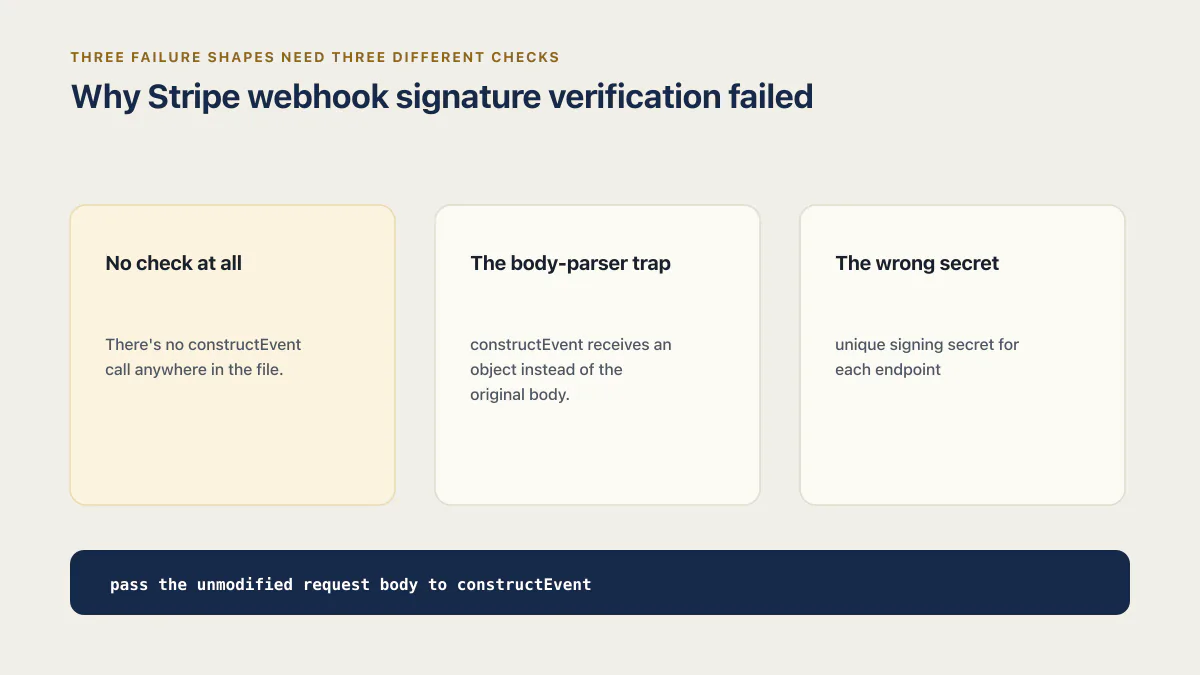
payload is a common failure point because many middleware stacks parse an incoming request into a JavaScript object before the route uses it. Stripe computed its signature over the exact body it sent, not a new string produced by JSON.stringify after parsing. Key order or whitespace can change, so the reconstructed body no longer matches. Signature verification therefore has one non-negotiable input requirement: pass the unmodified request body to constructEvent. Three failure shapes need three different checks.
Why Stripe webhook signature verification failed
No check at all
The handler reads the body, looks at event.type, and grants access. There’s no constructEvent call anywhere in the file. Nothing throws, because nothing verifies, so this shape never announces itself as broken the way the two below do. It fails quieter than that: it accepts a hand-written POST from anyone who finds the URL, which is the first of six ways a vibe-coded checkout leaks money I’ve catalogued elsewhere. That post covers the why. This one covers the how. The checks any receiving endpoint runs, whoever sends the event, are on the page about webhooks security.
The body-parser trap
A global body parser such as express.json() can read and parse the incoming stream before the route runs, so constructEvent receives an object instead of the original body. Which message comes back depends on what you hand the SDK. Pass the parsed object straight through and stripe-node answers Webhook payload must be provided as a string or a Buffer ... Payload was provided as a parsed JavaScript object instead. Re-stringify that object first, which is the more common patch, and it clears the type check but not the digest, so you get No signatures found matching the expected signature for payload, which Stripe’s signature troubleshooting guide prints as the full line Webhook signature verification failed. Err: No signatures found matching the expected signature for payload. That guide lists body mutation as a cause and calls out Express middleware order. Deleting constructEvent only converts a visible verification error into an unsigned endpoint. The real fix is to preserve the raw body for this route.
The wrong secret
Stripe issues a unique signing secret for each endpoint, with different secrets for testing and live deliveries even when the URL is the same. The Stripe CLI also prints a secret for the local listener it starts. Every one of them starts with whsec_, so the prefix tells you nothing about which destination a secret belongs to, and whatever your server loads into STRIPE_WEBHOOK_SECRET has to be the secret for the destination that actually sent this event. Using the CLI secret for a Dashboard endpoint, or a testing secret for live deliveries, produces the same general verification failure as a modified body. Confirm which destination sent the event before changing request parsing again.
”Webhook had no valid signature”
Same three causes, different words. The wording differs by library and by which of the three shapes you hit, so match the string to a shape before changing code. Stripe’s Go library declares the failure as webhook had no valid signature, next to webhook has no Stripe-Signature header, webhook has invalid Stripe-Signature header and timestamp wasn't within tolerance. Stripe’s Node library throws No signatures found matching the expected signature for payload. for the same condition, plus No webhook payload was provided. when nothing was passed in at all. That last one is what the search error no webhook payload was provided usually turns out to be: the raw body was consumed upstream, so the argument arrived empty rather than merely reshaped. Map the string back to one of the three shapes before changing any code.
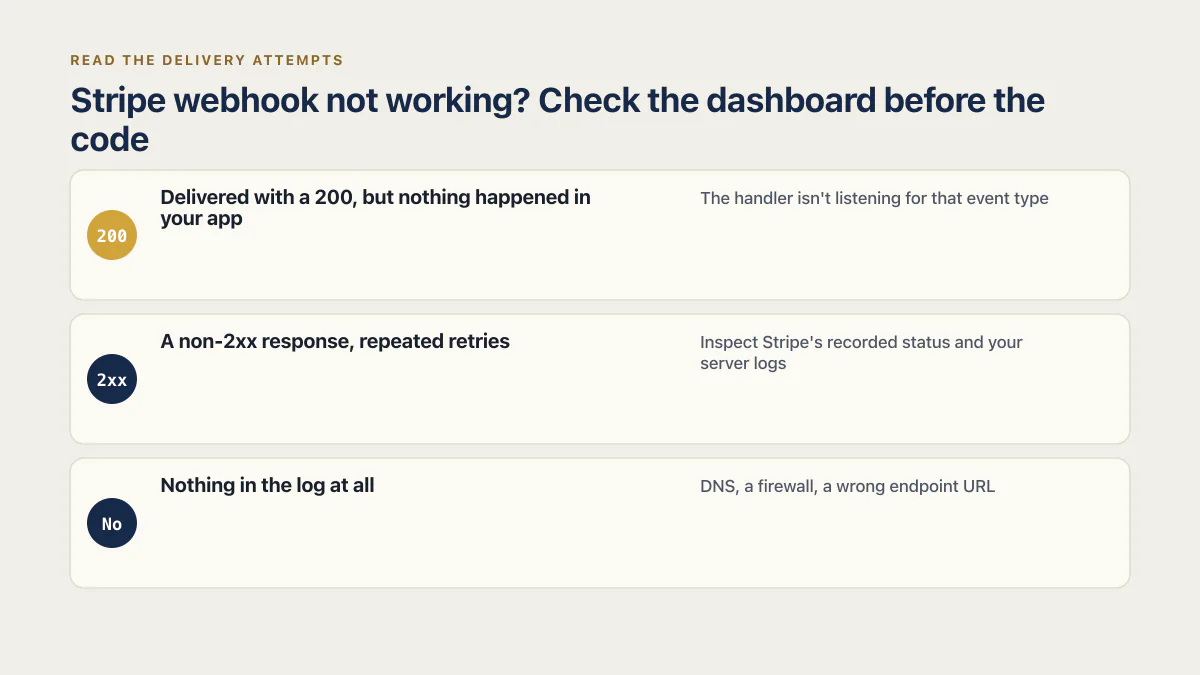
Stripe webhook not working? Check the dashboard before the code
Not every “not working” report is a signature problem, and the fastest way to tell them apart is the log Stripe already keeps. Open the endpoint’s page in the Stripe Dashboard and read the delivery attempts before touching any code.
Delivered with a 200, but nothing happened in your app
Not a verification failure. Your server accepted the event, and everything past that point is a different trace. The signature passed and still nothing changed is its own diagnosis.
A non-2xx response, repeated retries
The endpoint rejected the delivery, timed out, or failed while handling it. Inspect Stripe’s recorded status and your server logs; a failed delivery alone does not distinguish signature verification from downstream code or infrastructure errors.
Nothing in the log at all
Either the event was never sent to this endpoint, or it was sent and never arrived. Check the first case before the second: the event may not have been created at all, it may sit in the other mode (test against live), or the endpoint may not be subscribed to that event type. If the event exists and the endpoint is subscribed, a delivery attempt marked failed with no response from your server points to transport: DNS, a firewall, a wrong endpoint URL, or a local server the Stripe CLI was never told to forward to. No amount of fixing constructEvent touches this one.
Sorting which bucket you’re in first saves the time people usually spend re-reading signature-verification code for a problem that isn’t there.
The raw-body fix, framework by framework
The fix is always the same shape: get the exact bytes to constructEvent before anything else touches them, a requirement Stripe states directly: any manipulation of the raw body causes verification to fail. What changes is how each framework lets you ask for that.
Express
Register the webhook route with its own raw-body middleware, before any global JSON parser runs, since Express applies middleware in registration order.
const app = express();

app.post('/api/stripe/webhook', express.raw({ type: 'application/json' }), stripeWebhookHandler);

app.use(express.json()); // every other route still gets a parsed body
Next.js
In the App Router, a route handler reads a standard Request object with no framework parsing applied by default, so request.text() already returns the raw string.
// app/api/stripe/webhook/route.ts
export async function POST(request: Request) {
  const payload = await request.text();
  const signature = request.headers.get('stripe-signature')!;
  const event = stripe.webhooks.constructEvent(payload, signature, webhookSecret);
  // ... handle event.type
  return new Response(null, { status: 200 });
}
(The Pages Router needs the opposite instinct, since it parses by default: export const config = { api: { bodyParser: false } }, then a raw-body helper to read the stream yourself.)
Astro
An API route works the same way as the App Router: request is a standard, unparsed Request, inside a route file with server rendering turned on for that path.
// src/pages/api/stripe/webhook.ts
import type { APIRoute } from 'astro';

export const prerender = false;

export const POST: APIRoute = async ({ request }) => {
  const payload = await request.text();
  const signature = request.headers.get('stripe-signature')!;
  const event = stripe.webhooks.constructEvent(payload, signature, webhookSecret);
  // ... handle event.type
  return new Response(null, { status: 200 });
};
Signature verification only proves the request came from Stripe. Nothing about it stops your own server from processing that valid request twice.
Replay protection and event dedupe
Stripe’s libraries apply a five-minute timestamp tolerance by default, rejecting an otherwise valid signature when its signed timestamp is too old. Stripe generates a fresh signature and timestamp for each legitimate retry, so this replay check does not deduplicate deliveries. Stripe can retry live deliveries for up to three days and can send the same Event more than once. It also notes that two distinct Event objects can sometimes describe the same object transition. Store processed event.id values with a unique constraint, and for operations where duplicate Event objects matter, also guard the affected object ID plus event type. Verification proves the delivery came from Stripe; deduplication prevents the same business action from running twice. The page on how to make a webhook handler idempotent walks through the processed-events table and a test that delivers one event several times at once.
When the signing secret itself leaks
Six of the 21 third-party AI-built apps AxonBuild audited in June and July 2026 shipped a real secret somewhere in the app; three of those left it permanently in git history, the kind of exposure a deleted file never actually erases, no matter how confidently the commit message says the key was rotated. In one of the three, a multi-tenant B2B SaaS starter I audited, the exposed secret was this exact one: the webhook signing secret constructEvent needs, sitting in git history beside the Stripe test key it shipped with.
Anyone who holds an endpoint’s signing secret can create a forged payload that passes verification, so a leaked signing secret cancels the entire check this post is about. Removing the secret from the current file is not enough after it has appeared in source control, logs, screenshots, or tickets. Stripe recommends rolling a secret periodically and whenever you suspect compromise. You can expire the old secret immediately or keep a short overlap while the new value is deployed; during an overlap, Stripe signs deliveries with more than one secret. Update the server first when using an overlap, confirm verification with the new value, and then expire the old one.
Verify yours in five minutes
- 01 Run
stripe listen --forward-to localhost:3000/api/stripe/webhookand confirm the CLI prints your actual local URL, not a placeholder - 02 Fire
stripe trigger checkout.session.completedand read your server logs for a verification result, not just whether Stripe created its test fixtures - 03 For the CLI run above, confirm the secret your server loads is the
whsec_value the CLI printed; for a registered endpoint, confirm it matches the secret shown for that specific endpoint and mode, test or live, in the Stripe Dashboard, not a secret copied from a different endpoint - 04 Against the registered endpoint, with its own secret loaded, resend the same event with
stripe events resend <event_id> --webhook-endpoint=<your_endpoint_id>and confirm your database shows one grant, not two - 05 Open the Dashboard's webhook logs for any delivery marked failed and read the response your server actually sent before assuming a fix worked
A verified signature only tells you the event is genuinely from Stripe. Whether your server then writes the entitlement a customer actually paid for, and revokes it on a refund or cancellation, is a separate question: a companion piece on how your app gives away paid access for free walks through that side of it. The general version, what a webhook is and what has to be true before one is allowed to change your data, has its own page.
Common questions
Where do I find the webhook signing secret?
For a registered endpoint, open it in the Stripe Dashboard’s Webhooks section and use the Reveal secret link on the endpoint’s page; for a local listener, the Stripe CLI prints a secret when you run stripe listen. Both start with whsec_ and neither substitutes for the other. A signing secret is not an API key and is not listed with your API keys: it belongs to the destination you registered, so create the destination first, then load its secret into STRIPE_WEBHOOK_SECRET, the variable name Stripe’s own webhook quickstart uses in every language sample, for the environment that receives its events.
How do I test webhooks locally?
Install the Stripe CLI, run stripe login once, then stripe listen --forward-to localhost:3000/api/stripe/webhook, adjusted to wherever your local route is mounted. The CLI prints a signing secret specific to that forwarding session; use it as your local webhook secret, not the dashboard’s production one. stripe trigger <event-name> creates test fixtures that cause a signed webhook delivery. That proves the local verification path receives a Stripe event; it does not prove the generated customer or subscription maps to the account row your application uses. The full path from a CLI test to the first real live event is on the page about how to test webhooks.
Why does constructEvent say “no signatures found matching the expected signature for payload”?
The secret might not belong to the destination and mode that sent the event, or the body might have been parsed or otherwise changed before verification. Check the endpoint or CLI listener that produced the delivery, then trace whether middleware touched the request body.
Do I need to verify signatures in test mode too, or only in production?
Testing environments have their own signing secrets and destinations. Verify signatures in every environment you expose so staging exercises the same trust boundary as production.
Can I widen the timestamp tolerance if my server clock drifts?
You can pass a larger tolerance as constructEvent’s fourth argument, but first synchronize the server clock with NTP, as Stripe recommends. A wider tolerance is also a wider window in which a captured signed payload can be replayed. Do not set the tolerance to 0, because that disables the recency check.
If you have a working app built with these tools and need it ready for real customers, this is what we do.
Built it with AI. Now it has to hold up for real customers.
The Production Hardening Sprint takes the app you already have and builds the production foundation underneath it. Authentication and access rules, payments that stay consistent, error handling, monitoring, backups, automated tests and a documented handover. Our engineers work inside your existing codebase for ten working days. All 123 deliverables are included, and you get the evidence for each one.
See the Production Hardening Sprint →  $2,500 fixed price · 10 working days · One codebase