Stripe’s log says the event was delivered. The response was a 200. Your users table still says the account is free, and the person who paid for it is looking at a locked feature and a receipt for that feature at the same time.
A 200 from your webhook endpoint records that Stripe’s request arrived, not that your handler wrote anything. Five ordered checks separate the delivery from the write. Run them in order and stop at the first one that matches.
The Stripe behavior described here comes from Stripe’s published documentation, read on 17 August 2026, plus two findings from AxonBuild’s fixed cohort of 26 AI-built applications audited in June and July 2026. No Stripe account was clicked through for this page. The first check needs nothing but a browser tab, which is where the order starts.
What a 200 in Stripe’s log actually proves
A 200 proves one thing: the HTTP request Stripe sent reached your server and your server answered. Stripe’s own troubleshooting table is explicit about it. “When an event displays a status code of 200, it indicates successful delivery to the webhook endpoint” (Stripe’s webhook documentation, read 17 August 2026). Delivery is the whole claim.
Stripe then asks you to send that 200 early, before you do anything with the event: “Your endpoint must quickly return a successful status code (2xx) prior to any complex logic that could cause a timeout.” The advice is sound, because a handler that finishes a database write, an email, and a third-party call before responding will eventually time out and get retried. It also means the response and the write are two separate events in time, and the log only records the first one.
The part almost nobody says out loud is what Stripe’s own example handler does with an event it has no code for. This is the tail of the Ruby sample in the “Example endpoint” section of that same page, copied as printed on 17 August 2026:
  # Handle the event
  case event.type
  when 'payment_intent.succeeded'
    payment_intent = event.data.object # contains a Stripe::PaymentIntent
    # Then define and call a method to handle the successful payment intent.
    # handle_payment_intent_succeeded(payment_intent)
  when 'payment_method.attached'
    payment_method = event.data.object # contains a Stripe::PaymentMethod
    # Then define and call a method to handle the successful attachment of a PaymentMethod.
    # handle_payment_method_attached(payment_method)
  # ... handle other event types
  else
    puts "Unhandled event type: #{event.type}"
  end

  status 200
The else writes a line to standard output and falls through to status 200. Every event type the handler has no branch for is acknowledged as successfully received and then discarded, by design, in the reference implementation that AI builders and starter templates copy from. That is the whole confusion in one snippet: the green status in the delivery log confirms the copy-paste worked, and says nothing about whether a row moved.
Stripe’s green 200 is a receipt for the delivery. Your database is the only place that records the write.
This page starts after signature verification passed. Why signature verification fails on every real event is a separate set of causes, and it announces itself differently, with a 400 on every delivery instead of a green log and a silent database.
Which check to run first, and what each one rules out
Five checks sit between “Stripe delivered it” and “the row changed”. They are ordered so that each observation determines what to inspect next, and the first of them costs a browser tab.
| Symptom you can see | Likely cause | First check | What the result establishes |
|---|---|---|---|
| The event you are waiting for never appears in the endpoint’s deliveries | The endpoint may not be subscribed to that event type | The endpoint’s configured event list in Workbench | A correct subscription rules out one configuration error. It does not prove Stripe sent this event |
| Delivered with a 200, and your application log has no line for that event type | The handler has no branch for the type and falls straight through to the 200 | Your own log, printing event.type on every call | Your branch is running, so the cause is inside it |
| Your branch runs, the lookup returns nothing, and the handler exits without an error | The Stripe customer ID was never written next to the account | One user row, compared with the customer value in the event | The handler found the right account, so the failure is after the lookup |
| Delivered with a 200, and the log stops partway through your branch | The handler threw after the response was already sent | Your server’s error log at the delivery timestamp | Nothing by itself. Require a log or database result showing the write completed |
| The customer still sees the old plan after everything else came back clean | A cached or stale read on the page the customer is looking at | The row itself, read directly | The webhook path is fine end to end |
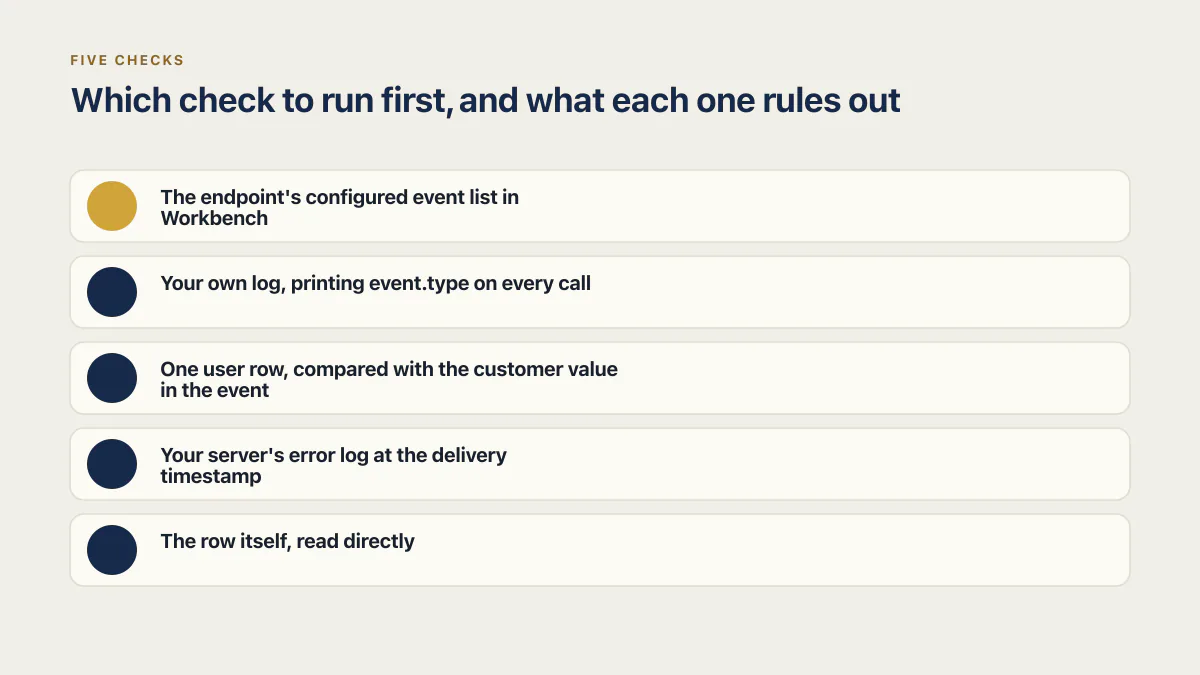
Running them out of order costs time in a specific way: four of the five look identical from the customer’s side, and the cheapest of them is settled in a browser tab before you open an editor.
Start in that tab. Open Workbench, select the endpoint under Webhooks, then open the Event deliveries tab. Stripe describes that view as a list of events and whether they are Delivered, Pending, or Failed, with an event’s own page showing metadata including the HTTP status code of the delivery attempt and the time of pending future deliveries. Two questions close on that screen: did the event you care about arrive, and what did your server answer it with. The four checks below all start from your own code and logs, so the free screen goes first.
One caution on names before you go looking. Stripe’s documentation states that Workbench replaces the Developers Dashboard, and the same page mixes “webhook endpoint” with the newer “event destination” framing, so an older account, an older tutorial, or an AI builder’s generated instructions may call these screens something else. The names used above are the ones Stripe’s documentation used on 17 August 2026.
The endpoint was never configured for the event you need
An endpoint receives only the event types it was configured for. Stripe states this as a best practice: “Configure your webhook endpoints to receive only the types of events required by your integration.” The Dashboard creation flow enforces it, with a step to “Select the event types that you want to send to a webhook endpoint.”
The failure is quiet because nothing about it looks like an error. The endpoint is live, older events are being delivered with 200s, and the one type carrying the change you care about was never on the list. Read the list on the endpoint’s own page in Workbench, next to the deliveries you were just looking at.
A subscription integration usually needs more than the one event a checkout generates. These are the events an access-granting integration leans on, with what Stripe’s own documentation says about each, all read 17 August 2026:
| Event | What it tells your app | Stripe’s description |
|---|---|---|
checkout.session.completed | The customer finished checkout | ”When someone pays you, it creates a checkout.session.completed event.” (fulfillment guide) |
checkout.session.async_payment_succeeded | A slower payment method finally cleared | ”Delayed payment methods generate a checkout.session.async_payment_succeeded event when payment succeeds later.” (same guide) |
customer.subscription.created | The subscription object exists, possibly not yet payable | ”Sent when the subscription is created. The subscription status might be incomplete if customer authentication is required to complete the payment …” (subscription webhooks) |
customer.subscription.updated | The plan or the status moved | ”Sent when a subscription starts or changes.” (same page) |
invoice.paid | A first payment or a renewal was collected | ”You can provision access to your product when you receive this event and the subscription status is active.” (same page) |
That last row is Stripe’s own recommendation for when to turn access on, and it is the event most single-branch handlers are missing. A handler that only knows checkout.session.completed grants access once and then never hears about month two. The subscription lifecycle in Stripe, with the statuses a subscription moves through and the events your app has to handle, has its own page.
Two neighbouring problems produce the same empty-handed feeling and are not this one. An endpoint registered in one mode never sees the other mode’s events, which is what moving a Stripe integration from test mode to live is mostly about. And the events that fire when a subscription is cancelled are a different set with a different consequence, since what should happen when a subscription is cancelled is a removal of access rather than a grant.
Falsifiable end: read the endpoint’s event list and compare it against the events your write depends on. A missing type there explains a database that never moves, and no change to your handler code will alter it.
The handler has no branch for that event type
The event is delivered, your code runs, and the switch or case has nothing for that type, so control reaches the fallback and returns 200. Stripe’s reference handler does exactly this on purpose, which is why the pattern survives code review: it looks like the documented shape, because it is the documented shape.
Generated handlers inherit the fallback and rarely inherit the branches, and the narrow shape is taught rather than invented. Stripe’s fulfillment guide closes its quickstart by telling you to create a webhook endpoint that sends checkout.session.completed events to your server, and the sample handler in that guide calls fulfillment for that event and for checkout.session.async_payment_succeeded, with no subscription event anywhere in it (read 17 August 2026). That is the right coverage for a guide about fulfilling one payment. It is the wrong coverage for a subscription. A handler copied from it grants access once, and renewals arrive for months afterwards and get acknowledged into nothing.
The check costs one line. Before the branching, log the event type on every call, something like console.log('stripe webhook received', event.id, event.type), then compare a day of those lines against the endpoint’s configured event list. Types that arrive and never appear anywhere else in your logs are the ones falling into the fallback. If your handler has a fallback that returns 200 silently, make it say which type it dropped, the way Stripe’s sample does with Unhandled event type, because a silent fallback and a working handler produce identical delivery logs.
Falsifiable end: after adding a branch, resend one of the dropped events and confirm that the line printed by your new branch appears in the log with the same event ID Stripe shows.
The event arrived and the handler cannot find your user
Stripe’s own subscription flow has a step for this, and it is easy to read past. In “Track active subscriptions”, between receiving the event and updating the database, the middle step is: “Your application finds the customer the payment was made for.”
An event carries Stripe’s identifiers, not yours. It names a customer like cus_123, and your database is keyed by your own user IDs. Something has to have written that Stripe customer ID next to the account at checkout time, and when nothing did, the handler runs a lookup that can never match:
const user = await db.users.findFirst({ where: { stripeCustomerId: event.data.object.customer } });
if (!user) return; // no row holds this ID, so the handler exits clean and Stripe records a 200
That is a passing delivery, a running handler, and no write, with no error anywhere in the chain.
The clearest version of this shape in AxonBuild’s fixed cohort of 26 AI-built applications audited in June and July 2026 came from my own multi-tenant WhatsApp agent platform, which is a messaging integration rather than a Stripe one. Its duplicate-message check called findUnique({ id: messageId }), while every message row was saved under a fresh random UUID and the provider’s own message ID was never stored anywhere, so the lookup could not match a record that existed. Every finding in that cohort was read out of the repository itself, not inferred from the stack it was built on. The vendor does not transfer; the mechanism does. A lookup keyed on a value nothing ever persisted fails the same way whether the missing key is a WhatsApp message ID or a Stripe customer ID.
Where the mapping should have been written is worth checking in the same sitting, because the repair belongs there rather than in the handler. The Checkout Session your server created for that purchase carries the customer it belongs to, and something has to store that value against the signed-in account before the first event arrives. Handlers that try to compensate later, by matching on the email address in the event, work until one person pays with a different email than the one they signed up with.
Falsifiable end: take one customer who paid, read the customer value from their event, and query your users table for it. If no row holds that value, the missing write is at checkout, not in the webhook.
The handler threw after the 200 was already sent
Acknowledge first, work second is the order Stripe recommends, and it is the order that makes this failure invisible. The response is already sent by the time the write is attempted, so the delivery log shows a clean 200 for a request whose work crashed a few milliseconds later. That order is only safe when the work after the response cannot be lost: persist or enqueue the event before you answer, or keep the write short enough to finish inside the response, because on a serverless host code that runs after the response is sent may simply stop. When the branch makes more than one write, how to wrap multiple writes in a transaction covers keeping a failure partway through from leaving anything half-finished. If you enqueue the event as a job, an idempotency key for safe retries covers making a repeated job a no-op and keeping what still fails in a dead letter queue.
An AI fitness app in the same 26-app cohort showed the unguarded half of the sequence, on a Clerk user-sync webhook rather than a Stripe one. A signup with no email address dereferenced email_addresses[0] outside the try block, so the webhook threw, Clerk retried it, and the user was never recorded. That handler at least failed loudly. Put the same field access after an early 200 and the retry disappears along with the error: a delivery that succeeded, a handler that ran, an unguarded field access, and a database that never heard about the new account.
Two properties of this check are worth knowing before you start reading logs. First, an exception thrown after the response leaves your framework’s normal error path, so it lands in your process log rather than in any HTTP status Stripe can see. Second, if your handler still returns a 5xx when it fails, Stripe keeps trying: deliveries are retried for up to three days with exponential back off in live mode, and three times over a few hours for events created in a sandbox. That retry window is why events from the previous two days will land on a handler you repair inside it, with nothing replayed by hand.
Falsifiable end: take the timestamp of a green delivery from the Event deliveries tab and read your server’s error log around that second. An unhandled exception there, with no corresponding row change, closes this check.
The row changed and the screen did not: stale UI after a Stripe webhook
The write happened, the database is right, and the page your customer is staring at is serving an older answer. This is the only one of the five where the webhook did its job.
Timing makes it common. Stripe’s fulfillment guide describes the redirect race directly: “When you have a webhook endpoint set up to listen for checkout.session.completed events and you set a success_url, Checkout waits up to 10 seconds for your server to respond to the webhook event delivery before redirecting your customer.” Ten seconds is generous for a well-behaved handler and short for a busy one, and it is a wait on the response, not on your write. A customer redirected at second three to a page that reads an entitlement it cached before checkout sees the free plan, correctly, from a stale copy.
One move separates this from everything above. Read the row directly, in your database client or with a query, for the customer who complained. If the row shows the paid plan and the app shows the free one, stop reading webhook code entirely: the gap is in caching, in a client-side store rehydrated at login, or in a build-time page that has not been revalidated. If the row still shows free, one of the four checks above owns the problem.
Access that is wrong on screen and access that is wrong in the database look identical to the person complaining, which is also how free accounts end up with premium features when entitlement is decided in the browser rather than on the server.
Falsifiable end: query the row, then reload the page in a private window with a fresh session. Matching answers means the earlier screen was cached, not wrong.
When Stripe delivers the events out of order
Stripe does not promise sequence. “Stripe doesn’t guarantee the delivery of events in the order that they’re generated.” The same section of Stripe’s webhook documentation gives its own worked example of what creating a subscription can generate:
customer.subscription.createdinvoice.createdinvoice.paidcharge.created(if there’s a charge)
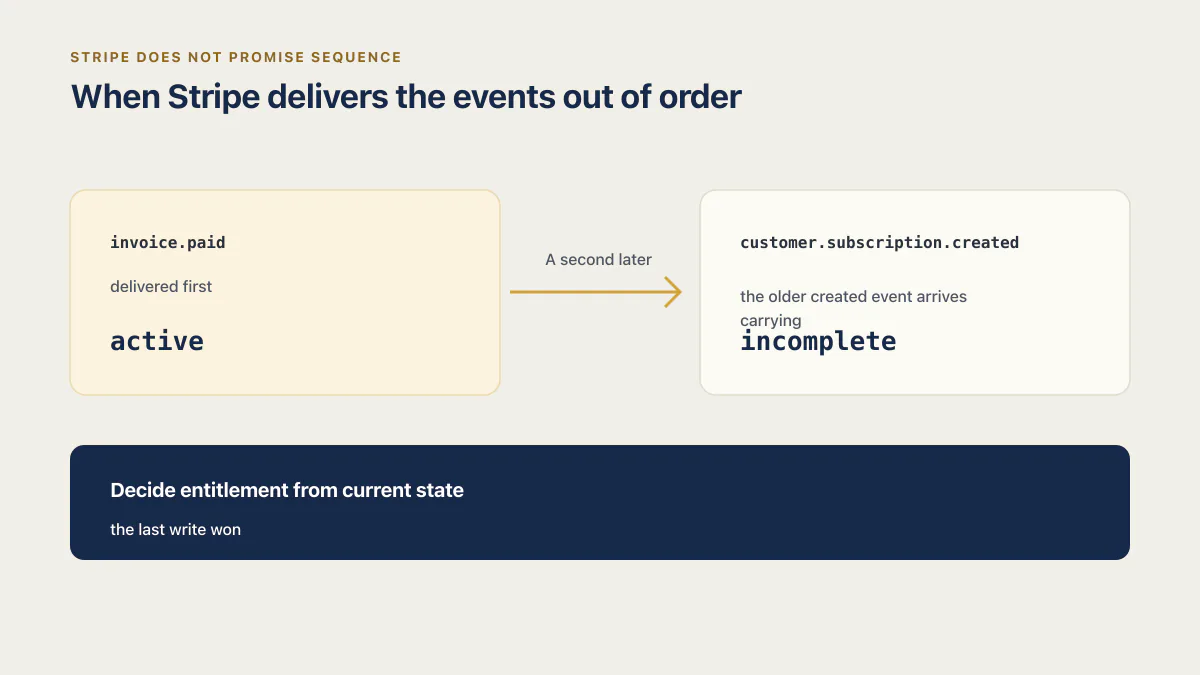
A handler that treats each event as the latest truth can therefore write an older state over a newer one. Two rows of that four-event example carry the whole race between them. customer.subscription.created describes a subscription that exists but has not necessarily been paid for, which is why its status can read incomplete. invoice.paid is the event Stripe tells you to provision on. They describe the same subscription at two different moments, they are generated moments apart, and nothing promises they arrive in that order.
Take the order that hurts. invoice.paid is delivered first, your branch runs, the row says active, and the customer has their feature. A second later the older created event arrives carrying incomplete, the same handler runs again, and a line that copies the status out of whatever payload it is holding writes incomplete over an account that has already paid. The customer is locked out of something they bought thirty seconds ago. Nothing failed anywhere you would think to look: both events were delivered, both returned 200, both branches ran, and the last write won.
The repair is in what the handler trusts. Decide entitlement from current state, so that when an event says something changed, your code retrieves the subscription or the invoice and reads the status on it at that moment. Stripe suggests the same recovery, noting you can retrieve the invoice, charge, and subscription objects with the information from invoice.paid if you receive that event first.
Where you have to write straight from the payload, compare the event’s own clock instead of trusting arrival order. Every Stripe event carries a created field, documented as the time the object was created, measured in seconds since the Unix epoch. Store that number on the row next to the value it set, and have the handler drop any event whose created is older than the one already recorded there. In practice it is one extra column and one condition on the write, and it turns the sequence above into a no-op instead of a lockout. Make the comparison and the write a single statement, an update whose where clause requires the stored created to be older than the incoming one, so two events handled at the same moment cannot both pass a separate check and then both write. Know its limit before you rely on it: the resolution is one second, so two events generated inside the same second compare equal and the guard cannot break the tie; treat an equal value as a tie and retrieve the current object instead. That is why retrieving current state is the default and the timestamp is the fallback.
Honest limit: Stripe’s documentation does not state how often events actually arrive out of order, and I have not found a published figure for it, so treat state-based handling as insurance rather than a diagnosis you will confirm from a log.
Prove the fix, not the guess
Any of these can look fixed when a retry lands at the same moment as your change, which leaves you shipping a guess and hoping. Each check has an observation that only its own fix can produce.
-
Missing subscription: the endpoint’s event list in Workbench now contains the type, and a new delivery of that type appears in Event deliveries where none appeared before.
-
Missing branch: your application log prints a line from inside the new branch, carrying the same event ID that Workbench shows for that delivery.
-
Failed lookup: a query for the Stripe
customervalue from the event returns exactly one row, and it is the account that complained. -
Handler threw: the error log around the delivery timestamp is empty for that request, and the row for that customer holds the value the event was meant to set, written after the delivery timestamp and, if your handler records it, tagged with that event ID.
-
Stale screen: a fresh session in a private window shows the same plan the database row shows.
Those items are observations against surfaces Stripe documents, assembled from its webhook and subscription guides read on 17 August 2026, rather than from a run against a live account. A webhook that acknowledges and never writes is one of the ways a checkout leaks money, and the others have their own checks and their own evidence.
Common questions about a Stripe webhook that does not update the database
Why is my Stripe webhook not updating my database?
Five causes are the starting hypotheses for a Stripe webhook that delivers and never writes: the endpoint was never configured for that event type, the handler has no branch for it, the customer cannot be matched to a user row, the handler throws after responding, or the row did change and the screen is stale. Check them in that order, and treat one as confirmed only when you see the observation that its fix alone produces, as the proof section above sets out.
Why is my Stripe webhook giving status 200 but the function is not firing?
Because the 200 comes from the outer handler, not from your business logic. Stripe’s reference example logs unhandled event types and returns 200 anyway, so a fallback branch produces exactly this: a delivery marked successful, and no line in your own log from the code you expected to run.
Why is my subscription plan not updating after a Stripe payment?
Usually because the integration listens for the checkout event only. The first payment lands, access is granted once, and later billing events go to a handler with no branch for them. Stripe recommends provisioning on invoice.paid when the subscription status is active, which covers renewals too.
How do I see whether Stripe delivered the event?
Open Workbench, select the endpoint under Webhooks, then open the Event deliveries tab. Stripe lists each event as Delivered, Pending, or Failed, and clicking one shows the HTTP status code of the attempt and when any future retry is due.
How long does Stripe keep retrying a webhook delivery?
In live mode, Stripe attempts delivery for up to three days with exponential back off. Events created in a sandbox are retried three times over a few hours. A handler fixed inside that window catches up on the events it failed without any manual replay.
Does a Stripe webhook update my database automatically?
Not by Stripe alone. Stripe sends an HTTP request carrying an event. Your handler must write any application-specific state. An integration such as dj-stripe can also maintain its own local Stripe models after its webhook endpoint and migrations are configured. A closed report in the dj-stripe repository, titled “Webhooks Not Updating Database Objects”, records the assumption in the reporter’s own words: “If I create an object, even if I successfully receive a webhook (200ing on the Stripe dashboard), the objects don’t update.”
That issue was opened in March 2020 and closed in November 2020. For dj-stripe, verify its migrations, model sync, and registered webhook endpoint before assuming the library cannot perform the write. For your own application tables, trace the explicit write in your handler. What a webhook is, and what has to be true before one is allowed to change your data, is covered separately.
Can I replay a Stripe event after I fix the handler?
Yes, two ways. In the Dashboard, click Resend on a specific event, which works for up to 15 days after the event was created. With the Stripe CLI, stripe events resend <event_id> --webhook-endpoint=<endpoint_id> works for up to 30 days. How to test webhooks, from a CLI test to the first real live event, is covered on its own page.
Paid, but the app still shows the old plan?
When a payment goes through and the account does not change, the customer is charged and locked out at once, and support requests pile up. On the audit, we go over how your app turns payment events into account changes and name the likely causes. By the end, you know which link to repair first.
Book a free audit → Free · 30 minutes · No code access needed