Stripe says the charge went through. The webhook answered 200. The customer is looking at the Pro screen. All three of those can be true while your app gives away paid access for free, because “did the money move?” and “who is allowed in right now?” are two different questions answered by two different systems, and only the first one is Stripe’s job.
The second one is yours. The record your server keeps of what each account may use is called an entitlement, and it can drift away from Stripe’s ledger when either half of the wiring is missing. In a fixed June–July 2026 study of 21 third-party AI-built apps, 10 had a broader trust-boundary failure: the browser held or asserted a fact that a trusted system should have derived or checked. That count includes prices, roles, and client-held state, so it is not a count of 10 broken entitlement systems. A browser-written plan or price repeats the same mechanism on a paid-access path. The findings were verified against the code.
The two-minute version. Log in as a free or cancelled test account, open your browser’s Network tab, and load the page that is supposed to be gated. If the paid data is sitting in the API response, your paywall is a conditional render and anyone can read past it. If the response is clean but the account still shows Pro, your entitlement record and Stripe have drifted apart. Both failures are invisible from Stripe’s dashboard, and both are checked below.
Billing is Stripe’s job; entitlement is yours
Two halves of this bug both hide behind a healthy Stripe dashboard. The first half is who writes the entitlement: if browser code sets plan: 'pro' and the server accepts it, then your customer can set plan: 'pro'. The second half is who updates or removes it as subscription status changes. If nothing handles cancellation, an unpaid terminal state, or a refund policy, access granted once can outlive the payment that justified it.
| What Stripe's dashboard says | What your server actually does |
|---|---|
| Payment succeeded | Access was granted by client code Stripe never touched |
| Renewal payment failed | The webhook returned 200 and no delinquency state was recorded |
| Subscription cancelled | No handler for the event: the account stays Pro indefinitely |
| Charge refunded | The credits it bought are still spendable |
Neither failure necessarily appears when you test the happy path. You pay through the real checkout, stay logged in, and do not edit the request or let the subscription reach its end state. The drift appears on a status transition or an untrusted request.
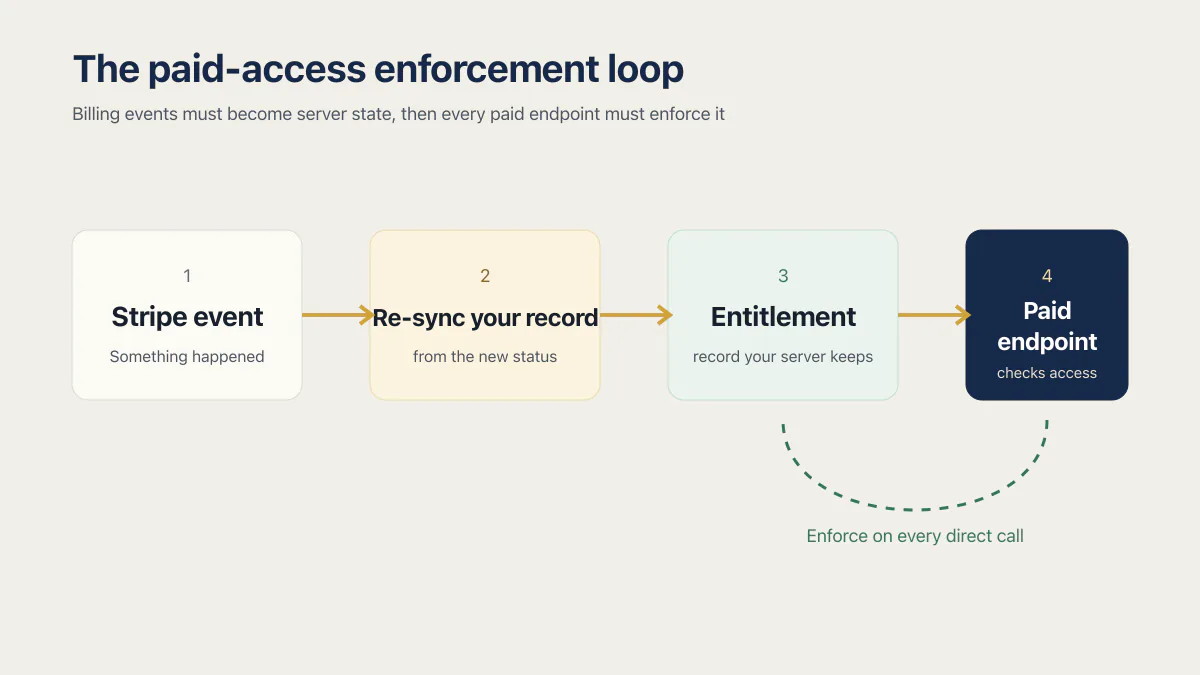
Stripe can charge every card successfully while your database upgrades nobody, or everybody.
The app where customers set their own price
One of the 21 was a pay-on-delivery food marketplace, and it took the pattern all the way. Reading its order endpoint, I found no price calculation on the server at all: the order total, every line item’s price included, arrived in the request body and went into the database as received. Edit one request and a full order books at a penny, or at a negative number, because nothing on the far side ever re-added the math. Then I checked how an account became a seller or a driver, and the answer was a role column on the user’s own row, written by new users themselves at signup, guarded by a Supabase row-level-security (RLS) policy that verified ownership of the row and nothing about the role it now claimed.
Notice there’s no Stripe anywhere in that story. The app had no payment processor at all, and it still leaked paid value, because the leak lived in what the server was willing to believe, never in the charging.
How the API inherits the UI’s trust boundary
A checkout generated by Lovable, Base44, Bolt or Claude Code inherits this bug when its API mirrors the UI. The screen knows the price, so the request carries the price; the request carries the price, so the endpoint stores it. The demo hides the trust-boundary mistake because its browser is honest.
The Node-style fragments below show the trust boundary, not a drop-in Stripe integration. Your real handler still needs signature verification, durable idempotency, account mapping, and tests against the API version configured for its event destination.
// The server takes the browser's word for everything:
app.post('/api/orders', async (req, res) => {
  const { items, total } = req.body; // total: chosen by the customer
  await db.orders.create({ userId: req.user.id, items, total });
  res.json({ ok: true });
});
The fix is one habit, applied everywhere money or access is decided: trusted code re-derives anything it is about to store.
// The server re-derives the truth it stores:
app.post('/api/orders', async (req, res) => {
  const items = await catalog.price(req.body.items); // server-side prices
  const total = items.reduce((sum, i) => sum + i.unitPrice * i.qty, 0);
  await db.orders.create({ userId: req.user.id, items, total });
  res.json({ ok: true });
});
The browser names what it wants; the server decides what that costs and who’s allowed to have it. When the server skips that permission check, the result is broken access control, and that page covers enforcing permission on every route, endpoint and server action.
When the paywall is only in the browser
Founders build three kinds of gate. A hard gate means pay or see nothing. Metered and free-trial gates give you a few free uses and then ask for money. A freemium feature gate gives everyone a free tier and locks specific features. Each one fails in its own place: the hard gate leaks through the response body, the metered gate through a counter the browser is holding, the freemium gate through a paid endpoint that never checks the entitlement.
The first of those is the most common leak in an AI-built app, and Stripe is nowhere near it. The server sends the paid content to everybody and lets the browser decide whether to draw it. Here is what a free account actually receives:
// GET /api/lessons/42, requested by an account that never paid
{
  "id": 42,
  "title": "Lesson 42",
  "preview": "The first two paragraphs, shown to everyone...",
  "isPro": true,
  "body": "the entire paid lesson, already delivered",
  "videoUrl": "https://cdn.example.com/lesson-42.mp4"
}
The gate is the line that renders it:
// The data has already arrived. This line only decides whether to paint it.
const view = user.isPro ? fullLesson(lesson.body) : upgradePrompt();
That is a paywall in the sense that a curtain is a wall. The Network tab shows the unauthorized response, and replaying the request with curl confirms the endpoint sends it. If the server includes paid content in the HTML it sends to a free account, view-source shows that separate server-rendered leak. None of this is hacking: the content was mailed to the reader, and the reader read it.
The write-path rule from the last section has a sibling on the read path. Trusted code decides what it sends, not just what it stores. If a field is paid for, the server leaves it out of the response for an account that has not paid, and then there is nothing to reveal no matter what the reader does to the browser:
app.get('/api/lessons/:id', async (req, res) => {
  const lesson = await db.lessons.find(req.params.id);
  const entitled = await hasProAccess(req.user.id); // read from your DB, never from the request

  if (!entitled) {
    const { id, title, preview } = lesson;
    return res.json({ id, title, preview, locked: true }); // body and videoUrl never leave the server
  }
  res.json(lesson);
});
Free trials and metered limits that reset with the site data
A trial counter or a hasUsedTrial flag kept in localStorage or a cookie is a limit your customer can delete. Clearing site data, opening an incognito window, or switching browsers sets the count back to zero and starts the trial again. Generated apps reach for localStorage because it works on the first try and needs no table.
The first fix is straightforward: the counter lives on the server, keyed to the account, and the server decrements it. The browser may display the number. It cannot be the number. This prevents cookie resets, but it does not stop one person from creating another account.
Set a trial-eligibility policy for repeat signups as a separate control. Depending on the product and risk, that can include verified contact details, a payment method, signup velocity limits, or rate controls. Stripe’s customer-abuse guidance describes repeated account creation as trial abuse and treats the response as business-specific. Device fingerprinting can be one signal, but it adds a privacy surface and is not a universal requirement.
When a renewal fails: the webhook returns 200 and nothing changes
A failed renewal exposes the other half of the wiring. A webhook handler may listen for the initial checkout, grant access, and return 200 to every other event. Stripe reads that 200 exactly as designed: delivery succeeded. Your application still needs a deliberate policy for past_due, unpaid, cancellation, and any refund or dispute that should change access.
// Grants on initial checkout. Acknowledges every later state change without syncing it.
app.post('/api/stripe/webhook', express.raw({ type: 'application/json' }), (req, res) => {
  const sig = req.headers['stripe-signature'];
  const event = stripe.webhooks.constructEvent(req.body, sig, endpointSecret);

  if (event.type === 'checkout.session.completed') {
    grantAccess(event.data.object.client_reference_id);
  }

  res.status(200).json({ received: true }); // invoice.payment_failed lands here too
});
When invoice.payment_failed arrives because a renewal card expired, this handler acknowledges it and changes nothing. Access continues without the application even recording that the account is delinquent. Stripe’s current subscription webhook guidance recommends provisioning after a paid invoice when the subscription is active, tracking payment failures, and revoking when a subscription reaches canceled or unpaid. A past_due subscription can still be in a retry window, so an immediate downgrade is a business rule rather than a universal Stripe requirement. The synchronization shape needs to reflect those states:
switch (event.type) {
  case 'invoice.paid':
    await syncPaidAccess(event);
    break;
  case 'invoice.payment_failed':
    await syncFailureStateAndNotify(event);
    break;
  case 'customer.subscription.updated':
    await syncSubscriptionStatus(event);
    break;
  case 'customer.subscription.deleted':
    await revokeAccess(event);
    break;
}
res.status(200).json({ received: true });
These are the events and statuses that decide who is allowed in. If your handler has no branch for a row in the first table, that row is a hole.
| Stripe event | What it means | What access should do |
|---|---|---|
checkout.session.completed | Checkout finished. The payment may still be settling. | Do not grant on this alone. Confirm the subscription or invoice server side first. |
invoice.paid | The invoice was paid. | Grant or extend access when the subscription status is active. |
invoice.payment_failed | A payment on an invoice failed. | Record the failure, notify the customer, then follow the subscription status. |
invoice.payment_action_required | The invoice needs customer authentication. | Prompt the customer. Do not treat it as paid. |
customer.subscription.updated | The subscription started or changed, including a cancellation scheduled for period end. | Re-sync your record from the new status. |
customer.subscription.deleted | The subscription ended. | Revoke. |
charge.refunded | Stripe refunded a charge. | Reverse what the charge bought: credits, period extension, seats. |
charge.dispute.created | A chargeback was opened and the payment is already reversed. | Apply your policy, usually restrict, and flag the account. |
The events tell you something happened. The subscription’s status is what you store and enforce against:
| Subscription status | What it means | What access should do |
|---|---|---|
trialing | In a trial period, moving to active on the first payment. | Provision. |
active | In good standing. | Provision. |
incomplete | The first payment has not succeeded yet. The customer has 23 hours. | Do not provision. |
incomplete_expired | The first payment never succeeded inside that window. Terminal. | Do not provision. |
past_due | The latest finalized invoice failed or was not attempted. Retries may still be running. | Your policy. Notify now, restrict at the point you chose. |
unpaid | Retries are finished and the invoice is still unpaid. | Revoke. |
canceled | Cancelled. Terminal, and it cannot be updated. | Revoke. |
paused | A trial ended with no payment method and you configured a pause. | Do not provision. |
Event names and subscription statuses above were verified against Stripe’s subscription webhook docs in August 2026.
One B2B SaaS starter in the study listened for nothing on the refund side, including charge.refunded and dispute events, so money could flow back to a customer while the credits it bought stayed spendable. The same app had committed its Stripe test key and webhook secret to git history, where deleting the file did not remove the credentials from earlier commits. A retail point-of-sale system in the same corpus ran a checkout “test suite” more than 800 lines long whose green runs never once touched the code that took the money. (If your webhook doesn’t verify signatures at all, that’s a different hole: the first of the six ways a vibe-coded checkout leaks money.)
Six checks that prove your paid access holds
None of these need a framework or a test suite, just one test account and an honest hour. Start with check 0, which runs in a browser and needs nothing else. A real entitlement check ends in your database: you look at the row and confirm the server wrote it.
0 · The two-minute browser check
No Stripe test mode, no CLI, no token. Run this one first because it catches the leak that has nothing to do with billing.
- Log in as an account that should not have paid access: a free-tier account, or one whose subscription you cancelled.
- Open your browser’s developer tools and select the Network tab.
- Load the page that is supposed to be gated.
- Read the API responses behind it (the fetch or XHR entries), not the page.
If the paid content or the paid fields are sitting in a response the free account received, the gate is cosmetic and nobody needs a tool to get past it. A plan value in the response is a lead rather than proof: change it in the request and see whether the server accepts the change or serves the paid data, and only then call the gate cosmetic. If the responses on the routes you tested are clean, those routes are not where your drift lives, so carry on to check 1.
1 · The checkout check
Pay with a Stripe test card and watch where the entitlement gets written. If the row appears before the webhook fires without a server-side Stripe retrieval or verification, or appears when you load the success page with a made-up session ID, the browser is granting access and trusted code is not confirming it.
2 · The failed-payment check
Fire invoice.payment_failed at your endpoint and confirm the action your dunning policy requires: synchronize the subscription’s actual status, notify the customer, and either retain access during retries or restrict it at the point you chose. A typical failed renewal can move a subscription to past_due; a failed first invoice can leave it incomplete, so do not write one status for every failure event. One precondition: stripe trigger creates fixture objects, so use --override, a test subscription tied to a failing test payment method, or a real test-mode event from the delivery log. The event must map to a customer your database knows. A 200 with no recorded state means your app cannot distinguish a paying account from a delinquent one.
3 · The cancellation check
Cancel a test subscription at period end. Confirm customer.subscription.updated records the scheduled cancellation and customer.subscription.deleted revokes access when the subscription actually ends. If the plan column still says Pro after that end state, the application and Stripe have drifted.
4 · The duplicate check
Send the same checkout event twice. Stripe’s docs are explicit that an endpoint can receive an event more than once, so record processed event IDs and skip repeats. Stripe also notes that two different Event objects can represent the same underlying object change; for that case, guard on the data object’s id plus event.type. One customer and one payment should still produce one entitlement change.
5 · The direct-call check
Take a canceled account’s token and call a paid endpoint with no UI in the way:
curl -s https://yourapp.example/api/pro/export \
  -H "Authorization: Bearer $CANCELED_ACCOUNT_TOKEN"
A 200 with real data means your paid endpoints check that the caller is logged in and stop there. Authentication answers who you are; the entitlement answers what you’ve paid for. In an AI-built app, the second question is the one nobody asked the generator to answer.
These cover the whole loop: read, grant, revoke, replay, enforce. Run them against the code and the deployed path because a correct-looking handler can still be bypassed by a route that never calls it.
How to tell if free users are getting premium features right now
What makes an entitlement bug different from a crash is that nothing throws. In the same fixed study, 17 of 21 third-party apps had no error tracking or alerting. This failure might not reach an error tracker anyway because every request can complete successfully while the ledger is wrong. It has the same shape as an app that fails silently and answers 200 OK, except here even the failure can be absent. The customer with free Pro access has no reason to report it.
The minimum signal is an append-only log of every entitlement change and the event that caused it. Then reconcile on a schedule that fits the business: pull subscription state from Stripe, compare it with your entitlements table, and alert on mismatches in either direction. Someone entitled who is not paying is this whole article; someone paying who is not entitled is a refund request you want to catch first.
Bottom line
Stripe answers one question: did the money move. Your app answers the other one: who is allowed in right now. The six checks cover five enforcement paths: read, grant, revoke, replay, and enforce. The failed-payment and cancellation checks both exercise revoke behavior. One rule sits under all five paths: trusted code decides what it stores and what it sends. Run the browser check today, the Stripe-side checks this week, and log every entitlement change so the next drift shows up in a query instead of a support ticket.
Common questions about paid access and paywall bypass
Why does my app still show Pro after cancellation?
First check whether the cancellation is scheduled for the end of the paid period. Continued access before that date can be correct. If the subscription has ended and the app still shows Pro, your database probably kept the last value it wrote. Handle customer.subscription.updated and customer.subscription.deleted, then check Stripe’s delivery log to confirm both events reached the endpoint. The canceled-but-still-has-access trace follows delivery, state mapping, cache, and reconciliation in order.
The app still shows premium after cancelling the subscription: is that Stripe’s fault?
Check the subscription’s status and current-period end first. If access should have ended, use Stripe’s delivery log to see whether the relevant update or deletion event was delivered. A delivered event plus unchanged entitlement points to your handler or state-mapping code. A missing or repeatedly failing delivery points to webhook configuration or availability.
Can someone see my paid content by opening devtools?
Yes, if your server sends the paid content to accounts that have not paid and the browser hides it. Open the Network tab, load a gated page while logged in as a free account, and read the API response for the paid fields. Replay the endpoint directly to confirm the unauthorized response. View-source is relevant only when the server includes paid content in the HTML it sends. The fix is server side: leave the paid fields out of the response for accounts without the entitlement.
Users are resetting my free trial by clearing cookies. How do I stop it?
Move the counter off the browser: keep trial state in your database keyed to the account and check it server side on every use. The two forms of free trial abuse, and the fix order for each, have their own page. That stops cookie resets for the same account, not repeat trials through new accounts.
Choose additional controls for the product’s risk. Verified contact details, payment-method checks, signup velocity limits, and rate controls can add friction to repeated signups. Anonymous trials have no account key, so some leakage may remain.
Do I need device fingerprinting to stop paywall bypass?
Not necessarily. In a logged-in app, use the user ID for server-side entitlement and per-account usage checks. A user ID does not prove that one person has only one account. Choose repeat-signup controls that fit the product’s risk, such as verified contact details, payment-method checks, velocity limits, or rate controls. Fingerprinting can be one signal, but it adds a privacy surface and is not a universal answer.
My Stripe webhook returns 200 but nothing updates in my database. Why?
A 200 only tells Stripe that delivery succeeded, not that you did anything with the event; the usual gap is a handler that acknowledges event types it never processes. The four causes, in the order to check them, are why a Stripe webhook that returns 200 still does not update the database.
How do I stop free users from accessing premium features?
Check the entitlement on the server, inside the endpoint that returns the premium data, on every request. Authentication tells you who is calling; the entitlement tells you what they paid for, and a generated app usually implements the first and skips the second. A conditional render in the front end is not a check, because the data has already been sent by then. Test it by calling a paid endpoint directly with a free or cancelled account’s token and seeing whether real data comes back.
Does Stripe revoke access automatically when a subscription ends?
No. Stripe ends the subscription and sends you customer.subscription.deleted; revoking access is your code’s job. Nothing in your database changes until a handler you wrote changes it, which is how an account stays on Pro long after the last payment. Refunds and chargebacks work the same way: charge.refunded and charge.dispute.created arrive, and on their own they change nothing.
Do I need an entitlement-management platform to fix this?
Not necessarily for this class of bug. Those platforms manage plan complexity (feature matrices, usage metering, tier migrations), and they sit on top of the wiring this post is about, so a server that trusts the browser or drops state-change events keeps those holes with a platform in front of them. For a single-product SaaS, an authoritative subscription record synchronized from verified webhooks, enforced on paid endpoints, and reconciled against Stripe may be enough. More plans and usage-based tiers can justify a dedicated entitlement system; neither option removes the need to test grant, revoke, replay, and enforcement paths.
If you have a working app built with these tools and need it ready for real customers, this is what we do.
Built it with AI. Now it has to hold up for real customers.
The Production Hardening Sprint takes the app you already have and builds the production foundation underneath it. Authentication and access rules, payments that stay consistent, error handling, monitoring, backups, automated tests and a documented handover. Our engineers work inside your existing codebase for ten working days. All 123 deliverables are included, and you get the evidence for each one.
See the Production Hardening Sprint →  $2,500 fixed price · 10 working days · One codebase