A small SaaS needs a public status page when customers require a shared, self-service incident record and direct outreach no longer scales or satisfies an uptime obligation. Paying users alone are not the trigger.
Before choosing a tool, separate three jobs. Monitoring detects a failure. Incident response coordinates the repair. A status page communicates verified impact and progress to users. Buying the communication layer does not supply the other two.
Does a small SaaS need a status page?
Use business obligations and communication load rather than an arbitrary user count. A public page becomes useful when one or more of these conditions is true:
- 01 A contract, SLA, procurement review, or customer policy requires public or recorded incident communication.
- 02 An outage affects enough customers that individual email or chat updates slow the response.
- 03 Customers need one place to subscribe to updates or check incident history without opening a support ticket.
- 04 Several services can fail independently, so users need component-level impact rather than one broad up-or-down message.
- 05 Your support team repeatedly answers the same outage question across several channels.
If none applies, prepare a lighter communication path first: a saved email template, a pinned community announcement, or an externally controlled notice. The channel still needs an owner, approval rule, contact list, and update cadence. “We will email people if something happens” is not a plan until someone can do it while the product is failing.
A status page is not uptime monitoring
Whether anything pings your app while you’re not looking is a separate decision. A monitor may discover a timeout, error rate, or failed transaction. A status page tells customers what impact you have confirmed, what they can do, and when the next update will arrive.
A health check route can give that monitor a bounded, machine-readable signal. It still cannot replace the customer-facing incident record or prove that every important business action works.
The distinction matters because a perfectly maintained status page can remain green during an undetected outage. It can also show an incident while the service is already recovering. Treat the page as a communication record rather than proof that every component meets an SLA. For the detection side, logging and monitoring covers the eight controls a small SaaS needs to know when something breaks.
When your app fails silently and answers 200 OK covers another boundary: a shallow monitor can miss a broken business action even when the page and endpoint both appear healthy.
One audit that has stayed with me was a tool built to log security incidents for other companies, GDPR/HIPAA compliance framing baked into the product copy. It kept everything in browser state with no database behind it, so a single unguarded fetch could white-screen the whole app and wipe out the incident record it was mid-way through recording. The tool whose entire job was helping someone else communicate about an incident had no way to tell its own users one had just happened to them. Incident communication was not a measured field across the corpus, so that observation does not establish how common the gap was.
| System | Job during an incident |
|---|---|
| Monitor or alert | Detect a symptom and notify the responsible person |
| Incident channel or runbook | Coordinate responders, evidence, decisions, and mitigation |
| Status page or customer channel | Publish confirmed impact, progress, workarounds, and resolution |
| Post-incident review | Record causes, contributing conditions, and follow-up work after recovery |
Google’s Site Reliability Workbook chapter on incident response recommends deciding communication channels and contacts beforehand, keeping the audience informed with regular updates, and preparing templates before an incident. That principle scales down to a one-person SaaS even when the founder performs every role. The incident response plan template for a team of five puts the roles, a customer message and a four-field record on two pages you can fill in today.
Choose a channel that survives the outage
An in-app banner is convenient for partial degradation, but it disappears if the app, authentication system, database, or deployment is unavailable. A status mechanism should not depend solely on the same failure path it reports.
Check the whole access chain:
- Can you publish an update if the application backend is down?
- Can customers read it without signing into the affected app?
- Does it share the same host, DNS, account, or administrator credentials as production?
- Can a second trusted person publish if the primary owner is unavailable?
- Do subscribers know where to look before an incident begins?
Independence is relative. A hosted status page may still share a DNS provider or account owner with production. A social account may be reachable but unsuitable for contractual notices. Document the failure modes you accept instead of assuming any channel is fully independent. Chaos testing covers how to break one dependency on purpose in staging before customers depend on the fallback.
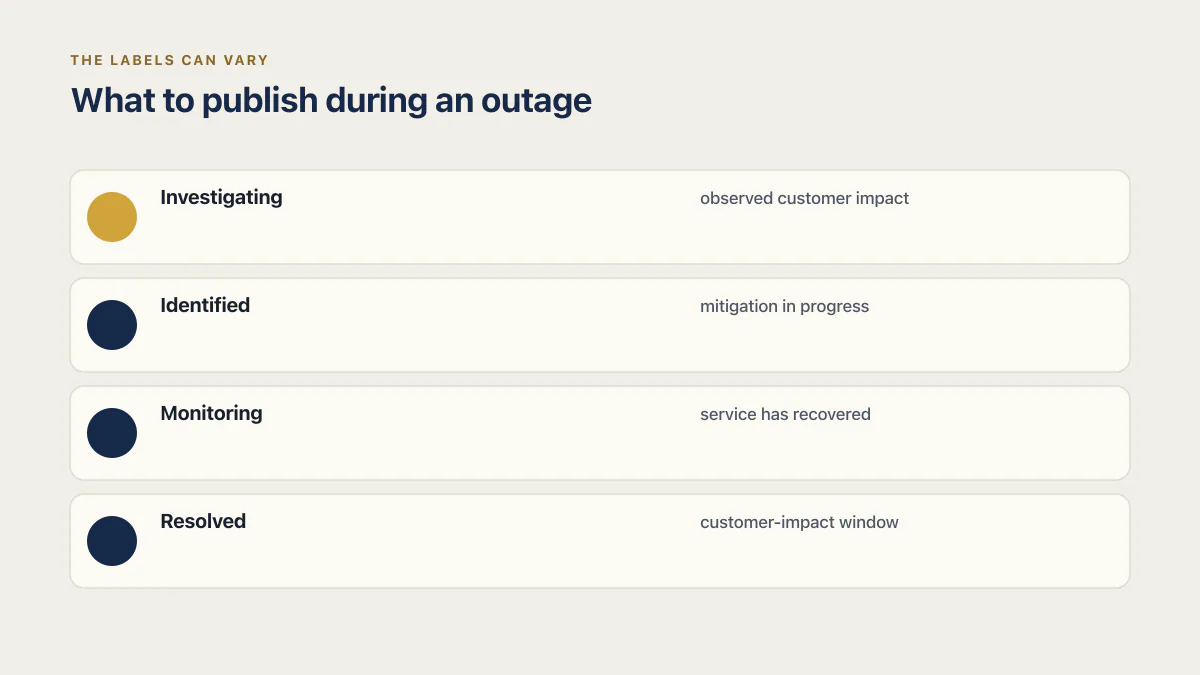
What to publish during an outage
Use a small set of states with evidence-based language. What you publish is only half of it: which named paying customers you contact one to one, before anything goes on the page at all, is the decision that comes first. The labels can vary, but this sequence is easy for customers and future responders to interpret:
Investigating
State the observed customer impact, when it began if known, affected features or regions, and the time of the next update. Do not guess at a root cause. To grade that impact, Sev1, Sev2 and Sev3 sets out severity levels a five-person team can apply.
We are investigating failed file uploads affecting some workspaces since 14:20 UTC. Existing files remain available. We will post another update by 14:50 UTC.
Identified
State what has been confirmed and the mitigation in progress. Include a safe workaround when one exists. Avoid promising an exact recovery time unless the team can support it.
We identified a failure in the upload-processing queue and are restoring processing capacity. New uploads remain delayed. Existing files are unaffected. The next update will be posted by 15:20 UTC.
Monitoring
State that service has recovered or mitigation is active, what evidence is being watched, and whether delayed work remains.
Upload processing has recovered, and queued files are completing. We are monitoring error rates and queue depth. We will confirm resolution after the backlog clears.
Resolved
State the customer-impact window, affected capability, current condition, and any remaining customer action. Link to a post-incident explanation only when one will actually be published.
File uploads were delayed from 14:20 to 15:34 UTC. Processing has recovered and the backlog has cleared. No customer action is required.
When a public page earns its maintenance cost
A prepared email or community notice can be sufficient when the affected group is small and known. Move to a public page when maintaining one record reduces duplicated work or fulfills a customer obligation.
The choice does not require a particular vendor. Evaluate whether the mechanism supports the capabilities you need: independent publishing, subscribers, component status, incident history, access control for drafts, an audit trail, and a custom domain if customers require it. Do not buy features because a template calls them standard.
A status page also creates a promise. Someone must update it during the incident and close the incident afterward. A stale “investigating” notice can be more confusing than a clearly owned direct channel.
Statuspage vs. a status page: clearing the confusion
Statuspage, capitalized, is Atlassian’s product, and its own pitch for why you need a status page makes the case in full, understandably, since Atlassian is also the company selling it. A status page, lowercase and generic, is the concept underneath: a place users can check to see if it’s you or them. You can have the concept for free today, with nothing installed, using a pinned post, a prepared email, or an externally hosted notice. The product starts earning its price once maintaining that concept by hand takes more work than a subscription would. Atlassian’s marketing numbers for Statuspage claim a 24 percent drop in incident-related support tickets, and that drop only shows up once an outage generates enough tickets to move. Confusing the two is how a founder ends up paying monthly for infrastructure a pinned Discord post already covered.
A status page is a tool for telling a crowd. If you don’t have a crowd yet and no contract requires one, you need a way to tell a handful of people, and that costs nothing.
The complete audit statistics rundown reports the fields that were measured across the corpus. Incident-communication obligations were not one of them, so the individual audit above is not a prevalence claim. The broader launch decision lives in is your AI-built app ready to launch.
Common questions about status pages for small SaaS
How many users do I need before creating a status page?
There is no reliable user-count threshold. Use contractual requirements, incident inquiry volume, affected components, and the need for subscriptions or public history. Ten enterprise customers may require more formal communication than hundreds of free users.
Should the status page update automatically?
Automation can open or update an incident from monitoring signals, but it can also publish false or misleading customer impact. Define which events are safe to automate and where a person must confirm scope and wording.
Can I use an in-app banner instead?
Yes for degradation where users can still reach the app. Keep an external fallback for full outages, authentication failures, or deployment problems that prevent the banner from loading.
What should a first incident update include?
Include confirmed impact, the known start time or discovery time, affected features or regions, a safe workaround if available, and a specific time for the next update. Leave out an unverified cause and unsupported recovery estimate.
If you have a working app built with these tools and need it ready for real customers, this is what we do.
Built it with AI. Now it has to hold up for real customers.
The Production Hardening Sprint takes the app you already have and builds the production foundation underneath it. Authentication and access rules, payments that stay consistent, error handling, monitoring, backups, automated tests and a documented handover. Our engineers work inside your existing codebase for ten working days. All 123 deliverables are included, and you get the evidence for each one.
See the Production Hardening Sprint →  $2,500 fixed price · 10 working days · One codebase