If production breaks immediately after a code deploy, restoring the last known-good deployment is often the fastest mitigation. Vercel can reassign production domains to an eligible earlier deployment. Netlify can publish an earlier successful atomic deploy. Neither action rebuilds your code, and neither reverses database changes or external state.
Roll back first when the previous artifact is compatible with the current database and configuration. Fix forward when no safe earlier artifact exists, the incident is caused by external state, or the old code would be incompatible with a migration that already ran.
How to roll back a deployment on Vercel
Vercel calls the feature Instant Rollback. In the dashboard, open the project, find the current production deployment, choose Instant Rollback, select an eligible earlier production deployment, and confirm. The CLI equivalent is:
vercel rollback [deployment-id-or-url]Vercel’s current Instant Rollback documentation says the action points production domains to the selected previous deployment without rebuilding it. Eligibility depends on plan: Hobby can select the immediately previous production deployment, while Pro and Enterprise can select eligible deployments that were previously assigned to production.
Three boundaries matter:
- The earlier deployment retains the code, build output, environment variables, and configuration used when it was built. A later project-setting change is not folded into that artifact.
- External systems do not roll back. A database, API, CMS, queue, or storage object may have changed after the earlier deployment was created.
- Vercel disables automatic production-domain assignment after a rollback. Once the corrected deployment is ready, use the documented promotion flow, such as
vercel promote [deployment-id-or-url], to put it in production and restore the normal assignment behavior.
Do not promote the next successful build merely because it compiled. Verify that it fixes the incident and remains compatible with the current data and configuration.
How to roll back a deployment on Netlify
In Netlify, open the site’s deploy list, select an earlier successful deploy, and choose Publish Deploy on its detail page. Netlify’s current deploy-management documentation says this publishes an available earlier atomic deploy without triggering a new build.
If Git-based auto publishing remains enabled, a later production deploy can replace the version you just restored. Netlify documents a separate deploy lock: disabling auto publishing pins the currently published deploy while later commits can continue building. Use that when you need production to stay on the known-good artifact until the repair is verified.
The same external-state boundary applies. An atomic deploy contains the site’s deploy artifact. It does not imply that every database, third-party service, secret, or separately managed storage system returned to its earlier condition.
| Platform action | What to check immediately afterward |
|---|---|
| Vercel Instant Rollback | Domains point to the intended deployment; old build-time configuration is still valid; later promotion behavior is understood |
| Netlify Publish Deploy | The intended deploy is published; auto publishing will not overwrite it before the repair is ready |
| Git revert and redeploy | The revert passed project checks; the pipeline deployed the new revert commit; external state remains compatible |
These platform facts were checked against the linked documentation on 2 August 2026. Recheck the current UI, plan eligibility, and command behavior before relying on an old runbook during an incident.
If the host has no rollback button
Create a new commit that reverses the bad code, test it, and let the normal deployment pipeline publish that commit. git revert records a new inverse commit rather than rewriting shared history.
For a simple non-merge commit, a cautious sequence looks like this:
git revert --no-commit <bad-commit-sha>
# run this repository's tests, type checks, and build
git commit
git push
Do not copy that sequence blindly for a merge commit, a group of dependent commits, or a repository with generated migrations. Review the diff before committing and use the project’s normal approval and deployment process. This path takes longer than repointing a prebuilt artifact because the pipeline must build and deploy again, but it works on hosts that retain no eligible previous deployment.
Deployment rollback does not mean database rollback
A platform rollback restores an earlier application artifact. If the bad release already changed a database schema or transformed rows, the earlier code may now face a schema it never supported.
A rollback puts your old code back in front of users. It never puts the old data back.
| Deployment artifact | Database and external state |
|---|---|
| Earlier code and build output can become live again | Rows, schema changes, queued jobs, and third-party writes remain as they are |
| Build-time configuration comes from the selected artifact | Separately managed runtime state may have changed since that artifact was created |
| Mitigation can avoid waiting for a new build | Recovery still needs a tested migration or restore path when data changed |
Reversing a schema change, and why the data underneath it doesn’t come back just because the code did, is its own subject. Before a schema-changing release, establish whether the change is backward-compatible, how it can be reversed, what backup or snapshot exists, and whether a restore has been tested. A snapshot is useful evidence only when it contains the required data and the team can restore it within an acceptable window.
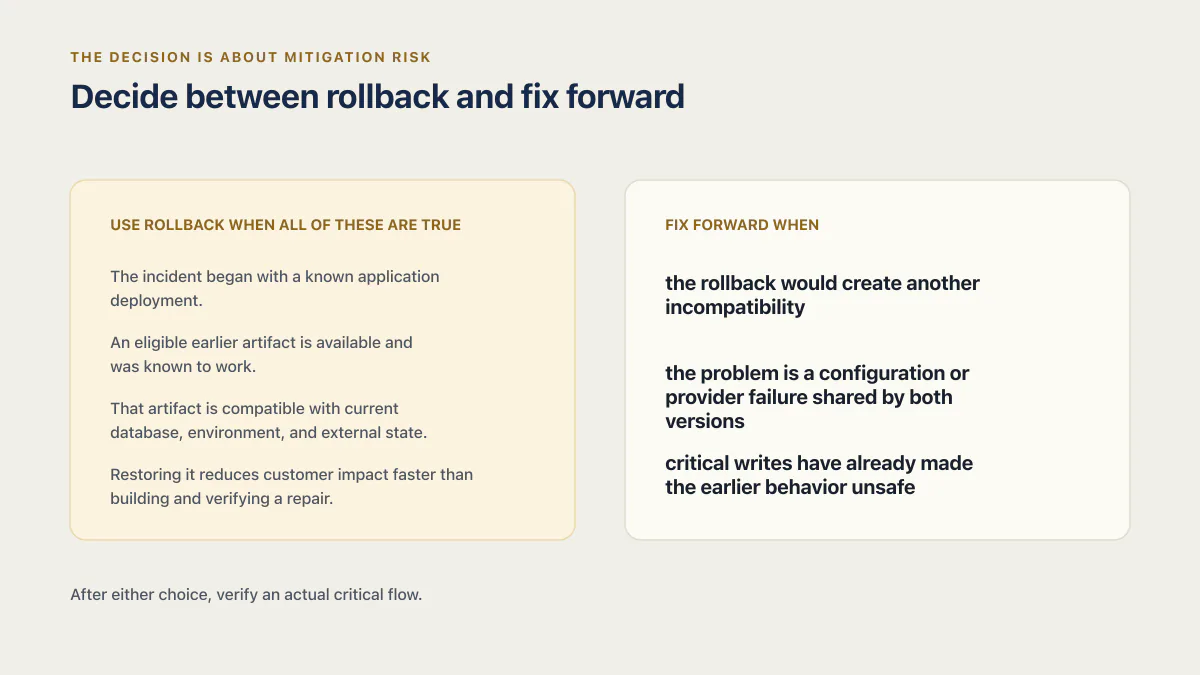
Decide between rollback and fix forward
Use rollback when all of these are true:
- The incident began with a known application deployment.
- An eligible earlier artifact is available and was known to work.
- That artifact is compatible with current database, environment, and external state.
- Restoring it reduces customer impact faster than building and verifying a repair.
Fix forward when the rollback would create another incompatibility, the problem is a configuration or provider failure shared by both versions, or critical writes have already made the earlier behavior unsafe. The decision rests on mitigation risk rather than loyalty to one recovery method.
After either choice, verify an actual critical flow. A homepage returning 200 does not prove sign-in, checkout, upload, or data retrieval recovered. A failure that answers 200 OK can leave a shallow deploy check green while users still fail. And if you have not yet established that a deploy is what broke it, the first hour of an app that is simply down comes before either choice.
Rehearse the path before an incident
- 01 Locate the platform rollback control and confirm which deployments are eligible on the current plan.
- 02 Record who can perform the rollback and how access works if the primary owner is unavailable.
- 03 Restore a non-production deployment and verify a critical flow against safe test data.
- 04 Document how build-time variables, runtime configuration, database migrations, jobs, and external writes behave.
- 05 Confirm how later deployments resume: Vercel promotion, Netlify auto-publish state, or the normal pipeline.
- 06 Set a detection and escalation path so someone knows when the rollback decision is needed.
In the fixed 21-app AxonBuild third-party cohort, at least 17 had no deploy gate of any kind. One audited motorsport dashboard even enabled strict TypeScript while configuring the production build to ignore TypeScript and lint errors. That historical result explains why a rollback rehearsal matters, but it does not predict the rate across all AI-built apps.
A preview environment can still be a staging environment nobody actually watches if no person or automated gate checks its critical flows before promotion. One database with no staging is a deploy set to break owns the broader separation and migration problem. The release readiness checklist covers an automated staging deploy, an explicit promotion gate, and the check after promotion. The one-page written version of this rehearsal is a rollback plan: the known-good release, the trigger, the steps by host, the database half, and a drill that proves it.
Common questions about rolling back a deployment
Does a deployment rollback undo database changes?
No. It restores an earlier application artifact. Database schema changes, row updates, queued work, and external API effects remain unless they have their own tested reversal or restore procedure.
Will the next push overwrite my rollback?
The behavior depends on the platform. Vercel disables automatic production-domain assignment after Instant Rollback until the promotion flow resumes it. On Netlify, a later Git-triggered production deploy can replace the republished deploy unless auto publishing is disabled with a deploy lock.
Should I roll back or fix forward?
Roll back when an earlier artifact is available, compatible with current state, and faster to validate. Fix forward when earlier code is incompatible with migrations or external state, or when the deployment was not the cause.
How do I know the rollback worked?
Confirm the intended deployment identifier is live, then test a real critical flow and inspect errors, latency, and dependency health. A successful platform action or healthy homepage alone is insufficient.
If you have a working app built with these tools and need it ready for real customers, this is what we do.
Built it with AI. Now it has to hold up for real customers.
The Production Hardening Sprint takes the app you already have and builds the production foundation underneath it. Authentication and access rules, payments that stay consistent, error handling, monitoring, backups, automated tests and a documented handover. Our engineers work inside your existing codebase for ten working days. All 123 deliverables are included, and you get the evidence for each one.
See the Production Hardening Sprint →  $2,500 fixed price · 10 working days · One codebase