A Supabase staging environment is a separate backend and app deployment where you can test the same migration and workflow you intend to release, without giving that test access to production data. For a small app, the practical setup is usually one production Supabase project, one staging project, and a preview build whose variables point only to staging.
That definition matters. A Vercel preview connected to the production Supabase URL is a different frontend writing to the same live database. A second database with different Auth settings, missing Edge Functions, and no test files is isolated, but it cannot prove that the full workflow will survive production.
At least 17 of 21 third-party apps in the AxonBuild audit corpus had no deploy gate in June and July 2026. One medical app tested changes directly against its only database. The full finding belongs in the one-database, no-staging account; the useful lesson here is narrower: adding staging to an existing app is a configuration and release job, not a reason to rebuild the app.
Staging is isolated when its credentials cannot reach production, and useful when it reproduces enough of production to expose the next release’s failure.
Managing multiple Supabase environments: what must staging keep separate?
A useful Supabase staging environment has its own project URL, publishable key, server-side keys, database, Auth users, Storage objects, Edge Function secrets, and redirect configuration. Its schema should come from the same version-controlled migrations as production. Its data should be synthetic, generated for testing, or deliberately sanitised. The guide on how to generate realistic fake data for staging covers a repeatable seed script for an empty test database.
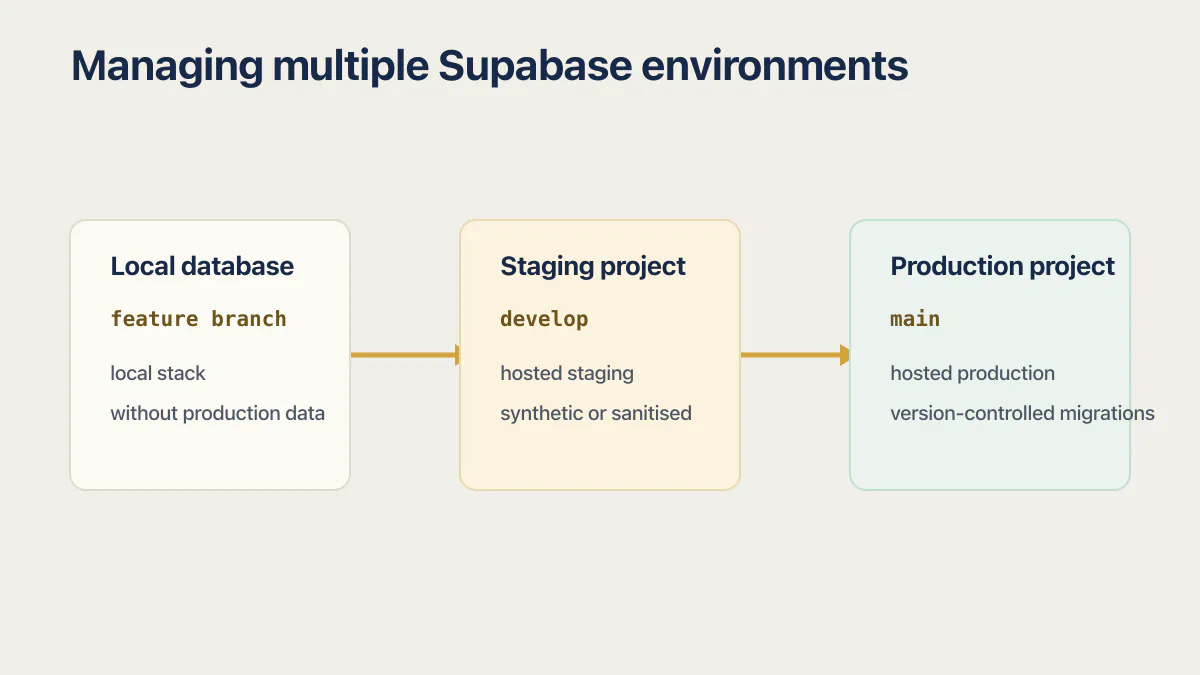
Supabase’s own Managing Environments guide sets out how to manage multiple environments with database migrations and GitHub Actions, and its shape is three tiers: a feature branch against a local database, a develop branch against a staging project, and main against production. Supabase Branching offers another route: a branch receives its own Supabase instance and API credentials, and persistent branches are intended for long-lived staging or QA. New branches start without production data, which is the safer default.
| A separate preview | A usable staging environment |
|---|---|
| A different frontend URL that may still use production variables | A frontend build whose database and service credentials point only to staging |
| A copied schema with Auth, Storage, functions, and secrets left unmatched | The same release path, with environment-specific configuration reproduced deliberately |
| A copy of customer rows used because realistic test data was inconvenient | Synthetic or sanitised fixtures covering the roles and edge cases the release can affect |
Do you need a local Supabase environment too?
The Supabase docs assume three tiers, not two: a local stack on your machine, a hosted staging project, and a hosted production project. The branch model that goes with it is feature branch to local, develop to staging, main to production. If you arrived here from the official guide, that is the shape you just read.
You can run the two-project retrofit without any of it. Local development runs the Supabase stack in Docker containers, so it needs a container runtime installed first (Docker Desktop, or Rancher Desktop, Podman, OrbStack and colima all work). A founder who does not want a container runtime on their laptop can write migrations by hand, apply them to staging, and treat staging as the place where SQL gets proved. You lose the fast reset loop, not the safety.
If you do install it, the loop is four commands:
supabase init      # creates supabase/ and config.toml in your repo
supabase start     # boots the local stack, Studio at http://localhost:54323
supabase db reset  # rebuilds the local DB from migrations, then runs your seed
supabase status    # prints the local URLs and keys for your .env.local
supabase db reset is the reason local is worth it. It throws the database away and replays every migration in order, so a migration that only works because of some leftover state fails on your machine instead of in production.
How do you retrofit staging when one Supabase project is already live?
The safest retrofit leaves the production app connected exactly as it is while you build and verify a separate path. Do not begin by changing production variables. Do not copy customer data merely to make staging feel realistic.
- 01 Inventory the live environment: database migrations, RLS policies, Auth providers and redirect URLs, Storage buckets and policies, Edge Functions, scheduled jobs, webhooks, extensions, secrets, and any dashboard-only settings.
- 02 Put the production schema into version control. Initialise the Supabase CLI, link it to production, run
supabase db pull, inspect the generated baseline, and commit it before making another schema change. - 03 Create a new, otherwise untouched Supabase project for staging. Apply the committed migration history to that project, then compare the resulting schema with production.
- 04 Recreate environment-specific configuration deliberately. Use test OAuth credentials, test payment keys, staging webhook destinations, staging function secrets, and a staging Site URL rather than copying live credentials.
- 05 Seed synthetic accounts for every important role and at least two ordinary users. Write the inserts into
supabase/seed.sql(or the file list under[db.seed]inconfig.toml) so the seed is a committed file, not a session of clicking. Add test files if Storage is part of the workflow. Never use a production export by default. - 06 Point one non-production app build at the staging URL and publishable key. Keep production variables scoped only to the production deployment.
- 07 Run the main workflow end to end, including sign-in, authorization between two users, uploads, background work, emails, payments in test mode, and the failure path you expect the change to exercise.
- 08 Release the exact migration file and compatible app change through staging first, then production. Record the migration version and keep both projects on the same ordered history.
Supabase warns that an existing staging project which was manually altered to resemble production can cause the CLI to reapply changes. Start with a new project, or reconcile its migration history before pushing anything. Run supabase migration list against each target so the database state and the files in Git agree.
Prove RLS isolates two users before you promote
Step 7 says test authorization between two users. Here is what that looks like as actual SQL and an actual sequence, because a policy that exists and a policy that works are different claims.
-- Turn the lock on. Without this line the policies below do nothing.
alter table public.documents enable row level security;

-- Owners read and write only their own rows.
create policy "owner reads own documents"
  on public.documents
  for select
  to authenticated
  using ( (select auth.uid()) = user_id );

create policy "owner writes own documents"
  on public.documents
  for insert
  to authenticated
  with check ( (select auth.uid()) = user_id );

create policy "owner updates own documents"
  on public.documents
  for update
  to authenticated
  using ( (select auth.uid()) = user_id )
  with check ( (select auth.uid()) = user_id );

create policy "owner deletes own documents"
  on public.documents
  for delete
  to authenticated
  using ( (select auth.uid()) = user_id );
Then run the check in staging, signed in as real seeded users, not from the SQL editor (the editor connects with a privileged role and bypasses RLS, so it will tell you everything passed):
- Sign in as user A in the staging build and create a document. Note its id.
- As user A, select and update that document. Both operations should succeed.
- Sign out, sign in as user B, and request that id directly. A
selectshould return zero rows, not an error. - As user B, try to update and delete that same id. Both should affect zero rows. Try to insert a row with user A’s
user_id; thewith checkclause should reject it. - Sign out and repeat the select, insert, update, and delete paths. Each should be denied.
- Sign back in as user A and delete the document. Exactly one row should be affected.
If an intended owner action fails, or any matching non-owner or signed-out action succeeds, the migration is not ready for production, regardless of what the policy list looks like in the dashboard.
Which commands establish the schema without copying customer rows?
For an older production project with dashboard-created tables, the baseline begins with db pull. Future changes should become new files under supabase/migrations/ and move through local, staging, and production in that order.
# Capture the existing production schema as a baseline.
supabase link --project-ref <production-project-ref>
supabase db pull

# Apply the committed history to a new staging project.
supabase link --project-ref <staging-project-ref>
supabase db push
supabase migration list

# Preview a later production release before applying it.
supabase link --project-ref <production-project-ref>
supabase db push --dry-run
The project ref in those commands is the string in the dashboard URL for each project (supabase.com/dashboard/project/<ref>), and it is also shown under Project Settings. Production and staging have different refs, which is exactly why relinking is the step people get wrong.
db push --dry-run lists pending migrations. It does not execute them against a temporary database, so the staging run is the real proof that the SQL applies and the app still works. Supabase recommends CI/CD for production migrations rather than repeatedly relinking a developer laptop; the commands above show the state transition, not the ideal long-term release automation.
Schema is only part of the copy. The Supabase branching documentation lists separate Database, Auth, Storage, Realtime, and Edge Function services for a branch. A two-project setup needs the same categories checked manually. Migration files cover database objects such as tables, policies, and functions; Storage buckets can be declared in supabase/config.toml. OAuth provider credentials, third-party webhooks, and service secrets remain environment-specific.
Capturing dashboard changes as a migration
db pull is for the one-time baseline. db diff is for everything after it, and it is the command most readers of this article actually need, because they built their schema by clicking around Studio or by asking an AI tool to “add a table”.
# Someone changed the schema in the linked project's dashboard.
supabase db diff --linked -f add_documents_table

# A change exists in the local database instead.
supabase db diff -f add_documents_table

# Limit the comparison to the schemas you care about.
supabase db diff --linked --schema public,storage -f add_documents_table
db diff compares a target database against a shadow database built from your existing migration files, and -f writes the difference into a new timestamped migration. Unflagged db diff targets the local database. Add --linked for a change made in the linked project’s dashboard. Use db pull once, on day one, to get the whole existing schema into Git. Use the matching db diff form after that, so each change is a reviewable file instead of an untracked click. The database migration checklist covers the whole move from dashboard edits to ordered migration files, including the freeze on dashboard edits and the clean-database comparison that proves it.
Take a backup before the production push
Take the backup before the production db push, not after it goes wrong. On the Free plan there are no automatic backups, so the recommended safety net is a manual supabase db dump kept off-site. Pro projects get the last 7 days of daily backups, Team gets 14 days, and Point-in-Time Recovery is a paid add-on available on Pro, Team and Enterprise (checked against Supabase’s backup documentation on August 5, 2026).
A daily backup restores the selected snapshot at its recorded timestamp. PITR lets you choose a point with seconds-level granularity. Which one you have decides how much of a bad migration you can actually undo, which is why the backup question belongs before the push and not after it.
Automating the staging-then-production release
Relinking a laptop between two projects works for the retrofit and stops working the moment a second person touches the repo. The documented pattern is one GitHub Actions workflow per environment: pushes to develop deploy migrations to staging, pushes to main deploy them to production.
# .github/workflows/staging.yaml
name: Deploy Migrations to Staging

on:
  push:
    branches:
      - develop
  workflow_dispatch:

jobs:
  deploy:
    runs-on: ubuntu-latest
    environment: staging

    env:
      SUPABASE_ACCESS_TOKEN: ${{ secrets.SUPABASE_ACCESS_TOKEN }}
      SUPABASE_DB_PASSWORD: ${{ secrets.STAGING_DB_PASSWORD }}
      SUPABASE_PROJECT_ID: ${{ secrets.STAGING_PROJECT_ID }}

    steps:
      - uses: actions/checkout@v4

      - uses: supabase/setup-cli@v1
        with:
          version: latest

      - run: supabase link --project-ref $SUPABASE_PROJECT_ID
      - run: supabase db push
The production workflow uses main in the trigger, the production secrets in env, and environment: production on the job. That last line binds the job to the GitHub Environment. Its reviewers and other protection rules do not apply to jobs that omit it. Three repository secrets do the work: SUPABASE_ACCESS_TOKEN (one personal access token, shared by both workflows), SUPABASE_DB_PASSWORD, and SUPABASE_PROJECT_ID. Store the last two twice, once per environment, as STAGING_DB_PASSWORD and STAGING_PROJECT_ID and again as PRODUCTION_DB_PASSWORD and PRODUCTION_PROJECT_ID.
Two habits make this safe. Put the production job behind a GitHub Environment with a required reviewer, so promoting to production is a click someone makes on purpose. GitHub makes required reviewers available for public repositories on current plans. Private or internal repositories need an applicable plan and a check that this protection rule is available. And never put a Supabase key in the workflow file itself; the access token and database passwords belong in repository secrets, where a fork’s pull request cannot read them.
What goes wrong during the retrofit
Four failures account for most stalled retrofits. All four are fixable without rebuilding anything.
Permission denied on db pull
db pull runs pg_dump against production, and on older projects it can stop with permission denied for table _type while locking graphql._type. The dump is being blocked by grants on the graphql schema, not by anything wrong with your tables. Supabase’s fix is to run the grant statements from its troubleshooting section (grant all on all tables in schema graphql to postgres, anon, authenticated, service_role;, plus the matching lines for functions and sequences) in the SQL editor, then run db pull again.
Permission denied on db push
This one usually means your database has a custom role that the postgres role cannot act on, so the migration cannot create or alter objects it owns. Granting the custom role to postgres (grant "custom_role" to "postgres";) resolves it. If the push failed halfway, check supabase migration list before retrying, so you know which files the remote already recorded.
Migration timestamps out of order after a rebase
Migrations are applied in filename-timestamp order, so a teammate merging a newer migration while yours sat unmerged leaves your file dated earlier than one already applied. The documented fix is to rename yours with a later timestamp and replay locally: git pull, create a fresh migration with supabase migration new, move your SQL into the new later-timestamped file, then supabase db reset to confirm the whole ordered history still applies from scratch.
The remote history and your migrations folder disagree
If supabase migration list shows a version on the remote that has no file locally, or a file that the remote never recorded, the migration history table is out of sync. supabase migration repair <version> --status reverted removes a stale record, and supabase migration repair <version> --status applied records a migration the remote already ran. Repair edits the bookkeeping table only. It does not run or undo SQL, so fix the schema first and repair second.
Do AI builders give you a staging environment?
Mostly not, and the ones that offer something call it by another name. The pattern is the same across the category: the builder gives you one backend per project, so isolation has to come from a second Supabase project you own, not from a setting inside the tool.
Lovable Test and Live
Lovable’s Test and Live environments are closed to new Lovable Cloud projects. Lovable’s current environment documentation dates the cutoff to March 24, 2026. Projects that enabled the beta earlier can keep using it; deleting the Test database permanently removes that option.
For an eligible older project, Lovable builds against Test and publishes code and safe schema changes to Live. Data and Cloud configuration remain separate, and Lovable creates a Live database backup before publishing. The documentation also says potentially destructive and data migrations are not applied automatically; Lovable supplies SQL for manual review instead.
For a newer Cloud project, a Git branch by itself does not create a second Lovable backend. The honest options are:
- keep the current Cloud backend, use preview for frontend and non-mutating workflows, and treat database-changing prompts as production-affecting because there is no separate Test database;
- move the backend to managed Supabase and operate separate staging and production projects;
- deploy the GitHub-synced frontend to a host such as Vercel, with its preview variables connected to a separate Supabase project.
Lovable’s managed Supabase integration documentation says each Lovable project connects to one Supabase project and has no built-in staging mode. Its external deployment guide confirms that moving from Cloud to managed Supabase also makes you responsible for Auth configuration, Storage files, function secrets, monitoring, and backups. That is a migration project, not a toggle to switch casually on a live app.
Bolt, Replit, Base44 and Claude Code on managed Supabase
For projects built with Bolt, Replit, Base44, Cursor or Claude Code and connected to managed Supabase, there is no builder-level staging switch to find. The isolation lives one layer down, in the Supabase project the build’s variables name, so the two-project retrofit in this article is the whole answer for all of them.
A Git branch on its own does not create a second backend for any of these tools. A branch changes which code runs; the database it talks to is decided by the environment variables attached to that deployment. Push a branch without changing those variables and you have a new frontend writing to production. That is the same trap as the Vercel preview below, and the fix is identical: a separate Supabase project, and variables scoped to the deployment that should reach it.
Why is a Vercel preview not automatically staging?
A Vercel preview isolates the frontend build and URL. The backend depends on the variables attached to that deployment. Vercel’s environment-variable guide allows different values for Production, Preview, Development, custom environments, and even a specific preview branch. Until the Supabase URL and keys differ, the preview still reaches production.
Three values decide which database a build talks to. Name them literally, because these are the strings you will be setting twice:
| What it is | Common variable name | Where it belongs |
|---|---|---|
| Project URL | NEXT_PUBLIC_SUPABASE_URL (or VITE_SUPABASE_URL) | Client and server, different value per environment |
Publishable key, formerly the anon key | NEXT_PUBLIC_SUPABASE_ANON_KEY or NEXT_PUBLIC_SUPABASE_PUBLISHABLE_KEY | Client-side, safe to ship, still per environment |
Secret key, formerly the service_role key | SUPABASE_SERVICE_ROLE_KEY or SUPABASE_SECRET_KEY | Server only, never in a NEXT_PUBLIC_ variable |
Supabase renamed the pair: the publishable key (sb_publishable_...) replaces the legacy anon key and the secret key (sb_secret_...) replaces service_role. Both formats work today, and Supabase’s API key documentation says the legacy JWT keys will be deprecated by the end of 2026 (checked August 5, 2026). Older tutorials and most AI-generated scaffolds still write anon and service_role, so expect to see both names in one codebase.
On Vercel Pro and Enterprise, a Custom Environment can provide a named staging target. Hobby users can use a staging branch with branch-specific Preview variables and a persistent branch domain. In either case, verify the values after redeploying: changing a Vercel variable does not alter deployments that already exist.
A quick isolation test is to create a clearly named staging-only record from the preview, then confirm it appears only in the staging Supabase dashboard. Repeat with a file upload, a sign-in, and any server-side function that handles a secret. Delete the test records afterward. A label in the Vercel dashboard is weaker evidence than observing where the writes landed. The environment variables security risk page covers giving each environment its own variables and keys, keeping a configuration inventory, and proving staging stays in staging.
Should you use two projects or Supabase Branching?
Two projects suit a founder or small team with one shared staging lane. They are easy to reason about and work with the documented staging-to-production CI flow. They also require you to keep non-database configuration aligned yourself.
Supabase Branching suits multiple changes in flight. Preview branches are short-lived; persistent branches are designed for staging, development, or QA. Each branch is data-less initially and has isolated API credentials. As checked against Supabase’s branching usage documentation on August 2, 2026, a default Micro branch starts at $0.01344 per hour, with database, egress, and storage usage billed as part of that environment. Branching is not included on the Free plan.
| Consideration | Two projects | Supabase Branching | Lovable Test and Live |
|---|---|---|---|
| Who it suits | A founder or small team with one shared staging lane | Several changes in flight at once, each needing its own backend | Lovable Cloud projects that enabled the beta before it closed |
| What it costs | Up to two active Free projects across all organizations where you are Owner or Administrator, then paid compute per project | Not on the Free plan; a default Micro branch starts at $0.01344 per hour | Included, but closed to new Cloud projects since March 24, 2026 |
| What it isolates | Everything, because it is a second real project: database, Auth, Storage, functions, secrets | Database, Auth, Storage, Realtime and Edge Functions per branch, with its own API credentials | Data and Cloud configuration, with code and safe schema changes published to Live |
| What you maintain by hand | Auth providers, redirect URLs, webhooks, function secrets, keeping both schemas in step | Less configuration drift, but branch lifecycle and cost | Little, though destructive and data migrations still need manual SQL review |
What a second Supabase project costs
The second project is free only when your account still has room in its two-project allowance. Supabase applies that allowance across every organization where you are an Owner or Administrator, not once per organization. Check the projects attached to all of those organizations before calling staging free. Checked against Supabase’s pricing and billing documentation on August 17, 2026.
Two caveats decide whether that stays true. Supabase pauses Free projects that show low database activity over a seven-day period. A staging label does not make a project inactive, so check its actual activity and restore it only if the dashboard shows it paused. Paused projects do not count against the two-project limit. And if production is already on Pro, the $25 per month covers one project on Micro compute; a second project runs on its own compute instance and is billed accordingly. The cheap arrangement for a Pro production app is to keep staging on the smallest compute you can and accept that it is slow, because staging measures correctness, not speed.
The choice changes who maintains the environment, not the release principle. The same reviewed migration should reach an isolated backend before it reaches production.
What to do when one of those migrations goes wrong anyway, and what a rollback genuinely can and can’t reverse is a separate decision. The safer starting point is to discover that failure in staging, while production is still running the previous version.
Common questions about a Supabase staging environment
Do I need staging before the app has real users?
A pre-launch Supabase staging environment is cheaper to establish because there is no live configuration to preserve and no customer data to protect. Create separate projects before onboarding users if the app already has Auth, payments, stored files, or a main workflow that a deployment could interrupt.
Can I copy production data into Supabase staging?
Production data should not be the default staging seed. Use synthetic fixtures or a sanitised subset with direct identifiers, secrets, tokens, health data, payment data, and private files removed. A schema-only baseline is enough to establish the environment; representative test cases can be built deliberately.
Do RLS policies move from production to staging?
RLS policies move when they are represented in the migration history, because policies are database schema objects. Their presence does not prove their behavior. First prove that an owner can select, insert, update, and delete their own rows. Then use a second user and a signed-out session to prove those same operations are denied against rows they do not own.
Can I reset the staging project when it drifts?
A disposable staging project can be rebuilt from committed migrations and seed data. Supabase documents supabase db reset --linked for remote development or staging, but the command drops the linked schema and erases its data. Confirm the linked project before running it, and never use that reset procedure on production.
Does a second Supabase project copy Auth and Storage automatically?
A second Supabase project starts as its own environment. Database migrations can reproduce schema-level objects, but Auth providers, redirect configuration, external service secrets, and stored files need separate setup. Treat the inventory and end-to-end workflow test as part of the retrofit, not optional cleanup.
How do I create dev and production environments for an existing Supabase project?
Keep the live project as production and create a new, empty project as dev or staging. Pull the existing schema into migration files with supabase db pull, commit them, then apply that same history to the new project with supabase db push. From then on every schema change is a migration file that reaches the new project first, which is what stops schema drift between the two.
Do I need a local environment or is a staging project enough?
A staging project alone is enough to get the safety benefit, and it is the right first step for a live app. Local development adds speed rather than safety: supabase db reset rebuilds the database from migrations in seconds, so you catch a broken migration before it reaches any hosted project. Local needs a container runtime such as Docker Desktop, so skip it if you do not want one on your machine.
Do I need to run migrations through GitHub Actions?
No, but you should move to it once more than one person can change the schema. Relinking a laptop between projects is fine for the retrofit itself and becomes risky the moment a mistake means pushing staging SQL at production. A workflow per environment, triggered by develop and main, makes the target a property of the branch rather than of whoever ran the last command.
What if I leaked the service role key while setting this up?
If the leaked credential is a current sb_secret_... key, create a replacement in the Supabase dashboard. Update server environment variables, CI secrets, Edge Function secrets, and local environment files during the controlled overlap. Confirm every component uses the replacement, then delete the compromised key. If the app still uses the legacy service_role key, replace it with a new secret key through the same overlap sequence instead of rotating the legacy JWT key in place. If the credential is being actively abused or continued access is more dangerous than downtime, disable the affected path or invalidate the credential immediately, then complete the replacement. Removing the value from one Git commit does not contain the exposure, because clones and forks may still carry it.
Treat a leak found in a client bundle as the more serious case. Create and deploy the replacement immediately, remove the compromised credential as soon as the required components have cut over, and review recent database activity. If active abuse makes continued overlap unsafe, contain it sooner even if that causes downtime.
If you have a working app built with these tools and need it ready for real customers, this is what we do.
Built it with AI. Now it has to hold up for real customers.
The Production Hardening Sprint takes the app you already have and builds the production foundation underneath it. Authentication and access rules, payments that stay consistent, error handling, monitoring, backups, automated tests and a documented handover. Our engineers work inside your existing codebase for ten working days. All 123 deliverables are included, and you get the evidence for each one.
See the Production Hardening Sprint →  $2,500 fixed price · 10 working days · One codebase