Supabase pricing starts at $0 for the Free plan and $25 a month for Pro, and the $25 buys the plan for a whole organization rather than a single project. Compute is what gets charged per project, at $10 a month for the default size.
That one distinction is where most surprise bills come from, and page one of Google currently gets it wrong. Two Supabase pages carry almost everything below, the published pricing page and the billing documentation, both read on 16 August 2026 from outside any paid account. The four bills further down are arithmetic over those published rates rather than invoices anyone received. Supabase changes prices, so the date on this page matters as much as the numbers.
A lot of people never chose Supabase deliberately. Why Supabase became the default backend in AI-built apps is a story about builders wiring it in before anyone had an opinion, so the first look at the pricing page often happens after the app is already live on it.
Supabase pricing in 2026: every plan on one line
Four plans, three of them with a public price. Prices and quotas checked 16 August 2026.
| Line | Free | Pro | Team | Enterprise |
|---|---|---|---|---|
| Base price per month | $0 | $25 | $599 | Custom |
| Billed per | Organization | Organization | Organization | Organization |
| Database disk, per project | 500 MB | 8 GB | 8 GB | Custom |
| Monthly active users | 50,000 | 100,000 | 100,000 | Custom |
| File storage | 1 GB | 100 GB | 100 GB | Custom |
| Egress | 5 GB | 250 GB | 250 GB | Custom |
| Cached egress | 5 GB | 250 GB | 250 GB | Custom |
| Edge Function invocations | 500,000 | 2 million | 2 million | Custom |
| Realtime messages | 2 million | 5 million | 5 million | Custom |
| Realtime peak connections | 200 | 500 | 500 | Custom |
| Backups | None listed | 7 days | 14 days | Custom |
| Log retention | 1 day | 7 days | 28 days | 90 days |
| Compute credits | None | $10 per month | $10 per month | Custom |
| Active projects | 2 | Unlimited | Unlimited | Unlimited |
| Inactive projects | Paused after a week | Never paused | Never paused | Never paused |
Two rows do more work than the rest. The compute-credits row is the one people skip, and it decides whether the bill reads $25 or $45. The active-projects row decides whether Free is a real plan for you or a sandbox. Enterprise publishes neither a number nor a quota, so any Enterprise figure on a third-party comparison page was estimated by that page.
Is Supabase pricing per project or per organization?
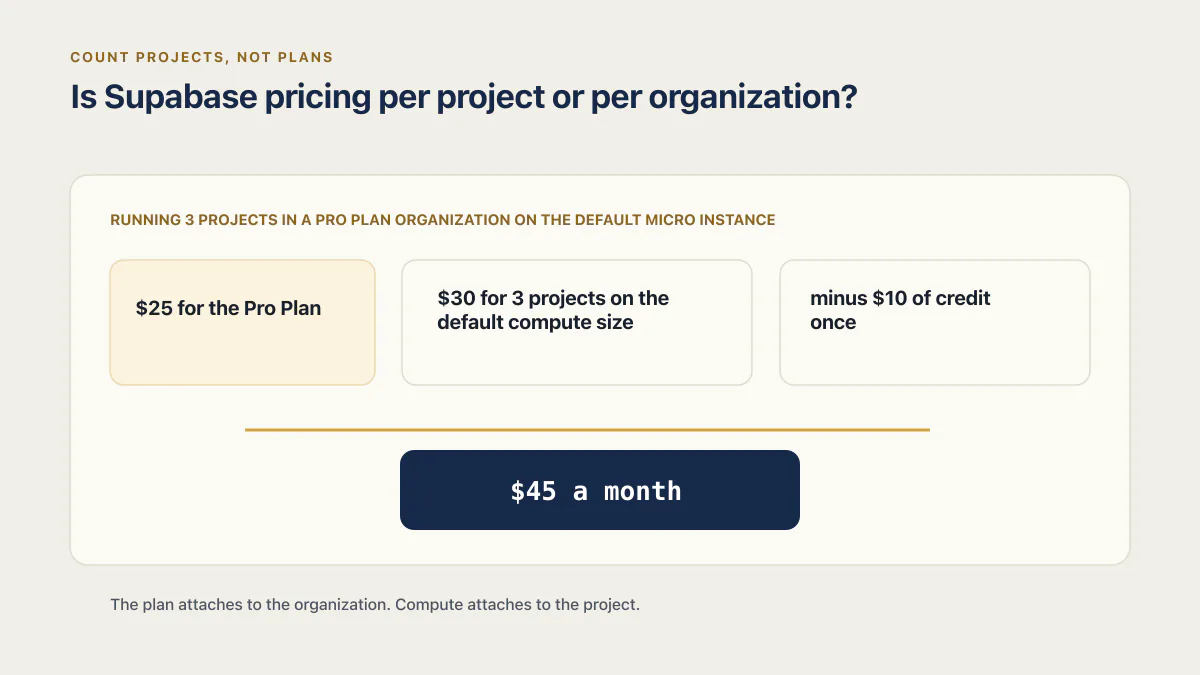
Supabase’s subscription plan is billed per organization, not per project. The $25 Pro fee covers every project in that organization. What multiplies with each project is compute: Supabase’s own billing FAQ prices three Micro projects on one Pro organization at $45 a month.
Supabase’s billing documentation is direct about the structure. Each organization carries its own subscription, plans cannot be mixed inside one organization, and paying for a plan unlocks that plan for every project in the organization. Most usage quotas work the same way: storage, egress, monthly active users and function invocations belong to the organization no matter how many projects you launch, and Supabase sums usage across all of an organization’s projects into one monthly invoice. Database disk is the exception, and the table above labels it per project.
What is per project is the machine. Each Supabase project runs its own dedicated Postgres instance on its own server, and you are charged for that server’s compute independently of how much you use the database. Launch a second project and you have bought a second server, whatever the database inside it is doing.
The plan attaches to the organization. Compute attaches to the project. Every confusing Supabase bill lives in the gap between those two sentences.
Supabase publishes the arithmetic itself, in an FAQ answer most people never scroll to. Supabase’s billing FAQ sets up the case as “Running 3 projects in a Pro Plan organization on the default Micro instance”, then bills it at $25 for the Pro Plan, $30 for 3 projects on the default compute size, and $10 in compute credits, for $45 a month. The same page explains the credit: “Each paid organization comes with $10 in Compute Credits to cover one project on the default compute size.” One project’s compute is effectively included. The second and third are $10 each.
This is where page one of Google gets it wrong. uibakery.io/blog/supabase-pricing, a page last updated 19 February 2026 and read on 16 August 2026, states that “The Pro plan starts at $25/month per project” and repeats “From $25 / month per project” in its Pro section. That link is deliberately absent, because the sentence being corrected is the reason the page is named. Read against Supabase’s own billing documentation, the claim inverts the model: it makes a three-project organization look like $75 when Supabase prices it at $45, and it makes a one-project organization on Small compute look like $25 when the compute add-on puts it at $30.
The practical version, for anyone budgeting: count projects, not plans. One plan fee, plus one compute line per project, minus $10 of credit once.
Is Supabase free, and what does the free plan actually hold?
The Supabase Free plan costs $0 a month. Its ceilings are two active projects, 1 GB of file storage, 5 GB of egress, 50,000 monthly active users and 500 MB of database, and the plan table lists no backups on Free. A project with little activity is paused after a week.
Those numbers hold more than founders expect on some axes and far less on others. 50,000 monthly active users is an enormous allowance for an app that has not launched, and almost nobody hits it. 500 MB of database is generous for rows and unforgiving for anything else you put in Postgres, because a table of embeddings, a log table nobody prunes, or a few months of event rows fill it without the app feeling busy. 5 GB of egress is the one that moves quietly, because every image, API response and file download counts against it and a single popular page can spend a week’s worth in a day.
The pause rule is a plan feature, not a fault. Supabase’s project-pausing documentation sets the rule at seven days: a project on Free is paused once a week passes without enough user activity reaching its database, which is how the documentation defines an inactive project. The bar it describes is genuinely low: a handful of database calls spread across each of the previous seven days clears it. A paused project keeps its data: it returns to its previous state when resumed, and there is a one-year window to resume it from the dashboard. For a live app with real traffic, the pause rule never fires. For a staging copy that sits idle between releases, it fires every time.
Then there is the row people misread most. Supabase’s plan table lists no backups on Free, and one of the pages ranking on this query says otherwise. bytebase.com/blog/supabase-vs-aws-database-pricing/, published 9 June 2026 and read on 16 August 2026, lists “7-day snapshot backups” among what the free tier includes. Unlinked for the same reason as above. Anyone budgeting off that sentence is running a live app believing there is a restore button that the plan table does not sell them. What a Supabase backup actually covers, plan by plan, is the question to settle before you decide Free is enough, and the short version is that a Free project’s recovery plan is whatever you built yourself.
Exceeding the Free quotas is not an instant shutdown either. Supabase’s billing FAQ says you will be notified when you exceed the Free Plan quota, that you can manage your usage or upgrade to a paid plan, and that service restrictions apply if limits keep being exceeded. Notification first, restriction later, and no surprise charge, because Free has no card attached to charge.
What the $25 Pro plan buys, and what it does not
Pro raises every quota in the table above and removes the two rules that make Free feel fragile: projects are never paused, and the project count is unlimited. It also turns on daily backups with 7-day retention and gives the organization $10 a month in compute credits.
What $25 does not buy is a machine. Compute is a separate line, priced per project, and it starts at $10 a month for Micro. The credits cover exactly one project at that size. Everything past the first project is added at full price.
| Compute size | Per month | RAM | CPU | Direct connections | Pooler connections |
|---|---|---|---|---|---|
| Micro | $10 | 1 GB | 2-core ARM | 60 | 200 |
| Small | $15 | 2 GB | 2-core ARM | 90 | 400 |
| Medium | $60 | 4 GB | 2-core ARM | 120 | 600 |
| Large | $110 | 8 GB | 2-core ARM, dedicated | 160 | 800 |
| XL | $210 | 16 GB | 4-core ARM | 240 | 1,000 |
| 2XL | $410 | 32 GB | 8-core ARM | 380 | 1,500 |
| 4XL | $960 | 64 GB | 16-core ARM | 480 | 3,000 |
| 8XL | $1,870 | 128 GB | 32-core ARM | 490 | 6,000 |
| 12XL | $2,800 | 192 GB | 48-core ARM | 500 | 9,000 |
| 16XL | $3,730 | 256 GB | 64-core ARM | 500 | 12,000 |
Supabase asks what connections you plan to use when you create a project, and the last two columns are the honest answer: compute size sets both ceilings at once. That matters more than the RAM column for most apps, because what happens when a Supabase project runs out of connections looks nothing like a slow database and everything like an outage. It is also worth knowing before you buy a bigger box that whether upgrading compute is actually the fix for a slow Supabase app depends on which of the three usual causes you have, and two of them do not improve at all with more RAM.
Advanced disk costs are not limited to IOPS. Supabase separately prices disk size, IOPS, and General Purpose throughput. Check the live pricing page before changing disk settings because the table below does not cover those rates.
Above the plan and compute lines sit the add-ons, each opted into per project.
| Add-on | Price |
|---|---|
| Point-in-Time Recovery | $100 per month per 7 days retention |
| Custom domain | $10 per domain per month per project |
| Database branching | $0.01344 per branch, per hour |
| Advanced MFA, phone | $75 per month for the first project, then $10 per additional |
| Log drains | $60 per drain per month, plus $0.20 per million events, plus $0.09 per GB egress |
| Image transformations | 100 origin images included, then $5 per 1,000 origin images |
The branching rate is the one that reads harmlessly and is not. At $0.01344 per branch-hour, a branch left open for a 30-day month is about $9.68, and four of them cost more than the plan. Two add-ons are priced elsewhere and belong to their own decisions: what the Supabase HIPAA add-on and a BAA cost is a Team-plan conversation with its own arithmetic, and the point-in-time recovery line above is a headline price that only makes sense against a compute floor and a loss window.
Finally, here are the main usage rates used in the worked bills below. This is not an exhaustive list of every billable feature or third-party usage category.
| Usage item | Rate above the included amount |
|---|---|
| Monthly active users | $0.00325 per MAU |
| Database disk size | $0.125 per GB |
| Egress | $0.09 per GB, cached egress $0.03 per GB |
| File storage | $0.0213 per GB |
| Edge Function invocations | $2 per 1 million |
| Realtime messages | $2.50 per million |
| Realtime peak connections | $10 per 1,000 |
| Monthly active SSO users | 50 included, then $0.015 per MAU |
Four Supabase bills, worked line by line
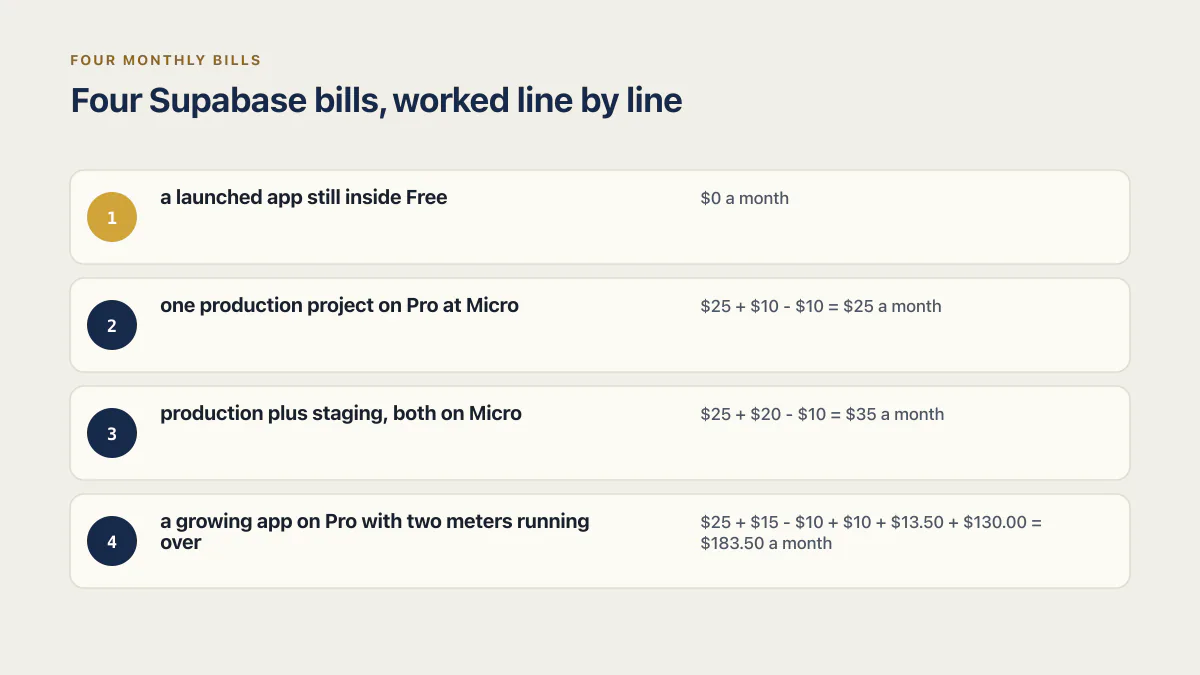
Supabase’s rate card is easy to find. A worked bill with the arithmetic still showing is harder, which is why “how much does Supabase cost” usually gets answered with the rate card again. Here are four, each stating its assumptions before its numbers. All four are arithmetic over the published rates above, read on 16 August 2026. None of them is an invoice anyone received.
Bill 1: a launched app still inside Free. $0 a month
Assumptions: one live project, a 200 MB database, 3,000 monthly active users, 2 GB of egress, 400 MB of files, and daily traffic so nothing pauses.
- Free plan: $0
- Compute: included, no add-on available on Free
- Everything metered: inside quota, no overage possible with the plan’s spend behaviour
Total: $0 a month. The line this app crosses first is almost always egress, at 5 GB uncached plus 5 GB cached. The second is the database, at 500 MB. The one it will never cross is monthly active users, because 50,000 is a number most apps meet after they can afford Pro anyway. Most people who leave Free leave for the empty backups row rather than for any quota.
Bill 2: one production project on Pro at Micro. $25 a month
Assumptions: a single project, default Micro compute, no custom domain, all usage inside the Pro quotas.
- Pro plan: $25
- Micro compute, 1 project: $10
- Compute credits: minus $10
Total: $25 + $10 - $10 = $25 a month. This is the bill the $25 headline describes, and it is real, for exactly one project at the default size.
Bill 3: production plus staging, both on Micro. $35 a month
Assumptions: two projects in one Pro organization, both on Micro, usage across both still inside the organization-wide quotas.
- Pro plan: $25
- Micro compute, 2 projects at $10 each: $20
- Compute credits: minus $10
Total: $25 + $20 - $10 = $35 a month. Add a custom domain on production and it is $45. Nothing about the plan changed between bill 2 and bill 3; the entire $10 difference is the second server. How to run a Supabase staging project without paying twice has a concrete answer, and it starts with noticing that the credit only ever covers one project.
Bill 4: a growing app on Pro with two meters running over. $183.50 a month
Assumptions: one project, Small compute for the extra headroom, a custom domain, 400 GB of egress in the month, 140,000 monthly active users, and the Pro Spend Cap turned off so the usage overages can be billed.
- Pro plan: $25
- Small compute, 1 project: $15
- Compute credits: minus $10
- Custom domain: $10
- Egress overage, 400 GB used against 250 GB included, 150 GB at $0.09: $13.50
- MAU overage, 140,000 against 100,000 included, 40,000 at $0.00325: $130.00
Total: $25 + $15 - $10 + $10 + $13.50 + $130.00 = $183.50 a month.
That breakdown holds the least intuitive result on this page. The plan is $25 and the bill is $183.50, and the largest single line by far is 40,000 monthly active users at a third of a cent each: $130, more than five times the plan fee. Growth in users moves a Supabase bill into the hundreds long before growth in data does. Anyone shopping for a cheaper starting point will find that what the alternatives cost to start looks much the same at $0 and diverges exactly here, at the meter that charges per person rather than per gigabyte.
Does the spend cap actually cap your bill?
The Supabase spend cap limits metered usage, not the whole bill. Supabase’s cost-control page lists twelve usage items the cap governs and eleven excluded ones, including compute, custom domains and point-in-time recovery. Supabase’s own example bills a three-project Pro organization $45 a month.
Work that conclusion from the two documents rather than taking it on faith, because the difference is worth hundreds of dollars.
Supabase’s cost-control documentation opens by naming what the cap governs: “The Spend Cap determines whether your organization can exceed your subscription plan’s quota for any usage item.” With the cap on, “After exceeding the quota for a usage item, further usage of that item is disallowed until the next billing cycle. You don’t get charged for over-usage but your services will be restricted according to our Fair Use Policy if you consistently exceed the quota.” With the cap off, “Your projects will continue to operate after exceeding the quota for a usage item. Any additional usage will be charged based on the item’s cost per unit, as outlined on the pricing page.”
Notice what both sentences are about. Every promise the cap makes is attached to a usage item. So the question becomes: which items are usage items?
The same page answers it in two lists. Twelve items are covered: Disk Size, Egress, Edge Function Invocations, Logs Ingest, Logs Query, Monthly Active Users, Monthly Active SSO Users, Monthly Active Third Party Users, Realtime Messages, Realtime Peak Connections, Storage Image Transformations and Storage Size. Then it states the exclusion rule, that “Usage items that are predictable and explicitly opted into by the user are excluded”, and lists eleven: Compute, Branching Compute, Read Replica Compute, Custom Domain, Additionally provisioned Disk IOPS, Additionally provisioned Disk Throughput, IPv4 address, Log Drain Hours, Log Drain Events, Multi-Factor Authentication Phone, and Point-in-Time-Recovery.
Now put Supabase’s own worked example next to those two lists. The billing FAQ says the Pro Plan has a Spend Cap enabled by default to keep costs under control. The same billing FAQ bills three Micro projects on a Pro organization at $45 a month, and says nothing about the cap being switched off, because it does not need to: every dollar above the $25 base in that example is compute, and compute is on the excluded list. Bill 3 above behaves the same way at $35, and bill 4’s $10 custom domain does too.
One of the pages ranking on this query manages to say both halves of the contradiction in the same article. flexprice.io/blog/supabase-pricing-breakdown, read on 16 August 2026 and dated 15 August 2026, states that “On the Pro plan, projects won’t exceed the $25/month base unless you manually turn off the cap”, and elsewhere on the same page states that “Each project runs on its own compute instance and is billed separately, so as you spin up additional projects, your monthly cost scales with them”. Both sentences cannot hold at once, and Supabase’s own $45 example settles which one gives way. Unlinked, like the other two corrections here, because the sentence being corrected is why the page is named.
The reader can draw the line from here. With the cap on and untouched, the metered items in the first list cannot bill you a cent of overage; they get restricted instead. The eleven items in the second list bill you whatever you opted into, cap or no cap. Bill 4 splits cleanly along that line: the $143.50 of overage, $13.50 of egress and $130 of MAUs, are capped items that would have been blocked rather than billed, while the $10 domain and the $15 of compute sit outside the cap and would have been charged regardless.
That has a practical consequence worth stating plainly. On Pro with the default cap on, an app that suddenly gets popular gets throttled rather than billed, at the exact moment being popular matters most. Turning the cap off is how you buy your way through a traffic spike, and it is also how a $25 plan turns into a $183.50 one.
Which Supabase meter moves the bill first
Ranked by what a unit of ordinary growth costs at the published rates, not by a survey of anyone’s invoices. It is arithmetic on the overage table above, redone in a minute with your own numbers.
Monthly active users win, by a distance. At $0.00325 each above 100,000, ten thousand extra users cost $32.50, which already exceeds the plan fee, and forty thousand cost $130. This is the only meter that scales directly with the thing you are trying to grow, so it is the one that turns a good month into an expensive one.
Compute comes second, and it is the fastest-moving line for most people even though it is an add-on rather than an overage. It multiplies by project count rather than by traffic, from $10 a month for Micro up to $3,730 for 16XL. Two projects, three projects and a branch left running each buy their own server.
Egress moves third, at $0.09 per GB, and it is the one that climbs while nobody changes anything, because images and API responses spend it every time a page loads. What is actually eating your Supabase egress is usually one or two assets being served uncompressed to every visitor, which also makes it the cheapest of these meters to diagnose and cut.
Database disk at $0.125 per GB is slow and steady, driven by what you store rather than who visits. It rarely produces a shocking number, and it is the only meter here that never falls unless someone deletes something.
Realtime peak connections at $10 per 1,000 matter only to apps that actually use Realtime, and the price is set by the peak rather than the average, so a single busy hour writes the whole month’s line.
File storage is the cheapest thing on the card at $0.0213 per GB, so a hundred gigabytes past the quota is about $2.13. It is almost never why a bill grew.
Six ways to hold a Supabase bill down
- Keep the spend cap on, and know exactly what it leaves uncovered. It stops overage on the twelve metered items and does nothing about a compute line, a custom domain, point-in-time recovery, an IPv4 address, or a branch you forgot to close.
- Run one organization rather than several. The plan fee, the quotas and the $10 compute credit all belong to the organization, so a second one means a second $25 fee and a second set of quotas you are paying to under-use.
- Keep staging off paid compute. A second project is a second server at full price from its first hour, because the credit was already spent on the first one. Free’s two-project allowance exists for exactly this, and a paused staging project costs nothing to resume.
- Read the meters in the dashboard before the invoice arrives. Supabase reports usage per item at the organization level, which is the same list the cap governs, so a meter climbing toward its quota is the earliest warning available.
- Buy compute in the month you need it. Supabase’s billing FAQ says changing compute size carries no immediate upfront charges, that billing follows the compute hours in the cycle, and that upgrading for ten hours then downgrading bills only those ten hours at the cycle’s end. A launch week on Large costs a launch week.
- Price point-in-time recovery against a real loss window. It is $100 a month per 7 days of retention plus a compute floor, and it earns that only when losing everything since last night’s backup would cost more.
None of this answers the bigger budgeting question, which is what the whole app costs per month once hosting, domains, email, AI APIs and a builder subscription are counted alongside the database. Supabase is one line on that page. It is usually not the largest one.
Common questions about Supabase pricing
Is Supabase free forever?
Yes, in the sense that the Free plan is a $0 plan rather than a countdown. It includes 500 MB of database, 1 GB of file storage, 500,000 Edge Function invocations, 5 GB of egress, two active projects and 50,000 monthly active users, checked on 16 August 2026. What it does not include is any backup entitlement, and Supabase pauses a Free project after a 7-day period of low database activity. Free ends when a quota, the pause rule, or the missing recovery path stops being acceptable, not when a clock runs out.
How much does Supabase cost per month for a small production app?
$25 a month for one project on Pro at the default Micro compute size: $25 for the plan, $10 for compute, minus the $10 of monthly compute credits that every paid organization gets. Add a custom domain and it is $35. Add a second project on the same plan and it is $35 without the domain, because the credit only covers one project’s compute. Figures checked 16 August 2026.
Does the Pro plan cover more than one project?
Yes. The subscription plan applies at the organization level, so one $25 Pro fee covers every project in that organization, and the usage quotas are shared across all of them, apart from database disk, which is per project. Compute is the part that is charged per project, at $10 a month for Micro, with $10 of credit applied once per organization. Supabase’s own billing FAQ prices three Micro projects on one Pro organization at $45 a month.
What happens when you exceed the Supabase free tier?
Supabase notifies you when you exceed the Free Plan quota, and its billing FAQ says you can manage your usage or upgrade to a paid plan. If limits keep being exceeded, service restrictions apply. You are not charged for the overage, because the Free plan has no per-unit billing behind it. The practical shape is a warning, then a restriction, rather than an invoice.
Is there a Supabase pricing calculator?
Yes. Supabase’s pricing page has an interactive compute estimator. It lets you add projects, adjust compute, and see a monthly estimate with the plan subscription, compute charges, and compute credits. Usage overages and add-ons still need separate arithmetic from the published rates.
Does Supabase charge for authentication?
Not as a separate product line. Auth is billed through the monthly-active-users meter shared by the whole organization: 50,000 MAUs on Free, 100,000 on Pro and Team, then $0.00325 per additional MAU. The one auth feature with its own price is SAML or SSO, where 50 monthly active SSO users are included and additional ones are $0.015 each, plus phone-based advanced MFA at $75 a month for the first project. The built-in email sender is throttled by a project-wide email rate limit that no plan meter shows.
Does Supabase offer annual or yearly billing?
No. Supabase’s billing FAQ says it currently does not support annual plans officially, and suggests a credit top-up as the way to avoid monthly payments. That means no annual discount and no yearly commitment, so the monthly figures on this page are the figures, checked 16 August 2026.
Is there a Supabase Pro trial?
As of 16 August 2026, neither Supabase’s pricing page nor its billing FAQ names a Pro trial or a trial period. Free is the substitute, at $0 a month with its own quotas rather than a time limit. One month of Pro with a single Micro project costs $25: the $25 plan plus $10 of compute, minus the paid organization’s $10 compute credit.
Is Supabase billed in USD?
Yes. Supabase’s billing FAQ says all its invoices are issued in USD, and that you can pay in any currency so long as the credit card provider allows charging in USD after conversion. Your own bank’s conversion rate and any card fee sit on top of the figures published on the pricing page, and Supabase does not publish country-specific prices.
Every figure here was read from Supabase’s pricing page, billing documentation, billing FAQ, cost-control page and project-pausing documentation on 16 August 2026. Supabase revises prices, so the date matters. If Firebase is the other option on your desk, how the two bill differently for the same app is a question neither list price answers, because the meters are not the same shape.
If you have a working app built with these tools and need it ready for real customers, this is what we do.
Built it with AI. Now it has to hold up for real customers.
The Production Hardening Sprint takes the app you already have and builds the production foundation underneath it. Authentication and access rules, payments that stay consistent, error handling, monitoring, backups, automated tests and a documented handover. Our engineers work inside your existing codebase for ten working days. All 123 deliverables are included, and you get the evidence for each one.
See the Production Hardening Sprint →  $2,500 fixed price · 10 working days · One codebase