Supabase suits relational data, the kind where records point at each other, and it leaves with pg_dump into any Postgres host. Firebase fits mobile-first and offline-first apps. Firestore’s exit is the expensive one: Google charges one read per document exported and requires the Blaze plan.
Most people reading this never made the choice. The app exists, the backend is wired in, and Lovable, Bolt, FlutterFlow or an agent picked it. This page is written for someone standing in front of a working app, not someone at an empty terminal picking a stack.
One more ground rule. Cloud Firestore and Firebase Realtime Database are kept apart throughout: two products, two rules languages, two price meters. The free-tier tables floating around rarely say which one they mean.
How this was checked, up front: nothing was tested in an account, and every quota, price, behavior and builder default on this page comes from Supabase’s and Google’s published documentation as it stood on 17 August 2026.
Supabase vs Firebase at a glance
Firebase vs Supabase, on the nine things that change how the app is built and paid for. The cells come from each vendor’s documentation, checked 17 August 2026.
| Supabase | Cloud Firestore | Firebase Realtime Database | |
|---|---|---|---|
| What the database is | Managed Postgres: tables, joins, foreign keys | A NoSQL cloud database of documents organized into collections | Data stored as JSON, synced to every connected client |
| How you query it | SQL queries, or an auto-generated REST endpoint per table | SDK queries for one document, or for the documents in a collection matching your parameters | SDK reads against paths in the JSON tree |
| How access is decided | Postgres grants plus row level security policies in SQL | Firebase Authentication plus Security Rules in Google’s rules language | Firebase Authentication plus rules written in JSON |
| Real-time | Broadcast, Presence, Postgres Changes | Snapshot listeners on documents and queries | The product’s whole point, billed by connection |
| Offline on the device | No offline mode in the client | On by default on Android and Apple, off by default on web | Android and Apple persist synced data to disk only when enabled; the web cache lasts for the session |
| Functions | Edge Functions, a Deno-compatible TypeScript runtime | Cloud Functions, free to 2M calls a month then $0.40 per million | The same Cloud Functions meter |
| Self-hosting | Documented and supported | None documented | None documented |
| What the free plan holds | 500 MB database, 50,000 monthly active users, 5 GB egress, 1 GB files, 2 projects | 1 GiB stored, 50,000 reads, 20,000 writes and 20,000 deletes a day, 10 GiB egress a month | 100 simultaneous connections, 1 GB stored, 10 GB downloaded a month |
| What leaving takes | A dump and a restore into any Postgres host | Blaze plan, one read charged per document, output into a Cloud Storage bucket | Not covered by the export doc cited here |
Prices and quotas checked 17 August 2026 against Firebase’s pricing page and Supabase’s pricing page. Both vendors revise them.
Firebase auth vs Supabase auth is the second-biggest question after price, and it has a short answer. Both give you email, password, social sign-in and a token, and nobody switches backends over a sign-in screen. What differs is what the token unlocks: a Supabase token is a Postgres session, so authorization is a SQL policy on a table, while a Firebase token is an identity your rules file inspects per document path.
Which one did your AI builder already pick?
New Bolt projects created with Claude Agent use Bolt Database by default, unless Supabase is selected when the project is created. FlutterFlow and Firebase Studio wire apps to Firestore. Lovable now ships its own built-in backend, Cloud, which its documentation says uses Supabase’s open-source foundation. Base44 and Replit each provide their own data layer. Those rows come from each vendor’s docs, checked 17 August 2026.
| Builder | What its own docs describe today |
|---|---|
| Lovable | A built-in backend called Cloud, enabled by default, built on Supabase’s open-source foundation. Connecting your own Supabase project is an option, not the default. The same page records one exception: on some Enterprise workspaces Cloud is disabled at the workspace level by an admin |
| Bolt | Bolt Database by default for new Claude Agent projects created after 30 September 2025. Supabase can be selected when a project is created, and older projects already using Supabase keep it. No Firebase integration is documented |
| FlutterFlow | Both. A Firebase integration for Firestore and Firebase Authentication, and a separate Supabase integration. The project picks one |
| Firebase Studio | Cloud Firestore and Firebase Authentication, set up by the App Prototyping agent when the app needs a database or sign-in |
| Base44 | Its own managed backend, with authentication and hosting built in |
| Replit | A Postgres SQL database that every Replit App gets by default |
Two rows changed recently enough to matter. Lovable’s default is no longer connect-your-own-Supabase, it is Lovable’s own Cloud on the same open-source pieces, so a Lovable app is on Postgres with no Supabase account attached to it. And Firebase Studio is on the way out: Google’s migration page says the product sunsets on 22 March 2027, and that new workspace creation and signup were disabled on 22 June 2026. Apps it built keep running, and so do Firestore and Firebase Authentication underneath them.
In AxonBuild’s fixed 26-app research cohort from June and July 2026, five apps ran on Supabase and none ran on Firebase, counted by reading all 26 findings files on 17 August 2026. Twenty-six apps, 21 of them public third-party repositories and 5 founder-owned, is a small and self-selected sample, and it says more about which builders those founders used than about which backend is more popular.
The default came from the builder’s business, not from your app. FlutterFlow started on Firebase because FlutterFlow started in Flutter and Flutter is Google’s. None of that is a judgment about whether your data is relational, and why AI builders reach for Supabase is a separate story from whether Supabase suits what you are building.
How Supabase and Firebase billing differ
Supabase bills a flat plan plus metered overage, so a Pro app’s bill starts with a predictable base and changes when it passes an included amount. Firestore charges for document operations, applicable index-entry reads, stored data including index overhead, and network bandwidth. Its rates depend on the database location.
A Supabase bill grows with how many people use the app, how much data leaves it, and the compute each project needs. A Firestore bill grows with operations, index work, storage, and network use. A screen that re-reads the same collection on every render has no separate per-read line on Supabase, but every response still uses database compute and egress. The same screen can add document and index-entry read charges on Firestore.
Firebase’s Firestore pricing documentation publishes the billing categories and links to location-specific rates. The three scenarios below do not contain enough information for a reproducible Blaze total. They omit database location, document and index-entry operations, index size, and billable network paths. The table therefore states Spark eligibility and names the inputs needed to apply the current rate table instead of inventing one number. The full Supabase plan arithmetic, meter by meter, is its own page.
| Small app | Growing app | Busy app | |
|---|---|---|---|
| Monthly active users | 2,000 | 25,000 | 150,000 |
| Database | 300 MB | 4 GB | 20 GB |
| Egress, uncached | 4 GB | 120 GB | 500 GB |
| Files | 500 MB | 20 GB | 200 GB |
| Inside Supabase Free? | Yes, at $0 a month | No, database and egress both exceed it | No |
| Supabase Pro bill | $25 | $25 | $213.63 |
| Inside Firebase Spark? | No. Cloud Storage for Firebase requires Blaze even when usage stays within a no-cost allowance | No, storage and egress both exceed it | No |
| Firebase Blaze bill | Depends on location and measured document, index, storage, and network usage; apply the current location rate table | Same inputs required | Same inputs required |
The Supabase arithmetic, so you can check it. Pro is $25 a month for the organization, and each project runs its own compute instance at $10 a month for a Micro, which the plan’s $10 compute credit covers for the first one. The small and growing apps sit inside every included amount, so both stop at $25. The busy app crosses four of them: 12 GB of database over the 8 GB included at $0.125 a GB is $1.50, 250 GB of egress over the 250 GB included at $0.09 a GB is $22.50, 100 GB of files over the 100 GB included at $0.0213 a GB is $2.13, and 50,000 monthly active users over the 100,000 included at $0.00325 each is $162.50. Add the $25 plan and it is $213.63, before any compute larger than a Micro.
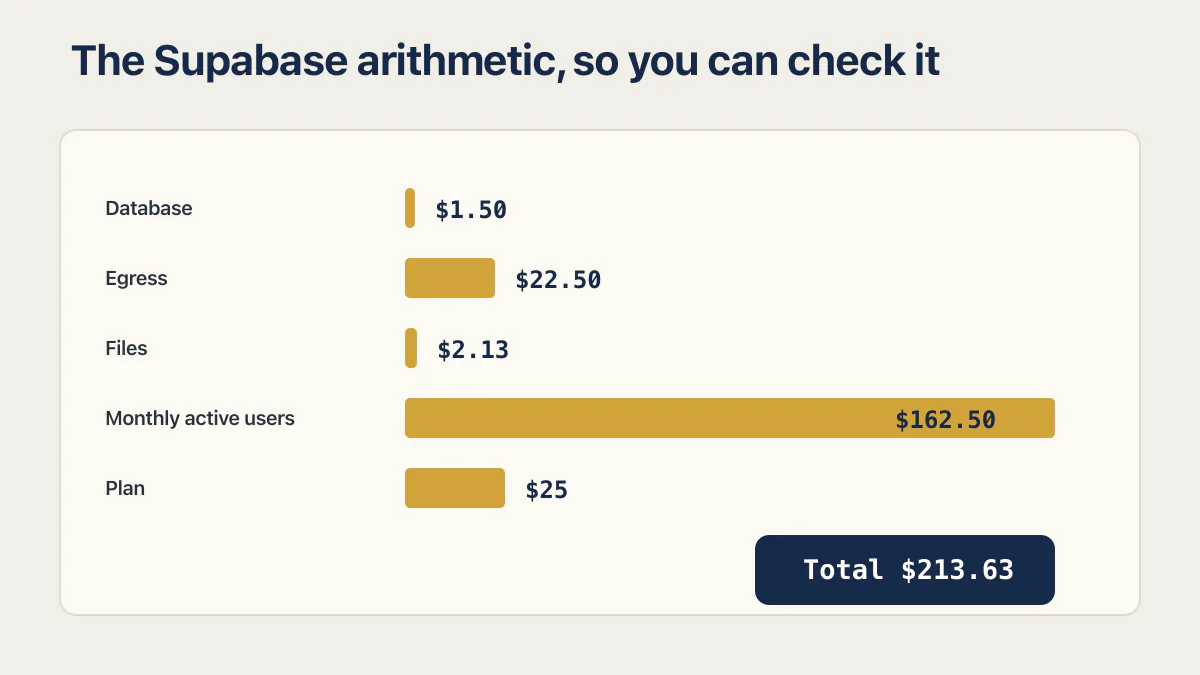
Look at which line dominates. Monthly active users are $162.50 of a $213.63 bill, so the meter that costs you money on Supabase is the same one you are trying to grow. The crossover is arithmetic: flat at $25 until the first included amount runs out, then rising at a published rate. Every Supabase plan and overage rate on one table is a longer job than this section, and it moves often enough that the date on it matters.
Firebase has no equivalent flat ceiling. Spark gives Firestore 50,000 document reads a day, which helps decide whether a small app is free. Split across 200 people opening the app daily, that is 250 reads each, which a chatty list screen can spend in one session. Past the no-cost quotas, the Blaze bill depends on document operations, applicable index-entry reads, stored data including indexes, network bandwidth, and the database location. Apply the current location rate table to measured workload inputs. The separate Firebase products keep their own meters, including Cloud Functions and Realtime Database.
Published answers vary more than they should. On 17 August 2026 the post ranking for this query at dev.to estimated about $145 a month on Firebase against about $247.50 on Supabase for a 50,000-daily-user app, reaching the Supabase figure by adding a Medium compute instance without showing the working. dbpro.app, on the same results page, says Supabase tends to be cheaper at scale and prints no bill. Opposite conclusions, neither reproducible.
Security Rules or row level security
Both platforms put the authorization boundary in a place a browser can reach, and both make you write it.
Supabase decides access with Postgres grants and row level security policies written in SQL. Supabase’s row level security guide says RLS must always be enabled on any table in an exposed schema, and that it is on by default for tables created through the Table Editor. The failure mode follows: a table created by running SQL, or by an agent writing a migration, does not get that default, and the generated API will serve it to anyone holding the publishable key.
Firebase decides access with Firebase Authentication and Security Rules. Google’s rules documentation covers Cloud Firestore, Realtime Database and Cloud Storage, and says Realtime Database rules use JSON while Firestore and Cloud Storage rules use a purpose-built language. The failure mode there is a project still sitting in the permissive state a prototype starts in, because that setting is what makes the first build work.
Neither is safer in the abstract. Both are a boundary you write yourself, and a wrong line leaks the same rows either way. The mechanics belong on three other pages: what Google secures and what you configure on the Firebase side, Firebase Security Rules examples and the tests that prove a denial for the rules file itself, and what a row level security policy decides, and what it cannot on the Supabase side.
What does it cost to leave?
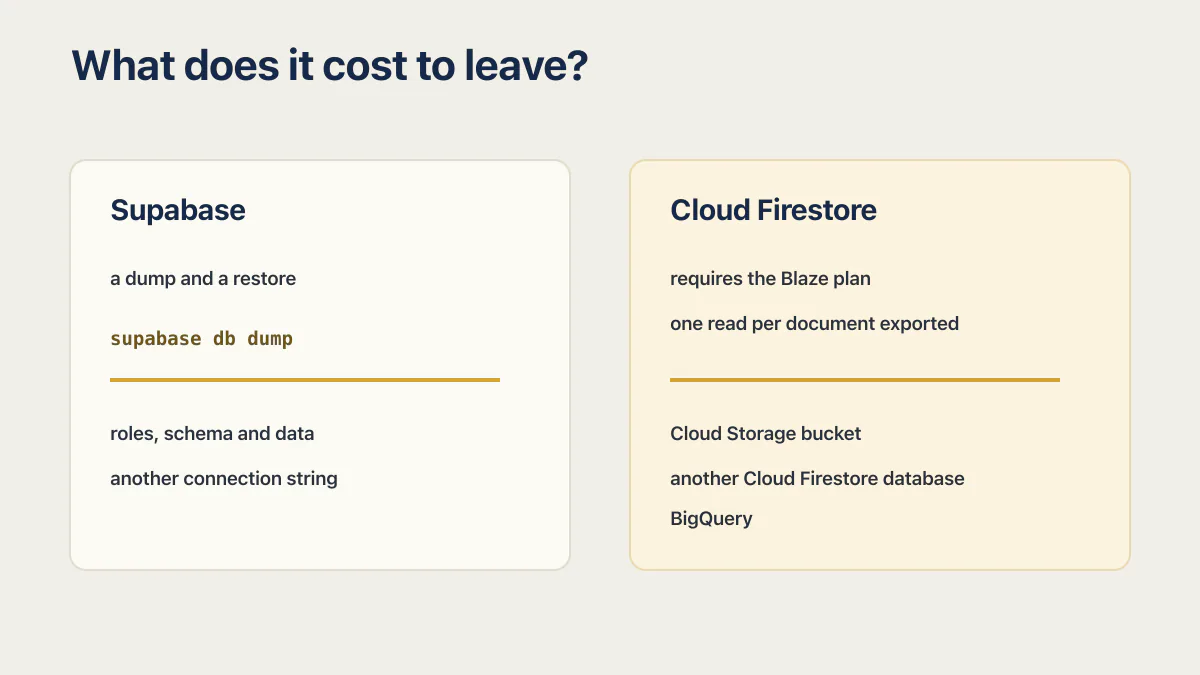
Leaving Supabase costs a dump and a restore, because the database is ordinary Postgres and Supabase documents the commands itself. Leaving Firestore costs money and rework: Google’s export service requires the Blaze plan, charges one read per document exported, and lands the output in a Cloud Storage bucket.
Supabase first. Its backup and restore documentation walks a logical backup with supabase db dump into three files, roles, schema and data, then a restore with psql into another connection string. That target does not have to be Supabase. It is Postgres, so it can be a managed host, a container, or a laptop. The platform backup guide holds the plan detail: daily backups on Pro kept for 7 days, and objects stored through the Storage API not included in a database backup. What a Supabase backup actually covers is worth reading before you assume the dump has everything.
Firebase next, in Google’s own words. Its export and import documentation states, “Firebase projects must be on the Blaze plan to use the managed export and import service.” The same page states, “Exporting data from Cloud Firestore will incur one read operation per document exported.”
Read that second sentence against a real collection. A million documents is a million billed reads to take a copy of your own data, and you cannot do it at all until the project is on pay-as-you-go. Google did not impose that as a penalty; it falls out of a meter that counts documents and an export that touches every one of them. The cost of leaving still rises with the size of the thing you built.
Where the export lands matters as much as what it costs. As of 17 August 2026, Google’s export documentation names another Cloud Firestore database and BigQuery as the destinations for an export, and does not document a format you can restore into an ordinary SQL database. That is a documented absence, not a claim that the data is locked away. The files exist and are yours. Turning collections of nested documents into tables with foreign keys is work someone has to do, and no export flag does it.
When Firebase is the better answer
There is a version of this comparison where Firebase never wins, and it is wrong.
Offline is the clearest case. Firestore’s offline persistence is on by default on Android and Apple platforms and off by default on the web. The app can read, write, and query cached data without a connection, then sync when the device returns. Realtime Database behaves differently. Android and Apple clients persist synced data to disk only after persistence is enabled. Its web API keeps offline data for the current session, and an unsent write is lost if the page closes before it reaches the server. Supabase has no equivalent in the client, and its own writing on offline-first Flutter apps reaches for a separate local data layer to get there. For a field tool or a delivery app used on a phone in a basement, that decides it.
Platform reach is the second case. Firebase ships first-party SDKs for Apple platforms, Android, web, Flutter, C++ and Unity. Supabase officially supports JavaScript, Dart/Flutter, Swift and Python, with C#, Go and Kotlin maintained by the community. For a Unity game or a C++ client, that gap settles it.
Realtime Database is the third, and it is the product people forget exists. Presence-shaped data, who is online, where the cursor is, what the score is, is what a JSON tree synced to every connected client is good at, and it bills by connection and bandwidth rather than by document operation.
If the app is already on Firebase and working, the better answer is usually to make it safe and observable where it is. The six gates before a Firebase launch cover that ground, and none of them require moving anything.
Should you switch?
Switching backends is four separate jobs: the data, the authorization rules, the server-side event handlers, and the user accounts. A working app with a bill you can live with does not need it. A relational app fighting a document store, or one whose exit is getting more expensive every month, might.
Take those four one at a time, because people price this as a single task and it never is. The data has to be reshaped rather than moved, since documents with nested objects become tables with keys. The rules have to be rewritten in the other language, and rewritten means retested, because a policy that compiles is not a policy that denies. Cloud Functions triggered by document writes become database triggers or Edge Functions with different guarantees. And the accounts have to move without invalidating everyone’s password.
The answer is no more often than the internet suggests: no when the app works, the data is genuinely document-shaped and the bill is predictable, and no when the only complaint is the query syntax. It becomes yes when you keep writing application code to do joins the database should be doing, when reporting is impossible because the data is not relational, or when the export cost is growing faster than the app is.
If the decision is really about getting off this platform rather than onto that one, the rest of the field, including the hosts that do less on purpose, is worth a look before you commit to a second bundled backend for the same reasons you regret the first.
Common questions about Supabase and Firebase
What is the difference between Firebase and Supabase?
Supabase is a managed Postgres database with authentication, storage, real-time and functions built around it, and the database stays ordinary Postgres. Firebase is Google’s app platform, whose databases are Cloud Firestore, a NoSQL document store, and Realtime Database, a synced JSON tree. The practical difference is SQL and tables against documents and collections.
Is Firebase or Supabase cheaper?
It depends on what the app consumes. Supabase charges a Pro base plus project compute and metered overage on database size, egress, files, and monthly active users. Firestore bills document operations, applicable index-entry reads, stored data including index overhead, and network bandwidth at location-specific rates. Measure the workload and apply each vendor’s current rates before comparing totals.
Is Supabase better than Firebase for a mobile app?
Usually not, if offline matters. Firestore enables offline persistence by default on Android and Apple platforms and syncs when the device reconnects, and Supabase has no equivalent in its client. Firebase also ships first-party SDKs for more platforms. For a mobile app that is mostly online and mostly relational, Supabase is fine.
Can you use Firebase and Supabase together?
Yes, and some apps do. A common shape is Firebase for push notifications, analytics and crash reporting alongside Supabase for the database and auth, since those Firebase products do not require Firestore. Running two databases at once is rarely worth it, because you then own the consistency problem between them.
Is Firebase Auth or Supabase Auth better?
Neither, for the sign-in itself. Both handle email and password, social providers and tokens without drama. The difference is what the token authorizes: a Supabase token becomes a Postgres session that row level security policies act on, while a Firebase token is an identity your Security Rules inspect per document path.
Which is easier if you are not a developer?
Firebase, for the first week. Its console provisions everything with clicks and its SDKs return data with very little code. Supabase gets easier later, because SQL is a skill you can look up and a Postgres database is something any developer you hire already understands.
Is Supabase a drop-in replacement for Firebase?
No. The data model differs, so documents have to be reshaped into tables, and the authorization language differs, so every rule is rewritten in SQL and retested. Supabase covers roughly the same product surface, including auth, storage, real-time and functions, which makes it a replacement for the bundle rather than for the code you wrote against Firestore.
Is Firestore faster than Postgres?
Neither vendor publishes a benchmark that would answer this, and it depends on the query. Firestore is fast at fetching a document by key and stays fast as data grows. Postgres is fast at joining several tables and filtering on columns, which Firestore cannot do without duplicating data. Speed complaints on either platform usually trace to a missing index or a screen that queries in a loop.
How this comparison was checked
Every source is named beside the claim it carries, and all of them were read on 17 August 2026. The table deliberately omits Blaze totals because these scenarios do not define a database location, document and index-entry operations, index size, or billable network paths. Google’s current Firestore documentation publishes the billing categories and location-specific rates needed for a reproducible estimate. Supabase’s own comparison page, last updated 20 August 2025, is the vendor’s marketing view and was read only for what Supabase says about Supabase.
Stay on your current backend or switch?
Most founders never chose their backend; the builder did, and the question only comes up once something starts to hurt. Bring that decision to an audit: we look at what your app stores and how it grows, then help you work out whether a move is worth what it costs.
Book a free audit → Free · 30 minutes · No code access needed