Firebase Security Rules are server-side authorization for Cloud Firestore, Realtime Database, and Cloud Storage, evaluated on every request that comes from a client SDK. They should grant the least privilege required for a specific user, resource, and operation. For a user-owned Firestore document, that normally means checking both request.auth.uid and the document’s owner or tenant boundary, then testing that a second signed-in user is rejected.
This guide owns that implementation question. It opens with copy-paste examples for Firestore, Realtime Database, and Storage, explains how Firestore rules evaluate, gives a current owner-scoped pattern, and shows how to prove the boundary with the Local Emulator Suite. The platform-level question, and the test-mode timer so many new projects start on, are covered separately.
What Firebase Security Rules protect
Security Rules are server-enforced authorization for requests made through supported Firebase mobile and web client SDKs. Firestore, Realtime Database, and Cloud Storage each have a rules language and resource model. They do not share one interchangeable rules file.
Rules do not protect every path into a project.
Where rules do not apply
- The Admin SDK and the server client libraries. They bypass Firestore Security Rules entirely and authorize through IAM instead. Whatever the service account can reach, that code can reach.
- Callable functions and API routes running with a service account. Rules never see the request. The function itself has to check who is calling and what they own, in trusted server code, before it touches the data.
- The Firebase console. Anyone with project access reads and edits records directly. IAM roles are the only control there.
- Data exports, backups, and BigQuery pipelines. Access is governed by IAM on the project and on the destination bucket or dataset, not by anything in your rules file.
A rule set can be perfect and still leave a project wide open if one of those four paths skips its own authorization check.
Signed in is not the same as authorized
Authentication and authorization also remain separate:
request.auth != nullThat condition proves a request has an authenticated Firebase user. By itself, it grants the operation to every authenticated user covered by the match. It does not prove ownership, organization membership, or an application role.
In the fixed June-July 2026 AxonBuild cohort, 7 of 21 third-party apps had a confirmed cross-user or cross-tenant access path. Because none used Firebase, the figure measures authorization failures in AI-built apps generally. It supports testing the same mechanism with two identities, without assigning Firebase a failure rate. The full ledger behind that figure lives elsewhere; only the mechanism travels here, and why AI coding tools ship security holes by default explains why the gap is structural rather than a one-off mistake, on any backend.
One audit that has stuck with me involved a B2B operations tool where every table was correctly scoped to its own workspace and the row-level policies held up under real testing. Then I read how the session itself was built: a plain object, stringified into a cookie, with nothing signing it against tampering. Edit the workspace ID from dev tools and the server just believed the new value; every downstream authorization check kept doing exactly what it was written to do, on an identity nobody had verified going in. Firebase makes that specific failure harder to reach, because request.auth comes from a token its own servers verified, not one your code assembled by hand. The identity is usually fine by the time a rule sees it. Confirming that the identity owns the thing it is asking for is the check most rules skip.
A rule can confirm someone is logged in and still never confirm they own the row.
Copy-paste Firebase security rules examples
Six blocks you can paste today. Each one is the shortest correct version of a pattern people actually search for. Change the collection and field names to match your data model, then read the rest of this guide to understand what each block does and does not cover.
The first and last blocks are complete files. The four Firestore blocks in between are fragments: they go inside the match /databases/{database}/documents { ... } block of firestore.rules.
Deny everything by default
firestore.rules
rules_version = '2';

service cloud.firestore {
  match /databases/{database}/documents {
    match /{document=**} {
      allow read, write: if false;
    }
  }
}
This is the safe baseline. Firebase’s get-started guide lists this deny-all set next to the dangerous open one, and it is where every new project should sit while you write the real rules. No client SDK reaches the data at all. Server code using the Admin SDK keeps working, so an app with a trusted backend can run on this while the client rules are still being built.
Allow only signed-in users
firestore.rules
match /posts/{postId} {
  allow read, write: if request.auth.uid != null;
}
This is the rule AI builders produce most often, and it is not ownership. request.auth.uid != null proves someone signed in. It does not prove they own the post. Anyone who registered thirty seconds ago can read and overwrite every document in the collection. Use it only for data that genuinely is shared across all users, and never on records with a per-user owner.
Allow only the document owner
firestore.rules
match /notes/{noteId} {
  allow read, delete: if request.auth != null
    && resource.data.userId == request.auth.uid;
  allow update: if request.auth != null
    && resource.data.userId == request.auth.uid
    && request.resource.data.userId == resource.data.userId;
}
The flat-collection version of the owner check, and the single most-searched rule in this family. resource.data is the document as it already exists, so this covers reads, updates, and deletes on a record that is already stored. userId is the common field name for the owner; ownerId behaves identically as long as the rule and the code that writes the document agree on one name. The extra line on update keeps userId fixed, so the owner cannot hand the record to another account by rewriting that one field; without it, the owner check passes on the old document and the new owner takes over on the next read.
Allow a user to create only their own document
firestore.rules
match /notes/{noteId} {
  allow create: if request.auth != null
    && request.resource.data.userId == request.auth.uid;
}
Create is a separate case because there is no existing document to inspect. resource.data is empty, so the check has to run against request.resource.data, the document as it would exist if the write succeeded. Without this, a signed-in user can create records stamped with somebody else’s userId.
Admin only, using a custom claim
firestore.rules
match /settings/{docId} {
  allow read: if request.auth.uid != null;
  allow write: if request.auth.token.admin == true;
}
request.auth.token holds the claims Firebase verified on the caller’s ID token. A claim can only be set from a privileged server context, so a client cannot grant itself one. A role field stored on the user’s own document can be, which is the failure mode covered under custom claims further down.
Owner-scoped Cloud Storage path
storage.rules
rules_version = '2';

service firebase.storage {
  match /b/{bucket}/o {
    match /users/{userId}/{allPaths=**} {
      allow read: if request.auth != null
        && request.auth.uid == userId;

      allow write: if request.auth != null
        && request.auth.uid == userId
        && request.resource.size < 5 * 1024 * 1024
        && request.resource.contentType.matches('image/.*');
    }
  }
}
Storage rules use the same match/allow shape as Firestore over file paths instead of documents. In rules version 2, {allPaths=**} is a recursive wildcard that matches zero or more path segments, so this covers everything under a user’s folder at any depth. Read and write are split because request.resource only exists on a write: on an upload it carries the file’s metadata, which is how the size cap and content-type check work.
Firestore, Realtime Database, and Storage side by side
The three products share a brand and almost nothing else. Securing one says nothing about the other two.
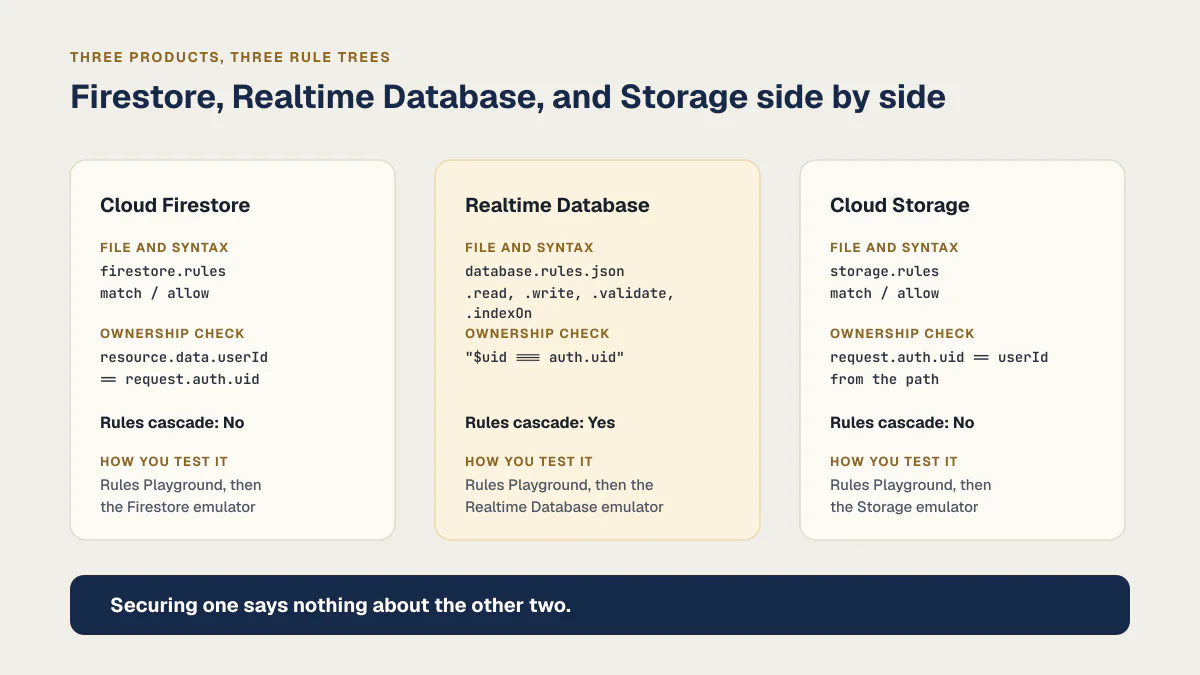
| Product | Rules syntax | Ownership check | Do rules cascade? | How you test it |
|---|---|---|---|---|
| Cloud Firestore | match / allow in firestore.rules | resource.data.userId == request.auth.uid | No. Matching allow statements combine with OR, so a broad match cannot be narrowed by a later, stricter one | Rules Playground, then @firebase/rules-unit-testing against the Firestore emulator |
| Realtime Database | A JSON tree of .read, .write, .validate, .indexOn in database.rules.json | "$uid === auth.uid" | Yes. Access granted on a parent node applies to every path below it, and a child rule cannot take it back | Rules Playground, then the Realtime Database emulator |
| Cloud Storage | match / allow in storage.rules | request.auth.uid == userId from the path | No. Same OR-combination model as Firestore | Rules Playground, then the Storage emulator |
How Firestore rules evaluate a request
A Firestore rule can inspect three important states:
| Value | Meaning | Typical use |
|---|---|---|
request.auth | The authenticated caller and token claims | Require a user, compare the UID, or evaluate a trusted custom claim |
resource.data | The document as it exists before the request | Authorize reads and deletes; prevent an update from taking over an existing record |
request.resource.data | The document as it would exist after the request | Validate creates and updates, including ownership and allowed fields |
Create has no existing resource.data. Delete has no resulting request.resource.data. That is why combining every operation into one broad allow read, write expression often creates mistakes: the safe condition is not identical for every operation.
Firestore also combines matching allow statements with OR logic. If any matching rule grants the request, a narrower rule cannot deny it later. Firebase’s rules structure documentation makes this especially important with recursive wildcards: one broad match can defeat the protection in a more specific block.
The worst version of that broad match is the one the console’s fast path produces:
firestore.rules
match /{document=**} {
  allow read, write: if true;
}
Firebase’s own get-started guide attaches a warning to that exact pattern, not a suggestion: “never use this rule set in production; it allows anyone to overwrite your entire database.” {document=**} is a recursive wildcard: it matches every document in every collection at any depth, present and future, so a collection added six weeks from now inherits the blanket rule unless someone remembers to scope it separately. A plain {userId} in braces is a single-segment path wildcard, and its captured value resolves to the matched document name inside the condition, which is what makes every owner check in this guide work.
An owner-scoped Firestore example
This is the full version of the owner check from the examples section, hardened for production. It stores a user’s notes under that user’s path, checks the path owner, checks the owner field on both sides of an update, limits the accepted create fields, and permits updates only to text.
firestore.rules
rules_version = '2';

service cloud.firestore {
  match /databases/{database}/documents {
    function signedInAs(userId) {
      return request.auth != null && request.auth.uid == userId;
    }

    match /users/{userId}/notes/{noteId} {
      allow create: if signedInAs(userId)
        && request.resource.data.ownerId == userId
        && request.resource.data.keys().hasAll(['ownerId', 'text'])
        && request.resource.data.keys()
          .hasOnly(['ownerId', 'text', 'createdAt'])
        && request.resource.data.text is string;

      allow read, delete: if signedInAs(userId)
        && resource.data.ownerId == userId;

      allow update: if signedInAs(userId)
        && resource.data.ownerId == userId
        && request.resource.data.ownerId == userId
        && request.resource.data.diff(resource.data).affectedKeys()
          .hasOnly(['text'])
        && request.resource.data.text is string;
    }
  }
}
The checks are intentionally redundant. The path prevents Bob from addressing Alice’s collection as his own. The stored ownerId check prevents a malformed record from silently inheriting trust from its path. Checking both old and new ownership prevents an update from transferring the record. The field allowlist stops a client from adding an unexpected privileged field.
Firestore supports hasAll, hasOnly, and diff().affectedKeys() for field restrictions. Adjust the schema and permitted mutations to the application. For example, a server-written billing status should not appear in a client-writable field list.
Adapt this pattern to the application’s data model. Shared workspaces should compare a trusted membership record or claim. Public documents need separate public-read and owner-write logic. Administrative actions need a server-assigned role whose lifecycle is controlled outside the client.
Use custom claims for roles, not a client-writable field
A generator that needs an admin path will often reach for whatever is already on the document: a role field the client itself wrote at signup. A rule that reads resource.data.role == 'admin' is only as trustworthy as the write path that set that field. If any authenticated user can write their own document, any authenticated user can write their own way into that role.
Firebase’s answer is custom claims, set from a privileged server context, never from the client:
getAuth().setCustomUserClaims(uid, { admin: true });The claim rides inside the user’s own verified auth token, and a rule reads it the same way it reads request.auth.uid:
allow write: if request.auth.token.admin == true;The claim changes only when your own server code calls setCustomUserClaims, and Firebase’s custom-claims documentation is direct about why that boundary matters: custom claims “can contain sensitive data” and belong only in a privileged server environment.
Rules are not filters
Firestore evaluates whether a query could return a forbidden document. It does not fetch every document and remove the ones the caller cannot read. As Firebase’s secure-query documentation says, rules are not filters.
Suppose a top-level notes collection allows a read only when resource.data.ownerId == request.auth.uid. A query for the entire collection is rejected because its possible result set includes other users’ notes. The client query must include an ownership constraint that proves every possible result is allowed, such as where('ownerId', '==', currentUid).
This creates two design obligations:
- Build queries and rules together. A correct rule may require a corresponding query constraint and index.
- Test list queries separately from single-document reads. Passing
getDoc()does not prove thatgetDocs()will work or that its scope is safe.
Do not weaken a rule merely to make an overbroad query pass. Narrow the query or redesign the collection boundary.
Validate every read and write operation
An application can block cross-user reads and still accept dangerous writes. Test at least these cases for every client-writable collection:
- an unauthenticated user creates, reads, updates, or deletes;
- the owner performs each intended operation;
- a second authenticated user tries the same operations;
- the owner changes
ownerId,tenantId, a role, price, plan, or other protected field; - the client adds an unknown field or omits a required field;
- a field has the wrong type or exceeds a size or range limit;
- a batch or transaction combines allowed and forbidden operations.
For Cloud Storage, validate ownership and file properties such as size and content type through request.resource. Firebase documents those Storage rule conditions.
Realtime Database rules are a different language
database.rules.json
{
  "rules": {
    "users": {
      "$uid": {
        ".read": "$uid === auth.uid",
        ".write": "$uid === auth.uid",
        ".validate": "newData.hasChildren(['text'])"
      }
    }
  }
}
Realtime Database rules are a JSON tree, not match/allow. Four keys carry the whole model, and Firebase defines them as follows: .read and .write describe if and when data may be read or written, .validate defines what a correctly formatted value looks like, and .indexOn names a child to index so ordering and querying work. $uid is a path variable, the Realtime Database equivalent of Firestore’s {userId} wildcard: it captures whatever segment sits in that position and the condition compares it to auth.uid.
The behavior with no Firestore equivalent is cascade. Read and write rules cascade downward, and Firebase’s own wording is that rules shallower in the database override deeper ones, so read access to /foo/bar/baz is still granted even if a rule at that exact path evaluates to false. One ".read": true near the root hands over everything beneath it and no child rule can revoke it. .validate rules do not cascade; they are evaluated per node. Grant access at the deepest node that needs it, never at the root, and treat a broad .read in a Realtime Database rules file as the same class of mistake as allow read, write: if true in Firestore.
Test the boundary in the Emulator Suite
Check it in the console Rules Playground first
Open the Firebase console, go to your database’s Rules tab, and click Rules Playground. Pick a path, an operation, and either an unauthenticated caller or a specific signed-in UID, and it tells you allow or deny in seconds, with the option to supply the document fields your rules reference. Firebase’s own guidance is to use the emulator for full validation and automated unit tests, so treat the Playground as a smoke check you run while writing a rule, not as the test suite. It does not run in CI and it does not stop a bad rule from shipping.
Then prove the denial with an automated test
The current @firebase/rules-unit-testing library supplies authenticated and unauthenticated contexts plus assertSucceeds and assertFails. Run it against the Firestore emulator, seed data with rules disabled, and make the expected denial part of CI.
The following test matches the owner-scoped example:
firestore.rules.test.ts
import { readFileSync } from "node:fs";
import {
  assertFails,
  assertSucceeds,
  initializeTestEnvironment,
} from "@firebase/rules-unit-testing";
import { doc, getDoc, setDoc, updateDoc } from "firebase/firestore";

const testEnv = await initializeTestEnvironment({
  projectId: "rules-test",
  firestore: {
    rules: readFileSync("firestore.rules", "utf8"),
  },
});

await testEnv.withSecurityRulesDisabled(async (context) => {
  await setDoc(doc(context.firestore(), "users/alice/notes/n1"), {
    ownerId: "alice",
    text: "private",
  });
});

const alice = testEnv.authenticatedContext("alice").firestore();
const bob = testEnv.authenticatedContext("bob").firestore();
const guest = testEnv.unauthenticatedContext().firestore();
const notePath = "users/alice/notes/n1";

await assertSucceeds(getDoc(doc(alice, notePath)));
await assertFails(getDoc(doc(bob, notePath)));
await assertFails(getDoc(doc(guest, notePath)));
await assertFails(updateDoc(doc(alice, notePath), { ownerId: "bob" }));

await testEnv.cleanup();
The expected result is explicit: Alice reads her note, Bob and the unauthenticated client receive a permission denial, and Alice cannot transfer ownership through a client update. Add success tests for every intended operation and denial tests for every important boundary. Firebase’s emulator also provides rules evaluation tracing and coverage reports to reveal untested expressions.
Keep the test project local and disposable. Emulator success does not prove the production project has the same deployed rules, so compare the release artifact with production during deployment verification.
Deploy rules as reviewed application code
Store rules and tests in version control. Require the rules tests before a targeted deploy such as:
firebase deploy --only firestore:rulesPin the intended Firebase project in the release job and review the rules diff. Firebase CLI documentation notes that Firestore, Realtime Database, and Storage rules do not have the same rollback support as Hosting releases, so retain the last known-good rules file and a tested fix-forward procedure.
Cost caps and a deploy process that checks a change before it ships are separate gates. This guide’s release requirement is narrower: a rule change must have passing authorization tests, an identifiable reviewer, and proof that the intended file reached the intended project.
The rules review standard
A Firestore rule set is ready for production when it can answer four questions with code and tests:
- Which identities may perform each operation?
- Which resource, owner, tenant, or role gives them that permission?
- Which fields may they create or change?
- Which second-user, unauthenticated, and privilege-change tests prove the boundary fails closed?
If a rule says only “signed in,” a query passes only after broadening access, or an Admin SDK route assumes client rules will protect it, the authorization design is incomplete. Tighten the trusted boundary and make the denial reproducible before deploying it.
The same presence-versus-behavior gap appears in Supabase RLS policies that look correct but expose the wrong rows, and a tested authorization boundary is one part of whether an AI-built app is ready for real use. When you want someone outside the build to probe the boundary too, web application penetration testing covers what a tester checks and how a small scope is agreed in writing.
Common questions about Firebase security rules
What are some Firebase security rules examples?
Six patterns cover almost every case: deny all with allow read, write: if false; signed-in-only with request.auth.uid != null; an owner check comparing request.auth.uid to resource.data.userId; a create rule checking request.resource.data.userId; an admin check on request.auth.token.admin; and an owner-scoped Cloud Storage path with size and content-type limits. Each has a complete, pasteable block in the examples section above. The two that carry the most weight are the owner check and the write-validation rule, because signed-in-only is the one AI builders generate by default and it is not ownership.
How do I test my Firebase security rules?
Run them against the Firebase Emulator Suite with the Rules Unit Testing library, and write both directions of every test: assertSucceeds for the request that should work, assertFails for a second account trying it against the first account’s data. Emulator success still needs deployment verification, because passing locally does not prove production runs the same rules file.
Why do I get “Missing or insufficient permissions”?
That message means a rule denied the request. It is an authorization result, not a network fault or a broken query. Three causes cover nearly all of it: no rule matches the path at all, because unmatched paths are denied by default; the rule requires a signed-in user and the client fired the request before authentication finished; or the request is a list query whose possible results include documents the rule would refuse, since rules are not filters. Reproduce it in the Rules Playground with the exact path, operation, and UID before you change a single line of the rules file.
What is the difference between test mode and production mode rules?
They are the two starting rule sets Firebase offers when you create a database, and neither is a finished one. Firebase describes test mode as good for getting started but one that “allows anyone to read and overwrite your data”, and production mode as the set that “denies all reads and writes from mobile and web clients” while your authenticated application servers keep their access. Production mode is a safe floor you build owner checks on top of. Test mode is an open database on a timer, so nothing should still be sitting on it past the prototype stage.
What is the difference between Firestore, Realtime Database, and Storage rules?
Three separate rule trees, evaluated independently, over three kinds of data: Firestore documents, a single JSON tree for Realtime Database, and file paths for Storage. Firestore and Storage share the match/allow shape; Realtime Database uses its own .read/.write JSON syntax. Securing one surface says nothing about the other two.
Are Firebase’s default rules secure?
No. A brand-new Firestore or Realtime Database instance starts on whichever rule you picked at creation, and the test-mode option every tutorial reaches for is open to anyone until its timer expires; the companion post on Firebase’s platform-level security covers that timer in full. The rules you write, and test, are the ones that matter here. The other managed-platform settings that ship open, and the safe value for each, are in the guide to what insecure defaults are.
What are Firebase security rules best practices?
In order of what an AI builder skips most often: check ownership on top of login; validate the write with request.resource.data alongside the read; use custom claims for roles, never a client-writable field; scope every wildcard to what it needs; build queries and rules together, because rules are not filters; test both directions, success and denial, in the emulator.
What is the actual difference between Firebase Security Rules and Supabase RLS?
Both enforce access at the database layer. Firebase Security Rules are a declarative language evaluated per request; Supabase RLS is Postgres row-level security, SQL policies attached to a table. Either one only protects you once someone has written a rule or policy that checks the right thing, and tested that it denies the wrong caller.
If you have a working app built with these tools and need it ready for real customers, this is what we do.
Built it with AI. Now it has to hold up for real customers.
The Production Hardening Sprint takes the app you already have and builds the production foundation underneath it. Authentication and access rules, payments that stay consistent, error handling, monitoring, backups, automated tests and a documented handover. Our engineers work inside your existing codebase for ten working days. All 123 deliverables are included, and you get the evidence for each one.
See the Production Hardening Sprint →  $2,500 fixed price · 10 working days · One codebase