Supabase has no command that runs a stored down file to reverse your SQL. supabase migration down resets the database and rebuilds it from your local migrations instead, so on a live project the way you undo the last migration is a new, tested forward migration that reverses the change, and on a local one it is supabase db reset.
A database migration rollback has four different meanings on Supabase. An uncommitted PostgreSQL transaction can discard its own changes. A new migration can correct a change that already committed. supabase migration down can destroy and rebuild a database to an earlier migration version. A backup restore can recover data that the migration deleted or overwrote when a retained recovery point predates the loss.
For a live database, the normal response after a committed migration is a new, tested forward correction. Do not run supabase migration down --linked on production expecting it to execute a paired “down” file. The command resets the database, drops user schemas and data, then reapplies earlier migrations and seed files.
The first job during an incident is therefore identification: did the migration fail before commit, did it commit a reversible schema change, did it leave old and new application versions compatible, or did it destroy information?
| Recovery path | What it actually does |
|---|---|
| Transaction rollback | Discards statements in the current uncommitted transaction; unavailable after commit and limited by commands that cannot run in that transaction |
| Forward correction | Applies a new migration from the current production state; usually the safest response to a committed Supabase migration |
| `supabase migration down` | Drops user schemas and data, then rebuilds to an earlier version from local migrations and seed files; intended for disposable environments |
| Backup or point-in-time restore | Rewinds database state to recover lost information, with downtime and a plan for writes that happened after the recovery point |
Command behavior, flags, and plan coverage in this post were checked against the Supabase CLI reference and the CLI source on 5 August 2026.
Why does a migration need reversing in the first place?
Most emergency rollbacks trace back to a short list of causes, and knowing which one you hit decides whether you can revert the last migration with SQL at all. A change that only broke the deployed build is a different problem from one that destroyed rows.
-
An AI-generated migration dropped or renamed a column the running app still reads. Lovable, Base44, Bolt, v0, Replit, Cursor, and Claude Code will all write schema SQL from a prompt that never mentioned the callers.
-
The wrong project was linked, so a change meant for a disposable environment landed on production.
-
A backfill overwrote source values, so the original data is gone even though the columns still exist.
-
A table was dropped and the row-level security policies, triggers, and indexes attached to it went too.
-
The schema changed but the deployed build did not, so old code is querying a shape that no longer exists.
-
A long
ALTER TABLEheld a lock, and the outage was the migration running rather than the migration being wrong.
Three of those destroy or move information: the dropped column, the overwritten backfill, and the dropped table. The rest leave your rows intact and are usually fixed by shipping compatible code, not by rewinding the database.
What should you do immediately after a database migration fails?
A failed database migration needs a state check before another command runs. Stop the release job, keep the previous application version available, and record the migration error and version. Confirm whether the migration history table says the version applied, then inspect the affected tables and a few representative rows.
- 01 Stop automated retries and pause any second deployment that contains another migration.
- 02 Save the CLI output, migration file, application commit, start time, and the exact database target.
- 03 Run
supabase migration list --linkedagainst the intended project and compare local and remote versions. - 04 Inspect the real schema and affected rows. A history entry is evidence that the runner recorded a version, not proof that application behavior is correct.
- 05 Keep or redeploy an application version compatible with the schema that is actually present. Do not assume the previous build still matches.
- 06 Choose transaction rollback, forward correction, or data recovery from observed state. Test that choice against staging or a restored copy before production.
supabase migration repair <version> --status reverted does not undo SQL. Supabase’s migration troubleshooting guide says it only changes the record in supabase_migrations.schema_migrations. Use repair when the tracking table is wrong and you already know the database state is correct. Using it to make a broken production migration look unapplied can cause the same SQL to run again. Rolling back the deployment itself is the application-side half, and it leaves the data exactly where it is.
One medical app in the AxonBuild audit corpus kept its schema in a drop-then-create script and tested changes against the only live database. That setup had no safe intermediate state to return to. A separate Supabase staging environment gives a migration somewhere isolated to fail, while the one-database pattern explains why a deployment rollback alone cannot repair changed rows.
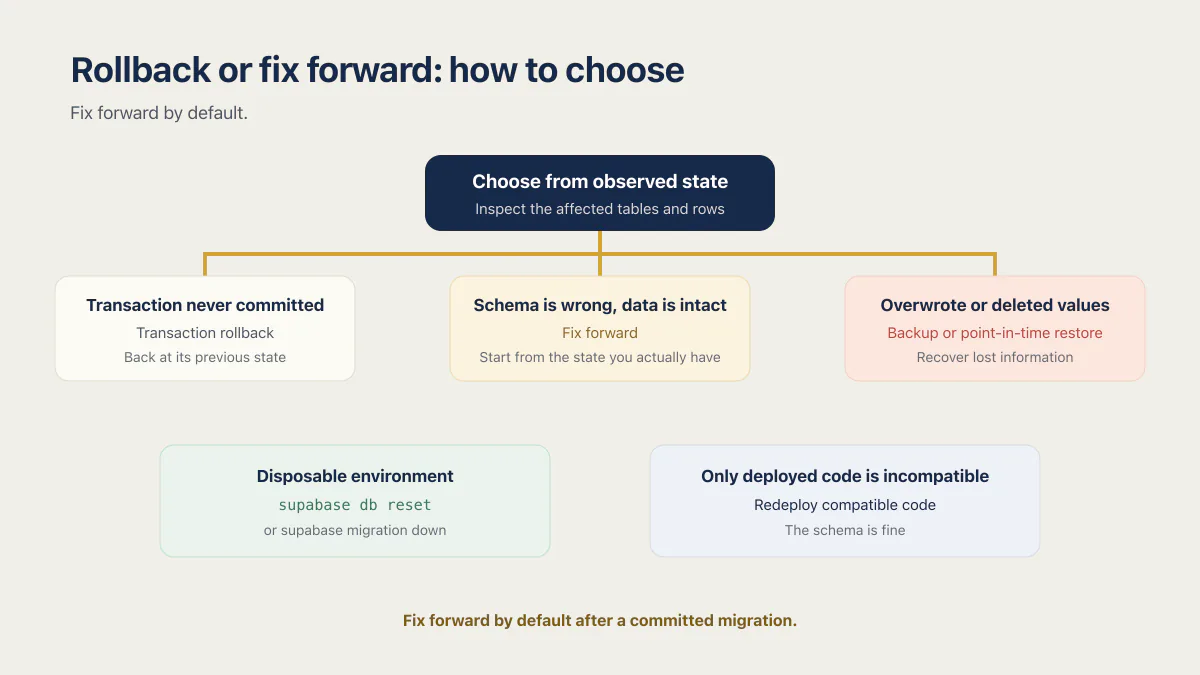
Rollback or fix forward: how to choose
Fix forward by default. Roll the database back only when it holds information no forward change can rebuild, or when nothing has committed yet.
| Situation | Choose | Why |
|---|---|---|
| The migration errored and the transaction never committed | Transaction rollback | The database is already back at its previous state and no history record should exist |
| It committed, the schema is wrong, the data is intact | Fix forward | A new migration starts from the state you actually have and keeps history honest |
| It committed and overwrote or deleted values | Backup or point-in-time restore | No forward SQL can recreate information the database no longer holds |
| The target is a local database, a preview branch, or a disposable staging project | supabase db reset or supabase migration down | State comes entirely from migrations and seeds, so rebuilding costs nothing |
| Only the deployed code is incompatible | Redeploy compatible code | The schema is fine; the running build is the thing that is wrong |
Rewinding the schema on a live database by restoring it to a point before the change is the expensive option. A whole-database restore discards every row written since that point, not only the ones the migration touched.
How does PostgreSQL transaction rollback differ from migration rollback?
PostgreSQL ROLLBACK discards updates made inside the current transaction before they commit. This can protect many ordinary DDL and data statements when the migration runner sends them as one transaction. It cannot travel back to a transaction that already committed.
Supabase CLI source currently describes a normal migration batch as implicitly transactional. PostgreSQL still has commands with different rules. For example, PostgreSQL documents that CREATE INDEX CONCURRENTLY cannot run inside a transaction block, while the ROLLBACK reference applies only to the current transaction. Long table rewrites and locks can also make a technically transactional change operationally unsafe for a busy database.
This creates three boundaries:
- failure before commit can leave the ordinary transaction unchanged;
- success and commit end the transaction safety net;
- commands executed outside that transaction need their own failure and cleanup plan.
Do not add BEGIN and COMMIT blindly around every generated migration. Test the exact file locally and in staging, check whether it contains a concurrent index or other transaction-incompatible command, and verify how the pinned CLI version applies it.
A transaction can protect a migration while it runs. It is not an undo button after the release has committed.
What does supabase migration down do to a database?
supabase migration down is a rebuild command, not a reverse-script runner. The current CLI reference describes it as resetting applied migrations on the target database. The CLI’s own side-effects documentation is more explicit: it drops every user schema and object, reapplies local migrations through the selected version, and applies configured seed files.
The flags decide which database gets rebuilt, and that choice is the whole risk:
| Flag | What it targets |
|---|---|
--local | The local database |
--linked | The linked Supabase project, which is production if that is what you linked |
--db-url <string> | The database at that connection string, percent-encoded |
--last <n> | Resets up to the last n migration versions instead of every one |
The confirmation prompt warns that all data in the database will be lost. That makes the command useful for a local database, a preview branch, or a disposable staging project whose state comes entirely from migrations and seeds. It makes the command the wrong default for a live database with customer writes. Before using --linked, run supabase projects list and confirm the linked marker points to the intended disposable project. Stop if it points to production.
Supabase migration files also are not native paired up.sql and down.sql files. They are ordered <timestamp>_<name>.sql files. If a committed change needs undoing in production, create a later migration containing the compensating SQL and test that new file from the current schema.
Developers have been asking for real down migrations since a GitHub discussion opened in December 2022, where a Supabase maintainer confirmed in August 2024 that automatic down migrations are planned, built on declarative schemas, and not yet shipped. Until that lands, the down migration for a Supabase project is the one you write by hand and apply as a later forward file.
# Confirm where local and remote histories diverge.
supabase migration list --linked

# Create a new forward correction.
supabase migration new restore_customer_name_compatibility

# Inspect pending files, then apply the tested correction.
supabase db push --dry-run
supabase db push
The correction should tolerate the application versions that may run during the deployment. A quick schema reversal can break the current build just as easily as the original migration broke the previous one.
How do you undo a Supabase migration locally with supabase db reset?
supabase db reset recreates the local Postgres container, reapplies every file in supabase/migrations, then seeds from supabase/seed.sql if that file exists. Delete or edit the offending migration, run the reset, and the local database no longer has the change. While you are still developing, that is the fastest way to revert the last migration.
Two flags turn it into the same destructive command as migration down. --linked resets the linked project with your local migrations. --db-url resets whatever the connection string points at. Both rebuild that database and lose its data. Run supabase projects list and read the linked marker before either one goes near your shell history.
# Local only. Rebuilds from supabase/migrations plus seed.sql.
supabase db reset

# Reset up to the last two migration versions instead of all of them.
supabase db reset --last 2

# Apply pending migrations again once the file is fixed.
supabase migration up --local

# Write the difference between local files and the linked project
# into a new migration file, instead of writing the SQL from memory.
supabase db diff --linked -f fix_customer_rename
supabase migration up is the paired direction of migration down: it applies pending migrations to the target database, with --include-all to pick up files missing from the remote history table. supabase db diff is the shortcut for generating reverse SQL. Point it at the state you want and let it produce the statements that get you there, then read every line before you push it.
None of this is safe against a live project. db reset and migration down both belong to environments whose entire state comes from files in your repo.
What if the migration history no longer matches your files?
This is the error, and the fix the CLI itself suggests:
The remote database's migration history does not match local files in supabase/migrations directory.

Make sure your local git repo is up-to-date. If the error persists, try repairing the migration history table:
supabase migration repair --status reverted <version>

And update local migrations to match remote database:
supabase db pull
It means schema drift. The supabase_migrations.schema_migrations table on the remote project lists versions your supabase/migrations folder does not, or the other way round. The usual causes are a change made by hand in the SQL editor or the dashboard, a migration file nobody committed, and an AI tool that applied SQL straight to the remote project. The database migration checklist covers moving dashboard schema changes into ordered, version-controlled migrations.
supabase migration repair edits that history table and nothing else. It runs in two directions:
| Command | What it does to the history table |
|---|---|
supabase migration repair --status reverted <version> | Deletes an existing record, so the CLI stops believing that version was applied |
supabase migration repair --status applied <version> | Inserts a new record, so the CLI stops trying to apply a change the database already has |
Check the real schema first. Repair is bookkeeping for a history table that disagrees with a state you have already verified. It is not a way to make a broken migration look like it never ran. Once the history is honest, supabase db pull writes the remote schema back into a local migration file so the two sides match going forward.
When should you fix forward instead of reversing the schema?
Fix forward when the original migration committed, production contains newer writes, and a compatible change can restore behavior without rewinding the whole database. A forward correction preserves migration history and starts from the state you actually have.
Suppose a release renamed customers.full_name to display_name, but one server version still reads the old column. Renaming it back restores the old server and breaks the new one. The compatible correction adds the old column back temporarily and copies values, allowing both versions to run while the code converges.
alter table public.customers
  add column if not exists full_name text;

update public.customers
set full_name = display_name
where full_name is null;
This is a compensating forward migration. It is not automatically lossless. If display_name was derived from several old fields, the reverse copy cannot recreate the original values. If writes can reach both columns, the application also needs a temporary dual-write or synchronization rule until all running versions agree.
What does a complete reverse migration look like?
An AI builder rarely adds a bare table. It adds the table, an index, an updated-at trigger, and two or three row-level security policies in one migration. Reversing that means dropping the whole set in dependency order, with if exists guards so a partial first run can be repeated. The guards cover a missing policy, trigger, index or function, not a missing table: once public.comments is gone, the first drop policy line errors on the relation, so treat the file as one a migration runner applies once, and try it first on a disposable database.
Name the file after the one it reverses. supabase migration new revert_add_comments produces a <timestamp>_revert_add_comments.sql file, which makes the pair obvious in a directory listing and in review.
-- revert_add_comments: undoes 20260731120000_add_comments.sql

drop policy if exists "comments_select_own" on public.comments;
drop policy if exists "comments_insert_own" on public.comments;

drop trigger if exists set_comments_updated_at on public.comments;

drop index if exists public.comments_post_id_idx;

drop table if exists public.comments;

drop function if exists public.handle_comments_updated_at();
Order matters less than it first looks. PostgreSQL’s DROP TABLE reference says the command already removes the indexes, rules, triggers, and constraints that belong to the table. Write the drops out anyway: the explicit version is the one that still works when you are removing a feature from a table that stays, and it is the one a reviewer can actually read.
The trigger function is the exception that bites. It lives outside the table and survives drop table, so a reverse migration that stops at the table leaves the function behind, and the next migration that tries to create the same name fails. Drop the trigger before the function, since the trigger depends on it.
Which migration tools actually reverse a change?
Migration tools split into three groups: those that run a stored down file, those that compute a down plan from the current database, and those that are forward-only and expect you to write the reversal yourself. Supabase is in the third group, alongside two tools its users often reach for.
| Tool | Reverse mechanism | What you run |
|---|---|---|
| Supabase CLI | Forward-only. No stored down file; migration down resets and rebuilds from local migrations and seeds | A new forward migration, or supabase db reset locally |
| Prisma Migrate | Forward-only. Down migrations are generated on demand by diffing the schema against migration history | prisma migrate diff --script > down.sql |
| Drizzle Kit | Forward-only. No down, rollback, or revert command in the CLI | A new generated migration |
| Atlas | Computes a down plan dynamically from the current database state, with pre-planned files as an option | atlas migrate down, --dry-run first |
| Flyway | Stored undo scripts, prefixed U to match the versioned migration. Paid editions only | flyway undo |
| Liquibase | Automatic reverse statements for many change types in XML, YAML, and JSON changelogs; hand-written rollback blocks for the rest. SQL changelogs get no automatic rollback | liquibase rollback |
| Rails Active Record | Reverses the change method automatically, or runs the down method you wrote | bin/rails db:rollback |
| Django | Runs operations backwards, and raises IrreversibleError when an operation has no reverse | python manage.py migrate <app> <migration> |
| EF Core | Scaffolds a Down method beside every Up and runs it when you target an earlier migration | dotnet ef database update PreviousMigrationName |
Two things fall out of that table. First, having real down migrations does not save you from the hard case: Django raises on an irreversible operation, Flyway warns about destructive changes, and no stored script recreates a value the database no longer holds. Second, Supabase sits in the same forward-only group as Prisma and Drizzle, which is why the answer here is a new migration rather than a missing command.
How does expand-contract avoid emergency rollbacks?
Expand-contract is how a zero downtime migration works in practice. It turns a destructive replacement into several compatible releases. The first migration adds the new structure without removing the old one. Application code then writes both representations or reads the new value with an old-value fallback. A bounded backfill migrates existing rows. Only after measurement shows every caller has moved does a later migration remove the old structure.
For a column replacement, the sequence is:
- Expand: add the new nullable column or table.
- Deploy compatible code: write the old and new shapes, and retain a fallback read.
- Backfill: copy existing data in small, retryable batches and record progress.
- Verify: compare counts, nulls, checksums, or business totals between representations.
- Switch: make the new shape authoritative after every running app version understands it.
- Contract: remove the old column in a later release, after the rollback window closes.
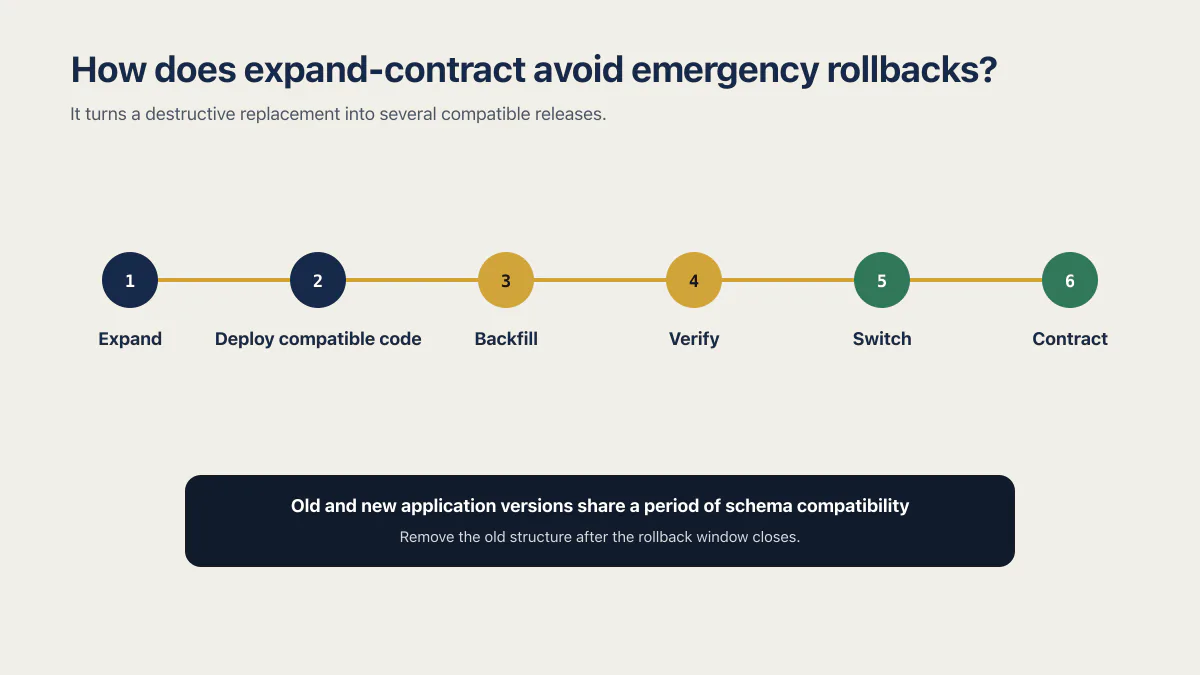
Prisma’s expand-contract migration guide demonstrates the same three-phase idea for replacing a field while preserving data. The pattern is independent of Prisma. It works because the old application and new application share a period of schema compatibility.
Large operations need another layer of care. PostgreSQL’s ALTER TABLE documentation notes that many forms acquire an ACCESS EXCLUSIVE lock and some forms rewrite the table. Test duration and lock behavior on representative data. A migration that is logically reversible can still cause an outage while it holds the wrong lock.
When is a backup restore the only real recovery path?
A backup is required when the migration removed information that the current database no longer contains. Dropped rows, overwritten source values, an incorrect merge, and a destructive backfill cannot be reconstructed by recreating the old columns. That is what makes a migration irreversible in the way that matters: not that the SQL is awkward to undo, but that the information is gone.
Supabase’s backup documentation says daily backups are available on Pro, Team, and Enterprise plans, while Point-in-Time Recovery is a paid add-on that can restore to a chosen point with finer granularity. A restore makes the project unavailable during the process. Daily backups can lose writes since the selected backup; PITR reduces that window but does not decide how to reconcile external events such as payments or emails.
When available, restoring to a new project is safer for selective recovery than overwriting the live project immediately. Supabase’s restore-to-new-project feature requires a paid plan and physical backups, creates a new billable project, and copies the database only. It does not copy Storage objects, Edge Functions, Auth settings, API keys, Realtime settings, or every extension setting. Compare the lost rows, export only what is needed, and preserve an audit trail of the repair.
Supabase database backups also do not contain the objects stored through the Storage API. They contain database metadata about those objects. Recovering a deleted database row and recovering a deleted file are separate jobs.
A destructive migration therefore needs its recovery point verified before it runs, not discovered afterwards. What a Supabase backup does and doesn’t cover, plan by plan, along with the timed restore drill that tells you whether yours would work, is documented in the backup guide. Data-loss bugs in AI-built apps covers application paths that destroy rows without a schema migration.
Mistakes that turn a bad migration into an outage
-
Deleting a pushed migration file by hand. The remote history table still lists that version, so the next
db pushormigration upfails with a history mismatch. -
Running
supabase db reset --linkedorsupabase migration down --linkedagainst the project that has customers in it. Both rebuild the database and both lose its data. -
Repairing a version to
revertedto hide a migration that half ran. The record disappears, the broken schema stays, and the same SQL runs again on the next push. -
Renaming a column straight back while the new build is live. You have now broken the deployment you were trying to protect.
-
Dropping a table and assuming everything it owned went with it. Trigger functions live outside the table and survive.
-
Fixing production and never fixing staging. The next deploy replays the same failure from the same files.
How should you prepare the next migration?
Every production migration needs a recovery note before it runs. State whether the file is transactional, which commands may sit outside a transaction, which application versions are compatible, whether the change destroys information, how long the lock may last, and which recovery point was verified. Larger teams file that note as a data migration rollback plan, and the name is heavier than the artifact: it is still one page naming the recovery point, the application versions that stay compatible, the steps that destroy information, and who decides to use it.
Prefer additive migrations, bounded backfills, and a later cleanup release. Run the exact file against staging with representative data. Confirm the previous application version can run after the expansion step and the next version can run before contraction. For a destructive step, verify a backup or PITR point and decide how writes after that point would be replayed. Where the migration step sits in a release, and which schema changes are safe in one deploy, is covered in how to run database migrations on deploy.
An AI tool can draft the SQL, but the decision is about state over time: old code, new code, old rows, new rows, concurrent writes, side effects, locks, and recovery. Those are the parts a successful demo does not exercise.
Common questions about database migration rollback
Can I recover data lost in a migration?
Lost migration data can be recovered only from another surviving source, such as a pre-change backup, PITR, event log, export, or external system of record. Recreating the old schema does not recreate overwritten values. Restore into a separate project when possible, compare the affected rows, and reconcile later writes deliberately.
Does Supabase have a built-in migration rollback?
Supabase has migration down, but it rebuilds the target database and loses its data; it does not execute a stored reverse file. For a committed production migration, use a new tested migration to fix forward. Use transaction rollback only before commit and backup recovery when information was destroyed.
Does migration repair --status reverted undo the SQL?
migration repair --status reverted deletes a version record from Supabase’s migration history. It does not reverse schema or data. Use it only to reconcile a tracking-table entry with a database state you have already verified.
How do I fix a Supabase migration history mismatch?
Compare the two histories with supabase migration list --linked, inspect the real schema, then repair the history table in the direction that matches reality: --status applied <version> when the database already has the change, and --status reverted <version> when it does not. Run supabase db pull afterwards so your local files match the remote schema. Repair never touches schema or data, so verify the state before you run it rather than after.
Can I run supabase db reset on production?
No. supabase db reset --linked rebuilds the linked project from your local migration files and seed script, which loses every row written since those files were last true. Treat it as a local and preview-branch command only. On a live project, undo a migration with a new forward migration and recover destroyed data from a backup or point-in-time restore.
How do I roll back a change on a Supabase preview branch?
Push the corrected migrations, then delete the preview branch in Supabase and reopen it. Supabase’s branching troubleshooting guide describes this path: reopening the branch reruns every migration in order and reseeds from supabase/seed.sql, the same effect as supabase db reset locally. Branch data is disposable, which is why a full rebuild is the normal answer there and never on production.
Does restoring a previous Vercel or Lovable deployment revert my database?
No. Rolling back a deploy on Vercel, Netlify, Lovable, Replit, or any other host changes the code that runs and leaves your Supabase schema and rows exactly where the migration left them. The old build only works if it is still compatible with the current schema. Reverting the database is a separate job, done with a new forward migration or a restore.
Do backups replace a migration recovery plan?
Backups recover information; compatible migrations restore service with less collateral change. A full restore can introduce downtime and discard newer writes, while a forward correction cannot recreate deleted data. A production change that can destroy information needs both a safe release sequence and a tested recovery source.
Can I roll back the application deployment instead?
An application rollback changes the code that is running. It leaves the database at its current schema and data state. The old build is safe only if it remains compatible with that state, which is why expand-contract migrations preserve both versions until the release has settled.
If you have a working app built with these tools and need it ready for real customers, this is what we do.
Built it with AI. Now it has to hold up for real customers.
The Production Hardening Sprint takes the app you already have and builds the production foundation underneath it. Authentication and access rules, payments that stay consistent, error handling, monitoring, backups, automated tests and a documented handover. Our engineers work inside your existing codebase for ten working days. All 123 deliverables are included, and you get the evidence for each one.
See the Production Hardening Sprint →  $2,500 fixed price · 10 working days · One codebase