If you accidentally overwrote production data, pause writes to the affected workflow, record the exact incident time and timezone, and preserve the current database and logs before attempting a repair. Restore an earlier state into a separate target whenever possible. Then copy back only the verified rows or fields that were damaged, accounting for legitimate changes made afterward.
Do not run a guessed UPDATE, restore an old backup over the live database, delete logs, or keep retrying the action that caused the overwrite. Those steps can turn a recoverable set of old values into a larger and harder-to-explain incident.
What should you do first after overwriting production data?
The first goal is to stop the affected path from changing more data while preserving enough evidence to recover accurately. Pause the save handler, bulk job, admin action, webhook, or background worker responsible for the overwrite. If you cannot isolate it, place the relevant workflow in maintenance mode. Avoid taking unrelated parts of the app offline without a reason.
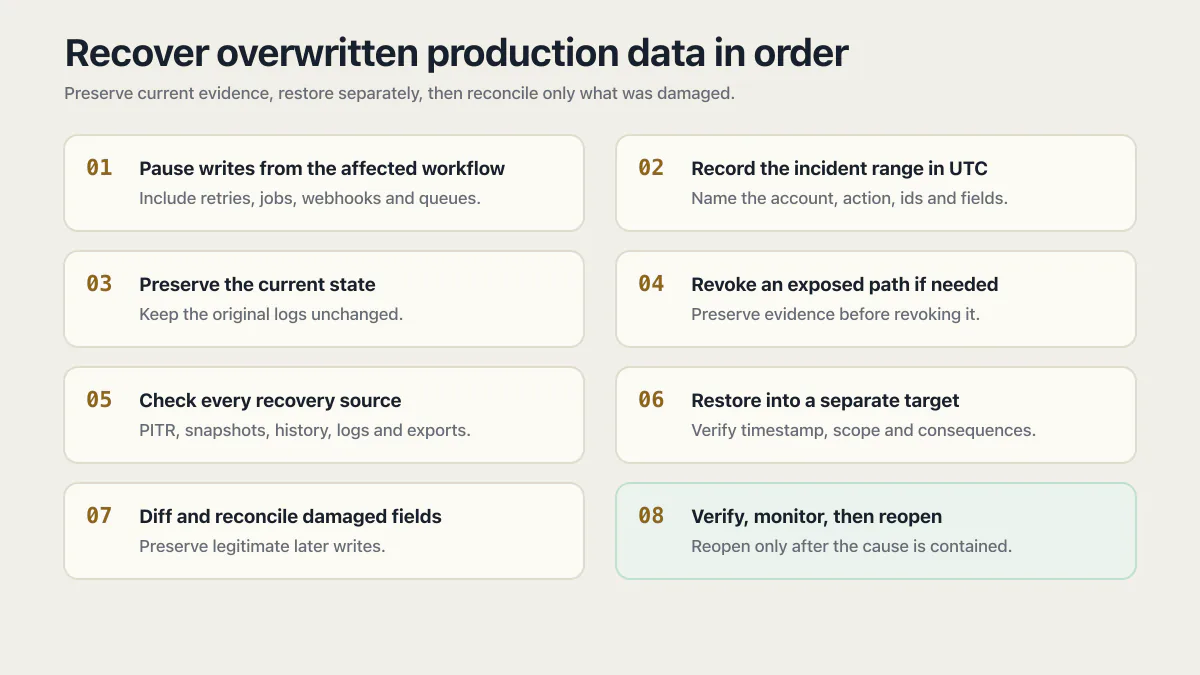
- 01 Pause writes from the affected workflow, including retries, scheduled jobs, webhooks, queues, and administrative tools that can repeat the change.
- 02 Record the earliest and latest possible incident time in UTC, the user or service account involved, the action taken, and the tables, collections, ids, or fields that may be affected.
- 03 Preserve the current state with a provider snapshot, logical export, or support-assisted copy. Place database, application, access, job, and deployment logs under an approved retention hold or make a protected copy without deleting or altering the originals.
- 04 If unauthorized access may be involved, revoke the exposed session or credential after preserving the evidence needed to understand its use. Do not rotate unrelated secrets blindly.
- 05 Check the provider for the earliest and latest restorable times, available snapshots, point-in-time recovery, history tables, audit records, change streams, exports, or delayed replicas.
- 06 Restore the last known-good point into a separate target. Do not replace production until you have verified the timestamp, scope, and business consequences.
- 07 Diff the restored values against current production and reconcile only the damaged records or fields, preserving legitimate writes that occurred after the incident.
- 08 Verify the affected workflow with side effects disabled, monitor for repeated writes, and reopen it only after the cause is contained.
Separate the incident types before choosing a recovery path. A delete removes the row entirely, the id stops resolving, and restore tooling applies; if the row is gone rather than clobbered, use the deletion recovery path. A migration already rewrote the column on its way through: a schema question with its own rollback path. An overwrite usually leaves the row present with one or more wrong values, which means ordinary “undelete” guidance can miss it.
Which “update without where clause” guardrails protect app writes?
Type an UPDATE with no WHERE clause into a JetBrains database tool and the SqlWithoutWhere inspection catches it first, flagging exactly what its docs describe: usages of DELETE or UPDATE statements without WHERE clauses. MySQL’s sql_safe_updates server variable throws an error before the same shape runs, unless the statement names a key in its WHERE clause or carries a LIMIT. In a 2023 Microsoft Q&A thread, the accepted answer found no Policy-Based Management rule for this in SSMS and suggested per-table triggers. The guardrails that do exist are all there for one sentence: this statement is about to touch every row.
The JetBrains inspection sits in its own client and never sees a Supabase or ORM call. MySQL’s control is different: sql_safe_updates is a dynamic global/session server variable, so it can govern an application connection when that connection enables it or inherits it from the global setting. It is off by default, so the application or database configuration has to apply it deliberately. The same gap shows up in the one-database, no-staging problem: a save handler with a clear path to production runs whatever the active database controls allow. Overwrite is that failure’s quieter cousin, with no crash or cascade to flag it.
Most AI-generated save handlers write the whole row, because “update the profile” is easier to satisfy that way than tracking which field changed:
// Whole-row overwrite: nothing left to compare it against.
await supabase.from('profiles').update({
  name: form.name,
  email: form.email,
  bio: form.bio,
}).eq('id', userId)

// Scoped patch: a concurrent edit to another field survives.
await supabase.from('profiles').update({ bio: form.bio }).eq('id', userId)

// Append-only history, schematic: the previous state is saved first.
// Two separate calls are not atomic, and a Supabase call reports failure in
// its error field rather than by throwing, so check it before the update.
const { error } = await supabase.from('profile_history')
  .insert({ profile_id: userId, ...oldRow })
if (error) throw error
await supabase.from('profiles').update({ bio: form.bio }).eq('id', userId)
// In production, do both inside one database function or transaction.
No version history and no audit trail catch the difference, because nothing generated one. Both writes return 200 in the demo, and the gap only shows up the day someone needed the old value.
Can overwritten database values still be recovered?
Overwritten values can be recovered when another system retained their earlier state. The strongest source is often a point-in-time restore created from backups and database change logs. Other useful sources include a version-history table, an immutable audit record that stored old values, a scheduled export, a warehouse or event stream, provider support artifacts, and sometimes a downstream document that contains the exact prior value.
None of those sources should be assumed. A normal application log may record that an update occurred without recording the old field contents. A read replica usually receives the same overwrite quickly and is not a historical copy. PostgreSQL’s write-ahead log enables point-in-time recovery only when the required base backup and archived WAL records were retained and the recovery process was configured correctly.
| Possible source | What it can establish |
|---|---|
| Point-in-time recovery | A coherent database state shortly before the overwrite, limited by the provider’s earliest and latest restorable times |
| Daily or manual snapshot | Values as of the snapshot, with a gap for every legitimate change made afterward |
| History or audit table with old values | Previous versions of selected records, if the history write was atomic and complete |
| Application or access logs | Timing, actor, request, and scope; many logs do not contain the previous value |
| Warehouse, export, event stream, or external system | A secondary copy of some fields, subject to sync delay and transformation |
The absence of PITR or a history table does not prove the value is gone. Inventory the systems that consumed or copied the data before making that conclusion. Keep provenance for every recovered value so the final correction is explainable.
Do not assume a history mechanism worked just because the schema shows one. Across the audits behind the AxonBuild record, run in June and July 2026, the weak link was usually the app rather than the database, and the clearest case was a health-data app whose own compliance rule required an immutable log of every clinical write, a strange thing to fail at in an app whose own pitch was AI guardrails for health data. Its code committed the write first, then logged the audit event as a separate step that swallowed its own failure and returned success anyway. The write happened. The record of what the row used to say did not.
How do you choose the correct point-in-time restore timestamp?
Choose a recovery point before the earliest possible damaging write, then restore it into an isolated target and inspect it. The timestamp must include a timezone. Account for queued work and retries because the button click, request log, job execution, and database commit may have happened at different times.
Managed platforms expose different precision and delays. Supabase documents point-in-time selection within the available recovery window and warns that an in-place restore makes the project inaccessible during recovery. Its paid-plan Restore to a New Project workflow requires physical backups and creates a database-only copy, which is safer for investigation because the source remains available. Amazon RDS similarly documents that point-in-time recovery creates a new DB instance without modifying the source. PostgreSQL documents recovery targets by time, named restore point, or transaction ID when continuous archiving was set up beforehand.
Use the provider’s current instructions rather than copying a command from a generic article:
- Supabase database backups and PITR
- Supabase Restore to a New Project
- Amazon RDS point-in-time restore
- PostgreSQL continuous archiving and PITR
If the earliest plausible incident time is 14:05 UTC, a 14:04 restore may still be too late if a background batch began earlier. Inspect application, queue, and database logs first, then choose a conservative point. You can restore more than one candidate into separate targets when the provider supports it.
Why should you restore to a separate database before repairing production?
A separate restore preserves current production while giving you a readable copy of the old state. Current production may contain valid orders, status changes, messages, or user edits created after the overwrite. Replacing it wholesale with an older snapshot would recover the damaged values by discarding every valid write after that snapshot.
An old database can supply the missing values without becoming the new production database.
Treat the restored copy as sensitive production-derived data. Restrict network access, disable outbound jobs, email, webhooks, and payments, and use test credentials. A restored scheduler or queue worker can replay real side effects if it starts automatically.
Once the target is ready, compare a bounded set:
- Identify the affected primary keys and fields from logs, job inputs, or the faulty query.
- Compare old and current versions for those keys.
- Separate damaged fields from legitimate post-incident changes.
- Check child records, totals, permissions, and derived values that depend on the overwritten field.
- Produce a proposed correction set for review before writing anything to production.
For a large or regulated dataset, preserve the diff, approvals, scripts, hashes, and timestamps according to the organization’s incident and retention requirements. This article cannot determine notification, legal, or regulatory duties for a specific incident.
How should you copy recovered values back into production safely?
Reconcile the smallest verified unit that fixes the damage. A field-level correction is safer than replacing a row, a bounded set of rows is safer than replacing a table, and replacing a table is usually safer than rolling the entire database backward. The appropriate unit depends on foreign keys, triggers, generated totals, event consumers, and the business meaning of the data.
Before the production write:
- take and retain a fresh snapshot or export of the current state;
- verify the correction set in a disposable copy;
- stop the affected writers for the reconciliation window;
- use a transaction where the database and operation support one;
- make the write idempotent or guarded by the current version or value;
- capture who approved and executed it;
- verify counts, relationships, audit records, and the user-visible workflow afterward.
Avoid a generic copy command that replaces the live table from the restored table. Such a command cannot know which post-incident changes are legitimate. It may also fire triggers, reset timestamps, violate constraints, or duplicate downstream events. If the repair also means deleting junk rows, the database cleanup checklist covers finding orphaned rows, rehearsing the delete, keeping an undo, and proving valid rows survived.
What if there is no backup, PITR, or version history?
Recovery becomes reconstruction when no trustworthy historical copy exists. Preserve what remains, then search for authoritative copies in exports, customer receipts, invoices, email events, object metadata, analytics events, warehouse tables, support systems, payment processors, and other services that received the values.
If what is missing is individual rows that were deleted rather than overwritten, that is a different recovery ladder with its own page. Rank each source by authority and freshness. A payment processor may be authoritative for a charge amount but not for an internal order status. An emailed receipt may show the customer’s address at checkout but not a later approved correction. Do not blend sources without documenting which fields came from where.
When exact recovery is impossible, identify the affected people and records, communicate through the organization’s incident process, and keep an explicit list of unknowns. Guessing values to make the interface look complete destroys the distinction between recovered fact and inferred replacement.
How do you prevent the next silent overwrite?
Prevent repeat overwrites by storing history for consequential data and rejecting stale writes. Optimistic concurrency adds a version number or last-updated token to each read and requires the same value when saving. If another writer changed the record meanwhile, the update affects zero rows and the app asks the user to reload or merge instead of silently winning.
Patch only the fields the user changed rather than resending an old whole-row copy. Put an append-only history record and the business update in the same database transaction where possible. Add scope previews and explicit confirmation for bulk operations. Testing a restore before the day you need one is the only way to know whether the recovery path works. The data-loss paths in AI-built apps show the related failure modes.
Common questions about overwritten production data
Can I recover an overwritten row with point-in-time recovery?
Yes, if the provider’s recovery window reaches a moment before the overwrite. Check whether PITR is on at all, and whether its retention window covers the exact timestamp of the overwrite. Restore that point into a separate target, verify the old row, and reconcile only the damaged fields into current production. A whole-database rollback can discard valid writes made after the chosen time.
Should I stop the whole app after an accidental overwrite?
Pause the narrowest workflow that can repeat or compound the damage. Stop the whole app only when the affected writer cannot be isolated or continuing operation would make the incident worse. Preserve current state and logs before destructive changes.
Is a read replica a backup of the old value?
Usually not. A normal read replica applies the same updates from the primary and may receive the overwrite within seconds. A deliberately delayed replica can offer a recovery window, but only if it was configured in advance and replication is stopped before the damaging change arrives.
Can database logs show the value before it was overwritten?
Sometimes, but ordinary logs often contain the statement, actor, or record identifier without the full prior value. PostgreSQL WAL supports recovery as part of a configured backup chain; it is not a convenient audit table. Preserve the logs and use the database provider’s recovery workflow.
Why doesn’t my ORM or Supabase client warn me the way a SQL tool would?
JetBrains’ warning lives in its database client, so an ORM or API handler never passes through it. MySQL’s sql_safe_updates is a server session control instead and can reject the same application-originated statement when it is enabled on that connection. A request handler calling .update() receives no GUI warning, so protection depends on the controls active for its database session.
When is it safe to reopen the affected workflow?
Reopen it after the damaging writer is disabled or corrected, the reconciliation has been verified, legitimate later writes are preserved, and monitoring shows no repeat attempt. Keep the incident timeline, correction set, and remaining unknowns with the recovery record.
If you have a working app built with these tools and need it ready for real customers, this is what we do.
Built it with AI. Now it has to hold up for real customers.
The Production Hardening Sprint takes the app you already have and builds the production foundation underneath it. Authentication and access rules, payments that stay consistent, error handling, monitoring, backups, automated tests and a documented handover. Our engineers work inside your existing codebase for ten working days. All 123 deliverables are included, and you get the evidence for each one.
See the Production Hardening Sprint →  $2,500 fixed price · 10 working days · One codebase