Your AI builder shows a button marked Publish, a tutorial tells you to deploy the app, and somebody in a forum asks whether it is deployed yet. Nobody stops to define the word, because in software it turns into assumed knowledge by about week two.
Deploy means putting your code somewhere other people can reach it, instead of only on the machine it was written on. The word carries three working definitions in software: a thing your host produced, a process with several stages, and a button in your AI builder marked Publish. All three describe the same event.
This page is for the reader who has not deployed anything yet and wants the words before the first attempt. If you already deployed and the app broke on arrival, why an app can work on your laptop and break the moment it is deployed is the page for that situation. Every vendor document quoted below was read on 16 August 2026, and nothing described here was tested hands-on.
What does deploy mean in software?
Deploy is a verb, a deployment is a noun, and deployed is an adjective, and all three get used in the same sentence by people who assume you know which is which. Deploying software means copying a finished version of it onto a computer that answers requests from the internet, so people other than you can use it.
The verb is the instruction: you deploy the app, meaning you send a working copy of it to a machine that is always on and connected. A deployment, the noun, is one specific attempt at that. Your host keeps a list of them, each with a timestamp, the change it contains, and its own web address, which is why a developer can say “the deployment from an hour ago” and mean something exact rather than something vague.
Deployed is the adjective, and it is the one that causes trouble in support threads. When someone says the code is deployed, they mean the version they are discussing has been sent out and is the one currently answering requests. It says nothing at all about whether the app works.
Deploying a web app means the same thing with the destination filled in: the pages and the server code go onto a host, the host gives them a web address, and from that moment anyone with the address can open the app. The meaning of deployment in software stops there. Everything hard about it lives in the details underneath.
Other software is deployed to app stores, devices, private networks, or on-premises systems. This page uses the hosted web-app meaning from here on.
Why deploy means three different things in software
Ask three sources what a deployment is and you get three answers that do not fit together, because the word is doing three jobs at once and almost nobody says which one they mean.
| Who is saying it | What they mean by deploy | Where that comes from |
|---|---|---|
| Your host, Vercel | A deployment is a thing you now own: “A deployment on Vercel is the result of a successful build of your project.” Each one gets its own address. | Vercel’s deployment documentation |
| The reference glossaries | Deployment is a process: “Software deployment is all of the activities that make a software system available for use.” | Wikipedia’s software deployment entry |
| Your AI builder, Lovable | The same act under a different word: “Publishing turns your Lovable project into a live web app by deploying a snapshot to a URL you can share.” | Lovable’s publishing documentation |
| A developer, casually | ”I deployed it” almost always means the change is live for real users now. | Ordinary usage, no document behind it |
Sumo Logic’s software development glossary gives the fullest version of the process definition: “Software deployment includes all of the steps, processes, and activities that are required to make a software system or update available to its intended users.” That sentence and Vercel’s sentence name two things with one word. One describes a body of work, the other describes an artifact sitting in a dashboard, and the word deployment covers both the action and the version it produces.
A fourth shading shows up in most textbooks. Sanity’s glossary entry, dated 15 April 2026, puts it this way: “In software development, deployment refers to the transition of software or updates from a development environment to a production environment, ensuring that any changes do not disrupt the live system.” That treats a deploy as a move between two places, which is useful right up until you realize nobody told you what the two places are.
Every one of those descriptions is the same event seen from a different seat. The host is looking at the artifact it produced, the glossaries at the work surrounding it, the builder at the button, and the developer at the consequence. Nobody reading all four in one afternoon is being slow, because the word is genuinely carrying that much.
The words that come with deploying software
Deploy never arrives on its own. The words below turn up in the same paragraph, the same error message and the same forum reply, and each one has a plain meaning underneath the jargon.
| Word | What it actually means | Where it bites you |
|---|---|---|
| build | Turning the code you or the AI wrote into the files a server can serve | A build can finish successfully while the app is still broken. Green build, broken app is an ordinary Tuesday |
| environment | Another complete copy of your app. Your laptop is one, the live site is another | Two environments can share a single database without saying so, which is how a test writes to real customer data |
| production | The copy real people use | The name sounds like a quality standard, but it only names a location |
| preview | A copy you can open before customers can | Which of the two you have open is decided by the deployment, not by the address in your browser |
| rollback | Putting the deployment before this one back in place | It restores the code and does nothing at all to the data |
| release | Often the same act as deploying, sometimes the later moment when users get the change | On a small app the two collapse into one event, so the distinction only appears when you read larger teams’ writing |
| hosting | The machine, or the rented slice of one, where your deployed files sit and answer requests | Hosting is rented by the month even when the deploy itself was free |
| domain | The address people type | Deploying gives you an address. A domain is the address you chose, and connecting the two is a separate task |
| environment variable | A setting kept outside the code, configured for each environment | The platform supplies the values configured for that build, runtime, and target. Missing target values break the app |
Two of those words hide a second meaning. Production is a place, the copy real people use. Production ready is a quality bar, a judgment about whether code should be in that place at all, and it is answered by reading the code rather than by looking at a dashboard. Production ready means something different again from production, and a deploy will move code into production without anyone having formed an opinion on the second question.
Environment is the word that costs beginners the most money. What breaks when you deploy without a staging environment covers the expensive version: one database sitting behind both copies of the app, so a harmless-looking test on the copy nobody was watching rewrites the data everyone depends on. Telling a preview apart from the real thing is a related small skill, because the two can share far more than their labels suggest. Rolling a deployment back on the big hosts puts the earlier code back and leaves your data exactly where it is, which is the most surprising thing about rollback for anyone who assumed it meant undo.
Environment variables stay outside the source code. A host supplies the values configured for the target environment during the applicable build or runtime. Vercel documents that configured variables are available during its build step and function execution, and that changes apply only to new deployments. Local values do not appear in production automatically. An app that worked at home and returns a blank screen after its first deploy is usually missing a required production value. Where environment variables actually live covers the host dashboards and local files in detail.
What your AI builder calls deploying
Almost nobody sees the word deploy on the button they actually press. Each builder has its own word for the same act, and the gap between that word and the behavior is where the first surprise lands.
| Builder or host | The word you press | What its documentation says happens | What it leaves out |
|---|---|---|---|
| Lovable | Publish | A snapshot of the project goes live at an address you can hand to someone | Repetition. The docs say a change does not reach the live app on its own, so every later edit needs the button again |
| Vercel | Deploy | A deployment is the result of a successful build, and there are three default environments: Local, Preview and Production | A preview deployment stays a preview until somebody uses Promote to Production, which Vercel describes as converting a preview deployment to production |
| Replit | Publish | Current database apps get a separate production database when needed during publishing. Legacy Neon-backed apps require the owner to create one in the publish settings | Development rows move only when the legacy owner chooses the optional seeding step. Publishing itself does not copy them by default |
| Any builder’s built-in preview | Preview | The panel inside the tool showing your app running | Not a deployment at all. Unless the builder gives the preview a shareable address, nobody outside your account can reach it |
The Lovable line is the one to write down. Its documentation states plainly that a change you make does not go live on its own, and the instruction that follows is to click Publish, then Publish changes. Somebody who spends an afternoon editing their live app inside the builder and never presses that button has changed nothing a visitor can see.
Moving off the builder’s own hosting is a job in itself, and the route for one builder is set out in how to deploy a Lovable app to Vercel. Actually publishing a site you built with AI is a sequence of decisions rather than a definition, and this page deliberately ends at the vocabulary.
What deploying your app does not do
Five jobs sit outside the word. Each of them is a common reason a first deploy lands on a blank page instead of a working site.
- Deploying does not copy your database. The code travels. The data on your machine stays on your machine, and the live app starts with whatever the live database already held, which is usually nothing.
- Deploying does not copy local secrets automatically. API keys and connection strings live outside the code by design. The host supplies values already configured for the target environment, and you must add any required value that is missing there.
- A deploy does not make the app correct or safe. It changes who can reach your code, and nothing about what the code does when they get there.
- A deploy does not repeat itself. Lovable’s documentation is explicit that a new change does not go live by itself, and on a host wired to a Git repository the trigger is a new commit rather than an edit sitting in your editor.
- Rolling back does not undo a data change. The previous code returns. Rows written, deleted or migrated in the meantime stay written, deleted or migrated.
None of it is a malfunction, and it is the reason experienced people treat a first deploy as the start of the work rather than the end of it. The production deployment checklist covers what to check before, during and after every release.
Why deploying an app is where non-developers get stuck
The mining corpus behind this blog holds 1,255 rows, each one a public post or comment from somebody building with AI tools. The whole set was read in a single pass on 14 August 2026, and five rows carry the same situation, none of them a bug report: the app got built, and then it would not go live.
One of the five had a finished product and a single wall left in front of it, which was getting the thing onto the internet where other people could open it. Another works in design rather than engineering and lost a night to moving an AI-built project onto a host, hitting an error, clearing it, then hitting the next one, and the next one after that. A third had the product working long before it was reachable, and the entire gap between those two states went on the deploy. A fourth found that the time the AI saved during the build came back later as failed deploys, a search-indexing problem and a path bug.
Five rows out of 1,255 is a small count, and this corpus leans heavily towards people posting finished work rather than complaining, so the number says the situation recurs and nothing about how common it is in general.
All four of those had a working app on their own screen before they hit the wall. The builder’s preview is convincing enough that finished feels finished, and nobody had warned them there was a second job waiting with its own vocabulary and its own ways of failing.
What the software deployment process actually covers
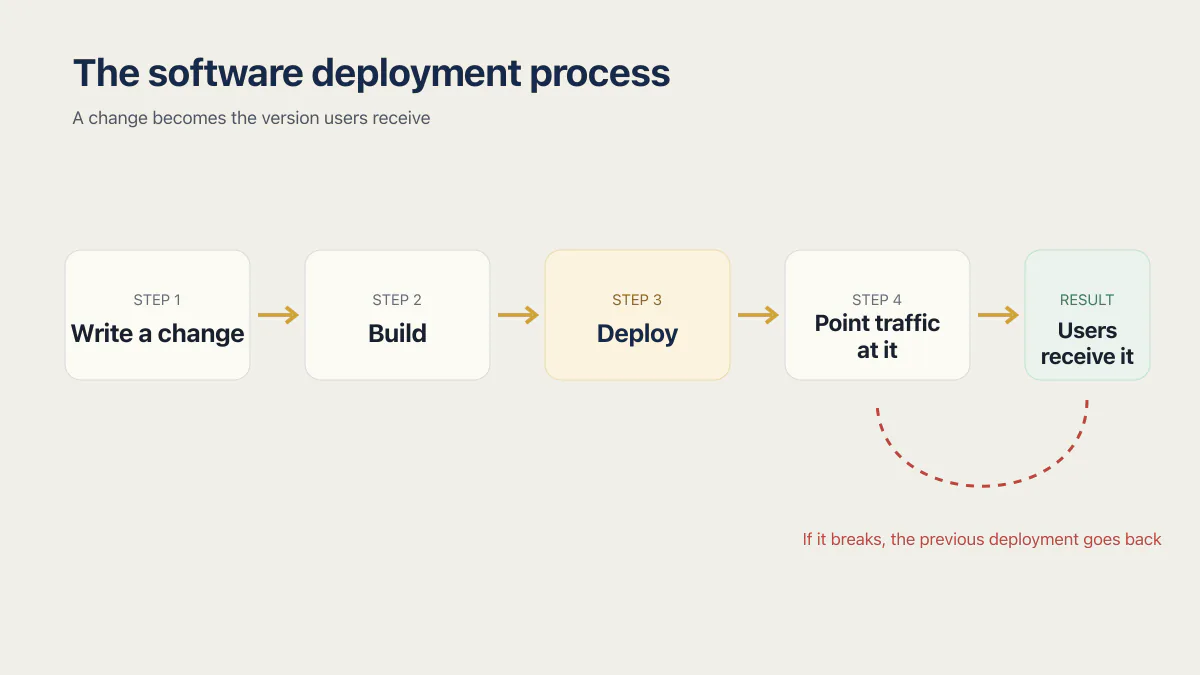
Software deployment process is the phrase the textbooks use, and behind it sits a short sequence that stays the same whether two hundred engineers run it or a single button does.
Someone writes a change. The change is built, which turns readable source into the files a server can serve. The build is deployed to an environment, usually a preview first and production afterwards. Traffic is pointed at the new deployment, which is the moment users actually receive it. If it breaks, the previous deployment goes back. The release readiness checklist covers that path for one app: an automated staging deploy, a promotion gate, and the check after promotion.
The software build and deployment process is the first two of those steps, and keeping them apart explains most of the confusing messages a host sends you. A build failure means your code never turned into servable files, so nothing reached the internet. A deployment that succeeded and still shows an error means the files are live and something they need while running is missing.
Teams can automate some or all of these steps. Whether a solo founder benefits from continuous deployment depends on release frequency, the consequence of a bad release, required checks, and how quickly a change can be reversed. A low-frequency app may use a simple manual gate; repeated or high-consequence releases can justify more automation even when one person owns the app. DevOps for startups covers the controls behind a release path you can trust and what DevOps means for a small team.
Deploying is one step inside something longer that begins before the code is finished and continues after the site is up: domains, accounts, store listings, the first real users. The whole launch sequence in order is a bigger question than a glossary can answer.
Common questions about deployment in software
What does deployment mean in software, in simple words?
Deployment means moving a finished copy of your app from the machine it was written on to a machine that is always on, so that other people can open it. In simple words, it is the difference between the app existing and the app being reachable.
What is the difference between deploying and publishing?
Publishing is the word most AI builders put on the button that deploys your app. Lovable’s documentation says publishing takes a snapshot of your project and makes it reachable at an address you can share, so the two words describe the same act from different seats.
What is the difference between a deployment and a release?
A deployment puts a version of your code onto a server. A release is the moment users actually get the change. On a small app the two happen seconds apart and the distinction never comes up. On larger teams code is often deployed days before anybody switches it on.
What does it mean to deploy a website?
Deploying a website puts its files on a host that answers requests from the internet and attaches a web address to them. Before the deploy, the site exists only where it was built. After it, anyone holding the address can load the site.
What does it mean when someone says the code is deployed?
Deployed means that version of the code has been sent out and is the one currently answering requests. It is a statement about location, never about quality. Code can be deployed and broken at the same moment, which is why “it is deployed” never means “it is finished”.
Is my app live as soon as it is deployed?
A successful deploy usually does mean the app is live, though not always. A deployment can succeed and still be unreachable for the people you meant, because the address it produced is a generated one nobody knows yet rather than your own domain, because a preview deployment sits behind the host’s sign-in or a visibility setting, or because what you created was a preview deployment rather than the production one your domain points at.
Does deploying my app make it safe to use?
No. Deploying changes who can reach your code and nothing about what the code does once they get there. A deploy will put a missing login check or an exposed database in front of the whole internet exactly as reliably as it puts a working feature there.
Whether the app is ready to be live at all is the separate question, and it is worth answering before real users show up rather than after.
Where should I deploy my app?
For a web app built with an AI tool, the sensible default is wherever your builder already deploys, until something specific pushes you off it. Cost, region, which account controls the database and which languages a host supports are the four things that usually decide otherwise.
Choosing between hosts is a comparison rather than a definition. Where to deploy a web app is worth answering with your own constraints written down first, because the honest answer changes with them.
If you have a working app built with these tools and need it ready for real customers, this is what we do.
Built it with AI. Now it has to hold up for real customers.
The Production Hardening Sprint takes the app you already have and builds the production foundation underneath it. Authentication and access rules, payments that stay consistent, error handling, monitoring, backups, automated tests and a documented handover. Our engineers work inside your existing codebase for ten working days. All 123 deliverables are included, and you get the evidence for each one.
See the Production Hardening Sprint →  $2,500 fixed price · 10 working days · One codebase