Launching an app is a sequence of eight steps, and the order is set by the gates you cannot rush rather than by your announcement. Two of those gates belong to Apple and Google. One of them, a new Google Play account’s closed test, runs for a fixed 14 days.
Most of what ranks for this question is a marketing schedule. Three of the top-ranking guides for it could be read in full on 16 August 2026, and all three run the same shape: validate the idea, research the market, build it, run a beta, submit to the stores, then send the press kit. That is a real job, written for somebody who has a development team behind them. The reason a first launch date slips is almost never the press kit.
So this page works as a map. Every branch gets one straight answer and a pointer to the page that covers it properly. If there is no app yet, then building it is the job and launching it is not.
What launching an app actually means when you did not write the code
Launching means two jobs running at once: making the software hold up when strangers use it, and getting it in front of those strangers. The sequence interleaves them. Four words carry the technical half, and every AI builder uses all four without ever defining them.
Deploy, build, environment and production are the four words this whole sequence is written in. A deploy is the act of copying your code onto the computer the public reaches. A build is the file that gets copied, produced from your project and not typed out by anyone. An environment is one running copy of the app with its own settings and its own data, which is why the version on your screen and the version on the internet can behave differently while running identical code. Production is the environment real people touch. Each of those deserves its own plain-English page, and everything below assumes you have met them.
People who have never written a line of code do finish this. One person in the founder corpus behind this site describes having no development background and getting their own app onto both the Apple store and Google Play. What gets you there is knowing which of the eight steps is currently blocking you, and that is exactly what a launch guide written for an agency leaves out.
Launching a new app splits early into two very different amounts of work. If what you built is a website rather than a phone app, the sequence is shorter and the gates are different: no store review, no developer account, no store-signed binary, and the whole thing can be live the same afternoon once the site builds and deploys. Publishing a website you built with AI is its own route with its own failure modes.
The steps to launch an app, in order
The steps to launching an app are the same eight whether the thing is a website, a phone app, or both. What changes is who has to approve each one, and that is the column most guides leave out.
| Step | What it actually is | What gates it | Who covers it in full |
|---|---|---|---|
| 1. Decide what live means | A web address, a listing in a phone store, or both | You | The branch below |
| 2. Make the software hold up | Evidence that strangers can use it without losing data or money | You | The readiness page |
| 3. Open the accounts | Developer accounts, hosting, a domain, a way to take money | Apple’s and Google’s verification, on their clock | The developer-account page |
| 4. Produce a build | A signed file, not a preview link | Your builder, or a cloud build service | The store walkthroughs |
| 5. Beta | The app on devices that are not yours | Apple reviews the first external TestFlight build; Play holds new personal accounts in a closed test | The TestFlight and beta pages |
| 6. Submit | Listing, images, privacy answers, upload | Apple’s and Google’s review queues | The publish hubs |
| 7. Launch day | Turning it on and telling people | You | This page |
| 8. The first week | Whether it holds, and whether anyone comes back | Real accounts | This page |
Nothing in that table is controversial, and most of it appears in some form on the guides that already rank. One column does not. Of the three top-ranking guides for how to launch an app that could be read in full on 16 August 2026, one from the software agency Vacuumlabs, one from Alchemer and one from Bubble, none puts a backup restore, a load check, a rollback plan or a payment verification anywhere in its launch steps. The closest any of them comes is Bubble’s advice to watch crash logs once you are live. That is a claim about three pages read on one day, not about the whole first page of Google.
Launching a mobile app, launching a website, or both
Mobile app launching has a step a website launch does not: somebody else decides when your build goes public, and there is no way to buy past them. A website launch has no review queue and no developer account, so steps 3 through 6 shrink to buying a domain, getting the build deploying to a host, and a short test with a few outside users before you point the domain at it. The web-only technical pass has its own list: whether the old URLs still point somewhere, whether the forms actually arrive, and whether anything is being measured, with no store gates in it at all. The go live checklist for a web app covers every switch to set, and the evidence it is set, before real customers arrive.
If you are doing both, start the store path first and let the website follow. The website can move in an afternoon. The store cannot.
What “ready” means, and who decides
Ready means the software survives people who are not you, and you are the one who decides, against evidence rather than against a feeling. In a fixed study of 26 working AI-built applications, 22 had at least one confirmed-critical finding, which says something about the population and nothing about your app.
“It works on my screen” fails as a test for a boring reason: your screen is one account, one network, one set of data, and one person who already knows which buttons not to press. The gap shows up the first time two accounts exist at once, or the first time a payment fails halfway through.
Those 26 apps were reviewed in June and July 2026 under fixed inclusion rules, 21 of them public third-party repositories and 5 founder-owned, and none of them reached the study’s green band. The 26-app selection, scoring and denominator ledger is worth reading before anyone quotes that number, because a fixed cohort of 26 cannot give you a probability for your own app. What it can do is tell you which checks are worth the afternoon.
Whether the software itself is ready is a separate check with its own evidence, and that page owns the verdict and the seven gates behind it. This page owns the calendar those checks sit on. Where the two meet is one row in the table further down, and that row points there instead of repeating it.
Beta: putting it in front of people who are not you
Beta is where the app stops being a demo, and it is also where both stores insert themselves into your schedule.
On iOS, the way to get a build onto somebody else’s phone before release is TestFlight, and Apple reviews the first build you hand to an external group before anyone outside your own team can install it. A beta is not something you start on the morning you decide to start it. Getting a build into TestFlight and out to people who are not you has its own walkthrough, including the route for people without a Mac.
On Android the gate is larger, and it is not really about the beta at all. A new personal Google Play developer account has to run a closed test before it may apply for production access: at least 12 testers opted in at the moment you apply, and opted in continuously for the preceding 14 days (Google’s app testing requirements page, read 16 August 2026). Testers who join, test for a few days and drop out do not count toward that minimum, and a tester who leaves and comes back starts a fresh 14 days. The closed test is a gate on the account rather than a quality bar on the app, and it is the single item most likely to set your launch date.
What a beta is for, how to recruit for one, and when to stop, is its own piece of work. The calendar below only needs to know when it starts.
Submitting to the stores
Submission is the shortest substantial section here on purpose. It is the part with the most already written about it and the least you can influence once the file is uploaded.
Submitting to the App Store means filling in a listing, uploading a signed build from a developer account in your own name, answering Apple’s privacy and content questions, and waiting. That is the same job whether you searched for launching on the App Store, on the Apple store, or on iPhone: one route, one queue. The six things an App Store submission needs are set out in full on their own page, which separates what the builder produces from what you have to answer yourself.
Submitting to Google Play is the same listing work against a different set of questions, plus the closed test above if the account is new and personal. Launching on Play, on Google Play, or on Android is again one route with one page behind it, however the search was phrased.
Doing it free is the question sitting under several of those searches. Publishing a website costs almost nothing; publishing to either store costs money before it costs anything else. The questions at the end of this page answer that one without any figures on it, and point at the page that carries the current ones.
The pass to make before you upload anything is a different list again. What each store rejects for is predictable and written down, and reading it once costs less than a rejection does.
The launch calendar, counted backwards from what you cannot rush
A new app launch calendar is usually written forwards from an announcement: three months before, do this; three weeks before, do that. Alchemer’s thirty steps and Bubble’s three phases are both built that way, and neither is anchored to anything that can actually hold a launch up. Anyone counting forwards to launch a new app ends up with a date the stores then move.
Count backwards instead, from the only things with fixed lengths.
| Counting back from launch day | What it actually requires | Who controls how long it takes |
|---|---|---|
| Launch day | The announcement, against an app already live or approved | You |
| Store review, before that | A complete submission sitting in Apple’s or Google’s queue | The store, and no number for it belongs here |
| Play production access, before that | An application made once 12 testers have stayed opted in for the full 14-day window | Google’s rule |
| Play closed test starts, at least 14 days before that | Twelve real people who install and stay opted in | You until it starts, then a fixed wait |
| First external beta build, before testers can install | TestFlight App Review of the first external build on iOS | Apple |
| The software checks, running alongside all of it | Evidence that the app holds up for people who are not you | You, and the readiness page owns this row |
| Developer accounts open, before any of the above | Identity verification, and on Play a device check as well | Apple and Google |
| Announcement slot chosen, any time after the accounts | A date the gates above actually allow | You |
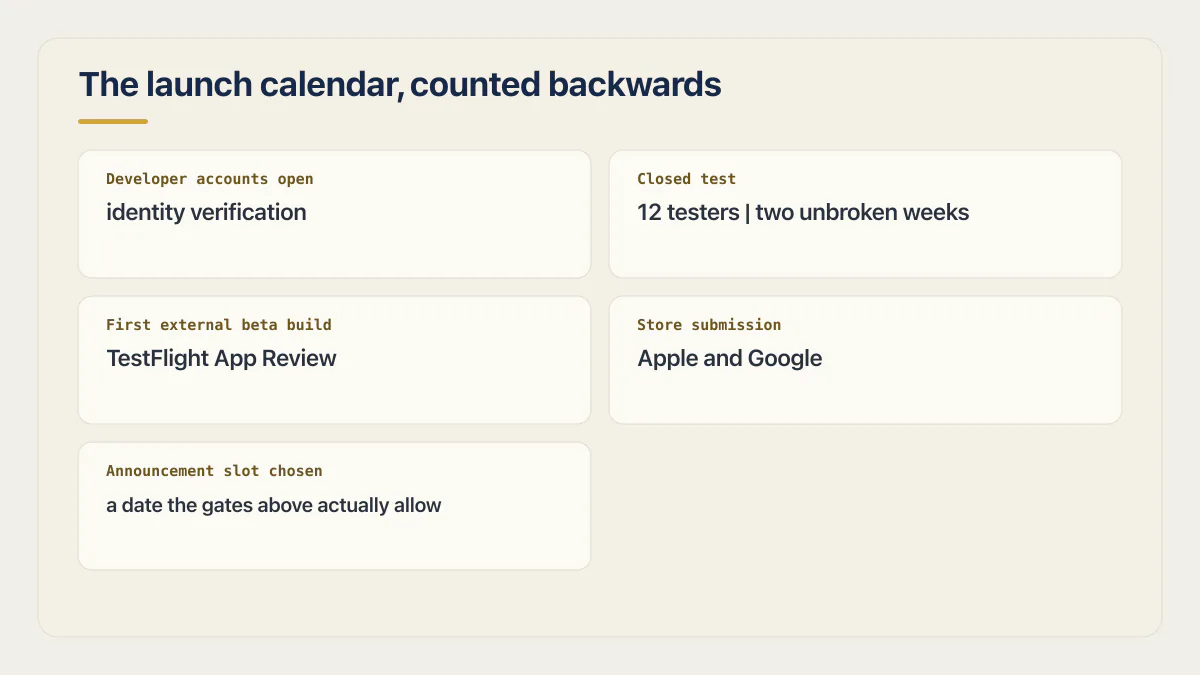
The readiness page carries a calendar too, and the two answer different questions. That one schedules the seven technical checks against the software in the days around release. This one schedules the whole launch, store gates and announcement included, for somebody who has not yet decided whether to run those checks at all. Where they meet is the single row above, and that row names the owner instead of restating the work.
Two rows on that table are not yours at all. Apple’s and Google’s review queues run at whatever speed the store sets, and how long the queue takes is its own question with its own answer, so no figure for it appears here. Account verification is the same shape: you can start it early, and starting it early is the whole of your influence over it. One decision inside that account row outlasts the launch, which is who holds the developer account, and why it is not the contractor.
The gate that sets your launch date is the one you cannot pay to shorten, and on Android it is fourteen days long.
The closed test is the row you can genuinely move, and you move it by starting before the app feels finished. Twelve people, opted in and staying opted in for two unbroken weeks, is a recruiting problem, and there is no technical way around it. It is also the part of a launch date a solo founder is most likely to discover late, because nothing inside the builder mentions that it exists. The Play side has its own gates and its own permanent choices, including a package name that cannot be changed after the first upload.
Launch day: the short list
Launch day is mostly not a technical day, and the technical part of it was decided a week earlier. What is left is an order of operations.
- 01 Open the app from a device and a network that have never touched it, before a single post goes out.
- 02 Load the public listing or URL yourself and check that the images, the price and the description are the ones you meant to publish.
- 03 Make sure everyone who is posting knows who can stop the promotion, and how to reach them within minutes.
- 04 Publish in the order that leaves you room to retreat: your own list first, communities second, the scheduled window last.
- 05 Answer the first questions yourself, in public, for the first few hours.
- 06 Write down what broke while it is still fresh, even the things you fixed in two minutes.
Two things sit outside the order itself. Watching whether people finish what they started, not counting who turned up, is the difference between a number that flatters you and a number that tells you something. And the app that worked in the builder and does nothing on the live URL is the classic launch-day failure: identical code, different environment, and the fix is rarely in the code at all.
The readiness page runs its own launch-day pass against the software, with dashboards, alerts, error rates and the signal pairs worth watching. This list is the order of the day around it, for the person who has to do both.
Where to launch: the product launch websites people actually post on
Product launch websites are worth ranking by what they cost you in preparation rather than by how much traffic anyone claims they send.
Your own list comes first, because it is the only audience that already agreed to hear from you and it costs nothing but the writing. Communities where your users already spend time come second: they cost you the months you spent being a member there, which is why they cannot be bought on launch morning. The store listing itself is third, and it works as a discovery surface as well as a delivery one, which makes being findable in the store a different job from being live in it.
A scheduled window comes fourth, and it is the only one with a published clock on it. Product Hunt runs its homepage on a 24-hour cycle on Pacific time and lets you schedule a launch up to a month ahead (Product Hunt’s launch guidance, read 16 August 2026). One of those windows is scheduled, which is the only reason it can be prepared for, and the technical half of that preparation is a separate piece of work with its own load, cost and rollback decisions.
What this section deliberately leaves out is landing-page design. Roughly half the results for product launch websites are galleries of launch pages and templates, which is a design question and a different search.
Whether posting to all four in one morning beats spreading them over a fortnight, I cannot tell you with evidence, and the guides that assert one or the other do not carry any either.
The first week
The first week is when the expectations get corrected, usually downwards. That is the normal shape of it, and it is worth knowing before it happens to you.
One founder in the corpus behind this site describes launching and then waiting roughly six weeks before two paying customers arrived together on the same day. That single account is evidence against treating launch day as an immediate-revenue guarantee; it does not establish a normal delay or prove that launch activity cannot shorten it.
One founder waited roughly six weeks for the first two paying customers. That case is evidence against an instant-revenue promise, not a universal launch timeline.
The parts of the product that only exist once real accounts do are what the week is actually for. The readiness page lists that lifecycle in full. What this section adds is the reason it lands in week one and not before: the refund path can sit fully built inside the payment provider while existing nowhere inside your app, and nobody finds that out until a real customer asks. None of it gets tested by whoever built the app either, because they know the happy path far too well to wander off it.
Traffic is the other half, and it does not arrive on a schedule either. Traffic that turns up without warning is a different emergency, and it is worth reading before it happens rather than during.
Then write down every gap you decided to accept, with a name against it and a date to look at it again. An accepted gap with no date on it becomes a permanent one, and week one is the last moment anybody still remembers it was ever a decision.
Common questions about launching an app
How do I launch my MVP?
An MVP launches on the same eight steps as anything else, with steps 2 and 5 cut down but not skipped. Pick the one workflow the product exists for, make that workflow hold up with two accounts using it at once, put it in front of ten people who are not you, and launch to the smallest audience that can still teach you something. The step founders cut that they should not is the beta. Shipping straight to strangers is how you learn about a failure from a public review instead of from a friend.
How long does it take to launch an app?
Count the fixed gates, not the work. A new personal Google Play account cannot apply for production access until it has held 12 continuously opted-in testers for two full weeks, which puts a floor of two weeks plus recruiting time on the Android side alone. Apple’s side has account verification, and a review of the first external beta build before anyone can install it. Store review then sits on top of all of that at a speed the store sets, and how long that queue takes is its own question with its own answer. A website has none of this and can be live the same afternoon.
What does it cost to launch an app?
Store publication normally requires a developer fee, and those charges are the smallest part of the bill. What actually adds up is hosting, a domain, whatever your payment provider keeps, the AI or API calls your app makes for every user, and the hours spent on the things nobody quotes for, like screenshots and a privacy policy. What the whole thing costs, once you get past the two entry charges, is worked out properly on its own page with current figures. A website can launch without a store fee. Eligible nonprofit organizations, accredited educational institutions, and government entities can request Apple’s fee waiver, but eligibility does not guarantee approval.
Do I need a developer to launch an app?
Not necessarily. What the sequence needs is somebody who can produce a signed build, answer the store’s technical questions honestly, and tell whether the app holds up when two accounts use it at the same time. That can be you with a builder that emits the file for you, and it can be somebody you pay for one specific piece of it. Where people without a development background actually get stuck is the build file, the signing, and the privacy answers, rather than the code itself.
How do you plan a launch strategy for an app you built yourself?
An app launch strategy for a solo founder is three decisions and not a document: which single audience you are launching to, which day the gates actually allow, and who hears about it in what order. The rest of what usually goes into a strategy, the press kit, the influencer list, the three-month content calendar, assumes a team exists to run it. The version that fits one person is four places ranked by preparation cost, your own list first, and a date chosen after the store gates instead of before them.
How do I launch an app on the App Store or Google Play?
Both stores are the same shape: open a developer account, produce a signed build, fill in a listing, answer the privacy and content questions, submit, and wait for review. Google Play adds a closed test for new personal accounts before production access opens. The differences run deep enough that each store has its own walkthrough on this site, and this page deliberately does not repeat them. Store mechanics are one page each. The launch around them is this one.
How do I know the app is ready?
Ready means the app survives people who are not you, judged against evidence and not against a feeling. The readiness page linked above owns that verdict and the seven checks behind it.
What should happen in the first week after launch?
Run the parts of the product that only exist once real accounts do. The readiness page lists that lifecycle in full, and the reason it belongs to week one is that none of it can be tried until strangers hold accounts of their own. A quiet week is information rather than a verdict, and it finds out which parts of the product nobody has ever exercised.
If this checklist left you with more open items than you expected, the sprint below works through all of them in ten working days.
Built it with AI. Now it has to hold up for real customers.
The Production Hardening Sprint takes the app you already have and builds the production foundation underneath it. Authentication and access rules, payments that stay consistent, error handling, monitoring, backups, automated tests and a documented handover. Our engineers work inside your existing codebase for ten working days. All 123 deliverables are included, and you get the evidence for each one.
See the Production Hardening Sprint →  $2,500 fixed price · 10 working days · One codebase