You have an idea, no app, and two sets of search results that do not agree with each other. Ask the question with “App Store” in it and you get Apple’s own documentation, written for people who already open Xcode most mornings. Ask it with “without coding” in it and you get tool shopping: a roundup, a few builder landing pages, a couple of old forum threads, none of them mentioning that the App Store is a place with requirements attached. Checked on 16 August 2026, nothing on either result page joins the two answers together.
One page gets close enough to name. A company selling an iOS development course, at codewithchris.com, runs idea to launch and does mention AI builders. It stays unlinked here because its build path bends toward learning to code, and because it leaves out signing, which is where most of this gets decided.
A non-developer can get an app onto the App Store. An AI builder writes the app itself from a description, and you never read the code. A builder that only produces a web app cannot make a native App Store build. A builder that produces a native project can connect to a cloud service that compiles, signs, and uploads it under your Apple account. You still provide that account, finish the listing, and submit the app for App Review.
What “without coding” actually covers in 2026
The tools build the app, and that half of the promise is checkable rather than a matter of taste. A file-tree read of 778 exported Base44 repositories on 14 August 2026 found 744 whose pages were named for a real product instead of the shipped default, which is what one builder’s exported code actually contains. Reservation systems, client portals, dashboards: screen names that would mean nothing in anyone else’s company.
Without coding describes how the app gets made. What you can download, change, and run elsewhere depends on the builder’s export rules and licence. Keep the developer, hosting, database, and billing accounts in your name. Check whether the backend can move before you pick a tool.
The bills are the concrete part. A small app usually ends up on the builder’s own subscription, a database or hosting account, a store membership, and whatever paid API it calls. Four accounts is an ordinary number, and every one of them is a card in your name and a password somebody has to keep.
One word of housekeeping, because this page keeps saying account. A developer account here means a membership in Apple’s program, the thing that lets you distribute software to other people’s phones. That is a different object from the Apple ID somebody uses to download apps, which is what most of the autocomplete around this question is really asking about. When this page says account, it means the first one.
Builders differ hard on the property that matters most, and it is not in any feature list. Some emit a native project a build service can compile. Some only ever produce a web address. That one difference decides your route before it decides anything else, so it is worth settling what the AI builders can and cannot make for phones before you spend a month inside one of them.
Everything that has to exist before your app is on the App Store
Six things have to exist. Only one of them is the app.
| What has to exist | Who produces it | Can you get it without a developer? |
|---|---|---|
| The app itself | The builder, from your description | Yes |
| A native build file rather than a web address | The builder, if it can. Some cannot | Sometimes. This is the first wall |
| A developer account in your own name or your company’s | You, with identity paperwork | Yes. Admin rather than skill |
| A signed upload | Signing tooling, using certificates that live in your account | Usually, with a cloud build service. This is the second wall |
| A store listing: name, icon, screenshots, description, privacy answers | You | Yes. It takes time and taste, and no programming |
| A passed review | A person at Apple | Hiring a developer does not change this one: Apple decides. This is the third wall |
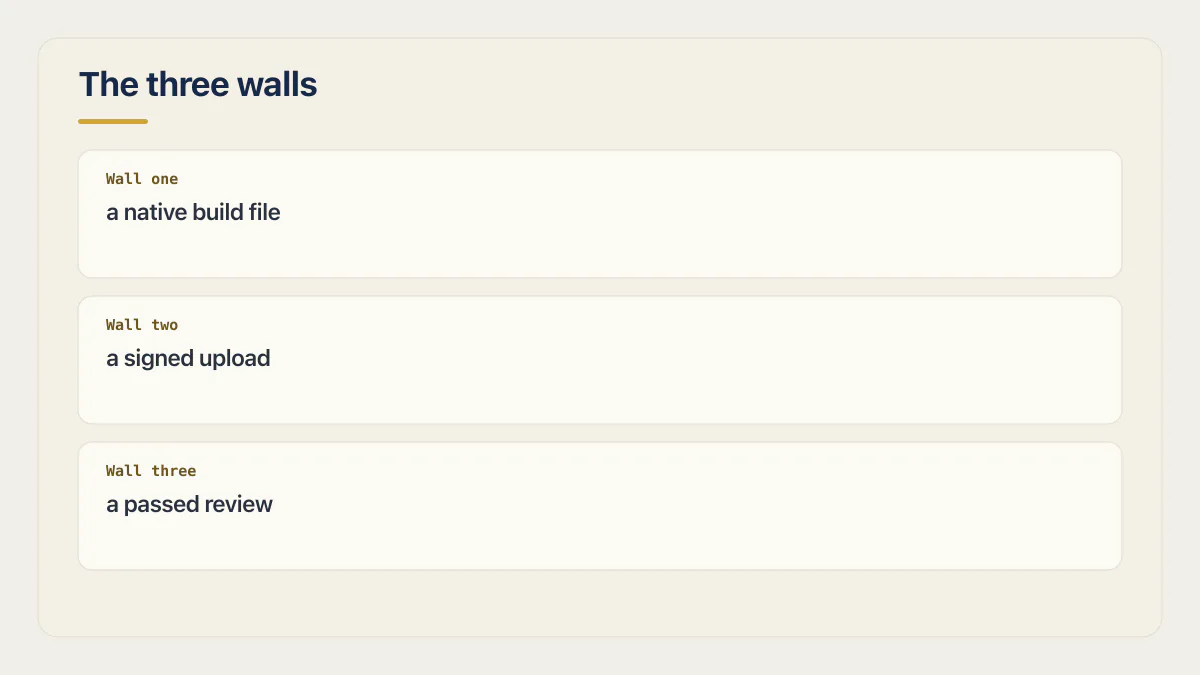
Read down the middle column and the shape of the problem shows up. Two rows are produced by software you are paying for, one by tooling you may never see, two by you, and one by somebody at Apple who has never heard of you. The last row is the only one you cannot buy, learn, or delegate.
The listing row is the one people underestimate, and it is the least technical thing on the list. Apple’s submitting page, checked 16 August 2026, asks for the product page to be ready before you submit: name, icon, description, screenshots, app previews and keywords. The same page requires your app’s privacy practices to be filled in, including what any third-party code inside the app does, before a new app or an update can be submitted at all. Answering that honestly about code you did not write is the first moment “without coding” starts costing you something.
None of that needs a programmer. All of it needs decisions: what the app is called, what the first screenshot shows, what the first two lines of the description say. That work sits waiting whether or not you have written a line of code, and it is where most first launches lose their week.
One sentence on App Store Connect, because the search results for this question are full of walkthroughs of it and none of them belong while you are choosing a tool: it is where Apple keeps your app’s record and its listing. Apple requires that record, with a bundle ID matching the build, before the first upload.
The three rows marked as walls are the rest of the page, in order.
Wall one: the App Store takes a compiled build
What Apple accepts is a file, compiled for the phone, uploaded from an account. A web address is not a candidate for that slot, however good the site looks once somebody saves it to a home screen.
Native build file is jargon worth one sentence. It is a single packaged file, produced by compiling the project on a Mac or on a build service renting you one, that Apple’s systems can install on a phone and a reviewer can open. Your builder either produces the project that becomes that file or it does not, and most builders are honest about which side they are on if you read past the landing page. Apple’s submitting page also sets a floor on how current the build toolchain has to be, and moves that floor on its own schedule, so a build produced by a tool that stopped updating will eventually stop being accepted.
If your builder made a web app, what you have in front of you is a route decision, and all three routes are real.
First, settle whether you need a native app at all. Plenty of products are better off as a site people bookmark, and that question is far cheaper to answer before you have paid for a membership.
Second, you can put a shell around a web app you already have. The shell is a genuine native project that loads your site, it produces a real build file, and it brings its own set of review problems that are worth reading about before you commit to it.
Third, pick a builder that outputs a native project from the start. Some do: a builder that produces a native project rather than a web page hands back either a React Native and Expo project or an Xcode project depending on the path you choose, and a build service can compile either one.
Apple has a reason to care about this, and it is worth stating in plain words because the guideline text is somebody else’s page. A reviewer opening your app is asking whether it does anything a browser tab could not have done just as well. An app that is a website in a frame, with nothing added, is the shape that comes back most reliably, and no amount of native packaging changes that answer.
Wall two: signing, and whose account it happens in
Every build Apple accepts is signed, and the signature traces back to your account. That one fact decides who can ship an update to your app for as long as the app exists.
Apple’s account help draws the line between two kinds of certificate. It says to use “development certificates to run your app on Apple devices and enable app capabilities during testing”, and reserves distribution certificates for sending the app out or uploading it to Apple (Apple’s certificates overview, checked 16 August 2026). That distinction decides more than it sounds like it should. The first kind gets the app onto a phone you are holding. The second kind is the only one that reaches the store.
Both kinds live inside a developer account, which makes account control the practical asset. It goes in your name or your company’s, and never in a helper’s, whatever the helper offers to do. Apple enrolls you either as an individual or as an organization (the Apple Developer Program page, checked 16 August 2026), and those are genuinely different choices: one is faster to start, while the organization route keeps account control with the company after your involvement ends. That choice, plus who should hold the developer account and how to let a helper in without giving away control, is worth settling before any money changes hands.
Signing has historically meant owning a Mac, because the compiler and the signing tools run on macOS. It no longer strictly does. Cloud build services rent that machine by the minute and sign on it using certificates from your own account, which is how most people without a Mac get a build uploaded at all.
There are fees on both sides of this, and none of them appear on this page. Apple charges an annual membership. Google Play charges once, at registration. Both stores take a cut of what you sell. None of those numbers belong in a decision you are making this early, because the membership is rarely the part that changes anybody’s mind.
Wall three: a person at Apple opens the app
The last requirement is not something you can produce. Apple’s App Review Guidelines describe the store as “a highly curated App Store where every app is reviewed by experts and an editorial team helps users discover new apps every day”, and state that Apple scans “each app for malware and other software that may impact user safety, security, and privacy” (Apple’s App Review Guidelines, checked 16 August 2026). Experts is Apple’s word. The practical reading is that a human being installs your app and uses it.
That person taps through what you built on a device, with whatever notes and test credentials you left for them and nothing else. A screen that only opens for an account they cannot reach, or a feature that only looks right because you seeded the data by hand, reads to them as an app that does not work. Everything the app can do has to be reachable by somebody who was handed it cold.
Being built by AI is not itself a reason to be turned down. What comes back is an app that is thin, an app that crashes on the reviewer’s device, an app whose privacy answers do not match what the code actually does, or an app submitted by a party other than the one the app represents. Those are ordinary failures with ordinary fixes, and what a rejection note is actually telling you maps each note Apple sends to the thing that has to change.
Three things are worth doing long before submission. Make sure the app does something a browser tab cannot. Make sure it runs on a real phone held by somebody who is not you. Answer the privacy questions from what the code actually does, which in practice means getting whoever built it to list what the app collects and where that data goes. Deciding whether it is ready to go out at all is a larger question than the store’s, and it is the one that decides whether the launch was worth having.
How long review actually takes has a real answer, and it belongs somewhere other than here. A duration quoted without its conditions is the fastest way to build a launch plan that breaks. Ask that question on its own.
What to decide before you build anything
Five decisions, in the order that saves the most work. None of them is a step, because you do not have a tool yet and steps assume you do.
- 01 Decide native or web first. It changes which builders are even candidates, and it is the one decision here that cannot be reversed cheaply.
- 02 Pick a builder you can leave with. What you can export decides what happens the day you outgrow the tool, or the day it changes its terms.
- 03 Start the developer account early. Identity checks run on their own clock and have nothing to do with whether your app is finished.
- 04 Plan to test on a real phone before the store sees it. A build that works in a preview and fails on a real handset is common enough to plan for, because the two configurations differ.
- 05 Read the store side once, before you commit to a tool. The surprises are all in the last mile, and all of them are knowable in advance.
Decision four already has a route. Getting a build onto a real phone before the store sees it covers the beta path most AI-built apps take, including the build options for people who do not own a Mac.
Decision five is the one people skip, and skipping it is expensive because it silently constrains decision one. The store side of this, from the account to the listing, runs on requirements rather than clicks, and reading it once before you choose a tool tends to change which tool you choose. Everything a launch involves beyond the store itself, the announcement, the first people through the door, the week after, is a separate job with its own order and its own decisions.
One thing this page cannot tell you is whether your idea deserves an app at all. The three walls stand at the same height either way, and only the third one has an opinion.
Common questions about making an app for the App Store without coding
How difficult is it to get an app on the App Store?
How hard it is to get an app published on the App Store depends on which part you mean. Making the app is the easy part now, because a builder does it from a description you write in ordinary English. The difficulty sits in three places, none of which is programming skill: producing a compiled build, getting it signed out of an account in your own name, and passing a review that a person performs. Tooling and paperwork solve the first two. The third is somebody else’s decision about your app.
Can anyone make an app and put it on the App Store?
Anyone can, and Apple says as much in the introduction to its own review rules: “Whether you are a first-time developer or a large team of experienced programmers, we are excited that you are creating apps for our platforms, and want to help you understand our guidelines so you can be confident your app will get through the review process quickly.” The qualifier Apple leaves implicit is the important one. The same guidelines apply to a first app built from a prompt and a hundredth app built by a team, and the review is the same review.
Which app builder should someone who does not code use?
No single builder is the right answer, and a ranked list is answering a different question than the one you asked. Two properties decide it for you. First, whether the tool can produce a native project, because a builder that only makes web apps puts you onto the shell route whether you wanted to be there or not. Second, what you can take with you, because the export decides what happens when you outgrow the tool or it outgrows you. Answer those two and the shortlist writes itself.
Can I make an app for the App Store for free?
The building can be free. Most AI builders have a free tier that will get you a working app, and several will let you export the code from it. The store side is not free on either platform: Apple charges an annual membership, Google Play charges once at registration, and neither waives it for a first app. What a launch actually costs on both stores is worth pricing before you build, because the figure that surprises people is rarely the membership.
Do I need a Mac to put an app on the App Store?
No, although the tooling that compiles and signs an iOS build only runs on macOS. Cloud build services rent that machine for you and do the signing there, using certificates from your own developer account, so the Mac exists but it is not yours and you never see it. Getting a build uploaded without a Mac is a well-worn route at this point, and the builders that produce iOS apps mostly assume you will take it.
Do I have to set the app up in App Store Connect myself?
Somebody holding access to your developer account has to, and it may as well be you. That is where Apple keeps the app’s record, its listing and its submissions. You do not need the record while choosing a tool, but Apple requires it before the first build upload. Its bundle ID must match the build.
What do I control if an AI builder made the app?
Your developer account controls the app record, listing, submissions, and store payments. Code access and licence rights depend on the builder. Backend portability is a separate question, because an exported interface may still depend on the builder’s database or hosted services. Check each boundary in the builder’s own documentation.
If you have a working app built with these tools and need it ready for real customers, this is what we do.
Built it with AI. Now it has to hold up for real customers.
The Production Hardening Sprint takes the app you already have and builds the production foundation underneath it. Authentication and access rules, payments that stay consistent, error handling, monitoring, backups, automated tests and a documented handover. Our engineers work inside your existing codebase for ten working days. All 123 deliverables are included, and you get the evidence for each one.
See the Production Hardening Sprint →  $2,500 fixed price · 10 working days · One codebase