Refreshing App Store Connect does not move the queue. After a few days of Waiting for Review, most people go looking for a number to measure their wait against, and Apple publishes one. It also published a broader measure in June 2026; the two describe different thresholds and can both be true.
App Store review usually clears in a day or two. Apple’s own App Review page says 90% of submissions are reviewed in less than 24 hours, while Apple said in June 2026 that 90% clear within 48 hours and the average is 1.5 days. Apple does not publish a separate review time for first submissions.
Before anything else, check which queue you are actually in. A beta build waits in a separate queue before any tester sees it, where an internal group needs no review at all and an external group waits on TestFlight’s own beta review. This page is about the public queue, the one that decides when strangers can download the app. Two different queues, two different waits, and people compare their numbers across them constantly.
The figures and rules below come from Apple’s and Google’s own pages, read on 16 August 2026, plus one live tracker of real submissions. None of it comes from a submission I pushed through myself, and where a page says nothing on a point, I say that instead of guessing.
One thing to rule out first. If the build has not shown up in App Store Connect at all, you may not be waiting on review. An upload that reports success while nothing appears against the record you just created is its own failure with its own fix, and no amount of patience solves it. The same goes for the earlier steps: the whole publishing sequence, in order, from the account to the submission, is a separate subject from what happens once the submission is in.
How long does App Store review take right now?
Two compatible measures are available. Apple’s evergreen App Review page, read on 16 August 2026, says 90% of submissions clear in under 24 hours. Apple’s June 2026 statement says 90% within 48 hours, with an average of 1.5 days across more than 200,000 submissions a week over 12 weeks.
| Where the figure comes from | What it says | Date attached to it |
|---|---|---|
| Apple’s App Review page | 90% of submissions reviewed in less than 24 hours, on average | No publication date printed on the page. Read 16 August 2026 |
| Apple, in a statement carried by 9to5Mac | 90% of submissions processed within 48 hours, average review time 1.5 days, more than 200,000 submissions a week across 12 weeks | 9 June 2026 |
| Runway’s tracker of real submissions | 14h 29m average in Waiting for Review, 1h 31m average in In Review, measured over the previous two weeks | Page stamped Aug 12. Read 16 August 2026 |
The first figure is Apple’s own, printed on the page it sends developers to. Apple’s App Review page states it plainly: “On average, 90% of submissions are reviewed in less than 24 hours.” There is no date on that sentence, which is part of the problem. On the results I pulled for this query on 16 August 2026, it was still the figure the ranked guides were repeating.
The second figure is newer and far less quoted. Reporting on 9 June 2026, 9to5Mac carried a statement from Apple that “the app review team processes 90% of submissions within 48 hours. And over the last 12 weeks, the team has processed more than 200,000 app submissions a week, with an average review time of 1.5 days.” Apple did not put that statement on its own site. It reached the public through a news report, which is the honest route to give it: reputable reporting of what Apple said, rather than a page Apple publishes and maintains. That is also why the evergreen page still says something different.
These figures can all be true at once. The under-24-hour claim is a stronger percentile bound than within 48 hours, while the 1.5-day figure is an average that can be lifted by the long tail. Treat all three as population measures, not deadlines for an individual submission.
An average is not a promise, and 90% leaves one submission in ten with no published expectation at all.
That tenth is where the long forum threads live. Apple publishes nothing about what happens to the submissions outside the 90%, so a wait that runs past two days is not covered by any figure Apple prints.
A third reading helps, because it measures rather than promises. Runway’s App Review Times tracks what teams using its product actually experience, and reports a truncated mean rather than a plain average. Read on 16 August 2026, with the page carrying its own Aug 12 stamp, it showed a two-week average of 14 hours 29 minutes sitting in Waiting for Review and 1 hour 31 minutes in In Review. Those two rows are worth separating. Almost all of the wait is queue, and very little of it is a reviewer looking at your app.
Public evidence of the long tail is not hard to find. A post on r/appledevelopers dated 30 July 2026 is titled First App Store submission still “Waiting for Review” after 10+ days. On Apple’s own developer forums, a thread opened in February 2026 about unusually long Waiting for Review times that week collected replies from developers describing waits well past seven days. Neither is a statistic, and neither should be read as one. What they establish is that the tenth outside Apple’s 90% is real and that people in it have nowhere published to look.
One more data point, from the builder side. In a public post on 6 August 2026, an owner who got a first Base44 app accepted counted eight days for the whole run. Only a slice of that count was App Review itself. The rest went on the account, the store record and the fixes, which is the pattern this page keeps running into: the queue is rarely the biggest number in a founder’s wait, even though it feels like the only one.
What Waiting for Review and In Review mean in App Store Connect
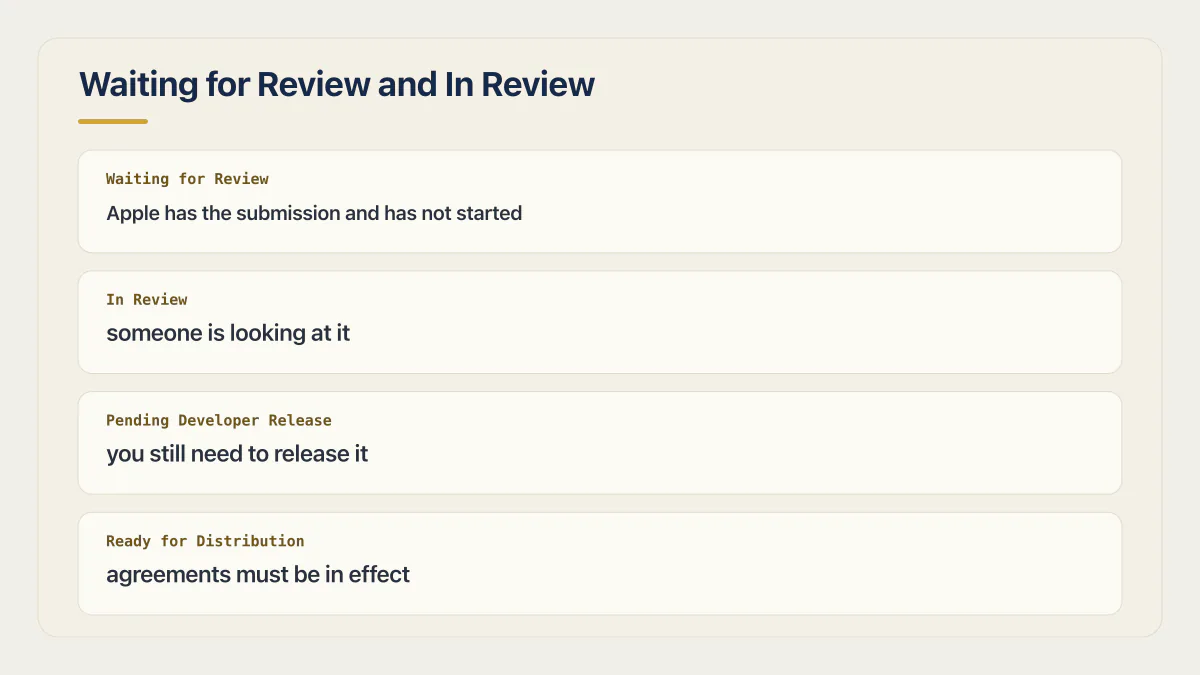
Waiting for Review means Apple has the submission and has not started. In Review means someone is looking at it. The practical difference is what you can still change: during Waiting for Review you can edit certain app information and pull the build back, but screenshots and app previews are frozen.
Apple defines each status in its App Store Connect reference on app and submission statuses. The definitions are short, and the useful part is the second column of the table below rather than the first.
| Status | Apple’s definition | What it lets you do |
|---|---|---|
| Waiting for Review | ”Apple received your submission, but hasn’t started the review.” | Edit certain app information, or remove the build from review. Screenshots and app previews are locked |
| In Review | ”App Review is reviewing your app.” | Remove the build from review. Nothing else |
| Waiting for Export Compliance | ”Your CCATS file is in Apple’s export compliance review process.” | Wait. This is a separate Apple process, and none of the review-time figures above cover it |
| Rejected | ”Your app wasn’t accepted.” | Reply in App Store Connect, or fix and submit again |
The screenshot rule is the one worth knowing before you need it. Apple’s page says that while you are waiting for the review you can edit certain app information and remove the build from review, then adds: “However, you can’t upload or edit screenshots or app previews.” So if you spot a typo baked into a screenshot an hour after submitting, you have two options and neither is convenient. Leave it and fix it in the next version, or pull the build out of review, fix the assets, and go back to the end of the queue. That second option is the one people take without noticing that it resets the clock they were already unhappy about.
In Review is narrower still. Apple’s definition for that status lists one action and nothing else: remove the build from review.
Export compliance sits outside all of this. If the status names a CCATS file, the app is in a different Apple process entirely, and the mechanics of getting that answered belong with the export-compliance material rather than with anything about queue length.
Five delays to check around a first submission
The submission may not be in the queue yet. A build has to finish processing before it can be attached to a submission, and a submission has to actually be submitted, which is a separate action from uploading. Plenty of first-timers upload a build, see it appear, and assume review started. Nothing is queued until the submission is sent. If the app came out of a builder, the whole path from a Base44 build to a live App Store listing is its own sequence, and most of that sequence happens before the queue does.
The queue is genuinely busy, and Apple says so. Apple’s own June 2026 figure of more than 200,000 submissions a week for 12 weeks is the volume claim, made by the company doing the reviewing. There is no scenario where that many submissions a week produces a uniform wait. Whether that pressure has moved the published average is something the published figures do not reveal.
An incomplete submission turns one wait into two. Apple states it directly on the App Review page: “If your submission is incomplete, review times may be delayed or your submission may not pass.” A missing demo account, an unanswered review note or a privacy answer that does not match what the app does can each cost a full round trip, because the reviewer’s question comes back to you and then your reply goes back into the queue. This is the argument for the pass to make before you submit at all, done once, properly, rather than a resubmission cycle discovered one item at a time.
A brand new account may be treated differently, though only one of the two stores says so. Google states outright that certain developer accounts get longer, more thorough review. Apple’s App Review page and its App Store Connect status reference, both read on 16 August 2026, say nothing about first submissions or new accounts taking longer. Do not add a special Apple review delay unless your own recent submission data supports it. Budget the documented account, build, metadata, and release steps separately from review.
The last stretch is often not Apple’s at all. An approved app does not go on sale by itself, and neither the review figures nor the tracker cover what happens after the approval lands. That part is next.
The waits that are not Apple’s
A meaningful share of “still not live” is an app that was approved days ago and is waiting on its owner. Apple’s status reference gives Pending Developer Release a one-line definition: “Your app was accepted, but you still need to release it for distribution on the App Store.” If you chose manual release, or scheduled a date and forgot it, the review clock stopped and nothing else started.
Ready for Distribution has a condition attached that catches accounts nobody has touched in a while. Apple’s page says that to distribute your app, your agreements must be in effect, and that the Account Holder can accept the latest agreements in the Business section. Agreements go stale on their own schedule, the Account Holder is often the founder rather than whoever is watching the submission, and an unaccepted agreement produces exactly the same symptom as a slow review: an app that is not on the store.
That distinction matters for who you chase. Who holds the account, and what has to be signed before an approved app can go on sale, is an ownership question rather than a queue question, and it is answered in the account settings rather than in the submission. Before you write to Apple about a slow review, confirm the app is actually still with Apple.
How long does Google Play Store app review take?
Google publishes a range rather than an average, and the range is wider than Apple’s. Google’s own wording is that certain developer accounts and certain apps may face review times of up to seven days or longer in exceptional cases. Nothing on Google’s page promises a typical figure, or a shorter path for a first release.
The sentences themselves, from Google’s Publish your app page in Play Console Help, state the same window twice. On accounts: “For certain developer accounts, we’ll take more time to thoroughly review your app to help better protect users. This may result in review times of up to seven days or longer in exceptional cases.” On apps, in the part of the page headed Publish an app update: “Certain apps may be subject to extended reviews, which may result in review times of up to 7 days or longer in exceptional cases.”
Both sentences are quoted exactly as Google writes them, including the fact that the same number is spelled out in one and written as a digit in the other. Ignore the spelling and read the words after the number. “Up to seven days or longer in exceptional cases” describes the ordinary range with an open-ended exception, not a maximum. Any plan that treats seven days as the worst case has read it as a limit Google did not write.
For a new personal account, review is also not the first obstacle. Google’s own rules for a first release, including the testing requirement that catches new accounts, add a fixed block of calendar time before a production review can begin at all. Budget for that separately from the review window, because no expedite exists for it.
When to request an expedited App Store review, and what Apple accepts
An expedited App Store review is available for a narrow set of situations, and Apple names them. Requesting one for an ordinary slow review is not among them. Apple publishes no turnaround for an expedited request either, so a granted request comes with no date attached to it.
Apple’s App Review page sets the boundary in one sentence: “You can request the review of your app to be expedited if you face extenuating circumstances, such as fixing a critical bug in your app or releasing your app to coincide with an event you’re directly associated with.” Two examples, both specific, and Apple’s wording (“such as”) leaves it a judgement of extenuating circumstances rather than a closed list. A launch you would like to hit sooner is not one of them.
What you send matters as much as whether you qualify. Apple asks for different contents in each case. For a critical bug, “include the steps to reproduce the bug on the current version of your app”. For an event, “Make sure your request includes the event, date of the event, and your app’s association with the event.” Both are the sort of detail that gets left out of a first request and then costs a round trip to supply.
The sequence catches people too. Apple’s guidance for event-related apps says that if your app is still in review and the launch of your event is quickly approaching, you can request to have your app review expedited. The request assumes a submission already in flight. Submitting and requesting are two actions in that order, not one.
Find the route before you need it in a hurry. Expedited review is requested through a signed-in contact form rather than a button in App Store Connect. The address is developer.apple.com/contact/app-store/?topic=expedite, deliberately not a link on this page: signing out and requesting it on 16 August 2026 bounced to Apple’s login at idmsa.apple.com, so linking it would only hand you a sign-in screen. Reach it signed in from Apple’s App Store support page, which gathers submission status, rejection clarification, appeals, expedited requests and guideline suggestions behind the same App Review contact door.
Two honest limits on all of this, both as of 16 August 2026. Apple does not publish how quickly an expedited request is answered, or how quickly the review that follows it completes. And nothing on Apple’s pages describes expedited review as a way to move an ordinary submission that has simply been sitting. Asking anyway costs nothing but the time to write the request. Apple publishes no basis for expecting it to move a submission that only needs patience.
App Store review time after a rejection
A corrected submission goes back into the same queue and takes the queue’s time. Apple publishes no separate figure for a resubmission, so the platform-wide numbers at the top of this page are the only expectation available, and they were never a promise in the first place.
Metadata fixes and code fixes differ in what has to happen before the queue restarts. A metadata fix answered in App Store Connect carries no new binary, so nothing has to be processed before the submission is reviewable again. A code fix means a new build, which means upload and processing before the queue even starts. That is a difference in what has to happen, not a published difference in review time, and Apple states neither.
None of which tells you which fix to make. Working out which guideline the rejection names, and what Apple expects instead is a different job from working out how long the next round will take, and it is the one worth doing first. If the same rejection keeps coming back under slightly different wording, what an appeal actually asks for, and how to break a repeat rejection loop, is its own decision with its own answer.
The loop has a cost that the review clock never shows. Each round is another build, another set of assets or answers, and another wait. What publishing actually costs, past the fees themselves, is mostly made of these rounds.
When a wait is genuinely stuck, and what to do about it
Four checks, in this order, before you conclude that Apple has lost your app.
First, read the status rather than the calendar. Waiting for Review and In Review are different situations, and only one of them means a person has your app. If the status has never changed from Waiting for Review, you are in the queue, which is where the tracker says almost all of the time goes.
Second, confirm the submission exists. Open the version record and check that a build is attached and that the submission was actually sent. An uploaded build sitting in App Store Connect with nothing submitted looks identical to a slow review from the outside and will wait forever.
Third, check for an unread message. Apple states that when a submission is not accepted, App Review notifies the App Store Connect users holding the Admin, App Manager or Developer role. If the person watching the status is not one of them, a message asking for a demo account can sit unanswered for a week while everyone assumes the queue is slow.
Fourth, check the account side. Pending Developer Release means you hold the last step. Agreements that are not in effect mean the same thing in a different place.
If all four come back clean and the wait is still running, the honest answer is that you are in the tenth of submissions Apple never describes. You can ask App Store Connect support about the status of the submission, which is a status enquiry rather than a way to move the queue, and beyond that there is nothing to do but wait. Nobody, this site included, can move App Review or influence a reviewer.
Where it stops being a waiting problem is when the reply finally arrives and it is about how the app behaves rather than about the listing. A crash on launch, a permission the app asks for and then misuses, a feature the reviewer could not reach: those are code problems, and submitting the same code again returns the same answer next round.
Common questions about App Store review times
How long does an App Store review take in 2026?
Apple’s current App Review page says 90% of submissions are reviewed in less than 24 hours. A June 2026 Apple statement covering more than 200,000 weekly submissions across 12 weeks said 90% were processed within 48 hours and gave a 1.5-day average. These compatible population measures do not promise a deadline for one submission.
How long does an App Store submission take, start to finish?
Longer than the review, usually by a lot. The review itself averaged 14 hours 29 minutes in the queue plus about an hour and a half in review on Runway’s tracker when I read it on 16 August 2026, but a first submission also carries account setup, build processing, the store record, and the release step after approval. The one founder run counted on this page took eight days from account to release, with review as a minority of it, and forum reports of similar first runs are anecdotes rather than a statistic.
Why is my App Store submission taking so long to review?
Check whether the submission was actually sent, whether the build is still processing, and whether an incomplete submission or unanswered reviewer message is holding the process. Apple states that incomplete submissions can delay review, but it does not publish a separate delay rule for first submissions or new accounts. After those checks, the remaining explanation may be queue volume, which Apple put at more than 200,000 submissions a week in June 2026.
Does Apple review apps on weekends?
Apple does not state its App Review working hours anywhere on the pages cited here, read on 16 August 2026. What the published figures imply is that reviews are not confined to business days, since an average of 1.5 days and a 90%-within-48-hours claim would be arithmetically difficult with two dead days a week. Treat that as an inference from Apple’s own numbers rather than a schedule Apple has confirmed.
Is an app update reviewed faster than a first submission?
Apple publishes one figure covering all submissions and does not break it out by update versus first release, as of 16 August 2026. Do not infer a faster review from account age. A first release can take longer end to end because account setup, agreements, the store record, build processing, and release steps happen outside the review queue.
How long does an expedited App Store review take?
Apple publishes no turnaround for an expedited review, checked 16 August 2026. It publishes only the conditions under which you may ask: fixing a critical bug in your app, or releasing to coincide with an event you are directly associated with. The request is a signed-in contact form rather than a control in App Store Connect, and Apple describes no service level attached to it.
How long does Google Play take to review an app?
Google publishes a range rather than an average. Its Play Console help page says certain developer accounts and certain apps are subject to extended reviews, which may result in review times of up to seven days or longer in exceptional cases. There is no published figure for a typical app, and the closed-testing requirement for new personal accounts adds calendar time before a production review starts at all.
How long does it take for my review of an app to show up on its listing?
That is a different question with a different answer. This page is about Apple and Google reviewing your app before it goes on sale. When customer ratings and written reviews appear on a listing, and what moves them, belongs with app store optimization rather than with the submission queue, and the two get confused constantly because both are called reviews.
If this checklist left you with more open items than you expected, the sprint below works through all of them in ten working days.
Built it with AI. Now it has to hold up for real customers.
The Production Hardening Sprint takes the app you already have and builds the production foundation underneath it. Authentication and access rules, payments that stay consistent, error handling, monitoring, backups, automated tests and a documented handover. Our engineers work inside your existing codebase for ten working days. All 123 deliverables are included, and you get the evidence for each one.
See the Production Hardening Sprint →  $2,500 fixed price · 10 working days · One codebase