Three rejections in, Apple’s wording has changed twice and the app has not. The decision waiting in App Store Connect is a choice between an App Store rejection appeal and another corrected build, and those two moves cost very different amounts of your week.
Fix and resubmit is the cheaper move in almost every case. An appeal is worth filing only when you can show Apple misread what the app does, or that the build complies and the guideline was applied unfairly; when the facts are merely unclear, reply in the rejection thread first. Apple accepts one appeal per submission that did not pass review.
This page is about the loop rather than the rule you were cited under. If you are still working out which guideline Apple cited and what it wants changed, that mapping lives on its own page and this one never repeats it. What follows is the appeal route as a mechanism, the rules App Store Connect enforces on a submission that already carries a rejected item, and the sweep that stops the same shaped defect coming back under a different rule next round.
Everything below is read from what Apple and Google publish, on 16 August 2026, rather than from a submission I ran and narrated.
The reader it is written for is on the second, third or eighth time through, where every fix lands and the app still comes back.
Appeal the App Store rejection, or fix it and resubmit?
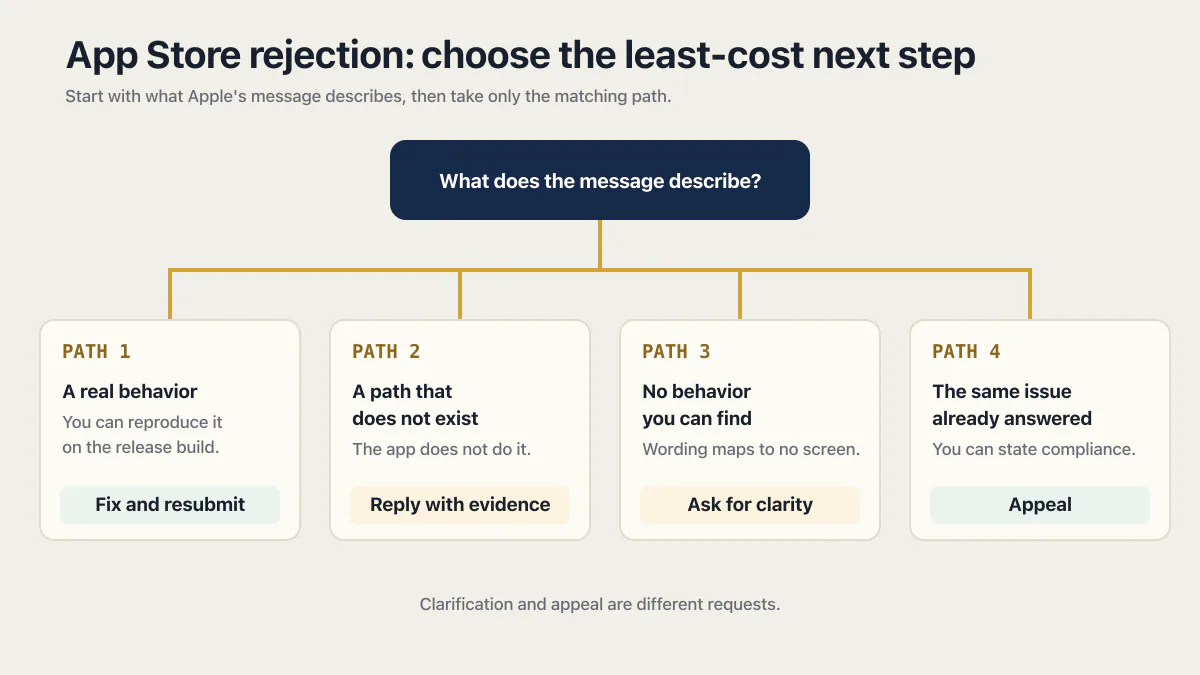
Fix and resubmit is the cheapest of three doors: reproduce what Apple described, change it, send it back. Reply with evidence when the message describes something the app does not do. Appeal to the App Review Board when the message stands after your reply and you can say specifically why the app complies.
Which door you take is decided by what Apple’s message describes rather than by how unfair the rejection feels.
| What Apple’s message describes | What costs you least next |
|---|---|
| Something the app does, and you can reproduce it yourself on the release build | Fix it, then resubmit that item |
| Something the app does not do, or a path through the app that does not exist | Reply in App Store Connect with evidence, before anything else |
| A behavior you cannot find at all, in wording you cannot map to a screen | Ask App Review for clarification, which is a different request from an appeal |
| The same thing your reply already answered, and you can state specifically why the app complies | Appeal to the App Review Board |
The third row is the one most people skip. Apple’s App Store support page puts several requests behind one door: “You can contact us to get details on your submission’s status, ask for clarification on a rejection, appeal a rejection, request an expedited review, suggest guideline changes, and more.” Asking what a message means is not the same request as arguing that the message is wrong, and it does not consume the single appeal you are allowed.
Reproducing the problem yourself is the test that decides the first two rows. Install the build Apple reviewed through TestFlight, on a device, on a normal network, and walk the exact path the message names. If you land on the same screen Apple describes, the argument is over and the fix is the work. If you cannot reach that screen at all, you have something worth writing down: the build number, the steps you took, what happened instead, and a screen recording of it.
What an App Store rejection appeal actually is
An App Store rejection appeal goes to the App Review Board, and Apple accepts one per submission that did not pass review. It argues that the guidelines were applied to an app Apple misread, or that the review was unfair. It is not a second review of a corrected build.
Apple’s App Review page states the grounds directly: “If your app didn’t pass review and you feel we misunderstood your app’s concept and functionality, or that you were treated unfairly by Apple in the course of our review, you may choose to submit an appeal to the App Review Board.” Read that as a filter. Misunderstanding and unfairness are the two things the Board is there to correct. A build that genuinely does the thing Apple described is neither.
The same page asks for three things, listed here in the order they hit you rather than the order Apple prints them:
- “Respond to any requests for additional information before submitting an appeal.”
- “Provide specific reasons why you believe your app complies with the App Review Guidelines.”
- “Submit only one appeal per submission that didn’t pass review.”
Apple states the first line as a prerequisite. If App Review asked you something and the thread still shows an unanswered question, that answer comes before the appeal. The second line rules out the appeal that is easiest to write, the one explaining how much the app cost to build and how long you have been waiting. Neither fact is a reason the app complies with a guideline. The third line means one shot per submission, so an appeal written in the first hour after a rejection is an appeal spent.
The route itself is worth knowing before you go looking for it in the console. The appeal to App Review is a signed-in contact form at developer.apple.com/contact/app-store/?topic=appeal, and that URL is deliberately not a link here: requested signed out on 16 August 2026 it answered with a redirect to Apple’s sign-in page at idmsa.apple.com, so a link would only land you on a login wall. Reach it from the Submit an appeal link on the App Review page above, signed in with the Apple Developer account that owns the app.
Two documented absences, both as of 16 August 2026. Apple’s help page for replying to App Review messages documents replies, attachments and resubmission, and documents no appeal option inside App Store Connect. And none of the Apple pages cited here describes the appeal as a faster route than fixing the item. It is a different question asked of different people, and how long the queue takes, plus what the clock does after a rejection, is a separate matter with its own answer.
What App Store Connect lets you change before you resubmit
App Store Connect puts a submission carrying rejected items into Unresolved Issues, and that status locks three things: no new items can join the submission, each item can be edited once before resubmission, and a removed item cannot be added back. Removing every rejected item completes the submission.
This is the part of the loop nobody writes down, and it decides whether your next move is cheap or expensive. Apple’s help page for a submission with unresolved issues sets out the status and the three locks that come with it, read on 16 August 2026:
- A submission carrying a rejected item takes the status Unresolved Issues, and App Review has to approve every item in it for the submission to be approved.
- You cannot add more items to a submission while it holds that status.
- You can edit items in a submission once before resubmission.
- You cannot add back a removed item to the same submission.
Take the third one slowly, because it is the rule that punishes speed. One edit per item before you resubmit means the guess you make now is the guess Apple reviews. If you are not sure which of three things Apple meant, that is an argument for asking, not for editing something and hoping.
The fourth rule has the same shape and a sharper edge. Removing an item is a one-way move within that submission. It is the right move often enough to be worth knowing about, and it is not reversible on the spot.
The same page carries the exit almost nobody uses. It says that once you remove all rejected items, the submission moves to the Completed section of the App Review page and is ready for release. If your submission holds four items and one of them is the problem, you do not have to hold the other three hostage while you argue about it. Remove the rejected item, let the rest of the release go out, and bring the removed piece back as its own submission when it is actually fixed. A founder sitting on a finished bug-fix release, blocked by one new feature a reviewer disliked, is usually one deletion away from shipping.
The mechanics of doing any of this are in App Store Connect under View App Review Issues & Messages, where the In Progress section carries a Resolve control next to the submission, and each item offers Edit and a delete control. An edited item goes back with Add for Review and then Resubmit to App Review.
One more thing to check before you type anything: who is allowed to type it. Apple’s reply help page lists the required role as Account Holder, Admin or App Manager, gives the reply field a 4000 character limit, and provides an Attach File link for screenshots and supporting documents. If a contractor set up the developer account, confirm your own role before you plan the reply, because those three roles are the only ones that can send one. The 4000 characters are more room than a good reply needs.
Why the same app gets rejected eight times
The loop repeats for a structural reason. Each round fixes the instance Apple cited, the thing that produced that instance stays in the build, and the next round comes back for its sibling.
A generated build gives that pattern plenty to feed on. Builders emit permission strings in batches, wire several screens the same way in the same pass, and fill the listing fields from the same prompt that produced the screens. So when a reviewer opens the app, finds the first member of a class and cites it, everything else in that class is still sitting there, untouched, waiting for a reviewer with slightly more time.
A reviewer only has to find one. You have to have swept them all, which is why the round that finally passes is the round where you stopped fixing examples.
That asymmetry is the whole reason the loop runs long. Apple’s message names one thing because one thing is enough to stop the submission. It was never a list of everything wrong, and reading it as a list is what turns three rounds into eight.
Fix the whole class the rejection came from
The move that ends the loop is to treat every rejection line as a sample. Read what Apple cited, work out what produced it, then sweep everything in the build that was produced the same way, whether or not a reviewer has mentioned it yet.
| What Apple cited, in plain words | What the class actually is | The sweep that clears it | Where the detail lives |
|---|---|---|---|
| A permission prompt with no real explanation, or wording that names no feature | Every permission your build declares, including ones for features you never shipped | Read the full declared list, delete the entries whose feature does not exist, rewrite the rest to name the feature and the user action | The permission list your builder generated, entry by entry |
| A screen that does nothing, a button with no result, a spinner that never ends | Screens that work in the builder’s preview and not in the signed build Apple installs | Install the release build on a real device and walk every screen the listing promises, on a normal network and a bad one | The signed release build, not the preview window |
| A purchase that cannot be restored, or a price shown outside Apple’s purchase flow | Everything in the app that takes money, including the paths you have not finished | Buy, cancel, restore and reinstall on a real device, as a new account and as a returning one | Every screen that moves money, plus the restore path |
| Screenshots, description or review notes that do not match the app | Listing answers written before the app was finished, and never revisited | Read each listing field next to the current build and correct anything the app no longer does | The listing fields in App Store Connect, next to the app as it stands today |
| An app that is mostly a website in a shell | Features the app promises but sends to the browser to perform | Name what the app does that a browser tab cannot, and finish that inside the app | The list of jobs a user can complete without leaving the app |
Permission strings are the clean worked example, because the class is visible without any judgment call. A generated iOS build tends to declare a batch of them at once, one per capability the template can reach, regardless of what your app uses. Apple cites the one the reviewer hit. The generated list differs by tool, so a Base44 app rejected over one permission string carries a different set from a Replit, Bolt, Lovable or FlutterFlow build, and working out which entries to strip rather than justify is its own piece of work worth doing once in full.
The second row is the one founders rarely check, because the evidence lives outside the tool they built in. Why a signed release build behaves differently from the preview a builder shows you has its own set of causes, from values that never made it into the signed build to network settings that only apply outside the preview. Apple’s reviewer installs the binary, so the preview’s behavior is never the thing being judged.
Money is its own class and the restore path is the part that gets cited, since a returning customer on a new phone has to be able to get back what they already bought. What it takes to charge for an app once it is approved is a separate job from getting it approved, and it is usually the job that follows this one.
The last row is the honest one. What a reviewer looks for in a shell around a website comes down to how much of the job finishes inside the app, and if the true answer is “not much”, adding screens to satisfy a reviewer produces an app nobody wanted to build.
Every one of those sweeps is the same question wearing different clothes, and it is the question worth writing on the wall next to the next rejection: what else in this build was produced the same way?
When to stop resubmitting to the App Store
There is a ceiling on how many times this loop can run, and Apple writes it down. Guideline 4.3(b) ends: “Repeated submissions of this kind may lead to removal from the Apple Developer Program.”
That sentence sits under the rule about apps indistinguishable from what is already widely available, which is a different situation from a founder fixing real defects in a real product. It is still the outer edge of the road, and it is the reason “just keep sending builds” is not a plan.
Three signals say the loop has stopped being a paperwork problem and become a code problem:
- The person who owns the developer account cannot reproduce the cited behavior, and cannot prove it does not happen either, because nothing in the app records what went wrong.
- Each fix breaks a different screen, so every round trades one rejection line for a new one.
- The rejection line changes every round while the app does not, which usually means reviewers are finding successive members of the same class.
Any of those three means the next spend belongs in the build, not in the submission. That is the point where the launch-readiness questions for an AI-built app are a better use of a week than a fourth resubmission.
The honest other half: some loops are not code problems at all. If Apple is disputing what your listing claims, or how your app makes money, then a listing edit, a reply, or an appeal is the entire job, and paying anyone to look at the code is waste. AxonBuild is worth talking to when the same shaped defect keeps coming back in code you did not write, and worth skipping while the disagreement is about words in the listing.
App removals, suspensions and account terminations run on a different track from all of this. Apple’s support page lists an app removal appeal separately from ordinary App Review questions, and nothing on this page applies to an app that is already off the store.
How Google Play’s rejection loop differs
Google Play runs a similar loop with one structural difference: Google’s page on an app removed from Google Play says a rejected update leaves the previously published version live, so on Play a rejected update is a delayed release rather than an outage, and Google’s appeal budget reads the same way Apple’s does, one appeal per enforcement action. The Play list of causes and what each one wants is its own page.
An App Store outcome does not travel to Play or back. The two stores enforce different rules with different wording, and a rejection on one says nothing about how the other will read the same build.
What to send with the next submission
The corrected build and a clear reply are the baseline, and there is nothing clever to add to them. What changes after a class sweep is what you can honestly say in the reply: the item you fixed, and the set you checked around it.
Two sentences in the reply do the work of a long explanation. Name the item Apple cited and what changed about it, then name the sweep: every permission entry re-read and the unused ones removed, every screen in the listing walked on the release build, every purchase path exercised including restore. A reviewer who sees the whole class handled has less left to find on the next pass, which is the entire objective.
Before Apple sees the build again, put the corrected build in front of real testers first. A tester on a real device finds the second member of a class faster than a resubmission does, and finding it there costs you a day rather than a review cycle.
The pass to make before any submission is longer than this, and it is a different piece of work from recovering a rejected one. This page assumes you are already past it and looking at a message.
Common questions about appealing an App Store rejection
How do I appeal an App Store rejection?
Sign in to the Apple Developer account that owns the app and use Apple’s appeal contact form, reachable from the Submit an appeal link on Apple’s App Review page. Requested signed out on 16 August 2026, the form’s URL redirected to Apple’s sign-in page, so the appeal cannot be filed without signing in to that account. Apple asks you to answer any outstanding request for additional information first, then give specific reasons why the app complies with the guidelines. The appeal goes to the App Review Board.
How many times can I appeal one App Store rejection?
Once. Apple’s App Review page allows a single appeal for each submission that did not pass review, so it is one shot rather than a conversation you can extend. That is the practical reason to reply in App Store Connect first and appeal second: a reply costs nothing, and an appeal spent on an argument you had not finished assembling cannot be spent again.
Should I reply in App Store Connect or file an appeal?
Reply first, in almost every case. A reply is where you supply evidence, answer a question App Review asked, or explain how to reach the working path on your build, and Apple asks you to respond to outstanding requests for information before appealing at all. Appeal only when the outcome stands after your reply and you can state specifically why the app complies with the guidelines.
Can I ship the rest of my release while one item is rejected?
Yes, by removing the rejected item. Apple’s help page for a submission with unresolved issues says that once you remove all rejected items, the submission moves to the Completed section of the App Review page and is ready for release. The removed item cannot be added back to that same submission, so it returns later as its own submission. This is how a finished release gets out while one disputed feature waits.
Can I keep editing the same submission until it passes?
No. Apple’s help page states that you can edit items in a submission once before resubmission, and that you cannot add more items to a submission while it carries the Unresolved Issues status. One edit per item is the budget, which makes a guessed fix expensive. If you cannot tell which behavior Apple means, ask for clarification before you edit.
Can Apple ban my developer account for too many rejections?
Apple’s spam guideline warns that repeatedly submitting apps of a particular kind can lead to removal from the Apple Developer Program, and the kind it names is apps indistinguishable from what is already widely available, or low-effort ones. Fixing genuine defects in a real product and sending it back is a different activity from that. What raises the risk is sending near-identical builds at the store without changing what the reviewer objected to.
Does a Google Play rejection work the same way?
Not exactly: a rejected Play update leaves the previously published version live for existing users, so it delays a release instead of taking the app down, and the rules being enforced are Google’s own, so an App Store outcome does not carry over.
Fixing the bug in this guide gets you past today. If you would rather have the whole foundation checked and built in one go, that is what the sprint below is for.
Built it with AI. Now it has to hold up for real customers.
The Production Hardening Sprint takes the app you already have and builds the production foundation underneath it. Authentication and access rules, payments that stay consistent, error handling, monitoring, backups, automated tests and a documented handover. Our engineers work inside your existing codebase for ten working days. All 123 deliverables are included, and you get the evidence for each one.
See the Production Hardening Sprint →  $2,500 fixed price · 10 working days · One codebase