A Google Play rejection arrives twice, once as an email and once as a line in Play Console, and both versions name at least one policy issue. The summary sentence around it is boilerplate, but the policy behind it has its own page on Google’s site, its own wording, and a change it is asking you to make.
A Google Play app rejection notice names at least one policy issue from Google’s Developer Policy Center. It does not necessarily name every violation in the app. The word in the notice matters as much as the policy: a rejection leaves your last published version live on Google Play, and a removal does not.
That second half is the part most people miss on the first read, and it decides whether the next hour is a repair job or an emergency. So this page does two things. It sets out what each enforcement word actually costs you, and then it maps ten Google Play Store rejection reasons that can affect an AI-built app to the exact Google page that names each rule, with the change that clears it.
I have not put a test app through Play review to write this. Nineteen Google pages, opened on 17 August 2026, are where the rules below come from: quoted when the exact wording carries the rule, paraphrased when it does not, and named at the point the rule is used. Where a claim is my reading rather than Google’s wording, the sentence says so.
What Play Console means when it says your app was rejected
Rejection, removal and suspension are three different outcomes and Google defines them by what happens to your store listing. A rejected app keeps its last published version on the store. A removed app does not. A suspended app is off Google Play entirely. Read that word first, before the policy name.
Google’s page titled “Check your app’s policy status” states each one in a single sentence. Its own navigation instruction is short: open Play Console, select the app, and go to Policy status in the left menu.
| The word in the notice | What Google’s policy status page says | What it costs you right now |
|---|---|---|
| Rejected | ”If your app was rejected, the last version that you successfully published is still available on Google Play.” | The new version is blocked. Existing users keep the old one and the listing keeps serving it. |
| Removed | ”If your app was removed, it won’t be available on Google Play until a compliant update is submitted.” | The listing is down. New installs stop until a compliant build is published. |
| Suspended | ”If your app was suspended, it’s no longer available on Google Play.” | The app is off the store, and Google’s page offers an Appeal control on that status. |
| Account terminated | ”When your developer account is terminated, all apps in your catalog will be removed from Google Play and you will no longer be able to publish new apps.” | Every app on the account goes, and Google’s enforcement page adds that related developer accounts are permanently suspended too. |
The first three rows are quoted from Google’s Check your app’s policy status page; the fourth from Google’s Enforcement Process page. Both were read on 17 August 2026.
For a first offence the word you get is usually set by what happened to your listing rather than by which policy you broke.
That is the useful shape of it, and it is worth stating plainly because nothing on Google’s side spells it out in one place. The same broken sign-in screen can produce a rejection when it blocks a submission and a removal when it is already live and Google catches it later. The policy does not change. What usually changes the word is the state of the listing, with the exception the enforcement page reserves: serious or repeated violations can draw the harsher actions regardless.
Four rows is not the whole ladder. Google’s Enforcement Process page lists eight actions, and the four this table leaves out are worth knowing exist: Limited Visibility, Limited Regions, Restricted Developer Account, and Dormant Accounts. A first-time founder is unlikely to meet any of the four, but the list being longer than the three words everyone uses is worth knowing before an email arrives with a fourth one in it.
One line on that policy status page governs everything you do next, and it is easy to break by accident when you are trying to move fast: “Until a policy violation has been fixed, don’t republish a rejected or removed app.”
Google Play rejection reasons, mapped to the policy that names each one
Google Play rejected apps come back with a policy name attached, and the ten below are the ones I would check first on an app a prompt built. Every one of them has a Google page behind it. The table gives the cause, that page, what a review had to reach to decide it, the change that clears it, and the tier. On Apple’s side the equivalent map is by guideline number, and how an App Store rejection maps to a guideline number and a fix is a separate exercise, because Google’s policies have names where Apple’s have numbers.
Two honest labels before you read it. Google does not publish what a reviewer opens, so the third column is my reading of what the policy text has to be judged against, not a description of Google’s internal process. And the tier column follows the usual pattern from the section above: the same policy lands as a rejection when it blocks a submission and as a removal when the offending version is already published, with serious or repeated violations able to go higher.
| What the app did | The policy page that names it | What the decision had to be measured against | The change that clears it | Tier |
|---|---|---|---|---|
| Crashed, froze or force-closed during use | Functionality, Content, and User Experience, section Broken Functionality | The app running on a device, past the screen that broke | Fix the crash in the build you submit, not in the release after it | Rejection, removal once live |
| Had almost nothing in it beyond static text or a single screen | The same page, section Limited Functionality and Content | The app’s actual screens against what a user could do in them | Ship the feature the listing promises before submitting again | Rejection, removal once live |
| Title, icon or description said something the build does not do | Metadata | The store listing read next to the working app | Rewrite the listing to what the current build actually does | Rejection, removal once live |
| Repeated an experience already on the store, or wrapped a site the developer does not own | Spam, sections Repetitive Content and Webviews and Affiliate Spam | The listing, the app, and whatever site sits behind it | Add what makes it its own app, or establish that the site is yours | Rejection, removal once live |
| No privacy policy link in Play Console, or a link that does not load | User Data | The designated privacy policy field and the URL inside it | Publish a policy at a URL that loads, and link it in Console and inside the app | Rejection, removal once live |
| Requested permissions that no shipped feature named in the listing uses | Permissions and APIs that Access Sensitive Information | The permissions the app requests against the features the listing promotes | Delete every permission that no working feature needs | Rejection, removal once live |
| Data safety answers did not match what the app sends | Data safety section | The declaration against the app’s real network behaviour | Re-answer the form from the code’s outbound calls, not from memory | Rejection, removal once live |
| Generates content with AI and offers no way to report it | AI-Generated Content | The generating feature, looked at for a report or flag control | Add in-app reporting on the generated output | Rejection, removal once live |
| Name, icon or copy implied a link to another app, company or person | Impersonation | Icon, title, description and in-app screens together | Rename and redraw until nothing implies a relationship you do not have | Rejection, removal on a rights complaint |
| The review could not get past the sign-in screen | Prepare your app for review | The login screen, with whatever credentials the submission supplied | Supply working sign-in details with the submission, checked the same day | Rejection |
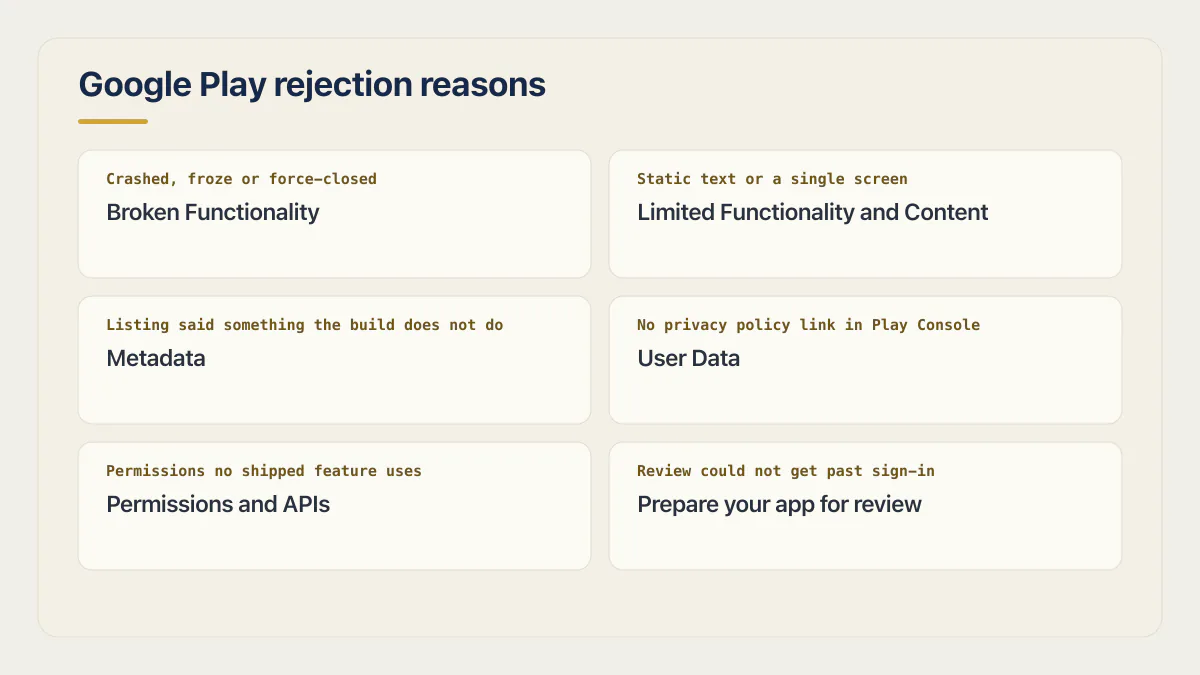
The six below are the ones worth reading in full if a prompt built your app, in the order I would open them.
The app crashed or froze in front of the review
Google’s wording is flat: “We don’t allow apps that crash, force close, freeze, or otherwise function abnormally.” The sentence has no carve-out for a crash that only happens on a cold start, on a slow network, or on the one device the review ran on.
For an AI-built app the crash is usually in the path nobody walked: the empty state before any data exists, the second sign-in, the back button from a screen that was generated three prompts after the one before it. Install the exact artifact you are about to upload on a real device, sign out, and walk it as a stranger with no rows in the database. An app that crashes only once it reaches real devices is a different investigation, and it starts after the store has already accepted the build rather than during review.
The app was too small to be its own app
The Limited Functionality and Content section of the same page is the one people misread. Google does not allow apps whose functionality and content are only minimal, and the examples it gives run to static text-only apps, single-wallpaper apps, and apps with no real function.
The version of this an AI builder produces is a shell that looks finished. Four tabs, three of which open a placeholder. The fix is not cosmetic. Ship the thing the listing describes, or cut the listing back to the one thing that works. What a shell around a website has to add before a store accepts it is a related but separate question, because there the content exists and the argument is about the wrapper. Whether your builder can produce an Android build at all sits earlier than either of them, and it is settled long before Play Console is involved.
The listing described an app the review could not find
The Metadata policy’s summary says: “App metadata like titles, icons, and descriptions must be honest, relevant, and suitable for all audiences.” Honest and relevant are judged against the build, not against the roadmap.
Generated store copy is confident by default. It describes the product you intend, in the voice of a product that already exists, and it will happily promise AI-powered scheduling in an app where the scheduling screen is a stub. Read your own description line by line with the app open beside it, and delete every claim you cannot demonstrate in under a minute.
Nobody could sign in
Google’s page on preparing an app for review is explicit that you provide and manage instructions for reaching restricted parts of your app, with a dedicated place for sign-in details when content sits behind a login.
This is the cheapest one on the list to fix and the easiest to cause, because the account you tested with is your own and it has existed for months. A demo account that worked in April, an invite code that expired, a magic-link email that goes to an address you no longer read: any of those ends the review at the first screen. Create the account fresh, sign in with it on a device that has never seen your app, and only then write it into the submission.
The privacy policy field was empty, or the link went nowhere
The User Data policy states the requirement in one sentence: “All apps must post a privacy policy link in the designated field within Play Console, and a privacy policy link or text within the app itself.” Two places, not one. The same policy adds a separate obligation to disclose data handling in the app itself: “You must provide an in-app disclosure of your data access, collection, use, and sharing.”
A generated app usually has neither, or has a privacy page that exists at a route the deployed build does not serve. Open the URL you typed into Play Console in a private browser window before you submit. If it 404s there, it 404s for the reviewer.
The permissions asked for more than the listing promised
The permissions policy is the strictest sentence Google publishes on this subject: “You may only request permissions and APIs that access sensitive information that are necessary to implement current features or services in your app that are promoted in your Google Play listing.”
Read that against a manifest you did not write. AI builders add permissions the way they add dependencies, in response to a feature you asked about once and abandoned. Camera, location and contacts are the ones worth checking first. Every permission has to point at something a user can do today and something your listing mentions. Delete the rest.
The two rejection causes that only exist because a prompt wrote the app
Both of the causes in this section come from the same fact: nobody read the code. The policies themselves apply to any app that generates content or collects data, whoever wrote it; what a prompt-built app adds is an owner who has not seen the code, so these two are the checks to make first. One is about a control the code does not contain, and the other is about a question the owner cannot answer honestly.
The first is Google’s AI-Generated Content policy, and it is short enough to quote whole: “Apps that generate content using AI must contain in-app user reporting or flagging features that allow users to report or flag offensive content to developers without needing to exit the app.” The policy adds that “Developers should utilize user reports to inform content filtering and moderation in their apps.”
An app that writes text for people needs a way for people to report the text it wrote.
A generated chatbot rarely has that control, and the reason is mechanical. The prompt that produced the chat screen produced a message list, an input box and a send button, because that is what a chat screen is. A report affordance on each generated message is a moderation feature, and nobody asks for moderation features while building a demo.
Google’s companion page on understanding the policy matters as much as the policy itself, because it narrows what the rule covers. Three kinds of app sit outside it: apps that “merely host AI-generated content and are unable to create content using AI, such as social media apps that do not contain AI content generation features”; apps that “summarize non-AI generated content, such as search result summarization and document summarization (for example, summarizing a book), if the summarization feature is the only feature of the app”; and “Productivity apps that use AI to improve an existing feature, such as email apps with AI-suggested email drafts”. If your app generates open-ended text, images or voice from a user prompt, none of those exclusions covers you.
The second cause is the Data safety declaration. Google’s page on it puts the responsibility in one line with no shared blame: “You alone are responsible for making complete and accurate declarations in your app’s store listing on Google Play.” The form asks what your app collects and shares. Someone who prompted the app into existence is answering questions about code they have never read, and the honest answer to most of those questions is that they do not know.
The audits are blunt about which way that error runs. AxonBuild’s audit cohort from June and July 2026 ran to 21 third-party apps, and confirmed exposure of personal or health data turned up in 5 of them at minimum, in apps whose owners did not believe they held any. None of the 26 apps in that audit set was an Android submission, so the cohort tells you what tends to be sitting behind an AI-built app, not what a Play reviewer decides.
The fix is procedural and takes an afternoon. Before you touch the form, write down every destination the app sends data to: your own backend, the analytics SDK, the crash reporter, the AI provider, the ads library, the font host. Each one is either a data type you declare or a call you delete. Answering from the list is the only version of that form that survives a later comparison against the app’s behaviour, and how to fill the form field by field belongs to the first-publish sequence on Google Play, from account to release track.
Four things that look like a Google Play rejection and are not
Play Console blocks releases in several ways that have nothing to do with a policy review, and the emails all read alike at seven in the evening. None of the four below is a rejection, and none of them is fixed by editing your listing or writing an appeal.
| What you saw | What it actually is | Where the answer lives |
|---|---|---|
| Play Console refuses the upload because the signing key does not match | A signing and key-management problem at upload time, before any review exists | An upload Play refuses because the signing key changed has separate causes and a separate recovery path |
| The app stops reaching new devices, or a release will not go out, over the target API level | A distribution rule. Google’s page says that where an app’s target sits below the current requirement, “it will stop being available to all new users whose devices run Android OS versions higher than your apps’ target API levels” | Google’s target API level requirements page |
| Play Console will not accept an icon, feature graphic or screenshot | Form validation against Google’s published asset formats and dimensions, applied before a human ever opens the listing | Google’s preview assets page |
| Production access is declined after a closed test | An application you submitted and Google answered, run under Google’s testing requirements for new personal developer accounts | Google’s page on testing requirements for new personal developer accounts, and the first-publish sequence covers where it sits in the release path |
All four routinely get called a Play Store rejection, because the wording is stern and the release is stuck either way. The difference is whether a person judged your app against a rule. If no policy is named anywhere in the message, no policy was applied, and nothing you write to Google will unblock it.
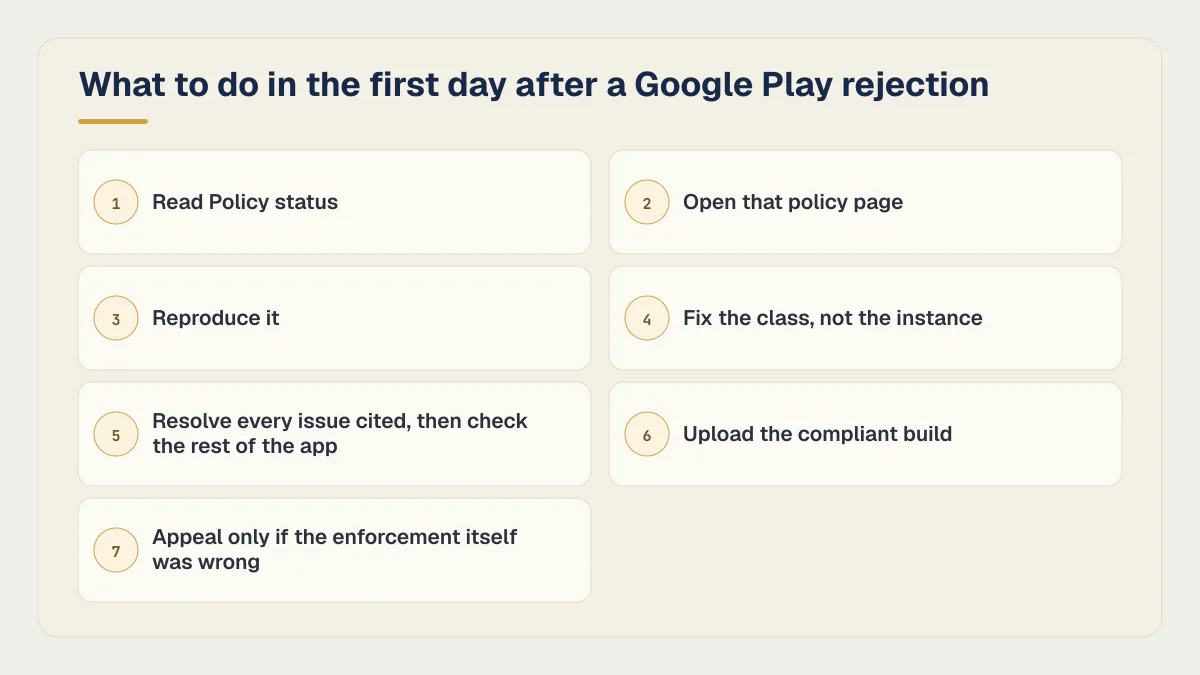
What to do in the first day after a Google Play rejection
The order matters more than the speed. Repeat rejections come from fixing the example Google gave rather than the rule Google cited, then sending back a build that fails the same policy on a different screen.
- 01 Open Play Console, select the app, and read Policy status in the left menu. Take the policy name from there, not from the summary line in the email
- 02 Open that policy page on Google support and read the specific sentence your app failed, not the whole category above it
- 03 Reproduce it. Install the exact artifact you submitted on a device that has never run your app, sign in with the credentials you supplied, and reach the screen the policy is about
- 04 Fix the class, not the instance. If one generated screen crashed on an empty state, every generated screen has an empty state, and the reviewer will find a different one
- 05 Resolve every issue the notice cites, then inspect the rest of the app for related violations before resubmitting
- 06 Upload the compliant build and take the non-compliant versions out of every track you published to, including the test tracks, before you roll out
- 07 Appeal only if you believe the enforcement itself was wrong, and write the appeal about the policy rather than about your effort
Google publishes the steps for the fix-and-resubmit half of that on its page for an app removed from Google Play. It is also where the appeal budget is set: Google allows a single appeal for each app removal, suspension or other enforcement action, so there is no version of this where you send three and hope. The same page adds a constraint nobody expects until they hit it, in Google’s own words: “we can only respond to appeals in Chinese, English, Japanese, and Korean at this time.” The route in is a troubleshooter titled Contact Google Play about an account termination, app removal, or suspension.
Fix-and-resubmit is the cheaper move nearly every time. An appeal is for the case where Google has described behaviour your app does not have, and that case is rarer than it feels at nine at night. What an appeal asks for on Apple’s side, and how a repeat rejection loop breaks, follows a different route with a different appeal body, so do not copy an Apple reply into a Play appeal.
Passing review is also a narrower test than being ready. Nothing in this list asks whether your database is reachable by the wrong account or whether your backups exist, and the checks that decide whether the app is ready for strangers cover ground no store policy touches. Google charges nothing to resubmit, which is worth separating from what being in both stores costs across a first year: a rejection delays a release without changing the store bill, though the corrective work itself (a crash fix, a missing feature, privacy or moderation controls) costs whatever it costs.
What Google does not publish about rejections
Three absences shape how much of the advice on this subject you should trust, and all three were confirmed by reading Google’s own pages on 17 August 2026.
Google publishes no rejection rate for Google Play, and no ranked list of the most common rejection reasons. The Developer Policy Center organises fourteen categories and its enforcement pages describe eight actions, and none of them counts anything. Every ranked list you can find is the author’s own ordering. The eleven-reason list at onemobile.ai/common-google-play-store-rejections/ was near the top of Google’s results on 16 August 2026, and it is a careful piece of writing. A re-read of it on 17 August 2026 found no link to a Google policy help page anywhere in it: one general link to Google’s content policies is the whole of it, and not one of the eleven reasons is tied to the page that states the rule. The comparable page at adalo.com spends most of its length on Apple’s review guidelines and names no Google policy at all. Neither is linked here, because both companies sell into the same market this site does.
Google’s page on ensuring app quality names no numeric crash rate or ANR rate that decides a review outcome. If a figure like that is being quoted at you as a Play threshold, it did not come from that page.
And the AI-Generated Content policy carries no visible publication or last-updated date, which is unusual for a rule this new. The Developer Policy Center announces its own changes on the page and currently shows “July 15, 2026: We’re updating our policies.” The AI policy shows nothing, so there is no way to tell from the page whether the reporting requirement is a month old or two years old. Treat it as the most perishable thing on this page and read it yourself before you rely on it.
Common questions about Google Play rejecting an app
Why did Google Play reject my app?
Because Google found at least one policy issue, and the notice names it in Play Console under Policy status. The notice may not list every violation, so resolve every cited issue and inspect the rest of the app for related problems. The ten causes this page maps, all of which apply to an AI-built app, are broken functionality, too little functionality, dishonest listing metadata, repetitive content or an unowned webview, a missing privacy policy link, permissions with no matching feature, a Data safety declaration that does not match behaviour, AI-generated content with no report control, impersonation, and a review that could not sign in.
How many times can Google Play reject my app before something worse happens?
Google does not publish a rejection count that triggers escalation, and there is no strike counter in Play Console. What its Enforcement Process page does describe is a set of harsher actions beyond rejection, including removal, suspension, restricted developer accounts and account termination, applied for repeated or serious violations. Repeatedly resubmitting a build that has not changed in the way the policy asked is the behaviour that carries risk, not the number of attempts.
Can I appeal a Google Play rejection?
Yes, and once. Google’s page for an app removed from Google Play allows a single appeal per app removal, suspension or other enforcement action, submitted through its troubleshooter, and states that it can only respond in Chinese, English, Japanese and Korean. Appeal when you believe the enforcement was an error. When the policy fits and the app does not, fixing and resubmitting is faster and does not spend the one appeal.
Does a Google Play rejection take my app off the store?
No, not if the word in the notice is rejected. Google’s policy status page says the last version you successfully published stays available on Google Play, so a rejected update blocks the new release and leaves existing users on the old one. Removed and suspended are the words that mean the listing is down, and they appear in the same field, so read it before you panic.
Why was my app rejected over its privacy policy?
Usually because the link is missing from one of the two required places, or because the URL does not load. Google’s User Data policy requires a privacy policy link in the designated Play Console field and a privacy policy link or text inside the app itself. A generated app often has the Console field filled and nothing in the app, or a policy page at a route the deployed build never serves. Open your own URL in a signed-out browser before resubmitting.
My app was rejected during closed testing. Is that the same thing?
Yes, if the message names a policy. Policy review applies to builds on test tracks, and the fix is the same fix. What is not a rejection is production access being declined after a closed test, because that is a decision on an application you submitted under Google’s testing requirements for new personal developer accounts, not a policy finding against your app. Google’s page on testing requirements for new personal developer accounts covers those requirements.
Does Google Play reject apps for being built with AI?
No. Nothing in Google’s Developer Program Policies rejects an app because of the tool that produced it. Two policies do apply more often to apps built this way: AI-Generated Content, which requires an in-app report or flag control in any app that generates content with AI, and the Data safety declaration, which holds the developer alone responsible for accuracy about code they may never have read. Both are about the finished app, not about who or what wrote it.
Is a rejected upload the same as a rejected app?
No. An upload Play Console refuses never reached a review, and the message names a technical condition rather than a policy: a signing key that does not match, an asset at the wrong dimensions, a version code already used. A policy rejection always names the policy. If you cannot find a policy name anywhere in the message, you are looking at an upload problem and no appeal or listing edit will move it.
How long until a fixed app gets reviewed again?
Google publishes a range rather than a typical figure, and the range is wide enough that planning around an average is a mistake. There is no published fast lane for a resubmission after a rejection, and no waiting period you have to observe before sending a fixed build. How long each store’s review actually takes carries the numbers Google does publish, and that is where to read them rather than here.
Every rule on this page came off a page Google publishes and nothing on it required a Play Console account to find. That is the part I did not expect. Ten policy pages and a couple of hours of reading is the whole cost of the decoder above, and the pages currently occupying this search have not paid it. I still do not have a good explanation for that.
If you have a working app built with these tools and need it ready for real customers, this is what we do.
Built it with AI. Now it has to hold up for real customers.
The Production Hardening Sprint takes the app you already have and builds the production foundation underneath it. Authentication and access rules, payments that stay consistent, error handling, monitoring, backups, automated tests and a documented handover. Our engineers work inside your existing codebase for ten working days. All 123 deliverables are included, and you get the evidence for each one.
See the Production Hardening Sprint →  $2,500 fixed price · 10 working days · One codebase