A Base44 App Store rejection over permission strings means the iOS build declared a protected resource your app never touches, or a resource it does use with a purpose string that does not say why. Apple gives two ways out: write a purpose string that explains the need, or remove the code reaching for the resource. Base44’s own documentation says those permissions are not editable in its interface.
If the rejection email names Bluetooth and your app has no Bluetooth in it, this page is about that. If it names a guideline number you do not recognize instead, start with which guideline Apple cited, and the fix for each and come back once you know a permission is the problem.
One person reported this in public in August 2026, a few weeks after Base44 changed how its iOS builds handle permissions. Another described “two iOS apps rejected by Apple for placeholder Bluetooth and Speech Recognition permission descriptions”. Placeholder is the word the problem turns on. The string was there, and it said nothing a reviewer could act on.
What did Apple actually reject?
App Review reads the purpose strings in your build and rejects the build when one of them fails. Two shapes fail: a generated placeholder that names nothing the app does, and a permission declared for a feature the app does not have. Either way the fix ends in a new build.
Apple states the rule plainly on its guidance for requesting access to protected resources: “App Review checks for the use of protected resources, and rejects apps that contain code accessing those resources without a purpose string.” The same page lists what makes a string valid. It is not blank or whitespace only, it is shorter than 4,000 bytes, it is the type the key requires (typically a string), and it “provides a description that’s accurate, meaningful, and specific about why the app needs to access the protected resource.”
That last requirement is the one a generated string fails. “This app needs Bluetooth access” is grammatical, and it is not accurate, meaningful or specific about anything, because the app does not do it.
Apple’s App Review Guidelines cover both halves in 5.1.1: purpose strings must “clearly and completely describe your use of the data”, and apps “should only request access to data relevant to the core functionality of the app”. A permission your app does not use fails both.
There is an opposite failure, and it lives on a different page. A purpose string that is absent never reaches a reviewer at all, because it stops the binary during processing as the upload error you get when a purpose string is missing.
The permission keys a Base44 iOS build can carry
A Base44 user asked the question in the plainest possible form.
Has anyone had Apple reject an iOS build because Base44 generated NSBluetoothPeripheralUsageDescription and NSSpeechRecognitionUsageDescription even though the app doesn’t use either?
Here is the set those two keys come from. Every key name below was read from Apple’s protected resources index on 16 August 2026, which is also where you can check any of them yourself.
| Key | What it covers | Keep it only if your app |
|---|---|---|
NSBluetoothPeripheralUsageDescription | Connecting to Bluetooth peripherals. Deprecated at iOS 13 | Targets iOS 12 or earlier and talks to a device |
NSBluetoothAlwaysUsageDescription | Access to Bluetooth | Talks to a device over Bluetooth |
NSSpeechRecognitionUsageDescription | Sending user data to Apple’s speech recognition servers | Transcribes speech through the Speech framework |
NSHealthShareUsageDescription | Reading samples from the HealthKit store | Reads Health data |
NSHealthUpdateUsageDescription | Saving samples to the HealthKit store | Writes Health data |
NSCameraUsageDescription | Access to the device’s camera | Takes photos or video |
NSMicrophoneUsageDescription | Access to the device’s microphone | Records audio |
NSPhotoLibraryUsageDescription | Access to the photo library | Reads photos the person already has |
NSPhotoLibraryAddUsageDescription | Add-only access to the photo library | Saves images into the library |
NSLocationWhenInUseUsageDescription | Location while the app runs in the foreground | Uses the person’s position on screen |
NSLocationAlwaysAndWhenInUseUsageDescription | Location at all times | Needs position with the app closed |
NSContactsUsageDescription | Access to contacts | Reads the address book |
NSCalendarsFullAccessUsageDescription | Reading and writing calendar data | Reads and writes events on iOS 17 and later |
NSCalendarsWriteOnlyAccessUsageDescription | Creating calendar events | Only creates events on iOS 17 and later |
NSCalendarsUsageDescription | Access to calendar data. Deprecated at iOS 17 | Predates the split above |
NSRemindersFullAccessUsageDescription | Reading and writing reminders | Touches Reminders on iOS 17 and later |
NSRemindersUsageDescription | Access to reminders. Deprecated at iOS 17 | Predates the split above |
NSMotionUsageDescription | Access to the device’s motion data | Counts steps or reads the accelerometer |
NSLocalNetworkUsageDescription | Access to the local network | Finds other devices on the same network |
NSFaceIDUsageDescription | Authenticating with Face ID | Unlocks or signs in with Face ID |
NSUserTrackingUsageDescription | Using data to track the user or the device | Tracks people across other companies’ apps and sites |
NSAppleMusicUsageDescription | Access to the media library | Plays the person’s own music |
NSSiriUsageDescription | Sending user data to Siri | Exposes actions to Siri |
If you cannot finish the third column for a key named in your rejection, that key is a strip candidate.
Three rows are Apple’s own leftovers. NSBluetoothPeripheralUsageDescription was deprecated at iOS 13, and Apple’s page for it says that for apps with a deployment target of iOS 13 and later, use NSBluetoothAlwaysUsageDescription instead. NSCalendarsUsageDescription and NSRemindersUsageDescription went the same way at iOS 17.
As of 16 August 2026, Base44’s documentation does not publish the list of permission keys its iOS builds include. Its mobile-experience page covers building, sharing and submitting, and says nothing about permissions. So the table above is Apple’s set rather than Base44’s, and there are two ways to see yours: the rejection message, which names the key, and the permission prompts the installed app puts on screen.
Strip it or justify it?
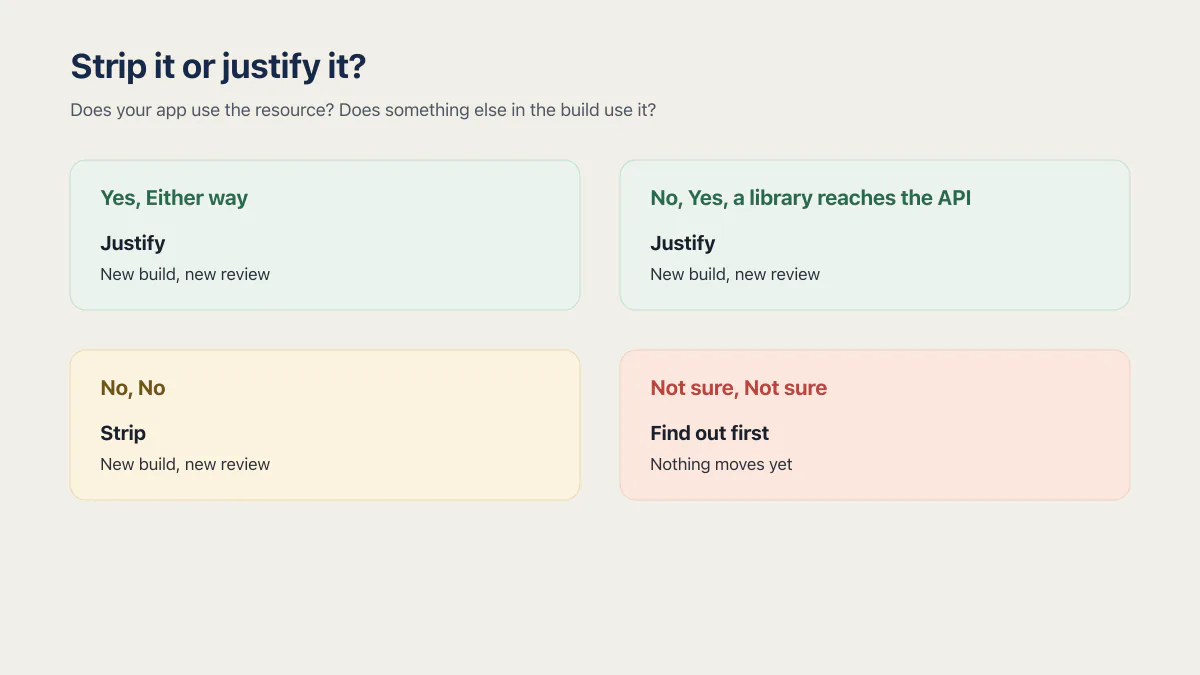
Apple’s own sentence is the decision. Provide a purpose string that explains why the app needs the access, or remove the code that reaches the resource. Strip when nothing in the build uses the resource. Justify when the feature is real and only the wording is generic.
The full sentence, from the same Apple page: “To resolve this issue, provide a purpose string that explains why the app needs access to this sensitive information, or remove the code that’s accessing the resource.”
Justifying is the easier half. Rewrite the string so it names the feature and the action that triggers it, in the person’s words, and you have met the accurate, meaningful and specific standard. Stripping is where people get hurt, and there are two rails on it.
The first rail is other people’s code. Apple’s note on the same page: “If you’re using external libraries or SDKs, they may reference APIs that require a purpose string. Although your app might not use these APIs, a purpose string is still necessary for App Review.” It ends: “You’re responsible for all access of protected resources, including external SDK and library access.” So a key can be correct even when nothing you built asks for it, which is why deleting on sight is the wrong first move.
The second rail is the Speech framework specifically, and it is the one named in both rejections. Apple’s guidance on asking permission to use speech recognition says you must include the NSSpeechRecognitionUsageDescription key in Info.plist, and that “If this key is not present, your app will crash when it attempts to request authorization or use the APIs of the Speech framework.” Pull that key out of a build that really does call Speech and you have traded a rejection for a crash on launch.
| Does your app use the resource? | Does something else in the build use it? | What to do | What that means |
|---|---|---|---|
| Yes | Either way | Justify. Rewrite the string to name the feature and the action that triggers it | New build, new review |
| No | Yes, a library reaches the API | Justify. You are responsible for the library’s access, so the string stays and has to be true | New build, new review |
| No | No | Strip. Take out whatever made the build ask, so the key stops being emitted | New build, new review |
| Not sure | Not sure | Find out first. The rejection names the key, and the installed app’s own prompts show what it asks for | Nothing moves yet |
The Base44 problem: you cannot edit the strings where you built the app
Base44’s store documentation is blunt about it. “Every mobile app package includes device-level permissions. Base44 uses AI to scan your app and set the permissions it needs. These permissions are not editable in the Base44 interface.” Checked on Base44’s store submission page on 16 August 2026.
The dates around that sentence matter, because this part of the build moved twice in eleven days. Base44’s product changelog records that on 26 July 2026, “Your mobile iOS builds now always include the permission usage descriptions Apple requires, with reasons generated automatically and localized into your app’s language”. On 5 August 2026: “Your iOS builds now include a permission purpose string for every permission your app requests, in all 25 supported languages rather than only your app’s own language.” Base44 adds that this is the text Apple’s automated review reads. That is Base44 describing its own change: Apple documents App Review checking purpose strings and does not document an automated reader.
The generated strings closed the common missing-string path, but not every path. Base44 still documents a missing NSHealthShareUsageDescription rejection that its current HealthKit limitation cannot fix. A build can also be rejected for carrying a string for something the app has never done, now in 25 languages. Both public reports landed after the second changelog entry shipped.
Three routes are open to you, and they are not equal.
Remove the reason. Base44 says the scan sets the permissions the app needs and that the result is not editable in the interface. It does not document a way to remove one. So the strip path follows from those two facts rather than from a Base44 instruction: take out the feature or the library that made the scanner ask, run the scan again from the editor (Publish, then the Mobile app tab, then Check Your App, then Run App Scan, with Apply with AI or Copy Fix Prompt for the results), regenerate the store files, and upload a new build. There is no permission editor to open.
Ask Base44, knowing the limit up front. The same page is explicit that support will not follow your submission, will not contact the stores on your behalf, and takes no part in the review conversation. Whatever changes on the platform side, the reply to the reviewer is yours to write.
Own the native shell yourself. If the build has to declare exactly the permissions the app uses and nothing more, somebody has to control the iOS project instead of the generator. That is a much bigger decision than one rejection, and better made on its own timeline than while a build sits in Rejected. What a Base44 mobile build actually ships, and what its store flow covers end to end, is a wider question than one stray key.
The clearest evidence that this is a real constraint sits on Base44’s own page. Under troubleshooting, it says a rejection “about a missing NSHealthShareUsageDescription key in Info.plist” is “caused by a HealthKit entitlement included in the iOS build”, and then: “Base44 does not support HealthKit, and there is currently no way to add NSHealthShareUsageDescription to the build configuration.” It calls this “a known limitation of the current iOS build”, and that text was still on the page on 16 August 2026. A vendor documenting a store rejection it cannot fix is unusually honest, and it is also a wall.
What goes in the resubmit note?
The resubmit note is four facts and no argument. Name the key you removed or rewrote, give the new string in full if you rewrote one, give the build number the change is in, and state in one sentence that the app does not use the resource.
Write it as plain sentences in the reply field. The reviewer is checking one thing: whether the build in front of them still declares a permission the app does not exercise. Give the exact new string, because they will otherwise go and read it themselves, and give the build number, because the rejected build and the fixed one look identical from the outside.
Leave three things out. Any argument about whether the reviewer was right, because that is not what the reply is for. Any promise about a future version, because review is about the binary in front of them. And any mention of the tool you built with: Base44 is not the thing under review.
Everything else a resubmission needs, from reviewer notes to a demo account, is the general rejection question rather than the permission one.
If the same rejection comes back
A second rejection on the same problem usually means the build still emits the key, which usually means the feature or the library that made the scanner ask is still in the app. Compare the key name in the new rejection against the old one before you change anything else. If it is the same key, nothing that mattered changed, whatever the build number says.
Breaking a repeat-rejection cycle is its own problem with its own answer, and so is the pre-submit pass that catches a stray permission before you ever upload. The second one is the cheaper place to solve this.
Common questions about Base44 permission-string rejections
Why does my Base44 app ask for Bluetooth when it has no Bluetooth feature?
The build declares it. Base44 says it uses AI to scan your app and set the permissions it needs, and that scan can attach a Bluetooth key to a project with no Bluetooth screen in it. What the phone prompts for, and what App Review reads, is the string in the build rather than anything you designed.
Can I edit permission strings in Base44?
No. Base44’s store documentation says device-level permissions are set by its AI scan and “are not editable in the Base44 interface”, checked 16 August 2026. There is no permission editor and no documented way to remove a single key. The route left is to take out whatever made the scan ask for it, then generate store files again.
Can I just delete the key out of the IPA?
Editing the generated file is a dead end. Base44’s documentation rules out changing the identity values it writes into those files, and anything else you edit by hand disappears the next time Base44 generates store files for you. The change has to happen in the build.
Will Apple reject an app for a permission it does not use?
Yes. Apple’s guidelines say apps “should only request access to data relevant to the core functionality of the app”, and a string for a resource the app never touches also fails Apple’s requirement that a purpose string be accurate, meaningful and specific about why the app needs the access. A reviewer who opens your app and finds no Bluetooth anywhere has both grounds at once.
What is a purpose string?
A purpose string is the sentence iOS shows a person the first time your app asks for a protected resource, stored in Info.plist under a key such as NSCameraUsageDescription. Apple’s word for it is purpose string, or usage description. Rejection emails and community posts call it a permission string. Same thing.
What is NSBluetoothPeripheralUsageDescription?
NSBluetoothPeripheralUsageDescription is the Info.plist key for connecting to Bluetooth peripherals, and Apple deprecated it at iOS 13. Apple’s documentation says apps with a deployment target of iOS 13 and later should use NSBluetoothAlwaysUsageDescription instead, and that both keys belong in the file only when the deployment target is older than iOS 13.
Does removing a permission need a new build and a new review?
Yes. The permission strings live in Info.plist, which is part of the binary, so changing one means generating store files again, moving the build number, and uploading a fresh build for review.
Why would an app get rejected from the App Store?
Rejections arrive with a guideline number, and the number is what decides which fix applies, so that is a wider question than the one cause on this page. Start from the number in your rejection and work back to the behavior it names, which is covered in which guideline Apple cited, and the fix for each.
Can a Base44 app get onto the App Store at all?
Yes. Base44 generates the store files and you submit them through your own App Store Connect account, so the listing, the pricing and the review conversation stay yours, though how a Base44 build gets from the editor to a live listing has more steps than this one rejection.
Does the same thing happen on Google Play?
The keys on this page are iOS only, so nothing in the table applies to a Play rejection. Base44’s in-editor scan can check an app against Google Play guidelines as well as App Store guidelines, and the same rule holds on either store: a permission the app does not use is worth removing rather than explaining.
Fixing the bug in this guide gets you past today. If you would rather have the whole foundation checked and built in one go, that is what the sprint below is for.
Built it with AI. Now it has to hold up for real customers.
The Production Hardening Sprint takes the app you already have and builds the production foundation underneath it. Authentication and access rules, payments that stay consistent, error handling, monitoring, backups, automated tests and a documented handover. Our engineers work inside your existing codebase for ten working days. All 123 deliverables are included, and you get the evidence for each one.
See the Production Hardening Sprint →  $2,500 fixed price · 10 working days · One codebase