“Can you turn a base44 web application to an IOS App Store application” is a question a Base44 owner put to freelancers in August 2026, in exactly those words. Most of the results for it answer badly, because the answer moved while people were still asking.
Base44 can make mobile apps. Its editor packages a published Base44 app into an iOS IPA and an Android AAB that you upload to the stores yourself, and what ships is a web view wrapper around your live URL. Downloading the files needs the Builder plan at $50 a month.
If you came here looking for Base44’s own app for building on a phone, that is a different product and it lives on Google Play. This page is about getting the app you built onto other people’s phones.
Everything below is read from Base44’s own documentation and from Apple’s and Google’s published rules on 15 August 2026. I have not submitted a Base44 app to Apple, so nothing here reports on how a review went. Base44’s store flow is one of four ways a web app gets onto phones; this page stays on the Base44 answer.
Is a Base44 mobile app native or a web app?
A Base44 mobile app is a web view rather than a native build. Base44’s own documentation calls it a lightweight native wrapper around your web app that opens only your app’s URL, and lists three native features, push notifications, full offline mode and HealthKit, as not supported yet.
Base44’s store-submission documentation, read on 15 August 2026, puts it in two sentences: “Your mobile app runs your published Base44 app inside a secure web view. This is a lightweight native wrapper around your web app that opens only your app’s URL.” Base44’s own marketing contradicts itself here, so it is worth knowing which half to believe. A post on how to make a mobile app, published 10 May 2026 and updated 10 August 2026, says “most AI-generated mobile apps run as a lightweight wrapper around your web app rather than a fully native build”, and elsewhere on the same page offers to let you “build native mobile apps by describing your features in plain language”. The documentation settles it, and the documentation says web view.
What comes out is a real IPA bundle for iOS and a real AAB bundle for Android, the files Apple and Google actually accept. What sits inside them is your website.
| Capability | In a Base44 store build | Base44’s documented wording, checked 15 August 2026 |
|---|---|---|
| An iOS IPA and an Android AAB you can upload | Yes | ”Build Stores Files” produces the bundles for App Store Connect and Google Play |
| Content and design changes reaching users without a resubmission | Usually | ”those updates usually appear in the app without submitting a new version …” |
| Push notifications | No | ”Native-only features such as push notifications, full offline mode, and HealthKit are not supported yet” |
| Full offline mode | No | Same sentence |
| HealthKit | No | Same sentence, and a Troubleshooting entry covers rejection over a missing HealthKit entitlement |
| Native rendering and performance | No | ”a lightweight wrapper around your web app rather than a fully native build” (Base44’s blog, 10 August 2026) |
| Selling digital subscriptions | No | ”We are working on a built-in integration for StoreKit and Google Play Billing” |
The resubmission row is the strongest thing about this build. Because the app loads your published URL, a copy change or a new screen usually reaches everyone who already installed it with no review queue in the middle, as long as the shell itself and its store-facing behaviour stay the same. That is the good half of the trade a web view makes.
Base44 documents a free version of the same idea. Its mobile-experience page covers adding the app to a phone’s home screen from the browser, where “their device uses your app’s logo as the icon. It appears alongside other apps and opens with a single tap, just like a native app.” That is a progressive web app, and nobody finds one by searching the App Store. It cannot be the answer if the reason you want a phone app is distribution.
What you bring before Base44 builds your App Store and Google Play files
Base44 generates the bundles. Every account, key and legal page around them is yours to produce first, and that is where the calendar time goes. The documentation’s own “Before you begin” list runs to seven items:
| What you bring | Detail from Base44’s documentation |
|---|---|
| A published Base44 app | With a stable URL, because that URL is what the app opens |
| An Apple Developer Program account | With access to App Store Connect and to its API keys |
| A Google Play Console developer account | Required separately from the Apple side |
| Permission to create and manage apps in both accounts | Named explicitly for people working in a team |
| A logo meeting Apple and Google icon requirements | Or a clear prompt to generate one |
| A privacy policy and terms of use page | Explaining how your app handles data and device permissions |
| Information about selling products | What your app sells, which is the question the payments section below turns on |
The Apple credentials get specific later rather than in that list. Step 4 of the flow is where an Issuer ID, a Key ID and a Team ID are pasted in and a .p8 key file is uploaded.
Then the plan gate, which sits with the download step: “You must be on the Builder plan or higher to download your app files.” Builder is $50 a month, or $40 a month billed annually, prices checked 15 August 2026. It is also the first tier with GitHub integration, so a project already syncing to a repository is on Builder or higher.
The privacy policy and terms pages deserve more attention than they usually get, because both stores compare them against what the app actually does with data and permissions. Base44’s platform paperwork does not cover yours: what Base44’s SOC 2 and GDPR materials cover is the platform, and the pages you link from your own app are yours to keep true.
Two lines set expectations correctly before you start. “You still need to submit the app through your own App Store Connect and Google Play Console accounts, where you control the listing details, pricing, and release settings.” And when review goes quiet, Base44 support “does not track the progress of your submission, contact Apple or Google, or manage conversations with the review teams.”
The pipeline is being patched, which is a reason to recheck rather than a worry. Base44’s product changelog records that on 5 August 2026 “iOS builds now include a permission purpose string for every permission your app requests, in all 25 supported languages”, after a 26 July 2026 entry that added those permission usage descriptions in the first place. One rejection cause closed, then widened, inside two weeks.
Can you sell a subscription in a Base44 mobile app?
Digital subscriptions cannot be sold from a Base44 mobile app today. Base44 tells you not to use Stripe for digital content inside the mobile app, because Apple and Google require their own billing, and its StoreKit and Google Play Billing integration was still described as in progress on 15 August 2026.
The documentation is blunt about it: “Do not use Stripe for payments inside your mobile app. Apple and Google require their own billing systems for digital content. If your app uses Stripe for digital content, your app is rejected. We are working on a built-in integration for StoreKit and Google Play Billing to handle digital purchases and keep your app compliant.”
Read that from the buyer’s side. If the thing your app sells is access to your app, the store build cannot take the money as of 15 August 2026, and wiring Stripe in anyway is the documented rejection rather than a workaround. The wall is also invisible from outside, so people reach it after paying for a developer account and doing the work. One Base44 owner, writing publicly and recorded in AxonBuild’s outreach corpus on 12 August 2026, described the order it happens in:
I created an app developer account, uploaded my Base44 app and did the whole thing, only to discover I need something to create an apple app store subscription (storekit billing) Base44 doesn’t offer yet and cannot write the code for
If your app sells physical goods or real-world services, none of this touches you. The stores require their own billing for digital content, and a delivery, a haircut or a hotel night is not digital content, so Stripe stays fine in a booking app, a shop that ships things or a service business taking deposits. Work out which side of that line you are on before you buy anything.
“We are working on” is the least stable sentence Base44 has published about this flow. If you are reading this well after 15 August 2026, open the submission documentation before planning around the gap.
Where a web view wrapper runs into Apple
Apple’s Guideline 4.2, minimum functionality, says an app “should include features, content, and UI that elevate it beyond a repackaged website”. An app whose native shell opens exactly one URL is the shape that sentence was written about, so a thin Base44 build is a real 4.2 candidate and a rich one usually is not. Google reads its own functionality and user-experience policy rather than Apple’s, and reaches its own conclusion.
If a build already came back rejected, the useful move is to match the guideline Apple cited to the fix rather than guess. And before any of that, get the build to testers first, because a wrapper that white-screens on someone else’s phone fails for a reason no guideline number will tell you.
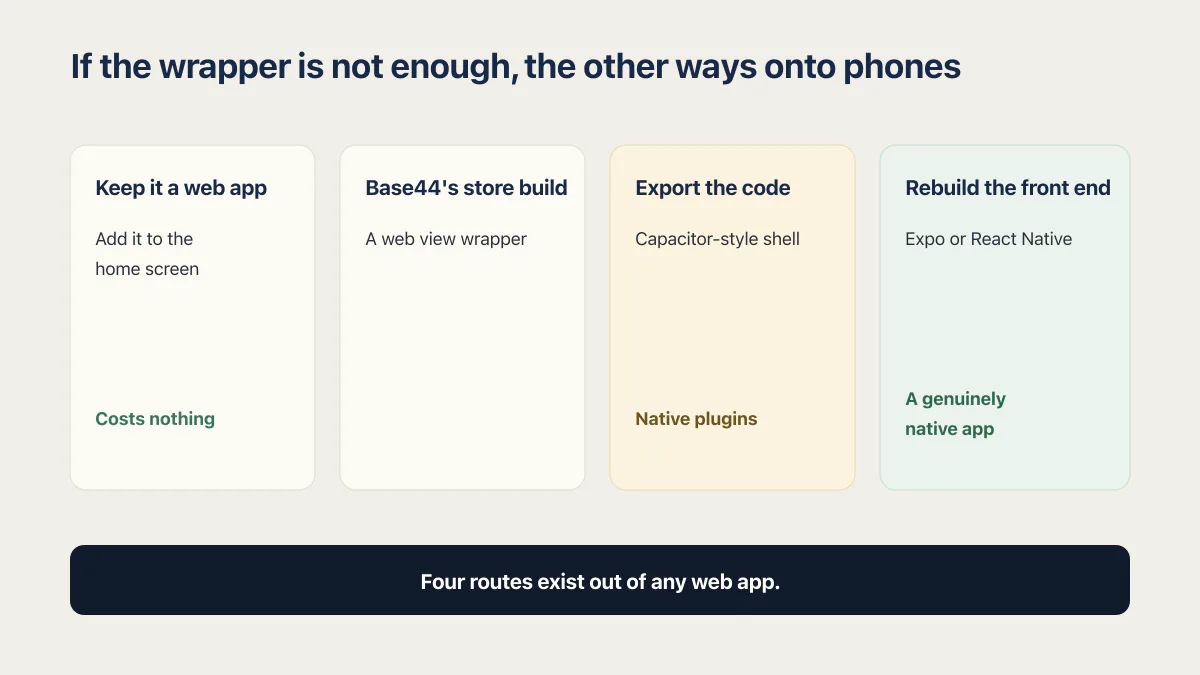
If the wrapper is not enough, the other ways onto phones
Four routes exist out of any web app, and Base44’s flow is one of them. Keep it a web app and let people add it to the home screen, which costs nothing and gives up store discovery. Use Base44’s store build, which is everything above. Export the code and wrap it in a Capacitor-style shell, which buys the native plugins Base44 does not expose. Or rebuild the front end in Expo or React Native, the only route that produces a genuinely native app.
What each costs, how long each takes, and which ones Apple turns away is compared on the page about the four ways a web app gets onto phones; this one stops at the Base44 answer.
The Base44-specific note on the last two routes: what you export is a React web app and the backend stays on Base44, so wrapping or rebuilding the front end moves neither the data nor the permission rules. What Base44’s exported code actually contains covers the scaffold; how to get your Base44 code out, and moving the app to Supabase and Vercel, each have their own page.
Who the Base44 store flow fits, and who it does not
It fits an app whose value is the web experience, whose owner is already on Builder, and which makes its money somewhere other than an in-app digital subscription. For that app the flow is close to free: the files come out of the editor, updates usually keep landing without resubmission, and what is left to pay is the developer accounts and the review wait.
It does not fit an app that needs to charge for access on iOS today, needs push notifications to be useful, or needs to work on a train. Those are documented gaps rather than preferences, and no amount of prompting closes them from inside Base44 as of 15 August 2026. If one is load-bearing, the choice is waiting for the integration or taking the front end elsewhere, and which Base44 exit fits your reason for leaving is worth deciding before a rejection forces it. Paying someone to do the move is a third option.
The store build changes nothing about your app’s permission rules; it just carries them onto more phones. The two-account test your own app still has to pass is the same before and after a listing, and a store review will not run it for you.
Common questions about Base44 mobile apps
Can you put Base44 apps on the App Store?
Yes. Base44’s documentation describes a flow inside the editor that scans your published app against store requirements, produces a Readiness Score, and then builds an IPA for the App Store and an AAB for Google Play. You upload those files through your own App Store Connect and Google Play Console accounts. Downloading them requires the Builder plan or higher. Checked 15 August 2026.
Is a Base44 mobile app native?
No. Base44 describes the build as “a lightweight native wrapper around your web app that opens only your app’s URL”, with your published app running inside a secure web view. The wrapper is native code, the app inside it is your website. Base44’s documentation lists push notifications, full offline mode and HealthKit as “not supported yet” for this reason.
Do you need a Mac to make a Base44 iOS app?
Base44’s documented submission flow does not mention a Mac or Xcode at any step, as of 15 August 2026. It builds the iOS bundle for you from App Store Connect API credentials: three IDs pasted into the editor and a .p8 key file uploaded. That is a documented absence rather than a promise from Base44 that no Mac is ever needed, so treat it as “nothing in the flow asks for one”.
Do you need an Apple Developer account for a Base44 app?
Yes, and a Google Play Console account for the Android side. Base44’s “Before you begin” list requires an Apple Developer Program account with access to App Store Connect and to its API keys, and step 4 of the flow is where the specifics arrive: an Issuer ID, a Key ID and a Team ID pasted in, plus a .p8 key file uploaded. Base44 does not submit on your behalf and its support does not contact Apple or Google for you.
What does the Builder plan have to do with mobile apps?
Builder is the download gate. Base44’s documentation says “You must be on the Builder plan or higher to download your app files”, so a Free or Starter account can prepare the build but cannot take the bundles away. Builder costs $50 a month, or $40 a month billed annually, prices checked 15 August 2026.
Can Base44 submit the app to the stores for you?
No. Base44’s documentation states that “You still need to submit the app through your own App Store Connect and Google Play Console accounts, where you control the listing details, pricing, and release settings.” It also says Base44 support “does not track the progress of your submission, contact Apple or Google, or manage conversations with the review teams.” The listing, the review replies and the release timing stay with you.
Does every change to a Base44 app need a new App Store submission?
Usually not. Because the app opens your published URL, Base44 says that “when you change content or design in Base44 and publish your app, those updates usually appear in the app without submitting a new version …”. The word “usually” is theirs and it matters: changes to icons, permissions, store metadata or anything baked into the bundle still need a new build and a new review.
Can you sell subscriptions in a Base44 mobile app?
Not today. Base44 says Apple and Google require their own billing systems for digital content, that an app using Stripe for digital content “is rejected”, and that it is “working on a built-in integration for StoreKit and Google Play Billing”. As of 15 August 2026 that integration has not shipped, so a Base44 store build cannot charge for in-app digital access. Stripe remains fine for physical goods and real-world services.
Can you put a Base44 app on Google Play only?
Yes. The documentation keeps the two builds in separate steps, “Create App Store files” and “Create Google Play files”, so nothing forces you to do both. Android-only skips the Apple Developer Program account entirely and leaves you with the AAB and a Google Play Console account. Google applies its own functionality policy to the result rather than Apple’s.
If you have a working app built with these tools and need it ready for real customers, this is what we do.
Built it with AI. Now it has to hold up for real customers.
The Production Hardening Sprint takes the app you already have and builds the production foundation underneath it. Authentication and access rules, payments that stay consistent, error handling, monitoring, backups, automated tests and a documented handover. Our engineers work inside your existing codebase for ten working days. All 123 deliverables are included, and you get the evidence for each one.
See the Production Hardening Sprint →  $2,500 fixed price · 10 working days · One codebase