Two Base44 owners, both writing in public, both on their way out. One wants his whole platform off Base44’s database and machines and onto Claude Code. Another described deleting an entity in the Base44 dashboard and watching it come back about seven minutes later.
They are asking the same question, and almost everybody currently answering it sells either the move or the destination.
Migrating off Base44 is a partial rebuild rather than a copy. Base44’s documentation says entities are managed in Base44 and are not in your local repository under GitHub sync, and that eject creates a second Base44 backend with an empty database. Of 107 Base44 owners in AxonBuild’s outreach corpus, 6 said they were leaving. None named price.
That last sentence is the part worth sitting with before you start. The Lovable exit story is a cost story, and people repeat it until it sounds like the only reason anyone leaves an AI builder. On Base44 the owners who actually said they were going gave four other reasons, and three of those reasons do not get solved by moving.
Why do people migrate off Base44?
Base44 departures cluster around four triggers: scale and rate limits, lock-in, data behaviour, and wanting a real phone app. Those are the reasons behind the 6 owners, out of the 107 whose posts name Base44 as their tool, who said they were leaving, as of the 14 August 2026 harvest of AxonBuild’s outreach corpus.
Two of the six left over scale and rate limits, one over lock-in, one over data behaviour, and two because they wanted a phone app. The inclusion rule was narrow on purpose. A row counts only if it names Base44 as the tool and the person’s own quoted words say they are leaving, have left, or want to leave. Two rows that look like matches were excluded: an agency advertising Base44 migrations as a service, and an owner who wanted to move data the other direction, out of Airtable and into a new Base44 app.
The scale pair are the loudest. One runs a platform for students and wrote that it was “impossible to use Base44 at scale. Slow services, problems with student volume, rate limit issues,” then “began moving everything to the classic Vercel + Supabase + Railway combo.” The other had already paid a company to rebuild the app after Base44 could not carry the user numbers. The lock-in case is the Claude Code owner from the top of this page, who has about 100,000 records in an app that only handled a few thousand of them. The data case is the entity that came back seven minutes after being deleted, in a multi-tenant app. The two phone cases are an owner willing to pay for a Base44 to React Native move, and a mother and teenage son who built a small-business app and wanted it off Base44’s servers so it could go on iOS and Google Play.
Not one of the six said Base44 cost too much.
The limits on that finding matter as much as the finding. These are people who chose to post publicly about their app, in a prospecting corpus rather than a survey of Base44’s users, and six is a small number no matter how the rows were counted. It is enough to say that price is not the dominant Base44 exit trigger in the evidence available, and not enough to say it never is.
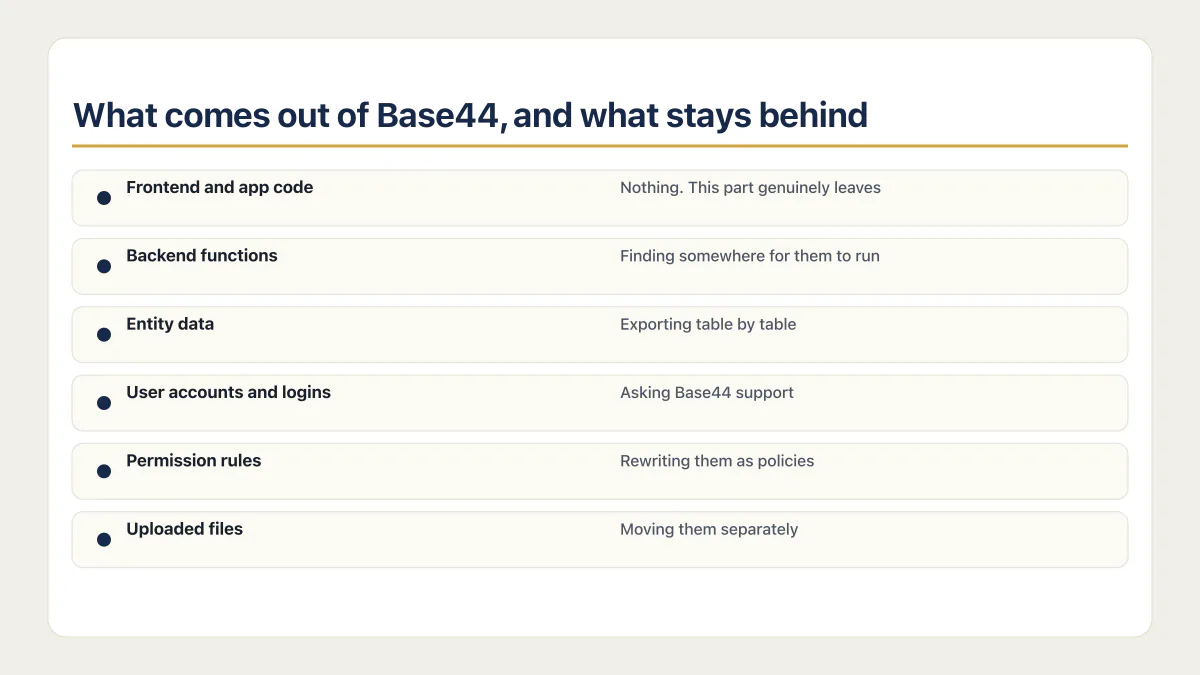
What comes out of Base44, and what stays behind
Your code leaves. The part that runs your code stays. Base44’s own documentation settles this once you read two of its pages next to each other, which is a thing the vendors selling the migration have not done.
Base44’s developer-tools documentation says you download everything as a ZIP from the code view, and that “Downloading a ZIP file and connecting to GitHub both require a Builder plan or higher.” So the exit itself sits behind a paid tier. Which Base44 plan unlocks two-way GitHub sync is the same threshold that unlocks backend functions and a custom domain, which is why most people trying to leave are already on it.
Here is the decision-grade version of what moves. What a Base44 export actually gives you, step by step, is a separate job and gets its own page.
| What you have in Base44 | What Base44 documents | What is still on you |
|---|---|---|
| Frontend and app code | ZIP download from the code view, or two-way GitHub sync, both on Builder or higher | The source files leave. Base44 SDK and API calls, plus any hosted backend services they use, stay until you retain or replace them |
| Backend functions | eject downloads backend resources: “Entity schemas, functions, and configuration files in the base44/ directory” | Finding somewhere for them to run |
| Entity schemas | The CLI eject command copies them into a new project. Under two-way GitHub sync, “entities are managed in Base44 and are not included in your local repository” | Recreating them as real database tables if you are not ejecting |
| Entity data | Not copied by eject. Leaves as a per-table CSV download from the app dashboard | Exporting table by table, then loading each one into the destination |
| User accounts and logins | Not described on any of the five documentation pages checked on 15 August 2026 | Asking Base44 support before you plan a cutover around it |
| Permission rules | Entities travel as declarations. Base44’s runtime is what enforces them | Rewriting them as policies in the destination and testing with two accounts |
| Uploaded files | Covered by neither the code export nor the CSV data export | Moving them separately |
Two rows there deserve to be read slowly, and both turn on a distinction Base44 documents in two separate places. The Code tab and GitHub sync layout puts entities/ and functions/ at the top level, and that page carries a Note: “Entities: When using GitHub 2-way integration, entities are managed in Base44 and are not included in your local repository.” The CLI layout is a different shape: entity schemas, functions and configuration files sit under base44/, and eject copies the schemas into the new project. So the route you pick decides whether you hold your data model as files at all, and neither route gives you the rows.
The permission row is the one that catches people who assumed a repository is the whole app. The entity declarations come with the code; the thing deciding whether one customer can read another customer’s rows does not. Who enforces your Base44 app’s permission rules is worth settling before you move, because the rules have to be rebuilt as policies on the other side and nothing in the export will tell you they are missing. What 778 confirmed Base44 exports actually contain covers the file-tree side of the same point on real repositories.
The data export is the plainest limit of all. Base44’s data documentation says “Your data downloads as a CSV file you can open in spreadsheet software such as Excel or Google Sheets,” one table at a time. For an app with a handful of entities that is an afternoon. For an app with thirty of them and foreign keys between them, it is the part of the project that quietly becomes the project.
Which exit fits your reason for leaving
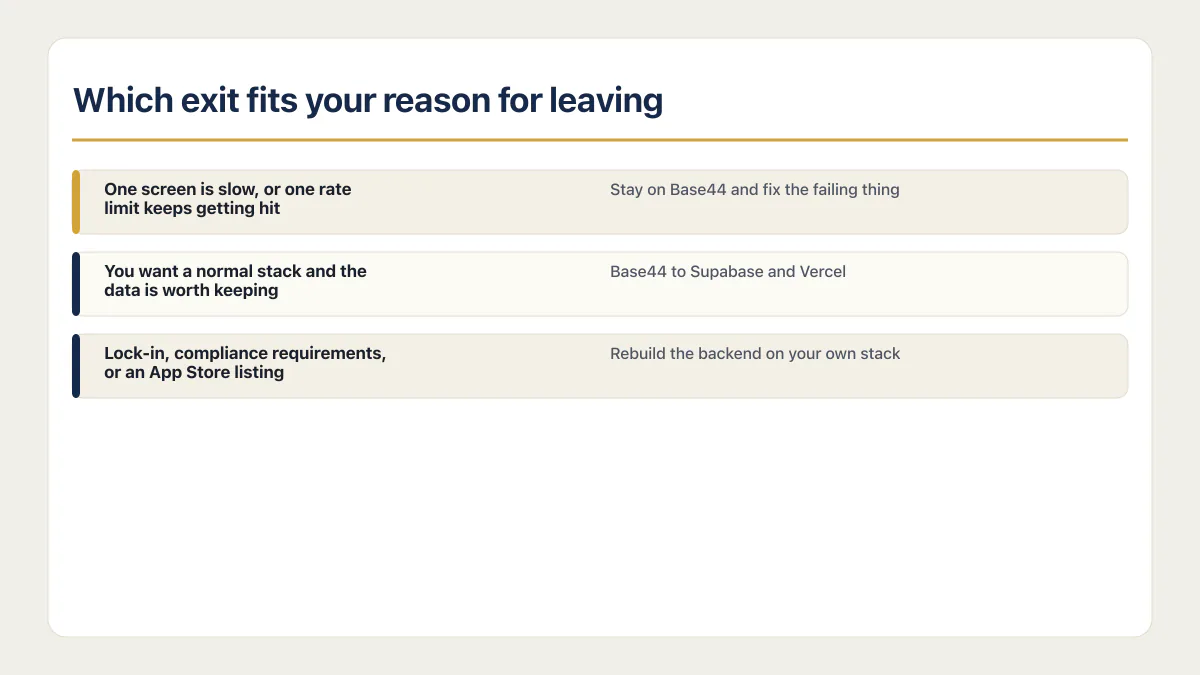
The exit is chosen by your trigger rather than by your preferred destination. Three fit the six real reasons in the cohort: stay on Base44 and fix the failing thing, move to Supabase and Vercel, or rebuild the backend on your own stack. Match the row that sounds like your week.
| Your reason for leaving | The exit that fits | What it does not fix |
|---|---|---|
| One screen is slow, or one rate limit keeps getting hit | Measure the failing path; stay and repair it only if the evidence identifies a local code defect, query, or provider configuration | A documented Base44 limit; keep migration open if the measurements identify one |
| You want a normal stack and the data is worth keeping | Base44 to Supabase and Vercel | Your permission rules, which get rewritten from scratch |
| Lock-in or compliance requirements | Rebuild the backend on your own stack | The timeline, which is the longest of the three |
| An App Store listing and nothing else wrong | A native client on top of the hosted backend first; rebuild only if the backend also has to leave | Whether the store build alone meets the requirement |
Stay on Base44 and fix what is failing
The cheapest exit may be no exit at all. If the trigger is one slow screen, one query, or one integration credit ceiling, measure request traces, query time, rows scanned, indexes, provider limits, and the platform’s documented ceiling before assigning the cause. If the evidence identifies a local query or screen, estimate that repair from the measured work; if it identifies a platform limit, keep migration open. A measured repair may fix something a day of work would have fixed in place, but the evidence has to establish both cause and effort first. The owner whose integration credits were about to run out in 24 to 48 hours was in a different situation, because no migration finishes inside that window.
Base44 to Supabase and Vercel
This is the default answer on the internet and the right one often enough. The frontend goes to Vercel, the entity schemas become Postgres tables, and Supabase takes over auth and storage. It suits an owner who wants a stack a developer will recognise and who has data worth carrying across. What it does not do is hand you your permission model, because the Supabase default comes with operating responsibilities of its own, row-level security first among them. The step by step move to Supabase and Vercel is a procedure rather than a decision, and it belongs on its own page. Nothing on this page is that procedure. Once the tables exist in Supabase, the database migration checklist covers keeping schema changes in ordered, version-controlled migration files.
Rebuild the backend on your own stack
The lock-in cases end up here, and the phone cases only sometimes. The owner moving to Claude Code needs their own machines and release pipeline, which Base44’s hosted runtime does not give them. The React Native case and the iOS and Google Play case need a native build, and a native client can keep talking to the hosted backend, so those owners only land here when the backend itself also has to leave; the mobile guide covers the store build on its own. Base44 self hosting is the phrasing people search for. Base44’s documentation describes hosting that is built in, and no path to running its backend on your own machines, which is why this exit is a rebuild rather than a relocation.
The question people ask next is which builder to go to instead. The destinations these six owners actually named were Vercel with Supabase and Railway, Claude Code, and React Native, so in this group the base44 alternatives that mattered were normal stacks rather than other builders. Which builder beats Base44 for a new app is a genuinely different question, and the Base44 review linked above answers the pros and cons version of it.
Do not move off Base44 yet if this is your reason
Three situations where the exit does not solve the problem, and the honest advice is to stay. The companies selling migrations have no reason to tell you any of it.
The app got slow under load. Treat query shape, indexes, per-row work, database or connection limits, external APIs, compute, and platform ceilings as hypotheses. Measure the constrained resource before deciding whether the same fault would travel to Supabase. Diagnose the load problem before you blame the platform, because the same fix works on either side and only one side costs you a month.
One integration keeps failing. Base44’s runtime is not what is failing when a payment provider rejects a webhook or an email provider silently drops a send. Moving the app moves the failure with it.
You are worried the app is not safe. A move does not make an app safe, and it can make it less safe for a while, because the permission rules that Base44 was enforcing arrive at the destination as declarations that nothing enforces yet. If the trigger is a security worry, settle the worry first and decide about the platform second.
The data-behaviour case in the cohort, the entity that reappeared seven minutes after deletion, is the one I would not argue with. Losing confidence that a write actually happened is not something a query plan fixes.
What does it cost to migrate off Base44?
A Base44 migration costs more than the free tools imply and less than the top service quotes, because the two are not selling the same job. Published field prices run from free, for an automated migration tool, to $25,000 and up. The named figures: base44devs quotes fixed prices of $6,000 for a small migration, $12,000 for a medium one and $25,000 or more for enterprise, and the Ai-Automators open-source SDK’s README says “Migration services start at $2,500”.
The free end is real too. Escapebase44 sells an automated move that keeps your app on a document store, hosting it on Vercel, AWS or Hetzner with MongoDB Atlas behind it, and staticbot gives its Base44 to Supabase and AWS migration away entirely and earns on the hosting afterwards. None of those prices covers the permission rules, the file storage, or the user accounts, because none of those is what the tools move.
Against that, staying costs $50 a month, or $40 a month billed annually, on Base44’s Builder plan, the tier the export itself requires. Prices checked 15 August 2026.
What you are actually buying, if you pay a person, is the rebuild of the parts that do not export: the data model as real tables, the permission rules as policies, the auth cutover, and the file storage. The code was never the expensive part. What a developer costs for work like this breaks the rates down by route.
AxonBuild’s own way of working belongs here, because the reader at this point is weighing a service quote against doing it themselves.
The one-way doors
Two things on this route cannot be undone, and two more are limits worth knowing before you start; one of the four is the official exit.
- GitHub sync is permanent. Base44’s integration documentation says it directly: “GitHub sync is permanent. You can’t disconnect or transfer the project back to Base44.” Connect it when you have decided, not while you are deciding.
- Version history from before the integration stops working. The same page: “After you connect GitHub to your app, you cannot use Version History to revert to versions from before the GitHub integration. Those older versions are not stored in your GitHub repository, so trying to revert to them results in an error.”
- The branch name is fixed. The GitHub integration documentation requires the default branch to be named
main, and says other names such asmasterare not currently supported. ejectdoes not eject you. Base44’s start-from-an-existing-app documentation says the CLI “creates a new Base44 backend project with a unique app ID,” describes the result as “a separate backend on Base44 with its own app ID and empty database,” and states that “Your entity schemas are copied to the new project, but data is not.”
That last door is where the loudest claims about this migration fall apart, and they fall apart in opposite directions. Escapebase44 says Base44’s export is the frontend with nothing behind it and leaves you with a blank screen, while Base44’s own eject page lists backend resources as “Entity schemas, functions, and configuration files in the base44/ directory” and the ZIP’s contents are not itemised in Base44’s documentation at all. Staticbot says its tool brings your users and their login screen across, while nothing in Base44’s documentation describes exporting user accounts. Check the vendor documentation yourself before either claim ends up inside a quote you are paying. The same decision on the Lovable side has its own doors, and they are different ones.
Common questions about moving off Base44
Can I export my app from Base44?
Yes, on the Builder plan or higher, by ZIP download, by two-way GitHub sync, or with the CLI, which lists what it brings down as “Entity schemas, functions, and configuration files in the base44/ directory” while the ZIP’s contents are not itemised in Base44’s documentation. What a Base44 export actually gives you, route by route, is a separate page.
How do I export my data from Base44?
One table at a time, as CSV from the app dashboard, with no documented single-click export of the whole database. The click path belongs to the page on what a Base44 export gives you; what matters for the decision is that an app with many entities means many downloads and a load plan on the other side.
Is Base44’s eject command the same as leaving Base44?
No. Base44’s documentation says the CLI creates a new Base44 backend project with its own app ID and an empty database, and that entity schemas are copied but data is not. That gives you a local project and a clean schema, both genuinely useful, while the backend your app talks to is still Base44’s. Treat ejecting as a good first step on the way out, with the actual departure still ahead of you.
Moving platforms is the moment the missing production pieces show up. The sprint below builds them into the codebase you land on.
Built it with AI. Now it has to hold up for real customers.
The Production Hardening Sprint takes the app you already have and builds the production foundation underneath it. Authentication and access rules, payments that stay consistent, error handling, monitoring, backups, automated tests and a documented handover. Our engineers work inside your existing codebase for ten working days. All 123 deliverables are included, and you get the evidence for each one.
See the Production Hardening Sprint →  $2,500 fixed price · 10 working days · One codebase