Two numbers are usually on the screen when someone asks this question. A free exporter promising the whole move in fifteen minutes, and a published service tier from $300 to $7,500 or more. Both prices are real, and neither one is the whole bill.
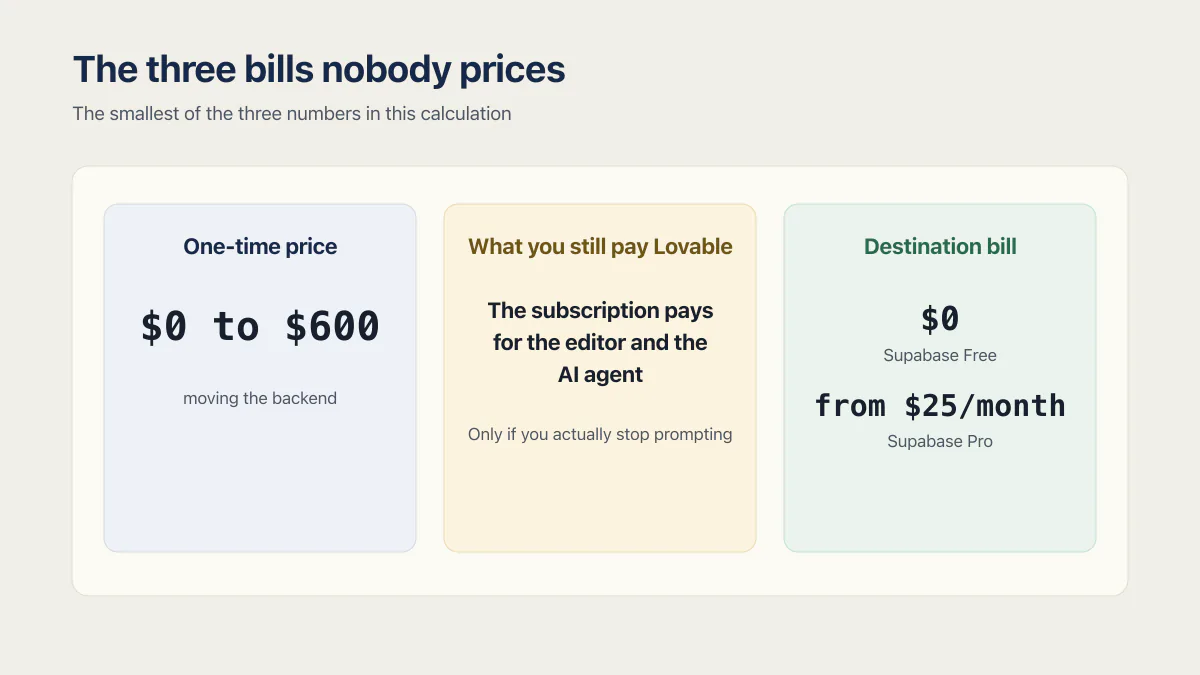
The dated one-time prices below for moving a Lovable app off Lovable Cloud run from $0 to $7,500 or more. That move is only one of the three numbers in this calculation. This page is a documented analysis of prices published by other companies and by Lovable’s own documentation, checked again on 17 August 2026. It is not a report of a Lovable Cloud migration AxonBuild ran end to end.
Founders often arrive here carrying a number somebody quoted them for a new build. That is a different job from moving a working app, so it cannot price the migration.
If you have not settled which of the four exits you are taking, settle that first, because the price follows the exit.
The dated examples below put the one-time migration price between $0 and $7,500 or more. The other numbers are the two recurring bills either side of the move: what you keep paying Lovable afterwards, and what the destination charges every month from then on.
How much does it cost to migrate off Lovable?
The dated prices below run from $0 for a self-serve exporter to $7,500 or more for a complex migration. Each seller publishes a different slice of the work. None of these prices includes both recurring bills after the move.
| Who | What they sell | Published price | Their own stated effort |
|---|---|---|---|
| Lovablemigration | Done-for-you Cloud to Supabase migration, three tiers | $300 Basic, $450 Standard, $600 Premium, with 7, 30 and 90 days of post-migration support | ”3-7 business days” |
| Lovablemigration, same page | Its estimate for doing it yourself | $0 in tool cost, “$1,950-$4,650 in engineering cost” at an assumed “$75/hour" | "26-62 hours”, or “2-4 weeks part-time” |
| Nextlovable | An audit, a CLI, and three fixed migration tiers | $199 audit; $39 CLI; $3,500 database migration; $4,500 Next.js migration; $7,500+ complex migration | 2 weeks for the first two fixed tiers; 3 weeks for complex work |
| Dreamlit | A free browser and CLI exporter, plus paid help | Tool “Free for every project”, “No card. No size limits.”; $299 for a “90-minute” expert review; done-for-you is a “custom quote" | "~10-15 minutes” of setup |
| Supabase | The usual destination | Free “from $0/month”, Pro “from $25/month”, Team “from $599/month” | n/a |
Prices checked 17 August 2026. The Lovablemigration source is Lovable Cloud to Supabase Migration Cost (2026) at lovablemigration.com/lovable-cloud-migration-cost; its support-window comparison uses the homepage at lovablemigration.com/. The Dreamlit source is Free Lovable Cloud to Supabase Exporter at dreamlit.ai/tools/lovable-cloud-to-supabase-exporter. The Nextlovable source is nextlovable.com/, titled Leave Lovable.
One discrepancy is worth carrying into any conversation with the seller. The 7, 30 and 90 day support windows above are from Lovablemigration’s migration cost page. The same company’s homepage lists 1 week, 2 weeks and 1 month against the same three tiers and the same three prices, so ask which window applies before you pay.
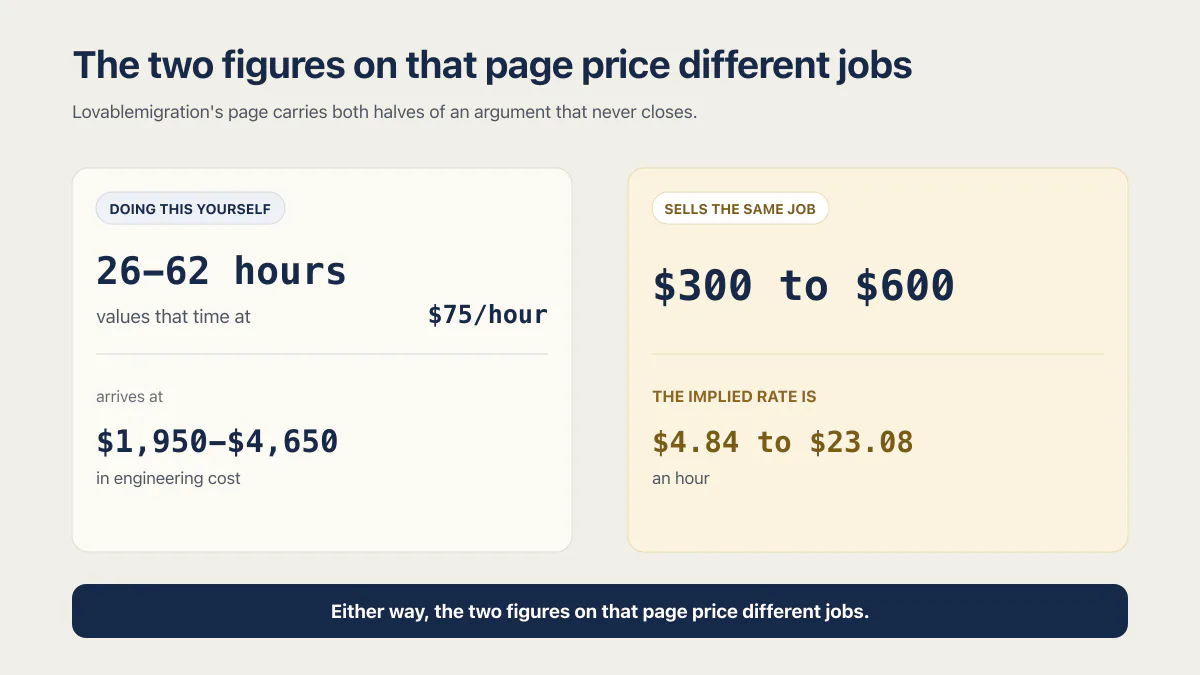
Lovablemigration’s page carries both halves of an argument that never closes. It says doing this yourself takes “26-62 hours”, values that time at “$75/hour”, and arrives at “$1,950-$4,650 in engineering cost”. Then it sells the same job for $300 to $600. Divide the price by the hour count the same page published, and the implied rate is $4.84 to $23.08 an hour.
The page ranking for this question values the work at $75 an hour and sells it at between $4.84 and $23.08.
Two readings survive that. Either the hour estimate is padded so the service looks cheap, or the fixed tiers buy a narrower job than 26 to 62 hours describes. The second is likelier: a flat price with a 7-day support window is not the shape of a 62-hour hand migration, and the tiers are sold as a repeatable product rather than as time. Either way, the two figures on that page price different jobs, and only one of them is the job you are being sold.
As of 15 August 2026, none of those three pages prices what the app costs to run after the move, or what remains owed to Lovable once the backend is gone. Those are the next two sections. If your app is on Base44 rather than Lovable, the exit bill has a different shape and the published done-for-you prices run from $2,500 to $25,000 and up, which is a separate page’s question.
What you still pay Lovable after the move
Moving the backend off Lovable Cloud does not close your Lovable account, and that catches people out. The subscription pays for the editor and the AI agent, and Lovable’s ownership documentation says plainly that the editor and AI agent “cannot be self-hosted or deployed inside a customer VPC”. The same page confirms the app itself is yours, a standard Vite and React project you can run anywhere.
What the move does remove is the Cloud side of the meter. Lovable’s credits documentation says every plan gets a monthly Cloud grant of 20 credits and an AI grant of 4 credits. On Pro a plan credit is worth $0.25, so that Cloud grant is roughly $5 a month of included backend value. On Business a credit is $0.50 and the same grant is worth about $10. Past the grant, Cloud usage draws on the same balance you build with.
So the honest version of the saving. Leaving Lovable Cloud can avoid charges above the included grant. It does not lower the subscription price or turn an unused $5 to $10 grant into a saving. What Lovable charges you to stay covers the plan prices and the whole credit model, which this page deliberately does not re-explain.
Three things can happen to that subscription after a migration, and this is where the real fork sits:
- You carry on prompting in Lovable against your own Supabase project, and the plan stays exactly where it was.
- You drive a coding tool against the repository yourself, and the Lovable plan can go, replaced by whatever that tool costs.
- A person takes the code over, and you pay for their time instead.
The second and the third both let the Lovable line come off your card, once nobody is prompting in Lovable any more; the first keeps it.
What does the app cost to run after you leave?
The destination bill is the number that runs forever, and on a small app it is often higher than what Lovable Cloud was costing. Supabase Free is $0 with a 500 MB database and 50,000 monthly active users. Supabase Pro is from $25 a month. Static hosting for the frontend can be $0, with a condition worth reading.
| Line item | The free path | The paid path |
|---|---|---|
| Database, auth, storage | Supabase Free, “from $0/month”: “500 MB database size”, “50,000 monthly active users”, “5 GB egress”, “1 GB file storage” | Supabase Pro, “from $25/month”, including “$10/month in compute credits”, “8 GB disk size per project” included, “100,000 monthly active users”, “250 GB egress” included |
| Extra database storage | Not available past the Free ceiling | ”$0.125 per GB” on Pro and Team |
| Frontend hosting | Netlify’s Free plan at “$0 forever”, or Vercel Hobby at “$0/mo.” | Netlify Personal at “$9/month”, or a Vercel Developer seat at “$20 / month” |
| Domain | Whatever you already pay | Whatever you already pay |
Prices checked 15 August 2026, from Supabase pricing, Netlify pricing and Vercel pricing.
The Vercel row has a catch worth reading before you plan around $0. Vercel’s pricing FAQ says “Our Hobby plan is for personal, non-commercial use.” An app with paying customers on it is not that, so the realistic frontend line for a business is Netlify’s free tier or a paid seat.
The destination bill grows with you as well. Layerbase, a managed-database company that sells into exactly this move, published in June 2026 that on Supabase “the bill can get to $150 per month surprisingly fast” for an app with modest traffic and a database that grew. That is a vendor describing the problem its own product solves, so read it as a ceiling claim rather than a measurement. Supabase’s own rates are the checkable version of the same worry: $25 for Pro, $0.125 per GB of database storage past the included 8 GB, and metered charges above each allowance.
Put the two sides together and the money case is narrower than the migration pages imply. The Lovable Cloud grant is about $5 a month of included value on Pro. Supabase Pro is $25. If your app genuinely fits inside Supabase Free, the backend runs at $0, and the saving is whatever you were paying above the included grant; the grant itself was never a charge, so leaving it behind saves nothing on its own. If it does not, you have traded $5 of included backend for a $25 floor you pay whether or not you opened the app. Running the database on a server you rent yourself is a third option with its own arithmetic, and the managed backend options are worth comparing before you assume Supabase is the destination.
What the cheap paths leave you to do by hand
What separates a free exporter from the $300 tier is how much of one list each of them carries. Lovable is explicit that no button does the whole thing: the Cloud documentation says “There is no one-click migration from the built-in backend (Cloud) to your own Supabase project”, and warns that removing Cloud “permanently deletes your Cloud instance and cannot be undone.”
Start with the one item where a vendor claim and the platform documentation disagree. Dreamlit’s exporter page says the tool “migrates user accounts with their password hashes intact, so existing users do not need to reset their passwords or re-verify their email addresses”. Lovable’s advanced settings documentation says this about what comes out of Lovable: “User passwords are not exported in a usable form either, so plan a password reset flow for migrated users.” Both pages were read on 15 August 2026. Until a tool demonstrates otherwise on your own project, plan for the reset, because that is the version written by the platform currently holding your users.
The same documentation sets the cap that turns a large database into a multi-day job. “Database exports are limited to 5 GB”, you can “request one export every 24 hours”, and the export “does not include files in storage buckets, edge function code, or your project’s secrets.”
That leaves a hand list, priced in effort rather than in invented dollars:
- Storage objects downloaded and re-uploaded into the new bucket, with every path in the app repointed.
- Edge function code rewritten or redeployed, since it does not come out in the export.
- Secrets reissued at each provider and re-entered at the destination, for the same reason.
- OAuth redirect URLs changed in the Google or GitHub console, once per provider you offer.
- Webhooks and scheduled jobs repointed, because anything still calling the old URL keeps calling it.
- A password reset flow for existing users, unless a tool proves otherwise on your data.
What actually moves and what you rebuild by hand walks that list item by item, and a separate page covers what breaks in a migration once the cutover is live. A fixed-price tier has to decide in advance how many of those items it carries, which is the real reason the tiers differ.
What a person does that the tools do not
A $199 audit, a $299 review, a $300 fixed migration and a five-figure agency number price four different jobs. Each one buys a different share of that hand list, and each one carries a different answer to who pays when something breaks on the other side.
The second of those is where the price actually lives. Moving 5 GB of tables is cheap because tables are the easy part, and because nothing in that transaction says what happens if your login stops working on Monday morning. Five questions get the real comparison out of any of them:
- 01 Which of these do you do: the schema, the data, the storage files, the edge functions, the secrets, the auth cutover?
- 02 What happens to existing users' passwords, answered for my project rather than in the marketing sentence?
- 03 Who changes the OAuth redirect URLs and the webhook targets, and who confirms they fired afterwards?
- 04 What does the price cover if the app is broken after the cutover, and for how many days?
- 05 Who edits the code once it is off Lovable, and who decides whether the Lovable plan stays?
Answers to the last two move the price more than anything technical does. What a developer costs by route breaks the wider rate picture down, and paying someone to do the whole move is its own decision with its own page.
Nothing is priced before the code has been checked, whether the job is a whole migration or one part that stopped working during the move, such as a failed auth cutover or a data load that will not complete.
Common questions about the cost of leaving Lovable
Does migrating off Lovable end my Lovable bill?
Not by itself. Moving the backend to your own Supabase project can avoid Cloud charges above the included 20-credit monthly grant. It does not reduce the subscription price or make an unused grant a saving. The subscription pays for the editor and the AI agent, and Lovable’s documentation says those cannot be self-hosted, so the plan only leaves your card when you stop prompting in Lovable.
Can I migrate off Lovable for free?
Yes, in tool cost. Dreamlit publishes a free exporter with “No card. No size limits.”, and Lovable’s own export path costs nothing to run. What is not free is the work the export leaves out: storage files, edge function code, secrets, OAuth redirect URLs and a password reset for existing users. The company selling the paid version of that work estimates it at “26-62 hours”.
How long does a Lovable migration take?
The published estimates disagree by two orders of magnitude. Dreamlit says its exporter needs “~10-15 minutes” of setup. Lovablemigration says a professional migration runs “3-7 business days” and doing it yourself runs “26-62 hours”, or “2-4 weeks part-time”. Nextlovable lists two-week delivery for its $3,500 database and $4,500 Next.js tiers, and three weeks for its $7,500+ complex tier. The 5 GB export limit and the one-export-per-24-hours rule are what stretch a large database past a single day.
Is it cheaper to stay on Lovable?
On money alone, for a small app, often yes. The Cloud grant included in a Lovable plan is 20 credits a month, roughly $5 of value on Pro, while Supabase Pro starts at $25 and Supabase Free stops at a 500 MB database and 50,000 monthly active users. Cost only becomes the reason to move once Cloud usage runs well past the grant. Whether you should move at all is a different question from what it costs.
Moving platforms is the moment the missing production pieces show up. The sprint below builds them into the codebase you land on.
Built it with AI. Now it has to hold up for real customers.
The Production Hardening Sprint takes the app you already have and builds the production foundation underneath it. Authentication and access rules, payments that stay consistent, error handling, monitoring, backups, automated tests and a documented handover. Our engineers work inside your existing codebase for ten working days. All 123 deliverables are included, and you get the evidence for each one.
See the Production Hardening Sprint →  $2,500 fixed price · 10 working days · One codebase