Lovable credits come from two sources: grants on Free, Pro and Business (5 daily Build credits, up to 30 a month on Free, plus 20 Cloud and 4 AI credits monthly), which do not roll over, and general credits from a paid plan, top-up or bonus. Grants pay first; general credits cover building, Lovable Cloud hosting and AI calls.
Lovable pricing starts at $0 on the Free plan. Pro is from $25 per month and Business from $50 per month, and both include 100 credits. A credit is worth $0.25 on Pro and $0.50 on Business, so the plan price alone does not tell you what a given workload costs.
A Lovable credit is the single unit Lovable uses to measure and bill usage across your workspace. One balance now pays for five types of usage: building in the editor (Build), chatting with Lovable (Chat), running the deployed app on Lovable Cloud, model calls your live app makes through the AI gateway, and requests through connectors Lovable manages. Build and Chat appear together as Build credits; Cloud, AI gateway and connector usage appear together as Run.
Those usage types have different cost drivers, so a falling balance does not tell you by itself whether the editor, the backend, or users calling a model caused the spend. This page covers what the meter counts, what a credit is worth in dollars, and how to trace a spike before you buy more.
Workspaces that had separate Cloud and AI dollar balances before the switch had them converted into credits. The current credits and usage documentation, checked 27 September 2026, says the conversion used each workspace’s plan credit rate and that “the Cloud and AI gateway value is the same.”
The current Lovable credit model
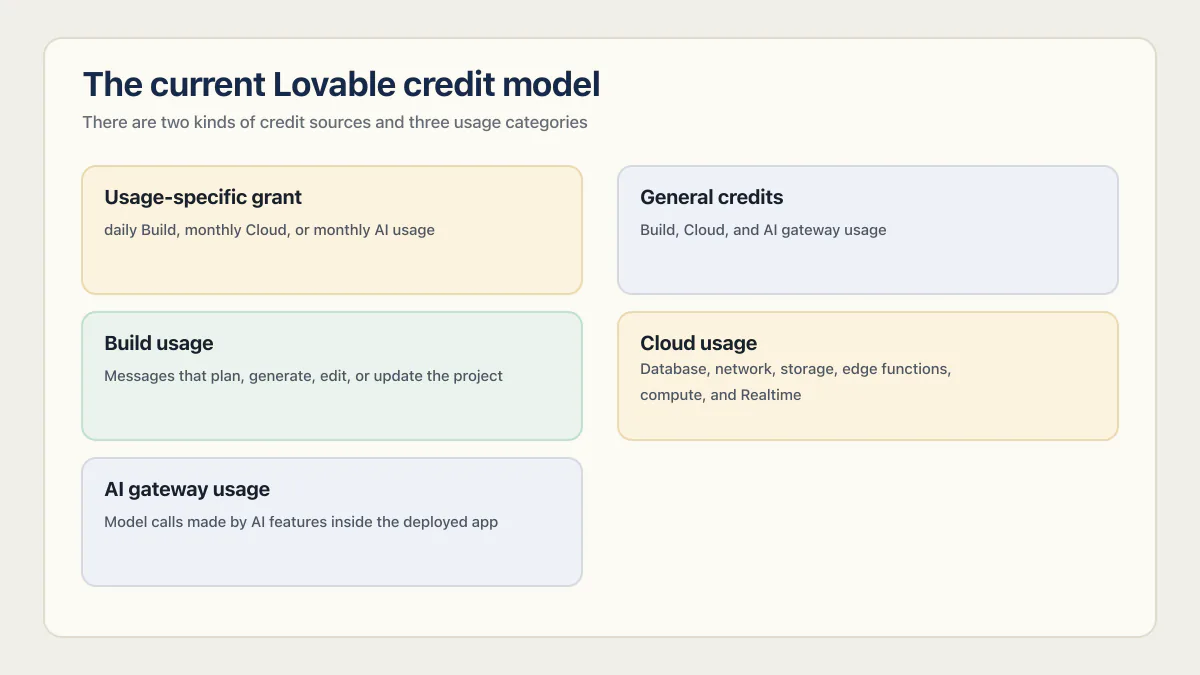
There are two kinds of credit sources and five usage types.
| Term in Lovable | What it means |
|---|---|
| Usage-specific grant | Included credits restricted to daily chat, daily Build, monthly Cloud, or monthly AI usage |
| General credits | Monthly plan, rollover, top-up, or bonus credits that can pay for any usage type once the grants run out |
| Build usage | Messages that plan, generate, edit, or update the project |
| Chat usage | Messages in Chats and Chat mode, priced per message, with a daily chat allowance first |
| Cloud usage | Database, network, storage, edge functions, compute, and Realtime for the deployed app |
| AI gateway usage | Model calls made by AI features inside the deployed app |
| Connector usage | Requests through connectors set to Managed by Lovable, paid from general credits only |
Lovable spends usage-specific grants first. After the relevant grant is exhausted, it draws from general credits, using the general credits closest to expiry first. This ordering explains why two workspaces with the same visible total can consume different credit sources during an identical task.
The Usage details screen groups Build and Chat activity under Build credits and Cloud, AI gateway and connector activity under Run credits. Run usage can take up to 24 hours to appear, so a new backend or model spike may not be visible immediately.
If you learned the old Platform and Cloud credit names
A Lovable tutorial that describes a two-bucket model, platform credits for building and Cloud credits for the deployed app, was written before the unified balance. Here is the mapping to the names on the screen today.
| What older guides call it | What it is now |
|---|---|
| Platform credits | Build credits |
| Cloud credits | Run credits (Cloud, AI gateway and connectors) |
| Separate AI dollar balance | Converted into credits, reported under Run |
If a guide tells you that building and hosting draw from two separate balances, it is describing the old model. One balance now covers every usage type, and the split you see in the dashboard is a reporting split, not a wallet split.
How much does Lovable cost?
Lovable costs $25 per month on Pro and $50 per month on Business, both including 100 credits, and nothing on Free. The plan fee buys a monthly credit allowance rather than unlimited usage. Build, Cloud, and AI all draw down that one balance, and top-ups cost $15 per 50 credits on Pro.
A credit is not worth the same amount on every plan, which is why credit counts alone cannot be compared across plans. These figures come from Lovable’s credits and usage documentation and its subscription plan comparison, both verified 5 August 2026.
| Plan | Plan price | Plan credit rate | Top-up price per credit | 20-credit monthly Cloud grant is worth | 4-credit monthly AI grant is worth |
|---|---|---|---|---|---|
| Pro | From $25 per month (100 credits) | $0.25 | $0.30 | $5.00 | $1.00 |
| Business | From $50 per month (100 credits) | $0.50 | $0.60 | $10.00 | $2.00 |
The grant counts are identical on both plans, so the same 20 Cloud credits and 4 AI credits are worth twice as many dollars on Business. That is the arithmetic behind the Pro-versus-Business warning later on this page: Business credits are priced higher, so the same workload burns fewer of them. Compare dollars per completed task, not credit counts.
Above the entry tier, Lovable pricing plans ladder by credits: Pro runs from 100 credits for $25 a month to 10,000 for $2,250, and Business from 100 for $50 to 10,000 for $4,300. No published Lovable plan has an unlimited credits tier: every Pro and Business tier is a fixed number of monthly credits. Lovable Enterprise pricing is quoted by Lovable, not published: the pricing page shows a platform fee and volume-based pricing with a demo booking in place of a price.
How much is 100 credits on Lovable?
100 Lovable credits is the smallest monthly allowance on Pro ($25) and Business ($50), so a plan credit there is $0.25 or $0.50. As a top-up, the same 100 credits cost $30 on Pro and $60 on Business. At the 0.50 to 2.00 credits of Lovable’s illustrative Build examples, that is roughly 50 to 200 Build messages.
| Credits | At Pro’s plan rate | At Business’s plan rate | As Pro top-ups | As Business top-ups | Pro plan tier price |
|---|---|---|---|---|---|
| 100 | $25 | $50 | $30 | $60 | $25 |
| 200 | $50 | $100 | $60 | $120 | $50 |
| 300 | $75 | $150 | $90 | $180 | Not a listed tier |
| 500 | $125 | $250 | $150 | $300 | Not a listed tier |
| 1,000 | $250 | $500 | $300 | $600 | Not a listed tier |
That first row is the monthly allowance a $25 Lovable Pro subscription price buys, and the $0.25 plan rate holds for the Pro tiers up to 800 credits, while every tier from 1,200 up costs less per credit.
Whether 100 credits is enough for Lovable depends on the build: Lovable says actual use varies with the complexity and scope of the specific project, so the range in the answer above holds only for requests the size of its illustrative examples.
How much 200, 300 or 1,000 Lovable credits cost follows from the same rates: bought as Pro top-ups they come to $60, $90 and $300, and at Pro’s plan rate they are worth $50, $75 and $250. All three are amounts you can buy as a top-up, but only 200 is also a Pro plan tier, so the 300 and 1,000 credit figures at the plan rate are values, not prices.
How Build credits are charged
How many credits Lovable uses per prompt depends on the mode: a Plan-mode message costs 1 credit, plus the cost of any subagent research Lovable runs while planning, and a Build-mode prompt’s cost depends on the complexity of the request and the work completed, as the four illustrative examples below show. Plan mode makes no code changes, and an extended planning conversation still consumes the Build grant or general balance.
Build mode is usage-based. Lovable publishes four example requests with the work each one did and the credits it used.
| Request | Work done | Credits |
|---|---|---|
| Make the button gray | Changes the button styles | 0.50 |
| Remove the footer | Removes the footer component | 0.90 |
| Add authentication | Adds login and authentication logic | 1.20 |
| Build a landing page with images | Creates a landing page with generated images, a theme, and sections | 2.00 |
Lovable explicitly labels those numbers as illustrations. They are not a guaranteed 0.50-to-2.00 price band. Actual cost depends on the request and the work completed, including codebase exploration, verification, browser checks, web search, and image and video generation.
You can inspect the exact cost of a Build response from the More options (three-dot) menu below that response, under Credits used. For a Build-credit spike, compare the expensive responses before you change plans. The habits under “how to spend fewer Lovable credits” below cut the repeat work that causes most spikes.
The meter can show which response consumed credits, and it is honest about what it counts: messages, completed work, tokens. It cannot tell you whether the resulting change is correct, maintainable, or complete. It also has no column for whether the code those credits bought survives a stranger using the app instead of you clicking through a demo, and no alert for a public endpoint that lets one visitor drain the balance being metered.
How Cloud and AI gateway usage is charged
Cloud usage follows resources consumed by the deployed app. Lovable currently breaks it down into database server and storage, network, file storage, compute, and Realtime. The database instance size and how long it remains active also affect usage, so Cloud cost is not purely a visitor counter.
AI gateway usage is separate from the Lovable agent that edits the project. It comes from model calls made by AI features in the live app. The model, input tokens, output tokens, call volume, and feature type determine consumption.
That distinction gives you a practical diagnosis:
| Usage pattern | Likely place to inspect |
|---|---|
| Build credits rise after editor sessions | Individual Lovable responses and repeated prompts |
| Database usage rises with little traffic | Instance size, slow queries, retained data, and background work |
| Network or storage rises | Large API responses, downloads, uploads, images, and media |
| Compute rises | Edge functions and background processing |
| AI gateway usage rises | Model choice, prompt/context size, response length, and calls per user action |
How to check your Lovable credit balance
Open Workspace settings → Plans & credit usage → Usage details, then select Build or Run credits and filter by project and time range. Projects and People are tabs below the usage chart there; on Pro and Business, Breakdown and History are the two tabs of the Credit balance dialog, which workspace admins and owners on paid plans can open from Details on the Plans & credit usage page.
| Tab | What it shows |
|---|---|
| Breakdown | Your general credit grants: each one’s type, expiry date, and remaining amount |
| History | Individual events: monthly credits granted or expired, bonus credits granted or expired, top-up credits granted or expired, commitment credits granted, and converted balance |
| Projects | Credit usage by project |
| People | Build-credit usage by workspace member |
Workspace admins and owners can see every project’s usage; editors see the projects they own, and role and plan determine what else a member can inspect.
Two things make this screen look broken when it is not. Run usage can take up to 24 hours to appear, so last night’s model spike may still be missing this morning. And Lovable only began recording credit history on 8 March 2026, so a workspace older than that shows a shorter history than you expect. Neither is a lost balance.
How to spend fewer Lovable credits
Most credit waste is repeated work, not expensive work, and it is also what decides whether hiring a developer is cheaper than paying for credits. The same requirement attempted four ways costs more than one well-scoped request that lands.
- Batch related changes into one Build request instead of five small ones.
- On a paid plan, use the code editor for a one-line copy or style fix instead of spending a Build message on it; editing code yourself uses no credits.
- Look for repeated attempts on the same requirement or file.
- Separate investigation into Plan mode when you need a decision before an edit, while remembering that each Plan message costs at least 1 credit.
- Make each Build request bounded enough that success can be checked in one response.
- Stop a failing direction early. Lovable charges a stopped Build request for work completed before it stopped, so restate the request instead of retrying the same prompt.
- On the Run side, cut prompt and context size and pick a cheaper model before you touch the plan.
How to write a bounded request that lands the first time is the job of the Lovable prompt guide.
Included Lovable credits and expiry
As of 5 August 2026, Lovable’s subscription plan comparison lists these usage-specific grants for Free, Pro, and Business workspaces:
| Grant | Free | Pro | Business | Rollover |
|---|---|---|---|---|
| Daily Build grant | 5 per day, capped at 30 per calendar month | 5 per day | 5 per day | No, expires at the daily reset (midnight UTC) |
| Monthly Cloud grant | 20 | 20 | 20 | No, expires at the end of the grant period |
| Monthly AI grant | 4 | 4 | 4 | No, same as the Cloud grant |
In plain terms, the daily credits reset at midnight UTC (00:00 UTC): 5 build credits per day, capped at 30 per calendar month on Free.
Lovable labels the monthly Cloud and AI grants as temporary and subject to change. Recheck the official documentation before relying on them in a budget.
Do Lovable credits roll over?
Grants do not roll over; paid plan credits do. The daily Build grant expires at the daily reset and the monthly Cloud and AI grants expire at the end of their grant period, so an unused Tuesday is gone on Wednesday.
Paid Pro and Business subscriptions start at 100 general credits per month. Under the normal active-subscription rules, unused monthly plan credits roll over. Credits issued on a monthly plan expire two months from issue; monthly credits on an annual plan expire one month after the annual billing period ends. Purchased top-up credits are valid for 12 months.
When a workspace moves to Free, unused monthly plan and rollover credits freeze. They become usable again if the workspace upgrades before their original expiry. Unexpired top-up and any bonus credits remain usable on Free until they expire.
Lovable top-ups: how to buy more credits
Top-ups are how you add extra credits without changing plans. Auto top-up buys credits for you when the balance falls below a threshold; a one-time top-up is a single manual purchase. Both are configured in the same Plans & credit usage screen.
| Setting | Default | Options |
|---|---|---|
| Auto top-up amount | 100 credits | 13 set amounts from 50 to 10,000 credits |
| Trigger threshold | Balance at or below 25 credits | 25, 50, or 100 |
| Monthly spend limit | 400 credits | 10 set amounts from 100 to 100,000 credits, or no limit |
| One-time top-up | Not applicable | The same 13 amounts, 50 to 10,000 credits |
Top-up credits cost $15 per 50 on Pro and $30 per 50 on Business, and they stay valid for 12 months. Lovable’s pricing FAQ says the underlying cost of running an app and its built-in AI features is the same for Pro and Business; Business represents that cost with lower credit consumption because its credits are priced higher. Comparing Run-credit counts across those two plans without the dollar conversion can therefore give the wrong conclusion.
The monthly spend limit caps how many credits the auto-top-up feature may purchase during a calendar month. It is not an application-level cap on model calls, downloads, or database work. A public AI feature still needs authentication, per-user limits, and a bounded request design if one caller should not be able to spend the workspace balance.
Lovable’s docs list the credit alerts you may get:
- When the workspace runs low, a nudge above the chat input shows the remaining credits and an option to add more.
- When Cloud or AI gateway usage approaches a limit, an in-app alert shows on the Plans & credit usage page.
- When top-up or rollover credits are nearing expiry, a nudge may appear in the project chat.
- A failed auto top-up, and an auto top-up that reaches its monthly spend limit, each send an email to workspace owners and admins.
On paid plans, workspace owners and admins can also set their own alerts and caps in Workspace settings → Usage limits & alerts: they can “get alerted when usage or the remaining balance crosses a threshold” and cap how many credits a member, project or the whole workspace can use. A second level is per message: a long-running Build message pauses when it crosses your credit check-in level, 20 credits by default, and shows what it has cost so far; the check-in, a beta feature, is a notification threshold, not a hard cap. A member who is not an admin and runs out can send a credits ping asking the workspace owners to add credits. Lovable’s docs name workspace owners and admins on paid plans as the people who can add Lovable top-up credits, so an alert is useful only when it reaches one of them.
Referral credits come in two parts: the person who signs up through your invite link gets 10 bonus credits, and you get 100 bonus credits once they pay for their first Pro or Business subscription.
What happens when a Lovable workspace runs out of credits
Running out affects building, AI features and the backend under the unified model:
- Building stops until credits become available.
- AI features inside deployed apps stop working while no credits are available.
- Built-in backend services such as database, storage, and authentication pause once the monthly Cloud grant and general credits are both gone, while the published pages keep serving.
An empty credit balance can pause a live app’s backend while its pages stay up; Lovable shows a banner before projects pause but gives no time for it. The Free plan’s specific limits and reset behavior, including whether Lovable gives you a grace period when credits run out, are covered separately.
If your live app suddenly stops responding, or logins start failing, check the credit balance before you check for an outage. A workspace at zero pauses database, storage, and authentication while the published pages keep serving, which can look like downtime from the outside. Auto top-up, described above, reduces the chance of that surprise.
Diagnose a credit spike before buying more
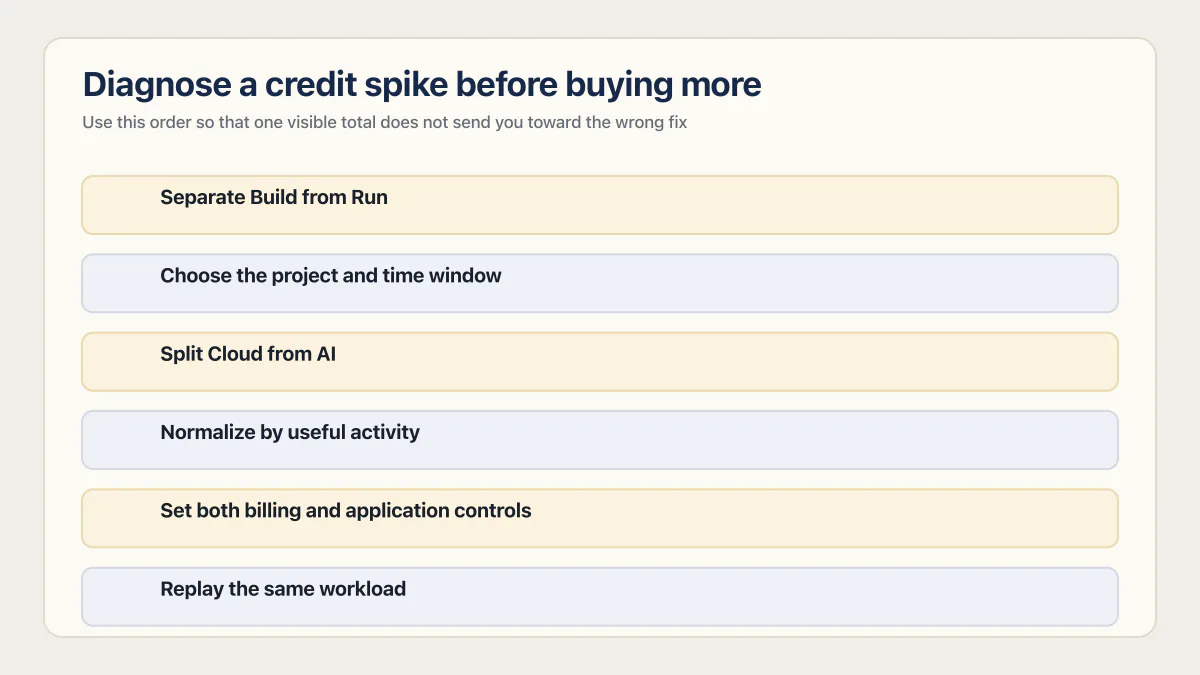
Use this order so that one visible total does not send you toward the wrong fix:
- 01 Separate Build from Run Filter Usage details. A Build spike came from editor or chat messages; Run combines Cloud, AI gateway and connector usage from deployed apps.
- 02 Choose the project and time window Find when the slope changed and which project was active. Account for the possible delay in new Run-usage reporting.
- 03 Split Cloud from AI Inspect database, network, storage, compute, Realtime, and top models. Do not infer the cause from the total credit bar.
- 04 Normalize by useful activity Compare credits per completed build task, active user, processed document, or successful model action. A total can rise safely while the unit cost falls.
- 05 Set both billing and application controls Configure top-up behavior for continuity, then add product-level limits so one user or loop cannot consume an unintended share of the balance.
- 06 Replay the same workload After changing a query, model, prompt, payload, or instance, compare the same time window and user action. Keep the result with the change.
The decision to move should come from portability, control, and measured unit economics. A proportional bill may be a fair price for managed infrastructure. A bill that grows faster than successful user activity deserves investigation before migration. If migration becomes the answer, moving off Lovable Cloud explains what the export includes and what must be rebuilt or re-verified. The same shape shows up one layer further down the stack, in Supabase egress limits, once your own backend replaces Lovable Cloud entirely: metered usage that needs the same split-then-normalize diagnosis before you pay to escape it.
Lovable Cloud cost: what a live app costs per month
A live Lovable app’s cost per month is the plan fee plus any Run usage the grants and plan credits cannot absorb: Cloud credits for database, storage and auth, AI gateway credits for model calls. Lovable says hosting most smaller or new apps is fully covered by the included grant; the $25 Pro fee is the floor.
Lovable app hosting pricing after the build is not a separate hosting fee. Lovable Cloud pricing is usage-based: the deployed app’s database, storage, auth and edge functions, and the AI gateway calls its users trigger, draw Run credits from the same balance that pays for building. Both lines come off that one balance in Lovable billing, with the plan fee underneath them. In the pricing FAQ’s words, for most users with smaller or new apps the cost to publish, view and keep the app running “will be minimal and fully covered by the included grant” in most cases, while “Apps that reach significant visitor traffic and/or size may start incurring cost on top of the included grant, which is covered by your credit balance.” That answer covers hosting only, so how much Lovable Cloud costs a given app, AI calls included, comes down to its own Run usage, which the month below prices.
The table is my example month: the three usage figures are mine, picked to show the arithmetic, not a measured app and not a benchmark. It follows Lovable’s spend order, the usage-specific grants first and then the general credits closest to expiry.
| Line | Credits | Paid from | Dollars on Pro |
|---|---|---|---|
| Plan fee | 100 general credits | The Pro subscription | $25 |
| Cloud usage, example | 90 | 20 from the monthly Cloud grant, 70 general | Counted in the general credits below |
| AI gateway usage, example | 40 | 4 from the monthly AI grant, 36 general | Counted in the general credits below |
| Build beyond the daily grant, example | 30 | General | Counted in the general credits below |
| General credits needed | 136 | 100 from the plan, 36 short | None yet |
| One-time top-up | 50 | Bought once | $15; the 14 left over stay valid for 12 months |
| The month | $40 |
In my example month, Run took 106 of the 136 general credits, and without it the plan’s 100 would have covered the month, so Cloud and AI calls are what pushed the bill $15 past the $25 plan fee.
A Lovable app goes live on Pro, and its owner budgets the plan fee as the monthly cost. As users arrive, Run usage for Cloud and the AI gateway grows with them, and once the app reaches significant visitor traffic or size, that usage can go past the included grants and draw on the credit balance. So read the last month’s Run history before trusting any budget.
To read your own month, open Workspace settings → Plans & credit usage → Usage details, select Run credits, set the time range to the last 30 days, and read the Projects tab under the chart for the live project. Allow for the reporting delay on new Run usage noted earlier, and for Run history that starts only on the date your workspace switched to the unified balance, June 1, 2026 at the earliest. Those Lovable Run credits, not the balance bar, are the number to budget from.
Here is how I work out the timing: when Run alone needs more general credits than the plan includes (100 on Pro) for two months running, price the move; my example month already crosses that line, at 106. Before you decide, read what the Lovable Cloud export leaves behind and what it costs to migrate off Lovable. Either way, the production readiness checklist lists the checks to run before the app takes that traffic.
One check you can run today, and fail: confirm that the person who pays for top-ups is a workspace owner or admin. Lovable emails auto top-up failures and spend-limit stops to owners and admins, and the docs name them as the people who can add credits, as the top-ups section above sets out. Then check that every AI feature that spends credits needs a signed-in user, the application-level control the same section says the spend limit does not replace.
In the Production Hardening Sprint, deliverable 2.7 configures spend or usage alerts for every metered API, using provider alerts or application-side measurement, and deliverable 2.7 is verified this way: trigger a test threshold and confirm the alert reaches the designated owner. Deliverable 2.5 moves private AI and other service keys server-side and implements usage caps, and deliverable 2.5 is verified this way: test unauthorized calls, per-user limits, and configured usage ceilings. Both are listed among the spend-alert and usage-cap checks in the sprint scope. Hosting, paid tools, and API usage remain in your accounts.
Common questions about Lovable plans and credits
How do Lovable credits work now?
Lovable uses one credit balance that pays for Build, Chat, Cloud, AI gateway, and connector usage. Restricted daily or monthly grants pay their matching usage first. General credits then pay for any usage type, with the credits closest to expiry used first.
Does Lovable Plan mode use credits?
Yes. Each Plan-mode message costs 1 credit, plus the cost of any subagent research Lovable runs while planning. Plan mode does not edit code, so the useful unit is the decision or resolved question, not lines changed.
How much does Lovable Build mode cost?
Build mode has no single price per prompt. Cost depends on the request and completed work. Lovable’s published examples run from 0.50 credits to make a button gray, 0.90 to remove a footer, 1.20 to add authentication, and 2.00 for a landing page with generated images, and it labels them as illustrations, not a price band. Check the response’s three-dot menu for its actual charge.
How many credits does it take to build a website on Lovable?
Lovable publishes no figure for a whole site, because the cost tracks how many Build messages the site takes rather than the site itself. The only site-shaped example in its documentation is 2.00 credits for a landing page with generated images, and Lovable labels that number an illustration. The practical version of the question is what 100 credits buys, since 100 credits is the monthly allowance on both Pro at $25 and Business at $50. Divided by the illustrative example costs of 0.50 to 2.00 credits, 100 credits is 50 to 200 requests of that size, and materially fewer when the same requirement is attempted several ways. Read the three-dot menu under your own first ten Build responses and you will have a better estimate for your project than any published average.
Which Lovable credits roll over and which expire?
Usage-specific daily Build and monthly Cloud or AI grants do not roll over. Paid monthly plan credits normally roll over while the subscription remains active and expire under the plan’s stated window. Top-up credits expire after 12 months. A move to Free freezes the monthly plan and rollover credits; an upgrade before their original expiry makes them usable again until that date, and top-up and bonus credits stay usable on Free until they expire.
How many free credits does Lovable give per day?
Five build credits per day on the Free plan, capped at 30 per calendar month. The daily grant resets at midnight UTC and does not roll over, so unused days are not banked. Free workspaces also get monthly grants of 20 Cloud credits and 4 AI credits, which Lovable labels as temporary and subject to change.
When do Lovable credits reset, and what time?
Three clocks, not one. The daily Build grant of 5 credits resets every day at 00:00 UTC on Free, Pro, and Business alike, and whatever is unused at that moment expires rather than banking. The monthly Cloud and AI grants expire at the end of their grant period instead of daily. Monthly plan credits do not reset at all in the daily sense: they are issued on your billing cycle, and unused ones roll over while the subscription stays active. Lovable’s documentation, checked 16 August 2026, calls the daily event a refresh at 00:00 UTC, so a reset and a refresh are the same event.
What does Lovable cost in my currency, and when do credits reset in my timezone?
Lovable publishes every price in US dollars. As of 16 August 2026, neither its pricing page nor its subscription plan documentation lists a price in any other currency, so the rupee, pound, or taka amount on your statement is whatever conversion your card issuer applies that day rather than a rate Lovable quotes. The reset is more definite, because 00:00 UTC is a fixed instant everywhere: 5:30 am in India, 6:00 am in Bangladesh, 1:00 am in the UK during British Summer Time and midnight there in winter, and 5:00 pm on the previous day on the US Pacific coast in summer. If you build in the evening in South Asia, tomorrow’s five Build credits land early in the morning rather than at your local midnight, which is the usual reason a balance looks stuck overnight.
Why are my Lovable credits running out quickly?
Filter Usage details into Build and Run first. Build cost comes from editor and chat messages and tasks. Run cost comes from Cloud resources, AI gateway calls in deployed apps, and managed connector requests. Within Run, inspect the resource or model breakdown and compare it with completed user activity.
Are Lovable credits refundable?
No. Lovable’s pricing FAQ says credits are not refundable and cannot be redeemed for cash or any other value. Plan payments and top-ups buy credits, and unused credits expire on their own schedule rather than converting back to money. Treat a top-up as spend, not as a balance you can recover later.
Does Lovable charge per seat or per credit?
Per credit. Lovable says workspaces support unlimited members on all plans, and plans are priced by the credits they include, not by seats. Adding a cofounder, a contractor, or a whole class to a workspace costs nothing by itself; what costs money is the Build, Cloud, and AI usage those people generate from the shared balance.
Can you transfer or share Lovable credits?
Sharing happens by default inside a workspace; transferring between workspaces or accounts is not documented. Credits belong to the workspace, so anyone invited to it is already drawing from the same balance without anything being moved. As of 16 August 2026, neither Lovable’s pricing page nor its credits and usage documentation describes a way to send credits to another workspace, hand them to another account, or gift them to a person. If a second workspace runs short, it needs its own top-up or plan rather than a slice of the first one’s balance.
Does Lovable offer a student discount?
Yes. Lovable’s pricing FAQ says it offers a student discount for students with a valid student email. Its subscription plan documentation sets the terms: 50% off for up to 12 months on the Pro plan with 100 credits per month, billed monthly, for verified students and teachers, with top-ups at standard prices.
Are Lovable credits expensive?
It depends on the work each credit buys, not on the per-credit price, because Build, Cloud, and AI consume credits differently, and Business represents Run usage differently from Pro. Compare the dollar cost per successful build task or useful production action, then include the value of hosting, managed backend services, and the work required to operate an alternative. Base44 pricing uses a separate message-and-integration-credit model, so compare the work each platform completes rather than treating the credit labels as equivalent. Which of the two builders you should be on is a wider question than price, and Base44 versus Lovable is a comparison in its own right.
How do I cancel a Lovable subscription?
Canceling a Lovable subscription is a downgrade to Free from Plans & credit usage in Workspace settings, and the paid plan stays active until the end of the current billing period. After that, unused monthly plan and rollover credits are frozen: you cannot use them on Free and they are not refunded, and you can use them until their original expiry only if the workspace upgrades again before they expire. Top-up credits bought while subscribed and any Lovable bonus credits can still be used on Free until they expire. If the deployed app uses a backend service such as a database, storage or auth, those services still pause once the Cloud grant and general credits are both gone, while the published pages keep serving.
The support article has the cancel steps, including the App Store case, and the out-of-credits section above covers what pauses and when.
Is Lovable worth paying for?
Yes for what it meters, in my judgment, as long as you do not budget it as the whole cost of a live app. Lovable credits buy the volume of code the editor writes and the Run usage that keeps the app up, not the checks that decide whether the app survives a real user. The 21 third-party apps I audited in June and July 2026 produced 958 confirmed findings, 58 of them critical. Those 21 are AI-built apps I selected, so the count is not a rate for Lovable apps.
Whether Lovable is worth it for your own build is the question the full Lovable review takes on.
Credits running out faster than your app grows?
A sudden jump in spend often points to a loop, a heavy prompt habit or AI calls with no cap inside the app. Bring the numbers to an audit: we go over where your app spends with you and name the likely causes. That leaves you knowing which cost to rein in first.
Book a free audit → Free · 30 minutes · No code access needed