Lovable is the app builder at lovable.dev, and this page starts where its fix loop stops helping: the bug has been described more than once, the screen still does the same thing, and the credits keep going.
A Lovable app that survives the documented fix ladder may be failing outside the visible screen. Run Try to fix once, describe the bug, switch to Plan mode, then revert. If it still fails after those four rungs, use the evidence to test data, permissions, money, delivery, frontend state, dependencies, configuration, and platform behavior rather than assuming one location.
Someone in the corpus behind this blog put the shape of it in three sentences: “I burned $1,000 on Lovable trying to build an app for my dance studio. The UI looked beautiful. The backend was a disaster.” That comment is one of 1,255 forum and community rows read on 14 August 2026 for this corpus, and 20 of those rows describe credits burning faster than the owner expected.
This page assumes lovable.dev itself is up; if the platform is down, no prompt will help. It also assumes the app is a Lovable app. If you are chasing Base44 or Replit app bugs instead, those builders give you different fix tools and fail in different places, so the ladder below is the wrong one to walk. It also assumes Lovable is actually running your prompt. If the chat has been sitting on Thinking and nothing is arriving, work out which hang you have before you spend another credit. And if you are not certain the fault is Lovable’s at all, start by matching what you can see to what it usually is.
Where this page says what Lovable does, the source is Lovable’s published documentation, checked 15 August 2026 and cited at the point it is used. I hold no Lovable account, so none of it comes from trying the product myself.
Why does your Lovable app keep saying it is fixed when it is not?
Lovable reports a fix because the edit it made matched the description you gave it. The vendor’s own debugging page says Lovable fixes what you can point at, and advises switching to Plan mode after one or two failed attempts because repeated blind fixes pile up code that hides the real problem.
Lovable’s debugging guide states the rule in one line: “Lovable fixes what you can point at.” The sentence after it tells you what pointing means in practice: “Say what is broken, where, what you expected, and what happened instead.” That is a description of a symptom you have already seen. Nothing in the loop starts from a symptom you have not seen.
The same page is unusually honest about what happens when you keep pulling the lever anyway: “Repeated blind fixes tend to pile up code that hides the real problem.” Its own advice is to stop after one or two failed attempts and switch to Plan mode.
In a search-results check on 15 August 2026, one of the pages competing for this exact query was a LinkedIn post whose snippet reads: “Lovable keeps telling me it’s fixed when it clearly isn’t.” That is snippet text rather than a page I read, so it counts as evidence of how owners describe this and nothing more. It is also the sentence most people arrive on this page carrying.
The mechanism underneath is ordinary. The model edits code, the build passes, and the symptom you described stops reproducing in the one surface Lovable is watching. If the real fault was never visible in that surface, the app now has an extra layer of edits sitting on top of it, which is why each new fix makes the next one harder. The cheapest moment to stop is the moment an AI edit breaks something that worked yesterday, before four more prompts land on top of it.
The fix tools in a Lovable app, and where each one stops
The table below is every fix tool Lovable’s documentation describes, grouped into ten rows. Most guides on this query stop at that list. The column that matters is the third one: what each tool does not reach, stated as what the documentation does and does not describe on 15 August 2026.
| The tool | What it reaches | What it does not reach, as of 15 August 2026 |
|---|---|---|
| Try to fix | An error Lovable can see, pointed at directly. Your account “includes 10 free fixes, and each one becomes available again 24 hours after you use it” | The debugging page gives no step for a failure you cannot point at, and warns: “Repeated blind fixes tend to pile up code that hides the real problem” |
| Describing the bug clearly | What is broken, where, what you expected, and what happened instead | A fault nobody has observed yet. The documented rule is that Lovable fixes what you can point at, so an unobserved failure has no input |
| Plan mode | Analysis before anything changes, recommended after one or two failed attempts | The debugging page does not describe Plan mode reading a production row, a live session, or a second account’s view of the data |
| Version history, Revert and resend | Getting back to a working version after fixes have tangled the code | The documented purpose is undoing edits. No step is described for a defect that every saved version shares |
| Rebuilding one piece | Replacing a component that has been patched too many times. “Rebuilding one piece is often faster than patching an overly broken one” | The page does not describe how to establish that the fault is inside that piece before you rebuild it |
| Codebase and performance audit prompts | A written report on the code. Both prompts instruct Lovable to “report without changing any code”, and the docs say to “Run the audits in Plan mode so you get analysis before anything changes” | Reading code is not running it. No documented audit signs in as a second account or checks what the database actually returns |
| Browser testing | ”browser console logs during browser testing” and “network requests made during browser testing”. Slower than the others, and the docs say “it gives the clearest picture of what a user actually experiences” | Everything on the documented observation list comes from the session Lovable drives. Another real user’s session is not on that list |
| Frontend tests | ”test failures and build errors from test runs” | A test that passes while asserting the wrong thing. The testing page describes no check on whether the assertion is correct |
| Direct edge function calls and edge tests | ”request and response data when calling backend functions directly”, which the docs call the easiest way to isolate a backend issue | The call proves the function. No documented step confirms that the route which needed that function is wired to it |
| Project monitoring | Two signals: “Lovable reviews the app code for broken functionality, broken app logic, and broken UI” and “checks recent errors that visitors to your app encountered” | It “is in beta” and “available on Pro, Business, and Enterprise workspaces”. Checks “run daily at 6:00 in your timezone, and only if the project was edited since the last check”, and “the first check runs at the next scheduled time, not immediately”. No on-demand run at the moment something breaks is documented |
Sources for that table: the debugging guide, the testing page, and the project monitoring page, all read on 15 August 2026. None of the three carries a visible last-updated date, so the third column is a snapshot of what those pages said that day rather than a permanent property of the product.
The honest bottom line: this ladder is good at anything that throws, renders wrong, or errors in a log Lovable can read. If your app crashes, shows the wrong number, or turns white on load, finish the ladder and you will probably close it. Everything in the next section sits outside the ladder by construction, because the tools all start from something visible and these failures start from something missing. And when the ladder runs out, Lovable’s own support policy leaves project debugging outside its scope, which is why a ticket that never gets answered is a different wait from a bug.
A working screen over a backend nobody checked
Another owner in the same corpus said it without a dollar figure attached:
The lovable app works wonderful but I feel like the foundation through lovable is not great.
Five of those 1,255 rows say a version of that: the app works, and the owner does not trust what is under it. It is a hard feeling to act on, because the thing they are sensing has no screen.
The 26 apps in the AxonBuild audit corpus, audited across June and July 2026, span several builder stacks rather than Lovable alone, so the pattern below identifies a recurring failure shape and does not measure Lovable’s own failure rate. The shape recurs often enough to have a name in the corpus index: a control that was built and never connected to the code path it was supposed to guard.
Two of those apps show it cleanly.
The first was a healthcare data hub. Its flagship AI generation endpoint answered a POST from anybody, with no login and no rate limit, and when the caller left out their own key it quietly ran the model on the server’s provider key. The app’s two other AI endpoints throttled anonymous callers specifically to stop that from happening. The rate-limit table even had empty buckets waiting for this route. It was never wired to them. Nothing about the app’s shape gave the gap away, because the rate limiter existed everywhere a reader would think to look for one.
The second was a voice AI SDK. Its token mint endpoint had no rate limit, no concurrency cap and no budget cap, and the browser client sent a site key on every request that the server never read. The control was built. Nothing enforced it.
That is what “the UI looked beautiful, the backend was a disaster” means when you open the file tree. The interface promised a control, the code contained something that looked like the control, and the path that needed it never called it. No preview, no screenshot and no passing test can show you an absence; what can is a test that expects a refusal, such as a second account trying to read the first account’s record or a script calling the paid route past its limit, where the missing control shows up as a request that should have been denied and was not. The same shape turns up in AI generated code from every builder and every assistant, which is why “point at the bug” fails as a strategy here. There is nothing to point at.
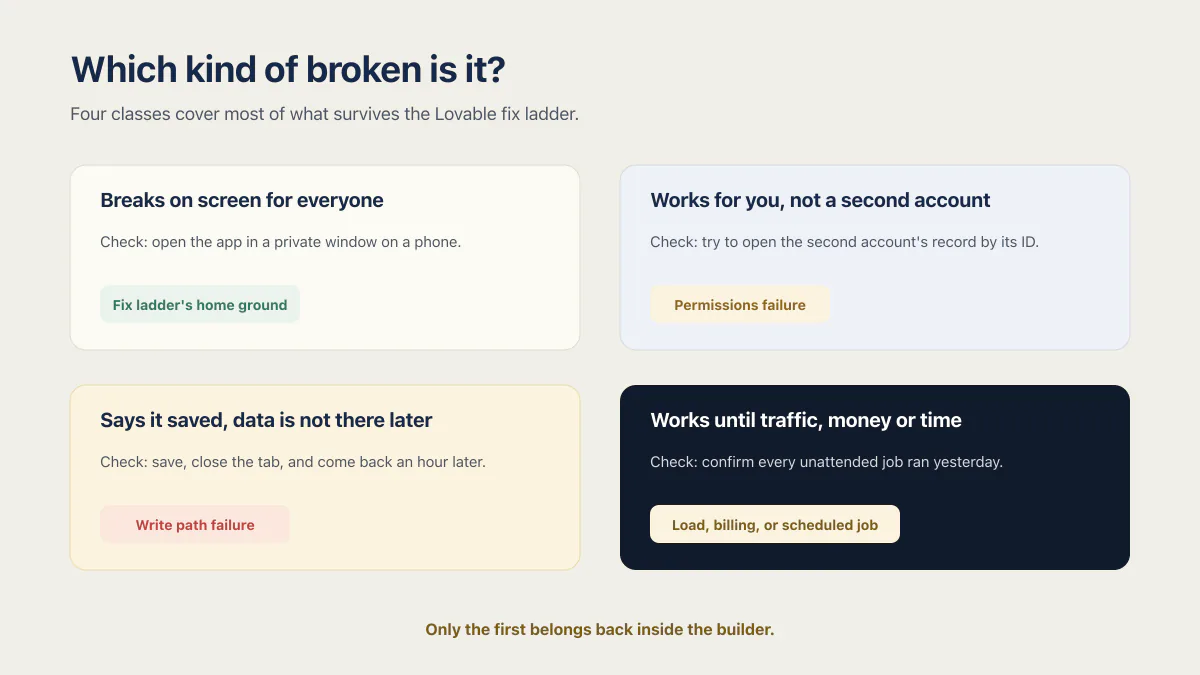
Which kind of broken is it? A four-way sort
The four branches below are a starting router for symptoms that survive the fix ladder: it breaks on screen for everyone, it works for you but not for a second account, it reports success and saves nothing, or it fails only under traffic, money or a schedule. They are not an exhaustive cause list. Each one has a different check and a different reason the prompting loop may not close it.
It breaks on screen, for everyone, every time. The check: open the app in a private window on a phone and reproduce it in under a minute. If you can, this is the ladder’s home ground. Go back to the table above, finish the rungs in order, and stop after two failed Try to fix attempts as the docs advise. The loop can close this one because the failure is visible to the exact surfaces Lovable watches.
It works for you and not for a second real account. The check: make a second account, put one record in it, then sign in as the first account and try to open the second account’s record by its ID. If it opens, permissions are the failure and every screen in the app will keep looking correct while it happens. The prompting loop cannot close this because nothing throws: the database answers the question it was asked, and the question was wrong. There are five tests that prove what your Lovable app actually enforces, and this is the first of them.
It says it saved and the data is not there later. The check: save something, close the tab, come back an hour later, and look for it. If the confirmation appeared but the record did not, the write path is reporting a success it never had, and Lovable’s documented observation list will show a clean network request either way. This is the pattern behind an app that reports success and nothing was saved, and the visible symptom arrives days after the cause.
It works until traffic, money or time is involved. The check: name every job in the app that runs without a human present, then confirm each one ran yesterday. Lovable’s own monitoring page lists the failures of this class by name, including sign-in errors, failing payments, inputs that are not saved correctly, failing cron jobs and broken integrations. That list is the vendor’s description of what its scheduled checks look for, and monitoring is in beta on Pro, Business and Enterprise workspaces with a daily check at 6:00, so on a smaller plan nothing is watching for these at all.
Three of those four branches often need evidence outside the visible builder loop; what a cleanup job actually covers depends on what that evidence finds, and only the first clearly belongs back inside the builder.
What does it cost to get someone to fix a Lovable app?
Fixing a Lovable app is priced two ways on the open market. AppStuck publishes $70 an hour with a five-hour prepaid minimum; Fora Soft publishes project tiers starting from $2,500. I do not publish a price.
The detail behind those numbers matters more than the headline. Fora Soft’s three tiers for Lovable bug fixing start from $2,500, $5,000 and $10,000, with timelines from one week, two to two and a half weeks, and four weeks. AppStuck sells $70 an hour against a five-hour prepaid minimum and quotes two to five days for a simple fix. Lovable’s own partner directory and the general freelance marketplaces sit alongside both, and they price by the hour or by the project too. Lovable has closed the Experts program and now takes new applicants through its Solution Partner Program. Prices checked 15 August 2026, directory checked 29 August 2026.
Those numbers make sense when you know what you are buying, and they are hard to judge when you do not, which is where most owners land.
When fixing this app is the wrong call
Two exits deserve naming, and neither one is a failure.
The first is rebuilding rather than repairing. If the same area has been patched five times and each patch broke something adjacent, the question stops being which bug to fix and becomes whether this app is worth fixing at all. Lovable’s own documentation reaches the small version of this conclusion when it says rebuilding one piece often beats patching an overly broken one.
The second is moving off Lovable entirely, a different job with its own cost and sequence that nothing on this page prices.
If you would rather do the work yourself, the steps for cleaning up an app you already own are their own procedure. And if the app has not launched yet, none of this is your problem yet: what you need is the behavioral pass a Lovable app has to survive before launch.
Common questions about fixing a Lovable app
How do I fix an app that’s not working?
For a Lovable app, run the builder’s own ladder in order before paying anyone: Try to fix once, then give a clear description of what is broken, where, what you expected, and what happened instead; then use Plan mode and revert to the last working version. Stop after two failed Try to fix attempts, as the documentation recommends. If the failure survives all four steps, treat data, permissions, billing, scheduled work, frontend state, dependencies, configuration, and platform behavior as possibilities, and do not spend another prompt without new evidence.
How do I repair an app?
For a Lovable app, use the four classes above as a starting router, not a complete diagnosis. Match the symptom to the nearest branch, then test frontend state, dependencies, configuration, and platform behavior if the evidence does not fit. On-screen failures can go back to the builder’s fix ladder. Permission failures, silent writes, and load or billing failures often require code, logs, or requests that show where the path breaks.
How many free fixes does a Lovable app get?
Lovable’s debugging documentation says your account “includes 10 free fixes, and each one becomes available again 24 hours after you use it”, read on 15 August 2026. That is a metered allowance rather than an unlimited loop, and the same page recommends switching to Plan mode after one or two failed attempts rather than spending the rest of them.
Does Plan mode use credits?
Plan mode is Lovable’s analysis mode, and how it is charged sits inside the current credit model rather than in the debugging documentation. The full picture, including where Lovable credits go when a fix loop runs long, is a separate question with its own answer.
Why does fixing one thing in my Lovable app break another?
Because each fix is an edit made from a description of a symptom, not from a model of the whole app, and the edits accumulate. Lovable’s own documentation names the effect: “Repeated blind fixes tend to pile up code that hides the real problem”. After several rounds, the code contains multiple attempts at the same problem, and a later change lands on a path that an earlier fix quietly rerouted.
Does the Lovable app builder find security or permission bugs on its own?
As of 15 August 2026, Lovable’s debugging documentation describes no check for whether one account can read another account’s rows, and its codebase audit prompt asks the model to “report without changing any code”, which is a reading of the code rather than a test of the running app. Lovable does document separate security scanning and project monitoring features, but reading code and signing in as a second real account are different acts, and only the second one settles a permissions question.
How can I hire a Lovable developer?
Three routes exist. Lovable lists partners of its own, and new ones now join through its Solution Partner Program after the Experts program closed; the general freelance marketplaces list people by the hour; and a handful of agencies sell Lovable rescue work as a project with a published starting price. None of them tells you which one you need, which is what the four-way sort above is for. Paying someone to read the code first is a fourth option, and cheaper than the wrong project.
What does it cost to fix a Lovable app?
Published prices ran from $70 an hour with a five-hour prepaid minimum at AppStuck to project tiers starting at $2,500, $5,000 and $10,000 at Fora Soft, checked 15 August 2026. I do not publish a price. Whether the builder is the right place to keep the app is a separate question, worth talking through before anyone quotes a move.
Should I fix it or start over?
Fix it when the failures are countable and land in different parts of the app; start over when the same area has broken repeatedly and every repair breaks something next to it. That decision deserves its own answer rather than a line in a page about fixing, because the honest version depends on how much of the app currently works and how much of it anyone would keep.
Fixing the bug in this guide gets you past today. If you would rather have the whole foundation checked and built in one go, that is what the sprint below is for.
Built it with AI. Now it has to hold up for real customers.
The Production Hardening Sprint takes the app you already have and builds the production foundation underneath it. Authentication and access rules, payments that stay consistent, error handling, monitoring, backups, automated tests and a documented handover. Our engineers work inside your existing codebase for ten working days. All 123 deliverables are included, and you get the evidence for each one.
See the Production Hardening Sprint →  $2,500 fixed price · 10 working days · One codebase