The tenth prompt returns the same error the first one did, and the tool still reports that it fixed the problem. That is usually the moment people stop looking for a better prompt and start looking for a person. One owner in AxonBuild’s mining corpus described the stretch just before that decision: “I’ve burned through 50 credits trying to fix an issue that refuse to be resolved…”
How to fix AI-generated code, once the tool that wrote it has already failed at it, has very little to do with wording. Something structural sits between the request and the result, and the same request phrased better walks into it again. This page is for the app that is broken right now, for a real user, today. An app that still works and has only gone messy is a different job with different steps.
The stop-loss this guide uses is three unchanged tries. After a third prompt fails on the same failure, stop, return to the last version that worked, keep the broken copy, and write down the exact steps that fail. Then have a person read the running app instead of your description of it.
Two notes on where the facts here come from. The tool behaviour described below was read from vendor documentation on 15 August 2026 and was not tested hands-on. The audit numbers come from AxonBuild’s own audits of 26 apps in June and July 2026, and the corpus numbers from 1,255 public posts and comments read on 14 August 2026.
Stop after three tries on the same failure
A try is one prompt, one generated change, and one look at the running app to see whether the behaviour actually changed. Without that last part you are counting messages rather than attempts, and the two numbers drift apart fast once you are frustrated.
The same failure means the same visible symptom, on the same screen, for the same account. A different error message after a change resets the count, because something new has entered the conversation. The identical symptom after a change that was meant to remove it does not reset anything.
Three attempts is an editorial stop-loss. If the third try adds no new evidence and the same symptom remains, the next prompt is likely to be another variation on the same guess. New evidence, such as a different error or a reproducible request, is a reason to reassess rather than count blindly.
The third failed attempt is the point to stop repeating an unchanged guess and collect new evidence.
The limit protects three things, in this order: the credit balance, the last version of the app that worked, and the evidence of what actually broke. The third one is the one people lose without noticing. Every extra attempt writes more changes on top of the failure, so by the time someone competent looks at it, the original break is buried under a stack of repairs that did nothing.
This situation is common enough to count. Of the 1,255 public posts and comments in AxonBuild’s mining corpus, all read on 14 August 2026, 16 describe being stuck on a single bug the tool could not fix, and 6 more describe a fix that broke two or three other things. Those are small absolute numbers, and the corpus is mostly people showing off apps they finished rather than complaining, so the pain language sits in a minority of the rows.
Five failures that need evidence beyond prompting
Some errors are ordinary and the tool will close them on another attempt. The five shapes below are common cases where prompting alone lacks the evidence needed to close an AI-generated code failure, because the missing information sits outside what the tool can observe.
| Failure shape | What you see | Why prompting alone lacks the evidence | Dated evidence | What closes it |
|---|---|---|---|---|
| The fix is written but never wired in | The tool reports success, the code exists, the behaviour is identical | The tool grades itself on whether it wrote the code, and never on whether anything running calls it | Built but not wired recurs across AxonBuild’s audits of 26 apps, June to July 2026 (patterns index, pattern 14) | Someone runs the app and confirms the behaviour changed, not the file |
| Nothing recorded what happened | You describe the symptom in your own words and the tool guesses at a cause | Every prompt is aimed at your description of the failure rather than the failure | At least 18 of 21 third-party apps audited June to July 2026 had no working test anywhere, so nothing proves a fix either way | Reproducing the failure once on the running app with the error captured |
| The green check proves nothing | Tests pass, the build is green, the app is still broken for customers | The tool trusts the same signals you do, and both signals were generated by the same process that shipped the bug | One audited retail point-of-sale app had a checkout test suite that never executed the actual checkout code (1 of 21, June to July 2026) | Walking the exact path a paying customer walks, on the real deployment |
| The failure is not in the code | It works in the builder preview and fails for real users | Configuration, keys, the database and the host are not in the files the tool is editing | Deployment and operations averaged 37 out of 100 across the 21 third-party apps audited June to July 2026 | Comparing the working environment against the failing one, setting by setting |
| Each fix moves the break | You fix one thing and two others stop working | The change needed touches several places at once and no single prompt owns all of them | 6 of the 1,255 corpus rows read on 14 August 2026 describe exactly this loop | One person holding every affected place in view before changing any of them |
The fix is written but never wired in
This is the one that wastes the most time, because the tool is telling the truth about the part it can see: it wrote the code, and the code is real. What it cannot see is whether anything running calls the code. AxonBuild’s audits record this shape under a plain name, built but not wired, and found it in controls rather than in repairs: one app carried a written set of safety rules that the running server never opened, another had a rate limiter present in the repo that no route ever called. A repair fails the same way for the same reason. The test an owner can run is short: do the exact thing that was broken, and watch the behaviour rather than the changelog.
The tool wrote the fix, the fix is real code, and nothing running ever calls it.
Nothing recorded what happened
When the failure leaves no trace, every prompt is a guess against your retelling of it. “The checkout is broken” and “a signed-in customer on iPhone gets a spinner after tapping Pay, and the order never appears” are different amounts of information, and the second one is often enough to end the loop on its own. At least 18 of 21 third-party apps in AxonBuild’s June to July 2026 audits had no working test anywhere, which is why so few of these apps can prove a fix worked even after it did.
The green check proves nothing
A passing suite is only evidence if the suite runs the path that broke. One audited retail point-of-sale app had a checkout test suite that never executed the actual checkout code, so the green run said nothing at all about whether people could pay. Some audited apps go further and disable their own type and lint checks at build time, so code the tooling would have rejected compiles and ships anyway. When tests pass and the app is still broken, the tests are the thing to distrust first.
The failure is not in the code
Missing keys, a different database, a setting that exists on your machine and not on the server, a platform limit. The tool is editing files, and none of the files are wrong. This is the shape where the failure is in the environment, not in the code explains the specific checks worth running. A related trap is an app that swallows the error and still reports success, which leaves both you and the tool looking at a screen that claims everything worked.
Each fix moves the break
The change actually needed touches the database, the API and the screen at the same time, and each prompt handles one of them. The corpus has a plain version of the feeling from someone trying to write around it: “I struggle to make prompts that dont completely flip everything on its head”. Six of the 1,255 rows read on 14 August 2026 carry this loop. It is the clearest signal that the next attempt should be a person rather than a prompt.
What to do in the next hour
Before anyone touches the code, protect what you still have. This is containment, and none of it requires reading code.
- 01 Stop prompting. Every further attempt writes changes on top of the failure and makes the original break harder to find.
- 02 Get back to the last version that worked, using the builder or repository version history, and keep the broken version rather than deleting it.
- 03 Write down the exact steps that fail: which page, which button, which account, which device, and what appears on screen.
- 04 Note what changed just before it broke, including any prompt, any deploy, any setting change, and any dependency update.
- 05 Protect the data. Do not let another fix attempt run against live customer records, and do not run anything that deletes or rewrites rows to test a theory.
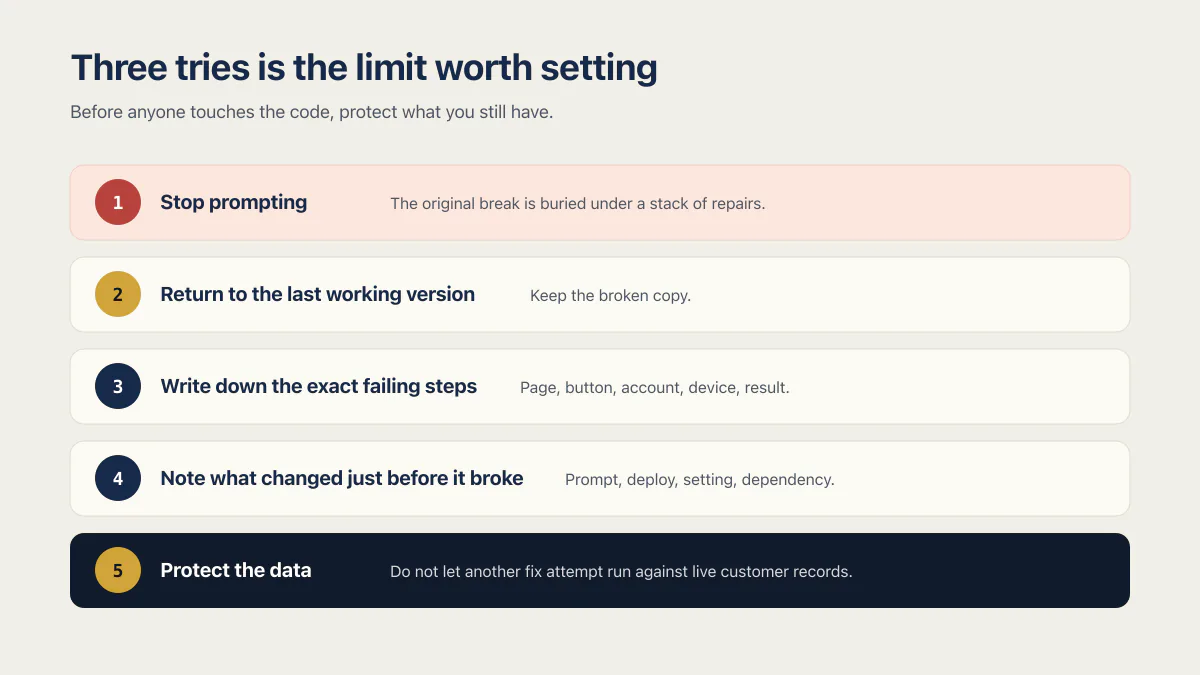
The second step is the one people ask about as removing the code the AI just added. Getting rid of the last changes and returning to the version that worked is a revert. Use an accessible known-good checkpoint, snapshot, or commit if one exists. If none exists, preserve the broken state before attempting a manual repair, because the broken version is the only place the evidence lives. Deleting dead files and unused code from an app that still works is a different task entirely, and it belongs in how to clean up an app that still works, not in an incident.
The last step is the one people skip. A fix attempt that runs a script against production is how a bad afternoon becomes an unrecoverable one, and the data-loss bugs hiding in an AI-built app are usually already present before anyone starts repairing. If a customer is currently being charged wrongly or seeing another account’s records, turn that feature off before anything else happens.
What is the problem with AI-generated code?
AI-generated code usually runs. The problem is that the parts which prove it works were never built, so a failure lands where nobody is looking and no record survives it. In the 26 apps AxonBuild audited in June and July 2026, at least 18 of 21 third-party ones had no working test anywhere.
That missing evidence is why repeating the same prompting loop may not close the failure. What the tool produced was the feature; what it skipped was the machinery that would have told either of you the feature stopped working: the test, the error record, the check on the deploy. The code that got written is often reasonable. The code that would have caught this was never requested, because nobody prompts for the thing that watches. For how that accumulates, why AI-generated code piles up problems you cannot see covers the mechanism, and why the app gets harder to change every week covers what it feels like from month two onward.
What a person adds when the tool stalls
A person can read the running app instead of only a description of it. That adds a path to reproduce the failure, find where it starts, change that place, then show the result by doing the thing that was broken.
Automated tools are honest about this boundary when you read their documentation rather than their marketing. GitHub’s documented Cleanup specialist custom agent for Copilot is instructed to “Focus on cleaning up existing code rather than adding new features” and to “Ensure all changes maintain existing functionality”, which is a sensible instruction for code that already works and the wrong one for code that is failing. The page carries no version number or last-updated date, so treat the wording as current at 15 August 2026 and nothing more. Sonar’s AI CodeFix suggests fixes for issues its own analysis already found, and its page says suggestions are presented so teams can review diffs, validate impact, and apply only what meets their standards. A person decides. Neither product claims to run your application and watch it fail.
Three dated searches pulled on 15 August 2026 surfaced two broad shapes: informational pages that teach developers to prompt better, and firms that quote privately. One direct service example, jetrockets.com/offers/fix-ai-code, publishes “Within 3-5 business days, we tell you what’s working, what’s not, and what to fix” and says most projects complete within 2 to 6 weeks. It printed no price when checked. Another example, callstack.com/services/ai-vibe-coding-cleanup, returned a 403 when fetched that day, so only its search snippet was available. The pages reviewed for those searches printed no stop rule or price.
If you want the shape of the work described before you buy it, what a cleanup specialist actually does and what it means to have a person read the code are the two things worth asking any candidate to explain in plain words. If you are not yet sure which failure you have, match what you can see against what it usually is before you buy anything.
When one fix is the wrong thing to buy
One fix suits one failing thing in an app that otherwise works. It does not suit a rebuild, a move to a different platform, or an app that nobody can currently run at all, and none of those should be priced like a single result.
The honest test is whether you can name the one thing that must work when the job is done. If you can, it may be one blocker. If the answer keeps growing while you say it out loud, whether to fix it or rebuild it is the next decision, followed by what a cleanup costs across the whole app. Paying for one fix first only makes sense when the problem is genuinely narrow.
Per-tool detail matters too. What breaks on Base44 is not what breaks on Replit, so how to fix a Base44 app, a Replit app that keeps breaking, and how to fix a Lovable app each start from different failures and some builders’ own documentation sets the stopping point lower than three.
Common questions about fixing AI-generated code
Is there a free code fixer available?
Paste-a-snippet fixers are easy to find. One example reviewed on 15 August 2026, OneCompiler’s Code Fixer, takes code plus an optional error message and returns corrected code with an explanation. Its page did not state whether the tool was free, and stated no sign-in, input-size or language limit. Nothing on the page described running or reaching your application, so it worked on the snippet you pasted rather than on the app that was failing.
That distinction matters more than the price. If you already know which twenty lines are wrong, a snippet fixer can help. If you knew that, you would probably not be searching.
How do I fix AI-generated code if I cannot read code?
You do the parts that do not need code, and they are the parts that decide whether the repair goes well. Stop prompting, restore the last working version, keep the broken one, write down the exact failing steps with the account and the device, and note what changed just before. Someone who can read code then starts from evidence rather than from a description, which is usually the difference between a short job and a long one. Once a fix is in, how to verify AI generated code before production covers seven pieces of evidence you can collect without reading code.
Losing the evidence is the bottleneck in the first hour, well ahead of being unable to read code.
Should I just ask the AI to fix it again?
One more attempt is reasonable when you have something new to give it: an error message you had not pasted, the exact steps that reproduce the failure, or the fact that it works for one account and not another. Without new information, the fourth attempt on the same failure spends credits on a rephrasing of a guess that has already been wrong three times.
Being stuck on a bug the AI cannot fix is a specific state, and the tell is that the replies have started repeating themselves.
How to remove AI-generated code?
For an app that is broken right now, removing the code the AI just added means reverting to an accessible known-good checkpoint, snapshot, or commit if one exists. If none exists, preserve the broken state before attempting a manual repair. Resist the urge to delete anything else while you are upset.
Deleting unused files and dead code from an app that still works is a different job, done deliberately and not during an incident.
Why does fixing one thing break another?
Because the change that is actually needed touches several places at once, and a single prompt handles one of them. The screen gets updated and the API does not, or the API gets updated and the database column it now expects was never added. Six of the 1,255 corpus rows AxonBuild read on 14 August 2026 describe this loop directly.
The loop ends when someone works out the full set of places one change has to land, then changes them together instead of in sequence.
Can AI fix bugs in code?
Often, yes. AI tools close plenty of ordinary bugs, and the five shapes above are common cases where prompting alone may lack the evidence needed to finish the repair.
Whether AI can review its own code is a related but separate question, and it deserves a longer answer than a paragraph here.
How long does one fix take?
It depends on which of the five shapes you are in, and the first is usually the quickest while the fourth is usually the slowest, because comparing two environments setting by setting takes as long as it takes. I quote a fix only after I have checked the app, and the quote says how long the change will take.
Anyone who quotes you a duration before looking at the running app is guessing, including the pages that publish a standard window.
What does it cost to get one thing fixed?
The pages reviewed across the three searches pulled on 15 August 2026 did not publish a price for fixing AI-generated code, which made this question hard to answer from that dated search. I do not publish a price either.
What a cleanup costs across an entire app is a different number, and it should never be quoted as one small repair.
Will the same bug come back?
It can, and the thing that stops it is a check that runs without you. A fix with nothing recording the behaviour afterwards is a fix you will have to trust rather than verify, which is the position you were in before the failure started.
The version of this that keeps happening looks like tests pass and the app is still broken, or one bad AI edit broke it again a few weeks later. Both are worth pinning with something that fails loudly the next time.
Fixing the bug in this guide gets you past today. If you would rather have the whole foundation checked and built in one go, that is what the sprint below is for.
Built it with AI. Now it has to hold up for real customers.
The Production Hardening Sprint takes the app you already have and builds the production foundation underneath it. Authentication and access rules, payments that stay consistent, error handling, monitoring, backups, automated tests and a documented handover. Our engineers work inside your existing codebase for ten working days. All 123 deliverables are included, and you get the evidence for each one.
See the Production Hardening Sprint →  $2,500 fixed price · 10 working days · One codebase