Nothing in the Lovable editor is moving. The chat sits on Thinking. Or the project says it is saving changes and keeps saying it. You are looking at a spinner and deciding whether to wait, reload the tab, press stop, or start worrying about the work you did this morning.
A Lovable project can hang in four different places: the chat run, the save, the build, and the publish. Only one of those four can cost you anything, and the save is never it. Lovable’s documentation says a running request lives on its servers, so closing the tab is safe.
Everything below is read out of Lovable’s own documentation and its status page on 25 August 2026, and quoted from there. I did not sit in front of a hung project with a stopwatch. Where the documentation is silent, this page says so rather than filling the gap with a number that would only sound reassuring.
That silence matters more than it looks, because it is where the current search results go wrong. Momen, a rival no-code builder whose blog ranks for this exact phrase, treats a hang as a bug to attack. AppStuck’s troubleshooting guide separates blank screens from build errors and still never says whether your work survived. Rapid Developers publishes a page per error string and resolves this one to four moves: refresh, check the status page, simplify the prompt, duplicate the project. Read on 25 August 2026, none of them answers the two questions you actually have while the spinner turns: is my work gone, and is waiting the right move.
The four hangs in a Lovable project, told apart in one look
Four rows, read out of Lovable’s documentation and status page on 25 August 2026 rather than reproduced. Find the row that matches your screen, then read its section below.
| What you are looking at | What Lovable’s documentation says is happening | Is the work lost | Is waiting correct | What it costs |
|---|---|---|---|---|
| The chat says Thinking and the activity cards have stopped scrolling | The request is executing on Lovable’s servers rather than in the browser tab you are watching | No. Each change becomes a version of its own, automatically | Yes. You can close the tab and come back to the finished result | Nothing extra to wait. Pressing stop charges you for the work already completed |
| The project says it is saving changes, or a message you typed will not send | There is no save step to finish. Either the message is greyed out and waiting on you, or a push to your connected repository was rejected | No, not on the Lovable side. The repository copy can fall behind | Yes for a waiting message. No for a rejected push, which needs a file removed | Nothing to wait |
| It says it is building, tasks are listed, and nothing arrives | Build mode shows the tasks it is working through. A long run also pauses on purpose when it crosses your credit check-in level, 20 credits by default | No | Yes, unless a card in chat is waiting for an answer, in which case waiting is exactly what stalls it | The message is charged for the work completed, whether you let it finish or stop it |
| Publish spins and the dialog never confirms | Publishing deploys a snapshot of the current version. The version already live keeps serving until a new one replaces it | No | Yes | Nothing to your visitors, who are still being served the last published version |
Every cell in that table is quoted or paraphrased from a Lovable documentation page read on 25 August 2026, and each row gets its own section below. Two of the four rows are the same underlying answer stated twice, which is the honest shape of this problem: most of the time the thing you are staring at is a job you cannot see, running somewhere you are not.
Why does Lovable get stuck on Thinking in the chat panel?
Lovable stuck on Thinking usually means the run is still going. The request executes on Lovable’s servers rather than in your browser, so the spinner is a status report on a job somewhere else. The Details view is the one documented place that shows whether steps are still landing.
The Lovable chat documentation answers the closing-the-tab question directly: “Lovable keeps working. Your request runs on Lovable’s servers, not in your browser, so you can close the tab and come back later to find the finished result in chat.” Nothing in the editor is holding your work hostage. The tab is a window onto the run, and shutting the window does not end the run.
What that sentence does not do is tell you whether the run is progressing. For that the same page describes activity cards and one view: “Click a card while Lovable works, or Details on a finished change, to open the Details view, which opens where the preview usually appears and shows the full timeline of steps and file changes. On bigger Build mode requests, Lovable also shows the tasks it’s working through.” Open that timeline. A step that landed two minutes ago and a step that landed thirty seconds ago are two very different situations, and the word Thinking looks identical in both.
The editor documentation names the surfaces you are working with, which is worth knowing before you go clicking: the chat panel on the left, the preview on the right, the Files and Code tabs, the More menu, and the History toggle. The Details view takes over the space where the preview normally sits, so a project that suddenly stops showing you your app has not broken. You opened a timeline over it.
If the run is genuinely long and you would rather not keep checking, the same page offers a way out of watching: “On desktop, Lovable may offer to enable browser notifications so you know when it finishes a task or needs your input.” Turning that on converts stuck on thinking longer than usual from a thing you monitor into a thing that taps you on the shoulder.
One more piece of the same behaviour explains why typing at a busy project feels like shouting into a wall. Lovable does not require you to wait your turn: “In both Build and Plan mode, Lovable picks up new messages at its next natural stopping point, usually within seconds.” Your follow-up is queued behind a step rather than dropped.
Replit’s Agent hangs the same way for the same reason, and the recovery order there is different enough to need its own treatment, because a Replit run has checkpoints in the middle of it.
The Lovable chat panel is stuck and the whole editor feels frozen
A Lovable chat panel that has stopped responding is worth four checks in a fixed order, and the order is the advice. Read the timeline first, because it is the only view that distinguishes a working run from a dead one. Press stop last, because stopping is the only step in the sequence that costs you money.
- 01 Open the Details view from an activity card. Lovable documents it as showing the full timeline of steps and file changes, so a recent step means the run is alive and the spinner is telling the truth.
- 02 Check status.lovable.dev. It will tell you whether the Editor, Login, Hosting, Cloud or API are having a bad day, and it will not tell you anything about your run. More on that limit below.
- 03 Reload the tab. Your request runs on Lovable's servers, so a reload costs you nothing and rules out a stalled browser page pretending to be a stalled project.
- 04 Only then consider the stop button, and only if you have decided you want the run abandoned rather than finished, because Lovable charges for the work already done either way.
Step two is the one that needs a caveat, and the caveat is the useful part. On 25 August 2026 the Lovable status page showed everything green under the heading System status, across Website, Login, Editor, Hosting, Cloud, Lovable MCP and API.
Read that list again and notice what is missing. As of 25 August 2026 it carries no component for the chat, none for the agent, and none for the build pipeline. The nearest row to your hung run is Editor, which covers the room the run happens in rather than the run itself. So a green status page is no evidence that your generation is healthy, and a green status page during a hang needs no explaining away, because that page does not measure the thing you are worried about.
Reloading is safe for the reason already quoted. The run lives on Lovable’s servers, so the browser tab is disposable. This is worth saying plainly because the instinct in front of a frozen panel is to avoid touching anything, and here the cautious move and the correct move point in opposite directions.
You typed a message and the Lovable chat does nothing
A Lovable chat that accepts your typing and then sits there is usually waiting on you rather than the reverse. The documentation states it outright: a greyed-out message means Lovable is stopped or holding a question, and answering the question releases everything behind it. It is also the state most easily mistaken for a bug.
Here is the wording from the chat page. “Until Lovable picks it up, your message appears grayed out at the bottom of the chat. If Lovable is stopped, or is waiting for you to answer a question, grayed-out messages wait: answer the question or send a new message, and Lovable picks up the waiting messages along with it.” The source spells it grayed. A greyed-out message is a queue, and you are the thing it is queued behind.
Which means the fix for lovable chat not working is often to scroll up. If Lovable asked you something and the question card scrolled out of view while you were writing your next instruction, both messages are sitting still and each is waiting for the other. Answer the card.
There is a second reason a message can look ignored, and it has a visible label. “Some messages always run as their own request after the current one instead of joining it, for example Try to fix, other one-click fixes, and any message you send while a free fix is running. Lovable marks these Runs after the current task.” If you pressed Try to fix during an active run and nothing appeared to happen, that is the documented behaviour rather than a swallowed click. The request exists. It starts when the current one ends.
Older projects have one more wrinkle. Lovable documents the message queue as deprecated: “follow-ups replace it as the default way of sending messages while Lovable works. The queue appears only if you actively used it recently, for example by reordering, editing, or pausing queued messages. If you don’t see it, you send follow-ups, and the queue cannot be enabled.” So two accounts can behave differently in front of the same symptom, and neither is broken. If you do still have the queue and want the newer behaviour, the page’s instruction is to “disable Message queue in Settings → Your account”. Paused queues are worth a look before you conclude anything: a paused queue holds messages by design.
Lovable stuck on saving changes: what the project is really doing
Lovable has no save button at all. Version history records every change automatically, so a Lovable project stuck on saving changes is never your morning’s work queued up waiting to be written somewhere. Two other states wear that description, and they have nothing to do with each other.
The version history documentation puts it in one line: “There is no save button: version history is always complete and up to date, and you can go back to any earlier version at any time.” Read on 25 August 2026. Nothing in the editor is sitting there waiting for permission to write your work down.
The first is the greyed-out message from the section above. A message that will not send looks exactly like a save that will not complete, and it clears the moment you answer the question or send another message.
The second is your repository. If you connected the project to GitHub or GitLab, Lovable’s git sync runs in both directions: “changes you make in Lovable are committed to your repository, and commits pushed to the synced branch appear back in your Lovable project.” That commit is a real network operation against someone else’s service, and it can be refused. When it is refused, the documented cause is size.
| The limit | What Lovable’s documentation says happens |
|---|---|
| Anything over 100 MB | GitHub refuses the push outright. Lovable documents that after a few failed sync attempts your project’s GitHub settings show the error “Your project contains files that exceed the maximum file size limit (100 MB)” together with a list of the affected files. |
| Anything over 10 MB | Lovable cannot save a file that size into the project at all. A bigger file pushed from your own machine will sync in, but from then on any Lovable edit that touches it fails. |
Both rows come from the GitHub integration page read on 25 August 2026, and both are worth checking against what you did in the last hour. A video, a design export, a database dump dragged into the project: any of those crosses one of those two lines and turns every subsequent sync into a failure that surfaces as a project which will not settle. The documented fix is to delete the listed files, or ask Lovable to remove them, and let the sync retry.
There is one dead end on this page, and it is honest to name it. Lovable’s own words: “If the push keeps failing after the files are gone, an oversized file is stuck in the repository’s history, and history cleanup requires help from Lovable Support.” That is the single hang in this whole article that you cannot clear from your own keyboard, which makes what you put in the support ticket the thing that determines how long you wait.
Whether the repository actually holds a complete, current copy of the project is a separate check with its own steps. It is worth running once the sync is healthy again rather than while it is failing.
The Lovable build says it is working and nothing arrives
A Lovable build that lists tasks and produces nothing is usually still running, and it has one documented reason to stop on purpose: a credit check-in. Lovable pauses a long Build mode message when it crosses your check-in level, 20 credits by default, and waits for you to choose. A paused run looks exactly like a hung one.
The credits documentation describes the pause: “For long-running Build mode messages, Lovable checks in when a single message crosses your credit check-in level, 20 credits by default. The run pauses with a card showing what the message has cost so far.” The card offers Continue or Wrap up, and the same page calls the level “a notification threshold, not a hard cap: a run can go slightly past the level before pausing, and sending a new message resets the count.” If your build has been sitting still on a large request, look for that card before you look for anything else. It is the most likely reason a big generation stopped, and it is a question rather than a failure.
A run out of credits pauses too, and it pauses differently. From the chat page: “The message pauses rather than ending, and a card appears in chat. Choose Add credits to resume where Lovable left off, or Wrap up to have Lovable finish the work in progress and stop. Paused work waits until you decide.” That last sentence is the one to hold on to. Paused work is not lost work, and there is no deadline on the decision.
A stalled build and a broken app are two different problems. A build that completes and hands you a screen doing the wrong thing has its own sequence, and Lovable’s own fix tools are the first rungs of it. That case belongs on the fix ladder for a Lovable bug that survives being described, where the question stops being is it running and becomes why does it keep saying it fixed this. Running out of credits entirely, as opposed to pausing mid-message, has its own consequences for a published app, and what running out of Lovable credits actually stops covers them.
The Lovable publish will not finish
A Lovable publish that never confirms is the safest hang on this list. Publishing deploys a snapshot, and only the current version is deployed, so whatever was live before is still live and still serving. Your visitors are looking at the last successful publish.
The publish documentation describes publishing as deploying a snapshot of the current version to a live URL, with later changes staying where they are until you publish again. The corollary is the thing people get wrong in both directions. A publish that hangs cannot break the site that is already up, and a publish you never ran cannot put this morning’s changes in front of anyone.
You can tell a finished deploy from a stalled one without guessing. When the deployment completes, “Lovable confirms Your website is live with buttons to copy the link and visit the site, and a preview of how your site appears in search results and link previews.” No confirmation panel means no completed deploy.
A publish that genuinely fails says so rather than spinning: “When a publish fails, Lovable shows a Publishing failed message explaining what went wrong, along with the action to take: Try again for temporary issues, or Try to fix to have Lovable investigate an error in your app.” Each way a Lovable publish fails has its own cause and its own repair, and telling those apart is a longer job than this page has room for. The distinction that matters here is between a publish that is still running and one that has already told you it failed.
Custom domains add a wait that is not a hang at all. Lovable’s wording is “If you use a custom domain, DNS changes can take time to take effect.” As of 25 August 2026 the publish page gives no duration for that, so if you pointed a domain at the project in the last hour and the address does not resolve yet, there is no published number to measure your impatience against.
Which hangs in a Lovable project actually lose your work?
A hang in a Lovable project does not lose your work. Each change becomes a version of its own automatically, and a run in progress is running on Lovable’s servers rather than in your tab. What a hang can cost you is credits, spent two ways: pressing stop, and re-prompting a run that was going to finish anyway.
There is no save step to fail in a Lovable project, so a save that will not finish is always something else: a message waiting on you, or a push your repository refused.
The stop button has a documented price. “If you need to change course, click the stop button while Lovable is responding. Lovable keeps the work completed so far, and the message is charged for the work already done.” You keep the partial work and you pay for the partial work. That is a reasonable trade when you have changed your mind about the instruction and a bad one when you were only impatient.
Reverting later does not undo the spending either. Asked whether a revert refunds credits, the version history page answers: “No. Credits pay for the work Lovable performs, so messages you later revert still count.” So a cycle of prompt, wait, lose patience, stop, revert, prompt again is the most expensive way through a slow afternoon, and it produces the same app as waiting.
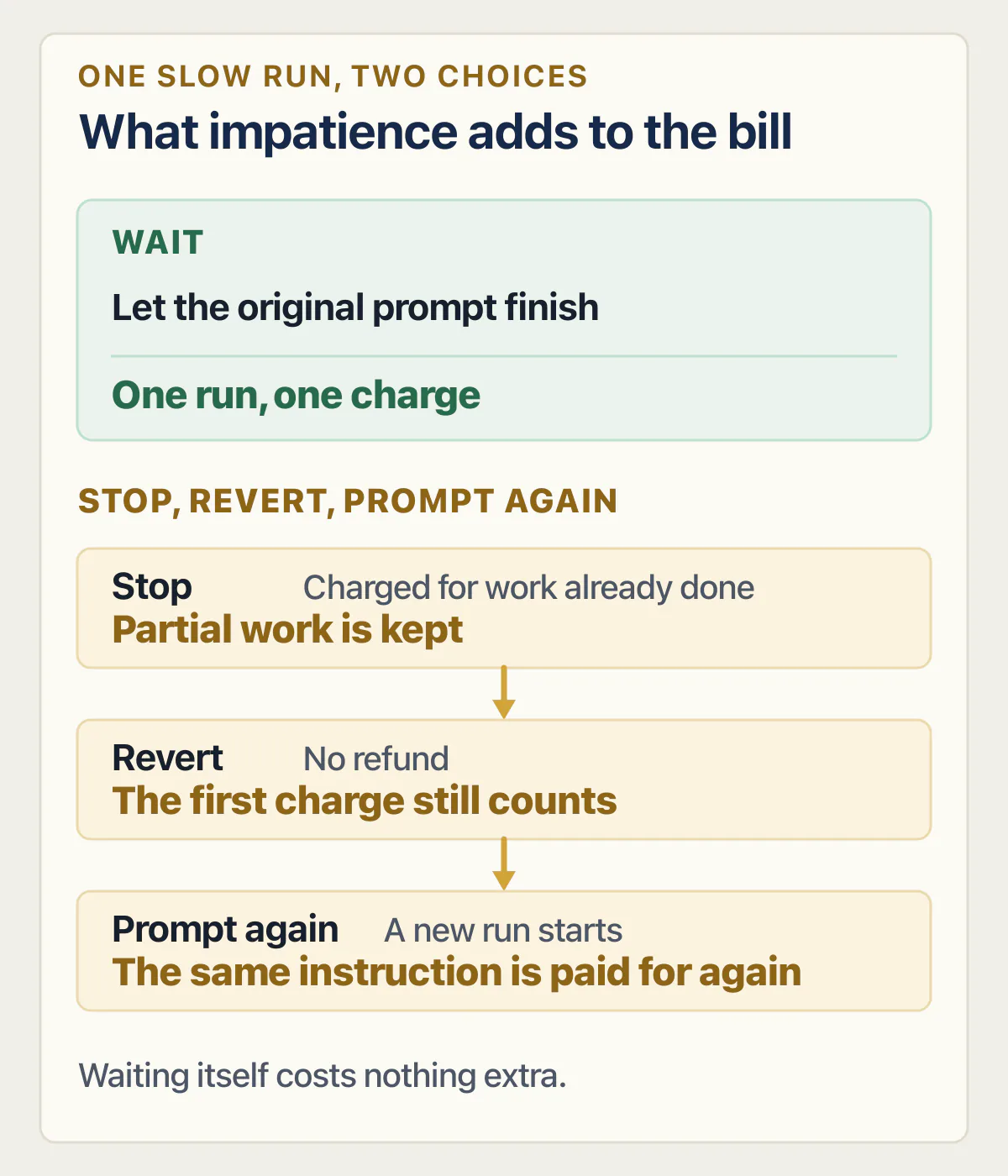
Reverting also does less than most people expect. Lovable’s version history page keeps a revert to the code and leaves your records alone. What a revert does and does not put back deserves more than the sentence it gets here, especially once real customer records are involved.
The genuine loss cases in Lovable involve old versions rather than hangs. The same page names two conditions that disable the Revert button: a project remixed from one on the built-in backend, where anything older than the remix is out of reach, and a version old enough that Lovable will still open and preview it but will not restore it. Those two are the only places in this article where something is actually gone, and a spinner causes neither. Which versions you can still get back to, and what to do when the one you want is out of reach, needs more room than a paragraph.
For everything else, the reassurance is in the documentation too: “Your chat history is preserved, and the edits made after that point stay in the chat, so you can reapply them anytime.”
How long should you wait before touching a stuck Lovable project?
Lovable now publishes one number, and it is a ceiling rather than a wait. When this page was first read on 25 August 2026, its chat, publish and credits pages gave no maximum run time for a Build mode message. The changelog entry dated 26 August 2026 and the Build mode page, both re-read on 2 September 2026, state that Lovable works on one Build mode message for up to 10 hours. That is the longest a single message can run, not a sign that a quiet run is healthy, and the documentation still gives no shorter timeout. What this page can offer instead is an order of operations that costs nothing.
Lovable has published a number for how much a single run may cost before it checks in with you, and a maximum run length of 10 hours. It has published no number for how long a healthy run should take, which is the number you actually want.
So the sequence, in order of what it costs you:
Read the Details view. A step that landed recently is the closest thing to proof that waiting is correct. Then check the status page, knowing it can only rule out a platform-level problem and has no row that speaks to your run. Turn on browser notifications next, so the waiting stops being active. Then leave it, and go do something else, because the run does not need the tab open.
Re-prompting is the move to think twice about, and the cost frame is published. Lovable bills Plan mode at one credit per message, and for Build mode “Cost depends on the complexity of the request and the work completed” (credit costs read on 25 August 2026). A stopped Build mode request is billed for the work completed so far. So sending the same instruction again because the first one felt slow means paying twice for one outcome, and what a Lovable credit buys is the page that puts real numbers on that.
If the run is hours old, the timeline shows nothing new, and the status page shows no incident, then Lovable’s own escalation route is the remaining step: “If you’re on a paid plan and believe the issue is with Lovable itself, contact Support.” What to put in that message so it is not bounced back for missing information is the difference between a day and a week, and it is worth preparing before you send it.
Other reasons a Lovable project stops moving
Not every stalled Lovable project is a run that hangs. Six other things produce the same feeling of nothing happening, and each has a different first check.
Lovable itself can be down, and whether Lovable itself is down or only your project is stuck is answered by status pages and by opening a second project, not by reading your own timeline.
The preview can refuse to load while the run behind it finished normally. A preview that will not paint and a run that never finishes look similar in the editor and have almost nothing in common underneath, starting with the fact that one of them has already written your changes.
An edit that completed and broke something is not a hang, and the recovery is version history rather than patience. Getting back to the last version that worked covers that path. When the same thing keeps happening, the loop where each fix breaks something else is its own problem with its own stop rule.
Credits can run out completely rather than pausing mid-message, which takes an app down for billing reasons instead of code reasons and looks nothing like a spinner. Lovable’s consequences for that are documented on what running out of Lovable credits actually stops.
A bug that will not die no matter how you describe it is the opposite failure: everything runs, everything completes, and nothing improves. Telling that apart from a hung run takes one glance at the timeline, since a fix loop produces finished messages and a hang produces none.
Finally, the symptom can belong to your visitors rather than to you. A request that never finishes for your visitors is a production problem in a deployed app, measured in server logs rather than in the editor, and why an app works locally but not in production is where that one starts.
Common questions about a Lovable project that is stuck
Is my work lost if Lovable is stuck on Thinking?
No. Lovable’s chat documentation states that your request runs on Lovable’s servers rather than in your browser, and its version history page states that every change becomes a version automatically with no save button involved. A run in progress has not lost anything, and a run that finished while you were away leaves its result in chat.
Can I close the tab while Lovable is working?
Yes. The documented answer is “Lovable keeps working. Your request runs on Lovable’s servers, not in your browser, so you can close the tab and come back later to find the finished result in chat.” Closing the tab is also the cheapest way to stop watching, since the alternative is often re-prompting a run that was going to finish.
How long should I wait before I refresh?
Refresh whenever you like, because a refresh does not touch the run. The only vendor number is a ceiling: as of 2 September 2026 the Build mode page states Lovable works on one Build mode message for up to 10 hours, so there is no shorter timeout to wait out. Use the Details view timeline instead: recent steps mean waiting is correct.
Does a stuck message still cost credits?
A message costs credits for the work Lovable performs, whether or not you let it finish. Stopping mid-run means “Lovable keeps the work completed so far, and the message is charged for the work already done”, and reverting afterwards does not refund it, because “messages you later revert still count”. Waiting adds no charge on top of the message, but every minute the run keeps working is work Lovable bills for, so decide to stop on whether progress has stalled and how much the run may cost, not because a wait is free.
What does “Failed to save changes” mean in Lovable?
As of 25 August 2026 Lovable’s documentation does not use that wording anywhere, so treat the phrase as a description rather than an error code. What it usually points at is one of two documented states: a message greyed out at the bottom of the chat waiting for you, or a rejected push to a connected GitHub or GitLab repository, which the docs attribute to files over 100 MB or Lovable edits touching files over 10 MB.
Is Lovable down, or is it just my project?
The status page answers half of that. As of 25 August 2026 its component list has no row for chat, for the agent, or for the build pipeline. So it can confirm a platform-wide editor or hosting incident, and it can neither confirm nor deny a hung generation inside your project.
Should I press the stop button?
Only if you want the instruction abandoned. Stopping is documented as keeping the work completed so far and charging for it, so it does not save you money and it does not bring a hung run back. Press it when you have changed your mind about what you asked for, and leave it alone when you are only impatient.
Does reverting give my credits back?
No. Lovable’s version history page answers this directly: “Credits pay for the work Lovable performs, so messages you later revert still count.” A revert also moves the code only, and your records stay as they are.
How to move out of Lovable?
Moving a project off the builder is a planned piece of work rather than a response to a hang, and it starts with getting a complete copy of the code and the backend out. How to move a Lovable project off the builder walks through what has to come with it.
One thing this page cannot tell you, because the documentation does not: what happens if a run genuinely dies on Lovable’s side rather than taking a long time. Every documented pause has a card, a label, or a timeline entry attached to it. A run with none of those and no new steps for hours is outside what the docs describe, and that is exactly the point at which the answer stops being a check you can run and becomes a support ticket.
Built it with AI. Can’t get the last part right?
That’s the normal state of an AI-built app, and it’s fixable. I trace what the app actually does, explain what needs changing, and build it if you want me to.
Talk about your app →  Free 20-minute video call with Bilal.